We use cookies to ensure you get the best user experience. For more information see our cookie policy.
Introduction to CryptOps
Key management strategies for DevSecOps.
Task 1: Introduction
In this room, we will explore how to enhance security within your DevSecOps pipeline by integrating HashiCorp Vault for secret management. By leveraging Vault's features, we'll ensure that sensitive information, such as API keys and database passwords, remains secure throughout the software development lifecycle. Additionally, we'll test the CI/CD pipeline to verify seamless integration with Vault, guaranteeing that secrets are retrieved dynamically and securely during build and deployment tasks.
Objectives
Introduction to key management for DevSecOps.
Learn about the Key Management Lifecycle.
Configure a Vault environment for secure secret management.
Integrate Vault with the CI/CD pipeline to dynamically retrieve secrets during build and deployment.
Answer the questions below
I'm ready!
Task 2: Key Management in DevSecOps
The Importance of Cryptographic Keys
At the heart of securing digital information lies the management of cryptographic keys. These keys serve as the cornerstone for encrypting sensitive data, authenticating users and devices, and ensuring the integrity of communication channels. In DevSecOps, managing these keys is vital to safeguarding the entire development and operations pipeline.
Integrating Security Practices Early
The DevSecOps framework is known for its approach to integrating security practices early in the development lifecycle. This proactive strategy is crucial for preventing security breaches, mitigating data loss, and circumventing compliance issues before they arise. This room will explore how integrating key management processes early in development can lead to a more secure and efficient pipeline.
Regulatory and Compliance Standards
Navigating the requirements of regulatory & compliance is a challenge for any organisation. Standards such as the Payment Card Industry Data Security Standard (PCI DSS), General Data Protection Regulation (GDPR), and the Health Insurance Portability and Accountability Act (HIPAA) outline strict guidelines for the protection of sensitive data. Adherence to these regulations is not optional but critical for organisations to avoid hefty fines and legal repercussions. In this context, effective key management is not just a security measure, but a compliance mandate.
Understanding the Key Management Lifecycle
The Key Management Lifecycle (KML) is essential for the security and integrity of cryptographic keys throughout their lifespan (also known as cryptoperiod). This lifecycle comprises several stages, each critical in effectively managing cryptographic keys. By integrating KML practices within the DevSecOps framework, organisations can enhance their security posture and ensure compliance with regulatory standards.
Key Generation
The lifecycle begins with the generation of cryptographic keys. This process must ensure that keys are created using secure and compliant methods, guaranteeing their strength and randomness. Proper key generation is the foundation of a secure key management system, as it determines the overall resilience of the encryption and authentication mechanisms.
Key Distribution
Once generated, keys must be distributed to intended users or systems securely. This stage involves securely transmitting keys, ensuring they are not intercepted or compromised. The distribution process also encompasses the secure storage of keys, preventing unauthorised access and ensuring their availability for authorised users.
Key Storage
After keys are generated and before they are distributed, they must be securely stored. Secure key storage is critical to prevent unauthorised access and use. It employs encrypted databases or specialised hardware security modules (HSMs), offering robust protection mechanisms. Effective key storage solutions also include access controls and audit logs to ensure only authorised entities can access the keys and any access is correctly recorded for future review.
Key Usage
The core purpose of cryptographic keys is their use in encrypting data, authenticating users and devices, and securing communication. During the usage phase, monitoring and controlling how, when, and by whom the keys are utilised is vital. This oversight helps prevent unauthorised use and ensures that keys are used for their designated purposes. Access control is super important here.
Key Backup and Recovery
Closely related to key rotation is the concept of critical backup and recovery. This involves creating secure "copies" of cryptographic keys to avoid losing access to keys in case of deletion or corruption. Effective backup and recovery strategies ensure that keys can be restored securely and controlled, maintaining the integrity and availability of encrypted information.
Note: Sometimes, old or replaced keys must be "archived" rather than destroyed (see Key Destruction section). Archiving is necessary for decrypting old communications or data, should the need arise. Secure key archiving ensures that keys are preserved to prevent unauthorised access while still being retrievable for authorised purposes. Sometimes, "purge periods" are set so that when you delete a key, you can still retrieve it after x amount of days before full deletion.
Key Rotation
Key rotation replaces old keys with new ones at regular intervals or in response to specific events, such as a key compromise. This practice helps mitigate the risk of key compromise over time.
Key Revocation
Key revocation is the process of invalidating a key before its scheduled expiration. This might be necessary if the key is compromised, the user is no longer authorised, or the key is suspected of being exposed to unauthorised entities. Revocation mechanisms must be in place to ensure that revoked keys cannot be used for cryptographic operations.
Key Destruction
The final stage in the key management lifecycle is the secure destruction of cryptographic keys. When a key is no longer needed, or its lifecycle has ended, it must be destroyed to ensure it cannot be recovered or used. Proper critical destruction prevents the unauthorised use of old keys and protects against data breaches.
Note: You usually revoke keys by declaring a key “invalid” before the expiration date, for example, in the case of compromise. Key destruction is safely deleting the key due to the expiration/end of the cryptoperiod assigned. Destruction is not that easy; you need to consider multiple locations, including backups (which are copies stored in various regions for failover). In extreme cases, such as government use, the keys may also be on hardware devices that must be wiped and physically destroyed.
For more information, check out CSAs best practices.
Answer the questions below
Which key process might involve using HSMs?
What can you set so that a key is recoverable after x days?
What process invalidates a key before its expiry date?
Task 3: Best Practices in Key Generation
Effectively managing cryptographic keys begins with secure generation and distribution practices. These initial steps are critical in establishing a strong foundation for the keys' lifecycle and ensuring digital asset security. Here, we discuss the best practices for generating and distributing cryptographic keys.
Best Practices
1. Use strong Random Number Generators (RNGs): The strength of cryptographic keys lies in their randomness. Use cryptographically secure pseudo-random number generators (CSPRNGs) designed to produce computationally infeasible output to predict. Some tools include modules and libraries with solid RNG. For industry standards, you can checkFIPS-140-X for algorithms and best practices. These standards get updated regularly, so always check for the latest versions.
2.Adhere to industry standards and algorithms: Follow current industry standards and recommendations (such as NIST) for generation algorithms and key lengths to ensure the cryptographic strength of your keys.
3. Secure the key generation environment:Ensure the environment where keys are generated is secure from unauthorised access and tamper-resistant. This can involve using a Hardware Security Module (HSM), which provides a secure and tamper-proof environment for key generation, storage, and management.
4. Validate key generation parameters: Before deploying keys, validate all parameters involved in the generation process. This includes verifying the randomness source and algorithm configurations and ensuring the key length is appropriate for the intended cryptographic use.
Generation Environment Use Cases
Use Case 1: Bastion Hosts for Key Generation in the Cloud
Bastion hosts, also known as jump servers, are securely configured cloud instances that serve as an isolated access point between the external and internal network resources. They are hardened, monitored, and maintained with strict security controls and can be an ideal environment for secure key generation due to their isolation and security posture.
Common Practices
Isolation: Bastion hosts need to be isolated from the public internet and sometimes internal networks if you need an "air gapped" environment, this minimises exposure to attacks. It also makes keys generated on these hosts less likely to be compromised. You usually access these jump servers with ssh keys or via service/private endpoints used in the backbone networks of cloud providers.
Secure access: Access to bastion hosts is tightly controlled through secure authentication mechanisms, such as SSH keys and Multi-Factor Authentication (MFA), ensuring that only authorised personnel have access.
Environmental security: The operating system and applications on bastion hosts are configured with security in mind, including disabling unnecessary services and applying the principle of least privilege.
Use Case 2: Generating Keys Directly in Secure Storage Solutions
For example, Azure Key Vault and HashiCorp Vault offer secure, managed environments for key generation, encryption, and key management. Users benefit from built-in security and compliance features by generating keys directly within these tools, reducing the risk of key exposure during generation and storage.
Common Practices
Direct generation: Keys are generated directly within the secure enclave of the vault, ensuring that the keys are never exposed outside the secure storage environment. This method effectively prevents the keys from being intercepted or leaked.
Compliance and standards: Azure Key Vault and HashiCorp Vault comply with various security standards and regulations, ensuring that key generation meets industry best practices and regulatory requirements.
Automated rotation and management: These tools often include features for automated key rotation and lifecycle management.
Answer the questions below
What does RNGs stand for?
In the context of key generation, what do you call securely configured cloud hosts or jump servers?
Task 4: Key Distribution
Cryptographic key distribution processes ensure secure transmission of keys between authorised parties, applications, and services for specific purposes, such as data encryption and decryption functions, while maintaining the confidentiality and integrity of keys.
Best Practices
1. Secure transmission channels: Always use secure, encrypted channels for key distribution. Protocols like TLS (Transport Layer Security) and mTLS (mutual TLS) can secure the transmission of keys over networks.
2. Employ Public Key Infrastructure (PKI):PKI involves using a pair of keys (public and private keys) where the public key can be openly distributed, and the private key remains securely with the owner.
3. Use trusted delivery methods: When distributing keys that cannot be securely transmitted over networks (e.g., root keys), use trusted and secure delivery channels. Depending on your requirements, this can include several tools, like a secure email exchange or an encrypted file exchange tool, in other cases SFTP servers can be set up too.
4. Implement robust authentication mechanisms: Before distributing a key, verify the identity of the receiving party using strong authentication mechanisms (or signature verification). This ensures that cryptographic keys are only delivered to authorised entities.
5. Provide secure key storage solutions: Educate and equip the recipients of cryptographic keys with the tools and knowledge to securely store the keys upon receipt. This could involve encrypted databases, key managers, or hardware security modules for secure key storage.
Use Cases
1. Symmetric key distribution: Symmetric encryption algorithms rely on a single shared key for encryption and decryption. To distribute the key securely, the sender and receiver exchange it through secure means, such as in-person meetings or secure file transfers.
2. Asymmetric key distribution: Asymmetric encryption involves public and private keys, which both the sender and receiver hold. The sender uses the receiver's public key to encrypt the data, and then the receiver decrypts it using their private key. Asymmetric keys can be securely distributed by implementing Public Key Infrastructure (PKI).
3. Key Distribution Centers (KDC): A Key Distribution Center is a secure and centralised system that distributes encryption keys to communicating parties. It acts as a trusted intermediary and generates session keys for symmetric encryption. The Kerberos protocol is a well-known example of a Key Distribution Center system, which can also be used for key exchange.
4. Pre-Shared Key (PSK): Pre-shared keys are symmetric keys shared beforehand by communicating parties. They are frequently used in scenarios where a restricted number of parties require secure communication, such as in Virtual Private Networks (VPNs) or wireless networks.
Answer the questions below
What does PKI stand for?
What's an example protocol for KDC?
What types of keys are used in VPNs? (Use the acronym)
Task 5: Secure Storage and Usage
Secure Storage Options for Cryptographic Keys
Hardware Security Module (HSM)
Definition: HSM is physical device designed to generate, store, and manage cryptographic keys securely. They provide a highly secure environment, protecting keys even if the surrounding system is compromised.
Benefits: HSM offer tamper-resistant hardware that securely handles key generation, encryption, decryption, and signing operations, ensuring that cryptographic keys do not leave the device in plaintext form.
Benefits: These services offer scalability, high availability, and built-in compliance features, allowing for the centralised management of keys with strong security and auditing capabilities.
Encrypted Databases and Keystores
Use case: For environments where HSMs or cloud-based solutions are not viable, encrypted databases or key stores can provide a secure storage option.
Implementation: These should be implemented with strong encryption algorithms and access controls, ensuring that only authorised applications and users can access the stored keys.
Access Control Mechanisms
Role-Based Access Control (RBAC)
Overview: RBAC restricts access to cryptographic keys by segregating responsibility with roles for individual users. Access rights are granted according to the responsibilities inherent to a user's role rather than the individual identity.
Application: This approach simplifies user permissions management, ensuring that only the necessary permissions are granted to authorised users based on their operational requirements.
Attribute-Based Access Control (ABAC)
Overview: ABAC provides a more granular level of access control, where a logical grouping of permission is based on user attributes, the resource, and the current environment.
Benefits: This allows for dynamic access control policies that adapt to various scenarios, providing tighter security around cryptographic keys.
Authentication
Multi-Factor Authentication (MFA)
Importance: MFA adds a layer of security to cryptographic keys, significantly reducing the risk of unauthorised access due to compromised credentials.
Implementation: Integrating MFA with key access requests ensures that only verified users can perform sensitive operations involving cryptographic keys.
Accountability
Auditing and Monitoring
Key to security: Continuously monitoring access to cryptographic keys and auditing key usage are essential for detecting unauthorised access attempts and ensuring compliance with security policies.
Tools: Implement logging and monitoring tools that provide real-time alerts and comprehensive audit trails for all access and operations performed on cryptographic keys.
Answer the questions below
What access control strategy relies on user attributes, resources, and the current environment?
What storage solution offers tamper-resistant hardware?
Task 6: Key Rotation and Revocation Strategies
Key rotation refers to replacing old cryptographic keys with new ones. Regular rotation helps minimise the window of opportunity for attackers to compromise keys and the data they protect.
Implementing Rotation Policies
Define a cryptoperiod: Establish cryptoperiods for keys based on their usage, sensitivity of the data they protect, and compliance requirements. A cryptoperiod is the span of time after which a key should be rotated. Sensitive keys with high usage might have shorter cryptoperiods due to increased exposure to potential compromise.
Automate rotation processes: Automate the rotation of keys using automated tools and services, such as Azure Key Vault or HashiCorp Vault. Automation ensures that rotations happen consistently and without delay, reducing the risk of human error.
Use versioning and backward compatibility: When rotating keys, ensure that systems can support multiple versions of keys to maintain access to historical data. Implement backward compatibility where necessary to avoid disruption of services.
Setting Up Alerting
Monitor key usage: Implement monitoring to track the usage of cryptographic keys. Anomalies in usage patterns can indicate a compromised key and trigger a rotation.
Alerts for rotation events: It's important to configure alerts for upcoming rotation events and for when rotations are executed. This helps ensure that rotations are noticed and accounted for in security audits or when an investigation is needed when there is compromise or corruption.
Key Revocation Strategies
Key revocation is the process of invalidating a key before its scheduled expiration. Revocation is crucial when a key is suspected to be compromised or no longer needed.
Revocation Mechanisms
Use Certificate Revocation Lists (CRLs) and Online Certificate Status Protocol (OCSP): For systems using Public Key Infrastructure (PKI), maintain CRLs or use OCSP to check the revocation status of certificates. These mechanisms allow entities to verify whether a certificate associated with a key is still valid.
Implement key status checks: For non-PKI systems, mechanisms should be implemented to check the status of keys before use. This can involve querying a centralised key management system to verify if a key has been revoked.
Communicating Revocation
Notify stakeholders: When revoking a key, it's important to notify all stakeholders, including users and systems relying on the key for encryption or authentication. This ensures they can take necessary actions, such as switching to a backup key.
Update access controls: Ensure that access controls are updated to reflect the revocation, preventing revoked keys from being used to access systems or data.
Answer the questions below
What are CRLs?
What term refers to a key's lifespan before rotation?
Task 7: Vault Config
Starting the VM
In this scenario, you will be interacting with a Hashicorp Vault server running on the target VM. You can start the VM by pressing the Start Lab Machine button attached in this task. To interact with the Vault server, you can either use the AttackBox where Vault is already installed for you, or use your own attacking machine with the install instructions found here.
Scenario: A Fintech Startup's Security Oversight
A rapidly growing fintech startup, TryFinMe, has developed an innovative payment processing platform. The development team implemented encryption across their cloud storage and communication channels to protect customer data and transaction details. However, under the pressure of tight deadlines and the focus on feature development, the team overlooked the importance of a robust key management system. They opted for a quick solution, embedding secrets like API keys directly within their application's source code, which was stored in a private but accessible online repository.
The oversight: During a routine code update, a junior developer accidentally pushed a commit to a public repository, exposing the source code and the embedded encryption keys. The mistake went unnoticed for several days, during which the exposed keys provided a straightforward path for unauthorised users to access encrypted sensitive data.
The exploit: An opportunistic attacker discovered the encryption keys by scanning for exposed secrets on public repositories. Leveraging these keys, the attacker could decrypt the data stored in the cloud, gaining access to thousands of customer records, including personal information and transaction details.
Objectives
In this exercise, you'll primarily focus on setting up HashiCorp Vault for secure secret management within the CI/CD pipeline of TryFinMe, a fintech startup. The objectives include:
Integrating Vault with the CI/CD pipeline: You'll configure the CI/CD script to retrieve secrets from Vault dynamically during build or deployment tasks.
Configuring Vault: This involves setting up the Vault environment, defining the Vault server address, logging in using the root token, and enabling and activating a key/value secrets engine in Vault.
Managing the secrets lifecycle: You'll create secrets in Vault for the pipeline, such as API keys and database passwords, and verify their existence.
Setup access policies: You'll define access policies in Vault to control who can access these secrets. For example, you'll create a policy granting read access to the API key.
Integrate with the CI/CD Pipeline
TryFinMe's CI/CD pipeline (e.g., using Jenkins, GitLab CI, or GitHub Actions) needs to retrieve these secrets:
CI/CD Script: Below is TryFinMe's integration script you've been given as a reference. It retrieves the secrets during a deployment task:
# Retrieve API key from HashiCorp Vault
API_KEY=$(vault kv get -field=value TFMSecrets/apiKey)

# Retrieve database credentials from HashiCorp Vault
DB_USERNAME=$(vault kv get -field=username TFMSecrets/dbCredentials)
DB_PASSWORD=$(vault kv get -field=password TFMSecrets/dbCredentials)

# Export API key and database credentials for TryFinMe deployment
export API_KEY
export DB_USERNAME
export DB_PASSWORD

# Use the API_KEY and DB credentials in TryFinMe deployment
echo "API key retrieved: $API_KEY"
echo "Database credentials retrieved: Username - $DB_USERNAME, Password - $DB_PASSWORD"
Your goal is to create the secrets (API_KEY & DB credentials) used by this script.
Configuring Vault
Let's first start by configuring the Vault. You'll need to set up your Vault environment for key management. You can start by defining your Vault address in your shell:
export VAULT_ADDR='http://MACHINE_IP:8222'
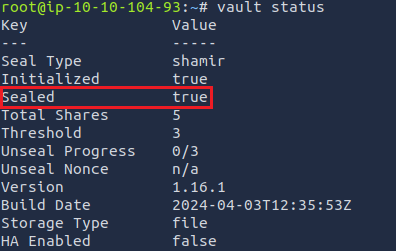
After defining the Vault address, run vault status. This checks the overall vault information before we start our crypto operations.
You should see something like this:
Note where it says Sealed -> true. Vault has a sealing feature that is activated after certain triggers. For security purposes, the Vault gets sealed after a machine running Vault reboots. We can unseal it by running the seal command with 3 unseal keys, which you get created as part of the initialisation ceremony,and 3 is the configured threshold (as seen in the Threshold line in the above screenshot) to deactivate the seal::
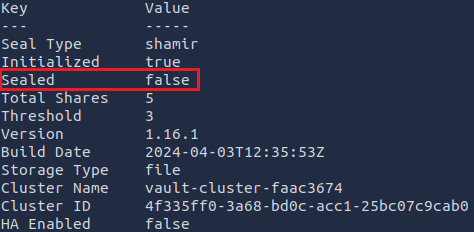
Did you notice the output? The unseal progress counter goes up as you run those commands. After running the three commands consecutively, you should see an output like this:
The Vault is now unsealed and ready for cryptography operations!
Log in using the command: vault login
After the prompt, you are required to input an access token, these are provided when creating a Vault environment. Here is the access token provided by TryFinMe: hvs.TdIwIlkBBuiS1sGs24syNCsQ
And you are in!
Next, enable the Secrets Engine and activate a key/value, where -path is the name of the TryFinMe (TFM) environment where the secrets will live:
vault secrets enable -path=TFMSecrets kv
Setting up Your Policy
As a DevSecOps engineer setting up this Vault and secrets, you must configure a policy so that only you and your designated crypto engineers can create these secrets.
Run the following commands in the given order to create a "cryptops" team policy:
Next, create the policy by running: vault token create -policy=cryptops
After the success message, note your new token and log in again to use your new policy. You are now ready to perform key operations and create the secrets.
Managing the Secrets Lifecycle
Create the secrets for the pipeline:
vault kv put TFMSecrets/apiKey value="12345-67890-ABCDE-FGHIJ"
vault kv put TFMSecrets/dbCredentials username="db_user" password="s3cureP@ssw0rd!"
Read the secret to check: vault kv get TFMSecrets/apiKey
That's it! As a DevSecOps engineer, you have set up a vault for TryFinMe's CI/CD pipeline, learned to configure granular policies and set up a secrets engine for it. Thanks to your work, TFM can now manage secrets securely and avoid using plaintext credentials or environment variables in their deployment machine.
Answer the questions below
What command checks the overall vault information?
What is the token_accessor value after logging in with the root token?
What's the default Time To Live (TTL) for a token in Vault? (in hours)
To access material, start machines and answer questions login.
In this room, we will explore how to enhance security within your pipeline by integrating HashiCorp Vault for secret management. By leveraging Vault's features, we'll ensure that sensitive information, such as keys and database passwords, remains secure throughout the software development lifecycle. Additionally, we'll test the / pipeline to verify seamless integration with Vault, guaranteeing that secrets are retrieved dynamically and securely during build and deployment tasks.
Objectives
Introduction to key management for DevSecOps.
Learn about the Key Management Lifecycle.
Configure a Vault environment for secure secret management.
Integrate Vault with the pipeline to dynamically retrieve secrets during build and deployment.
Answer the questions below
I'm ready!
The Importance of Cryptographic Keys
At the heart of securing digital information lies the management of cryptographic keys. These keys serve as the cornerstone for encrypting sensitive data, authenticating users and devices, and ensuring the of communication channels. In , managing these keys is vital to safeguarding the entire development and operations pipeline.
Integrating Security Practices Early
The DevSecOps framework is known for its approach to integrating security practices early in the development lifecycle. This proactive strategy is crucial for preventing security breaches, mitigating data loss, and circumventing compliance issues before they arise. This room will explore how integrating key management processes early in development can lead to a more secure and efficient pipeline.
Regulatory and Compliance Standards
Navigating the requirements of regulatory & compliance is a challenge for any organisation. Standards such as the Payment Card Industry Data Security Standard (), General Data Protection Regulation (), and the Health Insurance Portability and Accountability Act () outline strict guidelines for the protection of sensitive data. Adherence to these regulations is not optional but critical for organisations to avoid hefty fines and legal repercussions. In this context, effective key management is not just a security measure, but a compliance mandate.
Understanding the Key Management Lifecycle
The Key Management Lifecycle (KML) is essential for the security and integrity of cryptographic keys throughout their lifespan (also known as cryptoperiod). This lifecycle comprises several stages, each critical in effectively managing cryptographic keys. By integrating KML practices within the DevSecOps framework, organisations can enhance their security posture and ensure compliance with regulatory standards.
Key Generation
The lifecycle begins with the generation of cryptographic keys. This process must ensure that keys are created using secure and compliant methods, guaranteeing their strength and randomness. Proper key generation is the foundation of a secure key management system, as it determines the overall resilience of the encryption and authentication mechanisms.
Key Distribution
Once generated, keys must be distributed to intended users or systems securely. This stage involves securely transmitting keys, ensuring they are not intercepted or compromised. The distribution process also encompasses the secure storage of keys, preventing unauthorised access and ensuring their availability for authorised users.
Key Storage
After keys are generated and before they are distributed, they must be securely stored. Secure key storage is critical to prevent unauthorised access and use. It employs encrypted databases or specialised hardware security modules (HSMs), offering robust protection mechanisms. Effective key storage solutions also include access controls and audit logs to ensure only authorised entities can access the keys and any access is correctly recorded for future review.
Key Usage
The core purpose of cryptographic keys is their use in encrypting data, authenticating users and devices, and securing communication. During the usage phase, monitoring and controlling how, when, and by whom the keys are utilised is vital. This oversight helps prevent unauthorised use and ensures that keys are used for their designated purposes. Access control is super important here.
Key Backup and Recovery
Closely related to key rotation is the concept of critical backup and recovery. This involves creating secure "copies" of cryptographic keys to avoid losing access to keys in case of deletion or corruption. Effective backup and recovery strategies ensure that keys can be restored securely and controlled, maintaining the integrity and availability of encrypted information.
Note: Sometimes, old or replaced keys must be "archived" rather than destroyed (see Key Destruction section). Archiving is necessary for decrypting old communications or data, should the need arise. Secure key archiving ensures that keys are preserved to prevent unauthorised access while still being retrievable for authorised purposes. Sometimes, "purge periods" are set so that when you delete a key, you can still retrieve it after x amount of days before full deletion.
Key Rotation
Key rotation replaces old keys with new ones at regular intervals or in response to specific events, such as a key compromise. This practice helps mitigate the risk of key compromise over time.
Key Revocation
Key revocation is the process of invalidating a key before its scheduled expiration. This might be necessary if the key is compromised, the user is no longer authorised, or the key is suspected of being exposed to unauthorised entities. Revocation mechanisms must be in place to ensure that revoked keys cannot be used for cryptographic operations.
Key Destruction
The final stage in the key management lifecycle is the secure destruction of cryptographic keys. When a key is no longer needed, or its lifecycle has ended, it must be destroyed to ensure it cannot be recovered or used. Proper critical destruction prevents the unauthorised use of old keys and protects against data breaches.
Note: You usually revoke keys by declaring a key “invalid” before the expiration date, for example, in the case of compromise. Key destruction is safely deleting the key due to the expiration/end of the cryptoperiod assigned. Destruction is not that easy; you need to consider multiple locations, including backups (which are copies stored in various regions for failover). In extreme cases, such as government use, the keys may also be on hardware devices that must be wiped and physically destroyed.
For more information, check out CSAs best practices.
Answer the questions below
Which key process might involve using HSMs?
What can you set so that a key is recoverable after x days?
What process invalidates a key before its expiry date?
Effectively managing cryptographic keys begins with secure generation and distribution practices. These initial steps are critical in establishing a strong foundation for the keys' lifecycle and ensuring digital asset security. Here, we discuss the best practices for generating and distributing cryptographic keys.
Best Practices
1. Use strong Random Number Generators (RNGs): The strength of cryptographic keys lies in their randomness. Use cryptographically secure pseudo-random number generators (CSPRNGs) designed to produce computationally infeasible output to predict. Some tools include modules and libraries with solid RNG. For industry standards, you can checkFIPS-140-X for algorithms and best practices. These standards get updated regularly, so always check for the latest versions.
2.Adhere to industry standards and algorithms: Follow current industry standards and recommendations (such as ) for generation algorithms and key lengths to ensure the cryptographic strength of your keys.
3. Secure the key generation environment:Ensure the environment where keys are generated is secure from unauthorised access and tamper-resistant. This can involve using a Hardware Security Module (HSM), which provides a secure and tamper-proof environment for key generation, storage, and management.
4. Validate key generation parameters: Before deploying keys, validate all parameters involved in the generation process. This includes verifying the randomness source and algorithm configurations and ensuring the key length is appropriate for the intended cryptographic use.
Generation Environment Use Cases
Use Case 1: Bastion Hosts for Key Generation in the Cloud
Bastion hosts, also known as jump servers, are securely configured cloud instances that serve as an isolated access point between the external and internal network resources. They are hardened, monitored, and maintained with strict security controls and can be an ideal environment for secure key generation due to their isolation and security posture.
Common Practices
Isolation: Bastion hosts need to be isolated from the public internet and sometimes internal networks if you need an "air gapped" environment, this minimises exposure to attacks. It also makes keys generated on these hosts less likely to be compromised. Y usually access these jump servers with keys or via service/private endpoints used in the backbone networks of cloud providers.
Secure access: Access to bastion hosts is tightly controlled through secure authentication mechanisms, such as SSH keys and Multi-Factor Authentication (), ensuring that only authorised personnel have access.
Environmental security: The operating system and applications on bastion hosts are configured with security in mind, including disabling unnecessary services and applying the principle of least privilege.
Use Case 2: Generating Keys Directly in Secure Storage Solutions
For example, Azure Key Vault and HashiCorp Vault offer secure, managed environments for key generation, encryption, and key management. Users benefit from built-in security and compliance features by generating keys directly within these tools, reducing the risk of key exposure during generation and storage.
Common Practices
Direct generation: Keys are generated directly within the secure enclave of the vault, ensuring that the keys are never exposed outside the secure storage environment. This method effectively prevents the keys from being intercepted or leaked.
Compliance and standards: Azure Key Vault and HashiCorp Vault comply with various security standards and regulations, ensuring that key generation meets industry best practices and regulatory requirements.
Automated rotation and management: These tools often include features for automated key rotation and lifecycle management.
Answer the questions below
What does RNGs stand for?
In the context of key generation, what do you call securely configured cloud hosts or jump servers?
Cryptographic key distribution processes ensure secure transmission of keys between authorised parties, applications, and services for specific purposes, such as data encryption and decryption functions, while maintaining the confidentiality and of keys.
Best Practices
1. Secure transmission channels: Always use secure, encrypted channels for key distribution. Protocols like (Transport Layer Security) and (mutual TLS) can secure the transmission of keys over networks.
2. Employ Public Key Infrastructure ():PKI involves using a pair of keys (public and private keys) where the public key can be openly distributed, and the private key remains securely with the owner.
3. Use trusted delivery methods: When distributing keys that cannot be securely transmitted over networks (e.g., root keys), use trusted and secure delivery channels. Depending on your requirements, this can include several tools, like a secure email exchange or an encrypted file exchange tool, in other cases SFTP servers can be set up too.
4. Implement robust authentication mechanisms: Before distributing a key, verify the identity of the receiving party using strong authentication mechanisms (or signature verification). This ensures that cryptographic keys are only delivered to authorised entities.
5. Provide secure key storage solutions: Educate and equip the recipients of cryptographic keys with the tools and knowledge to securely store the keys upon receipt. This could involve encrypted databases, key managers, or hardware security modules for secure key storage.
Use Cases
1. Symmetric key distribution: Symmetric encryption algorithms rely on a single shared key for encryption and decryption. To distribute the key securely, the sender and receiver exchange it through secure means, such as in-person meetings or secure file transfers.
2. Asymmetric key distribution: Asymmetric encryption involves public and private keys, which both the sender and receiver hold. The sender uses the receiver's public key to encrypt the data, and then the receiver decrypts it using their private key. Asymmetric keys can be securely distributed by implementing Public Key Infrastructure (PKI).
3. Key Distribution Centers (): A Key Distribution Center is a secure and centralised system that distributes encryption keys to communicating parties. It acts as a trusted intermediary and generates session keys for symmetric encryption. The protocol is a well-known example of a Key Distribution Center system, which can also be used for key exchange.
4. Pre-Shared Key (PSK): Pre-shared keys are symmetric keys shared beforehand by communicating parties. They are frequently used in scenarios where a restricted number of parties require secure communication, such as in Virtual Private Networks (VPNs) or wireless networks.
Answer the questions below
What does PKI stand for?
What's an example protocol for KDC?
What types of keys are used in VPNs? (Use the acronym)
Secure Storage Options for Cryptographic Keys
Hardware Security Module (HSM)
Definition: HSM is physical device designed to generate, store, and manage cryptographic keys securely. They provide a highly secure environment, protecting keys even if the surrounding system is compromised.
Benefits: HSM offer tamper-resistant hardware that securely handles key generation, encryption, decryption, and signing operations, ensuring that cryptographic keys do not leave the device in plaintext form.
Benefits: These services offer scalability, high availability, and built-in compliance features, allowing for the centralised management of keys with strong security and auditing capabilities.
Encrypted Databases and Keystores
Use case: For environments where HSMs or cloud-based solutions are not viable, encrypted databases or key stores can provide a secure storage option.
Implementation: These should be implemented with strong encryption algorithms and access controls, ensuring that only authorised applications and users can access the stored keys.
Access Control Mechanisms
Role-Based Access Control ()
Overview: RBAC restricts access to cryptographic keys by segregating responsibility with roles for individual users. Access rights are granted according to the responsibilities inherent to a user's role rather than the individual identity.
Application: This approach simplifies user permissions management, ensuring that only the necessary permissions are granted to authorised users based on their operational requirements.
Attribute-Based Access Control (ABAC)
Overview: ABAC provides a more granular level of access control, where a logical grouping of permission is based on user attributes, the resource, and the current environment.
Benefits: This allows for dynamic access control policies that adapt to various scenarios, providing tighter security around cryptographic keys.
Authentication
Multi-Factor Authentication ()
Importance: MFA adds a layer of security to cryptographic keys, significantly reducing the risk of unauthorised access due to compromised credentials.
Implementation: Integrating MFA with key access requests ensures that only verified users can perform sensitive operations involving cryptographic keys.
Accountability
Auditing and Monitoring
Key to security: Continuously monitoring access to cryptographic keys and auditing key usage are essential for detecting unauthorised access attempts and ensuring compliance with security policies.
Tools: Implement logging and monitoring tools that provide real-time alerts and comprehensive audit trails for all access and operations performed on cryptographic keys.
Answer the questions below
What access control strategy relies on user attributes, resources, and the current environment?
What storage solution offers tamper-resistant hardware?
Key rotation refers to replacing old cryptographic keys with new ones. Regular rotation helps minimise the window of opportunity for attackers to compromise keys and the data they protect.
Implementing Rotation Policies
Define a cryptoperiod: Establish cryptoperiods for keys based on their usage, sensitivity of the data they protect, and compliance requirements. A cryptoperiod is the of time after which a key should be rotated. Sensitive keys with high usage might have shorter cryptoperiods due to increased exposure to potential compromise.
Automate rotation processes: Automate the rotation of keys using automated tools and services, such as Azure Key Vault or HashiCorp Vault. Automation ensures that rotations happen consistently and without delay, reducing the risk of human error.
Use versioning and backward compatibility: When rotating keys, ensure that systems can support multiple versions of keys to maintain access to historical data. Implement backward compatibility where necessary to avoid disruption of services.
Setting Up Alerting
Monitor key usage: Implement monitoring to track the usage of cryptographic keys. Anomalies in usage patterns can indicate a compromised key and trigger a rotation.
Alerts for rotation events: It's important to configure alerts for upcoming rotation events and for when rotations are executed. This helps ensure that rotations are noticed and accounted for in security audits or when an investigation is needed when there is compromise or corruption.
Key Revocation Strategies
Key revocation is the process of invalidating a key before its scheduled expiration. Revocation is crucial when a key is suspected to be compromised or no longer needed.
Revocation Mechanisms
Use Certificate Revocation Lists (CRLs) and Online Certificate Status Protocol (OCSP): For systems using Public Key Infrastructure (), maintain CRLs or use OCSP to check the revocation status of certificates. These mechanisms allow entities to verify whether a certificate associated with a key is still valid.
Implement key status checks: For non-PKI systems, mechanisms should be implemented to check the status of keys before use. This can involve querying a centralised key management system to verify if a key has been revoked.
Communicating Revocation
Notify stakeholders: When revoking a key, it's important to notify all stakeholders, including users and systems relying on the key for encryption or authentication. This ensures they can take necessary actions, such as switching to a backup key.
Update access controls: Ensure that access controls are updated to reflect the revocation, preventing revoked keys from being used to access systems or data.
Answer the questions below
What are CRLs?
What term refers to a key's lifespan before rotation?
Set up your virtual environment
To successfully complete this room, you'll need to set up your virtual environment. This involves starting both your AttackBox (if you're not using your VPN) and Lab Machines, ensuring you're equipped with the necessary tools and access to tackle the challenges ahead.
Attacker machine
Status:Off
Lab machine
Status:Off
Starting the
In this scenario, you will be interacting with a Hashicorp Vault server running on the target VM. You can start the VM by pressing the Start Lab Machine button attached in this task. To interact with the Vault server, you can either use the AttackBox where Vault is already installed for you, or use your own attacking machine with the install instructions found here.
Scenario: A Fintech Startup's Security Oversight
A rapidly growing fintech startup, TryFinMe, has developed an innovative payment processing platform. The development team implemented encryption across their cloud storage and communication channels to protect customer data and transaction details. However, under the pressure of tight deadlines and the focus on feature development, the team overlooked the importance of a robust key management system. They opted for a quick solution, secrets like keys directly within their application's source code, which was stored in a private but accessible online repository.
The oversight: During a routine code update, a junior developer accidentally pushed a commit to a public repository, exposing the source code and the embedded encryption keys. The mistake went unnoticed for several days, during which the exposed keys provided a straightforward path for unauthorised users to access encrypted sensitive data.
The exploit: An opportunistic attacker discovered the encryption keys by scanning for exposed secrets on public repositories. Leveraging these keys, the attacker could decrypt the data stored in the cloud, gaining access to thousands of customer records, including personal information and transaction details.
Objectives
In this exercise, you'll primarily focus on setting up HashiCorp Vault for secure secret management within the / pipeline of TryFinMe, a fintech startup. The objectives include:
Integrating Vault with the pipeline: You'll configure the CI/CD script to retrieve secrets from Vault dynamically during build or deployment tasks.
Configuring Vault: This involves setting up the Vault environment, defining the Vault server address, logging in using the root token, and enabling and activating a key/value secrets engine in Vault.
Managing the secrets lifecycle: You'll create secrets in Vault for the pipeline, such as API keys and database passwords, and verify their existence.
Setup access policies: You'll define access policies in Vault to control who can access these secrets. For example, you'll create a policy granting read access to the API key.
Integrate with the CI/CD Pipeline
TryFinMe's CI/CD pipeline (e.g., using , GitLab CI, or GitHub Actions) needs to retrieve these secrets:
CI/CD Script: Below is TryFinMe's integration script you've been given as a reference. It retrieves the secrets during a deployment task:
# Retrieve API key from HashiCorp VaultAPI_KEY=$(vault kv get -field=value TFMSecrets/apiKey)# Retrieve database credentials from HashiCorp VaultDB_USERNAME=$(vault kv get -field=username TFMSecrets/dbCredentials)DB_PASSWORD=$(vault kv get -field=password TFMSecrets/dbCredentials)# Export API key and database credentials for TryFinMe deploymentexport API_KEY
export DB_USERNAME
export DB_PASSWORD
# Use the API_KEY and DB credentials in TryFinMe deploymentecho"API key retrieved: $API_KEY"echo"Database credentials retrieved: Username - $DB_USERNAME, Password - $DB_PASSWORD"
Your goal is to create the secrets (API_KEY & DB credentials) used by this script.
Configuring Vault
Let's first start by configuring the Vault. You'll need to set up your Vault environment for key management. You can start by defining your Vault address in your shell:
export VAULT_ADDR='http://MACHINE_IP:8222'
After defining the Vault address, run vault status. This checks the overall vault information before we start our crypto operations.
You should see something like this:
Note where it says Sealed -> true. Vault has a sealing feature that is activated after certain triggers. For security purposes, the Vault gets sealed after a machine running Vault reboots. We can unseal it by running the seal command with 3 unseal keys, which you get created as part of the initialisation ceremony,and 3 is the configured threshold (as seen in the Threshold line in the above screenshot) to deactivate the seal::
Did you notice the output? The unseal progress counter goes up as you run those commands. After running the three commands consecutively, you should see an output like this:
The Vault is now unsealed and ready for cryptography operations!
Log in using the command: vault login
After the prompt, you are required to input an access token, these are provided when creating a Vault environment. Here is the access token provided by TryFinMe: hvs.TdIwIlkBBuiS1sGs24syNCsQ
And you are in!
Next, enable the Secrets Engine and activate a key/value, where -path is the name of the TryFinMe (TFM) environment where the secrets will live:
vault secrets enable -path=TFMSecrets kv
Setting up Your Policy
As a DevSecOps engineer setting up this Vault and secrets, you must configure a policy so that only you and your designated crypto engineers can create these secrets.
Run the following commands in the given order to create a "cryptops" team policy:
Next, create the policy by running: vault token create -policy=cryptops
After the success message, note your new token and log in again to use your new policy. You are now ready to perform key operations and create the secrets.
Managing the Secrets Lifecycle
Create the secrets for the pipeline:
vault kv put TFMSecrets/apiKey value="12345-67890-ABCDE-FGHIJ"
vault kv put TFMSecrets/dbCredentials username="db_user" password="s3cureP@ssw0rd!"
Read the secret to check: vault kv get TFMSecrets/apiKey
That's it! As a engineer, you have set up a vault for TryFinMe's CI/CD pipeline, learned to configure granular policies and set up a secrets engine for it. Thanks to your work, TFM can now manage secrets securely and avoid using plaintext credentials or environment variables in their deployment machine.
Answer the questions below
What command checks the overall vault information?
What is the token_accessor value after logging in with the root token?
What's the default Time To Live (TTL) for a token in Vault? (in hours)
Ready to learn Cyber Security?
TryHackMe provides free online cyber security training to secure jobs & upskill through a fun, interactive learning environment.