
SSH Attacks

Learn how attackers abuse SSH agent forwarding, certificate trust, and shell restrictions.
medium


To access material, start machines and answer questions login.
is the famous protocol behind almost every administrator's daily workflow, the thing that moves keystrokes, files, and entire tunnels wherever an admin needs them to go. As a red teamer, that ubiquity is exactly what makes it worth your attention. Once you land a foothold on a Linux host, SSH is very likely how the real administrators move between hosts, and its trust-extending features (agent forwarding, certificate authorities, ForceCommand, and port forwarding) each solve a real sysadmin problem by trading it for a new trust assumption. Every one of those assumptions is something you can exploit.
This room walks through five techniques across four tasks: hijacking a forwarded agent, forging a certificate, escaping a ForceCommand shell, bypassing TOTP-based MFA, and pivoting through a tunnel. None of them trip a failed-login alert. Every one rides over a normal, successfully authenticated session, because that is the whole point: successful authentication is not the same thing as legitimate authentication. Tasks 3 through 6 are four independent scenarios rather than one continuous engagement, so you will not be chaining an agent hijack into a certificate forgery into a tunnel.
Learning Objectives
- Explain SSH's authentication methods and how
AuthenticationMethodsenforces combinations - Hijack a forwarded SSH-agent socket to authenticate as another user
- Forge an SSH certificate from a compromised CA to impersonate a trusted principal
- Escape a
ForceCommand-restricted shell via unsafeAcceptEnvhandling - Explore other exploitation techniques through the eyes of a pentester
Prerequisites
No prior knowledge of SSH agent forwarding, SSH certificates, PAM/MFA, or port forwarding is assumed. Each is taught from scratch in the room that uses it.
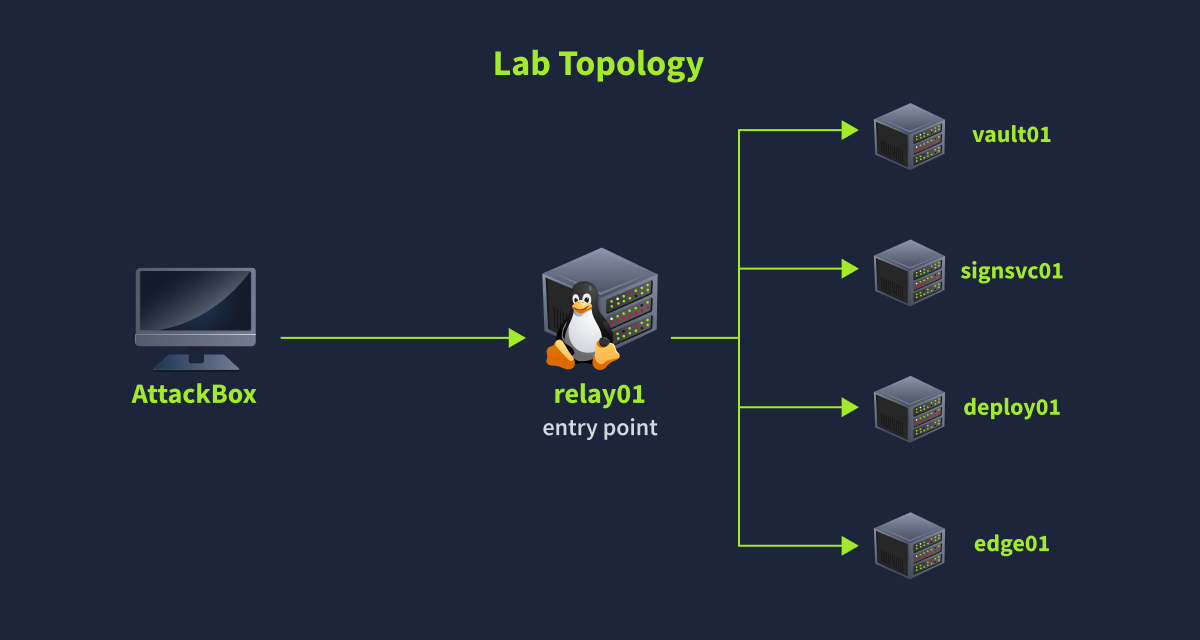
All five hosts relay01, vault01, signsvc01, deploy01, and edge01 run as Docker containers on a single VM and are attached to one custom Docker bridge network (10.60.10.0/24) with a fixed IP scheme (relay01=.11, vault01=.12, signsvc01=.13, deploy01=.14, edge01=.15). In this lab, only relay01's SSH port is accessible from the AttackBox (host 2201 → container 22) so that it's the single entry point. Once inside relay01, you can reach every other container directly by hostname. Docker's built-in DNS resolver automatically handles name-to-IP resolution for any containers sharing that network, so no manual /etc/hosts entries are needed.
Click Start Lab Machine to deploy the full lab, then click the Start AttackBox button to start learning the SSH exploitation techniques.
Set up your virtual environment

Credentials for relay01, the SSH entry point, are below:
Credentials
I have successfully started my SSH Attacks lab instance.
Ready to learn Cyber Security?
The SSH Attacks room is only available for Premium or Max subscribers. Signup now to access more than 500 free rooms and learn cyber security through a fun, interactive learning environment.
Already have an account? Log in