

AI in Security - old sAInt nick
Unleash the power of AI by exploring it's uses within cyber security.
easy

To access material, start machines and answer questions login.
The Story

The lights glimmer and servers hum blissfully at The Best Festival Company (TBFC), melting the snow surrounding the data centre. TBFC has continued its pursuit of excellence. After the past two years, they realise that Van Chatty, their in-house chatbot, wasn’t quite meeting their standards.
Unfortunately for the elves at TBFC, they are also not immune to performance metrics. The elves aim to find ways of increasing their velocity; something to manage the tedious, distracting tasks, which allows the elves to do the real magic.
TBFC, adventurous as ever, is trialling their brand new cyber security AI assistant, Van SolveIT, which is capable of helping the elves with all their defensive, offensive, and software needs. They decide to put this flashy technology to use as Christmas approaches, to identify, confirm, and resolve any potential vulnerabilities, before any nay-sayers can.
 Learning Objectives
- How AI can be used as an assistant in cyber security for a variety of roles, domains and tasks
- Using an AI assistant to solve various tasks within cyber security
- Some of the considerations, particularly in cyber security, surrounding the use of AI
Connecting to the Machine
Before moving forward, review the questions in the connection card shown below:
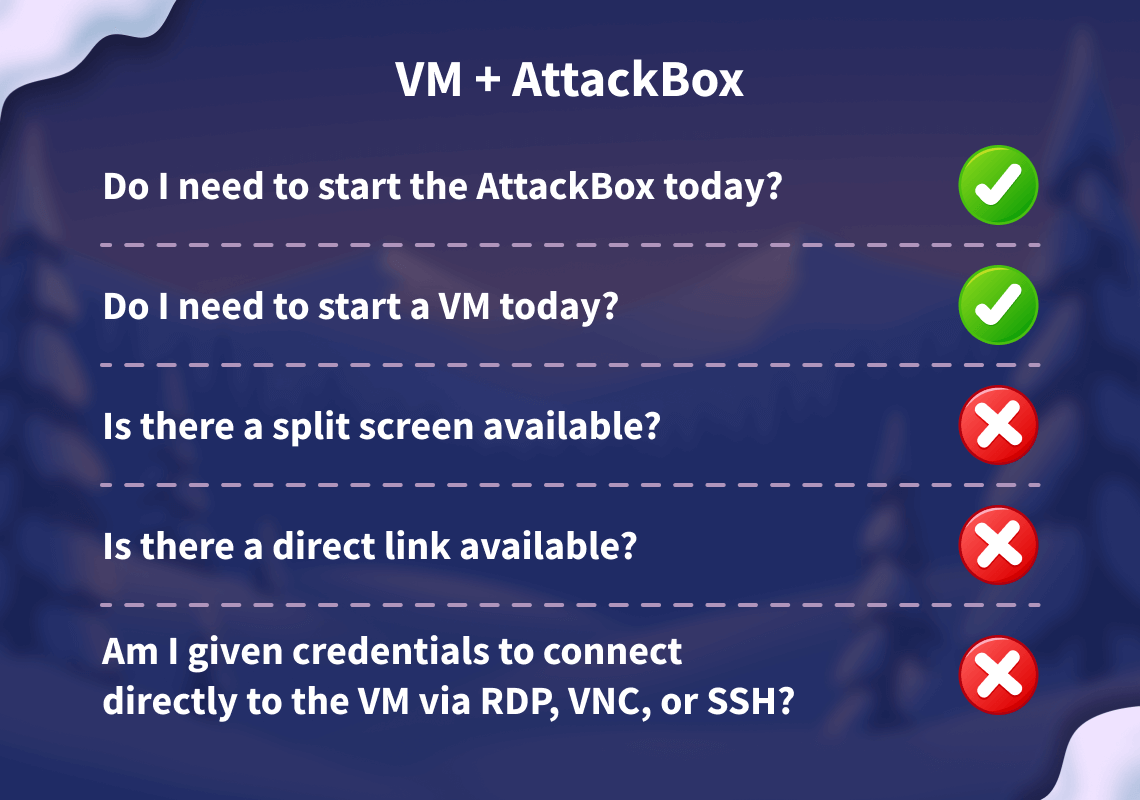
Start your target by clicking the Start Lab Machine button below. The machine will need about 2 minutes to fully boot. Additionally, start your AttackBox by clicking the Start AttackBox button below. The AttackBox will start in split view. In case you can not see it, click the Show Split View button at the top of the page.
Set up your virtual environment

I have successfully started the AttackBox and the lab machine!
The Boom of Assistants
Ah, yes, , that buzzword that seems here to stay. Who would have thought? Today’s room will highlight some ways AI is utilised in cyber security, along with important considerations to bear in mind when deploying AI for such tasks.
Particularly at the time of writing, AI is increasingly seen as a tool to boost speed by handling often tedious, time-consuming tasks, allowing humans to perform the real magic. Organisations want to see experience, not avoidance, in how these tools are operated.
GPT this, GPT that, we’ve all heard it often. And it’s likely to persist. As AI’s capabilities expand daily, we’ve observed a shift from AI being just “something to ask because you were too lazy to Google” (a mistake I’ve made myself). Now, AI is being embedded into everyday workflows, transforming how tasks are done and boosting productivity like never before.
With that said, let’s begin today’s room!
AI in Cyber Security
The use of artificial intelligence has seen a significant boost in cyber security. Visit almost any vendor, and they'll now have some form of AI powering a solution somewhere. Why? Well, it's not just because they're capitalising on the buzzword (although that's certainly a part of it), but rather, the benefits from artificial intelligence really do apply here. Let's explore some of these in the table below:
| Features of AI | Cyber Security Relevance |
| Processing large amounts of data | Analysing vast data from multiple types of sources. For example, system and network logs together. |
| Behaviour analysis | Tracking normal behaviour and activities over a period of time and flagging anything that is out of the ordinary. |
| Generative AI | Summarising or providing context behind a series of events. |
Defensive Security

AI agents are being used in blue teaming to speed up detection, investigation, and response, making them quicker and more dependable. Acting like automated assistants, these agents continuously process telemetry (logs, network flows, endpoint signals) and add context to alerts. Furthermore, we are witnessing the integration of AI into vendor appliances—such as AI-assisted firewalling and intrusion detection systems.
Beyond just detecting threats, AI can also assist in automating responses. Picture your system automatically isolating an infected device, blocking a suspicious email, or flagging an unusual login attempt — all in real time.
Offensive Security
AI agents have made a notable impact on offensive security by automating and handling the often very labourious and time-consuming tasks that a pentester might traditionally undertake.
For example, AI can be a powerful tool in a penetration tester's workflow for reconnaissance and information gathering, from to analysing noisy scanner outputs and mapping attack surfaces. This allows the pentester to spend more time on the crucial tasks that require a human touch.
Software

AI-driven software development, rightfully, sounds a bit frightening. Isn't that so? Well, you wouldn't be wrong to feel this way; we've all heard about the popularity of vibe coding and the vulnerabilities introduced by AI.
However, AI has proven to be a valuable addition to the software development process in several ways. One example is a virtual "colleague" to bounce ideas off while writing the code itself. More importantly, it is used as a / scanner. These scanners audit and analyse written code and applications for potential vulnerabilities.
Yes, it's somewhat ironic. AI agents can be great at identifying vulnerabilities, but are not quite as effective at writing secure code.
Considerations of AI In Cyber Security

Now, I’m not entirely here to sing the praises of AI and say it’s the silver bullet to all your needs. If you’ve used AI before, you’ll know the pitfalls and frustrations one can face. And nowhere is that truer than in cyber security.
While the usual considerations of using AI apply, such as not owning the output from AI, there are specific factors to consider before deploying it in cyber security.
One such consideration is the use of AI in activities like offensive penetration testing. While we have discussed some of AI's applications in these areas, caution remains essential. You do not want to explain to a client that their services and websites are down because an AI has caused a race condition or overwhelmed their systems.
We must think carefully about the data AI learns from, how transparent and fair its decisions are, and how reliable it remains when the unexpected occurs. We cannot assume the output from AI is 100% correct. Efforts must be made to verify the information it provides. Additionally, managing challenges such as keeping data private, securing AI models, and informing users properly requires careful consideration.
Practical
Phew! Ready for an exciting exercise? You will be interacting with Van SolveIT, who will guide you through three showcases of how AI can be used in cyber security:
- Red: Generate and use an exploit script.
- Blue: Analyse web logs of an attack that has occurred.
- Software: Analyse source code for vulnerabilities.
When you're ready, you can access Van SolveIT at http://MACHINE_IP. Remember, you will need to do so either from the AttackBox or your own device connected to the .
If you are on a small display, we recommend expanding the AttackBox into full screen mode which can be done by pressing the "two arrows" icon (left of the "+" icon) in the split-screen view to expand it into full screen.
Usage Tips
- Chatbot responses may appear blank for a minute or two while it generates the reply. You will start to see Van SolveIT's responses in real time.
- If the chatbot gets confused at any time, press the Restart Chat button at the top right of the page.
- As you progress throughout the showcase, stages will unlock. You can go back to any stage that you have unlocked by clicking on the stage name on the top left.
Complete the AI showcase by progressing through all of the stages. What is the flag presented to you?
Execute the exploit provided by the red team agent against the vulnerable web application hosted at MACHINE_IP:5000. What flag is provided in the script's output after it?
Remember, you will need to update the IP address placeholder in the script with the IP of your vulnerable machine (MACHINE_IP:5000)
If you enjoyed today's room, feel free to check out the Defending Adverserial Attacks room, where you will learn how to harden and secure AI models.
Ready to learn Cyber Security?
TryHackMe provides free online cyber security training to secure jobs & upskill through a fun, interactive learning environment.
Already have an account? Log in