
Back to all walkthroughs

The Docker Rodeo
Premium roomLearn a wide variety of Docker vulnerabilities in this guided showcase.
medium
To access material, start machines and answer questions login.
Set up your virtual environment
To successfully complete this room, you'll need to set up your virtual environment. This involves starting both your AttackBox (if you're not using your VPN) and Lab Machines, ensuring you're equipped with the necessary tools and access to tackle the challenges ahead.

Attacker machine
Status:Off
Lab machine - Task 1
Status:Off
The prerequisites for this room are a bit more complicated then most rooms, however, I'll detail every step of the way.
1.1. Getting Setup
1.1.1. I strongly recommend using the TryHackMe AttackBox for this room for the most reliable experience.
1.1.2. Deploy the Instance attached to this room and wait for the IP address to be displayed.
Take note of the IP address for your deployed Instance:
MACHINE_IP1.2. Add your Instance IP address to /etc/hosts
Once you have been given your IP address, you will need to create an entry in your
/etc/hosts file with both the IP address and docker-rodeo.thm1.2.1.
sudo nano /etc/hosts1.2.2. Add the entry so that it looks like the following:
MACHINE_IP docker-rodeo.thm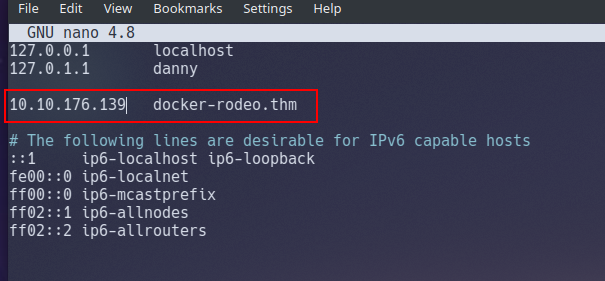
1.2.3. Save and close the file.
1.3. Tell Docker to Trust your Instance
1.3.1. You will need to either create or enter the following into
/etc/docker/daemon.json:{ "insecure-registries" : ["docker-rodeo.thm:5000","docker-rodeo.thm:7000"] } |

1.3.2. Save and close the file.
1.4. Restart Docker
1.4.1. For the changes to apply, you will need to stop then start (not just restart) the Docker service:
1.4.1.
sudo systemctl stop docker1.4.2. Wait for approximately 30 seconds
1.4.3.
sudo systemctl start dockerYou are now ready to progress with the room.
Answer the questions below
Let's go
Ready to learn Cyber Security?
The The Docker Rodeo room is only available for Premium or Max subscribers. Signup now to access more than 500 free rooms and learn cyber security through a fun, interactive learning environment.
Already have an account? Log in