
Host-Server Configuration Reviews
Learn the basics of host-server configuration reviews.
easy


To access material, start machines and answer questions login.
Every operating system ships with a set of default configurations. Administrators then layer their own changes on top, installing software, creating user accounts, configuring services, and setting permissions. When those configurations deviate from secure practices, whether through oversight, convenience, or a lack of awareness, they introduce weaknesses that can be exploited to escalate privileges on the host. This room provides the conceptual foundation for identifying and understanding those weaknesses.
Privilege escalation is the process of moving from a lower-privileged account to a higher-privileged one on a system. It is a critical phase of almost every penetration test. An attacker who gains initial access to a host, typically through a web application vulnerability, , or a compromised service, will rarely land with administrative or root-level access. The next step is to find a way to elevate privileges, and misconfigured hosts are one of the most reliable sources of opportunity.
There are broadly two categories of privilege escalation. The first is vulnerability-based escalation, which exploits bugs in software, such as kernel vulnerabilities, buffer overflows in installed applications, or known CVEs in running services. The second is configuration-based escalation, which exploits errors in how the system has been set up, such as overly permissive file permissions, insecure service configurations, or plaintext credentials left in accessible locations.
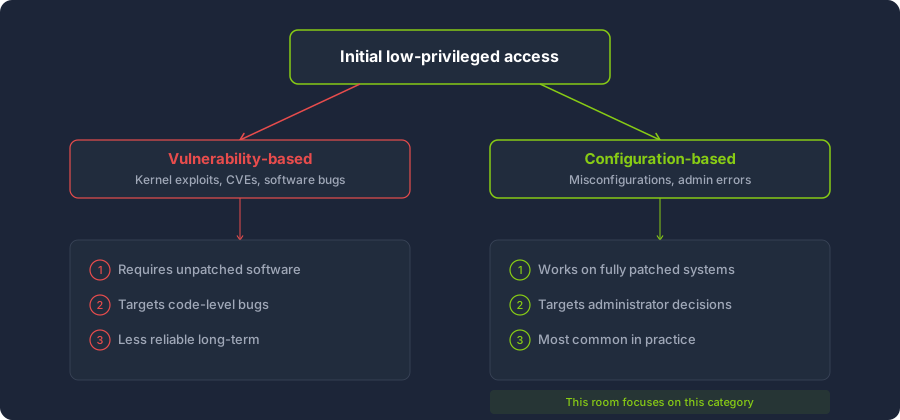
This room focuses on the second category. A fully patched system with no known software vulnerabilities can still be trivially escalated if its configuration is poor. In practice, configuration-based escalation is often more common and more reliable than vulnerability-based escalation, particularly in mature environments where patching is consistent but hardening is not.
The room does not cover specific exploitation techniques. Instead, it establishes the knowledge you need before approaching a host for privilege escalation. You will learn what a secure configuration looks like according to industry-recognised frameworks, what categories of misconfiguration commonly lead to escalation, and how to approach a new host with a structured methodology. The rooms that follow in this module apply these concepts hands-on to and Windows systems.
Learning Objectives
By the end of this room, you will be able to:
- Explain what a host-server configuration review is and when it is performed during a penetration testing engagement.
- Distinguish between vulnerability-based privilege escalation and configuration-based privilege escalation.
- Describe the purpose and structure of Benchmarks and DISA STIGs, and how they define a secure configuration baseline.
- Identify the role of automated compliance auditing tools such as Nessus, Lynis, and OpenSCAP in performing configuration reviews at scale.
- Identify the major categories of host misconfiguration that lead to privilege escalation, including file permissions, service configurations, scheduled tasks, and credential storage.
- Apply a structured enumeration methodology that maps to benchmark categories when approaching a new host.
Prerequisites
Before starting this room, you should be comfortable with the content covered in the Linux Fundamentals and Windows Fundamentals rooms. Familiarity with the Linux command line, the Windows command prompt, basic navigation, and the concept of user accounts and permissions is assumed throughout.
A configuration review is a structured audit of a host's settings, permissions, services, and policies, measured against an accepted secure baseline. Its purpose is to identify deviations from that baseline that could introduce security risk. In the context of penetration testing, those deviations are potential vectors for privilege escalation.
Configuration reviews differ from vulnerability scanning. A vulnerability scanner such as Nessus or Qualys identifies known software flaws, missing patches, and CVEs. A configuration review, by contrast, focuses on how the system is set up rather than what software it runs. A host can pass a vulnerability scan with no findings and still fail a configuration review because its services are running with excessive privileges, its file permissions are too broad, or its administrators have left credentials in accessible locations.
Configuration reviews also differ from exploit development. An exploit targets a specific software bug with a crafted payload. A configuration review identifies weaknesses in the way a host is administered. The skills are complementary, but the mindset is different. Exploitation asks "what is broken in this software?" Configuration review asks "what is set up incorrectly on this system?"
When Configuration Reviews Happen
During a penetration test, configuration reviews typically occur during the post-exploitation phase, after initial access to a host has been obtained. Once a tester has a shell on a target system, the next objective is usually to escalate privileges. The configuration review is the systematic process of examining the host for misconfigurations that enable that escalation.
Configuration reviews can also be conducted as standalone assessments, independent of a full penetration test. In this context, a security team or auditor is given authenticated access to hosts and evaluates their configuration against a defined baseline. The findings are reported as hardening gaps rather than exploitable vulnerabilities, but the checks performed are the same.
The Offensive Perspective
From a defensive standpoint, configuration reviews are a compliance and hardening exercise. Security teams audit hosts to ensure they meet organisational standards, regulatory requirements, and industry best practices. The goal is remediation.
From an offensive standpoint, the process is identical but the goal is reversed. A penetration tester auditing a host's configuration is looking for the same deviations a compliance auditor would flag, but with the intent to exploit them rather than fix them. The same checklist that a system administrator uses to harden a server is, in effect, an enumeration guide for an attacker.
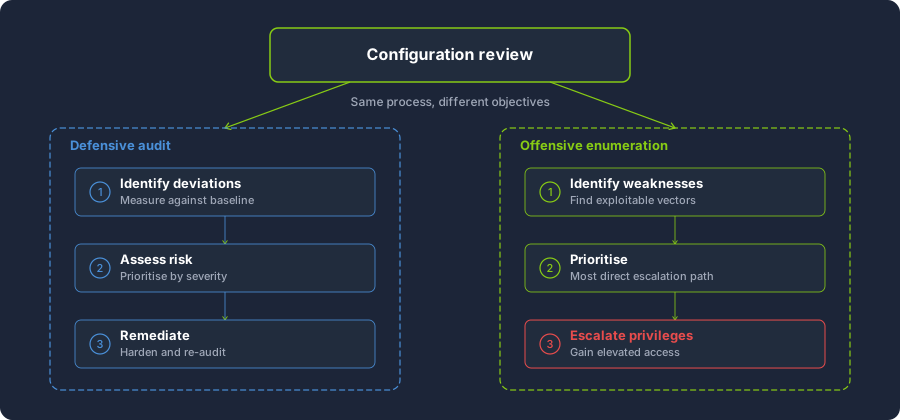
This duality is important to understand. When you learn what a secure configuration looks like, you simultaneously learn what an insecure one looks like and how to identify it during an engagement.
What Systems Are Reviewed
Configuration reviews apply to any system that can be audited. Workstations, file servers, domain controllers, web servers, database servers, network appliances, and cloud instances are all subject to configuration review. The specific checks vary by operating system and role, but the categories of misconfiguration are broadly consistent across platforms. A web server and a Windows domain controller both have file permissions, service configurations, user accounts, and credential storage that can be audited against a baseline.
Yay or Nay: a host that passes a vulnerability scan with no findings is guaranteed to have a secure configuration.
A security baseline is a documented standard that defines how a system should be configured to meet an acceptable level of security. Rather than relying on individual judgement about what constitutes a "secure" setup, organisations adopt baselines that provide specific, measurable recommendations for every configurable aspect of a system, from password policies and file permissions to service configurations and network settings.
Several industry-recognised frameworks publish these baselines. The two most widely referenced are Benchmarks and DISA STIGs.
CIS Benchmarks
The Center for Internet Security (CIS) publishes configuration benchmarks for a wide range of operating systems, cloud platforms, applications, and network devices. CIS Benchmarks are developed through a consensus-driven process involving security professionals from government, industry, and academia. Each benchmark contains hundreds of individual recommendations, each with a description, a rationale explaining the security risk it addresses, an audit procedure for checking compliance, and a remediation procedure for correcting deviations.
CIS Benchmarks define two profile levels. Level 1 recommendations are practical, broadly applicable settings that can be implemented on most systems without significant impact on functionality. Level 2 recommendations provide deeper defence-in-depth hardening but may restrict certain functionality or require more careful testing before deployment. An organisation typically selects one of these profiles as its baseline and measures hosts against it.
For example, a CIS Benchmark for Ubuntu might include a Level 1 recommendation that the PermitRootLogin directive in the SSH server configuration must be set to no. The rationale explains that allowing direct root login over provides an attacker who obtains or brute-forces the root password with immediate privileged access, bypassing any accountability provided by individual user accounts. The audit procedure specifies the command to check the current setting in sshd_config, and the remediation procedure provides the configuration change to disable it.
DISA STIGs
The Defense Information Systems Agency (DISA), part of the U.S. Department of Defense, publishes Security Technical Implementation Guides (STIGs). STIGs prescribe hardening requirements for systems used in government and military environments. They are more prescriptive than CIS Benchmarks and are mandatory for systems within U.S. government networks.
Each finding is assigned a severity category. CAT I findings represent the highest risk, where exploitation could directly lead to loss of confidentiality, , or availability. CAT II findings represent medium risk, and CAT III findings represent low risk. This categorisation helps administrators prioritise remediation and helps penetration testers prioritise which deviations to investigate first.
Relationship to Compliance Standards
CIS Benchmarks and DISA STIGs do not exist in isolation. Broader compliance frameworks such as PCI-DSS (for payment card processing), ISO 27001 (for information security management), and 800-53 (for federal information systems) frequently reference CIS or STIG hardening as implementation guidance for their own control requirements. When an organisation must demonstrate compliance with PCI-DSS, the specific system hardening it implements is often drawn directly from a CIS Benchmark.
For a penetration tester, awareness of these frameworks serves two purposes. First, they define what the target organisation considers "secure," which means deviations from the adopted baseline are the most defensible findings in a penetration testing report. Second, they provide a structured, comprehensive list of things to check, which is far more reliable than -hoc enumeration.
In a DISA STIG, which severity category represents the highest risk?
Manually auditing a host against a full Benchmark or DISA is time-consuming. A single benchmark can contain several hundred individual recommendations, and enterprise environments may have thousands of hosts to assess. Automated compliance tools address this problem by scanning hosts programmatically against defined baselines and producing reports that flag deviations.
Several tools are widely used for this purpose. Each serves a slightly different audience and use case, but all share the common goal of measuring a host's configuration against a known-good standard.
Nessus
Nessus is a commercial vulnerability scanner developed by Tenable. While it is best known for vulnerability scanning, Nessus also includes compliance auditing functionality. Administrators can configure Nessus to scan hosts against CIS Benchmarks, DISA STIGs, and custom audit policies. The resulting compliance report lists each check, its pass or fail status, and remediation guidance for failed checks.
From a penetration tester's perspective, a Nessus compliance report is a valuable source of information when available. If the target organisation has already run compliance scans internally and shares the results as part of a grey-box or white-box engagement, the report effectively provides a pre-built list of misconfigurations. Each failed check is a potential escalation vector worth investigating.
Lynis
Lynis is an open-source security auditing tool designed for , macOS, and other Unix-based systems. Unlike Nessus, Lynis runs locally on the host being audited rather than scanning remotely. It checks system configuration against hardening best practices and produces a hardening index score along with a categorised list of findings, warnings, and suggestions.
Lynis is useful in both defensive and offensive contexts. A system administrator runs Lynis to identify hardening gaps on servers under their management. A penetration tester who has gained shell access to a Linux target can run Lynis to quickly enumerate configuration weaknesses without manually checking each category. However, uploading or running additional tools on a target during an engagement introduces risk of detection and may violate the engagement's rules of engagement. The decision to use Lynis on a target should be weighed against the agreed scope and the operational security requirements of the assessment.
OpenSCAP
OpenSCAP is an open-source framework that implements the Security Content Automation Protocol (SCAP), a standardised method for expressing and evaluating security configuration policies. OpenSCAP evaluates a host against SCAP-formatted profiles, including CIS and STIG content, and produces detailed reports with pass/fail results for each rule.
OpenSCAP is commonly deployed in government and enterprise environments where automated compliance validation is a regulatory requirement. Its output is structured and machine-readable, making it suitable for integration into larger compliance management workflows.
CIS-CAT
CIS-CAT is the Center for Internet Security's own assessment tool, purpose-built to evaluate hosts against CIS Benchmarks. It is available in both a free limited version (CIS-CAT Lite) and a full commercial version (CIS-CAT Pro). CIS-CAT produces detailed pass/fail reports mapped directly to the benchmark recommendations, making it the most straightforward tool for CIS Benchmark compliance.
Offensive Enumeration Tools
The tools described above are designed primarily for defensive compliance auditing. A separate category of tools exists for offensive privilege escalation enumeration. Tools such as LinPEAS, WinPEAS, and PowerUp are designed to run on a compromised host and identify configuration weaknesses from an attacker's perspective. They check for many of the same issues that compliance tools flag, such as writable files, weak service permissions, and stored credentials, but their output is tailored for exploitation rather than remediation.
The overlap between these two categories is significant. A CIS Benchmark check that verifies root login is disabled is functionally related to a LinPEAS check that highlights the SSH configuration. The difference lies in the intended audience and the action taken on the finding. The compliance tools and offensive tools covered in later rooms in this module are two sides of the same coin.
What commercial vulnerability scanner, developed by Tenable, includes compliance auditing functionality against CIS Benchmarks?
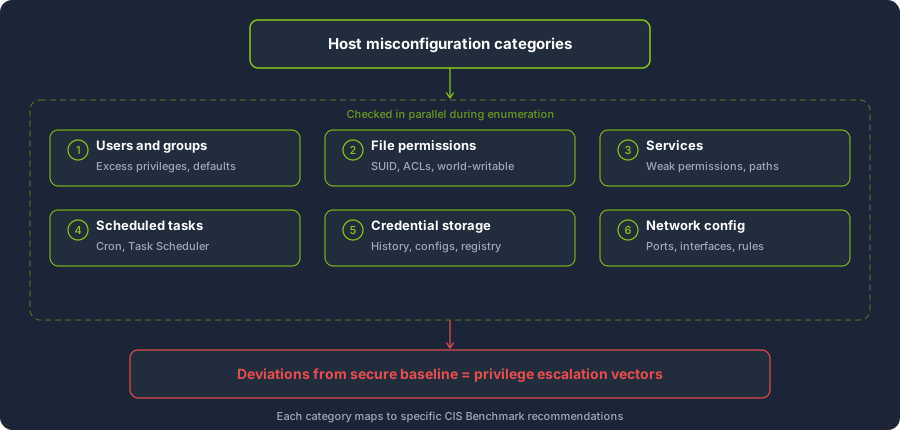
Host misconfigurations that lead to privilege escalation fall into a set of well-defined categories. Understanding these categories provides a mental framework for approaching any system, regardless of its operating system or role. Each category represents a type of deviation from secure baseline configuration that an attacker can exploit.
This task describes each category at a conceptual level. The specific techniques for identifying and exploiting these misconfigurations on and Windows are covered in the dedicated rooms later in this module.
User and Group Configuration
Operating systems use accounts and groups to control who can perform which actions. A secure baseline defines the principle of least privilege, where each account has only the permissions necessary for its intended function. Deviations from this principle create escalation opportunities.
Common misconfigurations in this category include assigning user accounts to administrative groups unnecessarily, creating service accounts with excessive privileges, failing to disable or remove default accounts that ship with the operating system, and configuring weak or absent password policies that allow easily guessable credentials. An attacker who compromises a user account that belongs to an administrative group, for instance, may already have elevated privileges without needing any further exploitation.
File and Directory Permissions
File and directory permissions control which users can read, write, or execute specific files. Both Linux and Windows implement access control mechanisms for this purpose, though the models differ in their specifics. A secure baseline defines strict permissions on sensitive files, system binaries, and configuration directories.
On Linux, misconfigurations in this category include the SUID (Set User ID) bit being set on binaries that do not require it. The SUID bit is a special permission that causes an executable to run with the privileges of the file's owner rather than the user who executes it. When a SUID binary is owned by root and contains functionality that allows arbitrary command execution or file access, it becomes a direct privilege escalation vector. Other common issues include world-writable scripts or binaries that are executed by privileged processes, and sensitive files such as /etc/shadow or SSH private keys having read permissions that are too broad.
On Windows, the analogous issues involve Access Control Lists (ACLs) that grant excessive permissions. Directories in the system PATH that are writable by non-privileged users, program installation directories with weak default permissions, and misconfigured registry key ACLs all fall into this category.
Service Configurations
Services are long-running processes that perform background tasks on a system. On Linux, services are typically managed by systemd and defined in unit files. On Windows, services are managed by the Service Control Manager (SCM) and configured through the registry and service properties.
A secure baseline requires services to run with the minimum privileges necessary, to be configured with restrictive access controls preventing unauthorised modification, and to reference their executables using full, unambiguous paths.
Common misconfigurations include services that run as root or LocalSystem when they do not need to, service configuration files or binaries that are writable by non-privileged users, and service binary paths that are unquoted and contain spaces. On Windows, the unquoted service path issue is particularly well-known. When a service's executable path contains spaces and is not enclosed in quotation marks, the Service Control Manager attempts to resolve the path by testing each possible token boundary. For a service with the path C:\Program Files\My App\service.exe, Windows will first attempt to execute C:\Program.exe, then C:\Program Files\My.exe, and then C:\Program Files\My App\service.exe. If a non-privileged user can write to any of the intermediate directories, they can place a malicious binary at one of the tested paths, and it will execute with the privileges of the service account.
Scheduled Tasks and Cron Jobs
Both Linux and Windows support scheduling commands or scripts to run automatically at defined intervals. On Linux, this is handled by cron, a job scheduler that executes commands according to time-based rules defined in crontab files. On Windows, the Task Scheduler provides equivalent functionality.
Scheduled tasks that run with elevated privileges and reference scripts or binaries that a non-privileged user can modify are a direct escalation vector. The secure baseline requires that any script or binary executed by a privileged scheduled task is itself protected by appropriate permissions, and that the task's configuration is not modifiable by unauthorised users.
A secondary issue involves the behaviour of certain utilities when processing filenames that resemble command-line flags. A scheduled task that uses a wildcard to process files in a directory may be vulnerable to wildcard injection. For example, if a root cron job runs tar cf /backup/archive.tar * inside a directory, an attacker who can create files in that directory can add files named --checkpoint=1 and --checkpoint-action=exec=sh shell.sh. When tar processes the wildcard, it interprets these filenames as command-line arguments and executes the attacker's script with the privileges of the cron job.
Credential Storage
Administrators and users frequently store credentials in locations that are accessible to other accounts on the system. This is not a permission misconfiguration in the traditional sense but rather an operational practice that violates the principle of credential hygiene.
On Linux, common locations for exposed credentials include shell history files such as ~/.bash_history, environment variables, application configuration files containing database connection strings or API keys, and SSH private keys stored with overly permissive read access.
On Windows, credential exposure may involve entries in the Windows Credential Manager (accessible via cmdkey /list), saved credentials used with runas /savecred, cleartext passwords in the Windows registry, deployment files such as Unattend.xml and Sysprep configuration files, PowerShell command history, and web application configuration files such as web.config.
An attacker who discovers stored credentials for a privileged account can escalate directly without exploiting any technical misconfiguration in the system itself.
Network Configuration
Network configuration misconfigurations are less commonly associated with local privilege escalation than the categories above, but they remain relevant to the overall security posture of a host. This category is included for completeness and is not a primary focus of this module.
A secure baseline defines which ports and services should be accessible, from which interfaces, and to which source addresses. Deviations from this baseline expand the attack surface available to an attacker who has already gained a foothold on the network. For example, a database service such as MySQL bound to 0.0.0.0 (all interfaces) instead of 127.0.0.1 (localhost only) is accessible from the network rather than restricted to local connections. If the database has weak credentials or no authentication, this misconfiguration provides a path to data access or, in some cases, command execution through database-specific features such as MySQL's INTO OUTFILE or PostgreSQL's COPY TO PROGRAM.
Other common issues include unnecessary ports left open, overly permissive rules that allow inbound connections to management interfaces, and insecure remote management protocols that transmit credentials in cleartext.
What special permission bit on Linux causes an executable to run with the privileges of the file's owner?
Approaching a host without a defined methodology leads to inconsistent results. Testers who rely on memory or intuition will inevitably overlook categories of misconfiguration, particularly under time pressure. A structured enumeration methodology ensures comprehensive coverage by mapping each step to a defined category of misconfiguration.
The methodology presented here is operating-system-agnostic. It defines what to check rather than how to check it. The specific commands and tools for and Windows are covered in the dedicated rooms that follow in this module.
Phase 1 - Situational Awareness
Before checking for specific misconfigurations, you need to understand the context of the host. This initial phase answers fundamental questions about the system and the account you are operating under.
You should determine the identity and privileges of the current user account, including group memberships. You should identify the operating system, its version, and its architecture. You should determine the hostname and understand the host's role within the network, whether it is a workstation, a web server, a database server, or a domain controller. You should also note whether the host is domain-joined, as this affects which escalation paths are available.
This information shapes the enumeration that follows. A domain-joined Windows server running presents different opportunities than a standalone Linux workstation. Knowing what you are working with prevents wasted effort.
Phase 2 - Category-Based Enumeration
With situational awareness established, enumeration proceeds through each misconfiguration category identified in the previous task. The order is not strictly fixed, but a consistent sequence ensures nothing is missed.
User and group configuration. Enumerate all user accounts on the system and their group memberships. Identify which accounts have administrative or root-level access. Check for default accounts that should have been disabled. Review password policy settings where accessible.
File and directory permissions. Search for files and directories with overly permissive access controls. On Linux, this includes locating SUID and SGID binaries, world-writable files and directories, and sensitive files with broad read permissions. On Windows, this includes reviewing ACLs on directories in the system PATH, program installation directories, and registry keys associated with services.
Service configurations. List all running services and their configurations. Identify which user account each service runs as. Check whether the service's binary or configuration file is writable by the current user. On Windows, check for unquoted service paths and review service security descriptors.
Scheduled tasks and cron jobs. Enumerate all scheduled jobs and identify those running with elevated privileges. Check the permissions on any scripts or binaries referenced by privileged scheduled tasks. On Linux, review system-wide and user-specific crontab entries. On Windows, review tasks in the Task Scheduler.
Credential storage. Search for credentials stored in accessible locations. Check shell history files, environment variables, configuration files, registry entries, credential stores, and deployment files. This step often yields the most direct path to escalation.
Network configuration. Review listening ports, bound interfaces, and rules. Identify services that are unnecessarily exposed or accessible. This step is more relevant to lateral movement than local escalation, but it contributes to the overall understanding of the host's posture.
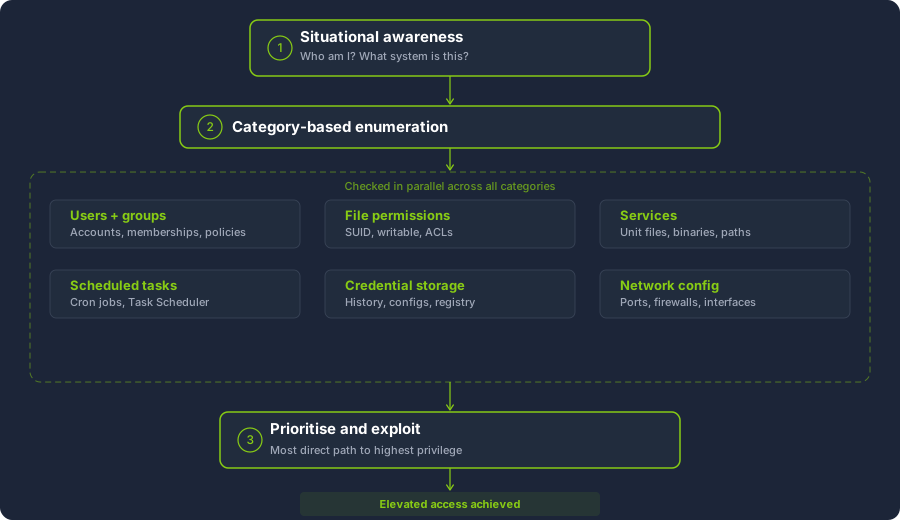
Phase 3 - Prioritisation and Exploitation
Enumeration typically produces multiple findings. Not all findings are equally exploitable or equally impactful. Prioritise findings based on the directness of the escalation path, with a preference for findings that provide the most reliable route to the highest privilege level.
Stored credentials for a root or administrator account, for instance, represent a more direct escalation path than a writable file in a cron job that executes hourly. Both are valid findings, but the first requires no waiting or additional steps.
Some findings are not exploitable in isolation but become significant when combined. For example, enumeration might reveal that a root cron job runs /opt/scripts/backup.sh every five minutes (a scheduled task finding) and that the script is world-writable (a file permissions finding). Neither finding is sufficient on its own. The cron job is not inherently insecure, and a world-writable file that is never executed by a privileged process is a low-priority issue. However, the combination of the two provides a direct privilege escalation path: modify the script, wait for the cron job to execute it as root, and gain elevated access. Recognising these chains across categories is a core skill in privilege escalation methodology.
The Role of Automated Tools
Automated enumeration tools such as LinPEAS, WinPEAS, and PowerUp map directly to this methodology. They perform many of the checks described above and highlight findings by severity. However, they are a supplement to the methodology, not a replacement. Understanding what the tools are checking and why allows you to interpret their output correctly, identify false positives, and recognise gaps where manual investigation is required.
If compliance scan output from tools such as Nessus or Lynis is available, whether through a white-box engagement or through running Lynis on a compromised host, its findings can be used to prioritise which categories to investigate first. A failed Benchmark check on service permissions, for instance, points directly to the service configurations category.
In the methodology described above, what is the first phase you should complete before checking for specific misconfigurations?
Understanding the structure of a Benchmark recommendation is a practical skill for both offensive and defensive work. Each recommendation follows a consistent format that, once familiar, allows you to quickly assess what a check is protecting against and what an exploitable deviation looks like.
Structure of a Recommendation
A typical CIS Benchmark recommendation contains several standard fields.
The title identifies the specific setting or configuration being assessed. It is usually phrased as an imperative or declarative statement. An example from the CIS Benchmark for Ubuntu is "Ensure permissions on /etc/shadow are configured."
The profile applicability indicates whether the recommendation belongs to the Level 1 or Level 2 profile. As described in Task 3, Level 1 recommendations are broadly applicable with minimal risk of disrupting functionality, while Level 2 recommendations provide additional hardening at the cost of potential operational impact.
The description explains what the recommendation requires in plain terms. For the /etc/shadow example, the description states that the file should be owned by root, with its group set to shadow, and its permissions set so that only root has read and write access while the shadow group has read access.
The rationale explains the security risk that the recommendation addresses. In this case, the rationale explains that /etc/shadow contains hashed passwords for all local user accounts, and that if non-privileged users can read this file, they can extract the hashes and attempt offline cracking to recover plaintext passwords.
The audit section provides specific commands or procedures to verify whether the host complies with the recommendation. For the /etc/shadow example, the audit procedure specifies running stat /etc/shadow and verifying that the output shows the expected ownership and permission values.
The remediation section provides the commands or steps to bring a non-compliant host into compliance. For this example, it would specify chown and chmod commands to correct the ownership and permissions.
Reading from an Offensive Perspective
A penetration tester reads the same recommendation with a different question in mind. Rather than asking "is this system compliant?", the question is "if this system is not compliant, what can I do with the finding?"
For the /etc/shadow example, the offensive reading is straightforward. If the audit check fails and /etc/shadow is readable by the current user, you can copy the file, extract the password hashes, and run an offline cracking attack using a tool such as John the Ripper or Hashcat. Successful cracking of a root or administrative user's hash provides direct privilege escalation.
Not every failed benchmark check leads to a direct escalation path. Some findings represent defence-in-depth improvements that, in isolation, are not exploitable. The skill lies in recognising which deviations are directly actionable, which contribute to a chain of exploitation when combined with other findings, and which are low-priority informational issues.
Mapping to Automated Tool Output
The checks performed by automated compliance tools correspond directly to individual benchmark recommendations. A compliance scan that flags "7.1.5 - Ensure permissions on /etc/shadow are configured - FAILED" is reporting the result of the same audit procedure described in the CIS Ubuntu Linux 24.04 LTS Benchmark. Similarly, a LinPEAS scan that highlights /etc/shadow as readable by the current user is detecting the same issue from an offensive perspective.
Understanding the benchmark recommendation behind a tool finding allows you to assess its severity and exploitability with greater confidence than relying on the tool's output alone.
Practical Exercise
The attached static site to this task contains the output of a Benchmark audit run against three hosts:
- Two servers (
linux-web-01at10.10.45.12andlinux-db-02at10.10.45.20, both assessed against the CIS Ubuntu Linux 24.04 LTS Benchmark v1.0.0) - One Windows server (
win-dc-01at10.10.45.50, assessed against the CIS Microsoft Windows Server 2022 Benchmark v3.0.0)
One of the Linux servers passes all checks. The other Linux server and the Windows server have multiple failing checks.
Click the hostnames to switch between machines. Expand each recommendation to examine its description, rationale, audit command, expected and actual output, and remediation steps. Use the results to answer the questions below.
On linux-web-01, what is the actual permission value observed on /etc/shadow in the failing check 7.1.5?
On linux-web-01, how many world-writable files were detected by check 7.1.11?
On linux-web-01, what is the full path of the unexpected SUID binary found by check 7.1.13?
On win-dc-01, what is the minimum password length currently configured, as reported by check 1.1.4?
On win-dc-01, what is the current value of the FilterAdministratorToken registry key, as reported by check 2.3.17.1?
How many total checks does linux-db-02 pass?
In this room, we covered the foundational concepts behind host and server configuration reviews. You now understand the distinction between vulnerability-based and configuration-based privilege escalation, and why misconfigurations remain among the most common and reliable escalation vectors encountered during penetration tests.
You have been introduced to the industry frameworks that define what a secure configuration baseline looks like. Benchmarks and DISA STIGs provide comprehensive, auditable standards against which any host can be measured. Automated compliance tools such as Nessus, Lynis, OpenSCAP, and CIS-CAT make it practical to assess hosts against these standards at scale, and their output serves both defensive remediation and offensive enumeration.
The six categories of misconfiguration covered in this room, specifically user and group configuration, file and directory permissions, service configurations, scheduled tasks and cron jobs, credential storage, and network configuration, form the backbone of the structured enumeration methodology you will carry into subsequent rooms. Each category maps to specific checks in the frameworks and tools discussed, and each represents a class of finding that appears repeatedly in real-world engagements.
I can now do host-server configuration reviews!
Ready to learn Cyber Security?
TryHackMe provides free online cyber security training to secure jobs & upskill through a fun, interactive learning environment.
Already have an account? Log in