
Back to all walkthroughs

OWASP API Security Top 10 - 2
Premium roomLearn the basic concepts for secure API development (Part 2).
medium
To access material, start machines and answer questions login.
Set up your virtual environment
To successfully complete this room, you'll need to set up your virtual environment. This involves starting both your AttackBox (if you're not using your VPN) and Lab Machines, ensuring you're equipped with the necessary tools and access to tackle the challenges ahead.

Attacker machine
Status:Off
Lab machine
Status:Off
In the previous room, we studied the first five principles of Security. Now in this room, we will briefly discuss the remaining principles and their potential impact and mitigation measures.
Learning Objectives
- Identification of security misconfigurations
- Preventing Denial of Service () against the API
- Ensuring appropriate logging and monitoring
An understanding of the following topics is recommended before starting the room: Connecting to the Machine
We will be using Windows as a development/test machine along with Talend API Tester - free edition throughout the room with the following credentials:
- Machine IP:
MACHINE_IP - Username:
Administrator - Password:
Owasp@123
Start Lab Machine button. The machine will start in a split-screen view. In case the is not visible, use the blue Show Split View button at the top-right of the page. Alternatively, you can connect with the VM through Remote Desktop using the above credentials. Please wait 1-2 minutes after the system boots completely to let the auto scripts run successfully that will execute Talend API Tester and Laravel-based web application automatically.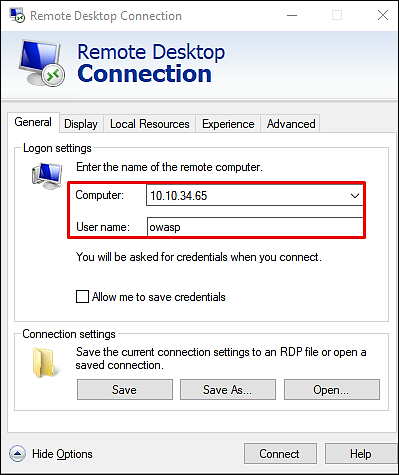
Answer the questions below
I can connect and log in to the machine.
Ready to learn Cyber Security?
The OWASP API Security Top 10 - 2 room is only available for Premium or Max subscribers. Signup now to access more than 500 free rooms and learn cyber security through a fun, interactive learning environment.
Already have an account? Log in