We use cookies to ensure you get the best user experience. For more information see our cookie policy.
Preparation
A look into the Preparation phase of the Incident Response.
Task 1: Introduction
Welcome to our Incident Response module's Preparation phase.
This room covers preparing for security incidents and configuring logging to gather artefacts and additional evidence effectively before a security incident.
Module Scenario
Our organisation SwiftSpend Financial (SSF), has hired you as the IR guy for our incident response team, which is being finalised. You noticed that absolutely nothing had been done so far about documenting the baseline network and system activities - heck, there's barely any documentation to begin with!
We're lucky that there's at least a semblance of a foundation of a detection system in place, as the IT has followed security best practices (amazing, right?), including turning on the logging for our endpoints, subnetting our different departments, ensuring all systems are in PowerShell v5, and enabling event log forwarding.
However, you identify some configurations that have not been set up and deem the organisation not fully mature in its incident response procedures.
Learning Objectives
To understand the need for an incident response capability.
To understand the need for the process, people and technologies for incident response.
Room Prerequisites
Before starting with this room, we recommend you complete the SOC Level 1 Learning Path.
Answer the questions below
I'm ready to prepare the organisation to respond to incidents.
Task 2: Incident Response Capability
Incident Response Debrief
Knowing that we are tackling the incident response process in this
room, you are expected to be familiar with the fact that
incident response is usually coupled with digital forensics concepts. Incident response, also known as incident
handling, is a cyber security function that uses various
methodologies, tools and techniques to detect and manage adversarial
attacks while minimising impact, recovery time and total operating
costs. Addressing attacks requires containing malware infections,
identifying and remediating vulnerabilities, as well as sourcing, managing, and
deploying technical and non-technical personnel.
Setting up an incident response capability requires organisations to
make several decisions, including having a specific definition for the
term "incident" to fit a clear scope. Therefore, we can differentiate
events and incidents as the following:
Event: This is an observed occurrence within a
system or network. It ranges from a user connecting to a file server, a
user sending emails, or anti-malware software blocking an
infection.
Incident: This is a violation of security
policies or practices by an adversary to negatively affect the
organisation through actions such as exfiltrating data, encrypting through ransomware, or causing a denial of services.
The Incident Response Process
As an overview, we shall look at the IR process below. This process
is meant to serve as a roadmap for incident responders, allowing them to
adapt as they progress through their investigations and mitigations.
The remainder of the room will cover the first phase, Preparation,
while the rest will be tackled in follow-up rooms.
The notable IR process consists of the following phases:
Preparation: Ensures that the organisation can
effectively react to a breach with laid down procedures.
Identification: Operational deviations must be
noted and determined to cause adverse effects.
Analysis or Scoping: The organisation determines the extent of a security incident, including identifying the affected systems, the type of data at risk, and the potential impact on the organisation.
Containment: Damage limitation is paramount, therefore, isolating affected systems and preserving forensic evidence is required.
Eradication: Adversarial artefacts and techniques
will be removed, restoring affected systems.
Recovery andLessons Learned: Business operations are to resume fully
after removing all threats and restoring systems to full function. Additionally, the organisation considers the
experience, updates its response capabilities, and conducts updated
training based on the incident.
Need for Incident Response Plan
Incident response capability benefits from organising response
processes into a consistent methodology. Additionally, the information
gathered during the process would strengthen defences against future
attacks on systems and data. This is where an incident response plan
comes into play.
An incident response plan (IRP) is a document
that outlines the steps an organisation will take to respond to an incident. The IRP should be the organisation's Swiss Army knife,
comprehensively covering all aspects of the incident response process,
roles and responsibilities, communication channels between stakeholders, and metrics to capture the effectiveness of the IR process.
To have an effective incident response plan, you would have gone
through numerous iteration processes via creating templates and
refactoring the process. This ensures that you can ingest incident data
and mitigate breaches as they occur accurately. The templates would also
be valuable in creating incident reports.
Accompanying an incident response plan is the use of playbooks. The
playbooks would provide the organisation with actions and procedures to
identify, contain, eradicate, recover and track successful incident
mitigation measures.
Answer the questions below
What is an observed occurrence within a system?
What is described as a violation of security policies and practices?
Under which incident response phase do organisations lay down their procedures?
Under which phase will an organisation resume business operations fully and update its response capabilities?
Task 3: People and Documentation Preparation
As we begin looking at the first phase, it is essential to know that
the purpose of preparation in incident handling is to ensure that your
team and organisation are ready to handle and recover from incidents.
Numerous elements should be covered during the Preparation phase,
including people, policy, technology, communication and
documentation.
Preparing The People
It is highly known that the easiest and most accessible attack point
for any organisation is its people. Your employees and teammates are
adversarial targets, mainly through social engineering and phishing
tactics. Therefore, preparing your team effectively to recognise and
address incidents before, during, and after is essential.
Creation of CSIRT Teams
You must create a cyber security
incident response team (CSIRT) that includes business, technical, legal
counsel, and public relations experts with relevant skills and authority
to act upon decisions during a cyber attack. Following the team's
creation, the members will require appropriate permissions under a
well-established access control policy. This access must be well
organised and controlled, with proper notifications to system
administrators when the CSIRT uses privileged access.
Training & Assessment Sessions
As we have identified some ways attackers target people, the most
effective way to ensure they are well-equipped with knowledge about
these attacks is through constant training, assessment, and awareness
sessions. Conducting social engineering campaigns, testing user
susceptibility towards spear phishing attacks, and providing current
affairs training will be crucial towards preparing your team.
This training also applies to your end users and customers, who would
act as your sensors and alert sources when they pick up anything
suspicious happening on their end. In this case, training content like
the Phishing Analysis Module we provide would be vital to internal and
external stakeholders to know how to detect and respond to phishing
attacks.
Additionally, incident handlers must be familiar with forensic
imaging tools, how to read audit logs, and performing analysis using
honeypots and vulnerable systems. This will allow them to identify
suspicious events when they occur and can conduct practical forensics
when the need arises.
Preparing The Documentation
Incident documentation would be a lifesaver for an organisation. The
information gathered could be used as evidence in a criminal cyber
attack or instrumental in developing mitigation plans, and lessons
learned assessments. This means that incident responders need to develop
note-taking and detail-oriented skills.
Policies
Defining principles and guidelines for security processes is vital
while conducting your preparation. This ensures that techniques are
well-known towards handling an incident. The policies need to be visible
to employees, users and other stakeholders, for example, through warning
banners, which would inform on the prohibition of unauthorised
activities and limit the presumption of privacy within the
organisation.
Additionally, the policies should outline the organisation's
authority towards monitoring the network and all the systems under its
roof. Policies would need to be reviewed by a legal team and aligned to
local privacy laws and regulations.
Communication Plan & Chain of Custody
Accompanying the policies would be a communication plan outlining who
within the CSIRT team should be the point of contact and what procedures
should be followed. For example, the CSIRT may have operations members
who are always on call to receive reports on suspected incidents. These reports should trigger a chain of actions, including when to notify
law enforcement, media personnel, or third parties. Additionally, the
team would keep track of the flow of information and manage evidence
forms and documents, such as the chain of custody documents. These documents are meant to track the flow of information, evidence handling and reporting when addressing any incident. A template of such a document can be downloaded from this task above.
Response Procedures
Incident handling should be viewed as an organisational operation,
ensuring every member has a role to avert damages and revert to normal
operations. This means that default procedures need to be defined and
approved by management. Effectiveness and timeliness are crucial when
security defences have been breached; thus, orderly processes would
determine the nature of handling breaches.
Answer the questions below
A group that handles events involving cyber security breaches, comprising individuals with different skills and expertise, is known as?
Which documents would be used to accompany any evidence collected and keeps track of who handles the investigation procedures?
Task 4: Technology Preparation
The people and policies set up by the CSIRT would require the backing
of tools and solutions to protect and defend their organisation's
technological infrastructure. Any incident response operation involves
the organisation of devices, systems, and technologies that will
facilitate the prevention, detection, and mitigation of any occurrence.
As a result, knowing your technical infrastructure is essential to the
incident response process.
Asset Inventory Classification
It is crucial to identify high-value assets within the organisation,
together with their technical composition. This will comprise the
infrastructure, intellectual property, client and employee data, and
brand reputation. Protecting these assets ensures that the
confidentiality, integrity, and availability of the organisation's services, data, and
processes are intact, which also helps maintain credibility.
Additionally, the asset classification will be helpful for the
prioritisation of protective and detective measures for the assets.
An example of an inventory list would be as follows. Do take note
that it is advisable to have hardware and software inventory lists for
proper tracking.
Asset Type
Asset Name
Operating System
Asset IP Address
Mail Server
MailSrvr1
Windows Server 2019
192.168.0.2
Web Server
WebSrvr1
Ubuntu Server 20.04
192.168.0.3
VPN Server
VPN1
Ubuntu Server 20.04
192.168.0.4
Software
THM_MathBooks
Software
TruckFinder
Technical Instrumentation
Once the inventory has been identified, this should be followed up
with telemetry about the network infrastructure, which is essential for
incident response. This means mapping every network device, cloud
platform, system, and application. Having this infrastructural picture simplifies the implementation of system and sensor-based detection mechanisms. These mechanisms include anti-malware, endpoint detection and response (EDR) tools, data loss prevention (DLP), intrusion detection and prevention systems (IDPS), and log collection capabilities.
One key aspect of the telemetry collection is network subnetting.
This is a means of logically grouping network devices and IPs with
specific access and usage permissions and policies, utilising firewalls,
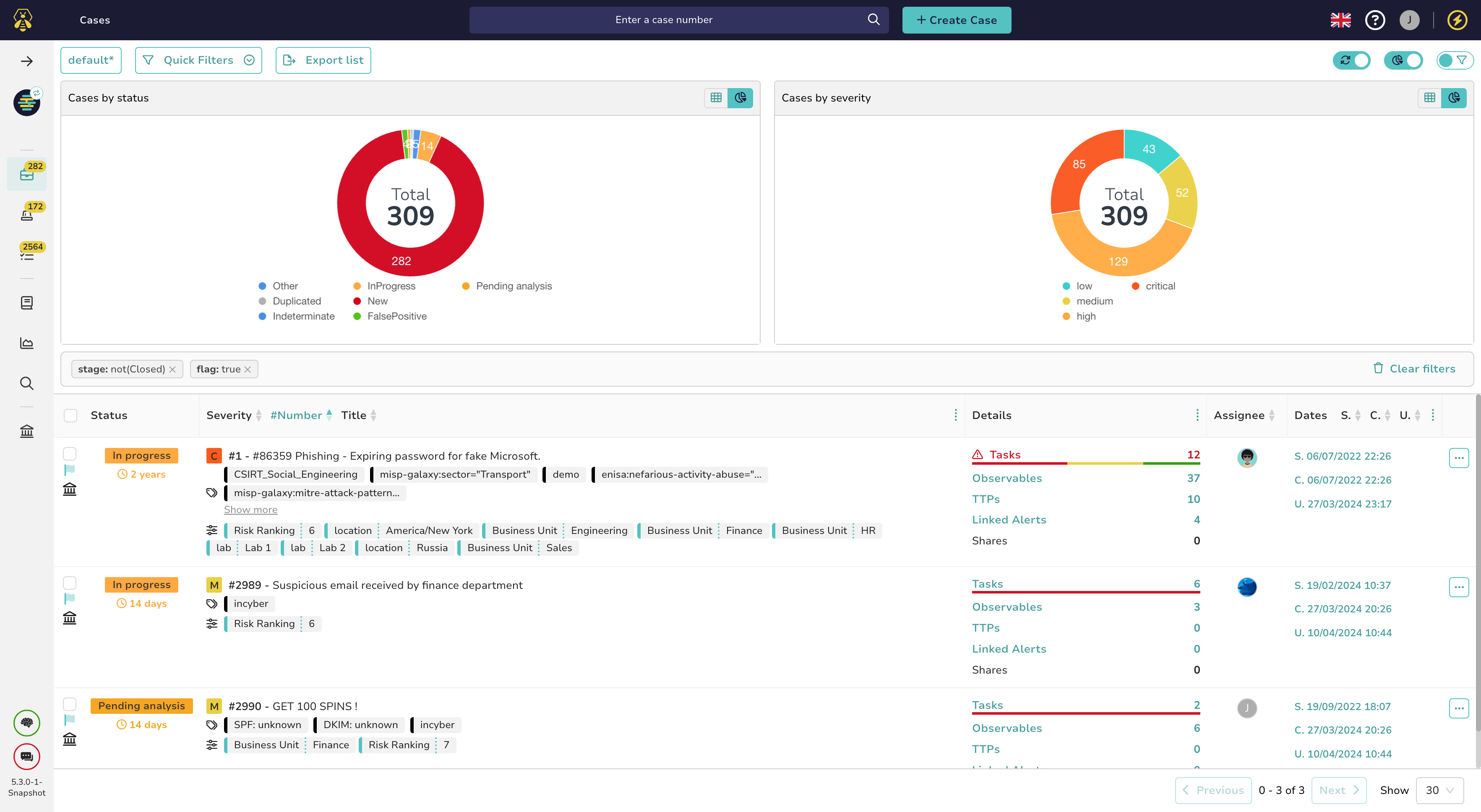
demilitarised zones, and IP segmentation. These telemetry and incident details can be collected and tracked using tools like TheHive Project. However, note that TheHive may have been updated since the release of the room.
Investigation Capabilities
To conduct any investigations during an attack or breach, incident
responders must ensure they can validate executing scripts and
installers on all endpoints and hosts within their network and implement
technical capabilities to facilitate attack containment, analysis, and replication. There should be means of collecting forensic evidence using disk and memory imaging tools, secure storage only accessible to the CSIRT, and analysis tools such as sandboxes. Accompanying these efforts should be an incident-handling jump bag. This bag contains all the necessary tools for incident
response. Each kit will be unique; however, as an incident responder,
the following items are worth having in your arsenal:
Media drives to store evidence being collected.
Disk imaging and host forensic software such as FTK Imager,
EnCase, and The Sleuth Kit.
Network tap to mirror and monitor traffic.
Cables and adapters such as USB, SATA, and card readers to
accommodate common scenarios.
PC repair kits that include screwdriver sets and tweezers.
Copies of incident response forms and communication playbooks.
Answer the questions below
What would a kit containing the necessary incident-handling tools be called?
Task 5: Visibility
After setting up the people, processes, and technology checks for your incident response effort, you must know what is happening within your organisation's digital assets. This ensures that you avoid digital obliviousness by having visibility across the network.
What does visibility entail? Visibility covers collecting audit and logs data, monitoring threat intelligence feeds on emerging adversarial tactics, techniques, and procedures (TTPs) and ingesting vendor patch advisories. These information sources allow the organisation to detect, identify, assess, alert, and mitigate unauthorised and abnormal activity within the network. Internal visibility revolves around log management, and having maximum coverage should be part of the cyber resilience and incident handling strategies. In contrast, external visibility entails being aware of what is happening within the community and the threat landscape.
Knowing the benefits that visibility will provide within the incident-handling process is essential. The following are a few of the benefits:
Provides factual information about access to resources, time of access, and who conducted the activity.
Visibility through log management can help improve the effectiveness of processes, policies, and procedures.
With log data collected, incidents can be handled using concrete evidence.
Compliance with regulations is made to be easier with the collection of log data.
Keeps you up-to-date with emerging threats, TTPs, and signatures.
Ensures that systems are patched up regularly.
Visibility via Logs
Every computing device within an organisation's network can generate and store logs. The challenge of aggregating the logs is addressed by using Security Information Event Management (SIEM) solutions, which provide a central storage and analysis platform. Logs must be secured from any modification once recorded. Additionally, as a CSIRT team member, you should be aware that the collection of logs enables the other stages of the incident response process to run as smoothly as possible.
Common types of log entries to enable and monitor include:
Event: These logs record information about a system or network occurrence, such as login attempts, application events and network traffic.
Audit: These cover a sequential recording of activities within a system by capturing who performed an action, what activity was initiated, and how the system responded. There are two classes of audit logs: Success and Failure.
Error: When a problem occurs within a system, such as service failure, the events would be recorded as error logs.
Debug: During the testing of systems and services, debug logs are recorded to help find problems and facilitate troubleshooting.
The log entries would be sourced from various avenues within an organisation's infrastructure. Some familiar sources of logs include:
Network logs: These are mainly collected from network devices such as switches and routers and through packet capture solutions.
Host perimeter logs: These are mainly facilitated by firewalls, proxies, and VPN servers. They contain information about allowed and denied actions transmitted to the organisation's host devices.
System logs: These logs record events and services being run by the operating system.
Application logs: These are logs collected from the applications being run internally. They may include web applications, cloud services, databases and proprietary tools.
Setting up Visibility
Before we dive into the contents of setting up visibility, start the lab machine by clicking on the green "Start Lab Machine" button on the upper-right section of this task. Give it about 4 minutes to load up in Split View fully. If the machine doesn't appear, press the blue "Show Split View" button on the top-right of this room.
As we have identified the sources and types of logs to be collected, the CSIRT has to develop procedures and plans for setting up the right tools and configuration policies within systems outlined in the asset inventory to collect and aggregate all the necessary logs. On Windows systems, security policies can be configured via local or group policy management, with the latter being used for multiple systems under an Active Directory.
Let us look at an example of setting up the policies for Interactive Logon sessions which have yet to be defined, as you can see below. Once the VM has loaded up, open the Windows Administrative Tools via the Start Menu and find the Local Security Policy settings. We can then navigate to the following policy: Security Settings -> Local Policies -> Security Options -> Interactive logon: Display user information when the session is locked.
Once here, you will find that the policy: Interactive logon: Display user information when the session is locked has not been defined. This policy aims to set the standard of whether to show user login identities, such as username, domain account, and email, when their session is locked. For sensitive systems, such as those used by the Finance or Human Resource departments, it is recommended to set this policy to the option that does not display any user information to prevent malicious actors from knowing whose credentials were last used.
What about the events taking place within the systems? Do these need logging and visibility?
You can pivot to the linked room to uncover more about Windows Event Logs; however, looking at our scenario, you find out that the organisation did not implement Windows Event monitoring.
The network systems have event logging disabled, which is integral to ensuring visibility, as adversaries may take advantage of this situation to cause havoc. So, how do you resolve this?
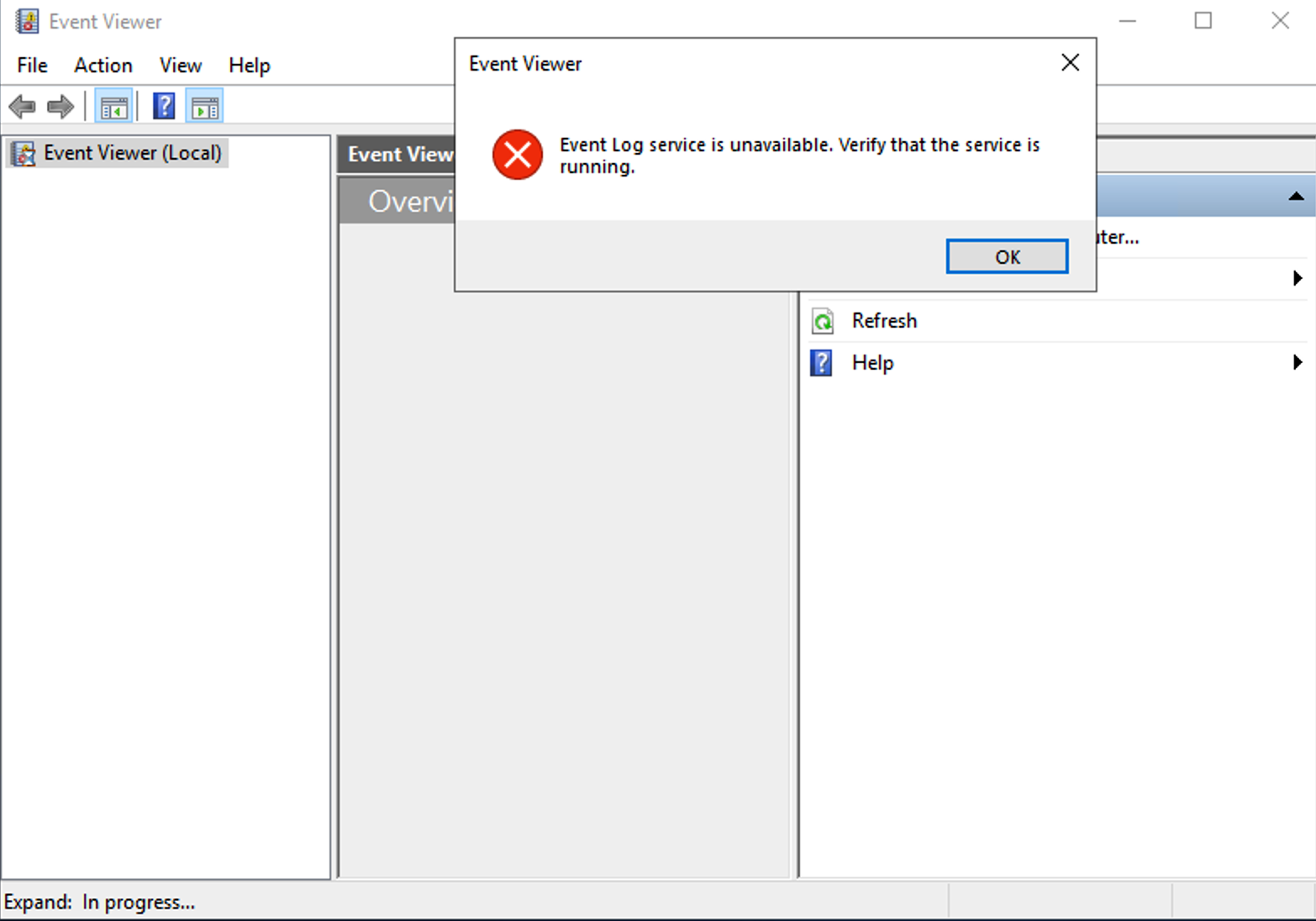
The first thing to check is the current situation via the Event Viewer. Open the Event Viewer pinned on the Taskbar, and you will be welcomed with a warning banner informing you that the Event Log service is unavailable. This means that the registry records for the service have been modified and need to be changed to enable it.
Navigating through the Registry via:Windows Administrative Tools -> Registry Editor -> HKEY_LOCAL_MACHINE\SYSTEM\CurrentControlSet\Services\EventLog\start. You will find that the registry key value is set to 4, which needs to be set to 2, representing putting the service into automatic startup mode. Modify the registry and reboot the system for the changes to take effect, which should take 3 minutes.
Once the system has been rebooted, you can open the Windows Event Viewer and confirm it works. We can test that the system is recording logs by using some Atomic Red Team tests, which have already been downloaded and installed, to simulate an incident. Open a PowerShell session and run the following commands:
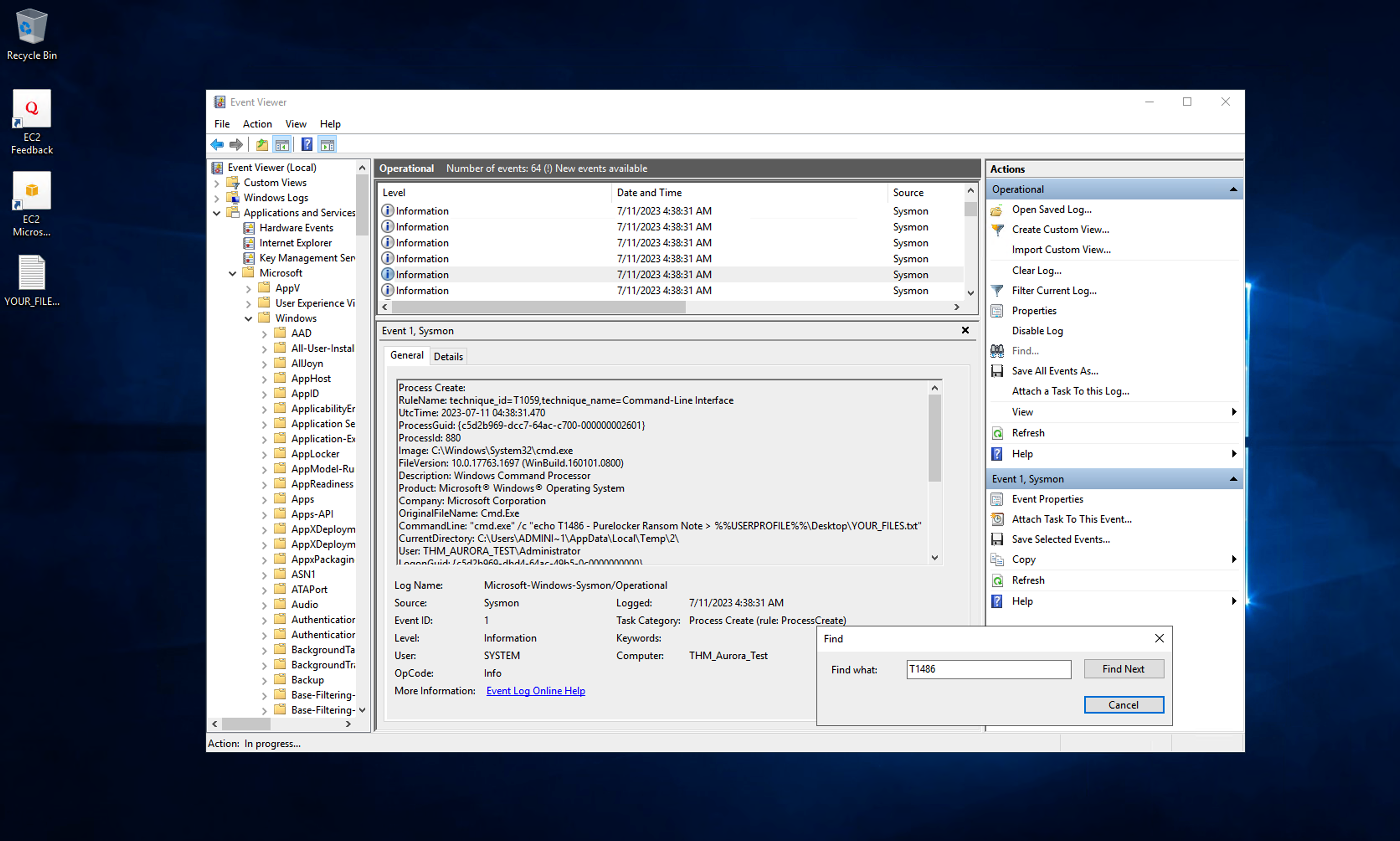
Navigating through the Windows Event Logs, under the Application and Service Logs -> Microsoft -> Windows -> Sysmon -> Operational we can confirm that our test was successful and a log entry was created for it by searching for the test we ran. It is easier to use the Find feature to identify the event due to the influx of logs being recorded since the service was enabled.
Answer the questions below
What is the Event ID for the File Created rule associated with the test?
Under the Software Restriction Policies, what is the default security level assigned to all policies?
Find the Audit Policy folder under Local Policies. What setting has been assigned to the policy Audit logon events?
Task 6: Conclusion
Wrapping up
Establishing an incident response process is vital to any organisation, and preparation is at the forefront of this process. As we have covered in the room, the Preparation step of the IR Lifecycle covers various aspects around people, policies, and technology.
Setting up your organisation with the proper training, defining the correct policies and procedures, and having visibility through log and event monitoring ensures you are on hand to tackle any adversarial attempts.
As you have gathered information and set up your visibility, it is time to go into the Incident Response Lifecycle's Identification and Scoping stages.
Answer the questions below
Systems and networks prepared. Time to identify incidents.
A look into the Preparation phase of the Incident Response.
medium
60 min
28,970
To access material, start machines and answer questions login.
Welcome to our Incident Response module's Preparation phase.
This room covers preparing for security incidents and configuring logging to gather artefacts and additional evidence effectively before a security incident.
Module Scenario
Our organisation SwiftSpend Financial (SSF), has hired you as the guy for our incident response team, which is being finalised. You noticed that absolutely nothing had been done so far about documenting the baseline network and system activities - heck, there's barely any documentation to begin with!
We're lucky that there's at least a semblance of a foundation of a detection system in place, as the IT has followed security best practices (amazing, right?), including turning on the logging for our endpoints, subnetting our different departments, ensuring all systems are in v5, and enabling event log forwarding.
However, you identify some configurations that have not been set up and deem the organisation not fully mature in its incident response procedures.
Learning Objectives
To understand the need for an incident response capability.
To understand the need for the process, people and technologies for incident response.
Room Prerequisites
Before starting with this room, we recommend you complete the Level 1 Learning Path.
Answer the questions below
I'm ready to prepare the organisation to respond to incidents.
Incident Response Debrief
Knowing that we are tackling the incident response process in this
room, you are expected to be familiar with the fact that
incident response is usually coupled with digital forensics concepts. Incident response, also known as incident
handling, is a cyber security function that uses various
methodologies, tools and techniques to detect and manage adversarial
attacks while minimising impact, recovery time and total operating
costs. Addressing attacks requires containing malware infections,
identifying and remediating vulnerabilities, as well as sourcing, managing, and
deploying technical and non-technical personnel.
Setting up an incident response capability requires organisations to
make several decisions, including having a specific definition for the
term "incident" to fit a clear scope. Therefore, we can differentiate
events and incidents as the following:
Event: This is an observed occurrence within a
system or network. It ranges from a user connecting to a file server, a
user sending emails, or anti-malware software blocking an
infection.
Incident: This is a violation of security
policies or practices by an adversary to negatively affect the
organisation through actions such as exfiltrating data, encrypting through ransomware, or causing a denial of services.
The Incident Response Process
As an overview, we shall look at the process below. This process
is meant to serve as a roadmap for incident responders, allowing them to
adapt as they progress through their investigations and mitigations.
The remainder of the room will cover the first phase, Preparation,
while the will be tackled in follow-up rooms.
The notable IR process consists of the following phases:
Preparation: Ensures that the organisation can
effectively react to a breach with laid down procedures.
Identification: Operational deviations must be
noted and determined to cause adverse effects.
Analysis or Scoping: The organisation determines the extent of a security incident, including identifying the affected systems, the type of data at risk, and the potential impact on the organisation.
Containment: Damage limitation is paramount, therefore, isolating affected systems and preserving forensic evidence is required.
Eradication: Adversarial artefacts and techniques
will be removed, restoring affected systems.
Recovery andLessons Learned: Business operations are to resume fully
after removing all threats and restoring systems to full function. Additionally, the organisation considers the
experience, updates its response capabilities, and conducts updated
training based on the incident.
Need for Incident Response Plan
Incident response capability benefits from organising response
processes into a consistent methodology. Additionally, the information
gathered during the process would strengthen defences against future
attacks on systems and data. This is where an incident response plan
comes into play.
An incident response plan (IRP) is a document
that outlines the steps an organisation will take to respond to an incident. The IRP should be the organisation's Swiss Army knife,
comprehensively covering all aspects of the incident response process,
roles and responsibilities, communication channels between stakeholders, and metrics to capture the effectiveness of the IR process.
To have an effective incident response plan, you would have gone
through numerous iteration processes via creating templates and
refactoring the process. This ensures that you can ingest incident data
and mitigate breaches as they occur accurately. The templates would also
be valuable in creating incident reports.
Accompanying an incident response plan is the use of playbooks. The
playbooks would provide the organisation with actions and procedures to
identify, contain, eradicate, recover and track successful incident
mitigation measures.
Answer the questions below
What is an observed occurrence within a system?
What is described as a violation of security policies and practices?
Under which incident response phase do organisations lay down their procedures?
Under which phase will an organisation resume business operations fully and update its response capabilities?
As we begin looking at the first phase, it is essential to know that
the purpose of preparation in incident handling is to ensure that your
team and organisation are ready to handle and recover from incidents.
Numerous elements should be covered during the Preparation phase,
including people, policy, technology, communication and
documentation.
Preparing The People
It is highly known that the easiest and most accessible attack point
for any organisation is its people. Your employees and teammates are
adversarial targets, mainly through and
tactics. Therefore, preparing your team effectively to recognise and
address incidents before, during, and after is essential.
Creation of Teams
You must create a cyber security
incident response team (CSIRT) that includes business, technical, legal
counsel, and public relations experts with relevant skills and authority
to act upon decisions during a cyber attack. Following the team's
creation, the members will require appropriate permissions under a
well-established access control policy. This access must be well
organised and controlled, with proper notifications to system
administrators when the CSIRT uses privileged access.
Training & Assessment Sessions
As we have identified some ways attackers target people, the most
effective way to ensure they are well-equipped with knowledge about
these attacks is through constant training, assessment, and awareness
sessions. Conducting social engineering campaigns, testing user
susceptibility towards spear phishing attacks, and providing current
affairs training will be crucial towards preparing your team.
This training also applies to your end users and customers, who would
act as your sensors and alert sources when they pick up anything
suspicious happening on their end. In this case, training content like
the Phishing Analysis Module we provide would be vital to internal and
external stakeholders to know how to detect and respond to phishing
attacks.
Additionally, incident handlers must be familiar with forensic
tools, how to read audit logs, and performing analysis using
honeypots and vulnerable systems. This will allow them to identify
suspicious events when they occur and can conduct practical forensics
when the need arises.
Preparing The Documentation
Incident documentation would be a lifesaver for an organisation. The
information gathered could be used as evidence in a criminal cyber
attack or instrumental in developing mitigation plans, and lessons
learned assessments. This means that incident responders need to develop
note-taking and detail-oriented skills.
Policies
Defining principles and guidelines for security processes is vital
while conducting your preparation. This ensures that techniques are
well-known towards handling an incident. The policies need to be visible
to employees, users and other stakeholders, for example, through warning
banners, which would inform on the prohibition of unauthorised
activities and limit the presumption of privacy within the
organisation.
Additionally, the policies should outline the organisation's
authority towards monitoring the network and all the systems under its
roof. Policies would need to be reviewed by a legal team and aligned to
local privacy laws and regulations.
Communication Plan &
Accompanying the policies would be a communication plan outlining who
within the CSIRT team should be the point of contact and what procedures
should be followed. For example, the CSIRT may have operations members
who are always on call to receive reports on suspected incidents. These reports should trigger a chain of actions, including when to notify
law enforcement, media personnel, or third parties. Additionally, the
team would keep track of the flow of information and manage evidence
forms and documents, such as the chain of custody documents. These documents are meant to track the flow of information, evidence handling and reporting when addressing any incident. A template of such a document can be downloaded from this task above.
Response Procedures
Incident handling should be viewed as an organisational operation,
ensuring every member has a role to avert damages and revert to normal
operations. This means that default procedures need to be defined and
approved by management. Effectiveness and timeliness are crucial when
security defences have been breached; thus, orderly processes would
determine the nature of handling breaches.
Answer the questions below
A group that handles events involving cyber security breaches, comprising individuals with different skills and expertise, is known as?
Which documents would be used to accompany any evidence collected and keeps track of who handles the investigation procedures?
The people and policies set up by the would require the backing
of tools and solutions to protect and defend their organisation's
technological infrastructure. Any incident response operation involves
the organisation of devices, systems, and technologies that will
facilitate the prevention, detection, and mitigation of any occurrence.
As a result, knowing your technical infrastructure is essential to the
incident response process.
Asset Inventory Classification
It is crucial to identify high-value assets within the organisation,
together with their technical composition. This will comprise the
infrastructure, intellectual property, client and employee data, and
brand reputation. Protecting these assets ensures that the
confidentiality, , and availability of the organisation's services, data, and
processes are intact, which also helps maintain credibility.
Additionally, the asset classification will be helpful for the
prioritisation of protective and detective measures for the assets.
An example of an inventory list would be as follows. Do take note
that it is advisable to have hardware and software inventory lists for
proper tracking.
Asset Type
Asset Name
Operating System
Asset IP Address
Mail Server
MailSrvr1
Windows Server 2019
192.168.0.2
Web Server
WebSrvr1
Ubuntu Server 20.04
192.168.0.3
Server
VPN1
Ubuntu Server 20.04
192.168.0.4
Software
THM_MathBooks
Software
TruckFinder
Technical Instrumentation
Once the inventory has been identified, this should be followed up
with telemetry about the network infrastructure, which is essential for
incident response. This means mapping every network device, cloud
platform, system, and application. Having this infrastructural picture simplifies the implementation of system and sensor-based detection mechanisms. These mechanisms include anti-malware, endpoint detection and response () tools, data loss prevention (), intrusion detection and prevention systems (IDPS), and log collection capabilities.
One key aspect of the telemetry collection is network subnetting.
This is a means of logically grouping network devices and with
specific access and usage permissions and policies, utilising firewalls,
demilitarised zones, and IP . These telemetry and incident details can be collected and tracked using tools like TheHive Project. However, note that TheHive may have been updated since the release of the room.
Investigation Capabilities
To conduct any investigations during an attack or breach, incident
responders must ensure they can validate executing scripts and
installers on all endpoints and hosts within their network and implement
technical capabilities to facilitate attack containment, analysis, and replication. There should be means of collecting forensic evidence using disk and memory tools, secure storage only accessible to the CSIRT, and analysis tools such as sandboxes. Accompanying these efforts should be an incident-handling jump bag. This bag contains all the necessary tools for incident
response. Each kit will be unique; however, as an incident responder,
the following items are worth having in your arsenal:
Media drives to store evidence being collected.
Disk imaging and host forensic software such as FTK Imager,
EnCase, and The Sleuth Kit.
Network to mirror and monitor traffic.
Cables and adapters such as USB, SATA, and card readers to
accommodate common scenarios.
PC repair kits that include screwdriver sets and tweezers.
Copies of incident response forms and communication playbooks.
Answer the questions below
What would a kit containing the necessary incident-handling tools be called?
Set up your virtual environment
To successfully complete this room, you'll need to set up your virtual environment. This involves starting both your AttackBox (if you're not using your VPN) and Lab Machines, ensuring you're equipped with the necessary tools and access to tackle the challenges ahead.
Attacker machine
Status:Off
Lab machine
Status:Off
After setting up the people, processes, and technology checks for your incident response effort, you must know what is happening within your organisation's digital assets. This ensures that you avoid digital obliviousness by having visibility across the network.
What does visibility entail? Visibility covers collecting audit and logs data, monitoring threat intelligence feeds on emerging adversarial tactics, techniques, and procedures (TTPs) and ingesting vendor patch advisories. These information sources allow the organisation to detect, identify, assess, alert, and mitigate unauthorised and abnormal activity within the network. Internal visibility revolves around log management, and having maximum coverage should be part of the cyber resilience and incident handling strategies. In contrast, external visibility entails being aware of what is happening within the community and the threat landscape.
Knowing the benefits that visibility will provide within the incident-handling process is essential. The following are a few of the benefits:
Provides factual information about access to resources, time of access, and who conducted the activity.
Visibility through log management can help improve the effectiveness of processes, policies, and procedures.
With log data collected, incidents can be handled using concrete evidence.
Compliance with regulations is made to be easier with the collection of log data.
Keeps you up-to-date with emerging threats, TTPs, and signatures.
Ensures that systems are patched up regularly.
Visibility via Logs
Every computing device within an organisation's network can generate and store logs. The challenge of aggregating the logs is addressed by using Security Information Event Management () solutions, which provide a central storage and analysis platform. Logs must be secured from any modification once recorded. Additionally, as a team member, you should be aware that the collection of logs enables the other stages of the incident response process to run as smoothly as possible.
Common types of log entries to enable and monitor include:
Event: These logs record information about a system or network occurrence, such as login attempts, application events and network traffic.
Audit: These cover a sequential recording of activities within a system by capturing who performed an action, what activity was initiated, and how the system responded. There are two classes of audit logs: Success and Failure.
Error: When a problem occurs within a system, such as service failure, the events would be recorded as error logs.
Debug: During the testing of systems and services, debug logs are recorded to help find problems and facilitate troubleshooting.
The log entries would be sourced from various avenues within an organisation's infrastructure. Some familiar sources of logs include:
Network logs: These are mainly collected from network devices such as switches and routers and through packet capture solutions.
Host perimeter logs: These are mainly facilitated by firewalls, proxies, and servers. They contain information about allowed and denied actions transmitted to the organisation's host devices.
System logs: These logs record events and services being run by the operating system.
Application logs: These are logs collected from the applications being run internally. They may include web applications, cloud services, databases and proprietary tools.
Setting up Visibility
Before we dive into the contents of setting up visibility, start the lab machine by clicking on the green "Start Lab Machine" button on the upper-right section of this task. Give it about 4 minutes to load up in Split View fully. If the machine doesn't appear, press the blue "Show Split View" button on the top-right of this room.
As we have identified the sources and types of logs to be collected, the CSIRT has to develop procedures and plans for setting up the right tools and configuration policies within systems outlined in the asset inventory to collect and aggregate all the necessary logs. On Windows systems, security policies can be configured via local or group policy management, with the latter being used for multiple systems under an Active Directory.
Let us look at an example of setting up the policies for Interactive Logon sessions which have yet to be defined, as you can see below. Once the has loaded up, open the Windows Administrative Tools via the Start Menu and find the Local Security Policy settings. We can then navigate to the following policy: Security Settings -> Local Policies -> Security Options -> Interactive logon: Display user information when the session is locked.
Once here, you will find that the policy: Interactive logon: Display user information when the session is locked has not been defined. This policy aims to set the standard of whether to show user login identities, such as username, domain account, and email, when their session is locked. For sensitive systems, such as those used by the Finance or Human Resource departments, it is recommended to set this policy to the option that does not display any user information to prevent malicious actors from knowing whose credentials were last used.
What about the events taking place within the systems? Do these need logging and visibility?
You can pivot to the linked room to uncover more about Windows Event Logs; however, looking at our scenario, you find out that the organisation did not implement Windows Event monitoring.
The network systems have event logging disabled, which is integral to ensuring visibility, as adversaries may take advantage of this situation to cause havoc. So, how do you resolve this?
The first thing to check is the current situation via the Event Viewer. Open the Event Viewer pinned on the Taskbar, and you will be welcomed with a warning banner informing you that the Event Log service is unavailable. This means that the registry records for the service have been modified and need to be changed to enable it.
Navigating through the Registry via:Windows Administrative Tools -> Registry Editor -> HKEY_LOCAL_MACHINE\SYSTEM\CurrentControlSet\Services\EventLog\start. You will find that the registry key value is set to 4, which needs to be set to 2, representing putting the service into automatic startup mode. Modify the registry and reboot the system for the changes to take effect, which should take 3 minutes.
Once the system has been rebooted, you can open the Windows Event Viewer and confirm it works. We can test that the system is recording logs by using some Atomic Red Team tests, which have already been downloaded and installed, to simulate an incident. Open a PowerShell session and run the following commands:
Navigating through the Windows Event Logs, under the Application and Service Logs -> Microsoft -> Windows -> Sysmon -> Operational we can confirm that our test was successful and a log entry was created for it by searching for the test we ran. It is easier to use the Find feature to identify the event due to the influx of logs being recorded since the service was enabled.
Answer the questions below
What is the Event ID for the File Created rule associated with the test?
Under the Software Restriction Policies, what is the default security level assigned to all policies?
Find the Audit Policy folder under Local Policies. What setting has been assigned to the policy Audit logon events?
Wrapping up
Establishing an incident response process is vital to any organisation, and preparation is at the forefront of this process. As we have covered in the room, the Preparation step of the Lifecycle covers various aspects around people, policies, and technology.
Setting up your organisation with the proper training, defining the correct policies and procedures, and having visibility through log and event monitoring ensures you are on hand to tackle any adversarial attempts.
As you have gathered information and set up your visibility, it is time to go into the Incident Response Lifecycle's Identification and Scoping stages.
Answer the questions below
Systems and networks prepared. Time to identify incidents.
Ready to learn Cyber Security?
TryHackMe provides free online cyber security training to secure jobs & upskill through a fun, interactive learning environment.