

Intro to Threat Emulation
A look into threat emulation practices as a means of cyber security assessment.
medium

To access material, start machines and answer questions login.
A retail company has just suffered a major breach. Their was running, patches were applied, and antivirus was active. On paper, everything looked fine. Yet an attacker still got through, moved across the network undetected, and exfiltrated customer data before anyone noticed. The hard question is not why the attack happened. The hard question is why nobody caught it.
This is exactly the problem that threat emulation is designed to solve. Rather than assuming your defences work, threat emulation puts them to the test by replicating the real tactics, techniques, and procedures that adversaries use. It gives security teams an adversary's perspective of their own environment, so gaps can be found and fixed before a real attacker finds them first.
This room introduces the foundations of threat emulation. By the time you finish, you will understand what it is, how it differs from other security assessments, and how the emulation process works from planning through to reporting. The rooms that follow will build on this foundation, taking you from threat modelling and tool-based emulation with Atomic Red Team through to hands-on purple teaming exercises.
Learning Objectives
- Understand what threat emulation is and why it matters for defensive security.
- Identify the key frameworks and resources used in threat emulation.
- Understand how to plan, execute and report emulation exercises.
- Understand how this room connects to the of the threat emulation module.
Prerequisites
Before embarking on this room, it is highly recommended to review the rooms in the following modules:
Purpose of Threat Emulation
Threat emulation helps security teams and organisations better understand their security posture and defence mechanisms by providing an adversary's perspective of an attack without the consequences of a real one. Organisations that go through emulation exercises are far better prepared when a sophisticated attack is initiated against them. Without this, security teams often fall back on assumptions such as:
- "We applied all patches."
- "Our applications have multi-factor authentication applied."
- "We have the network segmented, implemented a , and traffic flows through a ."
- "Nothing will go through our firewalls, antivirus and solutions."
Threat emulation is here to challenge those assumptions with evidence rather than confidence.
What is Threat Emulation?
Threat emulation is an intelligence-driven impersonation of real-world attack scenarios and TTPs in a controlled environment to test, assess and improve an organisation's security defences and response capabilities. The goal is to behave as the adversary would, identifying and mitigating security gaps before attackers exploit them.
Emulation can be conducted as a blind operation, mainly as a red team engagement unannounced to the wider defensive security team, or as a non-blind operation involving all security teams and ensuring knowledge sharing throughout the exercise.
Emulation vs Simulation
The industry often uses these terms interchangeably, but there is a meaningful distinction. Threat emulation seeks to accurately replicate the behaviour of a specific adversary based on real threat intelligence. Threat simulation, in contrast, represents adversary behaviour through predefined and automated attack patterns that combine TTPs from one or more groups without exactly imitating a particular adversary.
The Emulation Spectrum
Threat emulation is not a single fixed activity. It exists on a spectrum depending on the depth and scope of the exercise:
- Atomic Testing: Running individual, isolated technique-level tests mapped to ATT&CK. This is the most focused and repeatable form of emulation. You will work with this in the Atomic Red Team room.
- Adversary Emulation: Chaining multiple TTPs together to replicate a specific threat actor's campaign end to end, from initial access through to impact.
- Purple Teaming: Red and blue teams working together simultaneously, running techniques and checking detections in real time. You will experience this in the final rooms of this module.
Key Concepts
Threat emulation is built around several core characteristics that distinguish it from other security assessments:
| Real-world threats | TTPs are based on actual breaches, APTs and campaigns using sources like MITRE ATT&CK and cyber threat intelligence. |
| Behaviour-focused | Emulation targets adversary behaviours rather than signatures, making defences more robust against evolving threats. |
| Transparent | Activities are disclosed between teams to ensure the security posture is improved holistically rather than in isolation. |
| Collaborative | Red and blue teams work toward a common goal of improving organisational security rather than competing against each other. |
| Repeatable | Emulation tasks can be automated and repeated, creating a baseline for continuous practical security assessment. |
What can be defined as an intelligence-driven impersonation of real-world attacks?
What is the exercise of representing adversary functions through predefined and automated attack patterns?
When planning and executing a threat emulation exercise, security teams draw from a combination of frameworks, resources and methodologies. These are not the same thing, and understanding the difference matters:
- Frameworks provide the knowledge base and structure that informs emulation activity.
- Resources are libraries and tools that support the execution of emulation plans.
- Methodologies define the structured process followed when conducting an emulation exercise.
Frameworks
ATT&CK
The MITRE ATT&CK Framework is an industry-standard knowledge base of adversarial TTPs observed in real-world attacks and breaches. It is the common language of threat emulation. When emulation teams plan an exercise, they use ATT&CK to identify what techniques a specific adversary uses, understand how those techniques work, and map detections and mitigations against them.
The ATT&CK matrix organises 14 tactics from reconnaissance to impact, with techniques and sub-techniques listed under each. The ATT&CK Navigator extends this by allowing teams to create colour-coded heatmap layers of techniques attributed to a specific adversary or relevant to a specific platform.
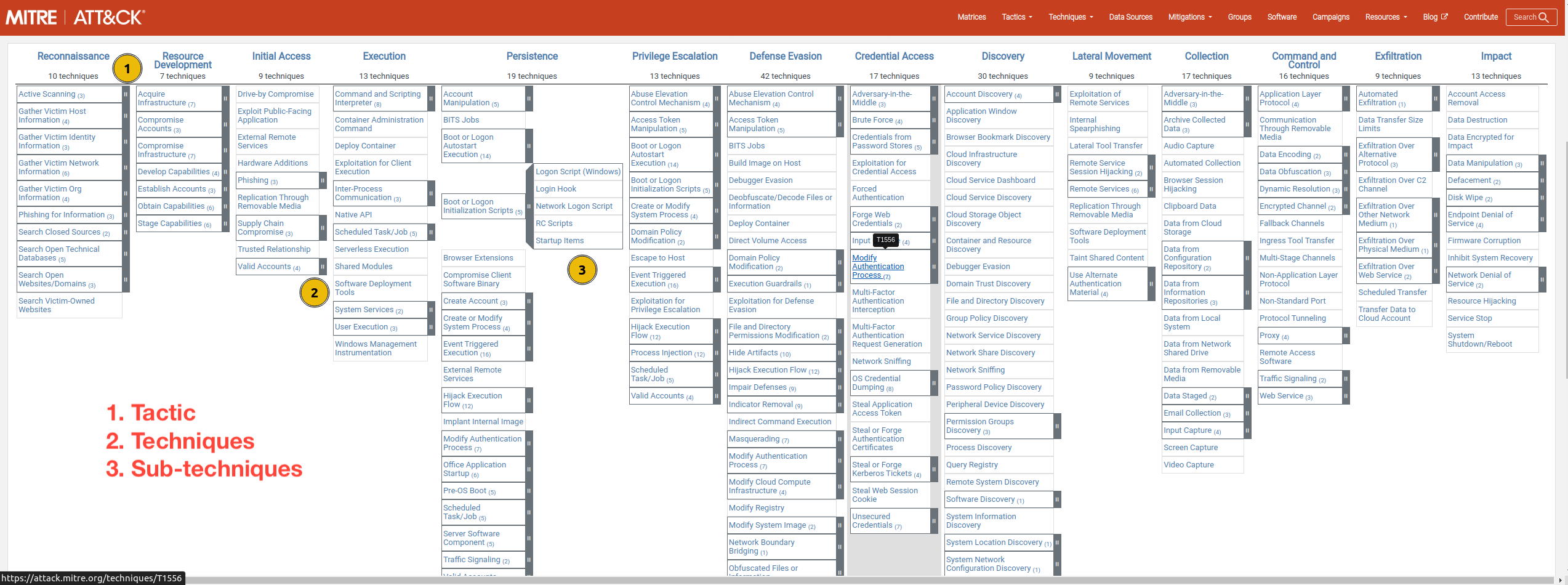
The MITRE ATT&CK Framework Matrix (click to enlarge the image).
Resources
Atomic Red Team
Atomic Red Team is a library of emulation tests developed and curated by Red Canary. Each test, called an atomic, is a small focused unit that executes a single technique and generates telemetry that can be used to validate and improve detections. All atomics are mapped to MITRE ATT&CK, making it straightforward to pivot between a threat profile and a practical test. Atomic Red Team supports emulation across a wide range of platforms including Windows, , macOS and cloud environments. You will work directly with this tool in the next room.
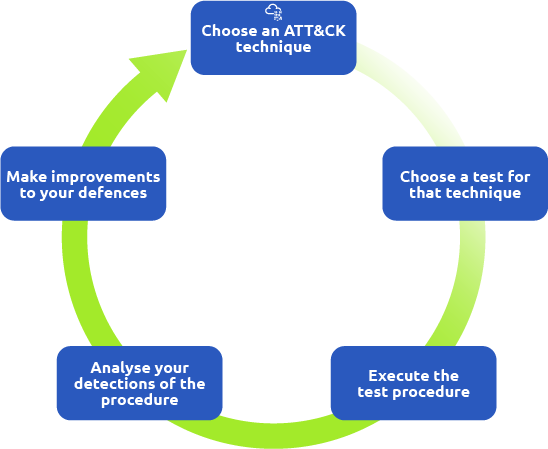
CTID Adversary Emulation Library
The Center for Threat-Informed Defense is a non-profit research and development organisation operated by MITRE Engenuity. They have curated an open-source adversary emulation plan library that provides ready-made emulation plans organisations can use to evaluate their capabilities against real-world threats. This is a resource, not a methodology. It gives you the plans, but your team still needs a process to execute them effectively.
The library offers two approaches:
- Full Emulation: A comprehensive approach that emulates a particular adversary from initial access to exfiltration, such as the APT29 Adversary Emulation plan.
- Micro Emulation: A focused approach that emulates specific behaviours across multiple adversaries, such as file access or process injection techniques.
Methodologies
TIBER-EU Framework
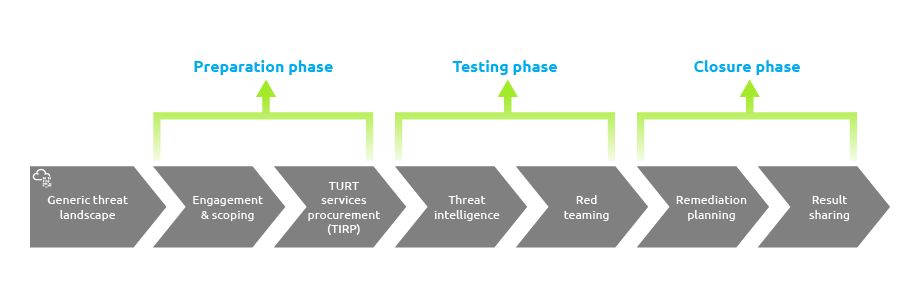
The Threat Intelligence-based Ethical Red Teaming (TIBER-EU) is a formal methodology developed for the European financial sector. It provides a structured, three-phase process for intelligence-led emulation testing on critical live production systems. While it is sector-specific and regional in scope, it is worth knowing as an example of how formal emulation methodologies are structured at an organisational and regulatory level.
The three phases are:
1. Preparation Phase
Security teams are established, scope is defined and approved by management, and all planning and procurement processes are completed before testing begins.
2. Testing Phase
The threat intelligence team produces a detailed report of threat areas and attack scenarios. The red team uses this to conduct emulation against critical systems while the assesses how their defences perform.
3. Closure Phase
Each team drafts analysis reports covering what was tested, findings, and recommendations for technical controls, policies and awareness training.
What is the library that provides technical emulation tests based on TTPs?
Scenario
VASEPY Corp is a multi-billion-dollar U.S. retail establishment aware of the numerous cyber threats plaguing the retail industry. Following a recent breach of one of their competitors, executives have become concerned about the company's security posture. They have hired you as a Threat Emulation Engineer to plan and execute an adversary emulation exercise based on known threat groups that would target their business.
The process outlined below is a practical synthesis of industry approaches to adversary emulation. It is iterative, intelligence-driven and methodical. The five steps are:
| Step 1 | Define Objectives |
| Step 2 | Research Adversary TTPs |
| Step 3 | Plan the Engagement |
| Step 4 | Conduct the Emulation |
| Step 5 | Report and Conclude |
This task covers Steps 1 and 2. Steps 3 and 4 are covered in the next task, and Step 5 follows after that.
1. Define Objectives

Define what the exercise is trying to achieve. Objectives should be specific and measurable. For VASEPY Corp, the objective is to identify gaps in protection against credit card fraud and ransomware attacks. The scope should also be defined here, covering which systems and data the emulation will target.
2. Research Adversary TTPs

This step accurately models the behaviour of the target adversary so the exercise can be conducted realistically. It breaks down into four activities.
2.1. Information Gathering
Gather information about threats relevant to your organisation from internal sources such as analysts, the cyber defence team and system administrators. For VASEPY Corp, the concern is financially motivated threat actors targeting retail. A search on ATT&CK surfaces FIN6, FIN7 and FIN8 as candidate adversaries.
2.2. Select the Adversary
Narrow the shortlist using these four factors:
| Relevance | Does the adversary align with the organisation's industry, goals and geography? |
| Available CTI | Is there enough reliable intelligence around their TTPs? |
| Complexity | Can existing tools handle the emulation or are custom tools required? |
| Available Resources | Is there sufficient budget, time and personnel? |
For VASEPY Corp, FIN7 is selected as they specifically target U.S-based retail entities.
2.3. Select the TTPs
Use the ATT&CK Navigator to visualise FIN7's techniques and prioritise which ones to emulate based on relevance to the target environment.
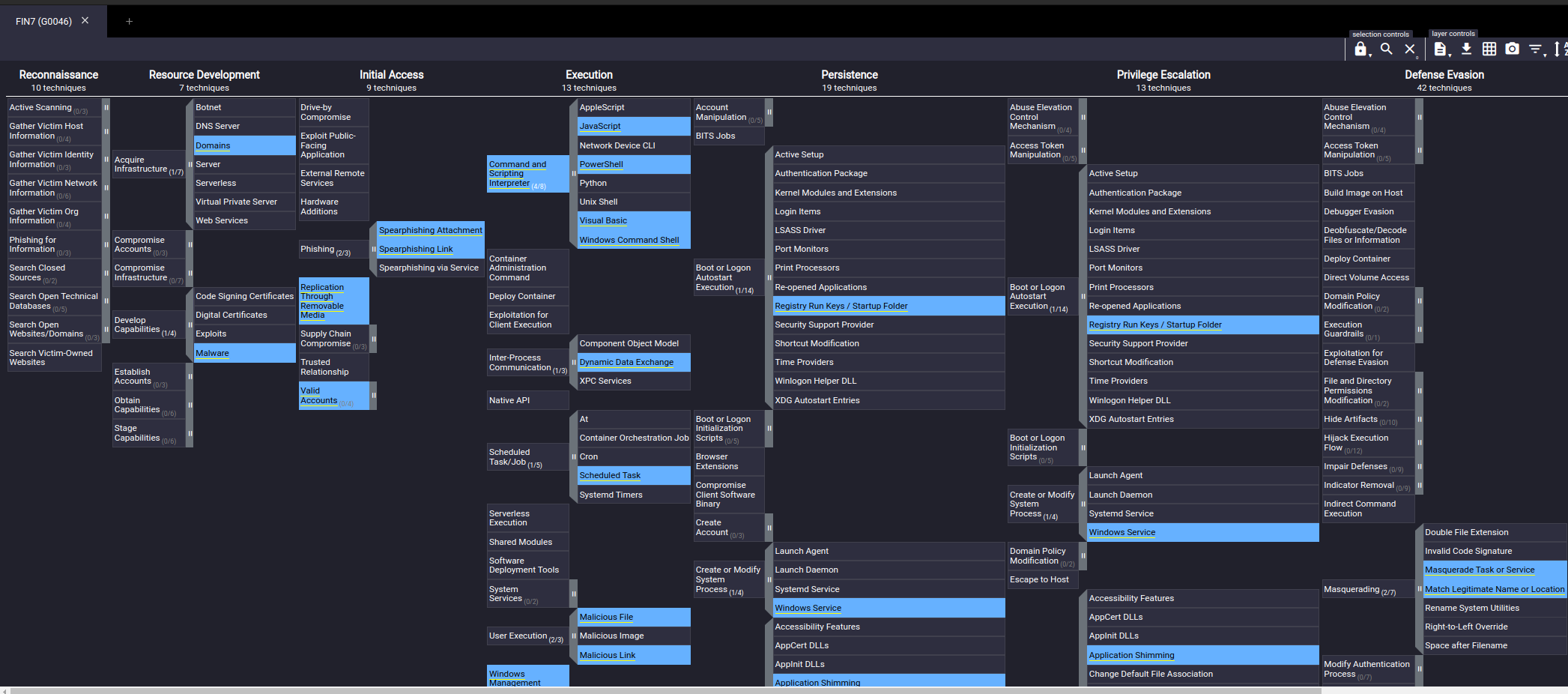
Snippet of the FIN7 Navigator Layer (click to enlarge the image).
2.4. Construct the TTP Outline
Build an outline covering the planned activities, scope, rules of engagement and how each TTP will be implemented. Adversary TTPs evolve over time, so keeping the outline updated with the latest threat intelligence is essential.
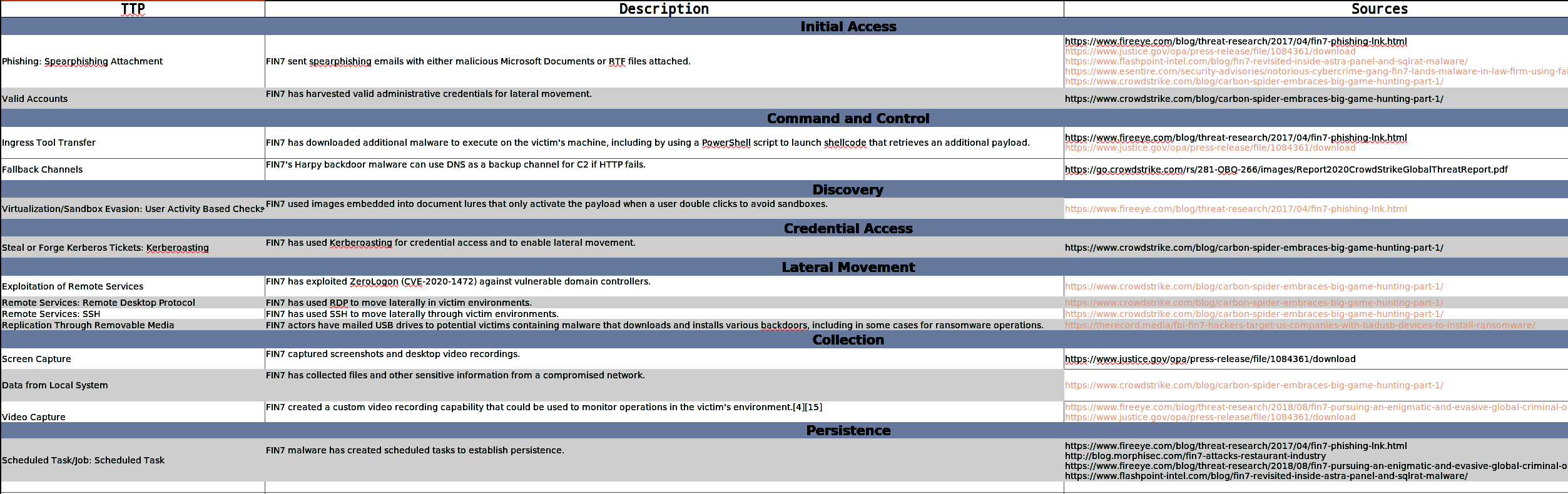
Chart showing the TTP Outline for FIN7 (click to enlarge the image).
There are 3 software tools used by FIN6 & FIN7. Can you identify them? Answers are in alphabetical order, separated by a comma.
Which factor will be considered when analysing whether to use existing or custom tools during the emulation?
3. Plan the Engagement

Since threat emulation involves mimicking actual cyber attacks, significant problems may ensue if not properly planned. These include data loss, unplanned system downtime and exposure of private data. A well-defined emulation plan keeps the exercise controlled and safe.
3.1. Threat Emulation Plan Components
A well-defined emulation plan should contain the following components:
| Engagement Objectives | What the exercise is trying to achieve and why. |
| Scope | The departments, users and devices upon which emulation activities are permitted. |
| Schedule | Dates and times for activities and deliverables to avoid conflicts with legitimate business operations. |
| Rules of Engagement | The acceptable adversary behaviour to be emulated, including mitigation actions for any high-risk TTPs. |
| Permission to Execute | Explicit written consent from sufficient authority within the organisation to conduct the emulation activities. |
| Communication Plan | How and when the emulation team and stakeholders will communicate throughout the exercise. |
4. Conduct the Emulation

This step involves carrying out the attack using the TTPs identified in the research phase. The exercise should be conducted in a controlled environment with skilled professionals who can accurately replicate adversary behaviour. The emulation lab typically consists of three components:
- Attack platform: where the emulation is executed from
- Analysis platform: used to gather forensic details and analyse artefacts
- Test systems: where the TTPs are deployed and observed
4.1. Plan the Deployment
Revisit the TTPs selected for FIN7 and map them using ATT&CK and the Navigator. Combine this with resources such as Mandiant's FIN7 Evolution Report and the ESentire FIN7 Report to understand how FIN7 executed their campaigns in practice. Ensure the lab environment is set up and all team members know their responsibilities before execution begins.
4.2. Implement the
This is where the actual TTPs are deployed. For FIN7's Initial Access technique, the emulation involves creating a malicious RTF document delivered through a spear email. FIN7 is known for using DOCX and RTF files with embedded Windows Shortcut Files (.) as their delivery mechanism.
The command below, taken from the CTID FIN7 Emulation Plan, copies the malicious RTF file to the target machine and opens an session to simulate the delivery. This maps to technique T1204.002 - Malicious File Execution.
# Copy 2-list.rtf to  Desktop on hotelmanager.
sudo smbclient -U '\' ///C$ -c "put fin7/Resources/Step1/SQLRat/2-list.rtf Users\\.\\Desktop\\2-list.rtf"

#Provide  password when prompted.


#Login to victim workstation as
xfreerdp +clipboard /u:"@" /p:"" /v:
4.3. Detections and Mitigations
The defence team must find ways to detect and mitigate the emulated TTPs. The uses security tools to collect, correlate and analyse TTP behaviour and logs. provides a list of mitigations for each technique which can be used as recommendations. For this exercise, refer to the T1204.002 mitigations and detection strategies on ATT&CK.
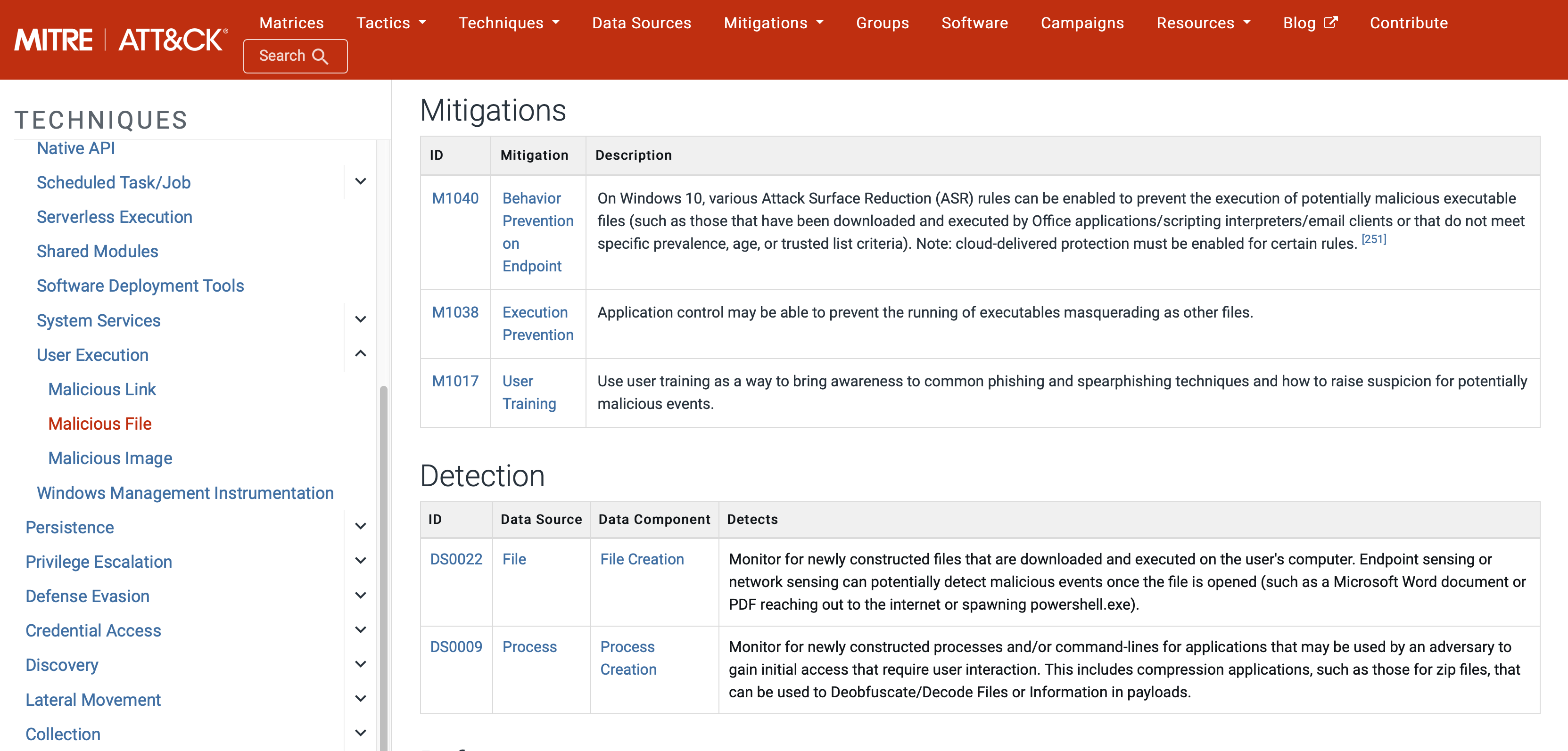
Mitigations and Detection sections for the Malicious File technique (click to enlarge the image).
Exercise
To complete this task, you will work through an interactive exercise that puts you in the shoes of a red teamer emulating two real-world threat groups. The exercise is split into two rounds. In Round 1, you will emulate Carbon Spider (FIN7), and in Round 2, you will emulate Reaper (APT37). Each round has three questions plus a Special Ability bonus question.
In this exercise, you are the attacker. Each correct answer means you have successfully landed a technique against the defender, draining their health. Each wrong answer gives the defender an advantage. If your attacker's health hits zero, the engagement is over. Use your knowledge of MITRE ATT&CK and the content covered in this task to guide your answers.
Click the View Site button at the top of the task to launch the exercise and obtain the flags for this task.
What is the emulation plan component that determines which activities are to be conducted known as?
What is the Round 1 flag obtained after completing the exercise?
What is the Round 2 flag obtained after completing the exercise?
5. Observe Results
While the emulation is running, the must actively look for artefacts that point to the emulated activity. This happens through three primary channels:
| Log Analysis | Review system and application logs for events triggered by the emulated techniques. |
| Event Log Evaluation | Look for Windows Event or events that correspond to the executed TTPs. |
| Network Traffic Monitoring | Track network connections, queries and data flows that may indicate adversary activity. |
The output of this observation tells the team one of three things about each that was executed:
- Detected and blocked: the defence worked as expected
- Detected but not blocked: visibility exists but the response needs tuning
- Not detected: a gap exists that needs to be addressed
For the FIN7 exercise, detection rules play a vital role. One useful collection is YARA rules. Have a look at the rules used to detect the pillowMint.exe malware as a practical example of how detection rules are applied against emulated threats.
6. Document and Report Findings
Once results are gathered, the teams must document and report their findings. Good documentation provides empirical evidence of what worked, what did not, and what needs to change. A well-structured emulation report typically covers the following:
| Exercise Summary | A high-level overview of the emulation exercise, the adversary emulated, and the TTPs tested. |
| Findings | For each TTP, document whether it was detected, blocked or missed, and what evidence was found in the logs. |
| Gaps Identified | A clear list of detection and visibility gaps discovered during the exercise. |
| Recommendations | Specific, actionable steps to address each gap, such as new detection rules, configuration changes or tuning existing controls. |
| Re-validation Plan | Once recommendations are implemented, the relevant TTPs should be re-run to confirm the gaps have been closed. |
A finding in an emulation report is not just a statement that a technique ran successfully. It should answer three questions: what was executed, what was observed, and what needs to change as a result. The stronger the documentation, the more actionable the exercise becomes for the organisation.
Exercise
To complete this task, you will work through an interactive exercise that puts you in the shoes of a defender protecting against real-world threat groups. The exercise is split into two rounds where you will defend against APTs. Each round has three questions plus a Special Ability bonus question.
In this exercise you are the defender. Each correct answer means you have successfully applied a mitigation against the attacker, draining their health. Each wrong answer gives the attacker an advantage and drains your own defender's health. If your defender's health hits zero, the engagement is over. Use your knowledge of ATT&CK mitigations and the content covered in this task to guide your answers.
Click the View Site button at the top of the task to launch the exercise and obtain the flags for this task.
What is the Round 1 flag obtained after completing the exercise?
What is the Round 2 flag obtained after completing the exercise?
Fantastic work completing the room!
You now have a solid understanding of what threat emulation is, how it differs from other security assessments, and how a full emulation exercise runs from planning through to reporting. The rooms ahead will take this foundation and put it into practice.
- Threat Modelling: Identify and prioritise the threats most relevant to an organisation before building an emulation plan.
- Atomic Red Team: Get hands-on with technique-level emulation, generate telemetry and see what your defences catch and what they miss.
- Atomic Bird Goes Purple 1: Apply everything from the module in a practical purple teaming exercise using real adversarial tactics.
- Atomic Bird Goes Purple 2: Continue the purple teaming journey with more advanced scenarios and detection challenges.
I have successfully completed the room!
Ready to learn Cyber Security?
TryHackMe provides free online cyber security training to secure jobs & upskill through a fun, interactive learning environment.
Already have an account? Log in