We use cookies to ensure you get the best user experience. For more information see our cookie policy.
Network Services
Learn about, then enumerate and exploit a variety of network services and misconfigurations.
Task 1: Get Connected
Hello and welcome!
This room will explore common Network Service vulnerabilities and misconfigurations, but in order to do
that, we'll need to do a few things first!
A basic knowledge of
Linux, and how to navigate the Linux file system, is required for this
room. If you think you'll need some help with this, try completing the
'Linux Fundamentals' Module (https://tryhackme.com/module/linux-fundamentals)
Make sure you're sitting comfortably, and have a cup of Tea, Coffee or Water close!
Now, let's move on!
N.B. This is nota room on WiFi access hacking or hijacking, rather how to gain unauthorized access to a machine by exploiting network services. If you are interested in WiFi hacking, I suggest checking out WiFi Hacking 101 by NinjaJc01 (https://tryhackme.com/room/wifihacking101)
Answer the questions below
Ready? Let's get going!
Task 2: Understanding SMB
What is SMB?
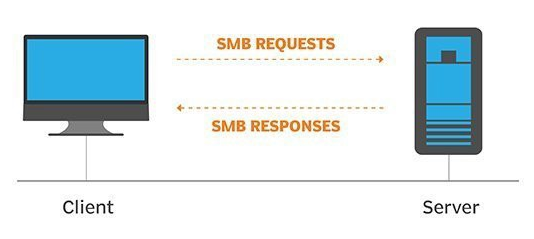
SMB - Server Message Block Protocol - is a client-server communication protocol used for sharing access to files, printers, serial ports and other resources on a network. [source]
Servers make file systems and other resources (printers,
named pipes, APIs) available to clients on the network. Client
computers may have their own hard disks, but they also want access
to the shared file systems and printers on the servers.
The SMB protocol is known as a response-request protocol, meaning that
it transmits multiple messages between the client and server to
establish a connection. Clients connect to servers using TCP/IP (actually NetBIOS over
TCP/IP as specified in RFC1001 and RFC1002), NetBEUI or IPX/SPX.
How does SMB work?
Once they have established a connection, clients can then send
commands (SMBs) to the server that allow them to access shares,
open files, read and write files, and generally do all the sort
of things that you want to do with a file system. However, in
the case of SMB, these things are done over the network.
What runs SMB?
Microsoft Windows operating systems since Windows 95 have included client and server SMB protocol support. Samba, an open source server that supports the SMB protocol, was released for Unix systems.
Answer the questions below
What does SMB stand for?
What type of protocol is SMB?
What protocol suite do clients use to connect to the server?
What systems does Samba run on?
Task 3: Enumerating SMB
Lets Get Started
Before we begin, make sure to deploy the room and give it some time to boot. Please be aware, this can take up to five minutes so be patient!
Enumeration
Enumeration is the process of gathering information on a target in order to find potential attack vectors and aid in exploitation.
This process is essential for an attack to be successful, as wasting time with exploits that either don't work or can crash the system can be a waste of energy. Enumeration can be used to gather usernames, passwords, network information, hostnames, application data, services, or any other information that may be valuable to an attacker.
SMB
Typically, there are SMB share drives on a server that can be connected to and used to view or transfer files. SMB can often be a great starting point for an attacker looking to discover sensitive information — you'd be surprised what is sometimes included on these shares.
Port Scanning
The first step of enumeration is to conduct a port scan, to find out as much information as you can about the services, applications, structure and operating system of the lab machine.
If you haven't already looked at port scanning, I recommend checking out the Nmap room here.
Enum4Linux
Enum4linux is a tool used to enumerate SMB shares on both Windows and Linux systems. It is basically a wrapper around the tools in the Samba package and makes it easy to quickly extract information from the target pertaining to SMB. It's already installed on the AttackBox, however if you need to install it on your own attacking machine, you can do so from the official github.
The syntax of Enum4Linux is nice and simple: "enum4linux [options] ip"
TAGFUNCTION
-U get userlist -M get machine list -N get namelist dump (different from -U and-M) -S get sharelist -P get password policy information -G get group and member list
-a all of the above (full basic enumeration)
Now we understand our enumeration tools, let's get started!
Answer the questions below
Conduct an nmap scan of your choosing, How many ports are open?
What ports is SMB running on? Provide the ports in ascending order.
Let's get started with Enum4Linux, conduct a full basic enumeration. For starters, what is the workgroup name?
What comes up as the name of the machine?
What operating system version is running?
What share sticks out as something we might want to investigate?
Task 4: Exploiting SMB
Types of SMB Exploit
While there are vulnerabilities such as CVE-2017-7494 that can allow remote code execution by exploiting SMB, you're more likely to encounter a situation where the best way into a system is due to misconfigurations in the system. In this case, we're going to be exploiting anonymous SMB share access- a common misconfiguration that can allow us to gain information that will lead to a shell.
Method Breakdown
So, from our enumeration stage, we know:
- The SMB share location
- The name of an interesting SMB share
SMBClient
Because we're trying to access an SMB share, we need a client to access resources on servers. We will be using SMBClientbecause it's part of the default samba suite. While it’s already installed on the AttackBox, if you do need to install it on your own attacking machine, you can find the documentation here.
We can remotely access the SMB share using the syntax:
Once inside the share, you can view the available commands by typing "help". The most useful of which are:
ls or dir: List files and directories
cd [DIR]: Move to a different directory
get [FILE]: Download the file to your AttackBox
Got it? Okay, let's do this!
Answer the questions below
What would be the correct syntax to access an SMB share called "secret" as user "suit" on a machine with the IP 10.10.10.2 on the default port?
Great! Now you've got a hang of the syntax, let's have a go at trying to exploit this vulnerability. You have a list of users, the name of the share (smb) and a suspected vulnerability.
Lets see if our interesting share has been configured to allow anonymous access, I.E it doesn't require authentication to view the files. We can do this easily by:
- using the username "Anonymous"
- connecting to the share we found during the enumeration stage
- and not supplying a password.
Does the share allow anonymous access? Y/N?
Great! Have a look around for any interesting documents that could contain valuable information. Who can we assume this profile folder belongs to?
What service has been configured to allow him to work from home?
Okay! Now we know this, what directory on the share should we look in?
This directory contains authentication keys that allow a user to authenticate themselves on, and then access, a server. Which of these keys is most useful to us?
Download this file to your local machine, and change the permissions to "600" using "chmod 600 [file]".
Now, use the information you have already gathered to work out the username of the account. Then, use the service and key to log-in to the server.
What is the smb.txt flag?
Task 5: Understanding Telnet
What is Telnet?
Telnet is an application protocol which allows you, with the use of a telnet client, to connect to and execute commands on a remote machine that's hosting a telnet server.
The telnet client will establish a connection with the server. The client will then become a virtual terminal - allowing you to interact with the remote host.
Replacement
Telnet sends all messages in clear text and has no specific security mechanisms. Thus, in many applications and services, Telnet has been replaced by SSH where transmitted data is encrypted.
How does Telnet work?
The user connects to the server by using the Telnet protocol, which means entering "telnet" into a command prompt. The user then executes commands on the server by using specific Telnet commands in the Telnet prompt. You can connect to a telnet server with the following syntax: "telnet [ip] [port]"
Answer the questions below
Is Telnet a client-server protocol (Y/N)?
What has slowly replaced Telnet?
How would you connect to a Telnet server with the IP 10.10.10.3 on port 23?
The lack of what, means that all Telnet communication is in plaintext?
Task 6: Enumerating Telnet
Lets Get Started
Before we begin, make sure to deploy the room and give it some time to boot. Please be aware, this can take up to five minutes so be patient!
Enumeration
We've already seen how key enumeration can be in exploiting a misconfigured network service. However, vulnerabilities that could be potentially trivial to exploit don't always jump out at us. For that reason, especially when it comes to enumerating network services, we need to be thorough in our method.
Port Scanning
Let's start out the same way we usually do, a port scan, to find out as much information as we can about the services, applications, structure and operating system of the lab machine. Scan the machine with nmap.
Output
Let's see what's going on on the target server...
Answer the questions below
How many ports are open on the lab machine? Note: you may need to scan non-standard ports too.
What port is this?
This port is unassigned, but still lists the protocol it's using, what protocol is this?
Now re-run the nmap scan, without the -p- tag, how many ports show up as open?
Here, we see that by assigning telnet to a non-standard port, it is not part of the common ports list, or top 1000 ports, that nmap scans. It's important to try every angle when enumerating, as the information you gather here will inform your exploitation stage.
Based on the title returned to us, what do we think this port could be used for?
Who could it belong to? Gathering possible usernames is an important step in enumeration.
Always keep a note of information you find during your enumeration
stage, so you can refer back to it when you move on to try exploits.
Task 7: Exploiting Telnet
Types of Telnet Exploit
Telnet, being a protocol, is in and of itself insecure for the reasons we talked about earlier. It lacks encryption, so sends all communication over plaintext, and for the most part has poor access control. There are CVE's for Telnet client and server systems, however, so when exploiting you can check for those on:
A CVE, short for Common Vulnerabilities and Exposures, is a list of
publicly disclosed computer security flaws. When someone refers to a
CVE, they usually mean the CVE ID number assigned to a security flaw.
However, you're far more likely to find a misconfiguration in how telnet has been configured or is operating that will allow you to exploit it.
Method Breakdown
So, from our enumeration stage, we know:
- There is a poorly hidden telnet service running on this machine
- The service itself is marked "backdoor"
- We have possible username of "Skidy" implicated
Using this information, let's try accessing this telnet port, and using that as a foothold to get a full reverse shell on the machine!
Connecting to Telnet
You can connect to a telnet server with the following syntax:
"telnet [ip] [port]"
We're going to need to keep this in mind as we try and exploit this machine.
What is a Reverse Shell?
A "shell" can simply be described as a piece of code or program which can be
used to gain code or command execution on a device.
A reverse shell is a type of shell in which the lab machine
communicates back to the attacking machine.
The attacking machine has a
listening port, on which it receives the connection, resulting in code
or command execution being achieved.
Answer the questions below
Okay, let's try and connect to this telnet port! If you get stuck, have a look at the syntax for connecting outlined above.
Great! It's an open telnet connection! What welcome message do we receive?
Let's try executing some commands, do we get a return on any input we enter into the telnet session? (Y/N)
Hmm... that's strange. Let's check to see if what we're typing is being executed as a system command.
Start a tcpdump listener on your local machine.
If using your own machine with the OpenVPN connection, use:
sudo tcpdump ip proto \\icmp -i tun0
If using the AttackBox, use:
sudo tcpdump ip proto \\icmp -i ens5
This starts a tcpdump listener, specifically listening for ICMP traffic, which pings operate on.
Now, use the command "ping [local THM ip] -c 1" through the telnet session to see if we're able to execute system commands. Do we receive any pings? Note, you need to preface this with .RUN (Y/N)
Great! This means that we are able to execute system commands AND that we are able to reach our local machine. Now let's have some fun!
We're going to generate a reverse shell payload using msfvenom.This will generate and encode a netcat reverse shell for us. Here's our syntax:
lhost = our local host IP address (this is your machine's IP address)
lport = the port to listen on (this is the port on your machine)
R = export the payload in raw format
What word does the generated payload start with?
Perfect. We're nearly there. Now all we need to do is start a netcat listener on our local machine. We do this using:
"nc -lvnp [listening port]"
What would the command look like for the listening port we selected in our payload?
Great! Now that's running, we need to copy and paste our msfvenom payload into the telnet session and run it as a command. Hopefully- this will give us a shell on the lab machine!
Success! What is the contents of flag.txt?
Task 8: Understanding FTP
What is FTP?
File Transfer Protocol (FTP) is, as the name suggests , a protocol used to allow remote transfer of files over a network. It uses a client-server model to do this, and- as we'll come on to later- relays commands and data in a very efficient way.
How does FTP work?
A
typical FTP session operates using two channels:
a command (sometimes called the control)
channel
a data channel.
As their names imply, the command channel
is used for transmitting commands as well as replies to those commands,
while the data channel is used for transferring data.
FTP operates using a client-server protocol.
The client initiates a connection with the server, the server validates
whatever login credentials are provided and then opens the session.
While the session is open, the client may execute FTP commands
on the server.
Active vs Passive
The FTP server may support either Active or Passive connections, or both.
In an Active FTP connection, the client opens a port and
listens. The server is required to actively connect to it.
In a Passive FTP
connection, the server opens a port and listens (passively) and the
client connects to it.
This separation of command
information and data into separate channels is a way of being able to
send commands to the server without having
to wait for the current data transfer to finish. If both channels were
interlinked, you could only enter commands in between data transfers, which wouldn't be efficient for either large file transfers, or slow internet connections.
More Details:
You can find more details on the technical function, and implementation of, FTP on the Internet Engineering Task Force website: https://www.ietf.org/rfc/rfc959.txt. The IETF is one of a number of standards agencies, who define and regulate internet standards.
Answer the questions below
What communications model does FTP use?
What's the standard FTP port?
How many modes of FTP connection are there?
Task 9: Enumerating FTP
Lets Get Started
Before we begin, make sure to deploy
the room and give it some time to boot. Please be aware, this can take
up to five minutes so be patient!
Enumeration
By now, I don't think I need to explain any further how enumeration is key when attacking network services and protocols. You should, by now, have enough experience with nmap to be able to port scan effectively. If you get stuck using any tool- you can always use "tool [-h / -help / --help]" to find out more about it's function and syntax. Equally, man pages are extremely useful for this purpose. They can be reached using "man [tool]".
Method
We're going to be exploiting an anonymous FTP login, to see what files we can access- and if they contain any information that might allow us to pop a shell on the system. This is a common pathway in CTF challenges, and mimics a real-life careless implementation of FTP servers.
Resources
As we're going to be logging in to an FTP server, we will need to make sure an FTP client is installed on the system. There should be one installed by default on most Linux operating systems, such as Kali or Parrot OS. You can test if there is one by typing "ftp" into the console. If you're brought to a prompt that says: "ftp>", then you have a working FTP client on your system. If not, it's a simple matter of using "sudo apt install ftp" to install one.
Alternative Enumeration Methods
It's worth noting that some vulnerable versions of in.ftpd and some other FTP server variants return different responses to the "cwd" command for
home directories which exist and those that don’t. This can be exploited because you can issue cwd commands before authentication, and if there's a home directory- there is more than likely a user account to go with it. While this bug is found mainly within legacy systems, it's worth knowing about, as a way to exploit FTP.
Great, now we know what type of FTP server we're dealing with we can check to see if we are able to login anonymously to the FTP server. We can do this using by typing "ftp [IP]" into the console, and entering "anonymous", and no password when prompted.
What is the name of the file in the anonymous FTP directory?
What do we think a possible username could be?
Great! Now we've got details about the FTP server and, crucially, a possible username. Let's see what we can do with that...
Task 10: Exploiting FTP
Types of FTP Exploit
Similarly to Telnet, when using
FTP both the command and data channels are unencrypted. Any data sent
over these channels can be intercepted and read.
With data from FTP being sent in plaintext, if a man-in-the-middle attack took place an attacker could reveal anything sent through this protocol (such as passwords). An article written by JSCape demonstrates and explains this process using ARP-Poisoning to trick a victim into sending sensitive information to an attacker, rather than a legitimate source.
When looking at an FTP server from the position we find ourselves in for this machine, an avenue we can exploit is weak or default password configurations.
Method Breakdown
So, from our enumeration stage, we know:
- There is an FTP server running on this machine
- We have a possible username
Using this information, let's try and bruteforce the password of the FTP Server.
Hydra
Hydra is a very fast online password cracking tool, which can perform rapid dictionary attacks against more than 50 Protocols, including Telnet, RDP, SSH, FTP, HTTP, HTTPS, SMB, several databases and much more. Hydra is already installed on the AttackBox, however, if you need it on your own attacking machine, you can find the GitHub repository here.
The syntax for the command we're going to use to find the passwords is this:
-l [user] Points to the user who's account you're trying to compromise
-P [path to dictionary] Points to the file containing the list of possible passwords
-vV Sets verbose mode to very verbose, shows the login+pass combination for each attempt
[machine IP] The IP address of the lab machine
ftp / protocol Sets the protocol
Let's crack some passwords!
Answer the questions below
What is the password for the user "mike"?
Bingo! Now, let's connect to the FTP server as this user using "ftp [IP]" and entering the credentials when prompted
What is ftp.txt?
Task 11: Expanding Your Knowledge
Further Learning
There is no checklist of things to
learn until you've officially learnt everything you can. There will
always be things that surprise us all, especially in the sometimes
abstract logical problems of capture the flag challenges. But, as with
anything, practice makes perfect. We can all look back on the things
we've learnt after completing something challenging and I hope you feel
the same about this room.
Reading
Here's some things that might be useful to read after completing this room, if it interests you:
Learn about, then enumerate and exploit a variety of network services and misconfigurations.
easy
60 min
235,257
To access material, start machines and answer questions login.
Hello and welcome!
This room will explore common Network Service vulnerabilities and misconfigurations, but in order to do
that, we'll need to do a few things first!
A basic knowledge of
, and how to navigate the Linux , is required for this
room. If you think you'll need some help with this, try completing the
'Linux Fundamentals' Module (https://tryhackme.com/module/linux-fundamentals)
Make sure you're sitting comfortably, and have a cup of Tea, Coffee or Water close!
Now, let's move on!
N.B. This is nota room on WiFi access hacking or hijacking, rather how to gain unauthorized access to a machine by exploiting network services. If you are interested in WiFi hacking, I suggest checking out WiFi Hacking 101 by NinjaJc01 (https://tryhackme.com/room/wifihacking101)
Answer the questions below
Ready? Let's get going!
What is ?
SMB - Server Message Block Protocol - is a client-server communication protocol used for sharing access to files, printers, serial ports and other resources on a network. [source]
Servers make file systems and other resources (printers,
named pipes, APIs) available to clients on the network. Client
computers may have their own hard disks, but they also want access
to the shared file systems and printers on the servers.
The SMB protocol is known as a response-request protocol, meaning that
it transmits multiple messages between the client and server to
establish a connection. Clients connect to servers using /IP (actually over
TCP/IP as specified in RFC1001 and RFC1002), NetBEUI or IPX/SPX.
How does SMB work?
Once they have established a connection, clients can then send
commands (SMBs) to the server that allow them to access shares,
open files, read and write files, and generally do all the sort
of things that you want to do with a . However, in
the case of SMB, these things are done over the network.
What runs SMB?
Microsoft Windows operating systems since Windows 95 have included client and server SMB protocol support. Samba, an open source server that supports the SMB protocol, was released for Unix systems.
Answer the questions below
What does SMB stand for?
What type of protocol is SMB?
What protocol suite do clients use to connect to the server?
What systems does Samba run on?
Set up your virtual environment
To successfully complete this room, you'll need to set up your virtual environment. This involves starting both your AttackBox (if you're not using your VPN) and Lab Machines, ensuring you're equipped with the necessary tools and access to tackle the challenges ahead.
Attacker machine
Status:Off
Lab machine - Task 3
Status:Off
Lets Get Started
Before we begin, make sure to deploy the room and give it some time to boot. Please be aware, this can take up to five minutes so be patient!
Enumeration
Enumeration is the process of gathering information on a target in order to find potential attack vectors and aid in exploitation.
This process is essential for an attack to be successful, as wasting time with exploits that either don't work or can crash the system can be a waste of energy. Enumeration can be used to gather usernames, passwords, network information, hostnames, application data, services, or any other information that may be valuable to an attacker.
Typically, there are SMB share drives on a server that can be connected to and used to view or transfer files. SMB can often be a great starting point for an attacker looking to discover sensitive information — you'd be surprised what is sometimes included on these shares.
Port Scanning
The first step of enumeration is to conduct a port scan, to find out as much information as you can about the services, applications, structure and operating system of the lab machine.
If you haven't already looked at port scanning, I recommend checking out the room here.
Enum4Linux
Enum4linux is a tool used to enumerate SMB shares on both Windows and systems. It is basically a wrapper around the tools in the Samba package and makes it easy to quickly extract information from the target pertaining to SMB. It's already installed on the AttackBox, however if you need to install it on your own attacking machine, you can do so from the official github.
The syntax of Enum4Linux is nice and simple: "enum4linux [options] ip"
TAGFUNCTION
-U get userlist -M get machine list -N get namelist dump (different from -U and-M) -S get sharelist -P get password policy information -G get group and member list
-a all of the above (full basic enumeration)
Now we understand our enumeration tools, let's get started!
Answer the questions below
Conduct an nmap scan of your choosing, How many ports are open?
What ports is SMB running on? Provide the ports in ascending order.
Let's get started with Enum4Linux, conduct a full basic enumeration. For starters, what is the workgroup name?
What comes up as the name of the machine?
What operating system version is running?
What share sticks out as something we might want to investigate?
Types of Exploit
While there are vulnerabilities such as -2017-7494 that can allow remote code execution by exploiting SMB, you're more likely to encounter a situation where the best way into a system is due to misconfigurations in the system. In this case, we're going to be exploiting anonymous SMB share access- a common misconfiguration that can allow us to gain information that will lead to a shell.
Method Breakdown
So, from our enumeration stage, we know:
- The SMB share location
- The name of an interesting SMB share
SMBClient
Because we're trying to access an SMB share, we need a client to access resources on servers. We will be using SMBClientbecause it's part of the default samba suite. While it’s already installed on the AttackBox, if you do need to install it on your own attacking machine, you can find the documentation here.
We can remotely access the SMB share using the syntax:
Once inside the share, you can view the available commands by typing "help". The most useful of which are:
ls or dir: List files and directories
[DIR]: Move to a different directory
get [FILE]: Download the file to your AttackBox
Got it? Okay, let's do this!
Answer the questions below
What would be the correct syntax to access an SMB share called "secret" as user "suit" on a machine with the IP 10.10.10.2 on the default port?
Great! Now you've got a hang of the syntax, let's have a go at trying to exploit this vulnerability. You have a list of users, the name of the share (smb) and a suspected vulnerability.
Lets see if our interesting share has been configured to allow anonymous access, I.E it doesn't require authentication to view the files. We can do this easily by:
- using the username "Anonymous"
- connecting to the share we found during the enumeration stage
- and not supplying a password.
Does the share allow anonymous access? Y/N?
Great! Have a look around for any interesting documents that could contain valuable information. Who can we assume this profile folder belongs to?
What service has been configured to allow him to work from home?
Okay! Now we know this, what directory on the share should we look in?
This directory contains authentication keys that allow a user to authenticate themselves on, and then access, a server. Which of these keys is most useful to us?
Download this file to your local machine, and change the permissions to "600" using "chmod 600 [file]".
Now, use the information you have already gathered to work out the username of the account. Then, use the service and key to log-in to the server.
What is the smb.txt flag?
What is Telnet?
Telnet is an application protocol which allows you, with the use of a telnet client, to connect to and execute commands on a remote machine that's hosting a telnet server.
The telnet client will establish a connection with the server. The client will then become a virtual terminal - allowing you to interact with the remote host.
Replacement
Telnet sends all messages in clear text and has no specific security mechanisms. Thus, in many applications and services, Telnet has been replaced by where transmitted data is encrypted.
How does Telnet work?
The user connects to the server by using the Telnet protocol, which means entering "telnet" into a command prompt. The user then executes commands on the server by using specific Telnet commands in the Telnet prompt. You can connect to a telnet server with the following syntax: "telnet [ip] [port]"
Answer the questions below
Is Telnet a client-server protocol (Y/N)?
What has slowly replaced Telnet?
How would you connect to a Telnet server with the IP 10.10.10.3 on port 23?
The lack of what, means that all Telnet communication is in plaintext?
Set up your virtual environment
To successfully complete this room, you'll need to set up your virtual environment. This involves starting both your AttackBox (if you're not using your VPN) and Lab Machines, ensuring you're equipped with the necessary tools and access to tackle the challenges ahead.
Attacker machine
Status:Off
Lab machine - Task 6
Status:Off
Lets Get Started
Before we begin, make sure to deploy the room and give it some time to boot. Please be aware, this can take up to five minutes so be patient!
Enumeration
We've already seen how key enumeration can be in exploiting a misconfigured network service. However, vulnerabilities that could be potentially trivial to exploit don't always jump out at us. For that reason, especially when it comes to enumerating network services, we need to be thorough in our method.
Port Scanning
Let's start out the same way we usually do, a port scan, to find out as much information as we can about the services, applications, structure and operating system of the lab machine. Scan the machine with .
Output
Let's see what's going on on the target server...
Answer the questions below
How many ports are open on the lab machine? Note: you may need to scan non-standard ports too.
What port is this?
This port is unassigned, but still lists the protocol it's using, what protocol is this?
Now re-run the nmap scan, without the -p- tag, how many ports show up as open?
Here, we see that by assigning telnet to a non-standard port, it is not part of the common ports list, or top 1000 ports, that nmap scans. It's important to try every angle when enumerating, as the information you gather here will inform your exploitation stage.
Based on the title returned to us, what do we think this port could be used for?
Who could it belong to? Gathering possible usernames is an important step in enumeration.
Always keep a note of information you find during your enumeration
stage, so you can refer back to it when you move on to try exploits.
Types of Telnet Exploit
Telnet, being a protocol, is in and of itself insecure for the reasons we talked about earlier. It lacks encryption, so sends all communication over plaintext, and for the most part has poor access control. There are 's for Telnet client and server systems, however, so when exploiting you can check for those on:
A CVE, short for Common Vulnerabilities and Exposures, is a list of
publicly disclosed computer security flaws. When someone refers to a
CVE, they usually mean the CVE ID number assigned to a security flaw.
However, you're far more likely to find a misconfiguration in how telnet has been configured or is operating that will allow you to exploit it.
Method Breakdown
So, from our enumeration stage, we know:
- There is a poorly hidden telnet service running on this machine
- The service itself is marked "backdoor"
- We have possible username of "Skidy" implicated
Using this information, let's try accessing this telnet port, and using that as a foothold to get a full reverse shell on the machine!
Connecting to Telnet
You can connect to a telnet server with the following syntax:
"telnet [ip] [port]"
We're going to need to keep this in mind as we try and exploit this machine.
What is a Reverse Shell?
A "shell" can simply be described as a piece of code or program which can be
used to gain code or command execution on a device.
A reverse shell is a type of shell in which the lab machine
communicates back to the attacking machine.
The attacking machine has a
listening port, on which it receives the connection, resulting in code
or command execution being achieved.
Answer the questions below
Okay, let's try and connect to this telnet port! If you get stuck, have a look at the syntax for connecting outlined above.
Great! It's an open telnet connection! What welcome message do we receive?
Let's try executing some commands, do we get a return on any input we enter into the telnet session? (Y/N)
Hmm... that's strange. Let's check to see if what we're typing is being executed as a system command.
Start a tcpdump listener on your local machine.
If using your own machine with the OpenVPN connection, use:
sudo tcpdump ip proto \\icmp -i tun0
If using the AttackBox, use:
sudo tcpdump ip proto \\icmp -i ens5
This starts a tcpdump listener, specifically listening for ICMP traffic, which pings operate on.
Now, use the command "ping [local THM ip] -c 1" through the telnet session to see if we're able to execute system commands. Do we receive any pings? Note, you need to preface this with .RUN (Y/N)
Great! This means that we are able to execute system commands AND that we are able to reach our local machine. Now let's have some fun!
We're going to generate a reverse shell payload using msfvenom.This will generate and encode a netcat reverse shell for us. Here's our syntax:
lhost = our local host IP address (this is your machine's IP address)
lport = the port to listen on (this is the port on your machine)
R = export the payload in raw format
What word does the generated payload start with?
Perfect. We're nearly there. Now all we need to do is start a netcat listener on our local machine. We do this using:
"nc -lvnp [listening port]"
What would the command look like for the listening port we selected in our payload?
Great! Now that's running, we need to copy and paste our msfvenom payload into the telnet session and run it as a command. Hopefully- this will give us a shell on the lab machine!
Success! What is the contents of flag.txt?
What is ?
File Transfer Protocol (FTP) is, as the name suggests , a protocol used to allow remote transfer of files over a network. It uses a client-server model to do this, and- as we'll come on to later- relays commands and data in a very efficient way.
How does FTP work?
A
typical FTP session operates using two channels:
a command (sometimes called the control)
channel
a data channel.
As their names imply, the command channel
is used for transmitting commands as well as replies to those commands,
while the data channel is used for transferring data.
FTP operates using a client-server protocol.
The client initiates a connection with the server, the server validates
whatever login credentials are provided and then opens the session.
While the session is open, the client may execute FTP commands
on the server.
Active vs Passive
The FTP server may support either Active or Passive connections, or both.
In an Active FTP connection, the client opens a port and
listens. The server is required to actively connect to it.
In a Passive FTP
connection, the server opens a port and listens (passively) and the
client connects to it.
This separation of command
information and data into separate channels is a way of being able to
send commands to the server without having
to wait for the current data transfer to finish. If both channels were
interlinked, you could only enter commands in between data transfers, which wouldn't be efficient for either large file transfers, or slow internet connections.
More Details:
You can find more details on the technical function, and implementation of, FTP on the Internet Engineering Task Force website: https://www..org//rfc959.txt. The IETF is one of a number of standards agencies, who define and regulate internet standards.
Answer the questions below
What communications model does FTP use?
What's the standard FTP port?
How many modes of FTP connection are there?
Set up your virtual environment
To successfully complete this room, you'll need to set up your virtual environment. This involves starting both your AttackBox (if you're not using your VPN) and Lab Machines, ensuring you're equipped with the necessary tools and access to tackle the challenges ahead.
Attacker machine
Status:Off
Lab machine - Task 9
Status:Off
Lets Get Started
Before we begin, make sure to deploy
the room and give it some time to boot. Please be aware, this can take
up to five minutes so be patient!
Enumeration
By now, I don't think I need to explain any further how enumeration is key when attacking network services and protocols. You should, by now, have enough experience with to be able to port scan effectively. If you get stuck using any tool- you can always use "tool [-h / -help / --help]" to find out more about it's function and syntax. Equally, man pages are extremely useful for this purpose. They can be reached using "man [tool]".
Method
We're going to be exploiting an anonymous login, to see what files we can access- and if they contain any information that might allow us to pop a shell on the system. This is a common pathway in CTF challenges, and mimics a real-life careless implementation of FTP servers.
Resources
As we're going to be logging in to an FTP server, we will need to make sure an FTP client is installed on the system. There should be one installed by default on most operating systems, such as Kali or Parrot . You can test if there is one by typing "ftp" into the console. If you're brought to a prompt that says: "ftp>", then you have a working FTP client on your system. If not, it's a simple matter of using "sudo install ftp" to install one.
Alternative Enumeration Methods
It's worth noting that some vulnerable versions of in.ftpd and some other FTP server variants return different responses to the "cwd" command for
home directories which exist and those that don’t. This can be exploited because you can issue cwd commands before authentication, and if there's a home directory- there is more than likely a user account to go with it. While this bug is found mainly within legacy systems, it's worth knowing about, as a way to exploit FTP.
Great, now we know what type of FTP server we're dealing with we can check to see if we are able to login anonymously to the FTP server. We can do this using by typing "ftp [IP]" into the console, and entering "anonymous", and no password when prompted.
What is the name of the file in the anonymous FTP directory?
What do we think a possible username could be?
Great! Now we've got details about the FTP server and, crucially, a possible username. Let's see what we can do with that...
Types of Exploit
Similarly to Telnet, when using
FTP both the command and data channels are unencrypted. Any data sent
over these channels can be intercepted and read.
With data from FTP being sent in plaintext, if a man-in-the-middle attack took place an attacker could reveal anything sent through this protocol (such as passwords). An article written by JSCape demonstrates and explains this process using -Poisoning to trick a victim into sending sensitive information to an attacker, rather than a legitimate source.
When looking at an FTP server from the position we find ourselves in for this machine, an avenue we can exploit is weak or default password configurations.
Method Breakdown
So, from our enumeration stage, we know:
- There is an FTP server running on this machine
- We have a possible username
Using this information, let's try and bruteforce the password of the FTP Server.
Hydra is a very fast online password cracking tool, which can perform rapid dictionary attacks against more than 50 Protocols, including Telnet, , , FTP, , HTTPS, , several databases and much more. Hydra is already installed on the AttackBox, however, if you need it on your own attacking machine, you can find the GitHub repository here.
The syntax for the command we're going to use to find the passwords is this:
-l [user] Points to the user who's account you're trying to compromise
-P [path to dictionary] Points to the file containing the list of possible passwords
-vV Sets verbose mode to very verbose, shows the login+pass combination for each attempt
[machine IP] The IP address of the lab machine
ftp / protocol Sets the protocol
Let's crack some passwords!
Answer the questions below
What is the password for the user "mike"?
Bingo! Now, let's connect to the FTP server as this user using "ftp [IP]" and entering the credentials when prompted
What is ftp.txt?
Further Learning
There is no checklist of things to
learn until you've officially learnt everything you can. There will
always be things that surprise us all, especially in the sometimes
abstract logical problems of capture the flag challenges. But, as with
anything, practice makes perfect. We can all look back on the things
we've learnt after completing something challenging and I hope you feel
the same about this room.
Reading
Here's some things that might be useful to read after completing this room, if it interests you:



 What is Telnet?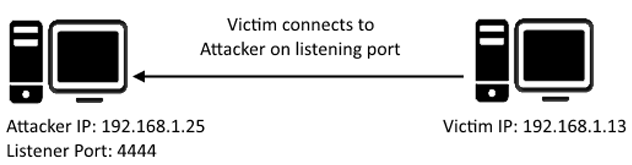
 What is ?
 Enumeration
 Similarly to Telnet, when using
FTP both the command and data channels are unencrypted. Any data sent
over these channels can be intercepted and read.
Similarly to Telnet, when using
FTP both the command and data channels are unencrypted. Any data sent
over these channels can be intercepted and read.