
Back to all walkthroughs



Advanced Container Escape Techniques
Pivot across a hardened Docker network via shared volumes, raw disk mounts, and a kernel module.
medium
To access material, start machines and answer questions login.
Containers are one of the most common ways modern applications get packaged and run. Docker alone sits underneath a huge share of production infrastructure, and most teams treat the isolation a provides as a hard security boundary rather than the thin, misconfigurable layer it actually is. That gap between assumed and actual isolation shows up constantly on real assessments, and it's exactly what this room is built to demonstrate.
As a pentester, you'll work through four container escape techniques back to back: a shared volume nobody scoped properly, a --privileged flag that hands over far more than it should, a gap between Linux capabilities and plain file permissions, and a single narrow capability that grants full host code execution. Each technique builds on the one before it, four containers, one unbroken chain, so treat this less like four standalone puzzles and more like one continuous pivot.
Here's the scenario: you already have access to container-alpha, one small piece of a larger internal Docker deployment, from earlier in this engagement. It's a thin foothold, no sudo, no obvious misconfiguration sitting in plain sight, no --privileged flag anywhere, no exposed docker.sock waiting to be found, but it's enough to start finding your way out. Your objective for the rest of this room: turn that one thin shell into a full compromise of every container on this network, using nothing but what a low-privilege shell can already reach.
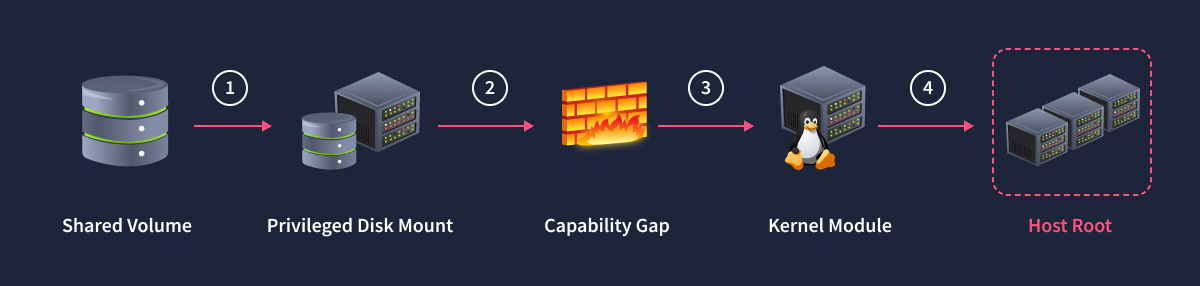
Learning Objectives
- Identify an unintended shared Docker volume between containers of different trust levels and recognize why permissive shared-mount permissions are a container-native misconfiguration
- Exploit a world-writable shared volume to pivot from a low-privilege, no-capability container into a root-owned neighboring container
- Explain what the
--privilegedflag exposes beyond capabilities and use that access to mount and read the host's raw block device from inside a container - Distinguish capability-gated syscalls from DAC and device-cgroup-gated raw device reads, and exploit that gap in a hardened, capability-dropped container
- Compile and load a malicious kernel module to prove that a single narrow capability grants unrestricted host code execution regardless of container or namespace boundaries
- Map each escape class covered here to a concrete, defense-in-depth remediation
Prerequisites
- Container fundamentals: completion of TryHackMe's Container Vulnerabilities room is recommended. That room covers capability and
--privilegedabuse, cgroup v1release_agentabuse, exposeddocker.sockabuse, and namespace abuse viansenter. This room assumes familiarity with those concepts and doesn't re-teach them. - Linux CLI comfort: completion of TryHackMe's Linux Fundamentals Part 1 room is recommended if you're not yet comfortable navigating a Linux shell over SSH, reading file permissions, and running basic commands like
mount,ls, andps.
You're still sitting inside container-alpha, one of several containers on a small internal Docker bridge network with no route out to the internet. Everything from here happens laterally, one pivot at a time, entirely inside this environment.
Machine Access
Start the lab by clicking the Start Machine button below. The Docker host at MACHINE_IP needs about two minutes to fully boot. All exercises run from the AttackBox against this lab machine.
Set up your virtual environment
To successfully complete this room, you'll need to set up your virtual environment. This involves starting the Lab Machine, ensuring you're equipped with the necessary tools and access to tackle the challenges ahead.

Lab machine
Status:Off
Credentials for the lab machine are below:
Credentials
Username
alpha
Â
Password
Handoff2026!
Â
IP address
MACHINE_IP
Â
Connection via
SSH
ssh alpha@MACHINE_IP
Â
Once you're up, open a terminal and SSH straight into container-alpha using the credentials above, the same way you'd land on any other target host in an engagement.
AttackBox - Terminal
root@tryhackme:~# ssh alpha@MACHINE_IP
alpha@MACHINE_IP's password:
alpha@f34c12183748:/$
That prompt is where every technique in this room begins.
Answer the questions below
I have successfully started my lab instance.
Ready to learn Cyber Security?
The Advanced Container Escape Techniques room is only available for Premium or Max subscribers. Signup now to access more than 500 free rooms and learn cyber security through a fun, interactive learning environment.
Already have an account? Log in