
Advanced Packet Analysis

Triage alerts, reassemble streams, extract files, and detect protocol abuse via Wireshark & TShark.
medium

To access material, start machines and answer questions login.
Scenario Overview
You are a analyst at Nexus Financial Group investigating a confirmed intrusion against the Finance subnet. In the previous rooms, we identified a recurring beacon on WKST-FINANCE-04 (10.14.22.88) communicating with 194.165.16.56, confirmed a 5.3 MB staging exfiltration to 185.213.154.201, and mapped the lateral movement path through WKST-IT-ADMIN-02 to the Domain Controller. The investigation so far has relied on Zeek logs and Zui queries, which told us what connections existed and how much data moved. What they could not tell us is what those sessions actually contained.
The PCAP that the Finance perimeter sensor has been storing is the final evidence source. This room teaches packet analysis as an investigative skill: every technique is introduced in the context of answering a specific question that logs alone could not answer.
Learning Objectives
By the end of this room, you will be able to:
- Explain the relationship between Wireshark and TShark and describe when CLI-based analysis is preferable to a GUI
- Navigate Wireshark's protocol dissection tree to extract investigatively relevant fields
- Follow TCP and UDP streams to reconstruct application-layer communications
- Extract files, credentials, and other artifacts from packet captures
- Identify exfiltration patterns, protocol tunneling, and protocol abuse in network traffic
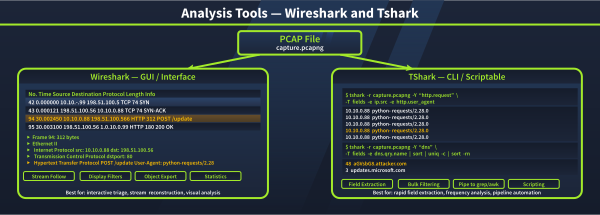
- Write TShark commands for field extraction, filtering, and automated evidence processing
Prerequisites
It is expected that you have gone through or explored the following rooms and topics before starting this room:
- Wireshark: The Basics: three-pane navigation, basic display filters, Follow Stream mechanics.
- Wireshark: Packet Operations: filter construction and Statistics menus.
- Network Security Monitoring with Zeek:
conn.log,files.log,ssl.log, JA4 fingerprinting. - Threat Hunting with Zui: behavioral pivots that produce the specific questions this room answers.
- Linux command-line comfort:
grep,awk,sha256sum,base64.
Lab Connection
Start the lab by clicking the Start Machine button at the top of this task. The VM takes approximately three minutes to load.
Set up your virtual environment

All evidence is preloaded:
- The investigation PCAP for all tasks:
/home/ubuntu/captures/investigation.pcap - Helper scripts:
/home/ubuntu/scripts/ - Threat feed and reference material:
/home/ubuntu/references/
Wireshark is installed on the desktop for graphical tasks. TShark is available at the command line.
Connect to the machine and continue.
Ready to learn Cyber Security?
The Advanced Packet Analysis room is only available for Premium or Max subscribers. Signup now to access more than 500 free rooms and learn cyber security through a fun, interactive learning environment.
Already have an account? Log in