

Threat Hunting with Zui

Learn how to hunt for threats using Zui.
medium

To access material, start machines and answer questions login.
The previous Network Monitoring with room taught us to interrogate Zeek logs from the command line. Every zeek-cut | awk | sort pipeline started from a known question, with an alert or an IOC handed to us, and the analyst worked from the indicator outward to scope and impact. This room begins from the opposite place. No alert has fired. The question we ask in front of the Zui pool is no longer "what fired?" but "what did nothing fire on that should have?"
Hunting vs Alert Response
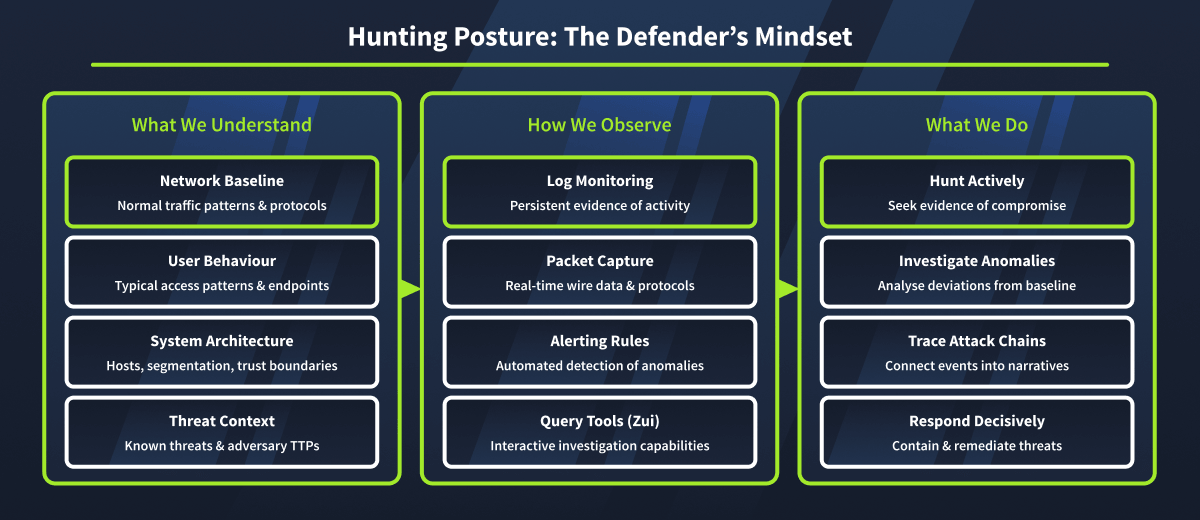
Alert response is deductive. An indicator exists, and our investigation ends once we confirm whether it is malicious or benign. Threat hunting is inductive; no indicator to start from. We work from a hypothesis (a statement of what attacker behaviour might look like in this environment) and search the data for evidence that confirms or refutes it. Modern operators assume they will eventually be detected, so they blend in with slow beacon intervals, legitimate-looking User-Agents, CDN-fronted infrastructure, and encrypted DNS. Hunting is the discipline of finding what blending in still looks like when examined deliberately.
Three Hunting Postures
Every hunt starts in one of three places, and most real hunts combine all three. Intel-driven hunts begin with a threat report describing a specific TTP, which we translate into a query that asks whether the pattern is present in our environment. Anomaly-driven hunts begin with a statistical baseline (e.g., most workstations make fewer than 20 outbound HTTPS connections per hour) and surface outliers above it. Hypothesis-driven hunts begin with a security question with no known TTP, where we formulate what the answer would look like in the data and check it.
Why Zui
The previous room's pipelines are powerful for confirmatory analysis, but each answers a single question, and pivoting requires rebuilding the pipeline from scratch. Exploratory analysis is too slow that way. Zui (formerly Brim) loads PCAPs and Zeek logs into a unified, queryable store called a Zed lake and provides a query interface where a field click adds a clause to the active query. We hunt in the logs and confirm in the packets without leaving the tool.
What This Room Covers
- Zui orientation, the Zed lake model, and the visual query interface
- The Zed query language for filtering, grouping, aggregating, and pivoting
- Hunting C2 beaconing, exfiltration, and lateral movement
- Building a saved query library that turns ad-hoc hunts into repeatable team workflows
Prerequisites
It is expected that you have gone through or explored the following rooms and topics before starting this room:
- Network Security Monitoring with Zeek: Zeek log structure, cross-log correlation via
uid, the protocol-specific logs (conn,dns,http,ssl,files). - Traffic Analysis Pitfalls: what modern networks obscure and why behaviour-based hunting matters.
- Basic query-language experience: Zed is pipeline-based rather than , but familiarity with filtering, grouping, and aggregating tabular data transfers directly.
Continue to the next task.
Ready to learn Cyber Security?
The Threat Hunting with Zui room is only available for Premium or Max subscribers. Signup now to access more than 500 free rooms and learn cyber security through a fun, interactive learning environment.
Already have an account? Log in