

Agent Foundations
Premium roomLearn the foundations of building Python-based AI agents.
easy

To access material, start machines and answer questions login.
If you have explored applications, AI security, or modern automation workflows, you have probably encountered the word agent. It appears everywhere: research agents, coding agents, agents, browser agents, pentesting agents, customer support agents, and autonomous AI assistants.
However, the term is often used loosely. An “agent” may refer to a simple prompt wrapped in an application, a deterministic workflow controlled by code, or a system that can reason, use tools, maintain state, and decide what to do next. Without clear foundations, it can be difficult to understand what an agent actually is, when one is needed, and which approach is appropriate for building it.
This room is designed to remove that confusion.
Before building the complete Research Agent in the next room, you will work through small, controlled Python examples that introduce the core building blocks of agentic systems. You will begin with a basic LLM workflow, then explore LangChain tool calling, structured outputs, LangGraph state and branching, framework selection, and common debugging failures.
The goal is not to cover every feature of LangChain or LangGraph. Instead, this room focuses on practical engineering judgement: recognising when plain Python is sufficient, when LangChain provides useful abstractions, and when LangGraph is better suited to stateful or branching workflows.
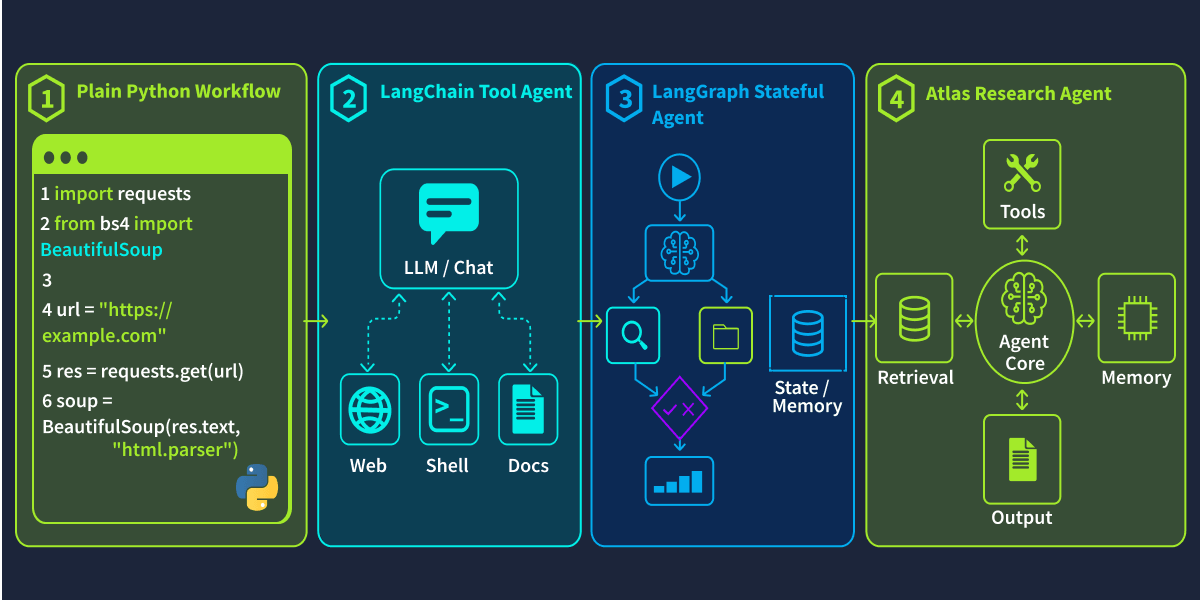
By the end of the room, you should be able to examine an AI-powered workflow and answer a simple but important question:
Does this actually need to be an agent?
Learning Objectives
- Explain what an AI agent is and when one is needed
- Compare plain Python, LangChain, and LangGraph workflows
- Build a basic Python LLM workflow
- Create a simple LangChain tool-calling workflow
- Use structured outputs to make responses easier to validate
- Build a basic LangGraph workflow with state and branching
- Choose the simplest workflow that safely solves the task
- Debug common agent failures such as invalid tool inputs, missing state updates, and wrong routing decisions
Prerequisites
Before starting this room, you should be comfortable with basic Python concepts such as variables, functions, conditionals, loops, files, and imports. If these topics are unfamiliar, complete the Python Basics room first.
Basic familiarity with LLM concepts, including prompts, responses, context, model outputs, and prompt structure, is also recommended. If you need a refresher, the Prompt Engineering room introduces LLM fundamentals, prompt behaviour, and effective prompt design.
Machine Access
Start the machine using the Start Lab Machine button below. Allow 2-3 minutes for it to fully load. Once ready, the will open in split view, providing access to both the lab environment and the required tools.
Set up your virtual environment

I'm ready to learn!
Ready to learn Cyber Security?
The Agent Foundations room is only available for Premium or Max subscribers. Signup now to access more than 500 free rooms and learn cyber security through a fun, interactive learning environment.
Already have an account? Log in