
Bypassing Cloud Security

Exploit AWS PassRole, over-permissive trust policies, and policy versioning to escalate privileges.
medium


To access material, start machines and answer questions login.
In November 2025, Sysdig's threat research team documented an attacker going from a single leaked, low-privilege credential to full administrative access in under eight minutes. The pivot point wasn't a stolen admin password. It was a function running with an execution role that carried far more permissions than the person who could invoke it.
Reporting on the incident (opens in new tab) notes that the function's execution role let the attacker mint new administrative access keys and read them straight out of the function's output. That incident used UpdateFunctionCode on an existing function rather than the exact PassRole plus CreateFunction sequence you'll work through in Task 3. The underlying weakness is identical, though: an over-privileged execution role, which is exactly what this room teaches you to find.
This isn't a one-off. During a 2020 Red Team engagement, Palo Alto Networks' Unit 42 found a customer's AWS account where hundreds of developers held unrestricted iam:PassRole reaching all the way to AdministratorAccess. A second account in the same environment had trust policies broad enough that anyone could assume them. When Unit 42 later scanned public GitHub repositories to see how common that trust-policy pattern was elsewhere, they found it again and again. Their research (opens in new tab) makes a point worth sitting with: IAM misconfiguration isn't an edge case in cloud security. It's one of the most common ways attackers actually escalate once they land inside an account.
You've been brought in to assess TryHatMe Studios' AWS account. The studio recently moved several backend workloads to AWS: a CI/CD pipeline, an internal finance-reporting service, and an analytics dashboard. For each workload, TryHatMe Studios hands you one restricted IAM identity, the same identity a real employee or contractor would use, and your job is to find out whether that identity can reach data it was never supposed to touch.
Learning Objectives
- Explain the difference between IAM users and roles, and between identity-based and resource-based (trust) policies.
- Identify why
iam:PassRoleis a permission check rather than an API call, and how it combines with Lambda execution roles to escalate privileges. - Recognize an over-permissive trust policy scoped to the account root, and use
sts:AssumeRoleto obtain credentials for a role you were never explicitly granted. - Explain how IAM managed policy versioning works, and use
iam:SetDefaultPolicyVersionto promote a dormant, more permissive version. - Compare all three escalation paths as instances of the same underlying pattern: a role's usable permissions gated by more than one independent control surface.
Prerequisites
- Comfort with a Linux terminal, including basic file editing and running multi-line command sequences.
- Basic AWS familiarity. You should know roughly what , Lambda, and Secrets Manager are used for.
- No prior AWS IAM privilege-escalation experience is assumed.
Start your AttackBox by clicking the Start AttackBox button below. It opens in split view alongside this room. Then start the lab machine by clicking the Start Lab Machine button. Give the lab machine about two minutes to fully load. The lab machine runs LocalStack behind a custom enforcement proxy, exposed on port 4566 at MACHINE_IP, the IP shown next to your machine once it starts. You work from the AttackBox for every task in this room. You never log into the lab machine itself.
Set up your virtual environment

Each of the next three scenario tasks hands you a different restricted identity to work as. You'll configure a named AWS CLI profile for each one directly on the AttackBox, using the access key given at the start of that task, and point it at MACHINE_IP:4566 with --endpoint-url or a saved endpoint_url config value. Here's how your commands actually reach the lab environment:
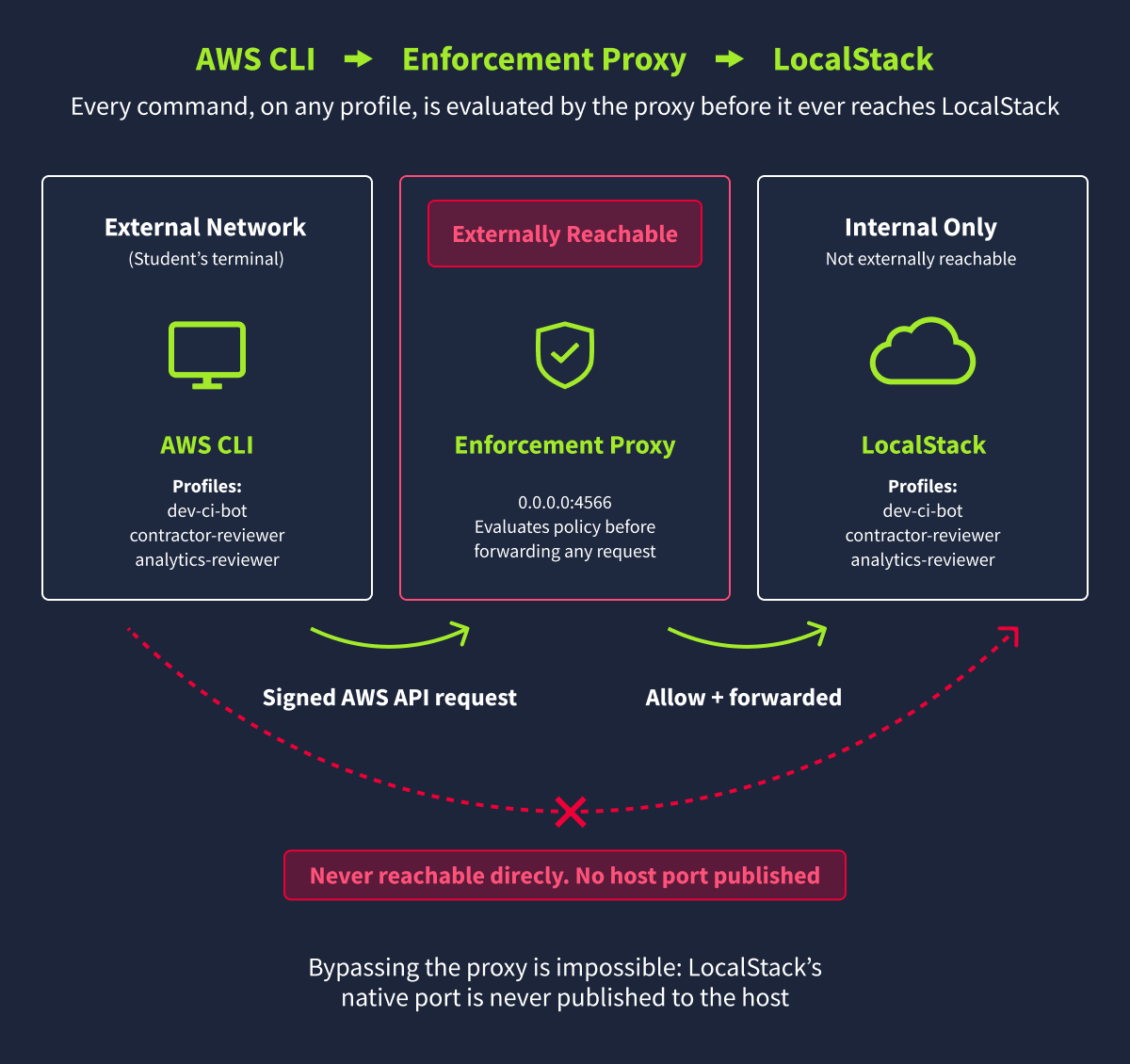
Every command you send, no matter which profile is active, passes through that proxy before it ever reaches LocalStack's IAM, STS, Lambda, or Secrets Manager emulation. That proxy is what turns LocalStack's normally permissive defaults into something that actually enforces the policies you're about to work with. The lab machine's own shell is never exposed to you. Everything here happens through this one network port, exactly the way a real external assessment would.
One thing worth knowing upfront: fields like UserId, RoleId, session tokens, and timestamps are generated fresh every time this lab boots, so yours will not match the exact values shown in this room's terminal captures. That is expected, not a sign anything is broken. Every question in this room is graded on the THM{...} flags and the mechanics of each escalation, never on one of these instance-specific values.
I have successfully started my AWS lab instance.
Ready to learn Cyber Security?
The Bypassing Cloud Security room is only available for Premium or Max subscribers. Signup now to access more than 500 free rooms and learn cyber security through a fun, interactive learning environment.
Already have an account? Log in