

Detection Rules Development
Explore the types of detection, how to use them in Elastic, and the process behind effective rules.
medium


To access material, start machines and answer questions login.
In the Intro to Detection Engineering room, you explored the Detection Engineering process and mindset by understanding where alerts originate, who decides what gets detected, and how to identify gaps in detection coverage. With that foundation in place, this room shifts from theory to practice.
You will follow a structured detection research process and build detection rules against a real attack chain, working through the core rule types used in modern environments. Beyond writing rules, you will learn how to implement them on a and tune to reduce false positives without sacrificing coverage.
Learning Objectives
By the end of this room, you will be able to:
- Understand what detection rules are and the role they play in a SOC workflow.
- Apply a structured detection research process to investigate attacker behavior before writing rules.
- Differentiate between atomic, stateful, correlation-based, and anomaly detection types, and select the appropriate type for a given scenario.
- Perform basic detection tuning to reduce false positives while preserving true positive coverage.
Prerequisites
Before starting this room, ensure you have completed:
Ready for developing detections!
What Is a Detection Rule?
A detection rule is not simply an alert. It is a piece of logic that encodes an analyst's understanding of what malicious or suspicious behavior looks like in log data. It translates threat intelligence, attack research, and operational experience into a structured query that runs continuously against incoming telemetry. When that logic matches the data, the generates an alert for an analyst to triage.
Think of it this way: Without detection rules, your SIEM ingests logs but produces nothing actionable. An alert is the output, and the detection rule is the logic that produces it. The quality, accuracy, and coverage of your detection rules directly determine whether the is responding to real threats or drowning in noise.
Anatomy of a Detection Rule
Regardless of the SIEM platform you work with, every detection rule contains the same fundamental components. Understanding these components is essential before you begin writing rules of your own. The table below breaks down each component and maps it to a practical example:
| Component | Description | Example |
|---|---|---|
| Data source | The log source for the rule queries. This defines what telemetry the rule operates on. A rule is only as good as the data it has access to. | Event ID 4625 (failed logon attempts) |
| Detection logic | The query or condition that identifies the specific behavior. This is the core of the rule. | A query matching Event ID 4625 where the logon type is 10 (RemoteInteractive), indicating failed RDP authentication attempts. |
| Trigger condition | The threshold or condition that causes the rule to fire. You will explore the types of rules and their different triggers further in this room. | 10 or more failed RDP logon attempts from the same source IP within a 5-minute window |
| Metadata | Contextual information attached to the rule: name, description, severity, MITRE ATT&CK mapping, author, and known false positive scenarios. Metadata ensures the rule is understandable, maintainable, and actionable. | Name: "RDP Brute Force Attempt" MITRE ATT&CK: T1110.001 (Brute Force: Password Guessing) Severity: Medium False positive note: "Legitimate users may trigger this rule during password resets." |
| Response action | Define what happens when the rule fires. This can range from a simple alert to automated enrichment, notification, or containment actions. | Alert created in the SIEM dashboard, notification sent to the on-call analyst, source IP automatically enriched with threat intelligence data. |
Each component serves a distinct purpose. Remove the data source, and the rule has nothing to query. Remove the detection logic, and it cannot identify the attack pattern. A well-constructed detection rule addresses all five components.
Detection Rules in the SIEM Workflow
As a SOC analyst, you are probably already familiar with the end-to-end pipeline that turns raw telemetry into incident response actions. After a detection is deployed into the SIEM, which is the step 5 (Deployment Phase) in the Detection Engineering Life Cycle, it occupies a specific and critical position in the SIEM pipeline:

Detection Query Languages
Different SIEM platforms use different query languages to express detection logic. The core concepts remain the same across platforms, but the syntax varies. Below are the most common languages you will encounter:
| SIEM Platform | Query Language | Example |
|---|---|---|
| Vendor-agnostic (portable rules) | Sigma |
|
| Splunk | SPL (Search Processing Language) |
|
| Microsoft Sentinel | KQL (Kusto Query Language) |
|
| Elastic Security | EQL (Event Query Language), ES|QL (Elasticsearch Query Language), (Kibana Query Language |
EQL: KQL: : |
In this room, the lab environment uses Elastic Security, so the detection rules you build will be written in KQL and . The concepts and methodology you learn here are transferable to any platform; only the query syntax changes.
Ready for exploring Elastic detection rules!
Set up your virtual environment

Research Before Queries
A common pitfall in detection engineering is jumping straight to writing queries. Without structured research, the resulting rule will either be too broad, flooding the with false positives, or too narrow, missing real attacks entirely. Both outcomes erode trust in detection capability and waste analyst time. Writing a query is the final step, not the first.
Identifying and prioritizing which threats to research is a strategic process in itself and outside the scope of this module. Here, the focus is on what happens once a detection lead has already been selected.
The Scenario: A Pentest Attack Chain
To ground this process in a realistic situation, consider the following: your organization recently had a pentest conducted, and no detections were triggered. The report documents a four-stage attack chain used to compromise a Windows domain environment:
- Brute-Force: Credential brute-force against a jump server that has an internet-facing RDP service targeting multiple users.
- Internal Reconnaissance: Classic Windows commands to enumerate users and the environment.
- Credential Dumping (): Credentials extracted from the LSASS process memory.
- Lateral Movement via PsExec: Lateral movement to a domain-joined server using stolen credentials.
Your goal is to build detection rules for each stage. In this task, you will walk through the research process for the first technique: RDP Brute-Force. Later tasks apply the same methodology to other stages.
Start the lab by clicking the Start Machine button below. Please wait 2-3 minutes for the Elastic instance to launch.
To access Elastic, wait for the to start and follow this link:
The attack chain logs Apr 27, 2026, to Apr 29, 2026. Ensure to use this timestamp for each search you run.
The Research Process
The diagram below shows a repeatable approach to researching a threat before writing detection logic. Note that the research process is iterative and involves walking through three steps of the detection life cycle: Threat Research (Step 1), Data Review (Step 2), and the initial part of Detection Design (Step 3).
Detection research is not an exact science, and every detection engineer adapts the process to their context, but most approaches share these common phases.

Research Loop
The key insight in this entire research process is in the middle three activities, the Research Loop. It's called a loop because, in real research, you rarely move through these steps in a clean, ordered sequence. You may not find the right log source on the first try. You may not even fully grasp the threat after a first read of the documentation, realizing what matters only once you start examining real events. That's why detection research is iterative: each phase informs the others, and you go back and forth between them as your understanding deepens.
From the pentest report, the first attack stage is an RDP brute-force targeting multiple users. With the threat identified, you enter the iterative research loop.
Understand the Technique
You cannot build a reliable detection for something you don't fully understand. Key questions: What is the attack goal? Why does it work? At what attack phase is it used? What does the attacker need? Does it work in our environment?
RDP password spraying targets the Initial Access phase. Instead of exhausting passwords against a single account, the attacker tries a small set of common passwords across many usernames, bypassing lockout policies in the process. The attack targets port 3389 and relies on weak or reused passwords.
This means that RDP password spraying has the following patterns:
- All the behavior happens in Windows authentication.
- The attacker is testing multiple users. The tested users may or may not exist in your environment.
- An increase in volume of failed authentications in a short period of time.
Identify Log Sources
Knowing how an attack works means nothing if you can't observe it. This step ensures the telemetry you need actually exists in your environment. Key questions: Which logs capture this behavior? Which steps of the attack are visible in telemetry? Does this telemetry exist in our organization?
A successful RDP password spray generates authentication events in the Windows Security Event Log:
| Event ID | Description | Logon Type |
|---|---|---|
| 4625 | Failed logon attempt | 3 (Network logon) |
| 4624 | Successful logon | 10 (RemoteInteractive, RDP) |
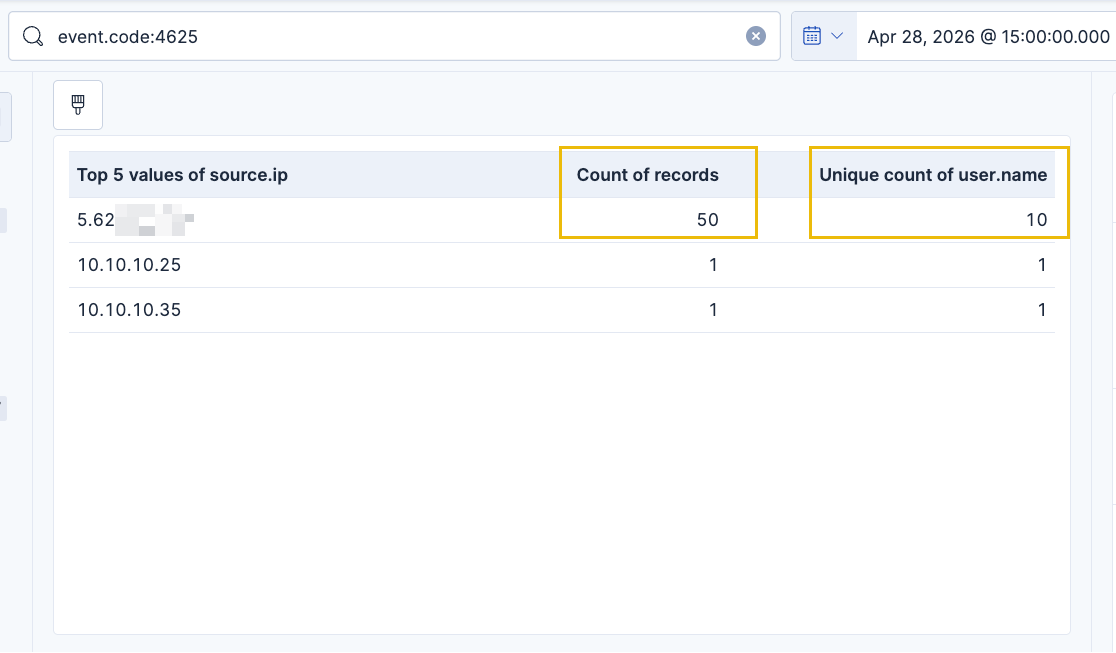
Considering your understanding of the attack and the necessary log sources, you can observe the attacker's behavior in your environment:

Baseline Normal Behavior
Understanding normal is arguably the most overlooked part of detection engineering, but it's what separates a useful rule from a noisy one. Key questions: How is this service normally used? Is the exploited feature needed in the enterprise? Who uses it, and from where?
RDP is a legitimate tool used daily by IT staff. A few failed logons are expected, since users mistype passwords. Legitimate admin access typically originates from known , involves a small number of accounts, and rarely produces sustained failure patterns.
What is not normal: failed logons across many accounts from an external IP in a short time window. This distinction is what your detection logic will target.
Match the Malicious Behavior
With research complete, you can now define the specific pattern that separates malicious activity from noise. Key questions: Is this a rare event on its own? Is there a suspicious sequence or combination of events? Can statistics help distinguish malicious from benign?
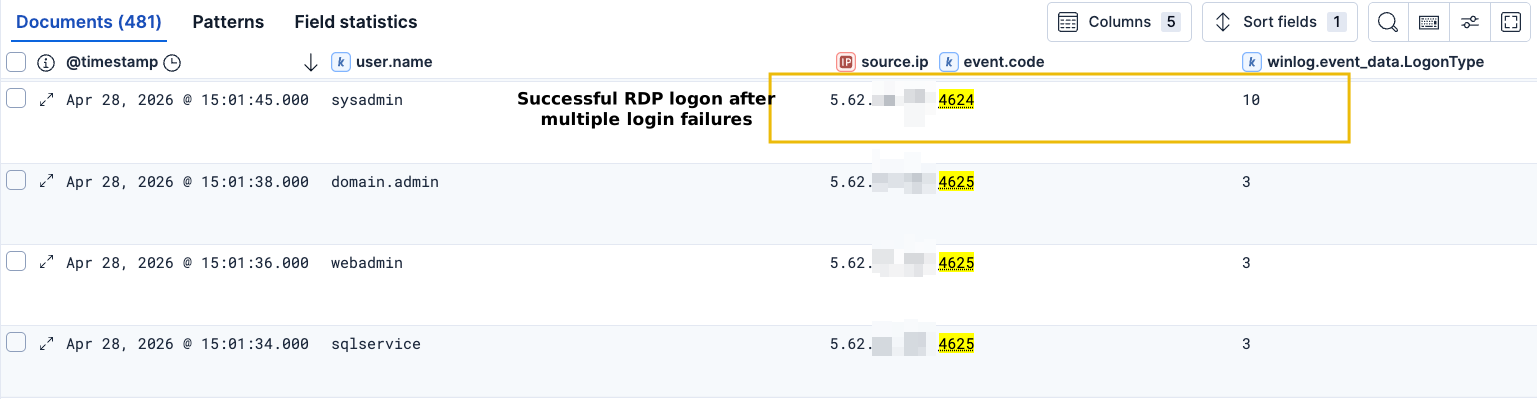
A single failed logon (4625) is not suspicious in itself. The spray pattern stands out because failed logons are distributed across multiple distinct accounts from the same external source IP within a short time window. Unlike a classic brute-force (many passwords against one account), the volume per account is low, and the signal lives in the account diversity. A subsequent successful logon (4624, ) from the same IP further strengthens the case.
Based on this analysis, the detection concept is around:
- Alert when a single source IP generates failed RDP logons against N or more distinct accounts within a defined time window, especially if followed by a successful logon.
Identify Bypasses
Another phase during the Match Malicious Behavior step is to understand how an attacker could break this detection without changing the technique itself. This is the core idea of Adversarial Detection Engineering (ADE), a framework that proactively reasons about how detection logic can fail, instead of waiting for real-world false negatives to teach you the hard way.
For example, a rule matching process.name: "psexec.exe" is defeated the moment an attacker renames the binary to svchost.exe. The technique is unchanged, but the detection misses it entirely. A more durable rule would target behavioral indicators that survive renaming, such as the command-line arguments, parent-process patterns, original file name, or service creation.

Identifying bypasses does not mean every rule must be bypass-proof, since this is often impossible. The goal is to make the rule's limitations visible so they can be tracked, layered with other detections, incorporated into threat-hunting routines, or accepted as known gaps. There are multiple ways to apply bypassing techniques that are out of scope for this room, but you can deep-dive into them at the ADE Framework, maintained by Nikolas Bielski and Daniel Koifman.
Analyze Prevention
Detection is a reaction; prevention stops the attack before it succeeds. If a control can eliminate the threat entirely, the detection may not be needed. At a minimum, prevention reduces the attack surface. It's not ideal to have RDP directly exposed to the internet. It's recommended to restrict access to VPNs only, complemented by account lockout policies and MFA, if possible.
A detection rule here acts as a safety net not just against attackers, but against future mistakes like this one. Keep in mind that this type of recommendation may be part of a detection engineer's role, as daily log review can yield valuable insights for network or security architecture teams.
Practice: Researching Internal Reconnaissance
Now, it's time for you to apply the same methodology to the second stage of the attack chain: Internal Reconnaissance. To help with your first independent research, here are starting points for the research loop:
- Technique: After gaining initial access, attackers run built-in Windows commands to map the compromised environment, identify the current user, enumerate local and domain accounts, and gather network configuration. These are legitimate system utilities, which means the signal is not in the command itself but in the context: who ran it, when, and how many in sequence. Common commands include
whoami,net user,net group,ipconfig, andsysteminfo. - Log Sources:
| Event ID | Log | Description |
|---|---|---|
| 1 | Sysmon | Process creation: captures the full command line, parent process, and user |
| 4688 | Security Log | Process creation: available without Sysmon, but requires command-line auditing to be enabled |
Sysmon Event ID 1 is the preferred source because it logs the parent process and full command line arguments, giving you the context needed to distinguish an admin running ipconfig from an attacker chaining five recon commands in 30 seconds.
- Starting Query: Run this in Discover using KQL to filter all process creation logs related to common Windows tools:
event.code: 1 AND (winlog.event_data.Image:*whoami* OR *net* OR *ipconfig* OR *systeminfo*)Note that this is not a ready-to-use query for a detection rule; it has design issues, so consider it only a starting point for your research. Examine the results: identify the false positives (commands that are not recon activities), identify which user executed the commands, the parent process that spawned them, the host where they ran, and whether multiple commands were executed in a short time window.
What user executed the recon commands?
Answer Format: domain.thm\user
What is the Image of a false-positive identified in the results of the suggested query?
Answer Format: Paste the full path, such as "C:\Windows\System32\net1.exe"
What is the executable name of the recon tool used by the attacker that is missing in the suggested query?
Answer Format: The exact executable name, such as "whoami.exe"
In the previous task, you learned through detection research how to identify attack patterns to develop a solid detection. Now, the question becomes: how do you translate that research into detection rules that fire reliably and with minimal false positives?
The answer depends on the detection type you choose. Not all detections work the same way. Some trigger on a single event, others require counting events over time, and others correlate entire sequences of activity. Each type has distinct strengths, weaknesses, and use cases for which it is better suited.
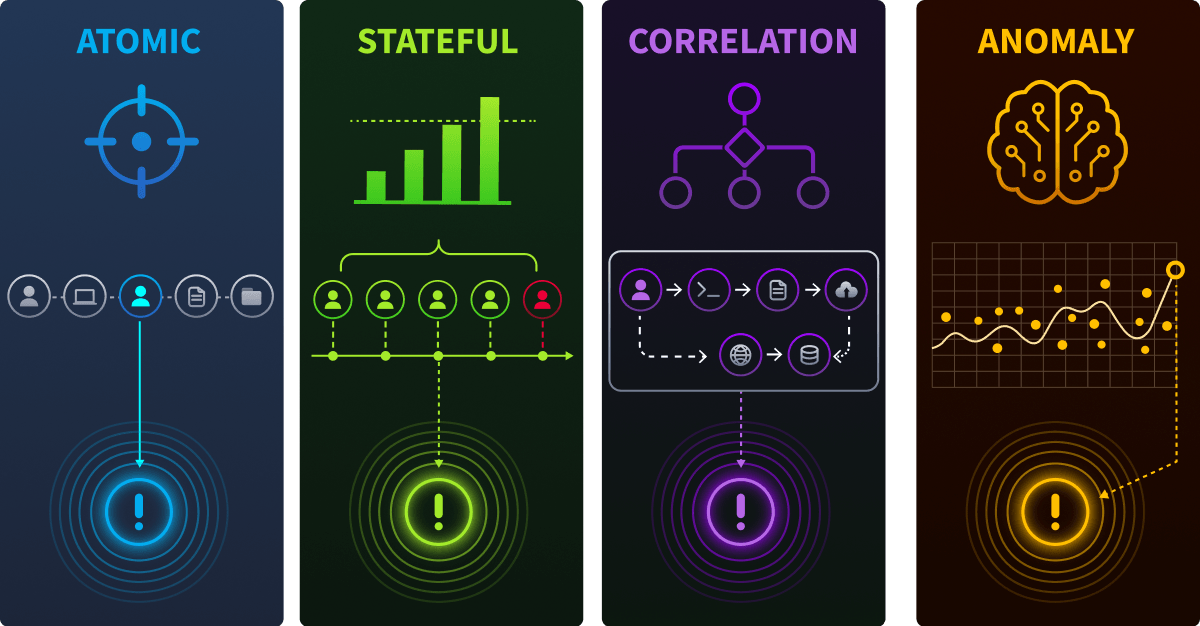
The following tasks cover four detection types, starting with the most popular and basic type: atomic detections.
Atomic Detections Overview
An atomic detection triggers on a single event that is independently suspicious or malicious. There is no aggregation, no correlation across multiple events, and no time-based windowing. If the event matches the rule's query, an alert fires with one event, one signal.
Atomic detections are the simplest and fastest to build. They work best when a single log entry contains enough context to indicate malicious behavior on its own: the execution of a known offensive tool, the creation of a suspicious scheduled task, or the execution of commands commonly used by attackers.
Atomic detections are appropriate when:
- A single event is inherently suspicious regardless of the surrounding context (e.g.,
mimikatz.exeexecutable in a process creation log). - The detection logic does not depend on event volume, frequency, or event sequencing.
- Speed matters. For example, you want the lowest possible detection latency with no dependency on event accumulation.
The trade-off: atomic detections are prone to false positives when the targeted behavior also occurs during legitimate operations. A sysadmin running whoami is not an attacker, but your rule does not know that without additional context. That's when the research process you learned previously became a core step before deploying atomic detections.
Building an Atomic Detection with Elastic
In the attack chain, after the attacker gained initial access via RDP brute-force, the first post-exploitation action was host reconnaissance. The attacker executed a series of built-in Windows commands to map the compromised environment, such as:
whoami: Identify the current user and privilege levelnet user: Enumerate local user accountsnet group "Domain Admins" /domain: Identify domain administrator accountsipconfig: Map network interfaces and IP configuration
Each of these commands generates a process creation event (Sysmon Event ID 1 or Windows Security Event ID 4688) that is logged independently.
Keep in mind that atomic detections can generate multiple false positives, so pick the right reconnaissance command that is more uncommon or unique within the environment before creating the detection rule.
Step 1: Create a Custom Query Rule
- Navigate to Elastic Security → Rules → Detection Rules (SIEM) → Create new rule. Select Custom query as the rule type.
Click on the image below to zoom in.

Before adding the query to the detection rule, consider the following:
- On the previous task, you found that the initial query was generating some false positives. Make sure to address these false positives in your query.
- Also, there's another recon tool that wasn't covered by that query. Could you find it? A good start is by taking a look at the process creation logs (
event.code: 1) around the same timestamp as the other reconnaissance commands.
With your refined KQL query, add it to the custom query field and click Continue.
Step 2: Configure Rule Metadata
Each company uses its own rule metadata standard, but below is a common reference. Use it for building your own:
- Name: T1059.001 - Suspicious Reconnaissance Command Execution
- Description: Detects execution of an uncommon Windows reconnaissance command that is commonly used during post-exploitation host enumeration. These commands are built-in Windows utilities and can generate false positives from system administrators and automated tools. Investigate the parent process, user context, and timing to determine legitimacy.
- Severity: Low
- Risk score: 21
- MITRE ATT&CK: Tactic →
Discovery, Technique →System Information Discovery (T1082)andAccount Discovery (T1087)
The severity is set to Low because these commands are legitimate system utilities. The detection's value lies in being a building block, individually low-confidence but critical when correlated with other attack chain events in later tasks.
Step 3: Configure Scheduling
- Runs every:
5 minutes - Additional look-back time:
1 minute
A 5-minute interval balances detection speed against the SIEM performance. Shorter intervals (e.g., 1 minute) reduce latency but multiply query load, which matters when running hundreds of rules in production. For a low-severity reconnaissance detection, 5 minutes is a reasonable default; higher-priority rules may justify tighter intervals at the cost of additional resources.
Scheduling terminology varies across SIEM platforms: Elastic uses "interval" and "additional look-back time", Splunk uses "cron schedule" with "earliest/latest time modifiers", and Microsoft Sentinel uses "query frequency" and "lookup period". The underlying concept is the same, but configuration fields and performance implications differ.
Step 4: Testing and Deploying
Before creating and enabling the detection, it's always important to test the rule. Elastic provides a feature, the Rule Preview, that enables a detection engineer to test the detection using historical data before deployment.
On the right side of your screen, set Apr 28, 2026 @ 14:00:00.000 -> Apr 28, 2026 @ 18:00:00.000 as the timeframe of your rule test.
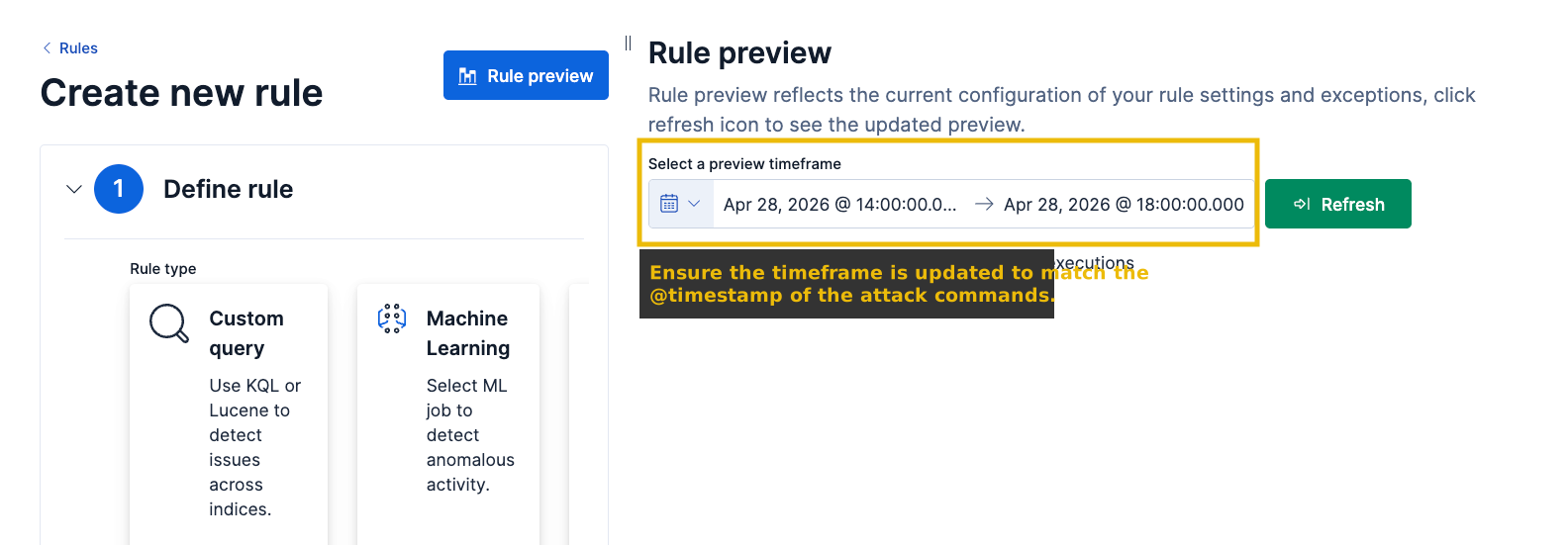
Review the triggered alerts to confirm your detection is working properly, then click Create & enable rule. Now that you've created your first atomic detection rule, answer the following questions before moving to the next task!
Considering that 1 alert was generated for each recon command performed by the attacker, how many alerts were generated?
What is the name of the detection rule type responsible for creating atomic detections on Elastic?
You learned that atomic detections work well when a single event is enough to raise suspicion, but what about attack behaviors that only become visible through volume? A single failed logon tells you nothing. Hundreds of failed logons from the same IP in under a minute tell you everything.
Attacks like brute-force, credential spraying, and port scanning are not defined by any one event; they are defined by the same event happening far too many times, far too quickly. This is where stateful detection comes in.
What Is a Stateful Detection?
A stateful detection triggers when events accumulate past a defined threshold within a time window. Where an atomic detection asks "Did this event happen?", a stateful detection asks "Did this event happen enough times to be suspicious?"
Stateful detections are the primary tool for identifying patterns that are normal in isolation but malicious at scale: a single failed logon is routine, but 50 failed logons from the same source IP in 2 minutes is a strong indicator of a brute-force attack:

Stateful detections are appropriate when:
- The individual events are benign or ambiguous on their own (failed logons, queries, process starts).
- Malicious intent only becomes apparent through repetition, velocity, or cardinality. Targeting many accounts from one source, for example.
The trade-off: stateful detections introduce detection latency proportional to the time window required for event accumulation. An attacker who brute-forces slowly (one attempt per minute over hours) may stay below a threshold designed for rapid attacks.
Refer to this article if you want to further explore the key differences between atomic and stateful detections and when to use each.
Threshold Rules in Elastic Security
The attacker's initial access vector was a credential brute-force attack against an internet-facing service, targeting multiple user accounts from a single external IP address and generating a high volume of failed logon events in a short time window before eventually authenticating successfully via RDP.
This is the textbook use case for stateful detection: individual failed logons are not malicious, but the volume and velocity from a single source clearly indicate an automated attack. Elastic Security's Threshold rule type is purpose-built for stateful detections. It executes a query, groups the results by one or more fields, counts the events per group, and fires an alert only when the count exceeds the configured threshold.
Key concepts of a stateful detection:
| Parameter | Purpose | Threshold Rule Field |
|---|---|---|
| Query | Base filter. It selects which events enter the aggregation | Custom query |
| Group by | Field(s) to partition results. The threshold is evaluated per group. | Group by |
| Threshold value | Minimum event count required to trigger an alert. | Threshold |
| Cardinality (optional) | Requires a minimum number of distinct values for a field within each group. | Count and Unique values |
Cardinality deserves special attention because it changes what you are detecting. Without cardinality, the threshold rule counts raw failed logons per source IP, where an attacker hammers a single account with many password attempts. With a cardinality condition on user.name (e.g., at least 5 distinct usernames per source.ip), the rule shifts to detecting password spraying, where an attacker tries a small number of passwords across many accounts to avoid lockout thresholds. Same rule structure, same KQL query, but the cardinality parameter changes the technique you are targeting.
Step 1: Create a Threshold Rule and Define the Query
In the same Create new rule tab you previously used, select Threshold as the rule type.
Click the image below to zoom in.

Now, fill the required fields to properly detect the password spraying behavior:
- Custom Query: Your custom query should aim for the failed login events you observed during the research phase. Use the following query as a starting point:
event.code: "4625" AND winlog.event_data.LogonType: "3" - Group by:
source.ip - Threshold:
10 - Count:
user.name - Unique values:
5
Click Continue.
Grouping by source.ip ensures each attacker is tracked independently. If you grouped by user.name instead, a targeted attack against a single account would trigger, but a spray across many accounts from the same IP (which is the pattern in this attack chain) might not, because each username would be counted separately.
However, no single group-by field covers every attack scenario. An attacker who rotates across multiple source IPs (e.g., using a botnet or VPN pool) would distribute failed logons across many groups, keeping each IP below the threshold, causing a false negative.
This is where layering multiple detections with different scopes becomes critical. A complementary rule grouped by host.name instead of source.ip would detect an abnormal spike in total failed logon volume on the target host, regardless of the number of IPs or usernames involved. Each rule has a blind spot; deploying rules with different group-by perspectives ensures that what one misses, another catches.

Step 2: Configure Rule Metadata
Add the following data to the rule metadata:
- Name: T1110.001 - RDP Brute Force: Password Guessing
- Description: Detects 10 or more failed logon attempts from a single source IP within the scheduled time window. This pattern indicates automated credential password-spraying activity. Known false positives: misconfigured service accounts performing repeated authentication, network scanners, and vulnerability assessment tools.
- Severity:
Medium - Risk score:
47 - MITRE ATT&CK: Tactic →
Credential Access, Technique →Brute Force: Password Guessing (T1110.001)
Click Continue.
Step 3: Configure Scheduling
- Runs every:
5 minutes - Additional look-back time:
1 minute
You should understand how scheduling directly impacts detection latency for stateful rules. If a brute-force attack begins at 12:00:00 and the rule is scheduled to run every 5 minutes, the earliest the rule can detect it is during its next execution, potentially 12:05:00. The actual detection time depends on when in the interval the attack occurs relative to the rule's schedule. In the worst case, an attack will have nearly 5 minutes of latency.
Click Continue.
Step 4: Testing and Deploying
Now, you should perform the same Rule Preview testing as you did in the previous task by setting the timeframe on the right side of your screen with Apr 28, 2026 @ 14:00:00.000 -> Apr 28, 2026 @ 18:00:00.000.
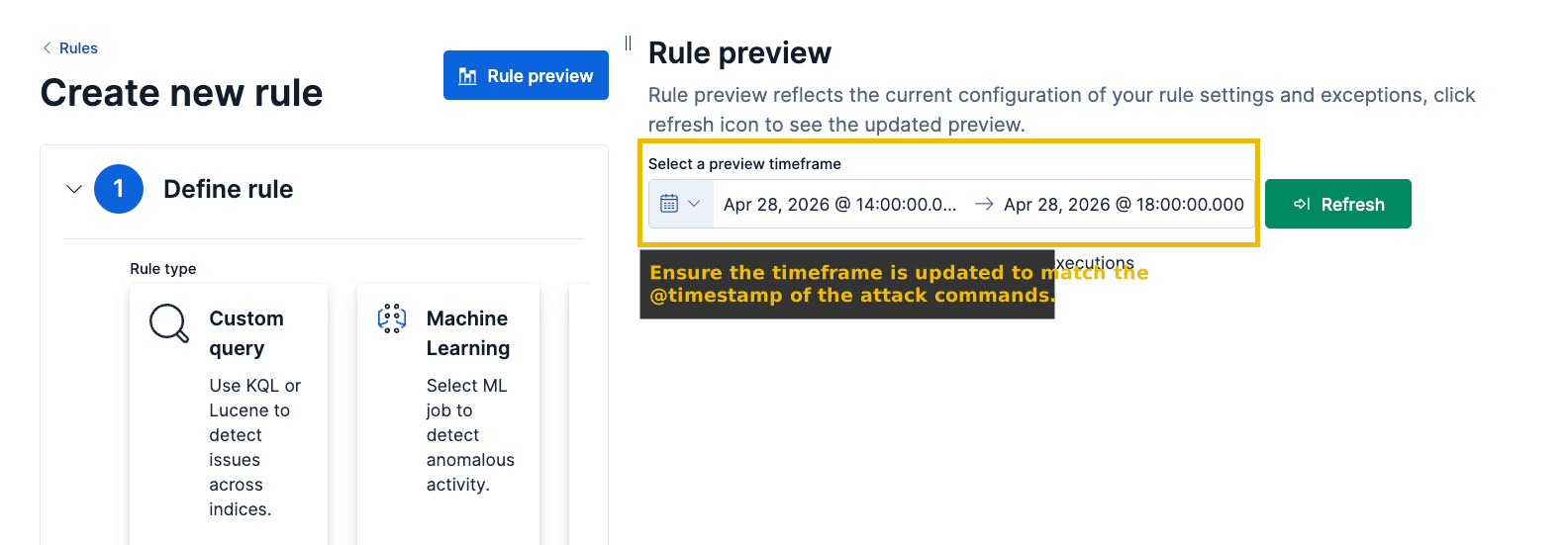
Review the triggered alerts to confirm your detection is working properly, then click Create & enable rule. Now that you've created your first stateful detection rule, answer the following questions before moving to the next task!
How many alerts were generated related to a password spraying pattern?
What is the attack IP, and how many total failure attempts did the attacker IP have?
Answer Format: "IP, Failures", such as "192.168.1.1, 78"
How many usernames did the attacker test?
You now understand atomic and stateful detections, but you've probably noticed the problem: an admin whoami execution or a legitimate login failure due to an account being locked may trigger the detection rules too often for non-malicious activity.
The real question is: how can we add some trust to these low-confidence alerts? That's when a correlation-based approach helps detection engineers.
What Is a Correlation-Based Detection?
A correlation-based detection identifies ordered sequences of events that, taken together, represent a multi-step attack pattern. No single event in the sequence is necessarily malicious; the detection logic depends on specific events happening in a defined order, often joined by a common entity (host, user, process) and constrained by a time window.
Consider the attack chain in this room. The attacker IP generated 50 failed logon attempts across multiple accounts against an internet-exposed device, but that does not mean a SOC analyst should investigate every single password spray attempt; they should prioritize the ones followed by a successful authentication.

Correlation-based detections are appropriate when:
- The individual events in the sequence are benign or low-confidence on their own, but the combination in order is high-confidence malicious.
- The attack involves multiple distinct phases that produce different event types (process creation, authentication, network connection).
- You need to reduce false positives by requiring multiple conditions to be met sequentially, rather than alerting on any single condition.
The trade-off: correlation rules are more complex to write, test, and maintain. They also require that all events in the sequence are logged and ingested. If one step in the chain is not captured, the sequence breaks and the detection fails silently.
EQL: The Language for Correlation Rules
EQL (Event Query Language) is Elastic's purpose-built language for expressing event sequences with temporal constraints. Where KQL matches individual documents, EQL matches ordered patterns across multiple logics.
Core EQL syntax for sequences:
sequence by <join_field> with maxspan=<duration>
  [<event_category> where <condition>] with runs = N
  [<event_category> where <condition>]
[<event_category> where <condition>]sequence: Declares an ordered sequence of events.by <join_field>: All events in the sequence must share the same value for this field (e.g.,host.namemeans all events occurred on the same host).with maxspan=<duration>: The entire sequence must complete within this time window (e.g.,15m).with runs=N: Applied to a sequence step, this requires the step to match at least N times before the sequence progresses. This is how you express "5 or more failures" without listing each one explicitly.- Bracket
[ ]: Each one defines one step in the sequence, specifying an event type and conditions.
Below is a sample ready to deploy EQL logic:
sequence by user.name with maxspan=5m
  [process where process.name == "cmd.exe"] with runs=3
  [file where file.extension == "exe" and file.path like "*\\Temp\\*"]
  [network where destination.port == "443"]
Events must match in order. For example, if the successful logon occurs before the failed attempts in the logs, the sequence does not match.
Building the Event Correlation Rule in Elastic
In the attack chain logs, the attacker performed a password spray against the RDP service on jmp-01. The sequence unfolded as follows:
- 50 failed logon attempts across multiple account names, all originating from the attacker's external IP.
- A successful logon (Event ID 4624, LogonType 10), from the same source IP.
The failed attempts alone triggered the threshold rule from Task 5. But that alert tells the SOC: "someone is spraying." It does not tell them: "someone got in." The correlation rule in this task answers that second, more urgent question.
Step 1: Create an Event Correlation Rule
In the same Create new rule tab you previously used, select Event Correlation as the rule type.
Click the image below to zoom in.

Your EQL query should cover the two steps introduced before: "multiple failed logons from the same source IP, followed by a successful authentication."
Use the EQL query below as your rule query:
sequence by source.ip with maxspan=5m
  [authentication where event.code == 4625 and
      winlog.event_data.LogonType == 3] with runs = 10
  [authentication where event.code == 4624 and
      winlog.event_data.LogonType == 10]
Click Continue when you have finished with your detection logic.
Step 2: Configure Rule Metadata
Add the following data to the rule metadata:
- Name: T1110.003 - RDP Password Spray: Successful Logon Following Multiple Failures
- Description: Detects a sequence where a single source IP generates 10 or more failed network logon attempts followed by a successful RDP logon from the same IP within 5 minutes. This pattern indicates a successful credential access following a password spray or brute-force attack against an RDP service. Known false positives: automated monitoring tools that perform repeated authentication checks and then establish a legitimate session; misconfigured service accounts that cycle through credential failures before succeeding.
- Severity:
High - Risk score:
73 - MITRE ATT&CK: Tactic →
Credential Access, Technique →OS Credential Dumping: LSASS Memory (T1003.001)
Note the severity increase from Task 5. The threshold rule in Task 5 fired on the spray attempt and warranted a Medium severity, as spraying alone does not indicate access was achieved. This correlation rule fires only when access is confirmed, which changes the risk profile significantly. A successful logon following a spray is a high-confidence initial access.
Step 3: Configure Scheduling
- Runs every:
5 minutes - Additional look-back time:
1 minute
For EQL sequence rules, the maxspan in the query and the rule schedule's time window serve different purposes. The maxspan constrains how far apart events in the sequence can be. The schedule window (interval + look-back) determines which events are visible to the rule on each execution. The schedule window must be at least as large as the maxspan. A rule that runs every 5 minutes with a 1-minute look-back queries a 6-minute window, which covers the 5-minute maxspan on every execution.
Step 4: Create, Enable, and Verify
Now, you should perform the same Rule Preview testing as you did in the previous task by setting the timeframe on the right side of your screen with Apr 28, 2026 @ 14:00:00.000 -> Apr 28, 2026 @ 18:00:00.000.
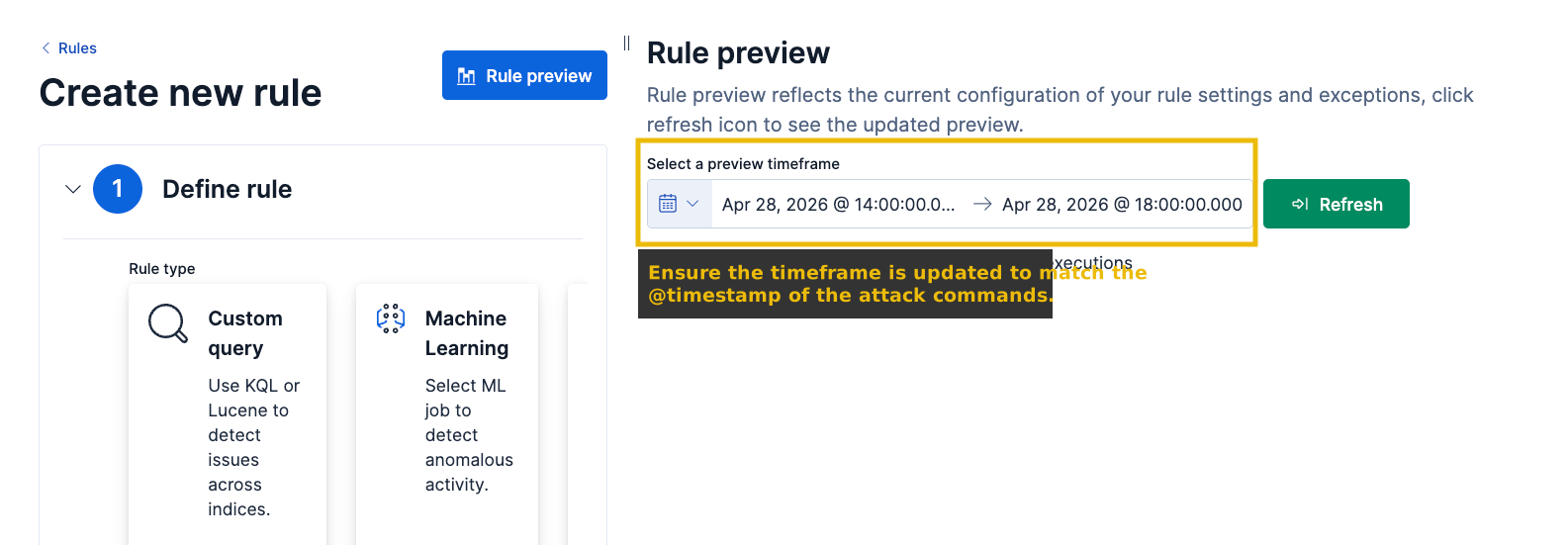
You may have noticed that multiple alerts were generated when only one was expected. This happens because with runs=10 means "at least 10 matches" rather than "exactly 10." If your logs contain 50 failed logons from the same IP, EQL finds multiple valid sequence instances, each starting at a different failure event, that all satisfy the threshold and are each followed by the same successful logon, producing one alert per match.
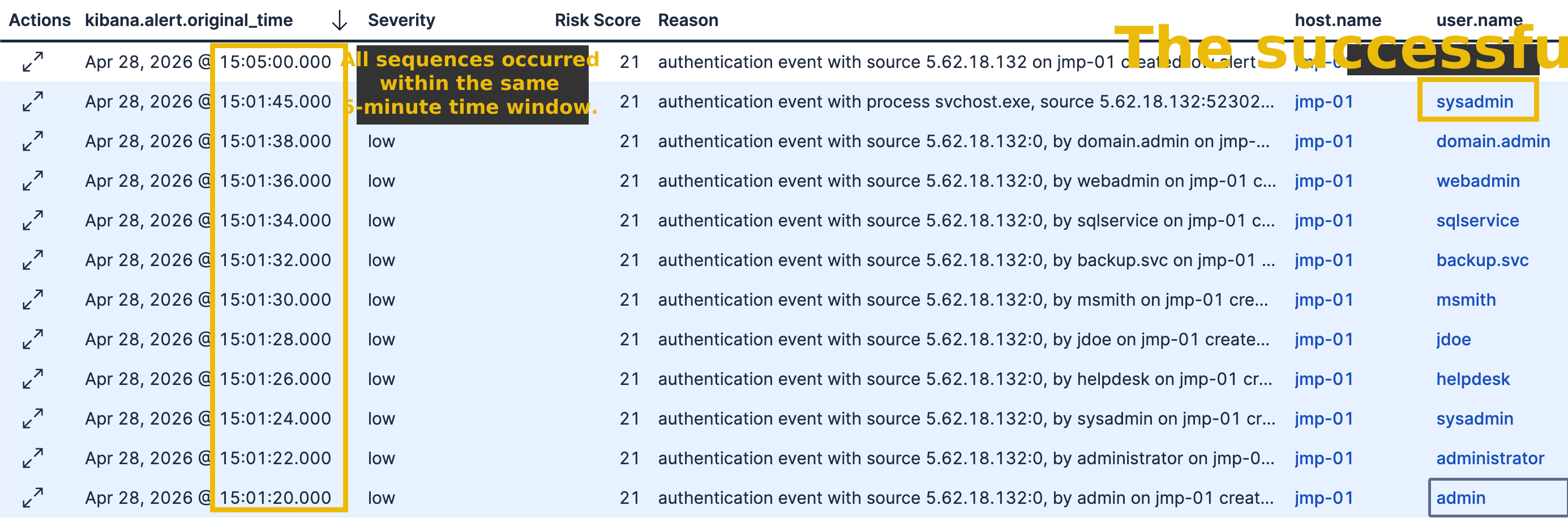
The intended fix is alert suppression, a rule-level setting that deduplicates alerts sharing the same field value within a defined time window. Configured with a common value in the alert's suppression field, Elastic would fire only the first alert and fold all subsequent matches into it.
Review the triggered alerts, then click Create & enable rule. Now that you've created your first correlation-based detection rule, answer the following questions before moving to the next task!
What field would be the best to be configured as a suppression field for your detection?
Removing the with runs condition from the EQL sequence would reduce the number of duplicate alerts. What type of alerts would your detection be more susceptible to generating with that change?
Answer Format: True Positive
Across the previous tasks, every rule you wrote defined exactly what to look for: a specific process name, a count threshold, an ordered sequence of events. But what about the attacks you cannot define in advance? An insider using valid credentials, a tool you have never seen before, or a service account behaving slightly outside its normal pattern? Anomaly detection flips the approach: instead of defining what is malicious, you define what is normal and alert on deviations.
What Is Anomaly Detection?
Anomaly detection identifies data points or patterns that deviate significantly from an established baseline. It is the primary implementation of behavioral detection in modern platforms.
To understand what anomaly detection looks for, run the following query in Discover:
event.code: "4625"As you can see in the image below, there is a clear spike in failed logons during the attack window, a volume that sharply deviates from the flat baselines before and after. That spike is what an anomaly detection model would score and automatically alert on, without you having to define a threshold.
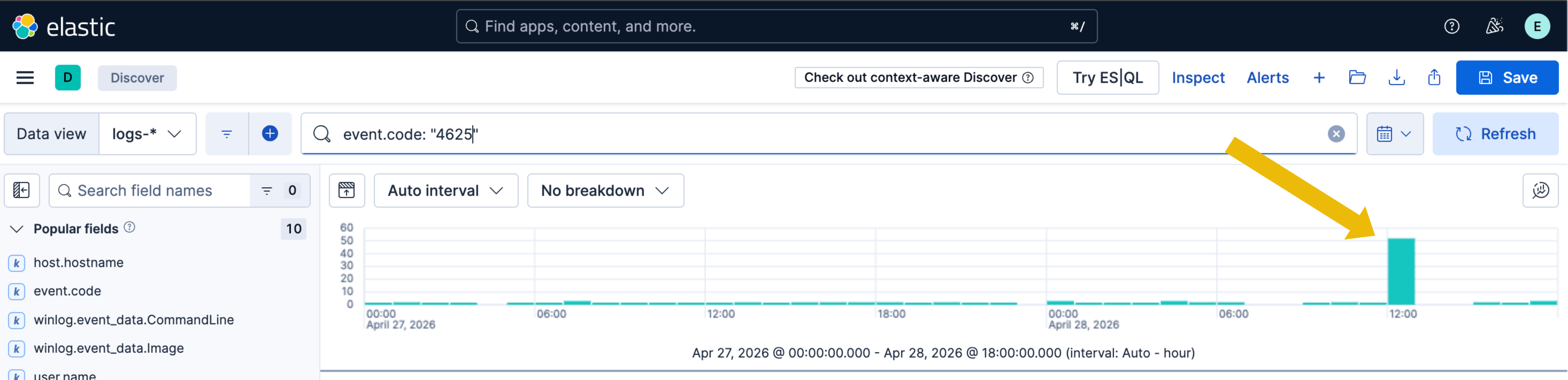
The example above is known as a Global Anomaly, but there are three main types of anomalies you should be familiar with:
| Anomaly Type | Description | Example |
|---|---|---|
| Global Anomaly | A single data point far outside the norm. This is the most common and simple type of anomaly used in detection rules. | A user who averages 5 failed logins per day suddenly generates 200 in an hour. |
| Contextual Anomaly | A data point that is only abnormal in a specific context. Also known as rare events. | A sysadmin running at 10:00 is routine; the same command at 03:00 on a Sunday is suspicious. |
| Collective Anomaly | Individual events that are normal in isolation but form an anomalous pattern as a series. | A single Windows service installation is unremarkable; multiple installations on five servers within ten minutes is not. |
How Anomaly Detection Works
The lifecycle has four phases:
- Step 1 - Training Window: The model ingests historical data and learns what "normal" looks like. For authentication, this includes typical login times, source , and session frequency per user over a training period (typically 2–4 weeks minimum).
- Step 2 - Baseline Definition: The model sets upper and lower bounds around the baseline. A user averaging 10 logons/day might legitimately range between 5 and 18. Anything beyond those limits is flagged.
- Step 3 - Real-Time Scoring: Incoming events are scored from 0 to 100 based on how far they deviate from the baseline. A score of 15 is minor variance; a score of 85 is a significant deviation that triggers an alert.
- Step 4 - Continuous Learning: Baselines update as new data arrives, adapting to legitimate changes (role changes, new projects) while retaining sensitivity to genuine deviations.

Machine Learning Rules in Elastic Security
Elastic Security includes a Machine Learning rule type that consumes the output of pre-built anomaly detection jobs, covering use cases like unusual process execution per host, rare destination countries, anomalous authentication, and uncommon service installations. An ML rule references a job, sets an anomaly score threshold (typically 75), and triggers when the score exceeds it. You can also create your own anomaly detections and define the threshold score you want.
ML features in Elastic Security require a Platinum or Enterprise license. Unfortunately, this room runs on a basic license, so you will not be able to create an ML rule directly. That said, the concept of anomaly detection can still be demonstrated in Discover.
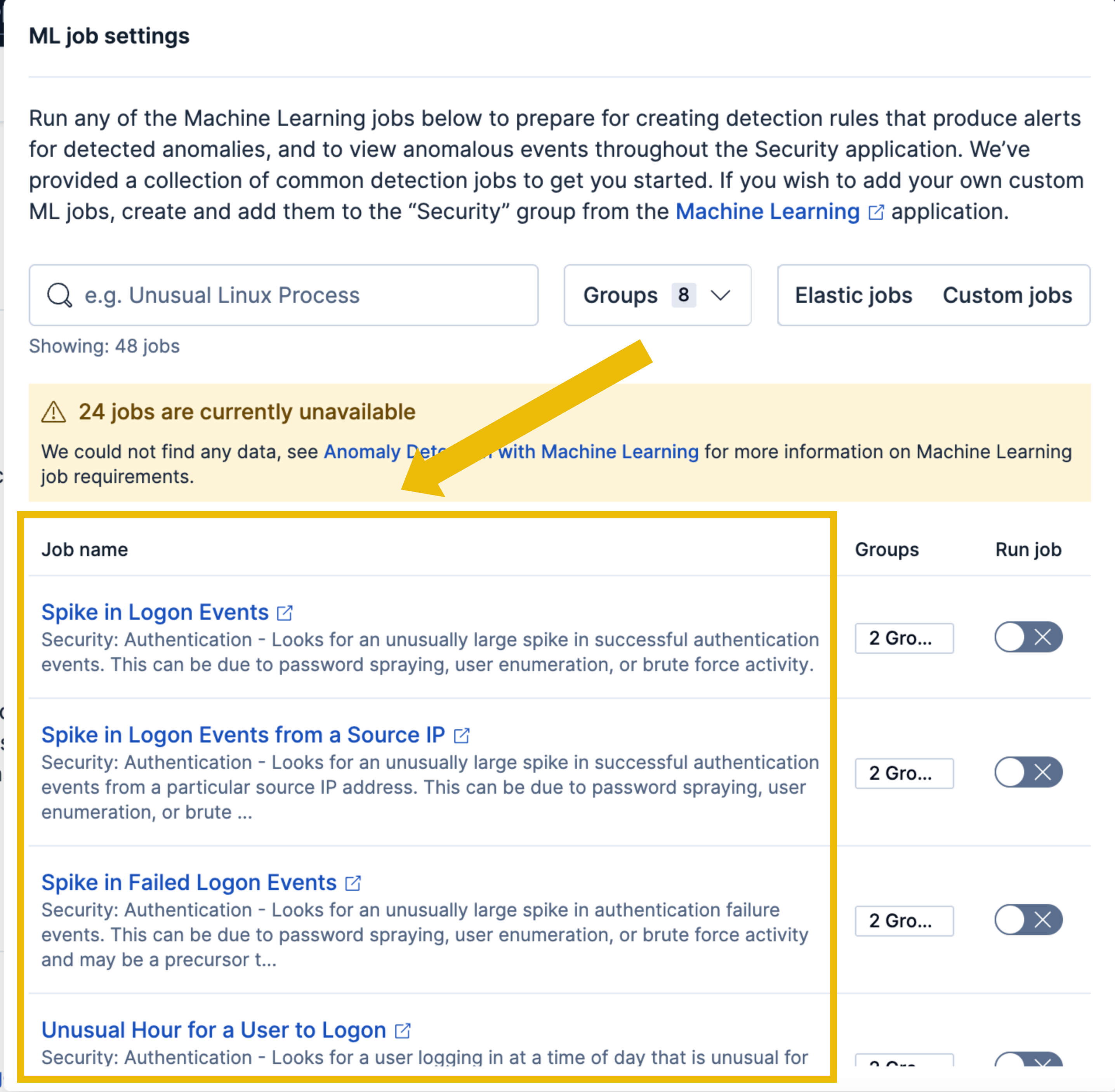
The PsExec lateral movement step in the attack chain is a perfect candidate for anomaly-based thinking. If you filter for service creation events in your environment, you will observe that service creation is not a common behavior on app-01 outside the attack window. When one suddenly appears, that single event is a strong anomaly signal on its own.
In Elastic, open Discover and select the logs-* index pattern. Set the time range to April 27, 2026, and apply this KQL filter:
event.code: "7045" and host.name: "app-01"In the time histogram, you should observe that service installation events are rare, with no events at all. This is your environment baseline.
Now narrow the time range to April 28, 2026. You can also observe the spike during the attack window. The service installation that occurred on app-01 stands out as a clear deviation from the surrounding baseline. This is exactly what an ML model would flag automatically: a service installation on a host that rarely sees them, by an account that does not normally install services.
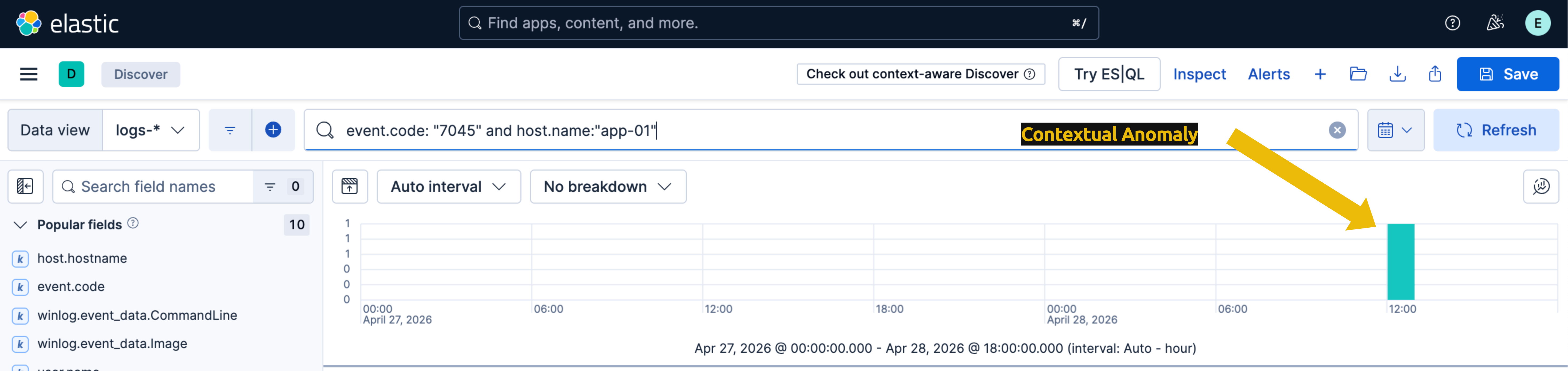
The combination of fields tells the story that an ML model would otherwise score numerically: a service that has never been installed on this host before, with an executable in a non-standard path, installed during a window where service installations are statistically rare. That convergence of signals is the anomaly.
Anomaly Detection vs Other Detection Types
In a production environment, ML jobs would complement the rules from earlier tasks. An anomalous service installation job would catch the PSEXESVC install regardless of the tool name. An attacker can use the -r flag and change the service name created in the target machine:
psexec \\RemoteComputer -r MyService cmd.exeThe table below explains how anomaly detection can avoid this bypass compared to an atomic detection:
| Detection Type | ServiceName = PSEXESVC |
Service Name = EvilService |
|---|---|---|
Atomic: triggers when a service is created with ServiceName = PSEXESVC |
✓ |
✗ |
| Anomaly: triggers when a service is created outside the host's normal behavior |
✓ |
✓ |
None of these signals requires knowing that PsExec was used. The detection is based on accounts and hosts deviating from their baselines, not on the specific technique employed. This is the core advantage of anomaly detection: technique-agnostic coverage that complements your signature-based and correlation-based rules.
What Elastic rule type uses anomaly detection jobs and statistical baselines to identify deviations from normal activity?
A user who normally logs in between 08:00 and 18:00 authenticates at 03:00. This data point is only abnormal because of the timing context. What type of anomaly is this?
You have now explored four types of detection you can implement in a company's environment. But running detections is only half the job. The other half is making sure your alerts are useful, which most of the time doesn't happen on the first attempt. Welcome to detection tuning!
Why Detections Need Tuning
In some cases, a detection, whether new or old, doesn't behave exactly as expected during the deployment. The first time you enable a rule against real production traffic, one of three things may happen:
- Too many alerts: the rule fires on legitimate activity that resembles the malicious pattern. Analysts experience alert fatigue and start ignoring or auto-closing alerts, sometimes including the real ones.
- Too few alerts: the rule is so narrow that real attacks evade it. False negatives are silent failures: nothing tells you the rule missed something until the incident comes up.
- Right number, wrong context: alerts fire on the right behavior but lack enough information for an analyst to act on them quickly, slowing down triage.
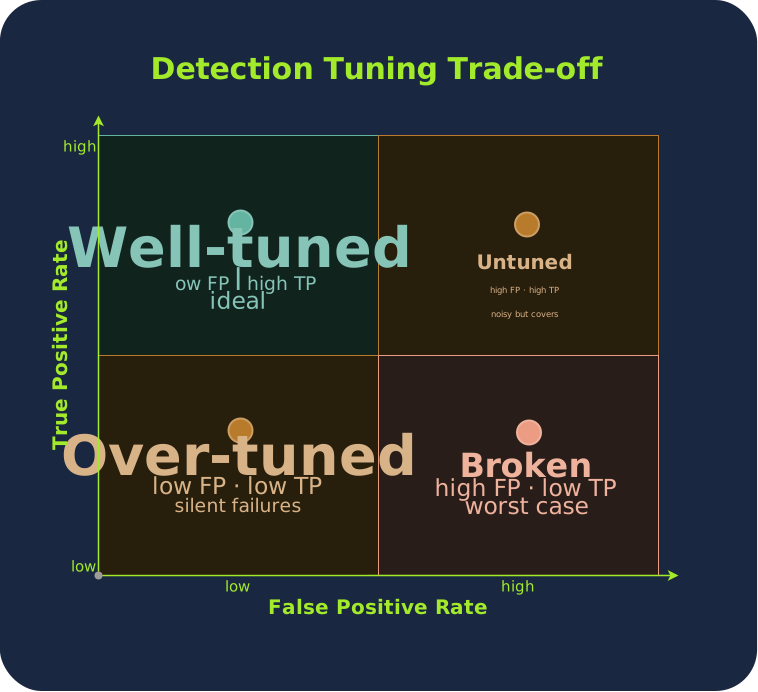
Detection tuning is the iterative process of adjusting rules to maximize true positive coverage while minimizing false positives, keeping alerts actionable and severity calibrated to actual risk.
The image below is the Detection Tuning Trade-off Matrix. Each ball represents a detection rule plotted by its true positive rate (how many real attacks it catches) against its false positive rate (how many benign events it flags). The goal of tuning is to move every rule toward the top-left quadrant.
Basic Tuning Strategies
There are four core tuning techniques every detection engineer uses to bring a rule under control, and you should be aware of:
- Allowlisting / Exclusions: Exclude known-good processes, service accounts, or expected . If your vulnerability scanner generates 1,000 failed logons every Monday, exclude its source IP rather than letting it drown out real spray attempts.
- Threshold Adjustment: Change the count, time window, or sensitivity. Firing on every failed logon is noise; firing on 15 failures in 5 minutes is a signal.
- Field Enrichment: Add context fields to reduce ambiguity. A
whoami.exealert is low-confidence on its own, but enriched with parent process, logon ID, and source IP, it becomes triageable. - Full Rework: A rule was designed for a purpose that no longer holds, and incremental adjustments cannot fix it. The detection logic, scope, or rule type itself needs to be rebuilt from scratch with a new context and design. This is the practical example you will walk through next.
Tuning the Atomic Recon Rule
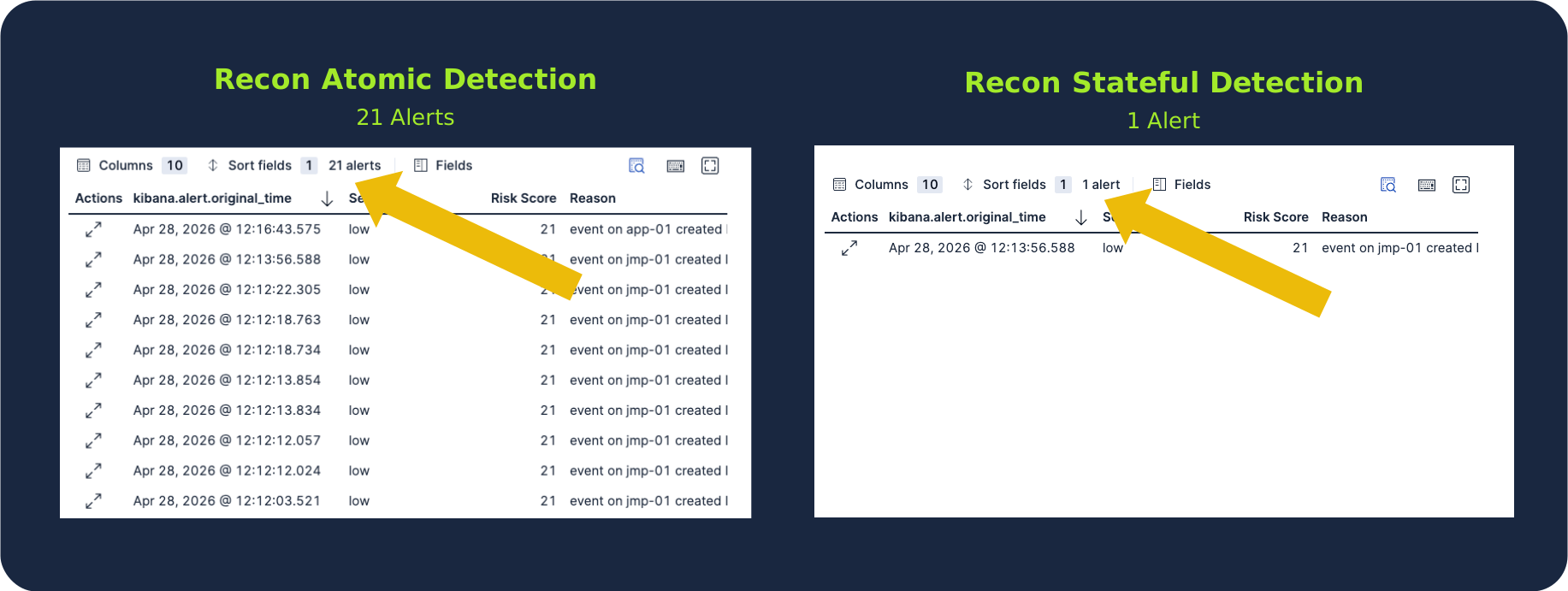
The atomic recon detection you built in Task 4 fires whenever whoami.exe, net.exe, ipconfig.exe, nltest.exe, or systeminfo.exe is executed. The problem: System administrators run these commands constantly during legitimate troubleshooting. After enabling the rule, the SOC may be flooded with low-confidence alerts, many of which are benign.
The behavior that is malicious in your attack chain is not "an admin ran whoami once", it is "an attacker ran multiple recon commands back-to-back in under a minute." That is the pattern your rule needs to match to avoid multiple false positives.
Step 1: Convert the Atomic Rule to a Threshold Rule
Navigate to Elastic Security → Detect → Rules → Create new Rule and select Threshold.
Keep the same KQL filter:
event.code: "1" AND (winlog.event_data.Image:"*whoami.exe*" OR "*net.exe*" OR "*nltest.exe*" OR "*ipconfig.exe*" OR "*systeminfo.exe*")Step 2: Configure the Threshold
This is where the tuning happens. Set the following:
- Group by:
host.nameandwinlog.event_data.LogonId - Threshold:
>= 3
The combined host.name + LogonId grouping is critical. It ties the alert to a specific logon session rather than just the host. If an attacker and an admin are active at the same time, their activities remain separate. The LogonId from a successful brute-force logon becomes the unique identifier that links all recon commands back to that single intrusion.
The threshold of 3 means the rule fires only when 3 or more distinct recon commands execute within the same logon session. A single admin running ipconfig during troubleshooting will never reach this threshold; an attacker running whoami, net user, and systeminfo in quick succession will.
Step 3: Adjust the Time Window and Severity
Keep the default scheduling settings (the same as previous tasks). Run the Rule Preview with Apr 28, 2026, as the test date and a 3-hour timestamp around the attack window, the same approach you used for the threshold and correlation rules in Tasks 5 and 6.
You should observe one alert firing, instead of the dozens that the original atomic rule produced:
Detection tuning is a never-ending task. Environments change, and new applications are deployed, employees change roles, scheduled tasks are added, and rules that were perfectly tuned six months ago will drift back into noise or silence. Effective detection programs include a regular review cycle where rules are evaluated against recent alert outcomes and adjusted accordingly.
The four techniques in this task are the building blocks. The work of detection engineering is applying them iteratively, every week, for as long as the detection runs.
What is the attacker's LogonId?
What type of tuning strategy did you apply in this task?
Detection rule authoring is the craft that turns threat knowledge into the alerts your relies on every day. Throughout this room, you explored the four detection types every engineer should know, walked through a structured research process to take a threat from intelligence to a working rule, and built four real detections (atomic, stateful, correlation-based, and anomaly) against a complete attack chain spanning recon, brute-force, credential dumping, and lateral movement. You also closed the loop with tuning, learning that a rule that fires is not the same as a useful rule. Before moving on, make sure you are comfortable with the following:
- Detection types are tools, not labels: Atomic, stateful, correlation, and anomaly each fit a different kind of attacker behavior. Picking the wrong one means either missing the activity entirely or drowning your analysts in noise.
- Research before rule, always: A detection without research is a guess. The research process, including understanding the threat, the data sources, and the environment, is what separates rules that protect from rules that frustrate.
- Tuning is not optional: Every rule degrades the moment it touches production traffic. False positives, false negatives, and shifting environments mean tuning is part of the job, not an afterthought.
You now have the foundation to author detections end-to-end. But the rules you've built so far speak only Elastic's language, and great detections shouldn't be locked to a single platform. Head over to the Sigma Language room (coming soon) to learn how to express the same logic in a vendor-agnostic format that travels across , Elastic, Sentinel, and beyond!
Ready for Sigma!
Ready to learn Cyber Security?
TryHackMe provides free online cyber security training to secure jobs & upskill through a fun, interactive learning environment.
Already have an account? Log in