Now that we have covered segmentation and secure architecture design, how do we enforce it? If there are routes between VLANs intended to be separated, how is the appropriate access restricted or granted?
Policies aid in defining how network traffic is controlled. A network traffic policy may determine how and if a router will route traffic before other routing protocols are employed. IEEE (Institute of Electrical and Electronics Engineers) has standardized a handful of access control and traffic policies, such as QoS (Quality of Service) (802.11e). There are still many other routing and traffic policies that are not standardized by IEEE but are commonly used by all vendors following the same objectives.
This task will focus on traffic filtering and introduce network policy concepts.
Traffic Filtering
Before formally defining what traffic filtering is, let’s discuss one of the most common standards of defining traffic filtering: ACL(s) (Access Control List(s)).
An ACL is used as a loose standard to create a ruleset for different implementations and access control protocols. In this task, we will use ACLs within a router to decide whether to route or drop a packet based on the defined list.
An ACL contains ACE(s) (Access Control Entry) or rules that define a list’s profile based on pre-defined criteria (source address, destination address, etc.)
Once defined, we can use an ACL for several vendor-specific implementations. For example, Cisco uses ACLs for traffic filtering, priority or custom queuing, and dynamic access control.
Formally, traffic filtering provides network security, validation, and segmentation by filtering network traffic based on pre-defined criteria.
We’ve now defined what traffic filtering is and how the criteria are defined. Let’s look at how we can implement ACLs in traffic filtering or access control policies.
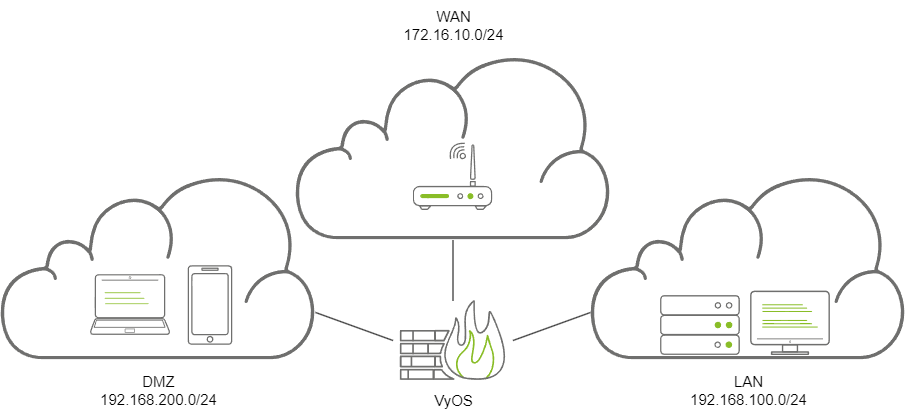
To get hands-on, we will look at the policies that VyOS offers. The VyOS access-list policy is the platform’s most basic implementation of filtering. The policy will use ACLs or prefix lists to define the criteria for filtering.
Let’s break down how VyOS creates an ACL and defines the policy.
Create the new access-list policy, defining the ACL number (1 - 2699)
set policy access-list <acl_number>
Set the description of the access list.
set policy access-list <acl_number> description <text>
Create a new rule (or ACE) under the ACL and define the action of the rule.
set policy access-list <acl_number> rule <1-65535> action <permit|deny>
Define criteria or parameters for the rule to enforce/match.
set policy access-list <acl_number> rule <1-65535> <destination|source> <any|host|inverse-mask|network>
At this point, we have an ACL and an ACE that is actively being enforced by the router.
Let’s recap, the ACL is defined as an ACL number and is made of separate rules or ACEs that describe the behavior of the ACL. Each ACE can determine the action, destination/source, and the specific address/range to trigger the ACE.
Below is a diagram showing a valid SSH request permitted by the ACL.
Internet Protocol Version 4, Src: 10.10.212.209, Dst: 10.10.212.209
    Protocol: TCP (6)
    Header checksum: 0xbfdd [validation disabled]
    [Header checksum status: Unverified]
    Source: 10.10.212.209
    Destination: 10.10.212.209
Transmission Control Protocol, Src Port: 35560, Dst Port: 22, Seq: 1578, Ack: 1670, Len: 148
    Source Port: 35560
    Destination Port: 22
set policy access-list 1 rule 1 action permit
set policy access-list 1 rule 1 source 10.10.212.209
Below is a diagram showing an invalid SSH request denied by the ACL.
Internet Protocol Version 4, Src: 10.10.212.209, Dst: 10.10.212.209
    Protocol: TCP (6)
    Header checksum: 0xbfdd [validation disabled]
    [Header checksum status: Unverified]
    Source: 10.10.212.209
    Destination: 10.10.212.209
Transmission Control Protocol, Src Port: 35560, Dst Port: 22, Seq: 1578, Ack: 1670, Len: 148
    Source Port: 35560
    Destination Port: 2
set policy access-list 1 rule 1 action deny
set policy access-list 1 rule 1 source 10.10.212.209
If correctly implemented, the router should now drop or accept packets based on their source or destination address.
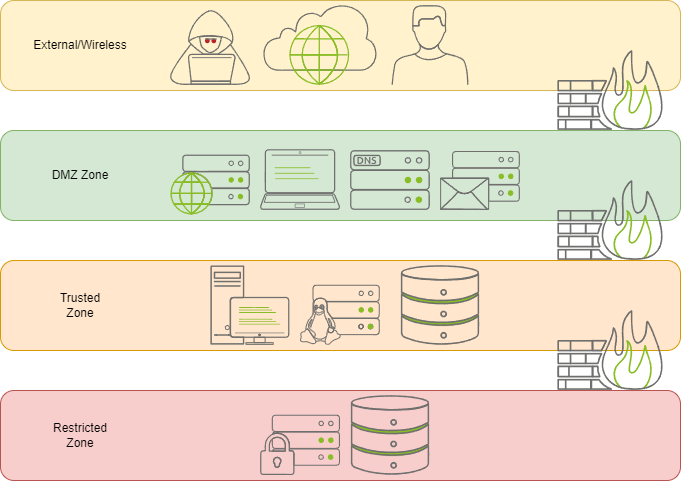
But is this the best solution? Recapping what was covered in task 3, what if we want a public web server in the DMZ and ensure that only HTTP traffic originates from it? What if specific hosts need specific protocols to be open on a server? A router can only provide a limited amount of extensibility for security.
In the next task, we will continue answering this question and look at how we may approach solutions for this problem.
Analyzing Packets and ACLs
Now that we understand the structure of an ACL and what it will look for in a packet, let’s analyze a few packets and ACL policies to determine if they will be accepted or dropped.
Below is each packet and ACL policy required; answer the questions using the resources below.
Packet #1 (Click to view)Internet Protocol Version 4, Src: 10.10.212.209, Dst: 10.10.212.209
Protocol:TCP (6)
Header checksum: 0xbfdd [validation disabled]
[Header checksum status: Unverified]
Source: 10.10.212.209
Destination: 10.10.212.209
Transmission Control Protocol, Src Port: 35560, Dst Port: 22, Seq: 1578, Ack: 1670, Len: 148
Source Port: 35560
Destination Port: 22
ACL Policy #1 (Click to view)set policy access-list 1 rule 1 action permit
set policy access-list 1 rule 1 source 255.255.255.0
set policy access-list 1 rule 1 source 10.10.212.0/24
Packet #2 (Click to view)Internet Protocol Version 4, Src: 10.10.212.200, Dst: 10.10.212.209
Protocol:TCP (6)
Header checksum: 0xbfdd [validation disabled]
[Header checksum status: Unverified]
Source: 10.10.212.209
Destination: 10.10.212.209
Transmission Control Protocol, Src Port: 35560, Dst Port: 22, Seq: 1578, Ack: 1670, Len: 148
Source Port: 35560
Destination Port: 2
ACL Policy #2 (Click to view)set policy access-list 1 rule 1 action deny
set policy access-list 1 rule 1 destination 10.10.212.209