
Back to all walkthroughs



NetworkMiner
Premium roomLearn how to use NetworkMiner to analyse recorded traffic files and practice network forensics activities.
easy
To access material, start machines and answer questions login.

NetworkMiner is an open-source traffic sniffer, handler and protocol analyser.
Developed and maintained by Netresec.
Tool Description
NetworkMiner is an open-source Network Forensic Analysis Tool (). It runs on Windows, , macOS, and FreeBSD, and can be used two ways: as a passive sniffer that fingerprints hosts, sessions, and open ports without sending any traffic, or as a PCAP parser that reassembles files and certificates from captured traffic for offline analysis. This room covers the basics of network analysis and walks you through investigating captured traffic with NetworkMiner.
Learning Objectives
- Discover what NetworkMiner is
- Learn the basics of NetworkMiner
- Explore the different information tabs and extract information efficiently
Prerequisites
- Complete the Network Fundamentals room
Environment and Setup
Throughout this room we will use the same for the walkthrough and the exercises. This is an Ubuntu 20.04 VM where two versions of NetworkMiner are installed. Instructions are included in the tasks when to use a certain version. Start the VM by clicking the Start Lab Machine button. The VM will start in split-view, if this is not the case, click the blue Show Split View at the top of the room.
Set up your virtual environment
To successfully complete this room, you'll need to set up your virtual environment. This involves starting the Lab Machine, ensuring you're equipped with the necessary tools and access to tackle the challenges ahead.

Lab machine
Status:Off
How To Start NetworkMiner
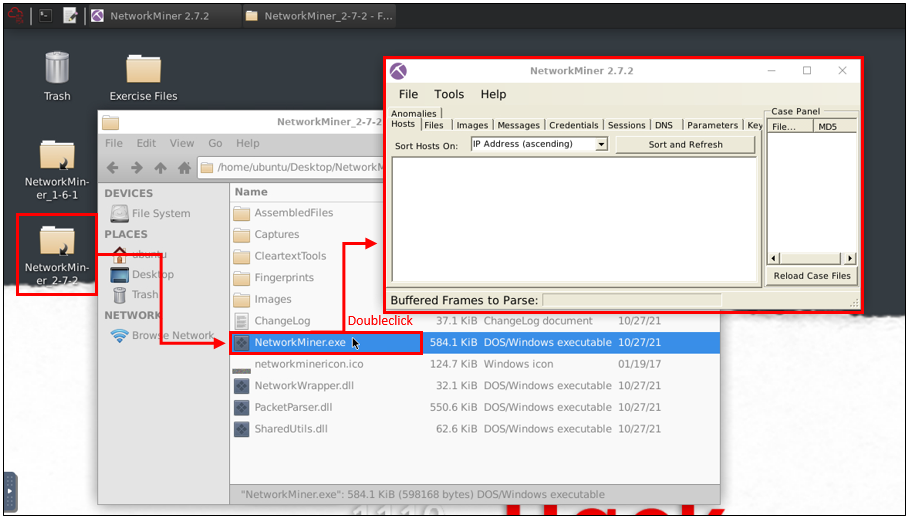
Navigate to the Desktop of the VM and open the NetworkMiner folder (choose the correct version), then double-click the NetworkMiner.exe binary to start NetworkMiner. The image below shows the visual flow. Note: When loading larger PCAP files, it can take up to a minute to complete (please be patient). Sometimes, due to the way NetworkMiner visualises the data, some packets/frames are not shown. If you notice that you are missing a frame (when answering a question for example), please reload the PCAP.
Answer the questions below
Read the task above.
Ready to learn Cyber Security?
The NetworkMiner room is only available for Premium or Max subscribers. Signup now to access more than 500 free rooms and learn cyber security through a fun, interactive learning environment.
Already have an account? Log in