
Back to all walkthroughs


nginx: CVE-2026-123007
Unauthenticated HTTP/2 heap-corruption RCE in nginx 1.31.8 (CVE-2026-123007).
hard
To access material, start machines and answer questions login.
Northvale Academy runs an evening college for adult learners, and a two-person IT (information technology) team keeps its servers online. One of those servers is a small Debian box that hosts course materials. Every evening, students pull PDFs and slides from it over HTTPS. It's done that job quietly for years. The team patches on a schedule that fits a school calendar, so updates are held until term breaks. That server still runs nginx 1.31.8, which Coralogix's advisory lists as vulnerable.
On 2026-11-18, F5 disclosed -2026-123007, an unauthenticated remote code execution flaw in nginx's /2 implementation, in a coordinated advisory on the oss-security list. It is the headline bug of a cluster that researchers named nginx2root. An attacker who can reach the server over HTTP/2 needs no password, account, or prior foothold. The flaw is in how nginx tracks HTTP/2 flow control. Flow control is the accounting that determines how many bytes nginx can send to a client. nginx 1.31.8 is the last release that contains it.
nginx is one of the most widely deployed web servers on the internet, so a flaw in its HTTP/2 path impacts a huge number of systems. It's not new code. HTTP/2 came into nginx with 1.9.5, and the accounting error has been in that code since then. The bug has sat dormant for about ten years until the disclosure turned it into a vulnerability that attackers can now exploit.
In this room, we're after Northvale's asset server (assets.northvale.thm). It's a containerized server that serves the course files over HTTP/2 and runs the vulnerable nginx 1.31.8.
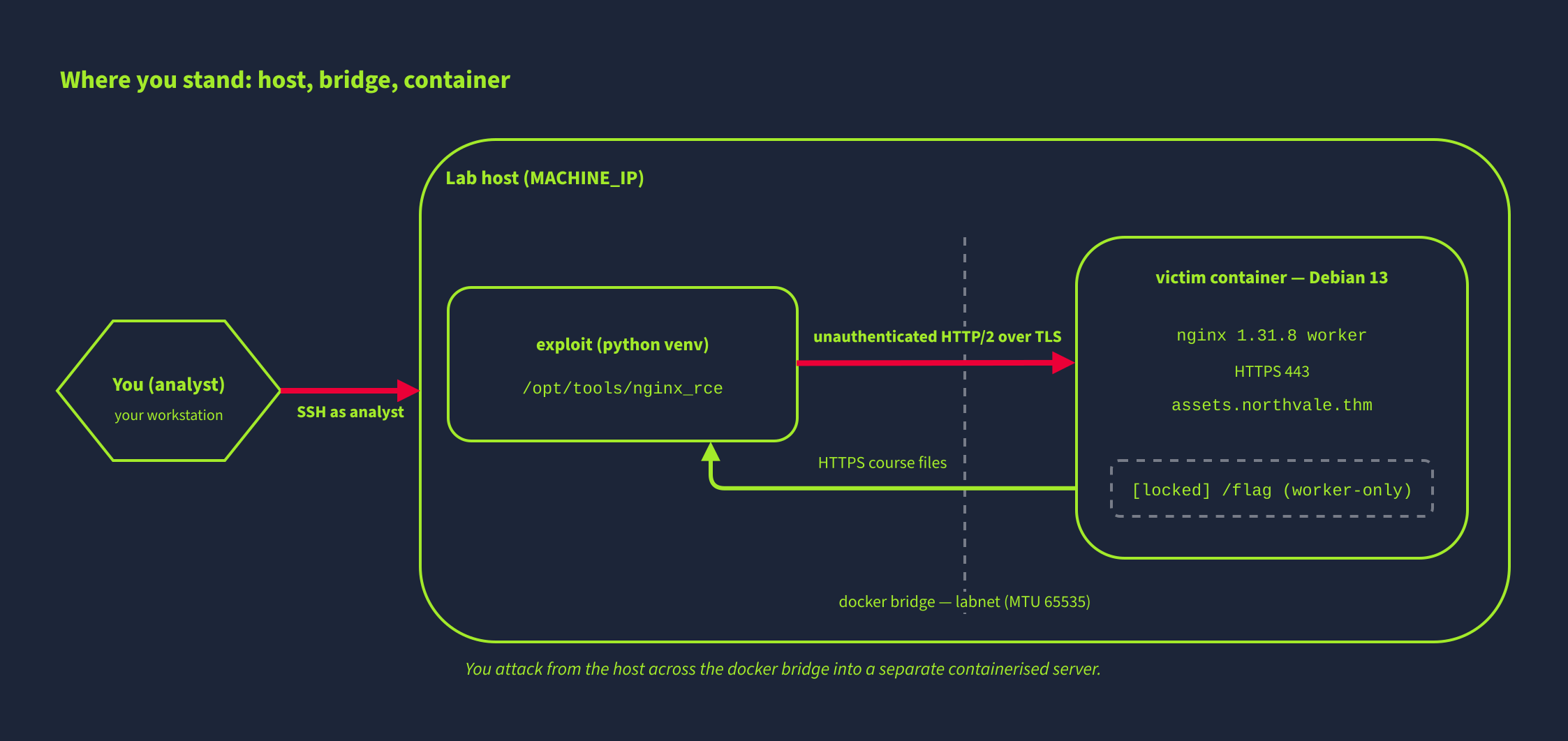
We work from the outside in. We trace the flow-control accounting bug and use that to run code as the nginx worker (the unprivileged process that serves each client request). From there, we run the public proof-of-concept (PoC) exploit that Rapid7 published, retrieve the flag only the worker can read, and confirm the runtime inside the container. We finish off by detecting the attack and patching it.
The fix went out the same day as the disclosure (1.31.9 on mainline, 1.30.7 on stable). Northvale hasn't applied it yet, so their server is still accessible.
Learning Objectives
This room walks you through CVE-2026-123007 from the HTTP/2 accounting bug all the way to a fully functional remote code execution exploit and the fix. You'll learn how to:
- Explain HTTP/2 flow control and its send window.
- Trace a window overflow into an out-of-bounds
memcpy. - Reach code execution as the nginx worker.
- Run the credited exploit against the containerized server.
- Confirm the target's runtime from inside its .
- Detect and remediate the HTTP/2 flow-control attack.
Room Prerequisites
This room expects comfort with a Linux shell over , the basics of HTTP and TLS, and a high-level sense of memory corruption, Address Space Layout Randomization (ASLR), and what remote code execution means. We do not assume any prior knowledge of HTTP/2 internals or exploit development; the room builds the flow-control model from the ground up. If these fundamentals are new to you, the TryHackMe Junior Penetration Tester path covers the web and Linux groundwork. For the same organization and the same SSH setup, the earlier Northvale Academy OpenSSH room is a natural warm-up.
Before you go on to Task 2, press the Start Machine button to get the lab host booted and give it a moment to come up. Once it is running, TryHackMe shows its address as MACHINE_IP, which is how you will reach it.
You will work on the lab host over SSH as the analyst account, and you can connect in either of two ways. The simplest needs nothing installed: once the machine is up, use the split-screen SSH terminal shown beside this task and log in as analyst. If you would rather use your own machine, join the TryHackMe VPN first, then connect from your own terminal with ssh analyst@MACHINE_IP. The password for either route is NorthvaleIT!, shown with the full connection command in the Credentials card below. In the next task, you'll make that first connection.
Credentials
Only needed if you are using your own machine.
Username
analyst
Password
NorthvaleIT!
IP address
MACHINE_IP
Connection via
SSH
ssh analyst@MACHINE_IP
Set up your virtual environment
To successfully complete this room, you'll need to set up your virtual environment. This involves starting both your AttackBox (if you're not using your VPN) and Lab Machines, ensuring you're equipped with the necessary tools and access to tackle the challenges ahead.
Attacker machine
Status:Off
Lab machine
Status:Off
Ready to learn Cyber Security?
The nginx: CVE-2026-123007 room is only available for Premium or Max subscribers. Signup now to access more than 500 free rooms and learn cyber security through a fun, interactive learning environment.
Already have an account? Log in