
Phishing Emails in Action
Learn the different indicators of phishing attempts by examining actual phishing emails.
easy


To access material, start machines and answer questions login.
In the first room of the Analysis module, Phishing Analysis Fundamentals, you learned how to investigate email headers and bodies to identify common red flags. Now, we transition to practice by examining real phishing email samples. This room focuses on the tactics attackers use to mirror legitimate communications. By analyzing real samples, you will learn to identify the subtle nuances that distinguish a routine notification from a sophisticated credential harvesting attempt. Note: The samples throughout this room contain information from actual emails. Proceed with caution if you attempt to interact with any IP, domain, or attachment.
Objectives
- Identify common tactics used in phishing
- Analyze red flags contained within phishing emails
- Detect link manipulation and tracking pixels
- Deconstruct credential harvesting and attachment manipulation
Prerequisites
- Check out Phishing Analysis Fundamentals for an overview of email communications and analysis
I am ready to analyze phishing emails!
In this task, we will examine a sample email designed to mimic an official transaction receipt from PayPal. By analyzing this specific sample, we will focus on how attackers leverage spoofed email addresses to impersonate trusted services and the strategic use of URL shortening services to obfuscate the final destination of malicious links.
Techniques Used
- Spoofed email address: Mimicking a trusted service to gain immediate credibility
- URL shortening: Using redirection services to hide the true destination of a link
- Branded HTML: Impersonating legitimate corporate imagery to create a sense of authenticity
First Observations
Let's first look at the sample email header and take a few notes on our immediate observations.
- Attention-grabbing subject line: The subject line uses a fake transaction to create a sense of urgency, prompting you to react in haste
- From address: This is an immediate red flag as the sender details
service@paypal.comdo not match the actual addressgibberish@sultanbogor.com - To address: This is an unusual email recipient address and not a normal Yahoo domain

Email Body Analysis
Taking a look at the email body below, we can see that this is a receipt for a purchase of gift cards. The email is designed to appear as a legitimate email from PayPal. There aren't any attachments associated with this email, and the only interactive element in this email is the Cancel the order button. Let's take a closer look.

Button Investigation
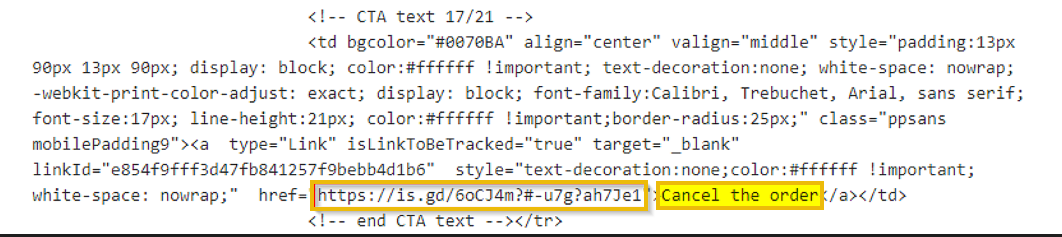
By inspecting the raw source of the email, we can further investigate the hyperlinks and underlying HTML that form the message. The Cancel the order button leads to the shortened URL. Because the attacker is using a URL shortening service, the final destination is obfuscated, making it impossible to verify the landing page at a glance. As a rule of thumb, you should never interact with buttons or links without first confirming exactly where they lead.
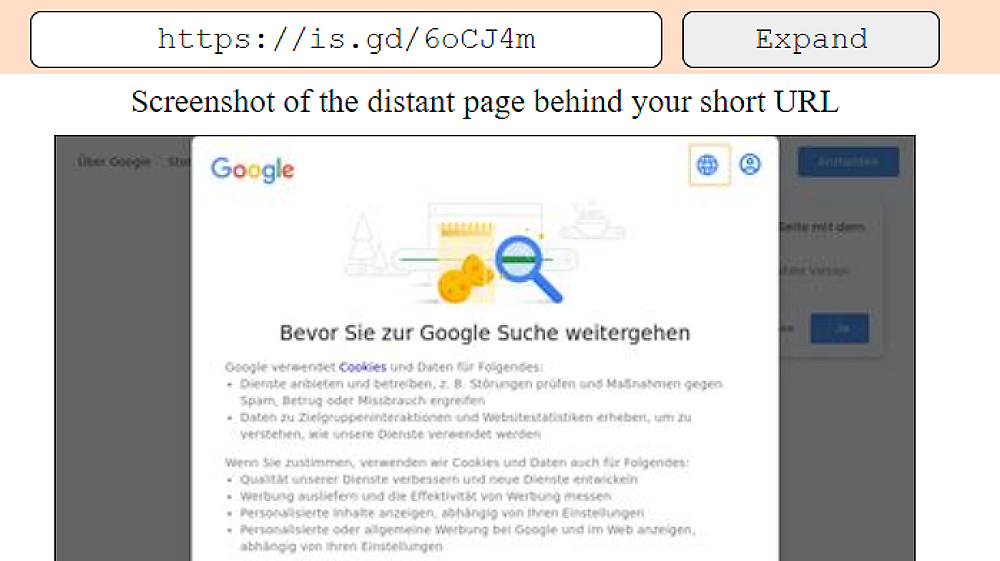
Thankfully for us, there are some great online tools, such as WhereGoes, that can be used to investigate shortened URLs without having to actually visit the destination.
Who is listed as the Merchant in the email body?
The next email we will investigate mimics a formal shipping notification to trick recipients into a sense of urgency. By analyzing this sample, we will uncover how attackers use spoofed addresses, link manipulation, and tracking pixels to compromise users. We’ll also examine the raw source code to see why email providers flagged these specific red flags.
Techniques Used
- Spoofed email address: Mimicking a trusted distribution center to gain immediate credibility
- Pixel tracking: invisible images to notify the sender when the email is opened
- Link manipulation: Masking a malicious destination with a fraudulent tracking number
First Observations
Let's take a look at the email below and try to highlight our initial observations.
- Subject line: The subject line uses a fake tracking number to create a sense of urgency, prompting the recipient to click to see their package status
- From address: This is an immediate red flag, as the display name Distribution Center does not match the actual sender address
contact@beginpro.club - Hyperlink: The link in the email body matches the subject line, although we do not know where it directs to just yet
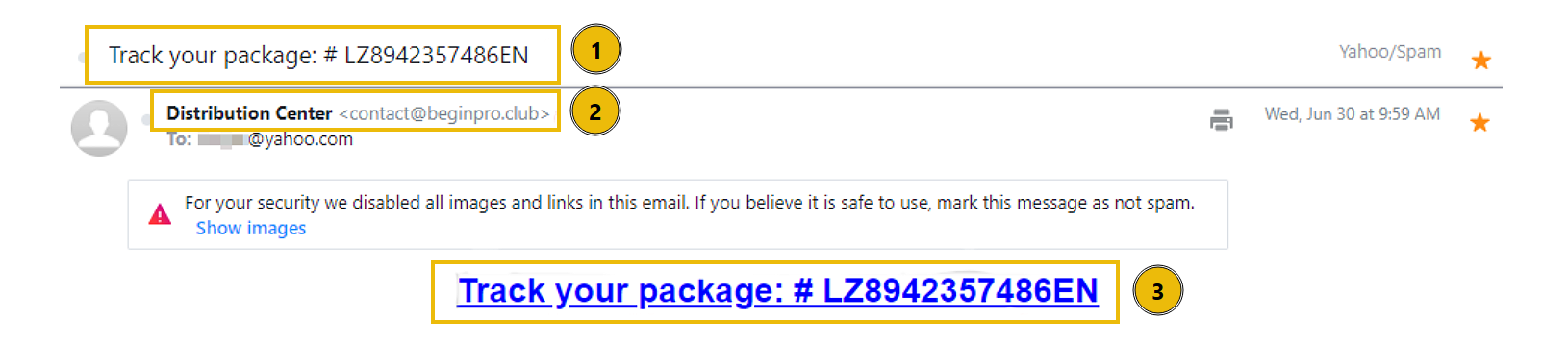
Note that in this email sample, Yahoo blocked the images from automatically loading. Any guesses as to why? Typically, you can hover the cursor over a link to see where the link is pointing to, but in this sample, that technique won't work because Yahoo disabled links in the email. We can look at the raw source code for the email and find out.
Hyperlink Tracking
Let's check out the source of the email message to get a closer look at the tracking number hyperlink from above. Here is an image file named Tracking.png. These trackers send information back to the spammer's server. There are several reasons spammers embed tracking pixels (very small images) into their emails, and now we can understand why Yahoo automatically blocked the images in this email. Many email providers do the same.

What root domain does the hyperlink in the above example point to?
Be sure to defang the URL.
In this task, we will analyze a campaign that utilizes a multi-stage redirection chain to harvest user credentials. This sample demonstrates how attackers leverage the reputations of professional document-sharing services, such as OneDrive, Adobe, and Microsoft, to create a deceptive path that leads the victim to a fraudulent login portal.
Phishing Techniques Used
- Artificial urgency: Creating a narrow window for action to create a sense of urgency
- Brand impersonation: Layering trusted brands, like Microsoft and Adobe, to build a false sense of security
- Link redirection: Using a chain of URLs to hide the final malicious destination from basic email filters
- Credential harvesting: Deploying a fake login portal to capture and exfiltrate usernames and passwords
First Observations
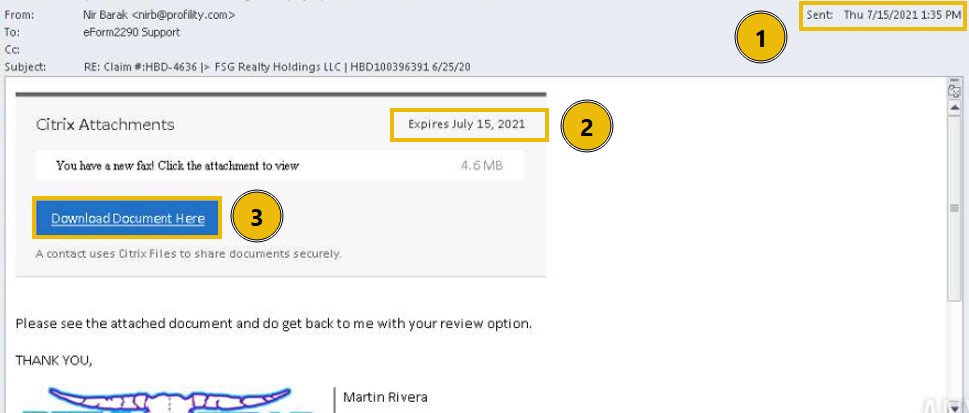
- Send date: The email was sent on Thursday, July 15th, 2021
- Expiration date: A sense of urgency is introduced in this email. Notice that the link to download the fax document expires on the same day
- Download Document Here button: There is an action to perform. In this case, a button to download the fax
Download Document Here
After clicking the Download Document Here button, the user is redirected to a landing page that mimics a legitimate OneDrive share. Interacting with the buttons on this page triggers a second redirection to a site impersonating Adobe, though several critical red flags are apparent. The URL is highly suspicious, and the provided directions are nonsensical. These inconsistencies lead to the final trap: a credential-harvesting portal that asks the victim to sign in with their email provider to view the document.

Logging In
In this example, the victim attempts to log in using Outlook. Even if they had entered valid credentials, the result would be the same: a generic error message. This happens because the page isn't actually authenticating the user to their mail service; it's simply a front used to send the credentials directly to the attacker's server. While this specific sample has obvious formatting and grammatical issues, keep in mind that these tells are becoming less reliable. With the help of , attackers can now easily generate polished, error-free content, making it harder to spot a scam based on typos alone.

The attacker deployed a fake portal to capture and exfiltrate user credentials.
What is this type of attack called?
In this example, we will again examine an email claiming to be from a trusted, household brand that demands immediate action from the recipient. While previous cases may have relied on malicious links, this variant introduces a shady attachment. By masquerading as an official billing notification, the attacker attempts to bypass standard email filters and leverage the victim's sense of urgency.
Techniques Used
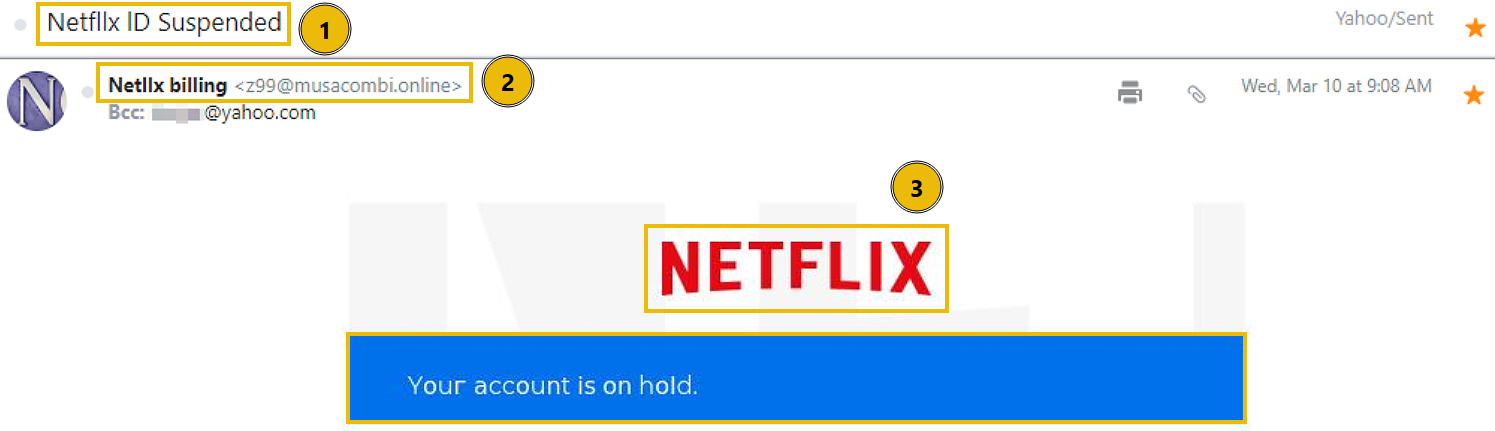
- Spoofed email address: The sender's display name is set to Netllx billing to appear legitimate
- Sense of urgency: Using a suspended account notification to pressure the victim into acting quickly
- Brand impersonation: Utilizing HTML templates and logos to mimic Netflix billing
- Poor grammar and typos: Noticeable misspellings of Netflix
- Attachments: Using a file attachment rather than a direct link to hide the malicious URL
First Observations
- Email subject: The receiver's ID was suspended and must act quickly
- From address: The display name does not match the user and domain
- Brand impersonation: The email utilizes rendered HTML to impersonate Netflix
Email Body and Attachment Analysis
Taking a look at the email body, we can see that the user is informed that there is an issue with their billing information. In order to update their account, they must open the attached PDF file. The attachment contains an embedded link titled Update Payment Account which directs to a URL not associated with a legitimate Netflix domain. We will investigate this email in detail in the next room of this module, Phishing Analysis Tools. There are a couple other of points of interest worth noting.
- The use of an atypical phone number format is a red flag
- Using a legitimate Netflix help center domain to build a false sense of trust

What is the actual sender email address hidden behind the Netllx billing display name?
In this example, we will analyze a attempt that masquerades as a billing notification from a major service provider. Unlike previous tasks that relied on body text to lure the victim, this sample utilizes a completely blank email body, and relies solely on a suspicious attachment. We will examine how attackers use BCC fields and spoofed domains to hide the true recipient list while leveraging a sense of urgency to trick the user into opening a malicious file.
Phishing Techniques Used
- Spoofed email address: The sender's display name is set to Apple Support
- Recipient is BCCed: The victim is not directly sent the email
- Urgency: Relies on the use of Action Required and a fake purchase notification
- Poor grammar and typos: Noticeable spelling errors within the email header
- Attachments: The email contains a .dot file (Microsoft Word Template), which is an unusual format for a receipt
First Observations
- Email subject: The recipient is told they must act quickly to resolve an unauthorized purchase, creating a false sense of urgency
- From address: The display name, Apple Support, does not match the user and domain. There are also typos in the From and To addresses
- Blind Carbon Copy: The recipient was not directly emailed, instead Blind Carbon Copied (BCC)

Analyzing the Attachment
The body of the email is completely blank, which is suspicious on its own. The only content present is an attachment in the form of a .dot file, so let’s investigate further. When the user interacts with the large image embedded in the document, they are redirected to a phishing site. Although the URL includes familiar terms like apps and ios to appear legitimate, its excessive length and complexity are strong indicators of a malicious redirection attempt.

What does the acronym BCC stand for?
What is the file extension of the attachment?
In this example, we analyze a attempt that masquerades as a global shipping notification using spoofed addresses and branded HTML to appear legitimate. We will examine how the attacker funnels the victim toward a malicious Excel attachment designed to execute a hidden payload.
Phishing Techniques Used
- Spoofed email address: The sender's display name is set to
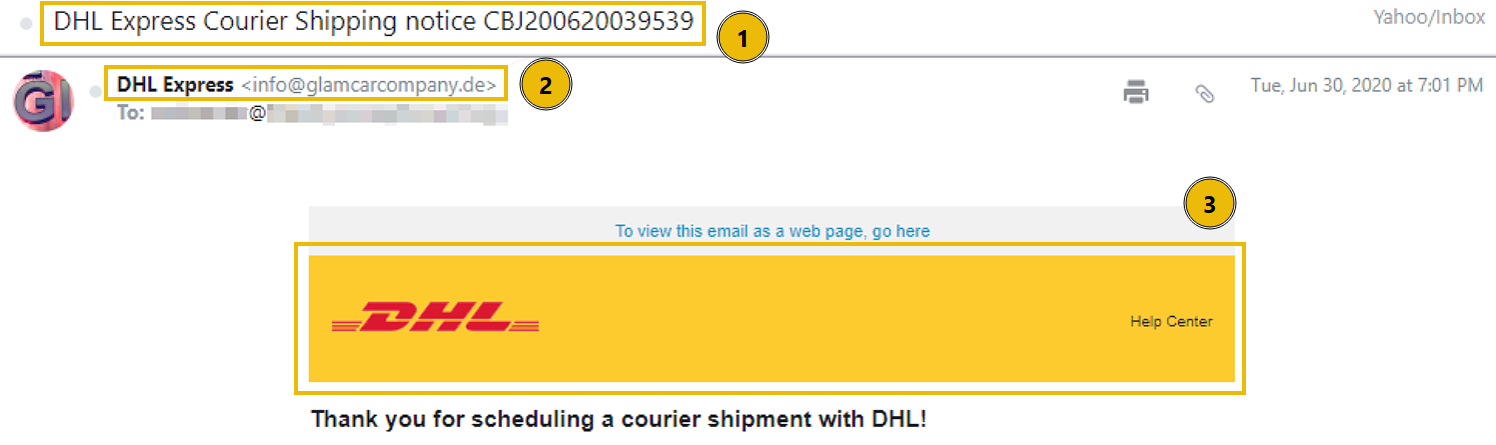
DHL Express - Brand impersonation: Utilizing HTML templates and logos to mimic DHL
- Attachments: An Excel document that triggers executable code upon opening
First Observations
- Email subject: Gives the impression that DHL will be shipping a package
- From address: The display name, DHL Express, does not match the user and domain
- Brand impersonation: The HTML in the email body is designed to look like it is sent from DHL
Email Body and Attachment
While there isn't much depth to the email body, the meat of this phishing attempt lies in the attached .xlsx file. Opening the document reveals several glaring inconsistencies. First, the sender uses a German domain, the invoice is addressed to a city in India, yet the document content itself contains Mandarin. These conflicting geographical markers are classic red flags that should make us question their legitimacy. The document contains a single clickable link designed to move the attack to the next stage.

The Executable
When the link within the Excel document is clicked, it attempts to download and execute a malicious payload named regasms.exe. As seen in the screenshot, this execution results in a system error. While the error prevents the payload from running in this environment, it indicates the attacker’s intent to execute code directly on the victim’s machine.
If successfully executed, the attacker could:
- Establish : Create a backdoor or scheduled task to maintain access after a reboot
- Exfiltrate Data: Steal sensitive files, credentials, or browser-stored passwords
- Deploy Ransomware: Encrypt the system and demand payment for recovery

What is the name of the executable that the Excel attachment attempts to run?
In this room, you analyzed a series of attempts and developed the skills needed to distinguish legitimate communications from malicious ones. By examining email headers, body content, links, and attachments, you learned how to identify common red flags such as spoofed senders, suspicious domains, and deceptive techniques.
Further Learning
This is the second room of the Phishing Analysis module of the Level 1 Path. You are encouraged to continue your learning with the walkthrough and challenge rooms below:
Complete the room and continue on your cyber learning journey!
Ready to learn Cyber Security?
TryHackMe provides free online cyber security training to secure jobs & upskill through a fun, interactive learning environment.
Already have an account? Log in