We use cookies to ensure you get the best user experience. For more information see our cookie policy.
Search Skills
Learn to efficiently search the Internet and use specialised services and technical docs for information
Task 1: Introduction
This room will show you examples of popular websites and services that can be used to gather information for a variety of cyber security purposes, both offensive and defensive.
Whether you're hunting down an exploit, trying to understand how a tool works, tracking a threat actor, knowing where to search is just as important as knowing what to search for.
Using the internet and it's resources effectively is a critical skill in cyber security.
If you're ready, let's explore some of these services below!
Answer the questions below
I'm ready to begin!
Task 2: Shodan (TryScanMe)
Shodan is often described as a search engine for the Internet of Things (IoT), but that undersells it. Shodan continuously scans the internet, searching for networking equipment, industrial control systems, traffic cameras, and virtually anything else with a public network connection to see what's running and where.
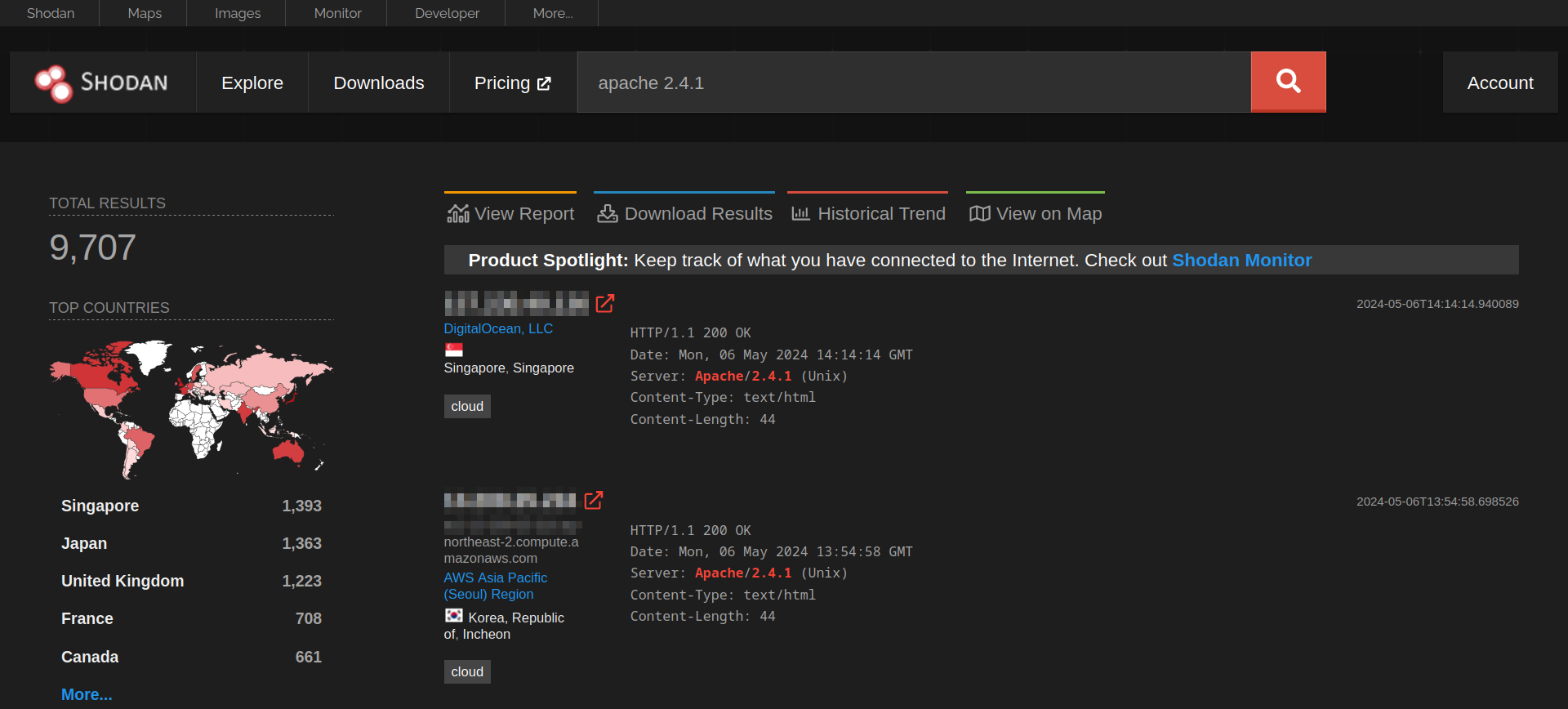
For example, searching apache 2.4.1 will return a list of servers advertising that version in their HTTP headers, broken down by country, organisation, and port. During a penetration test or vulnerability assessment, that kind of visibility is extremely useful, particularly when paired with a known CVE affecting that version.
Shodan also supports its own query filters, which let you narrow results significantly:
Filter
Description
Example
country
Restrict results to a specific country code.
country:IE
port
Filter by a specific port number or a range.
port:22
org
Scope results in a named organisation or ASN Identifier (Who owns a range of IP addresses).
AS7224 (Amazon Web Services)
hostname
Match against a specific hostname or domain.
hostname:fakebank.thm
Practical
Click the view site button below to start our Shodan simulation:
You'll need to...
1. Search for the term apache in the search bar of TryScanMe. Apache is a popular type of web server
2. Review the first entry within the list
3. Use that information to answer the question below
Answer the questions below
What domain is associated with the IP address 185.243.115.47?
Task 3: VirusTotal (TryDetectMe)
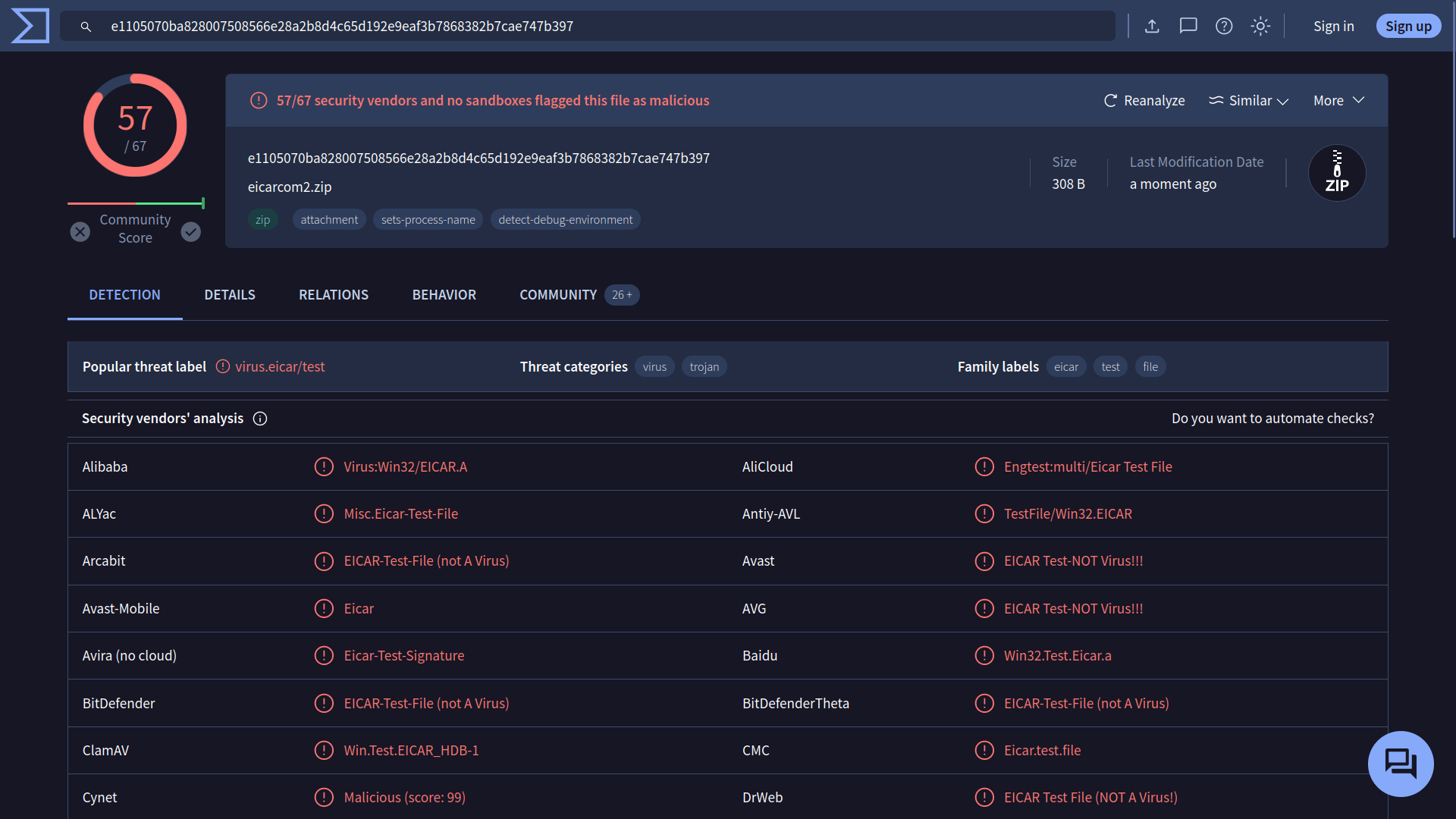
VirusTotal collates results from over 70 antivirus engines and website scanners into a single interface. Submit a file, a URL, a domain, or a file hash. VirusTotal will tell you whether any of those engines have flagged it as malicious or not.
Whilst not foolproof, VirusTotal is a popular resource in the blue teaming community for obtaining a general consensus on suspicious files and links, as well as for gathering intelligence on new threats on the move.
Practical
Click the view site button below to start our VirusTotal simulation:
You'll need to...
1. Search for the file invoice_payment.exe on TryDetectMe.
2. Review the information that has been provided. You will see a list of security vendors that have identified the file we have provided as dangerous.
3. Determine how many security vendors have identified the file as dangerous to answer the question below.
Answer the questions below
How many security vendors have identified the file as dangerous?
You can see a total count at the top of the page.
Task 4: Vulnerability Databases (CVE)
The Common Vulnerabilities and Exposures (CVE) programme is the closest thing the industry has to a universal dictionary of known vulnerabilities.
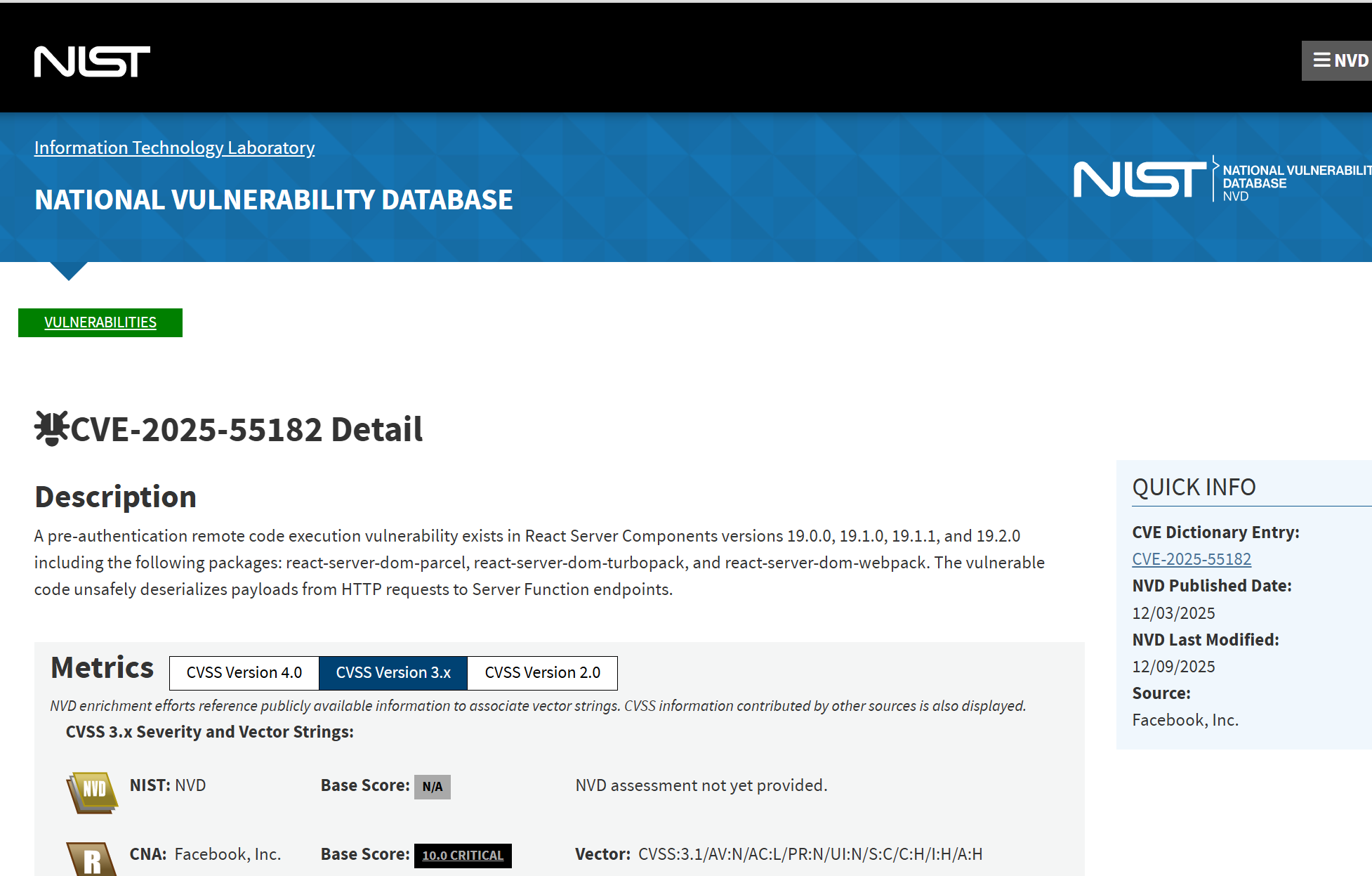
Each confirmed vulnerability is assigned a unique identifier in the format CVE-YEAR-NUMBER, such as CVE-2025-55182. If the vulnerability is impactful enough, it may even get a moniker. You may have heard of vulnerabilities such as Heartbleed, React2Shell, and Log4Shell. These vulnerabilities are given a score (CVSS) based on a variety of factors, such as:
Impact - What damage can this vulnerability lead to?
Complexity - Is the vulnerability easy to exploit or not?
Availability - How likely is it that someone can exploit this?
Organisations use scoring like this to prioritise their level of risk. Addressing the highest scoring first.
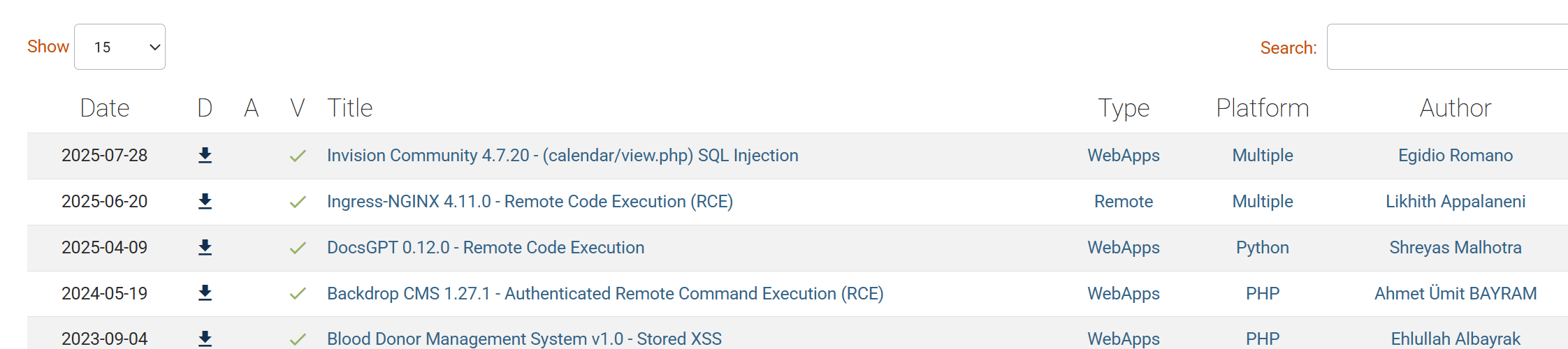
These identifiers function as a reference point among vendors, researchers, security tools, and documentation, ensuring that everyone discussing a vulnerability refers to the same issue. Websites like ExploitDB compile this information alongside "Proof of Concepts" (PoCs), which are scripts capable of demonstrating the vulnerability.
Practical
For this section, you will be interacting with TryHackMe's Vulnerability Database. Click the "Show Site" button below to get started.
You'll need to...
1. Search the Vulnerability Database forCVE-2026-1337
2. Review the details about the vulnerability
3. Find the CVSS scoring to answer the question.
Answer the questions below
What CVSS (Common Vulnerability Scoring System) classification did the vulnerability get?
Task 5: Technical Documentation (MAN)
Product and Tool Documentation
Each major security tool or platform provides its own documentation, which is the most reliable and up-to-date than any third-party tutorials.
When you're troubleshooting unexpected behaviour or trying to understand how to use a tool in a certain way, the official documentation should always be your first stop - not your last.
Linux Man Pages
Have you ever come across a command-line tool or command that you're not familiar with? Linux MANual pages have got your back. These pages serve as documentation that you can read within your terminal about any command on Linux, and a majority of cybersecurity tooling
To view the manual page, run man <command>. For example:
For this section of the practical, you will be interacting with a simulation of these manual pages. Click the "Show Site" button below to get started.
You'll need to...
1. Search the MANual pages for the tool nc (netcat)
2. Find the example command that allows you to open a connection for host.example.com on port 42 (this is located at the bottom of the output)
3. Copy and paste the command to answer the question below.
Answer the questions below
What is the example command?
Task 6: GitHub
GitHub can be a great resource for staying updated on the latest threats and vulnerabilities. Researchers often publish proof-of-concept (PoC) code, exploitation tools, and detailed technical reports there, which are usually faster than official channels.
Searching for a CVE identifier (e.g., CVE-2026-1337) directly on GitHub often reveals repositories containing PoC code, scanner scripts, or detailed analyses of the vulnerability.
That said, not all PoCs are equally reliable. Some are incomplete, some are intentionally flawed, and occasionally a "PoC" repository is malicious itself. Always verify what you're about to execute.
Practical
For the final portion of the practical, you will be interacting with a repository that contains an. Click the "Show Site" button below to get started.
You'll need to...
1. Review the repository for the fictious CVE CVE-2026-1337
2.Read the README about the vulnerability
3.Use that information to answer the question below
Answer the questions below
What is the name of the script in the repository that will demonstrate the vulnerability?
Learn to efficiently search the Internet and use specialised services and technical docs for information
easy
15 min
787,096
To access material, start machines and answer questions login.
This room will show you examples of popular websites and services that can be used to gather information for a variety of cyber security purposes, both offensive and defensive.
Whether you're hunting down an exploit, trying to understand how a tool works, tracking a threat actor, knowing where to search is just as important as knowing what to search for.
Using the internet and it's resources effectively is a critical skill in cyber security.
If you're ready, let's explore some of these services below!
Answer the questions below
I'm ready to begin!
Shodan is often described as a search engine for the Internet of Things (), but that undersells it. Shodan continuously scans the internet, searching for networking equipment, industrial control systems, traffic cameras, and virtually anything else with a public network connection to see what's running and where.
For example, searching apache 2.4.1 will return a list of servers advertising that version in their HTTP headers, broken down by country, organisation, and port. During a penetration test or vulnerability assessment, that kind of visibility is extremely useful, particularly when paired with a known CVE affecting that version.
Shodan also supports its own query filters, which let you narrow results significantly:
Filter
Description
Example
country
Restrict results to a specific country code.
country:IE
port
Filter by a specific port number or a range.
port:22
org
Scope results in a named organisation or ASN Identifier (Who owns a range of IP addresses).
AS7224 (Amazon Web Services)
hostname
Match against a specific hostname or domain.
hostname:fakebank.thm
Practical
Click the view site button below to start our Shodan simulation:
You'll need to...
1. Search for the term apache in the search bar of TryScanMe. is a popular type of web server
2. Review the first entry within the list
3. Use that information to answer the question below
Answer the questions below
What domain is associated with the IP address 185.243.115.47?
VirusTotal collates results from over 70 antivirus engines and website scanners into a single interface. Submit a file, a URL, a domain, or a file hash. VirusTotal will tell you whether any of those engines have flagged it as malicious or not.
Whilst not foolproof, VirusTotal is a popular resource in the blue teaming community for obtaining a general consensus on suspicious files and links, as well as for gathering intelligence on new threats on the move.
Practical
Click the view site button below to start our VirusTotal simulation:
You'll need to...
1. Search for the file invoice_payment.exe on TryDetectMe.
2. Review the information that has been provided. You will see a list of security vendors that have identified the file we have provided as dangerous.
3. Determine how many security vendors have identified the file as dangerous to answer the question below.
Answer the questions below
How many security vendors have identified the file as dangerous?
You can see a total count at the top of the page.
The Common Vulnerabilities and Exposures () programme is the closest thing the industry has to a universal dictionary of known vulnerabilities.
Each confirmed vulnerability is assigned a unique identifier in the format CVE-YEAR-NUMBER, such as CVE-2025-55182. If the vulnerability is impactful enough, it may even get a moniker. You may have heard of vulnerabilities such as Heartbleed, React2Shell, and Log4Shell. These vulnerabilities are given a score (CVSS) based on a variety of factors, such as:
Impact - What damage can this vulnerability lead to?
Complexity - Is the vulnerability easy to exploit or not?
Availability - How likely is it that someone can exploit this?
Organisations use scoring like this to prioritise their level of risk. Addressing the highest scoring first.
These identifiers function as a reference point among vendors, researchers, security tools, and documentation, ensuring that everyone discussing a vulnerability refers to the same issue. Websites like ExploitDB compile this information alongside "Proof of Concepts" (PoCs), which are scripts capable of demonstrating the vulnerability.
Practical
For this section, you will be interacting with TryHackMe's Vulnerability Database. Click the "Show Site" button below to get started.
You'll need to...
1. Search the Vulnerability Database forCVE-2026-1337
2. Review the details about the vulnerability
3. Find the scoring to answer the question.
Answer the questions below
What CVSS (Common Vulnerability Scoring System) classification did the vulnerability get?
Product and Tool Documentation
Each major security tool or platform provides its own documentation, which is the most reliable and up-to-date than any third-party tutorials.
When you're troubleshooting unexpected behaviour or trying to understand how to use a tool in a certain way, the official documentation should always be your first stop - not your last.
Man Pages
Have you ever come across a command-line tool or command that you're not familiar with? Linux MAN pages have got your back. These pages serve as documentation that you can read within your terminal about any command on Linux, and a majority of cybersecurity tooling
To view the manual page, run man <command>. For example:
For this section of the practical, you will be interacting with a simulation of these manual pages. Click the "Show Site" button below to get started.
You'll need to...
1. Search the MANual pages for the tool nc (netcat)
2. Find the example command that allows you to open a connection for host.example.com on port 42 (this is located at the bottom of the output)
3. Copy and paste the command to answer the question below.
Answer the questions below
What is the example command?
GitHub can be a great resource for staying updated on the latest threats and vulnerabilities. Researchers often publish proof-of-concept () code, exploitation tools, and detailed technical reports there, which are usually faster than official channels.
Searching for a identifier (e.g., CVE-2026-1337) directly on GitHub often reveals repositories containing PoC code, scanner scripts, or detailed analyses of the vulnerability.
That said, not all PoCs are equally reliable. Some are incomplete, some are intentionally flawed, and occasionally a "PoC" repository is malicious itself. Always verify what you're about to execute.
Practical
For the final portion of the practical, you will be interacting with a repository that contains an. Click the "Show Site" button below to get started.
You'll need to...
1. Review the repository for the fictious CVE CVE-2026-1337
2.Read the README about the vulnerability
3.Use that information to answer the question below
Answer the questions below
What is the name of the script in the repository that will demonstrate the vulnerability?
Ready to learn Cyber Security?
TryHackMe provides free online cyber security training to secure jobs & upskill through a fun, interactive learning environment.




 GitHub can be a great resource for staying updated on the latest threats and vulnerabilities. Researchers often publish proof-of-concept () code, exploitation tools, and detailed technical reports there, which are usually faster than official channels.