We use cookies to ensure you get the best user experience. For more information see our cookie policy.
SOC L2 Alert Triage
Learn how to triage escalated alerts and respond to cyber threats.
Task 1: Introduction
The SOC Level 2 role includes a wide range of responsibilities that you will cover throughout the SOC Level 2 learning path. But triage of escalated alerts remains the core duty, as every reported case might indicate an exfiltration attempt, ransomware, or even a wiper. In this room, you will learn the Level 2 workflow during alert triage and see how it differs from Level 1.
Learning Objectives
Explore the flow of processing escalated alerts
Learn the best practices applicable to any SOC team
Understand the junior vs senior mindset during alert triage
Basic SOC knowledge, such as the concepts of SIEM and EDR
Answer the questions below
Continue to the next task.
Task 2: SOC L2 Workflow
SOC Level 2 Workflow
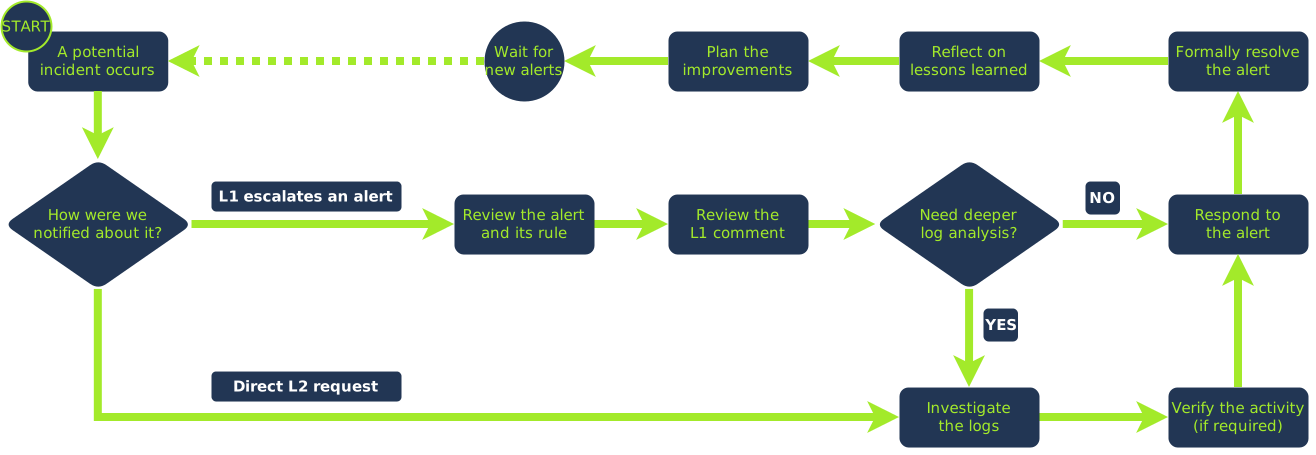
Same as Level 1, you need a trigger to start your job. For L1, this trigger is a new alert. For L2, it's a reported incident: mostly in the form of an escalated SOC alert, but can also be a direct, urgent request from your management or MSSP customers. Next, start your workflow: investigate, respond to, and learn from the incident. Below is a high-level diagram, but we will explore each section in detail in the next tasks.
L1 vs L2 Alert Triage
While L1 focus on triage speed and alert review, L2 focus on triage quality and deeper log analysis. You still have to comply with SLA, but a correct verdict and the right response to the incident are now much more important. For example, L1 may quickly review the alert and escalate it to you in 10 minutes. And you will spend 2 more hours investigating it, coordinating with other teams, and fully mitigating the attack.
- Manually clean up malware - Disable users and isolate hosts
Difference in L2 Duties
As a reminder, L2 will have different duties depending on the organization. For example, big enterprises and MSSPs can have an L3 position and dedicated DFIR and CTI squads that will take some of the work off your plate. On the other hand, in smaller companies, you might be a jack-of-all-trades, handling all investigative aspects, which is really fun but adds more responsibility. Keep this in mind when looking for a new job.
Answer the questions below
What is the most common trigger for L2 to start the triage?
Task 3: Log Analysis as L2
Log Analysis as L2
In an ideal scenario, the information you'll get from alert details and L1 comment will be sufficient to make a confident verdict without a need for deeper log analysis, but usually you'd still need to do a full investigation. This task will explore the log analysis process, but don't forget about the SOC operations, too:
Start the triage only once you understand the rule (know the technique the rule aims to detect)
Don't work on multiple cases at the same time (unless one is pending for the customer's action)
Aim to fit SLA. If the analysis takes too long, contain the threat and then continue investigating
See What Happened
Before rushing into deep log analysis, get a high-level understanding of what happened. Suppose you receive the "Rundll32 Spawned by PowerShell" alert. Your first SIEM queries should quickly answer these questions: Why did the rule trigger? What did Rundll32 do next? What led to PowerShell launching in the first place? And does it all resemble a specific attack pattern? Once you have formed a "story" of the case, you can then proceed to more detailed timelining.
Let's say Rundll32 activity resembles an infostealer infection, and PowerShell was launched by an unknown NetDbg application.
Build Detailed Timelines
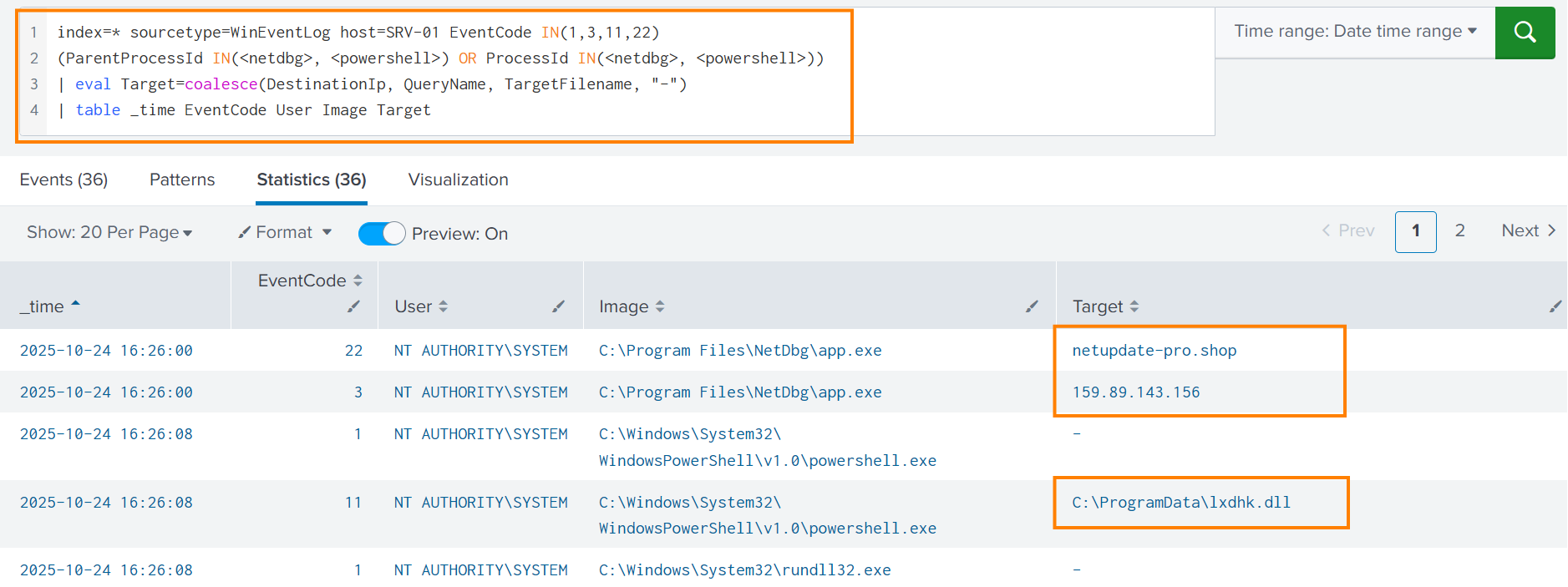
Forming a story helps with summarizing the incident, but it doesn't reveal all attack indicators. If you don't want to miss a hidden backdoor, you need to build a proper timeline. For the scenario above, you can timeline process, file, and network activities of NetDbg, and do the same for Rundll32 and its children until you have a full list of indicators and a complete timeline of the incident. Below is an example of a Splunk timeline that:
Filters for key Sysmon events from the NetDbg application
Highlights three indicators that may be useful in future triage (lxdhk.dll, netupdate-pro.shop, 159.89.143.156)
Confirms that NetDbg is either compromised or a malware itself (A suspicious connection followed by DLL drop and execution)
Threat Hunting Loop
A typical L2 case is simple enough to resolve with a single timeline. But in alerts like the one above, many questions remain open. You'll need to ask your IT regarding the NetDbg app, find out who installed it, how that user appeared in the network, whether their host is infected, and so on. For such cases, L2 log analysis becomes a threat hunting loop:
Form a story (hypothesis) from the alert details
Build a timeline of events to cover the gaps in the story
Think whether the story is now clear from start to finish
If not, return to step 1 and expand or change the story
Note: You will learn more about the "hypothesis" concept in the Threat Hunting module.
Answer the questions below
Should you understand the rule purpose before triaging the alert? (Yea/Nay)
What term is used for a chronological list of events (related to the attack)?
Task 4: Threat Response
Threat Response
The response is where your and L1's work merge into a real action that stops the threat or prevents future threats. Every threat requires a response, but sometimes it is automatically applied by EDR or other security measures. Ideally, you should start the response only once the investigation is complete and a verdict is made. But in the real world, it's a bit more complicated, so let's explore the details.
Verification of Activity
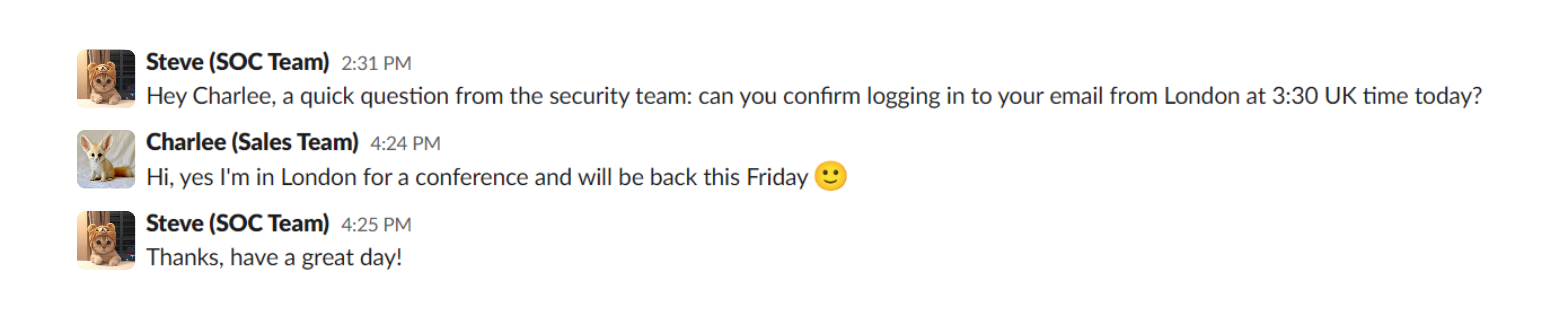
Imagine you're triaging an anomalous login alert where a user signs in to their Microsoft account through Proton VPN. The actions following the login look legitimate, but you're still concerned it could be a breach. Only the user themselves can confirm "yes, that was me", so the next step is to reach out directly. If the risk is high and there is no immediate reply, disable the account until they confirm. A few more examples of SOC verification:
Ask IT to explain the purpose of an unfamiliar tool (like NetDbg from Task 3)
Consult IT support to confirm the creation of an administrator user
Message DevOps to verify a suspicious API call coming from their script
Reach out to the red team to distinguish a real intrusion from a pentest
Above is the most common type of activity verification. If the user doesn't respond, disable the account and reach out to their manager
Response to True Positives
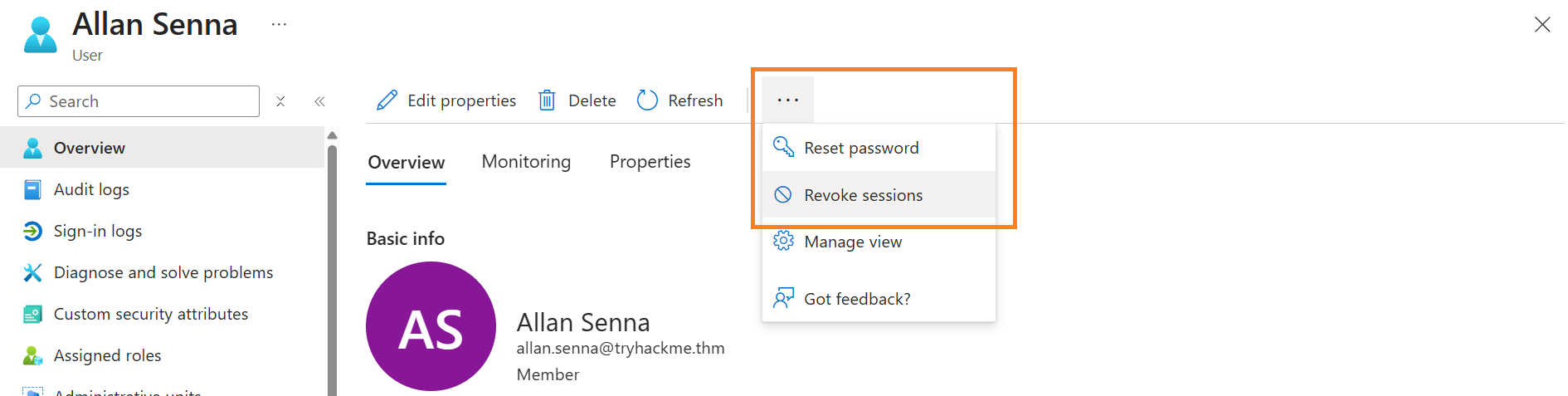
Once you verify the activity and make a final TP or FP verdict, you can start the response. For localized infections, such as adware on an employee's laptop, a file quarantine via EDR is sufficient. For large-scale intrusions, you may need to access the hosts via RDP/SSH, disable users in Entra ID, isolate subnets, apply patches, and more. Response work is tense but fun, as it introduces you to new tools and brings you closer to other teams, such as IT.
You will use many new tools to apply a proper response. Above is a screenshot from the Entra ID portal
Response to Major Incidents
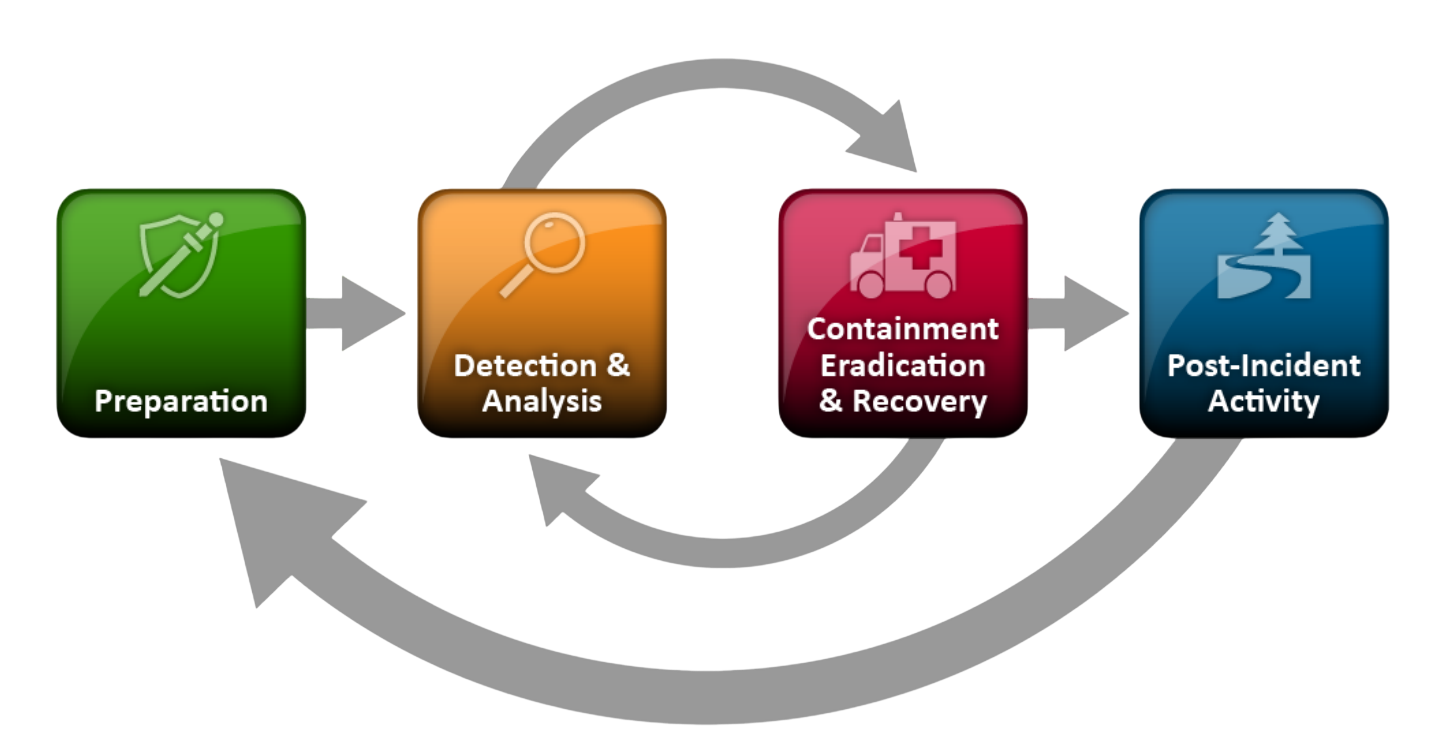
For major incidents where every second matters, you may need to contain the threat before the investigation is finished. If you see ongoing data exfiltration but don't yet know how it started, stop it first, then investigate. This is where experience matters most: making the right call under pressure, when playbooks can't give a single answer. In short, the response can be split into three parts, applied at different times:
Containment: Stop the threat from spreading by isolating hosts or disabling users
Eradication: Clean up malware files, rotate stolen passwords, revoke privileges, etc.
Recovery: Lift containment, patch the vulnerabilities, monitor for reinfection traces
During large-scale intrusions, the flow is not linear and can go back and forth. You will learn the IR best practices later in the Incident Response module
Response to False Positives
Even False Positives can require a response, just not so urgent as to the real threats. For example:
Example
L2 Response
Often Called
The rule triggered on an unrelated system activity due to a flaw in its query
Plan a fix in the rule or report the issue to the engineering team
False Positive Tuning
The alert was a FP, but it highlighted a server with an Internet-exposed RDP
Cooperate with IT team to hide RDP access behind a VPN
Security Hardening
The alert was simple, but the L1 analysis was incomplete or incorrect
Explain the mistakes to L1 or plan a dedicated mentorship call
Team Improvement
Resolving the Case
A case can be resolved once the verdict is set and the threat is fully remediated. Resolution processes vary by company and can involve ticketing routine and other formalities, but three best practices always apply:
Leave evidence of your actions in a centralized storage (e.g., a ticketing system)
Inform your SOC team about the incident, especially those you saw for the first time
Keep other parties updated, especially MSSP customers (e.g., with a summary report) Note: We will learn how to write professional reports in the next room
Answer the questions below
What is the term for a temporary response that stops the threat from spreading?
You see a clearly malicious activity on one of the corporate devices. You also know about an ongoing pentest, but red teamers do not respond. Would you isolate the device before receiving a confirmation? (Yea/Nay)
Task 5: Learning Lessons
Learning Lessons
Formally, the L2 workflow ends once the case is resolved. But an analyst with a senior mindset would also reflect on what went well and what could be improved. If the rule generated a False Positive, plan the changes or even fix it the same day if you have time. If some procedures felt useless, raise the topic on the team call. If the attack was completely new to you, learn about it in your free time. Overall, learn the lessons from every alert!
Challenge
Let's wrap up the learned knowledge! Open the static site by clicking the View Site button below. You will read the escalated alert and follow the triage workflow: analysis, response, and learning lessons from the incident. Once ready, grab your flag and answer the question.
Note: For the best experience, open the app in full screen mode.
Answer the questions below
What is the flag you get at the end of the challenge?
Task 6: Conclusion
SOC L2 alert triage goes far beyond log analysis. Communicating impact, responding to threats, tuning broken rules, and reflecting on outcomes are all core parts of the L2 workflow. The key takeaway: learn from your mistakes and take initiative to make your team better. In the next room, Report Writing for SOC L2, you'll focus on report writing, a critical soft skill for MSSPs and any senior role. Hope you enjoyed the room!
Learn how to triage escalated alerts and respond to cyber threats.
easy
45 min
14,314
To access material, start machines and answer questions login.
The Level 2 role includes a wide range of responsibilities that you will cover throughout the SOC Level 2 learning path. But triage of escalated alerts remains the core duty, as every reported case might indicate an exfiltration attempt, ransomware, or even a wiper. In this room, you will learn the Level 2 workflow during alert triage and see how it differs from Level 1.
Learning Objectives
Explore the flow of processing escalated alerts
Learn the best practices applicable to any SOC team
Understand the junior vs senior mindset during alert triage
Same as Level 1, you need a trigger to start your job. For L1, this trigger is a new alert. For L2, it's a reported incident: mostly in the form of an escalated SOC alert, but can also be a direct, urgent request from your management or customers. Next, start your workflow: investigate, respond to, and learn from the incident. Below is a high-level diagram, but we will explore each section in detail in the next tasks.
L1 vs L2 Alert Triage
While L1 focus on triage speed and alert review, L2 focus on triage quality and deeper log analysis. You still have to comply with , but a correct verdict and the right response to the incident are now much more important. For example, L1 may quickly review the alert and escalate it to you in 10 minutes. And you will spend 2 more hours investigating it, coordinating with other teams, and fully mitigating the attack.
- Manually clean up malware - Disable users and isolate hosts
Difference in L2 Duties
As a reminder, L2 will have different duties depending on the organization. For example, big enterprises and MSSPs can have an L3 position and dedicated and squads that will take some of the work off your plate. On the other hand, in smaller companies, you might be a jack-of-all-trades, handling all investigative aspects, which is really fun but adds more responsibility. Keep this in mind when looking for a new job.
Answer the questions below
What is the most common trigger for L2 to start the triage?
Log Analysis as L2
In an ideal scenario, the information you'll get from alert details and L1 comment will be sufficient to make a confident verdict without a need for deeper log analysis, but usually you'd still need to do a full investigation. This task will explore the log analysis process, but don't forget about the operations, too:
Start the triage only once you understand the rule (know the technique the rule aims to detect)
Don't work on multiple cases at the same time (unless one is pending for the customer's action)
Aim to fit . If the analysis takes too long, contain the threat and then continue investigating
See What Happened
Before rushing into deep log analysis, get a high-level understanding of what happened. Suppose you receive the "Rundll32 Spawned by " alert. Your first queries should quickly answer these questions: Why did the rule trigger? What did Rundll32 do next? What led to PowerShell launching in the first place? And does it all resemble a specific attack pattern? Once you have formed a "story" of the case, you can then proceed to more detailed timelining.
Let's say Rundll32 activity resembles an infostealer infection, and PowerShell was launched by an unknown NetDbg application.
Build Detailed Timelines
Forming a story helps with summarizing the incident, but it doesn't reveal all attack indicators. If you don't want to miss a hidden backdoor, you need to build a proper timeline. For the scenario above, you can timeline process, file, and network activities of NetDbg, and do the same for Rundll32 and its children until you have a full list of indicators and a complete timeline of the incident. Below is an example of a timeline that:
Filters for key events from the NetDbg application
Highlights three indicators that may be useful in future triage (lxdhk.dll, netupdate-pro.shop, 159.89.143.156)
Confirms that NetDbg is either compromised or a malware itself (A suspicious connection followed by drop and execution)
Threat Hunting Loop
A typical L2 case is simple enough to resolve with a single timeline. But in alerts like the one above, many questions remain open. You'll need to ask your IT regarding the NetDbg app, find out who installed it, how that user appeared in the network, whether their host is infected, and so on. For such cases, L2 log analysis becomes a threat hunting loop:
Form a story (hypothesis) from the alert details
Build a timeline of events to cover the gaps in the story
Think whether the story is now clear from start to finish
If not, return to step 1 and expand or change the story
Note: You will learn more about the "hypothesis" concept in the Threat Hunting module.
Answer the questions below
Should you understand the rule purpose before triaging the alert? (Yea/Nay)
What term is used for a chronological list of events (related to the attack)?
Threat Response
The response is where your and L1's work merge into a real action that stops the threat or prevents future threats. Every threat requires a response, but sometimes it is automatically applied by or other security measures. Ideally, you should start the response only once the investigation is complete and a verdict is made. But in the real world, it's a bit more complicated, so let's explore the details.
Verification of Activity
Imagine you're triaging an anomalous login alert where a user signs in to their Microsoft account through Proton . The actions following the login look legitimate, but you're still concerned it could be a breach. Only the user themselves can confirm "yes, that was me", so the next step is to reach out directly. If the risk is high and there is no immediate reply, disable the account until they confirm. A few more examples of verification:
Ask IT to explain the purpose of an unfamiliar tool (like NetDbg from Task 3)
Consult IT support to confirm the creation of an administrator user
Message to verify a suspicious call coming from their script
Reach out to the red team to distinguish a real intrusion from a pentest
Above is the most common type of activity verification. If the user doesn't respond, disable the account and reach out to their manager
Response to True Positives
Once you verify the activity and make a final TP or FP verdict, you can start the response. For localized infections, such as adware on an employee's laptop, a file quarantine via EDR is sufficient. For large-scale intrusions, you may need to access the hosts via /, disable users in Entra ID, isolate subnets, apply patches, and more. Response work is tense but fun, as it introduces you to new tools and brings you closer to other teams, such as IT.
You will use many new tools to apply a proper response. Above is a screenshot from the Entra ID portal
Response to Major Incidents
For major incidents where every second matters, you may need to contain the threat before the investigation is finished. If you see ongoing data exfiltration but don't yet know how it started, stop it first, then investigate. This is where experience matters most: making the right call under pressure, when playbooks can't give a single answer. In short, the response can be split into three parts, applied at different times:
Containment: Stop the threat from spreading by isolating hosts or disabling users
Eradication: Clean up malware files, rotate stolen passwords, revoke privileges, etc.
Recovery: Lift containment, patch the vulnerabilities, monitor for reinfection traces
During large-scale intrusions, the flow is not linear and can go back and forth. You will learn the best practices later in the Incident Response module
Response to False Positives
Even False Positives can require a response, just not so urgent as to the real threats. For example:
Example
L2 Response
Often Called
The rule triggered on an unrelated system activity due to a flaw in its query
Plan a fix in the rule or report the issue to the engineering team
False Positive Tuning
The alert was a FP, but it highlighted a server with an Internet-exposed RDP
Cooperate with IT team to hide RDP access behind a VPN
Security Hardening
The alert was simple, but the L1 analysis was incomplete or incorrect
Explain the mistakes to L1 or plan a dedicated mentorship call
Team Improvement
Resolving the Case
A case can be resolved once the verdict is set and the threat is fully remediated. Resolution processes vary by company and can involve ticketing routine and other formalities, but three best practices always apply:
Leave evidence of your actions in a centralized storage (e.g., a ticketing system)
Inform your SOC team about the incident, especially those you saw for the first time
Keep other parties updated, especially customers (e.g., with a summary report) Note: We will learn how to write professional reports in the next room
Answer the questions below
What is the term for a temporary response that stops the threat from spreading?
You see a clearly malicious activity on one of the corporate devices. You also know about an ongoing pentest, but red teamers do not respond. Would you isolate the device before receiving a confirmation? (Yea/Nay)
Learning Lessons
Formally, the L2 workflow ends once the case is resolved. But an analyst with a senior mindset would also reflect on what went well and what could be improved. If the rule generated a False Positive, plan the changes or even fix it the same day if you have time. If some procedures felt useless, raise the topic on the team call. If the attack was completely new to you, learn about it in your free time. Overall, learn the lessons from every alert!
Challenge
Let's wrap up the learned knowledge! Open the static site by clicking the View Site button below. You will read the escalated alert and follow the triage workflow: analysis, response, and learning lessons from the incident. Once ready, grab your flag and answer the question.
Note: For the best experience, open the app in full screen mode.
Answer the questions below
What is the flag you get at the end of the challenge?
L2 alert triage goes far beyond log analysis. Communicating impact, responding to threats, tuning broken rules, and reflecting on outcomes are all core parts of the L2 workflow. The key takeaway: learn from your mistakes and take initiative to make your team better. In the next room, Report Writing for SOC L2, you'll focus on report writing, a critical soft skill for MSSPs and any senior role. Hope you enjoyed the room!
Answer the questions below
Complete the room!
Ready to learn Cyber Security?
TryHackMe provides free online cyber security training to secure jobs & upskill through a fun, interactive learning environment.