We use cookies to ensure you get the best user experience. For more information see our cookie policy.
Wireless Security
Learn how wireless technologies work, the risks they introduce, and how to defend against them.
Task 1: Introduction to Wireless Security
Wireless technologies have played a key role in enabling connectivity between devices, which has allowed data exchange in modern environments without physical connections. However, it is important to understand that these technologies may introduce security weaknesses that attackers can exploit to compromise sensitive data. Understanding how wireless technologies operate and how they could expose an organisation to attacks will help build a strong foundation needed to assess wireless networks.
Learning Objectives
By the end of this room, you will be able to:
Understand the fundamentals of wireless networking, including how devices communicate over radio frequencies
Identify common wireless technologies (Wi-Fi, Bluetooth, NFC, and RFID) and their use cases
Recognise common security risks and attack vectors associated with wireless technologies
Apply basic security measures to protect wireless networks from common threats
Prerequisites
Before starting this room, it is recommended that you have a basic understanding of networking concepts. If you are new to networking, consider completing the following room first:
Nowadays, people have adapted to using Wi-Fi to connect to the Internet. It can be found in homes, offices, coffee shops, and airports. It lets devices communicate using radio signals instead of physical cables, which makes connectivity flexible and convenient. But to secure it, you first need to understand how it works.
The following key components make up a Wi-Fi network:
Access Point (AP): This is the device that is broadcasting the Wi-Fi signal. Think of it as the bridge between your wireless devices and the wired network behind it. A home router is one example of an AP.
Clients: These are the devices connecting to an AP to access internal resources or the Internet such as mobile phones, laptops, tablets, printers, and smart devices. Each device has a wireless network interface card (NIC) that handles sending and receiving radio signals.
Identifiers in Wi-Fi Networks
Every Wi-Fi network needs a way to be identified. Below are two commonly used identifiers.
SSID (Service Set Identifier): This is simply the network name that you see when you open your Wi-Fi settings and browse for available networks. E.g., Office_WiFi
BSSID (Basic Service Set Identifier): The unique identifier of an access point, which is usually represented by the MAC address of the wireless interface. E.g., 00:1A:2B:3C:4D:5E
How Wireless Devices Communicate
Devices communicate wirelessly by transmitting radio waves over a shared airspace. Communication between devices occurs within specific frequency bands. The frequency band a device uses determines a lot about its speed, range, and reliability. There are two common frequency bands in Wi-Fi, and each comes with trade-offs:
2.4 GHz gives you a better range (up to around 45 metres indoors) and can push through walls and floors more easily. The downside? It's crowded. Microwaves, Bluetooth devices, baby monitors, and your neighbour's Wi-Fi are all competing on this band. Additionally, speeds top out at around 600 Mbps.
5 GHz is faster (up to around 1300 Mbps) and far less congested, but the signal doesn't travel as far and struggles more with physical obstacles (around 15 metres indoors). If you've ever noticed your connection drop when you walk to another room, you might be on 5 GHz.
The image below illustrates a side-by-side comparison of the difference between 2.4 GHz and 5 GHz in terms of range, speed, penetration through physical obstacles, and congestion.
Association Process
When a device joins a Wi-Fi network, the connection process involves multiple steps, including association. The general flow looks like this:
The device scans the area for available networks
You (or your device automatically) pick a network to join
The device and AP exchange authentication details and establish a connection
Encryption keys get negotiated so traffic can be protected
Data starts flowing
One thing worth knowing is that the order of these steps can vary depending on the security protocol in use. With Open System Authentication, the AP doesn't actually verify any credentials during the authentication step. It's essentially a handshake that says "yes, you can talk to me.". This happens in both WPA2-Personal and WPA2-Enterprise. The difference is what comes next. In WPA2-Personal, the device goes through the 4-way handshake to prove it knows the pre-shared key. In WPA2-Enterprise with 802.1X, the device associates first, then gets handed off to a dedicated authentication server (e.g. RADIUS) for full credential-based authentication. Either way, both steps have to be completed before any real data gets exchanged.
Factors That Affect Wi-Fi Signals and Coverage
The strength and reliability of signals in a Wi-Fi network are influenced by several factors. Below are some of the factors that degrade the quality of a Wi-Fi connection.
Physical barriers: Walls, floors, and ceilings weaken the Wi-Fi signal. Concrete and metal are the worst offenders. Even a fish tank full of water can noticeably impact signal strength.
Distance: The further you are from the AP, the weaker and less reliable your connection gets.
Interference: Electronic devices on similar frequencies can disrupt signals. This includes microwave ovens, Bluetooth devices, and other Wi-Fi networks.
Channel Congestion: Multiple networks that operate on overlapping channels could cause performance issues due to signal congestion and competition. In dense environments like apartment blocks, this can seriously hurt performance.
Signal Leakage: Signals could extend beyond intended physical boundaries and reach areas such as streets, parking lots, or adjacent offices, which increases exposure if not properly managed.
Answer the questions below
What is the process that occurs when a device connects to a wireless network?
What occurs when multiple devices communicate on the same frequency, affecting the wireless signal and coverage?
Task 3: Wi-Fi Security
Wi-Fi is a wireless technology that is used in homes, offices, and public places. It follows the IEEE 802.11 standards, which define how wireless devices connect and communicate with each other.
There are different generations of Wi-Fi that were introduced under the IEEE 802.11 standards over the years. These standards are outlined in the table below.
Most enterprises deploy Wi-Fi 5 and Wi-Fi 6 standards because they work well with modern laptops, smartphones, and access points, which is why they are often seen during security assessments.
Authentication and Encryption in Wi-Fi
Secure Wi-Fi communication relies on two key components: authentication, which controls who can connect, and encryption, which protects the data being transmitted.
Wi-Fi networks use security protocols to ensure that only authorised devices can connect and that data remains protected. Some common Wi-Fi security protocols include the following:
Common Wi-Fi Misconfigurations
Proper configuration of Wi-Fi networks is crucial to maintaining security. Wi-Fi networks that are configured improperly could introduce weaknesses and increase exposure to wireless network attacks. Common weaknesses include the following:
Use of outdated security protocols such as WEP
Use of weak passwords
Use of unnecessary features such as WPS
Use of default administrative credentials
Common Wi-Fi Attack Concepts
When Wi-Fi networks are insecure, attackers could attempt to exploit weaknesses in authentication or configuration. Common Wi-Fi attack concepts include the following:
Password Attacks: Brute-forcing or cracking weak Wi-Fi passwords.
Rogue Access Points: An unauthorised access point that is connected to a network without the knowledge of the network administrator. This could be set up intentionally by an attacker or even unintentionally by an employee plugging in their own router.
Evil Twin Attacks: Creating a fake access point that mimics a legitimate network by using the same SSID. Unlike a rogue access point, which is physically connected to the target network, an evil twin operates independently and relies on tricking users into connecting to it, often to intercept their traffic or capture credentials.
Deauthentication Attacks: Forcing devices to disconnect from a network.
Traffic Interception: Attempting to capture wireless traffic if encryption is weak or improperly configured.
Protecting Wi-Fi Networks
Securing Wi-Fi networks involves proper configuration and monitoring. Below are some of the best practices involved in securing a Wi-Fi network:
Using WPA2 or WPA3 with strong passphrases: Protects against unauthorised network access by ensuring that only authenticated devices can connect and preventing attackers from easily guessing or cracking credentials.
Turning off outdated protocols such as WEP: Protects against attacks that exploit encryption weaknesses to recover wireless encryption keys.
Turning off WPS if not required: Prevents attackers from connecting to a Wi-Fi network by using alternative authentication methods such as an 8-digit PIN.
Changing default administrative credentials: Prevents attackers from gaining administrative control of access points using publicly known default usernames and passwords.
Implementing network segmentation (e.g., separate guest networks): Limits access to internal systems by isolating guest or untrusted devices from sensitive organisational resources.
Regularly updating firmware on access points: Protects against known vulnerabilities by applying security patches and fixes released by device manufacturers.
Proper configuration significantly reduces the risk of unauthorised access and network compromise, while protecting the integrity of data being transmitted in both private and public networks.
Answer the questions below
An attacker sets up a wireless access point with the same SSID as a nearby coffee shop's network. Unsuspecting customers connect to it instead of the legitimate network. What type of attack is this?
A network administrator wants to allow guest devices to connect to Wi-Fi without sharing the main password. Which Wi-Fi feature allows connection by entering an 8-digit PIN instead?
Between WPA2 and WPA3, which protocol is resistant to offline dictionary attacks?
Task 4: Bluetooth Security
Bluetooth is a technology that enables wireless communication between devices via direct pairing. It operates on the 2.4 GHz frequency and is designed for short-range communication. Common devices that use Bluetooth include the following:
Wireless keyboards and mice
Headphones and speakers
Smartwatches and fitness trackers
Vehicle infotainment systems
Internet of Things (IoT) and smart home devices
Bluetooth is commonly enabled on personal and corporate devices, which makes it an appealing target for attackers.
Classic Bluetooth vs Bluetooth Low Energy (BLE)
There are two main variants of Bluetooth: Classic Bluetooth and Bluetooth Low Energy (BLE).
Classic Bluetooth handles heavier tasks like streaming audio and transferring files. BLE, on the other hand, is built for devices that only send small bits of data occasionally. Fitness trackers, smart locks, and beacons are examples of devices that use BLE. Think of Classic Bluetooth as a phone call and BLE as a text message. One stays connected while the other is quick and lightweight.
The security differences between the two variants matter as well. Classic Bluetooth goes through a proper pairing process where both devices agree on a shared key. BLE supports several pairing methods, but the most common one in low-cost IoT devices is called "Just Works", which doesn't involve any user verification. That means an attacker can sit between the connection and intercept everything.
The table below outlines key security differences between Classic Bluetooth and BLE in different areas.
How Bluetooth Devices Pair and Exchange Data
Before two Bluetooth devices can communicate, they must first go through a pairing process to create a secure connection.
Older Bluetooth versions relied on a simple PIN for pairing. A code would either be displayed on one device for the user to enter on the other, or both users would agree on the same number and enter it on both devices. While this method is effective, short or default PINs such as 0000 or 1234 were easy to guess, and the pairing process could sometimes be intercepted or brute-forced by someone nearby.
Modern Bluetooth uses stronger pairing methods. In Classic Bluetooth, Secure Simple Pairing (SSP) was introduced in Bluetooth 2.1, which replaced PIN-based pairing with a more secure cryptographic key exchange. In BLE, newer devices use LE Secure Connections, which was introduced in Bluetooth 4.2 and also relies on cryptographic key exchange. However, older BLE devices running Bluetooth 4.0 or 4.1 still use LE Legacy Pairing, which provides weaker protection.
How the pairing appears to the user depends on the device. Some devices ask you to confirm that the same number appears on both screens, others may use an NFC tap, and simpler devices may pair automatically with little or no user interaction.
The diagrams below show how each variant handles the pairing process.
Common Bluetooth Security Risks
Bluetooth communication could introduce security risks despite its convenience. Below are common security risks that may affect Bluetooth-enabled devices.
Unnecessary Discoverability: Leaving devices in discoverable mode can be detected by nearby attackers.
Weak Pairing Mechanisms: Older devices that use simple PIN codes may be vulnerable to brute-force attacks.
Unauthorised Pairing: Attackers may attempt to pair with devices if user approval controls are weak or misconfigured.
Bluejacking: Sending unsolicited messages to Bluetooth-enabled devices.
Bluesnarfing: Attempting to access data through a Bluetooth connection.
Bluebugging: Exploiting a vulnerability in a Bluetooth connection to gain control of certain device functions.
Lack of Device Updates: Outdated Bluetooth implementations may contain known vulnerabilities.
Attackers who attempt to exploit Bluetooth weaknesses must be within the device's proximity. Places such as offices, conferences, and airports are where Bluetooth attacks could often take place.
Security Considerations for Classic Bluetooth and BLE
Both Classic Bluetooth and BLE devices should be configured and managed carefully to minimise exposure to security risks. The table below outlines some practical measures that can help, and whether they apply to Classic Bluetooth, BLE, or both.
Even though Bluetooth has a limited range, don't let that give you a false sense of security. A vulnerable device can still leak sensitive data or give an attacker a foothold into a wider network. Think of it like leaving a window slightly open on the ground floor. It might seem too small an issue to matter, but it's often enough for someone determined to get through. Proper configuration and a bit of awareness go a long way in keeping things locked down.
Answer the questions below
A user is connecting a new pair of wireless headphones to their smartphone and is asked to confirm a six-digit code displayed on both devices. What is this step called?
What frequency band does Bluetooth operate on?
An attacker within Bluetooth range gains access to a victim's phone and downloads their contacts and messages without authorisation. What type of attack is this?
Task 5: RFID and NFC Security
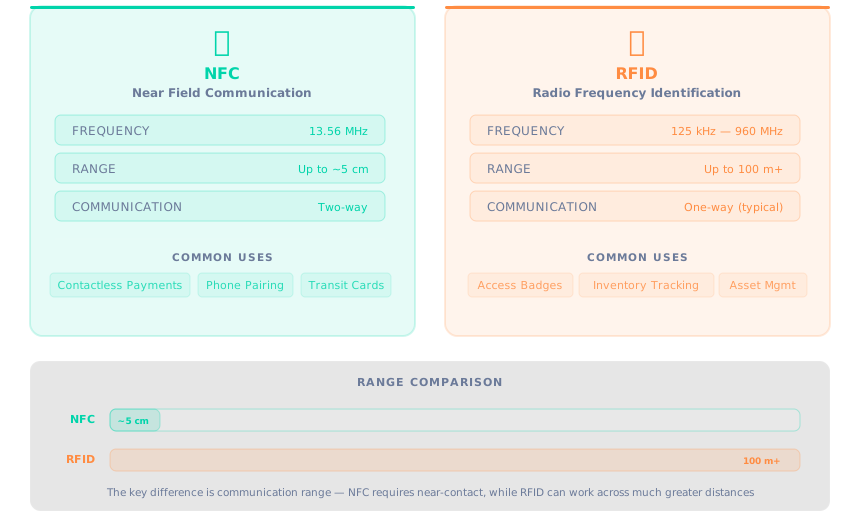
Radio-Frequency Identification (RFID) is a technology that uses electromagnetic fields to identify and track tags attached to objects. Near-Field Communication (NFC) is a closely related standard that enables two devices to exchange data when brought into close proximity. Both technologies allow wireless communication over short distances, but they differ primarily in range. RFID devices can transmit radio waves up to 100 metres or more, depending on the tag type and frequency band. NFC devices, by contrast, operate only within approximately 5 cm. The image below highlights the key differences between the RFID and NFC.
How RFID and NFC Work
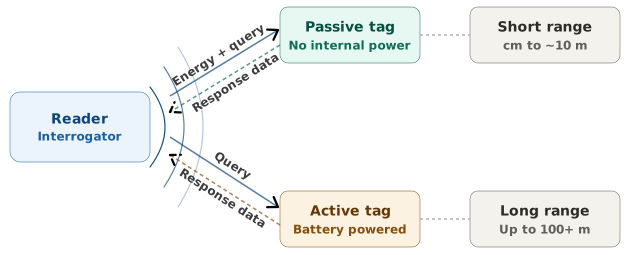
An RFID system consists of two components: a reader (or interrogator) and a tag. The reader emits radio waves, and when a tag enters the reader's field, it responds with stored data. Tags can be passive or active. A passive tag has no internal power source and draws its energy from the reader's electromagnetic field, which limits its range but makes it inexpensive and long-lasting. An active tag contains its own battery, enabling it to transmit over much greater distances but at higher cost and with a limited lifespan.
The following diagram illustrates how communication in an RFID system works:
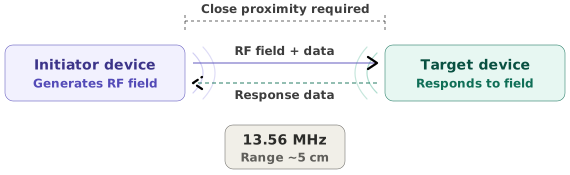
NFC operates on a specific RFID frequency (13.56 MHz) and supports two-way communication between devices. One device generates an RF field, and the other either responds passively or generates its own field to complete the exchange. This bidirectional capability is what allows NFC to support interactive use cases such as contactless payments, transit cards, and device pairing. Both technologies are designed for quick, simple interactions that do not require manual connection to a network.
The following diagram illustrates how communication in an NFC system works:
RFID and NFC are commonly used for identification, access control, and contactless transactions. Employee badges, warehouse inventory tags, hotel key cards, and payment terminals all rely on one or both of these technologies.
Common RFID and NFC Security Risks
The following techniques are commonly performed by attackers to exploit RFID and NFC weaknesses:
Eavesdropping: Intercepting communication when an access card is scanned.
Cloning: Copying data from one card to another.
Relay Attacks: Forwarding communication between a legitimate card and a reader to bypass the distance limitation that would normally prevent the interaction.
Unauthorised Scanning (Skimming): Secretly scanning a card without the owner’s knowledge to steal data.
Lost or Stolen Cards: A lost employee badge could be used to enter an office or building if access rights are not revoked.
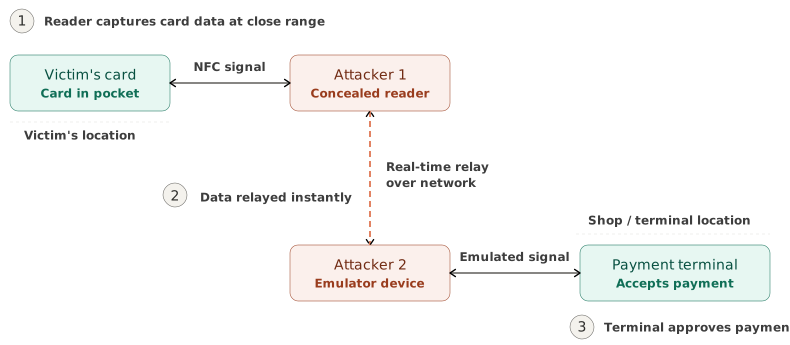
An example of a relay attack involves a contactless payment card stored in a victim's pocket. One attacker holds a device near the victim to pick up the card's signal, while a second attacker holds another device near a payment terminal in a shop. The two devices relay the communication in real time, causing the terminal to process a transaction as though the card were physically present.
The following diagram illustrates how a relay attack is performed:
Security Considerations for RFID and NFC
A multi-layered approach is required in order to secure RFID and NFC devices, which requires protection of data during transmission and securing physical access to devices. The following measures could help ensure that exposure to risks is minimised:
Use cards that support encryption
Limit sensitive data stored on cards or use tokenisation
Immediately deactivate lost or stolen cards
Use protective sleeves such as Faraday pouches to protect against unauthorised scanning
Update access controls regularly
Implement secondary biometric authentication where possible
Answer the questions below
An attacker reads the data stored on an employee's access badge and writes it to a blank card. What is this technique called?
An employee reports their access badge as lost. To prevent unauthorised building access, what should be done to the card's access rights?
Task 6: Other Wireless Technologies
In addition to Wi-Fi, Bluetooth, NFC, and RFID, many other wireless technologies are used in modern environments. These technologies support smart devices, automation systems, and connected infrastructure.
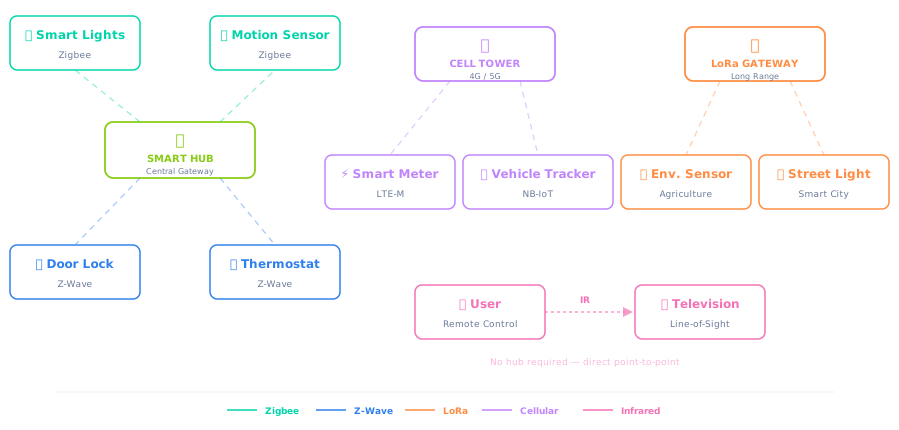
Several wireless technologies are commonly used in smart environments and Internet of Things (IoT) systems.
Zigbee
Zigbee is a low-power, short-range protocol commonly used in smart home devices such as lights, sensors, and smart plugs. It operates on a mesh network topology. Each device can relay data to its neighbours, extending the overall range of the network.
Z-Wave
Z-Wave serves a similar purpose to Zigbee but uses a more standardised protocol and offers a wider communication range. It is common in home automation systems that control thermostats, blinds, lights, and security sensors.
LoRa (Long Range)
LoRa is designed for long-distance, low-power communication. It is used in IoT deployments such as environmental monitoring systems, agricultural sensors, and smart street lighting, where devices transmit small amounts of data over distances of several kilometres.
Cellular (e.g., LTE-M, NB-IoT)
Cellular technologies allow devices to send data over existing mobile networks by connecting to nearby cell towers, in the same way a smartphone connects to the Internet when Wi-Fi is unavailable. Smart meters, vehicle trackers, and remote industrial sensors commonly rely on cellular connectivity.
Infrared
Infrared uses light signals for simple, line-of-sight communication over very short distances. It is found in remote controls for televisions, air conditioners, and projectors, though it has largely been replaced by radio-based protocols in newer devices.
Security Risks in Emerging Wireless Ecosystems
Because IoT devices are often small and inexpensive, security is sometimes not prioritised during design or deployment. As more devices connect wirelessly, new security risks may arise.
The following table describes known security risks associated with the wireless technologies introduced in this task. This is not an exhaustive list, as a full treatment of each protocol's attack surface is beyond the scope of this room.
Wireless Technology
Known Security Risks
Example
Zigbee
When a device without a pre-configured key joins a Zigbee network, the coordinator may transmit the network encryption key protected only by a well-known default link key. An attacker sniffing the network during this pairing window can recover the key and decrypt all subsequent traffic. The mesh topology amplifies this risk, as a single compromised device can relay malicious commands to every other device on the network.
Researchers exploited the Zigbee protocol in Philips Hue smart bulbs, taking control of a bulb and using it to install malware on the Hue bridge, which then provided access to the wider home network (CVE-2020-6007).
Z-Wave
Z-Wave uses a security framework to protect the encryption key exchanged during device pairing. The original framework, known as S0, encrypted this key using a static value of all zeroes, making interception trivial. The newer S2 framework replaced this with Diffie-Hellman key exchange, but devices supporting both versions can be forced into a downgrade from S2 to S0 because the pairing handshake is unauthenticated.
Researchers demonstrated this downgrade attack (dubbed Z-Shave) against a Yale Conexis L1 smart door lock, extracting the network key and gaining persistent access to the lock.
LoRa
Devices activated by personalisation (ABP) use static session keys that remain unchanged unless manually rotated. If the frame counter resets after an overflow or device reboot, an attacker who previously captured traffic can replay old messages within the counter's acceptance window. Devices deployed in remote, unattended locations are also physically accessible to tampering and key extraction.
Researchers demonstrated a replay attack against LoRaWAN 1.0 devices, desynchronising frame counters between a sensor and the network server and cutting off legitimate communication.
Cellular (LTE-M, NB-IoT)
LTE-M and NB-IoT are built on 4G LTE infrastructure, with newer deployments beginning to operate over 5G. Both benefit from SIM-based authentication and standardised encryption. However, the devices are frequently deployed in remote locations, making physical tampering and firmware extraction feasible. Many run limited software stacks that are difficult to patch, and management interfaces on cellular gateways have shown vulnerabilities including default credentials and injection flaws.
A 2021 study from Purdue University demonstrated that attackers could identify cellular IoT devices on the network and exploit their low-power sleep modes to launch targeted denial-of-service and data interception attacks.
Infrared
Infrared signals carry no authentication or encryption. An attacker can capture a signal from a remote control and replay it to operate the target device. Because Infrared commands follow fixed, publicly documented protocols such as NEC and RC5, an attacker can construct valid commands from the specification without needing to capture any signal at all.
Researchers used a Raspberry Pi with a low-cost Infrared transceiver to record and replay commands, controlling televisions, air conditioners, and set-top boxes from across a room.
Security Considerations for Emerging Wireless Technologies
The following measures help reduce the exposure of these wireless technologies to the risks described above:
Using install codes for Zigbee device pairing: Derives a unique link key per device, ensuring the network key is never encrypted under the publicly known default key during the joining process. This prevents an attacker sniffing the pairing exchange from recovering the network key.
Turning off S0 backward compatibility on Z-Wave controllers: Prevents attackers from forcing a downgrade from S2 to S0 during pairing. If backward compatibility is required, the controller should be configured to require explicit user confirmation before accepting an S0 connection.
Using over-the-air activation (OTAA) for LoRaWAN devices: Generates fresh session keys for each join, unlike activation by personalisation (ABP), which uses static keys that persist until manually changed. Where ABP is unavoidable, regular key rotation and frame counter monitoring help reduce exposure to replay attacks.
Restricting access to cellular IoT gateway management interfaces: Changing default credentials immediately after deployment and placing devices behind a VPN or private APN limits exposure to remote exploitation. Firmware updates should be applied as they become available.
Deactivating unused Infrared receivers on network-connected devices: Reduces the risk of replay or command injection attacks by removing an unauthenticated control channel. Infrared-responsive devices should not be placed in locations accessible from outside a window or doorway.
Segmenting IoT devices onto dedicated network segments: Isolates wireless devices from systems that handle sensitive data, regardless of the protocol in use. This limits the impact of any single compromised device on the wider network.
As wireless ecosystems continue to grow, security professionals must understand these technologies, recognise the risks they introduce, and apply appropriate measures in order to properly manage and secure them.
Answer the questions below
A homeowner installs smart lights and motion sensors that communicate with a central hub using a low-power mesh network. Which wireless technology from this task best fits this scenario?
Between S0 and S2, which Z-Wave security framework is vulnerable to key interception due to its use of an all-zero encryption key?
Task 7: Knowledge Test
Match the Attack
An interactive exercise is available on the static site attached to this task. Click the View Site button to launch the activity. Upon completing the activity, submit the flag that is presented as the answer to the question below.
Answer the questions below
Obtain the flag by completing the activity that is attached to this task. What is the flag?
Task 8: Conclusion
In this room, we covered the fundamentals of wireless networking at a high level, including the different types of wireless technologies in wide use today. We also covered the security risks that come with these technologies and the measures that can be put into practice to reduce their exposure to threats.
The foundational knowledge from this room prepares you for rooms that explore wireless attack scenarios in greater depth. To further explore wireless network attack concepts, completing the following rooms is highly recommended:
Service Set Identifier. The human-readable name of a Wi-Fi network.
BSSID
Basic Service Set Identifier. The MAC address of a wireless access point.
WEP
Wired Equivalent Privacy. The original Wi-Fi security protocol, now deprecated due to fundamental weaknesses in its RC4-based encryption that allow the network key to be recovered within minutes.
WPA
Wi-Fi Protected Access. An intermediate security protocol introduced as a replacement for WEP, using TKIP for encryption. Superseded by WPA2 and WPA3.
WPA2
Wi-Fi Protected Access 2. A security protocol that uses AES encryption to protect Wi-Fi traffic.
WPA3
Wi-Fi Protected Access 3. The successor to WPA2, introducing Simultaneous Authentication of Equals (SAE) to resist offline dictionary attacks.
MITM
Man-in-the-Middle. An attack in which an adversary secretly intercepts and potentially alters communication between two parties who believe they are communicating directly with each other.
SAE
Simultaneous Authentication of Equals. The key exchange mechanism used in WPA3 that replaces the four-way handshake with a more resistant authentication process.
BLE
Bluetooth Low Energy. A power-efficient variant of Bluetooth designed for IoT devices that transmit small amounts of data intermittently.
SSP
Secure Simple Pairing. A Bluetooth pairing mechanism introduced in version 2.1 that uses Elliptic Curve Diffie-Hellman to protect against passive eavesdropping.
RFID
Radio-Frequency Identification. A technology that uses electromagnetic fields to identify and track tags attached to objects.
NFC
Near-Field Communication. A short-range wireless standard operating at 13.56 MHz that supports bidirectional communication between devices within approximately 5 cm.
Zigbee
A low-power, short-range mesh networking protocol used in smart home devices such as lights and sensors.
Z-Wave
A wireless protocol for home automation that uses a standardised frequency band and the S2 security framework for encrypted device communication.
LoRa
Long Range. A low-power wireless technology designed for transmitting small amounts of data over distances of several kilometres in IoT deployments.
Infrared
A wireless communication method that uses light signals for short-range, line-of-sight data transmission between a transmitter and receiver, commonly used in remote controls.
Learn how wireless technologies work, the risks they introduce, and how to defend against them.
easy
60 min
9,627
To access material, start machines and answer questions login.
Wireless technologies have played a key role in enabling connectivity between devices, which has allowed data exchange in modern environments without physical connections. However, it is important to understand that these technologies may introduce security weaknesses that attackers can exploit to compromise sensitive data. Understanding how wireless technologies operate and how they could expose an organisation to attacks will help build a strong foundation needed to assess wireless networks.
Learning Objectives
By the end of this room, you will be able to:
Understand the fundamentals of wireless networking, including how devices communicate over radio frequencies
Identify common wireless technologies (Wi-Fi, Bluetooth, NFC, and RFID) and their use cases
Recognise common security risks and attack vectors associated with wireless technologies
Apply basic security measures to protect wireless networks from common threats
Prerequisites
Before starting this room, it is recommended that you have a basic understanding of networking concepts. If you are new to networking, consider completing the following room first:
Nowadays, people have adapted to using Wi-Fi to connect to the Internet. It can be found in homes, offices, coffee shops, and airports. It lets devices communicate using radio signals instead of physical cables, which makes connectivity flexible and convenient. But to secure it, you first need to understand how it works.
The following key components make up a Wi-Fi network:
Access Point (): This is the device that is broadcasting the Wi-Fi signal. Think of it as the bridge between your wireless devices and the wired network behind it. A home router is one example of an AP.
Clients: These are the devices connecting to an AP to access internal resources or the Internet such as mobile phones, laptops, tablets, printers, and smart devices. Each device has a wireless network interface card (NIC) that handles sending and receiving radio signals.
Identifiers in Wi-Fi Networks
Every Wi-Fi network needs a way to be identified. Below are two commonly used identifiers.
(Service Set Identifier): This is simply the network name that you see when you open your Wi-Fi settings and browse for available networks. E.g., Office_WiFi
BSSID (Basic Service Set Identifier): The unique identifier of an access point, which is usually represented by the MAC address of the wireless interface. E.g., 00:1A:2B:3C:4D:5E
How Wireless Devices Communicate
Devices communicate wirelessly by transmitting radio waves over a shared airspace. Communication between devices occurs within specific frequency bands. The frequency band a device uses determines a lot about its speed, range, and reliability. There are two common frequency bands in Wi-Fi, and each comes with trade-offs:
2.4 GHz gives you a better range (up to around 45 metres indoors) and can push through walls and floors more easily. The downside? It's crowded. Microwaves, Bluetooth devices, baby monitors, and your neighbour's Wi-Fi are all competing on this band. Additionally, speeds top out at around 600 Mbps.
5 GHz is faster (up to around 1300 Mbps) and far less congested, but the signal doesn't travel as far and struggles more with physical obstacles (around 15 metres indoors). If you've ever noticed your connection drop when you walk to another room, you might be on 5 GHz.
The image below illustrates a side-by-side comparison of the difference between 2.4 GHz and 5 GHz in terms of range, speed, penetration through physical obstacles, and congestion.
Association Process
When a device joins a Wi-Fi network, the connection process involves multiple steps, including association. The general flow looks like this:
The device scans the area for available networks
You (or your device automatically) pick a network to join
The device and AP exchange authentication details and establish a connection
Encryption keys get negotiated so traffic can be protected
Data starts flowing
One thing worth knowing is that the order of these steps can vary depending on the security protocol in use. With Open System Authentication, the AP doesn't actually verify any credentials during the authentication step. It's essentially a handshake that says "yes, you can talk to me.". This happens in both -Personal and WPA2-Enterprise. The difference is what comes next. In WPA2-Personal, the device goes through the 4-way handshake to prove it knows the pre-shared key. In WPA2-Enterprise with 802.1X, the device associates first, then gets handed off to a dedicated authentication server (e.g. RADIUS) for full credential-based authentication. Either way, both steps have to be completed before any real data gets exchanged.
Factors That Affect Wi-Fi Signals and Coverage
The strength and reliability of signals in a Wi-Fi network are influenced by several factors. Below are some of the factors that degrade the quality of a Wi-Fi connection.
Physical barriers: Walls, floors, and ceilings weaken the Wi-Fi signal. Concrete and metal are the worst offenders. Even a fish tank full of water can noticeably impact signal strength.
Distance: The further you are from the AP, the weaker and less reliable your connection gets.
Interference: Electronic devices on similar frequencies can disrupt signals. This includes microwave ovens, Bluetooth devices, and other Wi-Fi networks.
Channel Congestion: Multiple networks that operate on overlapping channels could cause performance issues due to signal congestion and competition. In dense environments like apartment blocks, this can seriously hurt performance.
Signal Leakage: Signals could extend beyond intended physical boundaries and reach areas such as streets, parking lots, or adjacent offices, which increases exposure if not properly managed.
Answer the questions below
What is the process that occurs when a device connects to a wireless network?
What occurs when multiple devices communicate on the same frequency, affecting the wireless signal and coverage?
Wi-Fi is a wireless technology that is used in homes, offices, and public places. It follows the IEEE 802.11 standards, which define how wireless devices connect and communicate with each other.
There are different generations of Wi-Fi that were introduced under the IEEE 802.11 standards over the years. These standards are outlined in the table below.
Most enterprises deploy Wi-Fi 5 and Wi-Fi 6 standards because they work well with modern laptops, smartphones, and access points, which is why they are often seen during security assessments.
Authentication and Encryption in Wi-Fi
Secure Wi-Fi communication relies on two key components: authentication, which controls who can connect, and encryption, which protects the data being transmitted.
Wi-Fi networks use security protocols to ensure that only authorised devices can connect and that data remains protected. Some common Wi-Fi security protocols include the following:
Common Wi-Fi Misconfigurations
Proper configuration of Wi-Fi networks is crucial to maintaining security. Wi-Fi networks that are configured improperly could introduce weaknesses and increase exposure to wireless network attacks. Common weaknesses include the following:
Use of outdated security protocols such as
Use of weak passwords
Use of unnecessary features such as
Use of default administrative credentials
Common Wi-Fi Attack Concepts
When Wi-Fi networks are insecure, attackers could attempt to exploit weaknesses in authentication or configuration. Common Wi-Fi attack concepts include the following:
Password Attacks: Brute-forcing or cracking weak Wi-Fi passwords.
Rogue Access Points: An unauthorised access point that is connected to a network without the knowledge of the network administrator. This could be set up intentionally by an attacker or even unintentionally by an employee plugging in their own router.
Evil Twin Attacks: Creating a fake access point that mimics a legitimate network by using the same . Unlike a rogue access point, which is physically connected to the target network, an evil twin operates independently and relies on tricking users into connecting to it, often to intercept their traffic or capture credentials.
Deauthentication Attacks: Forcing devices to disconnect from a network.
Traffic Interception: Attempting to capture wireless traffic if encryption is weak or improperly configured.
Protecting Wi-Fi Networks
Securing Wi-Fi networks involves proper configuration and monitoring. Below are some of the best practices involved in securing a Wi-Fi network:
Using or WPA3 with strong passphrases: Protects against unauthorised network access by ensuring that only authenticated devices can connect and preventing attackers from easily guessing or cracking credentials.
Turning off outdated protocols such as WEP: Protects against attacks that exploit encryption weaknesses to recover wireless encryption keys.
Turning off WPS if not required: Prevents attackers from connecting to a Wi-Fi network by using alternative authentication methods such as an 8-digit PIN.
Changing default administrative credentials: Prevents attackers from gaining administrative control of access points using publicly known default usernames and passwords.
Implementing network (e.g., separate guest networks): Limits access to internal systems by isolating guest or untrusted devices from sensitive organisational resources.
Regularly updating firmware on access points: Protects against known vulnerabilities by applying security patches and fixes released by device manufacturers.
Proper configuration significantly reduces the risk of unauthorised access and network compromise, while protecting the of data being transmitted in both private and public networks.
Answer the questions below
An attacker sets up a wireless access point with the same SSID as a nearby coffee shop's network. Unsuspecting customers connect to it instead of the legitimate network. What type of attack is this?
A network administrator wants to allow guest devices to connect to Wi-Fi without sharing the main password. Which Wi-Fi feature allows connection by entering an 8-digit PIN instead?
Between WPA2 and WPA3, which protocol is resistant to offline dictionary attacks?
Bluetooth is a technology that enables wireless communication between devices via direct pairing. It operates on the 2.4 GHz frequency and is designed for short-range communication. Common devices that use Bluetooth include the following:
Wireless keyboards and mice
Headphones and speakers
Smartwatches and fitness trackers
Vehicle infotainment systems
Internet of Things () and smart home devices
Bluetooth is commonly enabled on personal and corporate devices, which makes it an appealing target for attackers.
Classic Bluetooth vs Bluetooth Low Energy (BLE)
There are two main variants of Bluetooth: Classic Bluetooth and Bluetooth Low Energy (BLE).
Classic Bluetooth handles heavier tasks like streaming audio and transferring files. BLE, on the other hand, is built for devices that only send small bits of data occasionally. Fitness trackers, smart locks, and beacons are examples of devices that use BLE. Think of Classic Bluetooth as a phone call and BLE as a text message. One stays connected while the other is quick and lightweight.
The security differences between the two variants matter as well. Classic Bluetooth goes through a proper pairing process where both devices agree on a shared key. BLE supports several pairing methods, but the most common one in low-cost IoT devices is called "Just Works", which doesn't involve any user verification. That means an attacker can sit between the connection and intercept everything.
The table below outlines key security differences between Classic Bluetooth and BLE in different areas.
How Bluetooth Devices Pair and Exchange Data
Before two Bluetooth devices can communicate, they must first go through a pairing process to create a secure connection.
Older Bluetooth versions relied on a simple PIN for pairing. A code would either be displayed on one device for the user to enter on the other, or both users would agree on the same number and enter it on both devices. While this method is effective, short or default PINs such as 0000 or 1234 were easy to guess, and the pairing process could sometimes be intercepted or brute-forced by someone nearby.
Modern Bluetooth uses stronger pairing methods. In Classic Bluetooth, Secure Simple Pairing (SSP) was introduced in Bluetooth 2.1, which replaced PIN-based pairing with a more secure cryptographic key exchange. In BLE, newer devices use LE Secure Connections, which was introduced in Bluetooth 4.2 and also relies on cryptographic key exchange. However, older BLE devices running Bluetooth 4.0 or 4.1 still use LE Legacy Pairing, which provides weaker protection.
How the pairing appears to the user depends on the device. Some devices ask you to confirm that the same number appears on both screens, others may use an NFC , and simpler devices may pair automatically with little or no user interaction.
The diagrams below show how each variant handles the pairing process.
Common Bluetooth Security Risks
Bluetooth communication could introduce security risks despite its convenience. Below are common security risks that may affect Bluetooth-enabled devices.
Unnecessary Discoverability: Leaving devices in discoverable mode can be detected by nearby attackers.
Weak Pairing Mechanisms: Older devices that use simple PIN codes may be vulnerable to brute-force attacks.
Unauthorised Pairing: Attackers may attempt to pair with devices if user approval controls are weak or misconfigured.
Bluejacking: Sending unsolicited messages to Bluetooth-enabled devices.
Bluesnarfing: Attempting to access data through a Bluetooth connection.
Bluebugging: Exploiting a vulnerability in a Bluetooth connection to gain control of certain device functions.
Lack of Device Updates: Outdated Bluetooth implementations may contain known vulnerabilities.
Attackers who attempt to exploit Bluetooth weaknesses must be within the device's proximity. Places such as offices, conferences, and airports are where Bluetooth attacks could often take place.
Security Considerations for Classic Bluetooth and BLE
Both Classic Bluetooth and BLE devices should be configured and managed carefully to minimise exposure to security risks. The table below outlines some practical measures that can help, and whether they apply to Classic Bluetooth, BLE, or both.
Even though Bluetooth has a limited range, don't let that give you a false sense of security. A vulnerable device can still leak sensitive data or give an attacker a foothold into a wider network. Think of it like leaving a window slightly open on the ground floor. It might seem too small an issue to matter, but it's often enough for someone determined to get through. Proper configuration and a bit of awareness go a long way in keeping things locked down.
Answer the questions below
A user is connecting a new pair of wireless headphones to their smartphone and is asked to confirm a six-digit code displayed on both devices. What is this step called?
What frequency band does Bluetooth operate on?
An attacker within Bluetooth range gains access to a victim's phone and downloads their contacts and messages without authorisation. What type of attack is this?
Radio-Frequency Identification (RFID) is a technology that uses electromagnetic fields to identify and track tags attached to objects. Near-Field Communication (NFC) is a closely related standard that enables two devices to exchange data when brought into close proximity. Both technologies allow wireless communication over short distances, but they differ primarily in range. RFID devices can transmit radio waves up to 100 metres or more, depending on the tag type and frequency band. NFC devices, by contrast, operate only within approximately 5 cm. The image below highlights the key differences between the RFID and NFC.
How RFID and NFC Work
An RFID system consists of two components: a reader (or interrogator) and a tag. The reader emits radio waves, and when a tag enters the reader's field, it responds with stored data. Tags can be passive or active. A passive tag has no internal power source and draws its energy from the reader's electromagnetic field, which limits its range but makes it inexpensive and long-lasting. An active tag contains its own battery, enabling it to transmit over much greater distances but at higher cost and with a limited lifespan.
The following diagram illustrates how communication in an RFID system works:
NFC operates on a specific RFID frequency (13.56 MHz) and supports two-way communication between devices. One device generates an RF field, and the other either responds passively or generates its own field to complete the exchange. This bidirectional capability is what allows NFC to support interactive use cases such as contactless payments, transit cards, and device pairing. Both technologies are designed for quick, simple interactions that do not require manual connection to a network.
The following diagram illustrates how communication in an NFC system works:
RFID and NFC are commonly used for identification, access control, and contactless transactions. Employee badges, warehouse inventory tags, hotel key cards, and payment terminals all rely on one or both of these technologies.
Common RFID and NFC Security Risks
The following techniques are commonly performed by attackers to exploit RFID and NFC weaknesses:
Eavesdropping: Intercepting communication when an access card is scanned.
Cloning: Copying data from one card to another.
Relay Attacks: Forwarding communication between a legitimate card and a reader to bypass the distance limitation that would normally prevent the interaction.
Unauthorised Scanning (Skimming): Secretly scanning a card without the owner’s knowledge to steal data.
Lost or Stolen Cards: A lost employee badge could be used to enter an office or building if access rights are not revoked.
An example of a relay attack involves a contactless payment card stored in a victim's pocket. One attacker holds a device near the victim to pick up the card's signal, while a second attacker holds another device near a payment terminal in a shop. The two devices relay the communication in real time, causing the terminal to process a transaction as though the card were physically present.
The following diagram illustrates how a relay attack is performed:
Security Considerations for RFID and NFC
A multi-layered approach is required in order to secure RFID and NFC devices, which requires protection of data during transmission and securing physical access to devices. The following measures could help ensure that exposure to risks is minimised:
Use cards that support encryption
Limit sensitive data stored on cards or use tokenisation
Immediately deactivate lost or stolen cards
Use protective sleeves such as Faraday pouches to protect against unauthorised scanning
Update access controls regularly
Implement secondary biometric authentication where possible
Answer the questions below
An attacker reads the data stored on an employee's access badge and writes it to a blank card. What is this technique called?
An employee reports their access badge as lost. To prevent unauthorised building access, what should be done to the card's access rights?
In addition to Wi-Fi, Bluetooth, NFC, and RFID, many other wireless technologies are used in modern environments. These technologies support smart devices, automation systems, and connected infrastructure.
Several wireless technologies are commonly used in smart environments and Internet of Things () systems.
Zigbee
Zigbee is a low-power, short-range protocol commonly used in smart home devices such as lights, sensors, and smart plugs. It operates on a mesh network topology. Each device can relay data to its neighbours, extending the overall range of the network.
Z-Wave
Z-Wave serves a similar purpose to Zigbee but uses a more standardised protocol and offers a wider communication range. It is common in home automation systems that control thermostats, blinds, lights, and security sensors.
(Long Range)
LoRa is designed for long-distance, low-power communication. It is used in IoT deployments such as environmental monitoring systems, agricultural sensors, and smart street lighting, where devices transmit small amounts of data over distances of several kilometres.
Cellular (e.g., LTE-M, NB-IoT)
Cellular technologies allow devices to send data over existing mobile networks by connecting to nearby cell towers, in the same way a smartphone connects to the Internet when Wi-Fi is unavailable. Smart meters, vehicle trackers, and remote industrial sensors commonly rely on cellular connectivity.
Infrared
Infrared uses light signals for simple, line-of-sight communication over very short distances. It is found in remote controls for televisions, air conditioners, and projectors, though it has largely been replaced by radio-based protocols in newer devices.
Security Risks in Emerging Wireless Ecosystems
Because IoT devices are often small and inexpensive, security is sometimes not prioritised during design or deployment. As more devices connect wirelessly, new security risks may arise.
The following table describes known security risks associated with the wireless technologies introduced in this task. This is not an exhaustive list, as a full treatment of each protocol's attack surface is beyond the scope of this room.
Wireless Technology
Known Security Risks
Example
Zigbee
When a device without a pre-configured key joins a Zigbee network, the coordinator may transmit the network encryption key protected only by a well-known default link key. An attacker sniffing the network during this pairing window can recover the key and decrypt all subsequent traffic. The mesh topology amplifies this risk, as a single compromised device can relay malicious commands to every other device on the network.
Researchers exploited the Zigbee protocol in Philips Hue smart bulbs, taking control of a bulb and using it to install malware on the Hue bridge, which then provided access to the wider home network (-2020-6007).
Z-Wave
Z-Wave uses a security framework to protect the encryption key exchanged during device pairing. The original framework, known as S0, encrypted this key using a static value of all zeroes, making interception trivial. The newer S2 framework replaced this with Diffie-Hellman key exchange, but devices supporting both versions can be forced into a downgrade from S2 to S0 because the pairing handshake is unauthenticated.
Researchers demonstrated this downgrade attack (dubbed Z-Shave) against a Yale Conexis L1 smart door lock, extracting the network key and gaining persistent access to the lock.
LoRa
Devices activated by personalisation (ABP) use static session keys that remain unchanged unless manually rotated. If the frame counter resets after an overflow or device reboot, an attacker who previously captured traffic can replay old messages within the counter's acceptance window. Devices deployed in remote, unattended locations are also physically accessible to tampering and key extraction.
Researchers demonstrated a replay attack against LoRaWAN 1.0 devices, desynchronising frame counters between a sensor and the network server and cutting off legitimate communication.
Cellular (LTE-M, NB-IoT)
LTE-M and NB-IoT are built on 4G LTE infrastructure, with newer deployments beginning to operate over 5G. Both benefit from SIM-based authentication and standardised encryption. However, the devices are frequently deployed in remote locations, making physical tampering and firmware extraction feasible. Many run limited software stacks that are difficult to patch, and management interfaces on cellular gateways have shown vulnerabilities including default credentials and injection flaws.
A 2021 study from Purdue University demonstrated that attackers could identify cellular IoT devices on the network and exploit their low-power sleep modes to launch targeted denial-of-service and data interception attacks.
Infrared
Infrared signals carry no authentication or encryption. An attacker can capture a signal from a remote control and replay it to operate the target device. Because Infrared commands follow fixed, publicly documented protocols such as NEC and RC5, an attacker can construct valid commands from the specification without needing to capture any signal at all.
Researchers used a Raspberry Pi with a low-cost Infrared transceiver to record and replay commands, controlling televisions, air conditioners, and set-top boxes from across a room.
Security Considerations for Emerging Wireless Technologies
The following measures help reduce the exposure of these wireless technologies to the risks described above:
Using install codes for Zigbee device pairing: Derives a unique link key per device, ensuring the network key is never encrypted under the publicly known default key during the joining process. This prevents an attacker sniffing the pairing exchange from recovering the network key.
Turning off S0 backward compatibility on Z-Wave controllers: Prevents attackers from forcing a downgrade from S2 to S0 during pairing. If backward compatibility is required, the controller should be configured to require explicit user confirmation before accepting an S0 connection.
Using over-the-air activation (OTAA) for LoRaWAN devices: Generates fresh session keys for each join, unlike activation by personalisation (ABP), which uses static keys that persist until manually changed. Where ABP is unavoidable, regular key rotation and frame counter monitoring help reduce exposure to replay attacks.
Restricting access to cellular IoT gateway management interfaces: Changing default credentials immediately after deployment and placing devices behind a or private APN limits exposure to remote exploitation. Firmware updates should be applied as they become available.
Deactivating unused Infrared receivers on network-connected devices: Reduces the risk of replay or attacks by removing an unauthenticated control channel. Infrared-responsive devices should not be placed in locations accessible from outside a window or doorway.
Segmenting IoT devices onto dedicated network segments: Isolates wireless devices from systems that handle sensitive data, regardless of the protocol in use. This limits the impact of any single compromised device on the wider network.
As wireless ecosystems continue to grow, security professionals must understand these technologies, recognise the risks they introduce, and apply appropriate measures in order to properly manage and secure them.
Answer the questions below
A homeowner installs smart lights and motion sensors that communicate with a central hub using a low-power mesh network. Which wireless technology from this task best fits this scenario?
Between S0 and S2, which Z-Wave security framework is vulnerable to key interception due to its use of an all-zero encryption key?
Match the Attack
An interactive exercise is available on the static site attached to this task. Click the View Site button to launch the activity. Upon completing the activity, submit the flag that is presented as the answer to the question below.
Answer the questions below
Obtain the flag by completing the activity that is attached to this task. What is the flag?
In this room, we covered the fundamentals of wireless networking at a high level, including the different types of wireless technologies in wide use today. We also covered the security risks that come with these technologies and the measures that can be put into practice to reduce their exposure to threats.
The foundational knowledge from this room prepares you for rooms that explore wireless attack scenarios in greater depth. To further explore wireless network attack concepts, completing the following rooms is highly recommended:
Service Set Identifier. The human-readable name of a Wi-Fi network.
Basic Service Set Identifier. The MAC address of a wireless access point.
Wired Equivalent Privacy. The original Wi-Fi security protocol, now deprecated due to fundamental weaknesses in its -based encryption that allow the network key to be recovered within minutes.
Wi-Fi Protected Access. An intermediate security protocol introduced as a replacement for WEP, using TKIP for encryption. Superseded by and WPA3.
WPA2
Wi-Fi Protected Access 2. A security protocol that uses encryption to protect Wi-Fi traffic.
WPA3
Wi-Fi Protected Access 3. The successor to WPA2, introducing Simultaneous Authentication of Equals (SAE) to resist offline dictionary attacks.
Man-in-the-Middle. An attack in which an adversary secretly intercepts and potentially alters communication between two parties who believe they are communicating directly with each other.
SAE
Simultaneous Authentication of Equals. The key exchange mechanism used in WPA3 that replaces the four-way handshake with a more resistant authentication process.
BLE
Bluetooth Low Energy. A power-efficient variant of Bluetooth designed for IoT devices that transmit small amounts of data intermittently.
SSP
Secure Simple Pairing. A Bluetooth pairing mechanism introduced in version 2.1 that uses Elliptic Curve Diffie-Hellman to protect against passive eavesdropping.
RFID
Radio-Frequency Identification. A technology that uses electromagnetic fields to identify and track tags attached to objects.
NFC
Near-Field Communication. A short-range wireless standard operating at 13.56 MHz that supports bidirectional communication between devices within approximately 5 cm.
Zigbee
A low-power, short-range mesh networking protocol used in smart home devices such as lights and sensors.
Z-Wave
A wireless protocol for home automation that uses a standardised frequency band and the S2 security framework for encrypted device communication.
Long Range. A low-power wireless technology designed for transmitting small amounts of data over distances of several kilometres in IoT deployments.
Infrared
A wireless communication method that uses light signals for short-range, line-of-sight data transmission between a transmitter and receiver, commonly used in remote controls.
Ready to learn Cyber Security?
TryHackMe provides free online cyber security training to secure jobs & upskill through a fun, interactive learning environment.