Room Banner
Back to all walkthroughs
Room Icon

Intro to LAN

Learn about some of the technologies and designs that power private networks

info

15 min

624,339

User profile photo.
User profile photo.

To access material, start machines and answer questions login.

Introduction to LAN •Jul 10, 2021
Source: YouTube

Local Area Network (LAN) Topologies

Over the years, there has been experimentation and implementation of various network designs. In reference to networking, when we refer to the term "topology", we are actually referring to the design or look of the network at hand. Let's discuss the advantages and disadvantages of these topologies below.

Star Topology

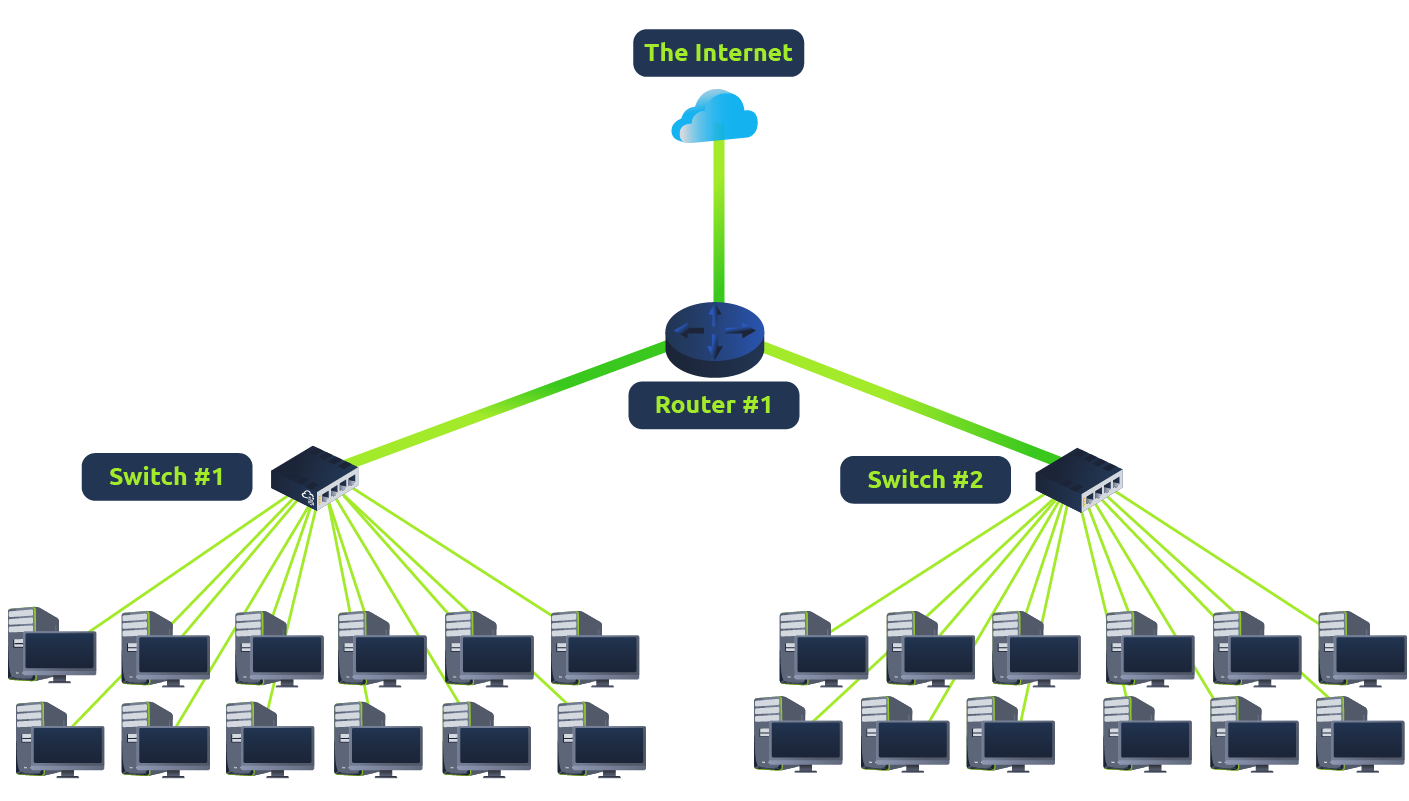
The main premise of a star topology is that devices are individually connected via a central networking device such as a switch or hub. This topology is the most commonly found today because of its reliability and scalability - despite the cost.

Any information sent to a device in this topology is sent via the central device to which it connects. Let's explore some of these advantages and disadvantages of this topology below:

Because more cabling and the purchase of dedicated networking equipment is required for this topology, it is more expensive than any of the other topologies. However, despite the added cost, this does provide some significant advantages. For example, this topology is much more scalable in nature, which means that it is very easy to add more devices as the demand for the network increases.

Unfortunately, the more the network scales, the more maintenance is required to keep the network functional. This increased dependence on maintenance can also make troubleshooting faults much harder. Furthermore, the star topology is still prone to failure - albeit reduced. For example, if the centralised hardware that connects devices fails, these devices will no longer be able to send or receive data. Thankfully, these centralised hardware devices are often robust.

Bus Topology

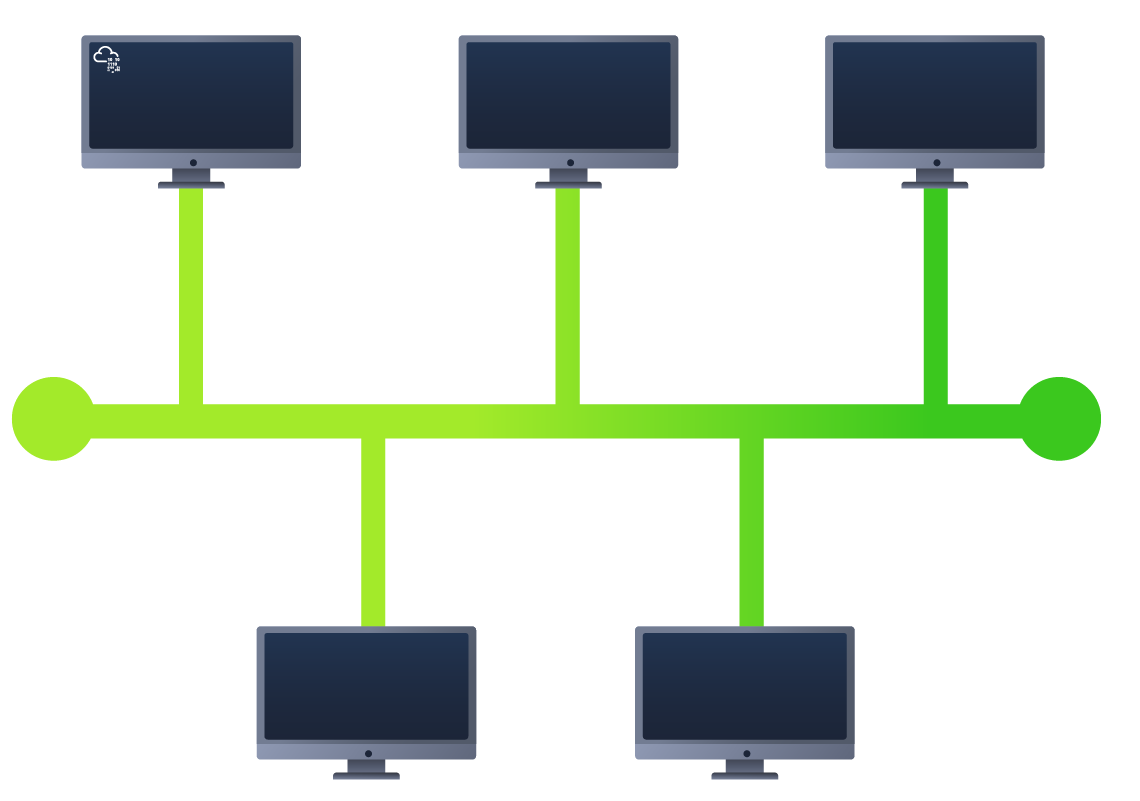
This type of connection relies upon a single connection which is known as a backbone cable. This type of topology is similar to the leaf off of a tree in the sense that devices (leaves) stem from where the branches are on this cable.

Because all data destined for each device travels along the same cable, it is very quickly prone to becoming slow and bottlenecked if devices within the topology are simultaneously requesting data. This bottleneck also results in very difficult troubleshooting because it quickly becomes difficult to identify which device is experiencing issues with data all travelling along the same route.

However, with this said, bus topologies are one of the easier and more cost-efficient topologies to set up because of their expenses, such as cabling or dedicated networking equipment used to connect these devices.

Lastly, another disadvantage of the bus topology is that there is little redundancy in place in case of failures. This disadvantage is because there is a single point of failure along the backbone cable. If this cable were to break, devices can no longer receive or transmit data along the bus.

Ring Topology

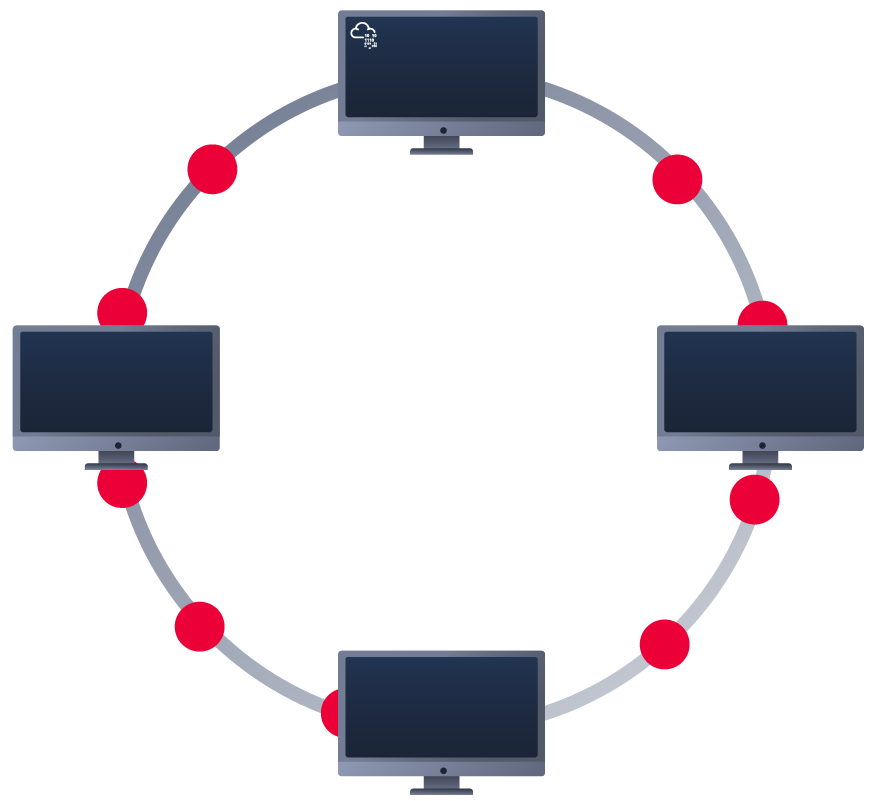
The ring topology (also known as token topology) boasts some similarities. Devices such as computers are connected directly to each other to form a loop, meaning that there is little cabling required and less dependence on dedicated hardware such as within a star topology.

A ring topology works by sending data across the loop until it reaches the destined device, using other devices along the loop to forward the data. Interestingly, a device will only send received data from another device in this topology if it does not have any to send itself. If the device happens to have data to send, it will send its own data first before sending data from another device.

Because there is only one direction for data to travel across this topology, it is fairly easy to troubleshoot any faults that arise. However, this is a double-edged sword because it isn't an efficient way of data travelling across a network, as it may have to visit many multiple devices first before reaching the intended device.

Lastly, ring topologies are less prone to bottlenecks, such as within a bus topology, as large amounts of traffic are not travelling across the network at any one time. The design of this topology does, however, mean that a fault such as cut cable, or broken device will result in the entire networking breaking.

What is a Switch?

Switches are dedicated devices within a network that are designed to aggregate multiple other devices such as computers, printers, or any other networking-capable device using ethernet. These various devices plug into a switch's port. Switches are usually found in larger networks such as businesses, schools, or similar-sized networks, where there are many devices to connect to the network. Switches can connect a large number of devices by having ports of 4, 8, 16, 24, 32, and 64 for devices to plug into.

Switches are much more efficient than their lesser counterpart (hubs/repeaters). Switches keep track of what device is connected to which port. This way, when they receive a packet, instead of repeating that packet to every port like a hub would do, it just sends it to the intended target, thus reducing network traffic.

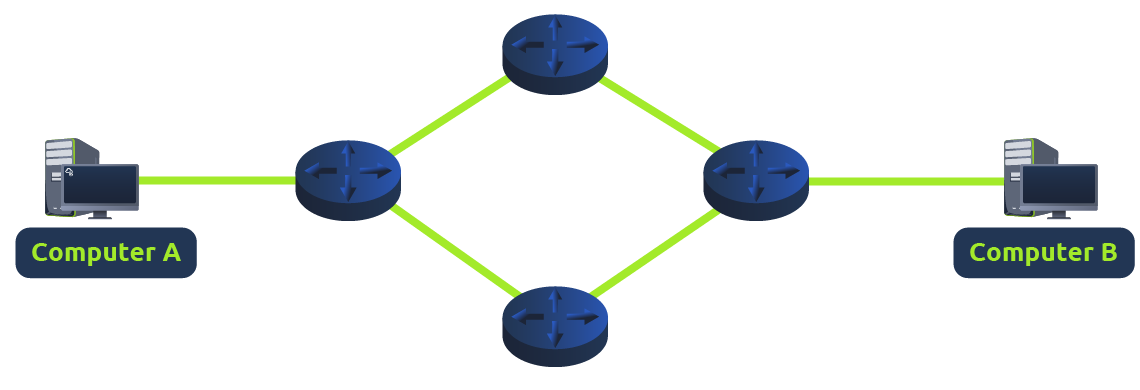
Both Switches and Routers can be connected to one another. The ability to do this increases the redundancy (the reliability) of a network by adding multiple paths for data to take. If one path goes down, another can be used. Whilst this may reduce the overall performance of a network because packets have to take longer to travel, there is no downtime -- a small price to pay considering the alternative.

What is a Router?

It's a router's job to connect networks and pass data between them. It does this by using routing (hence the name router!).

Routing is the label given to the process of data travelling across networks. Routing involves creating a path between networks so that this data can be successfully delivered.

Routing is useful when devices are connected by many paths, such as in the example diagram below.

Practical

Attached to this task is an interactive practical featuring the discussed LAN topologies. Learn about the various ways in which they are vulnerable to breaking. Break the LAN topologies to retrieve the flag.

Answer the questions below

What does LAN stand for?

What is the verb given to the job that Routers perform?

What device is used to centrally connect multiple devices on the local network and transmit data to the correct location?

What topology is cost-efficient to set up?

What topology is expensive to set up and maintain?

Complete the interactive lab attached to this task. What is the flag given at the end?

As we've previously discussed throughout the module so far, Networks can be found in all shapes and sizes - ranging from small to large. Subnetting is the term given to splitting up a network into smaller, miniature networks within itself. Think of it as slicing up a cake for your friends. There's only a certain amount of cake to go around, but everybody wants a piece. Subnetting is you deciding who gets what slice & reserving such a slice of this metaphorical cake.

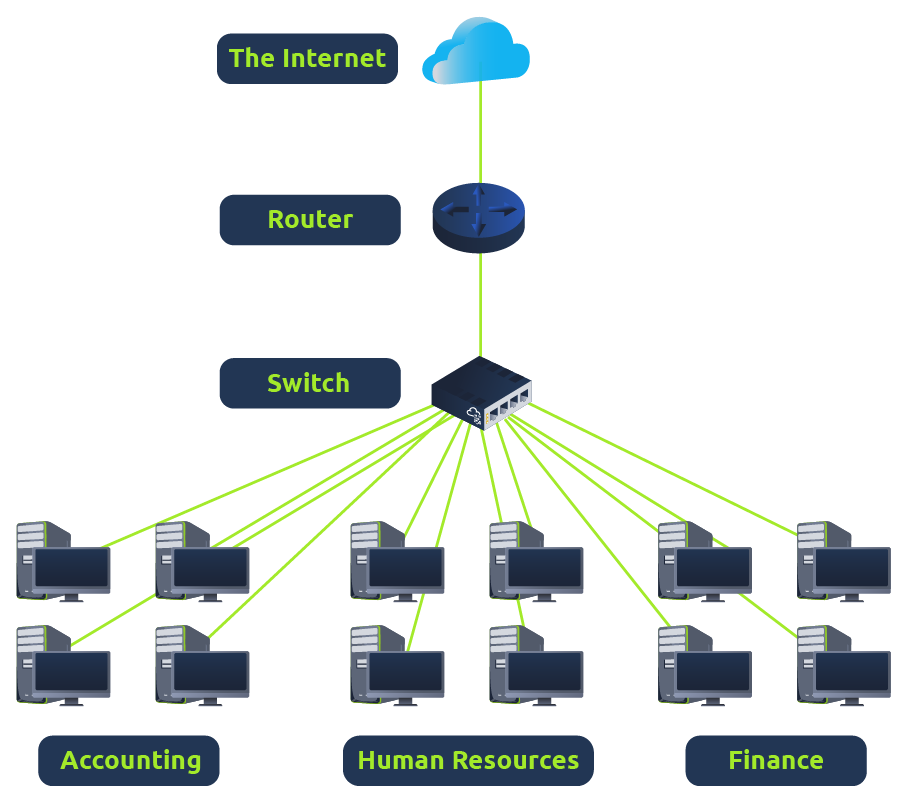
Take a business, for example; You will have different departments such as:

  • Accounting
  • Finance
  • Human Resources


Whilst you know where to send information in real life to the correct department, networks need to know as well. Network administrators use subnetting to categorise and assign specific parts of a network to reflect this.

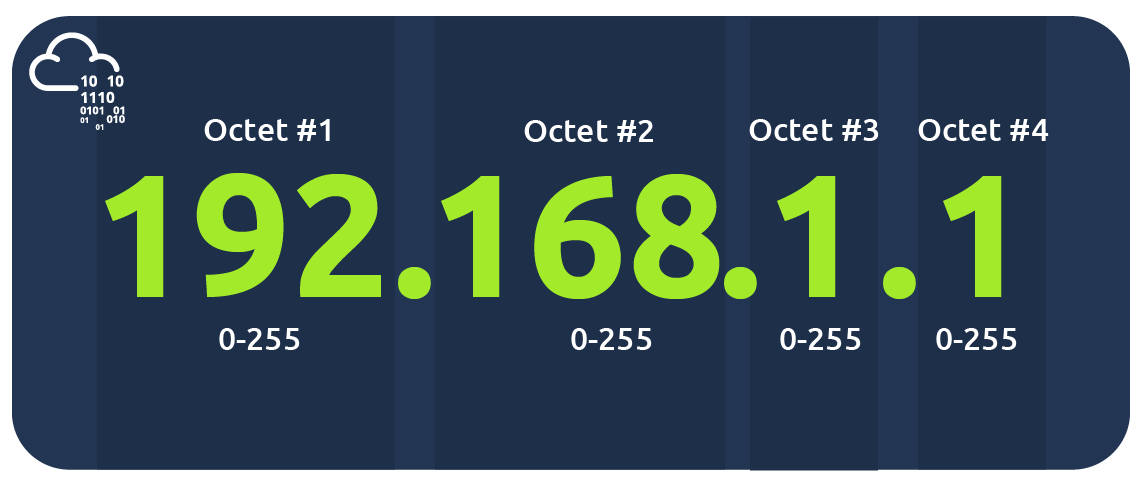
Subnetting is achieved by splitting up the number of hosts that can fit within the network, represented by a number called a subnet mask. Let's refer back to our diagram from the first room in this module:


As we can recall, an IP address is made up of four sections called octets. The same goes for a subnet mask which is also represented as a number of four bytes (32 bits), ranging from 0 to 255 (0-255).

Subnets use IP addresses in three different ways:

  • Identify the network address
  • Identify the host address
  • Identify the default gateway

Let's split these three up to understand their purposes into the table below:

TypePurposeExplanationExample
Network Address 
This address identifies the start of the actual network and is used to identify a network's existence.
For example, a device with the IP address of 192.168.1.100 will be on the network identified by 192.168.1.0
192.168.1.0
Host Address
An IP address here is used to identify a device on the subnet
For example, a device will have the network address of 192.168.1.1
192.168.1.100
Default Gateway
The default gateway address is a special address assigned to a device on the network that is capable of sending information to another network 
Any data that needs to go to a device that isn't on the same network (i.e. isn't on 192.168.1.0) will be sent to this device. These devices can use any host address but usually use either the first or last host address in a network (.1 or .254)
192.168.1.254


Now, in small networks such as at home, you will be on one subnet as there is an unlikely chance that you need more than 254 devices connected at one time.

However, places such as businesses and offices will have much more of these devices (PCs, printers, cameras and sensors), where subnetting takes place.

Subnetting provides a range of benefits, including:

  • Efficiency
  • Security
  • Full control

We'll come on to explore exactly how subnetting provides these benefits at a later date; however, for now, all we need to understand is the security element to it. Let's take the typical café on the street. This cafe will have two networks:

  1. One for employees, cash registers, and other devices for the facility
  2. One for the general public to use as a hotspot

Subnetting allows you to separate these two use cases from each other whilst having the benefits of a connection to larger networks such as the Internet.

Answer the questions below
What is the technical term for dividing a network up into smaller pieces?

How many bits are in a subnet mask?

What is the range of a section (octet) of a subnet mask?

What address is used to identify the start of a network?

What address is used to identify devices within a network?

What is the name used to identify the device responsible for sending data to another network?

Recalling from our previous tasks that devices can have two identifiers: A MAC address and an IP address, the Address Resolution Protocol or for short, is the technology that is responsible for allowing devices to identify themselves on a network.

Simply, allows a device to associate its MAC address with an IP address on the network. Each device on a network will keep a log of the MAC addresses associated with other devices.

When devices wish to communicate with another, they will send a broadcast to the entire network searching for the specific device. Devices can use to find the MAC address (and therefore the physical identifier) of a device for communication.

How does Work?

Each device within a network has a ledger to store information on, which is called a cache. In the context of , this cache stores the identifiers of other devices on the network.

In order to map these two identifiers together (IP address and MAC address), sends two types of messages:

  1. Request
  2. Reply

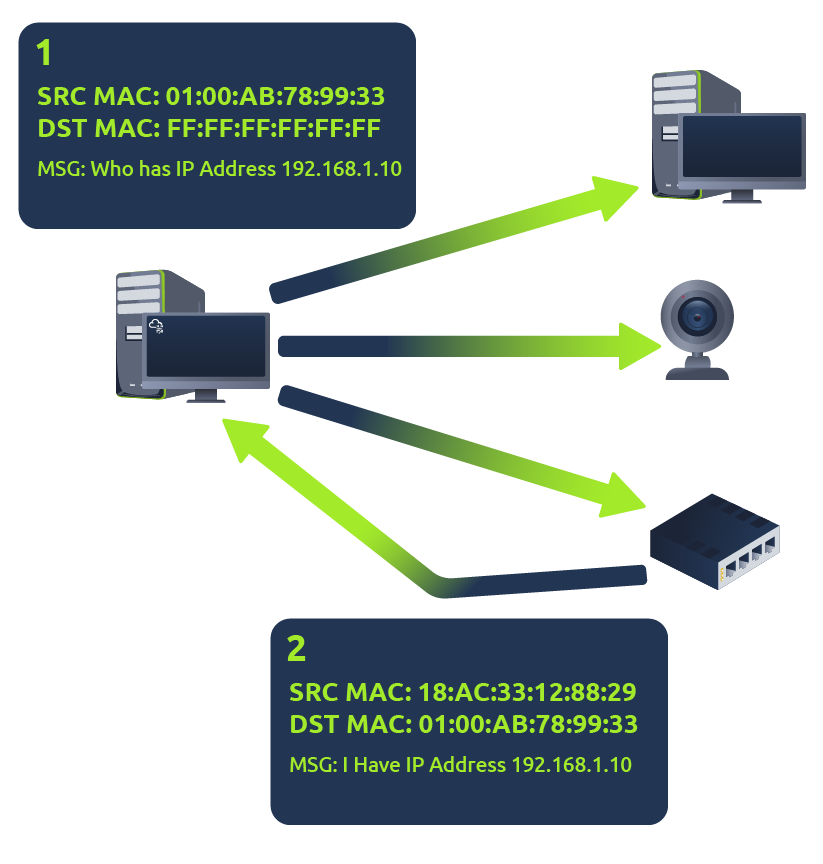
When an request is sent, a message is broadcasted on the network to other devices asking, "What is the mac address that owns this IP address?" When the other devices receive that message, they will only respond if they own that IP address and will send an reply with its MAC address. The requesting device can now remember this mapping and store it in its cache for future use.

This process is illustrated in the diagram below:


Answer the questions below
What does ARP stand for?

What category of ARP Packet asks a device whether or not it has a specific IP address?

What address is used as a physical identifier for a device on a network?

What address is used as a logical identifier for a device on a network?

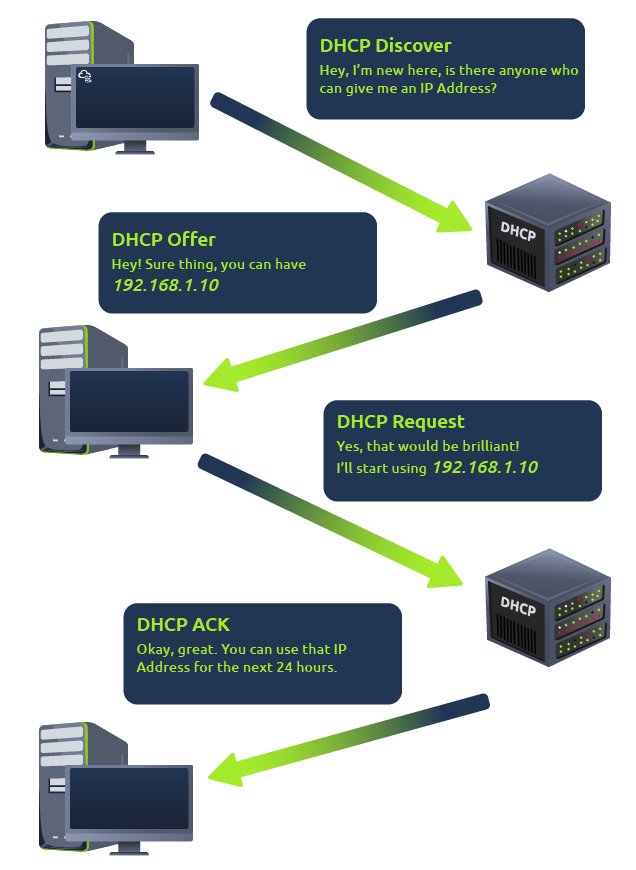
IP addresses can be assigned either manually, by entering them physically into a device, or automatically and most commonly by using a (Dynamic Host Configuration Protocol) server. When a device connects to a network, if it has not already been manually assigned an IP address, it sends out a request ( Discover) to see if any servers are on the network. The server then replies back with an IP address the device could use ( Offer). The device then sends a reply confirming it wants the offered IP Address ( Request), and then lastly, the server sends a reply acknowledging this has been completed, and the device can start using the IP Address ( ACK).


Answer the questions below
What type of DHCP packet is used by a device to retrieve an IP address?
What type of DHCP packet does a device send once it has been offered an IP address by the DHCP server?

Finally, what is the last DHCP packet that is sent to a device from a DHCP server?

Continue your learning by joining the "OSI Model" room.

Answer the questions below