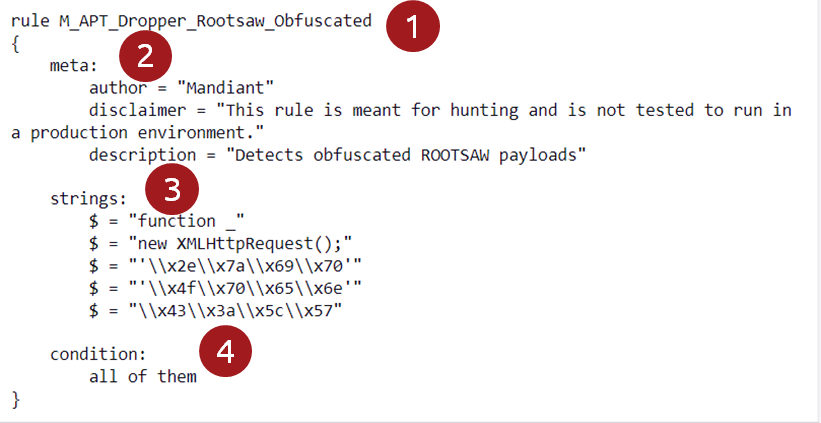
In the previous task, we briefly discussed the different parts of a YARA rule and mentioned that a YARA rule requires at least the strings and condition part to function as intended. These two parts make or break a YARA rule, so it is important to go a bit deeper into them. But before that, we will talk briefly about false positives.
False Positives
An essential part of threat hunting is excluding false positives. When we look at YARA, this means creating rules that uniquely identify the threat you are looking for. This is easier said than done. YARA rules can get complex very fast when tailored toward specific malware. Using well-written and tested YARA rules is a must. This leaves us with two choices: You either dive deep into the specifics of writing YARA rules or use YARA rules created by experts (like those included in the threat intelligence we received in Task 3). Of course, the combination of these two options is also viable. Even when just using pre-created YARA rules, it is crucial that you understand them.
Strings
In this paragraph, we will investigate what strings we can use within a YARA rule. We will discuss the general types of available strings without going too deep in each category. Most modifier keywords we will encounter throughout this paragraph can be combined. It is out of scope to discuss all the possible combinations. If you want to dig deeper, you can have a look at the official YARA documentation.
Text Strings
In its simplest form, we can define an ASCII-encoded string that matches some text we seek. It is essential to mention that the specified string is case-sensitive. Let us look at an example:
rule textString
    {
      strings:
            $1 = "This is an ASCII-encoded string" //strings are defined between double quotes
            $2 = "This is an ascii-encoded string" //not the same as $1.

      condition:
            all of them
    }
It is possible to define the string as case-insensitive by adding the modifier nocase next to it. This way, it will search for all permutations of the specified string. The example below shows the use of the nocase modifier:
rule noCaseTextString
    {
      strings:
            $1 = "This is an ASCII-encoded string" nocase

      condition:
            $1
    }
Wide-Character Strings
Strings can be encoded in different ways. One way often found in binaries is encoding the string as two bytes per character instead of the traditional one-byte ASCII encoding. For example, the string tryhackme would be encoded as t00r00y00h00a00c00k00m00e00. It is possible to use a modifier next to the defined string so the rule matches for this wide-character string. The modifier used for this is wide. The example below shows the use of the wide modifier:
rule wideTextString
    {
      strings:
            $1 = "tryhackme" wide // will match with t\x00r\x00y\x00h\x00a\x00c\x00k\x00m\x00e\x00

      condition:
            $1
    }
Hexadecimal Strings
When malware analysts start analyzing malware, they often use a disassembler and debugger like IDA Pro to dismantle binaries. Often, the pieces of code they uncover are displayed in hexadecimal. We can then use the hexadecimal strings uncovered during analysis to create our own YARA rules. Sequences of hexadecimal characters are often more challenging for attackers to obfuscate and hide. So, these hexadecimal strings provide an excellent opportunity to uniquely identify a certain malicious binary. Let us look at an example of hexadecimal strings in a YARA rule.
rule hexString
    {
      strings:
            $1 = { E2 34 B6 C8 A3 FB } // Hexadecimal strings are defined between {}

      condition:
            $1
    }
Defining hexadecimal strings can be very flexible. YARA supports four ways to realize this: Use of wild cards, not operators, jumps, and alternatives. All of the constructions can be combined as well. Let us look at an example of its primary usage:
rule hexStringExpanded
    {
      strings:
            $1 = { E2 34 B6 ?? A3 FB } // The ? is a wildcard and can represent any hex value.

            $2 = { E2 34 B6 ~00 A3 FB } // The ~ is a not operator that precedes the value to exclude from the search. In this case 00.

            $3 = { E2 34 [2-4] A3 FB } // The [X-Y] construct defines a jump. This means that any value between 2 and 4 bytes can occupy this position.

            $4 = { E2 34 (C5|B5) A3 FB } // Between () alternative byte sequences can be defined separated with the boolean operator OR. The value can be B5 OR C5.

      condition:
             $1
    }
XOR Strings
Malware creators often use XOR to encrypt their code, making it harder for malware analysts to analyze. It also helps evade anti-virus signatures. The XOR string support in YARA helps us to hunt for XOR encrypted string variations with 1-byte keys. Let us look at an example:
rule xorString
    {
      strings:
            $1 = "http://maliciousurl.thm" xor // This line will look for all variations possible with a 1-byte XOR key

      condition:
            $1
    }
Malware authors will often use encoding to evade detection. One encoding technique that is often used is base64. YARA supports looking for base64 encoded strings. To do this, you can use the modifier base64 after defining the string. YARA will search for the base64 encoded string when running the YARA rule. Let us have a look at an example:
rule base64String
        {
            strings:
                $1 = "This is a regular string"  base64 // At runtime YARA will encode the string with base64 and look for matches.

            condition:
                $1
        }
Regular Expressions
Just like with the grep command in Linux, using regular expressions makes YARA powerful. You can define regular expressions the same way as strings, with the only difference being forward slashes instead of double quotes. A bonus is that the above modifiers can also be applied to these regular expressions. Check out our Regular expressions room for more info on creating regular expressions. It is, however, important to note that since version 2.0, YARA has used its regular expression engine, which implements most features found in PCRE. For now, let us look at an example of a YARA rule that includes a regular expression:
rule regularExpression
        {
            strings:
                $1 = /THM\{[a-zA-Z]{3}\}/ // This regex will match any string that starts with "THM{", ends with "}" and has 3 alphabetic characters (lower-case or upper-case) between the curly brackets.

            condition:
                $1
        }
Conditions
Once you have defined your strings, it is crucial to define how to combine them and match the files you are searching for. YARA offers great flexibility when making different combinations. YARA includes Boolean, relational, arithmetic, and bitwise operators. Additionally, some keywords can be used. The table below shows an overview of the operators and keywords:
| Boolean operators |
Relational operators |
Arithmetic operators |
Bitwise operators |
Keywords |
| and |
>= |
+ |
& |
1 of them |
| or |
<= |
- |
| |
any of them |
| not |
< |
* |
<< |
none of them |
|
> |
\ |
>> |
contains |
|
== |
% |
~ |
icontains |
|
!= |
|
^ |
startswith |
|
|
|
|
istartswith |
|
|
|
|
endswith |
|
|
|
|
iendswith |
|
|
|
|
iequals |
|
|
|
|
matches |
|
|
|
|
not defined |
|
|
|
|
filesize |
We could dedicate a complete room to all the operators, but for this room, we will focus only on some of the Boolean operators and keywords. Let’s look at some examples:
rule differentConditions
    {
      strings:
            $1 = "Try"
            $2 = "Hack"
            $3 = "Me"

      condition:
            all of them // Matches when all defined strings are present.
    }
rule differentConditions
    {
      strings:
            $1 = "Try"
            $2 = "Hack"
            $3 = "Me"

      condition:
            any of them  // Matches when at least one of the defined strings is present.
    }
rule differentConditions
    {
      strings:
            $1 = "Try"
            $2 = "Hack"
            $3 = "Me"

      condition:
             1 of $(*) // Identical to "any of them" condition.
    }
rule differentConditions
    {
      strings:
            $1 = "Try"
            $2 = "Hack"
            $3 = "Me"

      condition:
            "$1 or $2" // Matches when 'Try' or 'Hack' is present.
    }
rule differentConditions
    {
      strings:
            $1 = "Try"
            $2 = "Hack"
            $3 = "Me"

      condition:
            $1 and $2 // Matches when 'Try' and 'Hack' are present.
    }
rule differentConditions
    {
      strings:
            $1 = "Try"
            $2 = "Hack"
            $3 = "Me"

      condition:
            $1 and ($2 or $3) // Matches when 'Try' and 'Hack' or 'Try' and 'Me' combinations are present.
    }
rule differentConditions
    {
      strings:
            $1 = "Try"
            $2 = "Hack"
            $3 = "Me"

      condition:
            none of them // Matches only when none of the defined strings are present.
    }
rule differentConditions
    {
      strings:
            $1 = "Try"
            $2 = "Hack"
            $3 = "Me"

      condition:
            filesize < 500KB // Matches all files smaller than 500 KiloByte. This can only be used when matching for files.
    }
rule differentConditions
    {
      strings:
            $1 = "Try"
            $2 = "Hack"
            $3 = "Me"

      condition:
            ($1 or $2) and filesize < 200KB // Matches for 'Try' or 'Hack' in files smaller than 200KB.
    }
Now that we have covered the two most important parts of a YARA rule, let’s move on to the next task and examine how we can use YARA rules to hunt for Indicators of Compromise.