We use cookies to ensure you get the best user experience. For more information see our cookie policy.
Broken Access Control
Exploit Broken Access Control: Number 1 of the Top 10 web security risks.
Task 1: Introduction
Broken access controls are a type of security vulnerability that
arises when an application or system fails to properly restrict access
to sensitive data or functionality. This vulnerability allows attackers
to gain unauthorized access to resources that should be restricted, such
as user accounts, files, databases, or administrative functions. Broken
access controls can occur due to a variety of factors, including poor
design, configuration errors, or coding mistakes.
Objectives that the
student will learn:
Understand what Broken Access Control is and its impact.
Identify Broken Access Control vulnerabilities in web
applications.
Exploit these vulnerabilities in a controlled environment.
Understand and apply measures to mitigate and prevent these
vulnerabilities.
Pre-requisites:
Basic understanding of JSON, web applications, and HTTP
protocols.
Familiarity with scripting languages such as PHP and
JavaScript.
Knowledge of web application security standards and frameworks such
as OWASP Top
10.
Basic understanding and usage of a proxy tool like Burp Suite.
Answer the questions below
Click me to proceed onto the next task.
Task 2: Broken Access Control Introduction
What is Access Control?
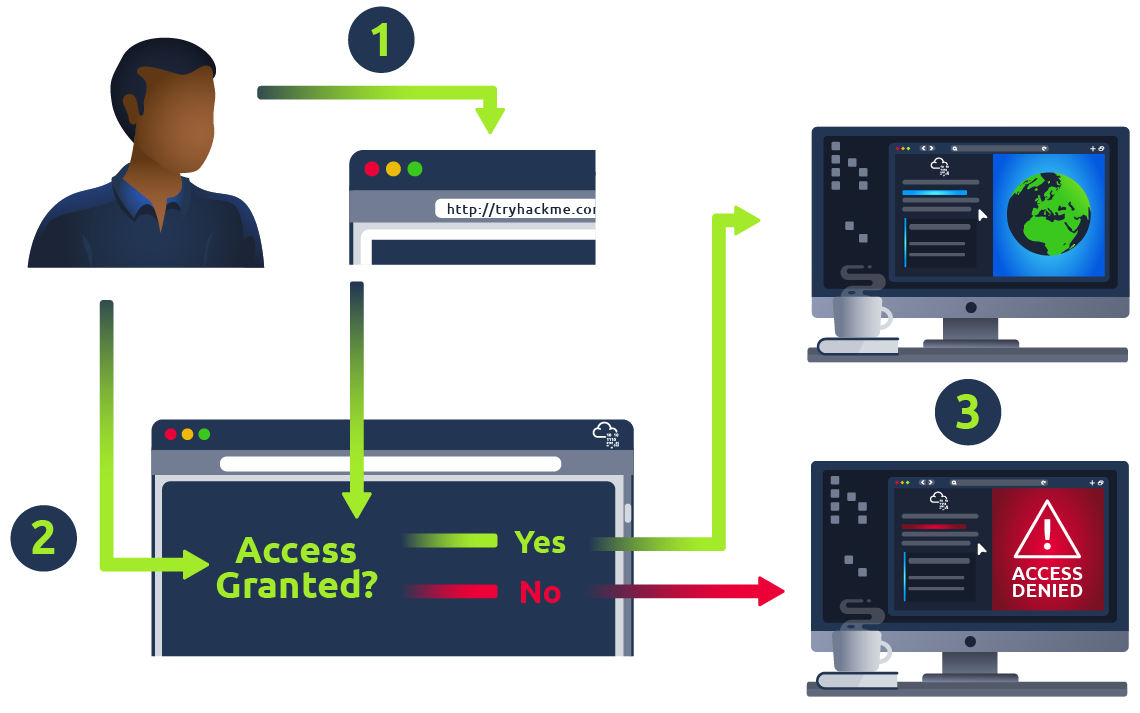
Access control is a security mechanism used to control which users or
systems are allowed to access a particular resource or system. Access
control is implemented in computer systems to ensure that only
authorized users have access to resources, such as files, directories,
databases, and web pages. The primary goal of access control is to
protect sensitive data and ensure that it is only accessible to those
who are authorized to access it.
Access control can be implemented in different ways, depending on the
type of resource being protected and the security requirements of the
system. Some common access control mechanisms include:
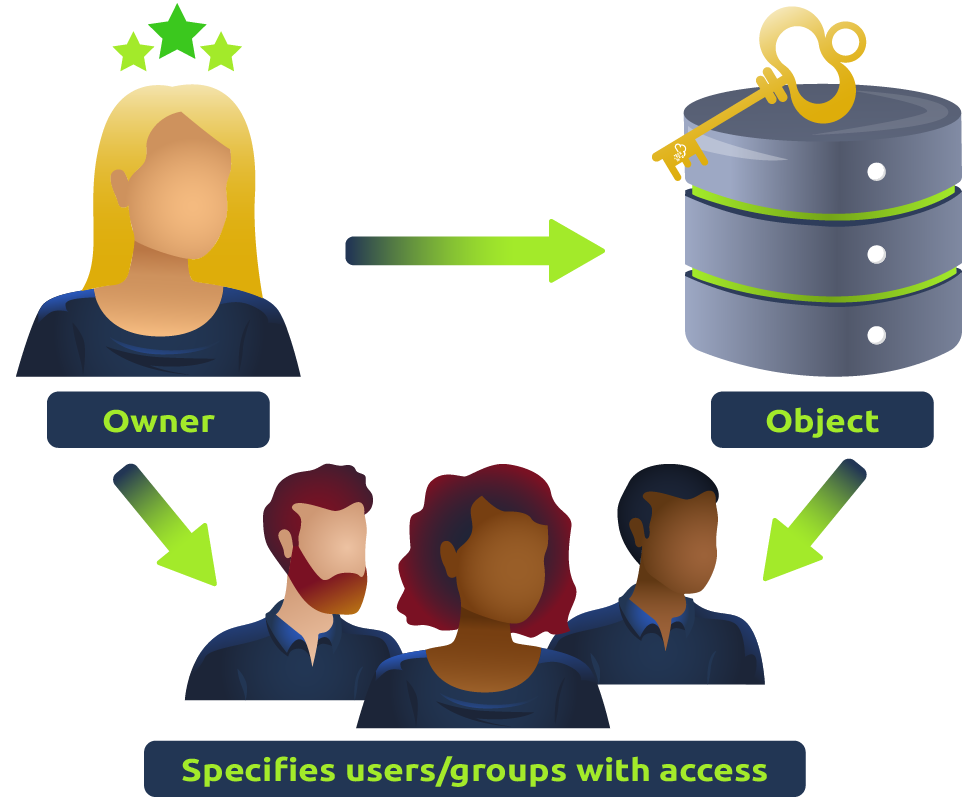
Discretionary Access Control (DAC): In this type
of access control, the resource owner or administrator determines who is
allowed to access a resource and what actions they are allowed to
perform. DAC is commonly used in operating systems and file systems. In layman’s terms, imagine a castle where the king can give keys to his advisors, allowing them to open any doors they like, whenever they want.
That’s DAC for you. It’s the liberty to control access to your own
resources. The one in charge, like the king of the castle, can hand out
permissions to whomever they please, dictating who can come in and
out.
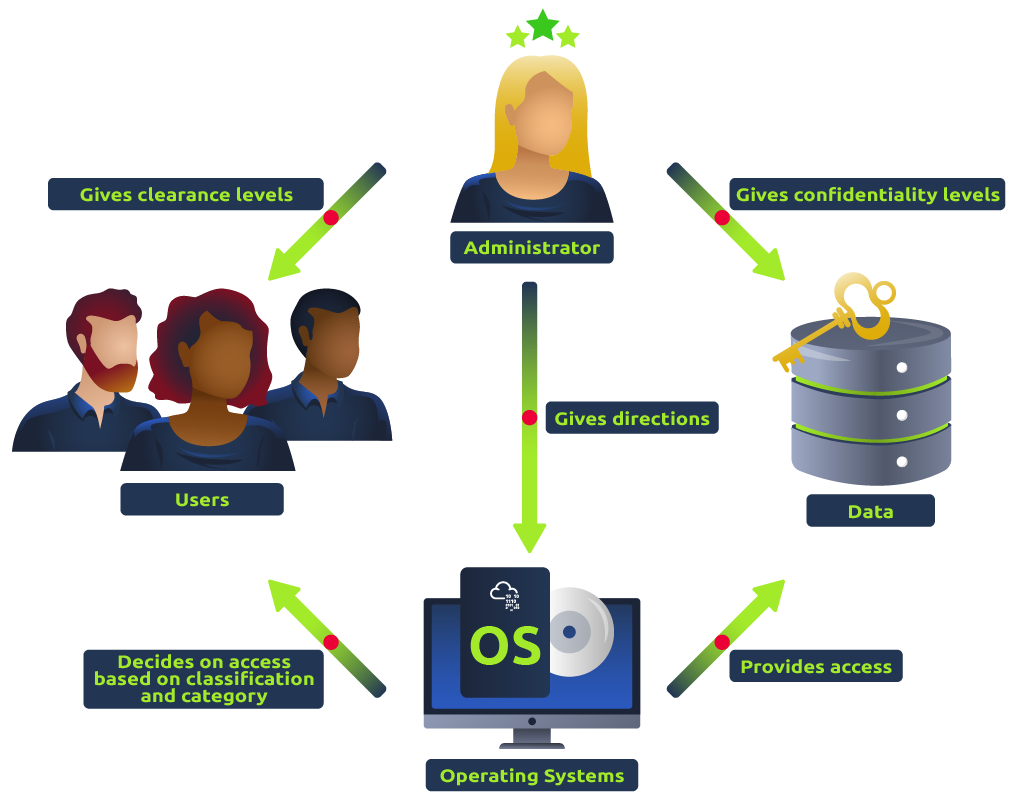
Mandatory Access Control (MAC): In this type of
access control, access to resources is determined by a set of predefined
rules or policies that are enforced by the system. MAC is commonly used
in highly secure environments, such as government and military
systems. In layman’s terms, picture a fort with an iron-clad security protocol. Only specific individuals with particular security clearances
can access certain areas, and this is non-negotiable. The high commander
sets the rules, and they are rigorously followed. That’s how MAC works.
It’s like the stern security officer who allows no exceptions to the
rule.
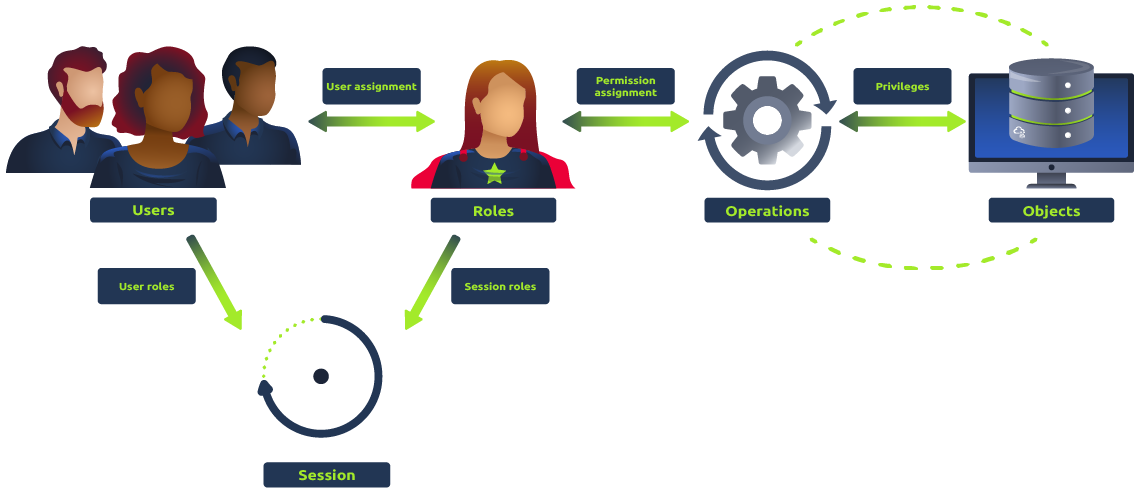
Role-Based Access Control (RBAC): In this type
of access control, users are assigned roles that define their level of
access to resources. RBAC is commonly used in enterprise systems, where
users have different levels of authority based on their job
responsibilities. In layman’s terms, imagine a modern corporation. You
have your managers, your executives, your sales staff, etc. They each
have different access to the building. Some can enter the boardroom,
others can access the sales floor, and so on. That’s the essence of RBAC
- assigning access based on a person’s role within an organization.
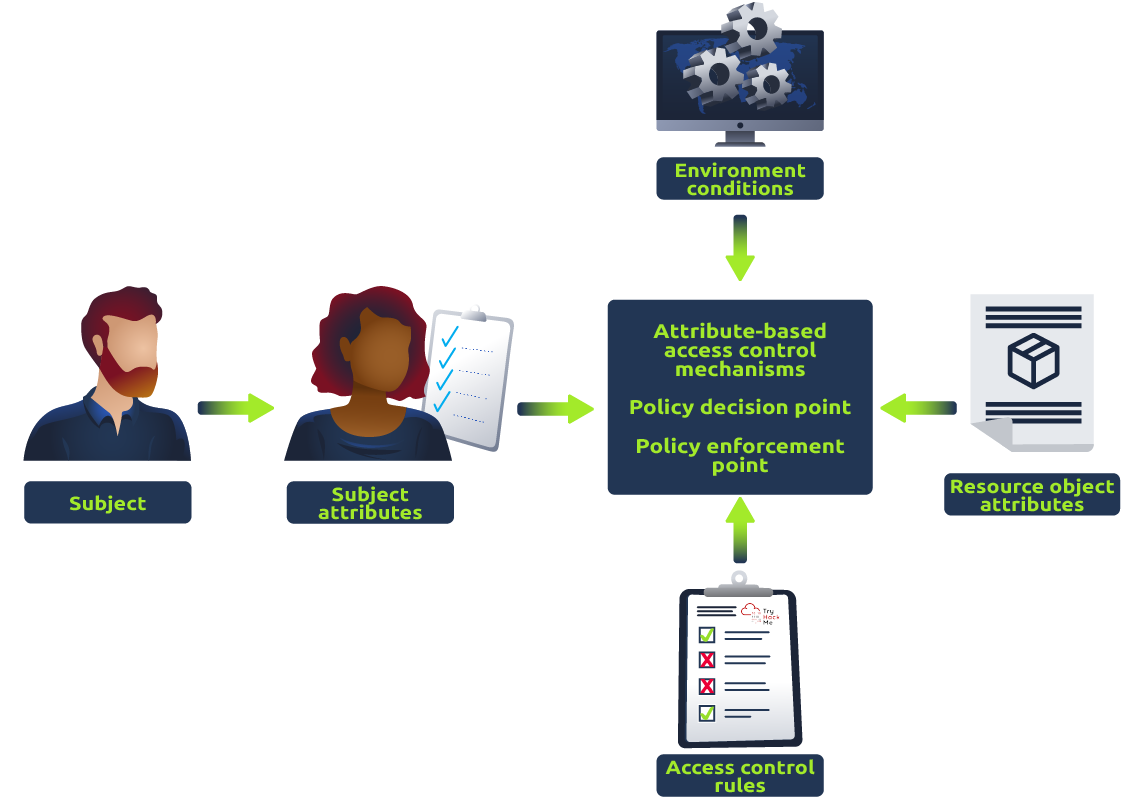
Attribute-Based Access Control (ABAC): In this
type of access control, access to resources is determined by a set of
attributes, such as user role, time of day, location, and device. ABAC
is commonly used in cloud environments and web applications. In layman’s
terms, think of a highly advanced sci-fi security system that scans
individuals for certain attributes. Maybe it checks whether they’re from
a particular planet, whether they’re carrying a specific device, or if
they’re trying to access a resource at a specific time. That’s ABAC.
It’s like the smart, flexible security of the future.
Implementing access control can help prevent security breaches and
unauthorized access to sensitive data. However, access control is not
foolproof and can be vulnerable to various types of attacks, such as
privilege escalation and broken access control vulnerabilities.
Therefore, it is important to regularly review and test access control
mechanisms to ensure that they are working as intended.
Broken Access Control:
Broken access control vulnerabilities refer to situations where
access control mechanisms fail to enforce proper restrictions on user
access to resources or data. Here are some common exploits for broken
access control and examples:
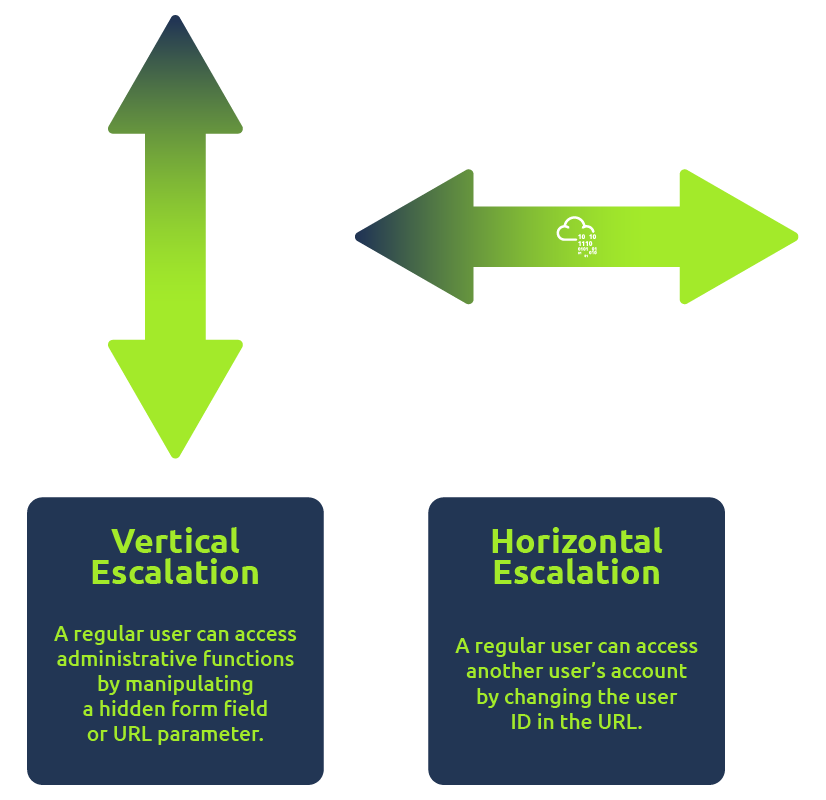
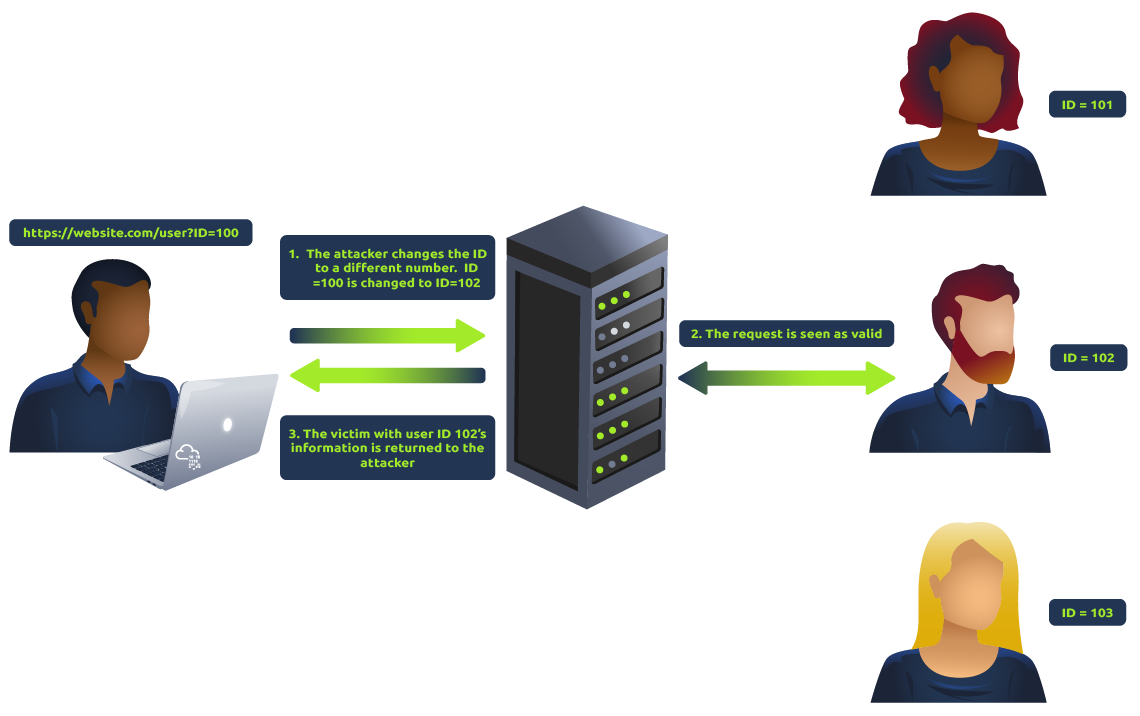
Horizontal privilege escalation occurs when an
attacker can access resources or data belonging to other users with the
same level of access. For example, a user might be able to access
another user’s account by changing the user ID in the URL.
Vertical privilege escalation occurs when an
attacker can access resources or data belonging to users with higher
access levels. For example, a regular user can access administrative
functions by manipulating a hidden form field or URL parameter.
Insufficient access control checks occur when
access control checks are not performed correctly or consistently,
allowing an attacker to bypass them. For example, an application might
allow users to view sensitive data without verifying their proper
permissions.
Insecure direct object references occur when an
attacker can access a resource or data by exploiting a weakness in the
application’s access control mechanisms. For example, an application
might use predictable or easily guessable identifiers for sensitive
data, making it easier for an attacker to access. You may refer to this
room in Task
#4 to learn more about this.
These exploits can be prevented by implementing strong access control
mechanisms and regularly reviewing and testing them to ensure they are
functioning as intended.
Answer the questions below
What is IDOR?
What occurs when an attacker can access resources or data belonging to other users with the same level of access?
What occurs when an attacker can access resources or data from users with higher access levels?
What is ABAC?
What is RBAC?
Task 3: Deploy the Machine
To focus on learning about the Broken Access Controls, please click
on the Start Lab Machine button located in the upper-right-hand
corner of this task to deploy the lab machine for this room.
After obtaining the machine’s generated IP address, you can either
use our AttackBox or use your own VM connected to TryHackMe’s VPN to
begin the attack. If you prefer to use the AttackBox, you can simply
click on the Start AttackBox button located above the room
name.
After starting the AttackBox or connecting your attack VM to
TryHackMe’s VPN, you can now start accessing the target website
application by entering http://MACHINE_IP/ into the
browser.
Keep in mind that the machine may take up to
5 minutes to spawn.
Answer the questions below
I have deployed the machine attached to the task.
Task 4: Assessing the Web Application
Learning Objective:
In this task, our objective is to gain a comprehensive understanding
of the web application’s functionalities. This will allow us to make the
most of the application’s capabilities and achieve our desired
outcomes.
Assessing the Application:
When you browse a web application as a penetration tester, imagine
what the underlying code looks like and what vulnerabilities come to
mind for each functionality, request, and response.
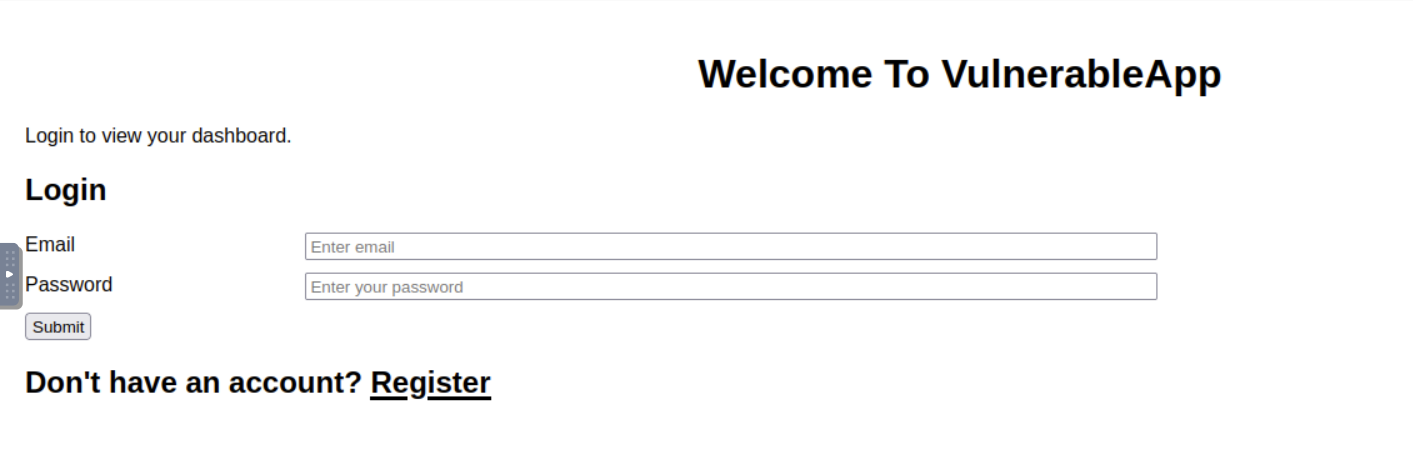
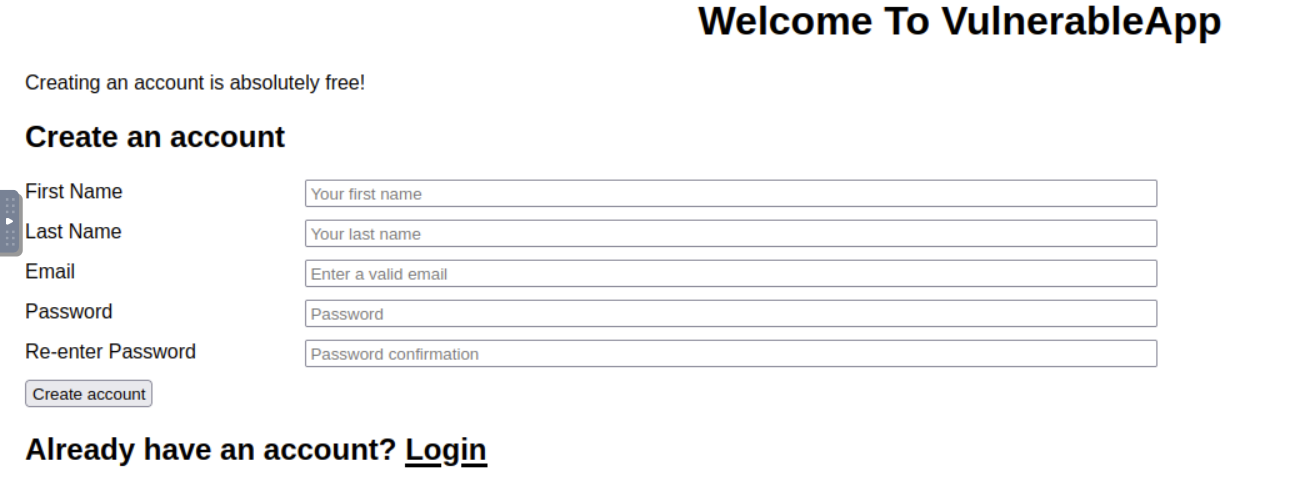
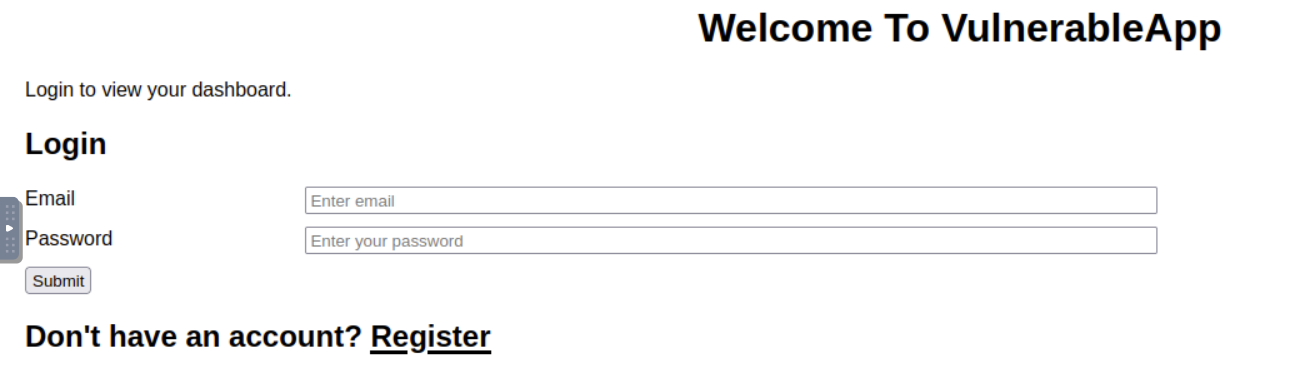
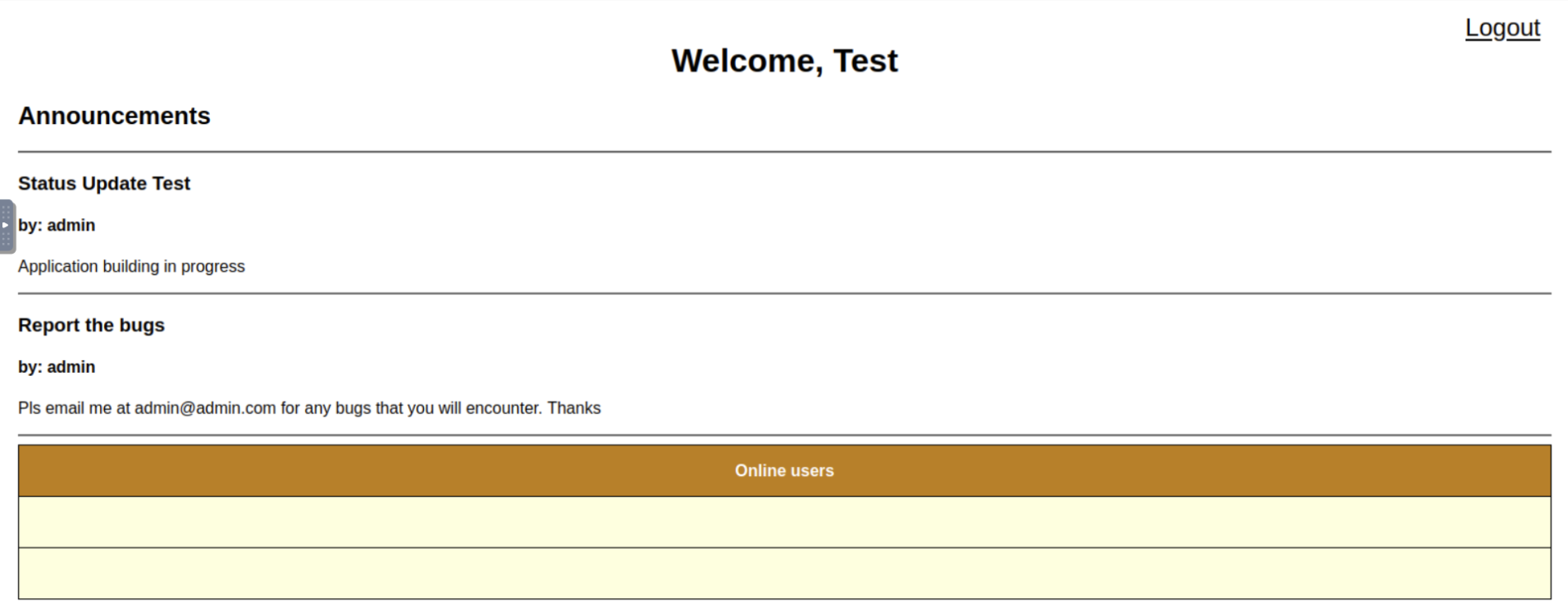
The web application for this room features a Dashboard, Login, and
Registration form that enables users to access the dashboard of the
website. From a web app pentester standpoint, the pentester will usually
register an account. After the registration, the pentester will then try
to check the login function for any access control vulnerabilities.
Below are the screenshots of each webpage:
Registration:
Login:
Dashboard:
In order for us to capture the HTTP requests being sent to the server,
we can use OWASP ZAP or Burp
Suite Community Edition.
To learn more about the detailed usage of Burp Suite and its
functionalities, you may refer to the Burp Suite
Module.
Capturing the HTTP traffic
In order for us to further analyze the requests and responses being
sent and received from the server, we will use the
“Proxy” module of Burp Suite to capture the HTTP
traffic that is being sent to the server. The captured HTTP traffic can be used with the other modules of Burp Suite.
These can then be manipulated or sent to other tools, such as
“Repeater”, for further processing before being allowed
to continue to their destination.
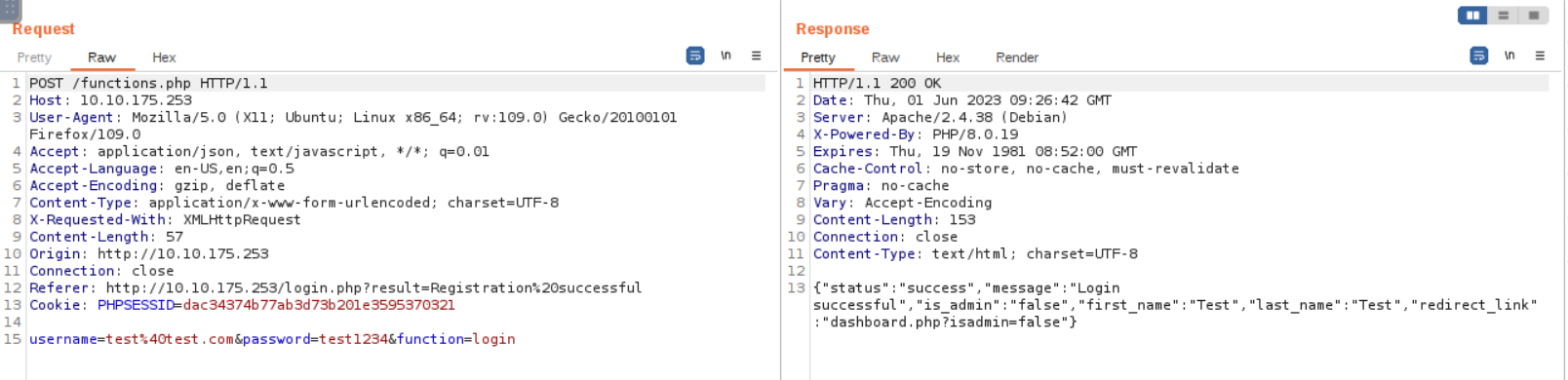
Below is the captured HTTP traffic that is being sent to
functions.php after login.
Based on the screenshot displayed above, we can observe that upon
completing the login process, the web application will give us a JSON
response that contains the status, message, first_name, last_name,
is_admin, and redirect_link which the server uses to redirect the user
to the dashboard.php with the parameter “isadmin” in the
URL.
Understanding
the content of the HTTP request and response:
The target web application does not have any implemented security
headers, which indicates that there are no preventative measures (like a
first line of defense) in place to protect the web application against
certain types of attacks.
The target web application is running on a Linux operating system
(Debian) and is using Apache web server
(Apache/2.4.38). This information can be useful in
identifying potential security vulnerabilities that may exist in the
target web application.
The target web application utilizes PHP/8.0.19 as its
backend programming language. This information is important for
understanding the technology stack of the application and identifying
potential security vulnerabilities or compatibility issues that may
arise with other software components.
The target web application redirects the user to the dashboard with
a parameter that we can possibly test for privilege escalation
vulnerabilities.
Answer the questions below
What is the type of server that is hosting the web application? This can be found in the response of the request in Burp Suite.
What is the name of the parameter in the JSON response from the login request that contains a redirect link?
What Burp Suite module allows us to capture requests and responses between ourselves and our target?
What is the admin’s email that can be found in the online users’ table?
Task 5: Exploiting the Web Application
In the previous task, we learned that the file
functions.php returns a JSON response upon login. The
response contains a redirect_link with a parameter that
we can test for access control vulnerabilities.
To start testing for this vulnerability, we can intercept the HTTP
response and copy the value of the
redirect_link parameter to our address bar.
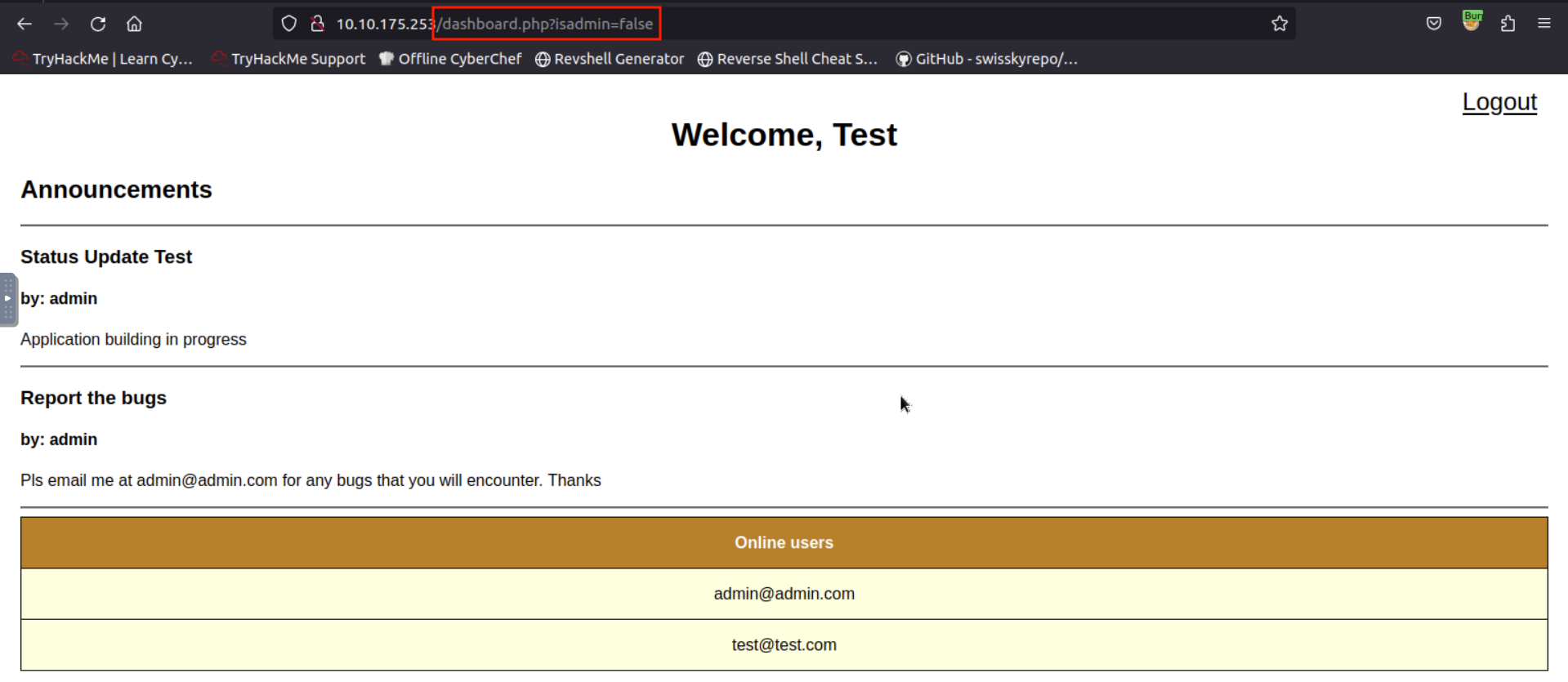
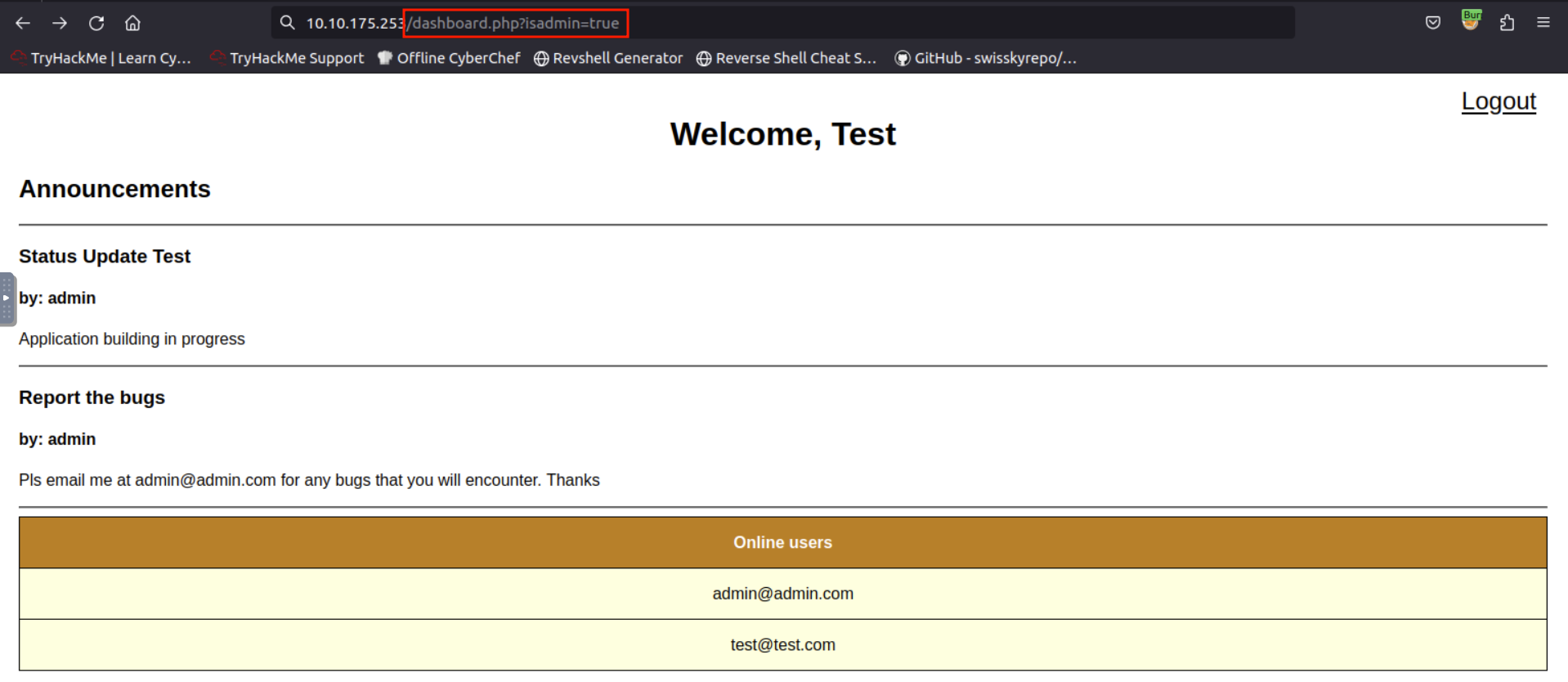
Since the application redirects the user to dashboard.php while the
JSON response can only be seen by intercepting using a proxy tool, we can try changing the parameter’s value from “false” to
“true” or vice versa.
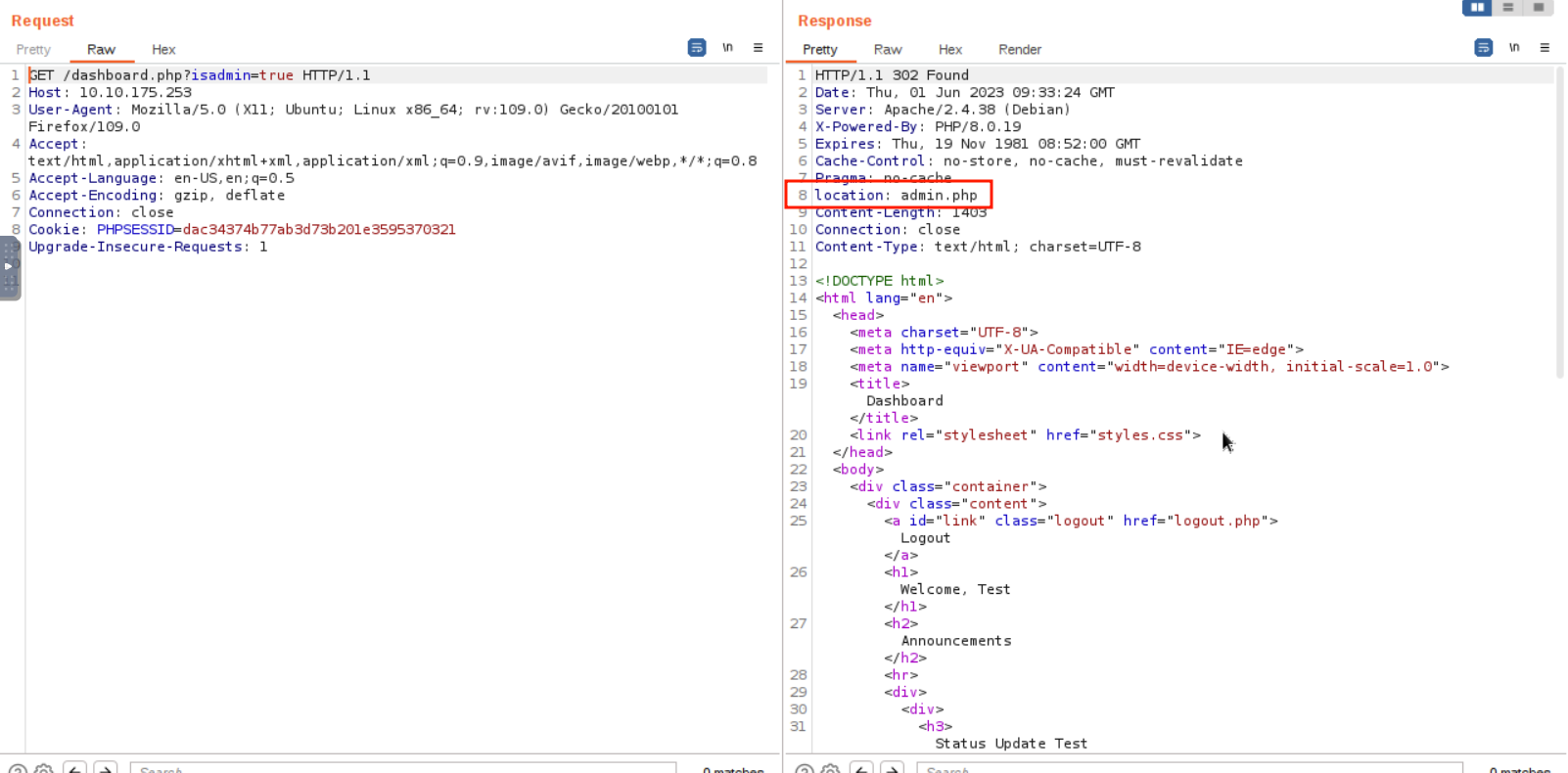
Upon changing the value from false
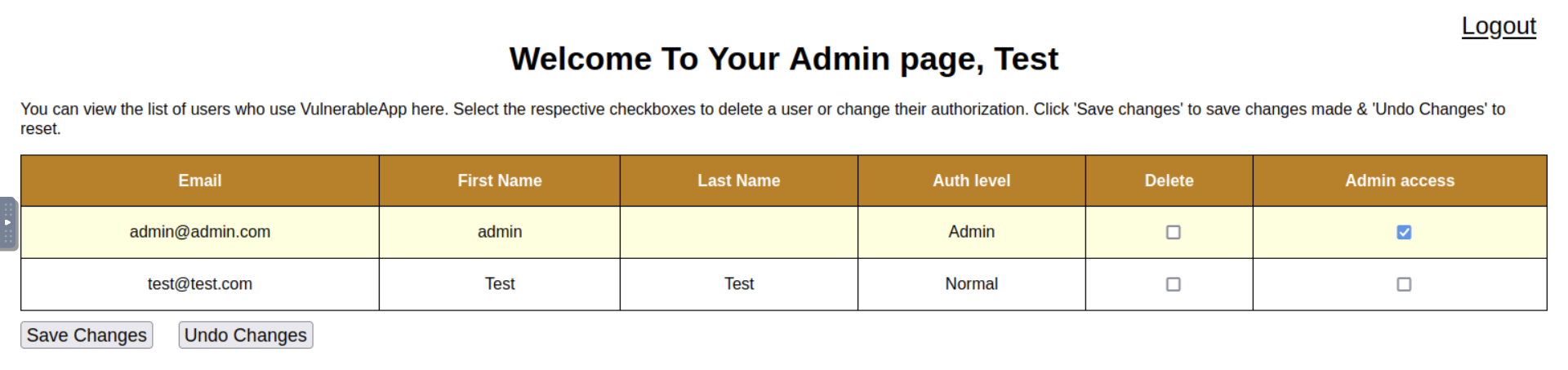
to true, application redirects us to admin.php, which is hidden to a normal user by default.
Below is the HTTP request that is captured using Burp Suite Proxy.
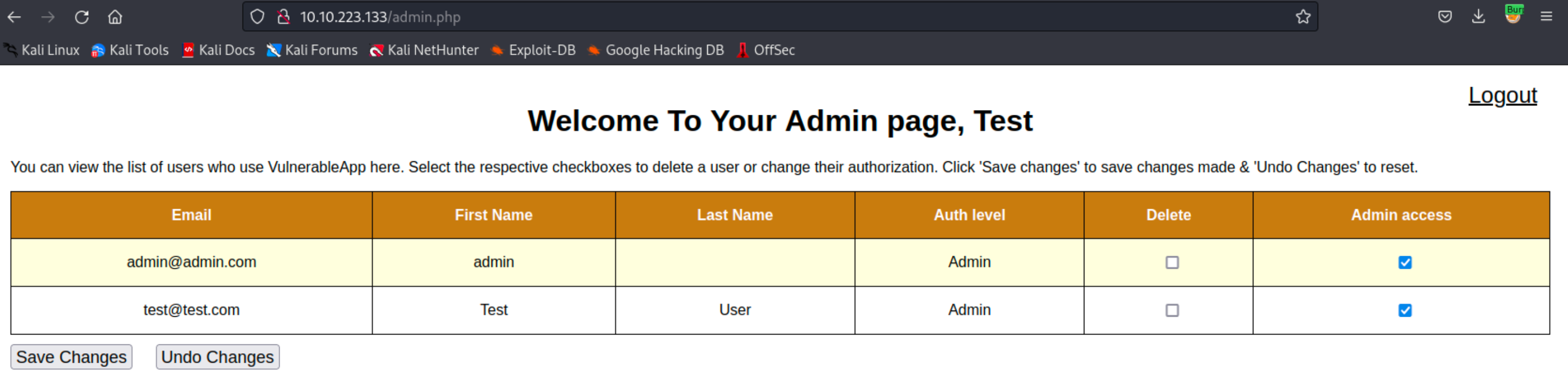
Since we have access to admin.php using a low-privilege account, we might as well check for a vertical privilege escalation attack.
Checking the box in the “Admin access” column of the account you
registered and clicking the “Save Changes” button will give us admin privileges. Which in return enables us to revoke the access of other
admin users.
Answer the questions below
What kind of privilege escalation happened after accessing admin.php?
What parameter allows the attacker to access the admin page?
What is the flag in the admin page?
Task 6: Mitigation
There are several steps that can be taken to mitigate the risk of
broken access control vulnerabilities in PHP applications:
Implement Role-Based Access Control (RBAC):
Role-based access control (RBAC) is a method of regulating access to
computer or network resources based on the roles of individual users
within an enterprise. By defining roles in an organization and assigning
access rights to these roles, you can control what actions a user can
perform on a system. The provided code snippet illustrates how you can
define roles (such as ‘admin’, ‘editor’, or ‘user’) and the permissions
associated with them. The hasPermission function checks if
a user of a certain role has a specified permission.
Sample Code
 // Define roles and permissions
 $roles = [
     'admin' => ['create', 'read', 'update', 'delete'],
     'editor' => ['create', 'read', 'update'],
     'user' => ['read'],
 ];

 // Check user permissions
 function hasPermission($userRole, $requiredPermission) {
     global $roles;
     return in_array($requiredPermission, $roles[$userRole]);
 }

 // Example usage
 if (hasPermission('admin', 'delete')) {
     // Allow delete operation
 } else {
     // Deny delete operation
 }
Use Parameterized Queries: Parameterized queries
are a way to protect PHP applications from SQL Injection attacks, where
malicious users could potentially gain unauthorized access to your
database. By using placeholders instead of directly including user input
into the SQL query, you can significantly reduce the risk of SQL
Injection attacks. The provided example demonstrates how a query can be
made secure using prepared statements, which separates SQL syntax from
data and handles user input safely.
Sample Code
 // Example of vulnerable query
 $username = $_POST['username'];
 $password = $_POST['password'];
 $query = "SELECT * FROM users WHERE username='$username' AND password='$password'";

 // Example of secure query using prepared statements
 $username = $_POST['username'];
 $password = $_POST['password'];
 $stmt = $pdo->prepare("SELECT * FROM users WHERE username=? AND password=?");
 $stmt->execute([$username, $password]);
 $user = $stmt->fetch();
Proper Session Management: Proper session
management ensures that authenticated users have timely and appropriate
access to resources, thereby reducing the risk of unauthorized access to
sensitive information. Session management includes using secure cookies,
setting session timeouts, and limiting the number of active sessions a
user can have. The code snippet shows how to initialize a session, set
session variables and check for session validity by looking at the last
activity time.
Sample Code
 // Start session
 session_start();

 // Set session variables
 $_SESSION['user_id'] = $user_id;
 $_SESSION['last_activity'] = time();

 // Check if session is still valid
 if (isset($_SESSION['last_activity']) && (time() - $_SESSION['last_activity'] > 1800)) {
     // Session has expired
     session_unset();
     session_destroy();
 }
Use Secure Coding Practices: Secure coding
practices involve methods to prevent the introduction of security
vulnerabilities. Developers should sanitize and validate user input to
prevent malicious data from causing harm and avoid using insecure
functions or libraries. The given example shows how to sanitize user
input using PHP’s filter_input function and demonstrates
how to securely hash a password using password_hash instead
of an insecure function like md5.
Sample Code
 // Validate user input
 $username = filter_input(INPUT_POST, 'username', FILTER_SANITIZE_STRING);
 $password = filter_input(INPUT_POST, 'password', FILTER_SANITIZE_STRING);

 // Avoid insecure functions
 // Example of vulnerable code using md5
 $password = md5($password);
 // Example of secure code using password_hash
 $password = password_hash($password, PASSWORD_DEFAULT);
Answer the questions below
Click me to proceed onto the next task.
Task 7: Conclusion
Broken access control is a security vulnerability that occurs when a
system fails to properly enforce access controls, which can result in
unauthorized users gaining access to sensitive information or performing
actions they are not authorized to do.
Horizontal privilege escalation occurs when a user is able to access
data or perform actions that they are not authorized to do within their
own privilege level. This can be dangerous because it can allow an
attacker who has already gained access to the system to move laterally
through the network and access additional resources or sensitive
data.
Vertical privilege escalation occurs when a user is able to gain
access to data or perform actions that are reserved for users with
higher privilege levels, such as system administrators. This can be even
more dangerous because it can allow an attacker to gain full control of
the system and potentially take over the entire network.
The impact of these types of privilege escalation can vary depending
on the specific system and the level of access that is gained. However,
in general, the consequences can include unauthorized access to
sensitive information, data loss or theft, disruption of critical
systems or services, and even complete network compromise. Therefore, it is important to implement strong access controls and regularly
monitor for any signs of unauthorized access or activity.
Here are some references that you can give to PHP developers to help
them implement these mitigation strategies:
Exploit Broken Access Control: Number 1 of the Top 10 web security risks.
easy
30 min
30,941
To access material, start machines and answer questions login.
Broken access controls are a type of security vulnerability that
arises when an application or system fails to properly restrict access
to sensitive data or functionality. This vulnerability allows attackers
to gain unauthorized access to resources that should be restricted, such
as user accounts, files, databases, or administrative functions. Broken
access controls can occur due to a variety of factors, including poor
design, configuration errors, or coding mistakes.
Objectives that the
student will learn:
Understand what Broken Access Control is and its impact.
Identify Broken Access Control vulnerabilities in web
applications.
Exploit these vulnerabilities in a controlled environment.
Understand and apply measures to mitigate and prevent these
vulnerabilities.
Pre-requisites:
Basic understanding of , web applications, and
protocols.
Familiarity with scripting languages such as and
JavaScript.
Knowledge of web application security standards and frameworks such
as Top
10.
Basic understanding and usage of a tool like .
Answer the questions below
Click me to proceed onto the next task.
What is Access Control?
Access control is a security mechanism used to control which users or
systems are allowed to access a particular resource or system. Access
control is implemented in computer systems to ensure that only
authorized users have access to resources, such as files, directories,
databases, and web pages. The primary goal of access control is to
protect sensitive data and ensure that it is only accessible to those
who are authorized to access it.
Access control can be implemented in different ways, depending on the
type of resource being protected and the security requirements of the
system. Some common access control mechanisms include:
Discretionary Access Control (DAC): In this type
of access control, the resource owner or administrator determines who is
allowed to access a resource and what actions they are allowed to
perform. DAC is commonly used in operating systems and file systems. In layman’s terms, imagine a castle where the king can give keys to his advisors, allowing them to open any doors they like, whenever they want.
That’s DAC for you. It’s the liberty to control access to your own
resources. The one in charge, like the king of the castle, can hand out
permissions to whomever they please, dictating who can come in and
out.
Mandatory Access Control (MAC): In this type of
access control, access to resources is determined by a set of predefined
rules or policies that are enforced by the system. MAC is commonly used
in highly secure environments, such as government and military
systems. In layman’s terms, picture a fort with an iron-clad security protocol. Only specific individuals with particular security clearances
can access certain areas, and this is non-negotiable. The high commander
sets the rules, and they are rigorously followed. That’s how MAC works.
It’s like the stern security officer who allows no exceptions to the
rule.
Role-Based Access Control (): In this type
of access control, users are assigned roles that define their level of
access to resources. RBAC is commonly used in enterprise systems, where
users have different levels of authority based on their job
responsibilities. In layman’s terms, imagine a modern corporation. You
have your managers, your executives, your sales staff, etc. They each
have different access to the building. Some can enter the boardroom,
others can access the sales floor, and so on. That’s the essence of RBAC
- assigning access based on a person’s role within an organization.
Attribute-Based Access Control (ABAC): In this
type of access control, access to resources is determined by a set of
attributes, such as user role, time of day, location, and device. ABAC
is commonly used in cloud environments and web applications. In layman’s
terms, think of a highly advanced sci-fi security system that scans
individuals for certain attributes. Maybe it checks whether they’re from
a particular planet, whether they’re carrying a specific device, or if
they’re trying to access a resource at a specific time. That’s ABAC.
It’s like the smart, flexible security of the future.
Implementing access control can help prevent security breaches and
unauthorized access to sensitive data. However, access control is not
foolproof and can be vulnerable to various types of attacks, such as
privilege escalation and broken access control vulnerabilities.
Therefore, it is important to regularly review and test access control
mechanisms to ensure that they are working as intended.
Broken Access Control:
Broken access control vulnerabilities refer to situations where
access control mechanisms fail to enforce proper restrictions on user
access to resources or data. Here are some common exploits for broken
access control and examples:
Horizontal privilege escalation occurs when an
attacker can access resources or data belonging to other users with the
same level of access. For example, a user might be able to access
another user’s account by changing the user ID in the URL.
Vertical privilege escalation occurs when an
attacker can access resources or data belonging to users with higher
access levels. For example, a regular user can access administrative
functions by manipulating a hidden form field or URL parameter.
Insufficient access control checks occur when
access control checks are not performed correctly or consistently,
allowing an attacker to bypass them. For example, an application might
allow users to view sensitive data without verifying their proper
permissions.
Insecure direct object references occur when an
attacker can access a resource or data by exploiting a weakness in the
application’s access control mechanisms. For example, an application
might use predictable or easily guessable identifiers for sensitive
data, making it easier for an attacker to access. You may refer to this
room in Task
#4 to learn more about this.
These exploits can be prevented by implementing strong access control
mechanisms and regularly reviewing and testing them to ensure they are
functioning as intended.
Answer the questions below
What is IDOR?
What occurs when an attacker can access resources or data belonging to other users with the same level of access?
What occurs when an attacker can access resources or data from users with higher access levels?
What is ABAC?
What is RBAC?
Set up your virtual environment
To successfully complete this room, you'll need to set up your virtual environment. This involves starting both your AttackBox (if you're not using your VPN) and Lab Machines, ensuring you're equipped with the necessary tools and access to tackle the challenges ahead.
Attacker machine
Status:Off
Lab machine
Status:Off
To focus on learning about the Broken Access Controls, please click
on the Start Lab Machine button located in the upper-right-hand
corner of this task to deploy the lab machine for this room.
After obtaining the machine’s generated IP address, you can either
use our AttackBox or use your own VM connected to TryHackMe’s VPN to
begin the attack. If you prefer to use the AttackBox, you can simply
click on the Start AttackBox button located above the room
name.
After starting the AttackBox or connecting your attack to
TryHackMe’s , you can now start accessing the target website
application by entering ://MACHINE_IP/ into the
browser.
Keep in mind that the machine may take up to
5 minutes to spawn.
Answer the questions below
I have deployed the machine attached to the task.
Learning Objective:
In this task, our objective is to gain a comprehensive understanding
of the web application’s functionalities. This will allow us to make the
most of the application’s capabilities and achieve our desired
outcomes.
Assessing the Application:
When you browse a web application as a penetration tester, imagine
what the underlying code looks like and what vulnerabilities come to
mind for each functionality, request, and response.
The web application for this room features a Dashboard, Login, and
Registration form that enables users to access the dashboard of the
website. From a web app pentester standpoint, the pentester will usually
register an account. After the registration, the pentester will then try
to check the login function for any access control vulnerabilities.
Below are the screenshots of each webpage:
Registration:
Login:
Dashboard:
In order for us to capture the requests being sent to the server,
we can use or Burp
Suite Community Edition.
To learn more about the detailed usage of and its
functionalities, you may refer to the Burp Suite
Module.
Capturing the HTTP traffic
In order for us to further analyze the requests and responses being
sent and received from the server, we will use the
“” module of Burp Suite to capture the HTTP
traffic that is being sent to the server. The captured HTTP traffic can be used with the other modules of Burp Suite.
These can then be manipulated or sent to other tools, such as
“Repeater”, for further processing before being allowed
to continue to their destination.
Below is the captured HTTP traffic that is being sent to
functions.php after login.
Based on the screenshot displayed above, we can observe that upon
completing the login process, the web application will give us a JSON
response that contains the status, message, first_name, last_name,
is_admin, and redirect_link which the server uses to redirect the user
to the dashboard.php with the parameter “isadmin” in the
URL.
Understanding
the content of the HTTP request and response:
The target web application does not have any implemented security
headers, which indicates that there are no preventative measures (like a
first line of defense) in place to protect the web application against
certain types of attacks.
The target web application is running on a Linux operating system
(Debian) and is using Apache web server
(Apache/2.4.38). This information can be useful in
identifying potential security vulnerabilities that may exist in the
target web application.
The target web application utilizes PHP/8.0.19 as its
backend programming language. This information is important for
understanding the technology stack of the application and identifying
potential security vulnerabilities or compatibility issues that may
arise with other software components.
The target web application redirects the user to the dashboard with
a parameter that we can possibly test for privilege escalation
vulnerabilities.
Answer the questions below
What is the type of server that is hosting the web application? This can be found in the response of the request in Burp Suite.
What is the name of the parameter in the JSON response from the login request that contains a redirect link?
What Burp Suite module allows us to capture requests and responses between ourselves and our target?
What is the admin’s email that can be found in the online users’ table?
In the previous task, we learned that the file
functions.php returns a JSON response upon login. The
response contains a redirect_link with a parameter that
we can test for access control vulnerabilities.
To start testing for this vulnerability, we can intercept the HTTP
response and copy the value of the
redirect_link parameter to our address bar.
Since the application redirects the user to dashboard. while the
JSON response can only be seen by intercepting using a proxy tool, we can try changing the parameter’s value from “false” to
“true” or vice versa.
Upon changing the value from false
to true, application redirects us to admin.php, which is hidden to a normal user by default.
Below is the request that is captured using .
Since we have access to admin.php using a low-privilege account, we might as well check for a vertical privilege escalation attack.
Checking the box in the “Admin access” column of the account you
registered and clicking the “Save Changes” button will give us admin privileges. Which in return enables us to revoke the access of other
admin users.
Answer the questions below
What kind of privilege escalation happened after accessing admin.php?
What parameter allows the attacker to access the admin page?
What is the flag in the admin page?
There are several steps that can be taken to mitigate the risk of
broken access control vulnerabilities in applications:
Implement Role-Based Access Control ():
Role-based access control (RBAC) is a method of regulating access to
computer or network resources based on the roles of individual users
within an enterprise. By defining roles in an organization and assigning
access rights to these roles, you can control what actions a user can
perform on a system. The provided code snippet illustrates how you can
define roles (such as ‘admin’, ‘editor’, or ‘user’) and the permissions
associated with them. The hasPermission function checks if
a user of a certain role has a specified permission.
Sample Code
// Define roles and permissions$roles=['admin'=>['create','read','update','delete'],'editor'=>['create','read','update'],'user'=>['read'],];// Check user permissionsfunctionhasPermission($userRole,$requiredPermission){global$roles;returnin_array($requiredPermission,$roles[$userRole]);}// Example usageif(hasPermission('admin','delete')){// Allow delete operation}else{// Deny delete operation}
Use Parameterized Queries: Parameterized queries
are a way to protect PHP applications from SQL Injection attacks, where
malicious users could potentially gain unauthorized access to your
database. By using placeholders instead of directly including user input
into the SQL query, you can significantly reduce the risk of SQL
Injection attacks. The provided example demonstrates how a query can be
made secure using prepared statements, which separates SQL syntax from
data and handles user input safely.
Sample Code
// Example of vulnerable query$username=$_POST['username'];$password=$_POST['password'];$query="SELECT * FROM users WHERE username='$username' AND password='$password'";// Example of secure query using prepared statements$username=$_POST['username'];$password=$_POST['password'];$stmt=$pdo->prepare("SELECT * FROM users WHERE username=? AND password=?");$stmt->execute([$username,$password]);$user=$stmt->fetch();
Proper Session Management: Proper session
management ensures that authenticated users have timely and appropriate
access to resources, thereby reducing the risk of unauthorized access to
sensitive information. Session management includes using secure cookies,
setting session timeouts, and limiting the number of active sessions a
user can have. The code snippet shows how to initialize a session, set
session variables and check for session validity by looking at the last
activity time.
Sample Code
// Start sessionsession_start();// Set session variables$_SESSION['user_id']=$user_id;$_SESSION['last_activity']=time();// Check if session is still validif(isset($_SESSION['last_activity'])&&(time()-$_SESSION['last_activity']>1800)){// Session has expiredsession_unset();session_destroy();}
Use Secure Coding Practices: Secure coding
practices involve methods to prevent the introduction of security
vulnerabilities. Developers should sanitize and validate user input to
prevent malicious data from causing harm and avoid using insecure
functions or libraries. The given example shows how to sanitize user
input using PHP’s filter_input function and demonstrates
how to securely hash a password using password_hash instead
of an insecure function like md5.
Sample Code
// Validate user input$username=filter_input(INPUT_POST,'username',FILTER_SANITIZE_STRING);$password=filter_input(INPUT_POST,'password',FILTER_SANITIZE_STRING);// Avoid insecure functions// Example of vulnerable code using md5$password=md5($password);// Example of secure code using password_hash$password=password_hash($password,PASSWORD_DEFAULT);
Answer the questions below
Click me to proceed onto the next task.
Broken access control is a security vulnerability that occurs when a
system fails to properly enforce access controls, which can result in
unauthorized users gaining access to sensitive information or performing
actions they are not authorized to do.
Horizontal privilege escalation occurs when a user is able to access
data or perform actions that they are not authorized to do within their
own privilege level. This can be dangerous because it can allow an
attacker who has already gained access to the system to move laterally
through the network and access additional resources or sensitive
data.
Vertical privilege escalation occurs when a user is able to gain
access to data or perform actions that are reserved for users with
higher privilege levels, such as system administrators. This can be even
more dangerous because it can allow an attacker to gain full control of
the system and potentially take over the entire network.
The impact of these types of privilege escalation can vary depending
on the specific system and the level of access that is gained. However,
in general, the consequences can include unauthorized access to
sensitive information, data loss or theft, disruption of critical
systems or services, and even complete network compromise. Therefore, it is important to implement strong access controls and regularly
monitor for any signs of unauthorized access or activity.
Here are some references that you can give to developers to help
them implement these mitigation strategies: