
Back to all networks


Active Directory Basics
Premium roomExplore the basic concepts and functionality provided by Active Directory.
easy
To access material, start machines and answer questions login.
Press 'Start' to begin
Please join this room to start the network
This will be enabled once the network is live. Please wait.
Can't reconnect? Try regenerating your VPN config.
When there are enough votes, the network will reset to its default state
Microsoft's Active Directory is the backbone of the corporate world. It simplifies the management of devices and users within a corporate environment.
In this room, we'll take a deep dive into the essential components of Active Directory and assume the role of the new IT admin at Inc. As our first task, we have been asked to create a new Active Directory child domain, join a server to the domain, and then review some of the existing controls and configurations in the parent domain. You will be provided with administrative credentials for all servers to perform these configuration changes and complete the tasks ahead.
Learning Objectives
In this room, we will learn about Active Directory and will become familiar with the following topics:
- What Active Directory is
- What an Active Directory Domain is
- What components go into an Active Directory Domain
- Forests and Domain Trust
Prerequisites
Before starting this room, you should be familiar with the following:
- General familiarity with Windows
- Concepts covered in Windows Fundamentals
Network Configuration
This room uses a network where you will create your very own Active Directory forest! If this is your first time using networks on TryHackMe, it is suggested that you complete the Network Room Guide first. As a recap, you can use either the AttackBox to connect to this network or download the network OVPN file from the network diagram as shown below:
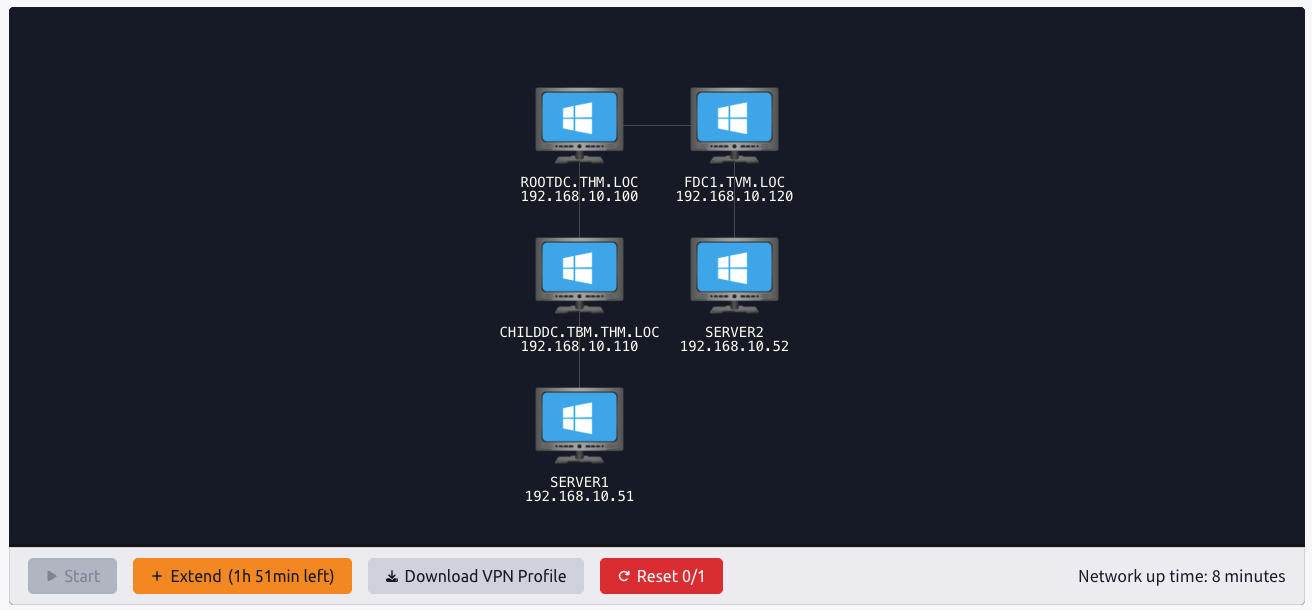
If you are experiencing issues connecting to the network, please refer back to the debugging steps provided in the Network Guide Room. Your subnet range for this network room will be 192.168.10.0/24.
Answer the questions below
I am ready to learn about Active Directory!
FAQ
Ready to learn Cyber Security?
The Active Directory Basics room is only available for Premium or Max subscribers. Signup now to access more than 500 free rooms and learn cyber security through a fun, interactive learning environment.
Already have an account? Log in