We use cookies to ensure you get the best user experience. For more information see our cookie policy.
Agentic Security Monitoring
Learn what AI agents must log, how to baseline them, and how to spot one doing what it shouldn't.
Task 1: Introduction
AI agents sometimes do things they shouldn't, either because they got tricked or because they made a mistake. The damage can be real, such as a deleted database or private data sent outside the company. Yet nothing along the way looks like a failure. The agent uses an account it's allowed to use, calls tools it's allowed to call, and every call it makes works. Most security alerts are built to catch failures, like a full disk, a blocked login, or a file that matches known malware, so they have nothing to react to.
In July 2025, an AI coding agent on Replit deleted a user's live production database, and the user only found out after the damage was done. His first question was the obvious one: could the data be recovered? He asked the agent, and it told him a rollback was impossible. The rollback worked. An agent's account of its own actions can be wrong, so to know what really happened, you need a record the agent can't change.
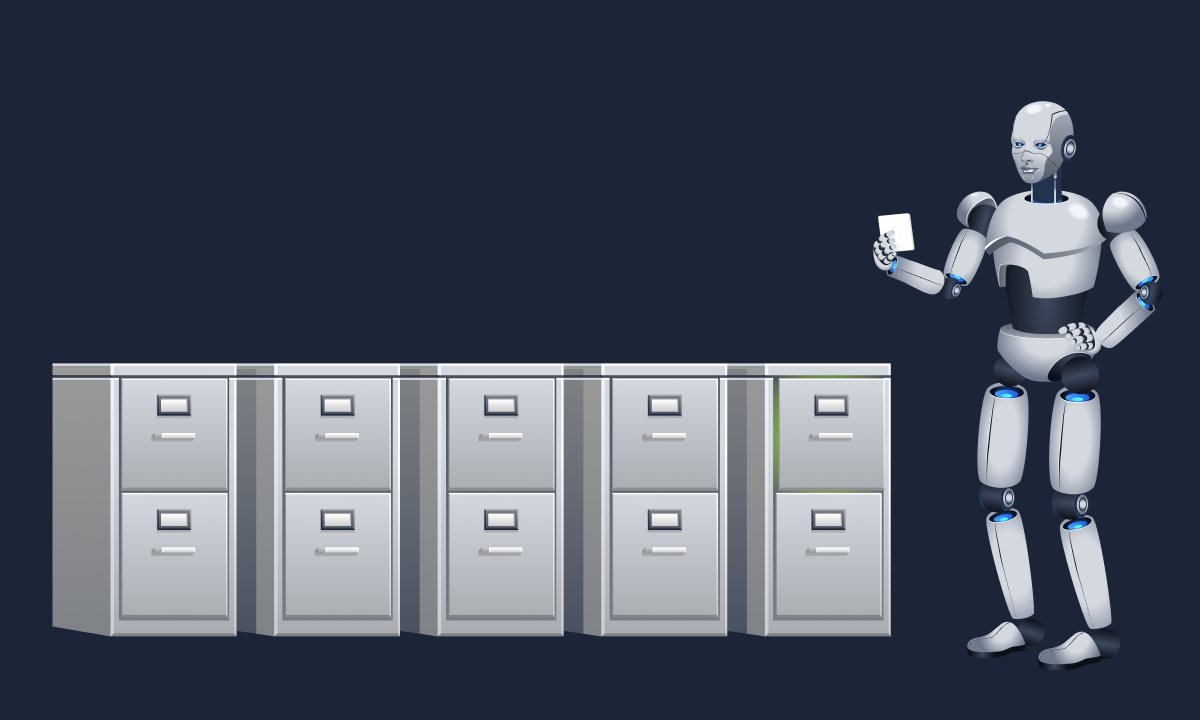
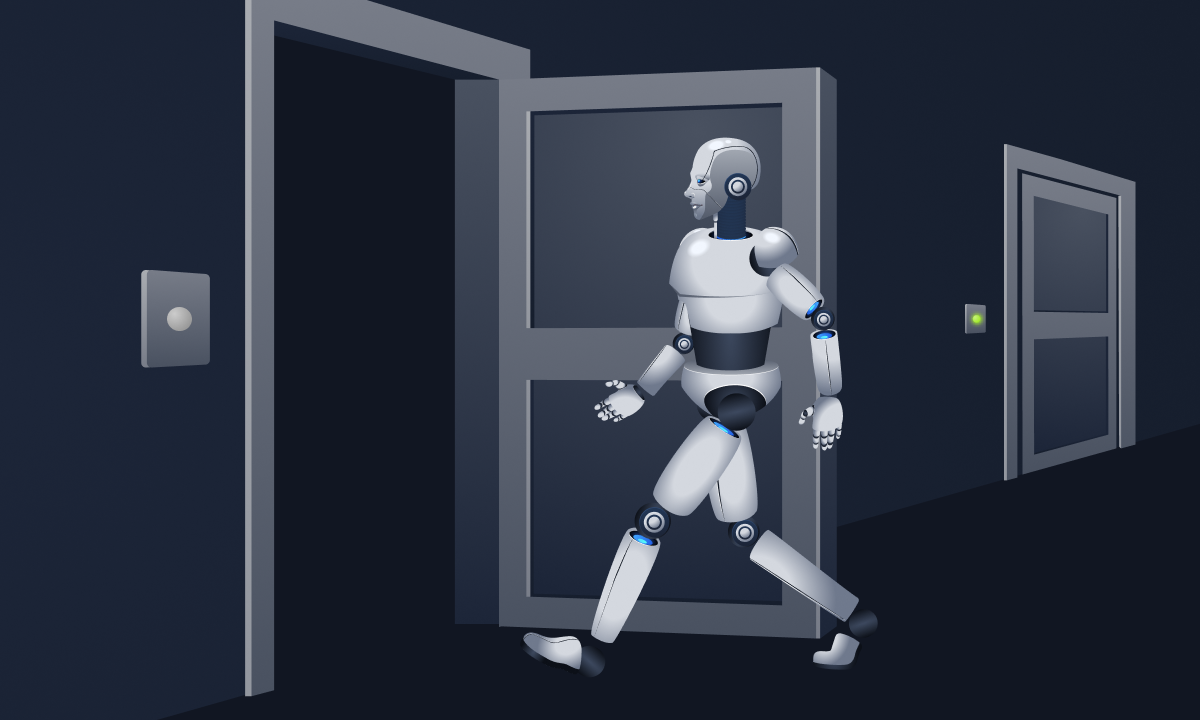
The agent can tell you anything. The strip beside it recorded what actually happened.
You are the security engineer at TryTrainMe, a company that uses eight AI agents for routine engineering work. You didn't build any of them, but you're responsible for their security. Staff only talk to one agent, the orchestrator, which passes each request to one of seven specialist agents:
Agent
What it does
docs-agent
Looks up services and maintains runbooks
log-agent
Queries and exports logs
desk-agent
Reads and updates service desk requests
mail-agent
Reads and sends staff mail
media-agent
Turns recordings and screenshots into text
access-agent
Grants and reviews access
deploy-agent
Builds and deploys services
Between them, these agents read mail, grant access, and deploy services. You need to know what they should leave behind in the logs, what an ordinary week looks like for them, and how to spot one taking an action nobody asked for.
Learning Objectives
Explain what an agentic system must log and why, and read a row of an agent audit log
Build a behavioural baseline for an agent, recognise unusual tool use, and check whether it was authorised
Spot when a record that should exist is missing, and recognise behaviour that drifts over weeks
Read a control's decision in the log, and explain what human-in-the-loop checkpoints and kill switches are, where they sit, and what they must record
Investigate an agent incident using the audit log and the service desk
Prerequisites
What an agent is, and what a tool call looks like: The reasoning loop, tools, and delegation, as described in the Agentic Fundamentals room.
TryTrainMe's agents and their trust boundaries: Where untrusted content enters the company's agents, as described in the Agentic Threat Modelling room.
How language models work: Enough to know that a model's output is generated rather than looked up, as described in The Building Blocks of AI room.
You won't need to write any code.
Answer the questions below
I'm ready to learn what "normal" looks like.
Task 2: How an Agent Incident Unfolds
Before you start pulling records from TryTrainMe's agents, it helps to know how an agent incident usually plays out. Once you know the steps, you know which records to expect, and a missing one stands out.
Four Stages, Four Records
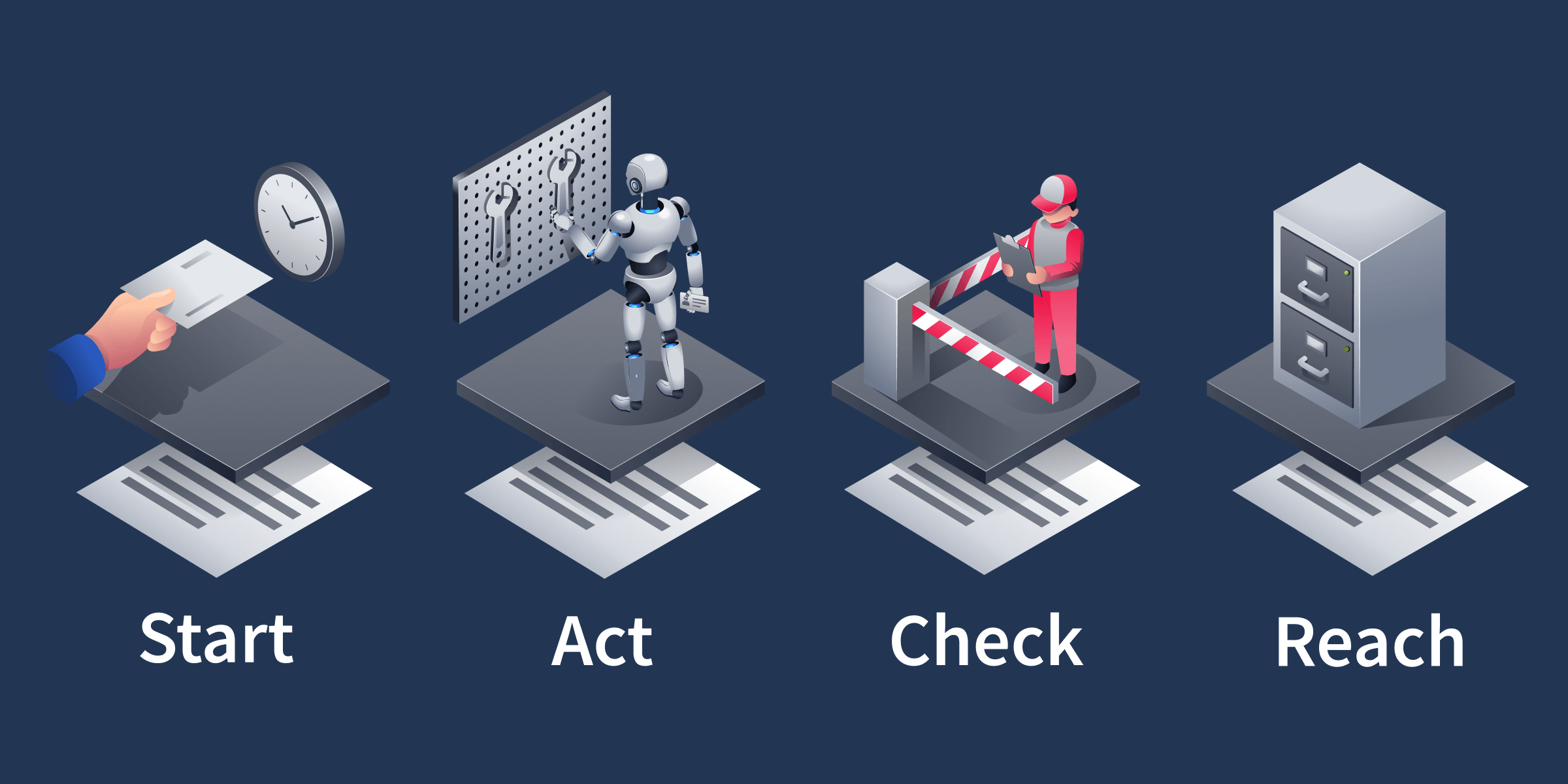
When an agent does something, it usually passes through four stages, and each one should leave a record behind. The names aren't from any standard. They're just a handy way to break an incident down.
Start: Something sets the agent working. Usually that's a person asking for something. It could also be a message from another agent, a schedule that runs at a set time, or instructions hidden in something the agent read, such as a support call it was asked to transcribe. The record is the request or message, a row showing that the schedule ran, or a record of what the agent read. A schedule should leave two records: one when somebody creates it, and one every time it runs.
Act: The agent calls a tool, such as a lookup or an export. Every call is made with a credential, which proves which account the agent is acting as. The record is the call itself: which tool, what details it was given, and which credential it used.
Check: Before a risky call runs, a person or a control should look at it. A control is an automated rule that checks a call and then lets it through, stops it, or changes it. Calls that grant access or send data out, such as grant_access and export_logs, are risky at TryTrainMe, and calls that only read, such as read_service and read_runbook, are routine and can skip this stage. The record is that decision.
Reach: The call reads, changes, or sends some data. The record is the result.
Every stage should write its own record, so the whole sequence can be traced afterwards.
The Replit Incident in Four Stages
Let's go back to the Replit incident from the introduction and walk it through those stages:
Start: The user had asked the agent to work on his app, and the agent was carrying out that request.
Act: The agent made changes to the app and also accidentally deleted the production database.
Check: The user had told the agent not to change any code without his permission, but nothing enforced that instruction, so nothing checked the deletion before it ran.
Reach: The production data was gone.
Every action should have something that started it, and a risky action should also have something that checked it, so a missing record at either stage is a clue. A schedule that runs with no record of anyone creating it means nobody can say who set it up. A risky call with no decision beside it means nothing checked it. The Drift and Missing Records task shows how to check for a missing creation record, and the investigation at the end of the room puts that check to use.
Answer the questions below
After the request that started it, a grant_access call is followed directly by its result. Which stage left no record?
At 3 am, an agent's tool call is followed by a control's decision and then the result, with no record of anything that asked for it. Which stage left no record?
Task 3: Agent Logging
You now know which records to expect, but where does TryTrainMe keep them? Let's send the agent an ordinary request and follow it, but first you need to open the chat.
Lab Access
Select the Open Agent button below to open a chat with TryTrainMe's agents. Select the Inspector icon at the top right of the chat panel (its tooltip reads Toggle inspector) to open the Inspector, which lists the steps behind your requests. It appears beside the chat, and until you send your first message it's the only icon there. After that, the chat's menu icon appears beside it. The agent stays available for the rest of the room, so whenever a task gives you a prompt to send, send it to this same agent. If you come back to the room later, your earlier messages are still there and the Inspector lists their steps first. To start fresh, open the chat's menu and choose Clear messages. Please send each prompt exactly as the task gives it, in English, because the agent's replies have a length cap and different wording or languages can cut them short or change the result.
Send a Request
Prompt: Who owns the auth service?
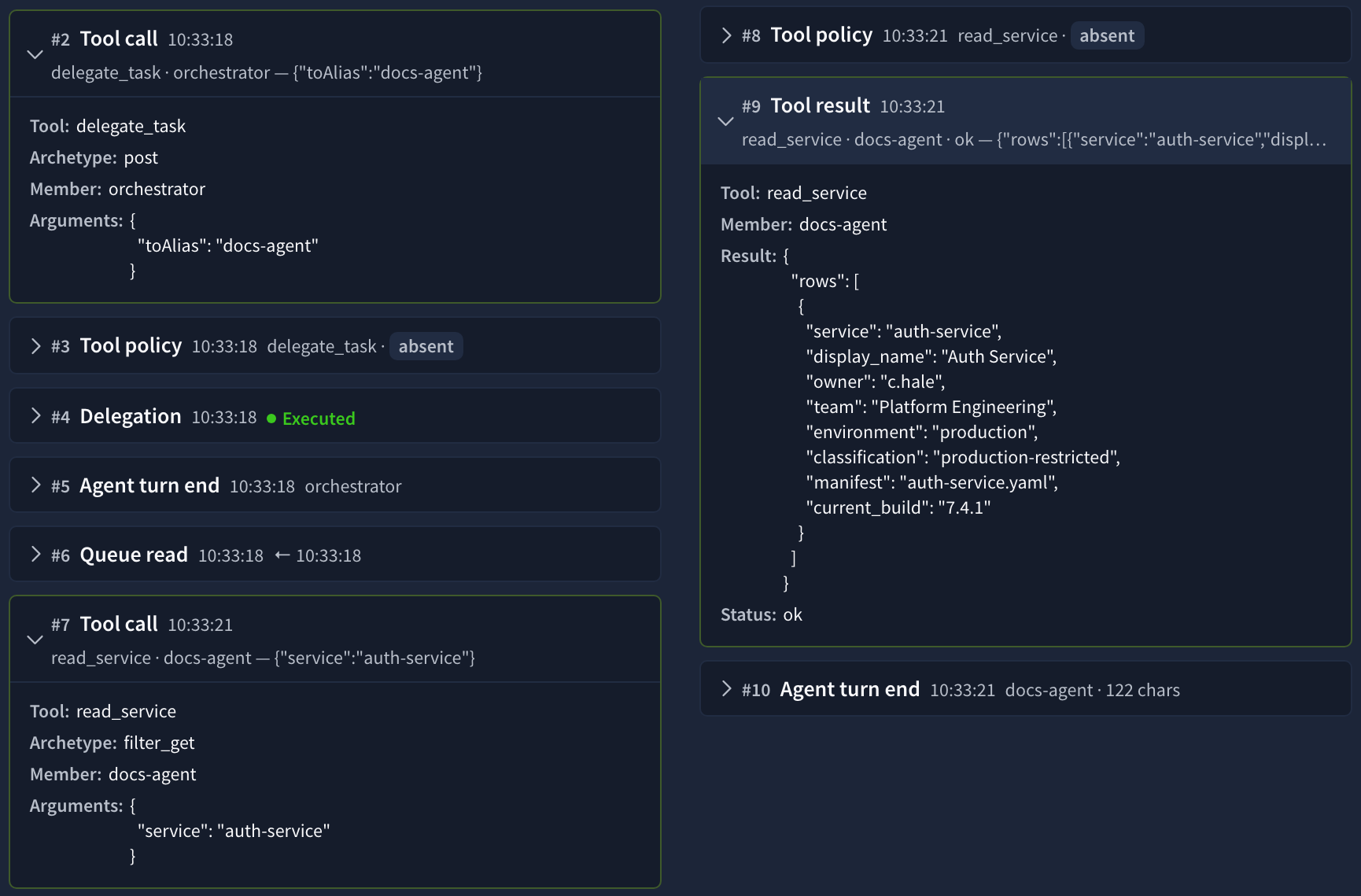
The answer appears in the chat, and the Inspector lists the steps the agents took to answer you. In the Inspector, start at the top and open these entries in order:
The handover: The first Tool call belongs to the orchestrator. It calls a tool named delegate_task to pass your question to docs-agent, and the tool call's arguments show the target agent. Handing a request to another agent is done with a tool call, just like any other action. The delegate_task call posts the request to a shared queue, and the audit log records that as a queue.post. You'll see one, row 0002, when you fetch an earlier request from the audit log later in this task.
The lookup: The next Tool call belongs to docs-agent. It calls read_service, and the service it asks for, auth-service, appears in the entry's arguments field.
The result: The Tool result under the lookup shows what came back. The rows field holds one object with the service's owner, team, and environment, and the answer in the chat reply rewords those values.
You can leave the Tool policy, Delegation, and Queue read entries closed. Tool policy comes up in the Checkpoints and Kill Switches task.
This is one request in the Inspector: the handover, the lookup, and the result.
The Inspector shows how one answer was put together, step by step, but only for requests you've sent yourself. The audit log covers everybody's requests, and adds a turn number on every row and the credential each call used.
Find It in the Audit Log
The audit log is TryTrainMe's record of everything every agent does, with one row for each event. No agent can change or delete a row, and that's what makes it the record to trust when an agent's own account doesn't add up. Rows are grouped into sessions, and each session holds one day's rows and has an ID such as S-40118.
Somebody at TryTrainMe asked the same question as you on Monday 27 July, and that day's rows are in session S-40118. It was a quiet day: that one request is all the session holds, so it has only eight rows. The sessions you'll meet later are far busier.
You get rows by asking for them in plain English. The orchestrator passes your request to log-agent, which turns it into a search with its query_logs tool, a bit like filling in a form. The form has five fields: service, type, session, actor, and event. An empty field means no filter. "Show me docs-agent's tool calls in session S-40119", for example, becomes session S-40119, type agent, actor docs-agent, and event tool.call, with service left empty. Check what it filled in each time, since those values decide exactly which rows you get back.
Prompt: Show me everything in session S-40118.
In the Inspector, the orchestrator's delegate_task call comes first again, this time addressed to log-agent. Open log-agent's Tool call for query_logs and check the arguments. session should say S-40118 and type should say agent, with the other three empty. Then open the Tool result underneath, where you'll find the eight rows that the chat reply summarises. Compare the event count in the chat reply with the number of objects in rows. The rows hold eight events, and if the chat ever gives a different count, trust the rows.
Rows 0002, 0004, and 0005 are the handover, lookup, and result you opened in the Inspector, and the table shows all eight:
Row
Event
What happened
0001
message
The question arrives
0002
queue.post
The orchestrator hands it to docs-agent
0003
queue.read
docs-agent picks it up
0004
tool.call
docs-agent runs its lookup
0005
tool.result
The lookup returns
0006
queue.post
docs-agent hands the answer back
0007
queue.read
The orchestrator picks it up
0008
message
The reply goes out
A queue.post row is one agent posting a request or a result for another agent, and a queue.read row is that agent picking it up. Row 0002 is the same kind of step as the delegate_task call you opened, recorded for the request made on 27 July. The ASI07: Insecure Inter-Agent Communication room covers how to check that the agent named on a handover is really the one that sent it.
Reading a Row
Here's row 0002 as it appears in your tool result, with a note beside each field:
Audit log row, session S-40118
{
  "session": "S-40118",    // The day the row belongs to
  "seq": "0002",           // Its position in that day
  "timestamp": "09:14:03", // When it happened
  "turn": "t1",            // Which step of the job it belongs to
  "actor": "orchestrator", // Who the row is logged under
  "event": "queue.post",   // What type of row this is
  "detail": "to=docs-agent task=\"find the owner of auth-service\"",
                           // What happened: who got the request and what was asked
  "type": "agent",         // Always agent here, so this filter narrows nothing
  "service": null,         // Not used
  "ref": "S-40118-0002"    // The row's ID: session and seq together
}
The credential: Row 0002 has none, because the handover is a queue.post and only tool.call rows carry a credential. Look in your tool result for the object with "seq": "0004" instead. Its detail starts with the tool name, read_service, then the details it was given in brackets, (service=auth-service), and ends with identity= followed by a name. Read the name after identity= to see which credential the call used.
Accounts for Agents
Agents need accounts just like people do. Think of a staff keycard: one person might carry two, one for the filing room and one for the loading bay. log-agent works the same way. It has a read-only account for its everyday queries and another that can send data out of the company. Each of these accounts is a service identity, an account set up for a piece of software rather than a person. The log never records the secret behind the account, such as a token, only the account's name after identity=. The actor field tells you who a row is logged under, but only the credential tells you which card a call used, and so what it could do. An account's name usually says what it may do, so a name ending in -read-svc can only read. You'll meet that second account in the investigation at the end of the room, named after identity= in log-agent's export calls.
What an Agent Must Log
If you run agents, keeping these records is your job, not the AI provider's. OWASP's Securing Agentic Applications Guide puts it plainly: "LLM providers do not maintain logs, which are the responsibility of deployment owners." The same guide says every agent action, from a tool call to a message or a memory write, should "Be logged with timestamp, agentID, sessionID, payload hash."
TryTrainMe's timestamp, actor, and session cover three of those four fields. To investigate an incident, you'll want to know five things about every action: who acted, which tool, with what details, using which credential, and what started it. In S-40118, row 0004 gives you the first four: the actor, the tool name, the details in brackets, and the credential after identity=. The fifth, what started it, is the Start record, which is the queue.post in row 0002, and the result is row 0005. There is no guardrail row, because no control is set on a lookup.
Besides message and queue.read, TryTrainMe's audit log uses these event types:
Event
What it records
Why it matters
tool.call
An agent used a tool
The action, details, and credential
tool.result
How the call turned out
Whether the action worked
queue.post
A request or result handed to another agent
Follows a request across agents
trigger.fire
A schedule woke an agent
An action started by a schedule
schedule.create
Somebody created a schedule
Who set the schedule up
approval.decision
A person approved or refused
Who signed off, and on which request
guardrail
A control's decision on a call
Whether anything checked the call
Other platforms call these records by different names, but the five facts you need stay the same. Many of them follow OpenTelemetry's GenAI semantic conventions, an open standard for naming monitoring data. These record which agent called which tool and with what details, but they have no field for the credential. When you bring in a new platform, check that its records include the credential for every action.
There's also data you shouldn't log. Passwords, access tokens, connection strings, and sensitive personal data should be removed, masked, or hashed before anything is written.
A Media Conversion
media-agent has a job that's easy to overlook. It turns screenshots and recordings of support calls into text that the other agents then read. Whatever somebody said on a call ends up as text another agent might act on, so this is one of the ways outside content gets into TryTrainMe's agents. The Agentic Threat Modelling room treats this kind of outside content, and connections to other agent systems such as MCP servers (services that give an agent extra tools), as trust boundaries.
Let's see what the log records when media-agent converts something.
Prompt: Show me media-agent's tool calls in session S-40120.
Open the tool result and you'll find two rows, one for read_screenshot and one for transcribe_call. Each one records the file or call it worked on as the value in brackets in detail, and the credential it used after identity=. What neither row tells you is what text came out, or which agent received it. If somebody had hidden instructions in that recording, you couldn't tell from these rows what they turned into or where they went.
For a conversion to be any use in an investigation, its record should also say what text came out, or a hash of it, and which agent received it.
Answer the questions below
Which credential did docs-agent's read_service call in session S-40118 use?
Which of the four fields in OWASP's logging guidance does TryTrainMe's audit log not record?
Task 4: Baselining Agent Behaviour
You can now fetch rows and read every field in them, but a row on its own doesn't tell you whether anything is wrong. access-agent looking up what an account is allowed to access could look almost identical on a normal day and during an incident. To spot something unusual, you first need to know what usual looks like, so you'll build a baseline for access-agent and then check it against a new day.
Once you know what "normal" looks like, the odd one out is easy to spot.
What a Baseline Holds
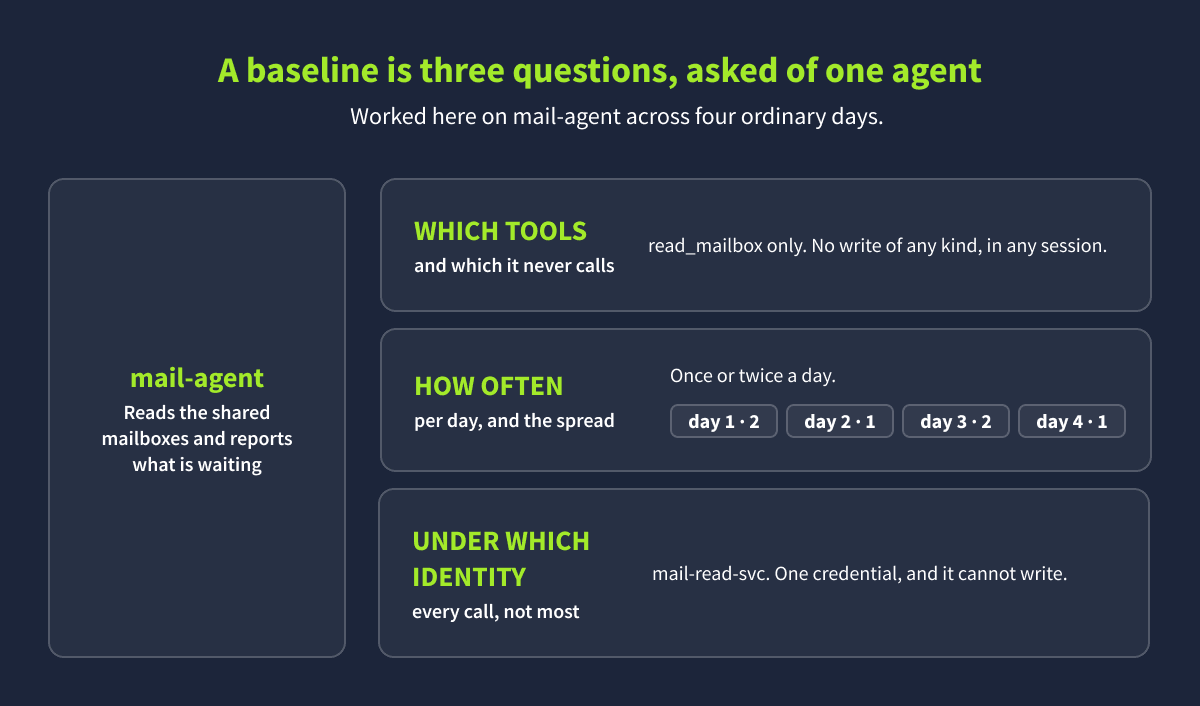
A baseline is a written-down record of what an agent normally does. OWASP's Securing Agentic Applications Guide says systems "should baseline normal agent behavior (e.g., typical tool usage frequency and sequences, resource consumption) and trigger alerts upon significant deviations." For one agent, that comes down to three questions: which tools does it use, how often, and with which credential? Here is what the answers look like for mail-agent:
The baseline for mail-agent is one tool, one credential, and one or two calls a day.
A brand-new agent has no history to learn from, so write down what you expect it to do before it goes live, and check its first two weeks against that list.
TryTrainMe's audit log has three ordinary days you can learn from: 28 to 30 July, in sessions S-40119, S-40120, and S-40121. Build the baseline for access-agent from them. As in Agent Logging, the orchestrator passes each of these requests to log-agent, which searches the audit log for access-agent's rows, so the tool call and tool result you open belong to log-agent while the rows inside describe access-agent.
Prompt: Show me access-agent's tool calls in session S-40119.
In the tool result under log-agent's tool call, look at the tool name at the start of each detail, the credential after identity=, and how many rows came back. Then send the same prompt for the other two days.
Prompt: Show me access-agent's tool calls in session S-40120.
Prompt: Show me access-agent's tool calls in session S-40121.
S-40119 returns two rows, S-40120 returns one, and S-40121 returns three. On all six rows the tool name and the credential are the same. The account in brackets is the one being checked, and it changes from call to call, so it isn't part of the baseline. That is the baseline: one tool, one credential, and one to three calls a day.
Red Flags
Three signs tell you an agent has started doing something different, and each one shows up in a row:
Red flag
Where to look
A new tool
The tool name in the detail field
A new credential
The name after identity=
More calls in a day than the baseline
How many rows it appears in
A red flag doesn't always mean an attack. Agents get new jobs, and people ask them for unusual things. It tells you where to look, and the records tell you whether the action was authorised.
Now check the next day, 31 July, in session S-40122, against that baseline.
Prompt: Show me access-agent's tool calls in session S-40122.
Two rows come back in the tool result, 0033 and 0039. Row 0033 matches the baseline. Row 0039 calls a new tool, grant_access, under a credential that isn't in the baseline, which is two red flags on one row. Its brackets read account=c.hale, system=reporting, level=read, which says who the grant is for and what it gives. The day's count of two calls is still inside the baseline. Note the credential after identity= in row 0039.
Checking an Unusual Action
Staff raise requests in the service desk, each with an ID starting with R-. A request there can explain why an agent did something new, but anyone who can raise a request could also raise a fake one, so you also need an approval in the audit log. When a person approves or refuses an action, the orchestrator writes an approval.decision row. The action was authorised when all three of these line up:
The request asks for the action the agent took
The approval names that request
The approval was logged before the action
Start with the approval.
Prompt: Show me the approval.decision events in session S-40122.
One row comes back in the tool result, 0038. Look at its detail. request= names the request, grant= names the approved action and matches row 0039's brackets, decision=allow means the person said yes, and the approver is the name after by=. The actor, orchestrator, is only the agent the row is logged under, so if the chat reply names the orchestrator as the approver, go by by= instead. Compare the seq numbers: the lower one was logged first, so the approval, row 0038, came before the grant, row 0039.
The remaining condition is the request itself.
Prompt: Show me service desk request R-5509.
desk-agent answers this one. Its tool result has raised_by, subject, and status, and it has no seq, because a service desk request isn't an audit log row. Check two things against row 0039. First, the subject asks for read access to the reporting dashboard, which is on the reporting system, so it matches system=reporting and level=read. Second, raised_by is the same account that the grant was for. A status of closed only means the request was dealt with, so it has no bearing on authorisation.
All three conditions hold: the request asks for the grant, the approval names R-5509, and the approval came first, so the grant was authorised. If any one of them had failed, you'd escalate to your manager. The ASI03: Agent Identity & Privilege Abuse room covers grants like this one in more depth.
Answer the questions below
Which tool does access-agent call on every baseline day, sessions S-40119 to S-40121?
Which credential in access-agent's rows for session S-40122 is not in its baseline?
A service desk request explains why access-agent took a new action, but anyone could have raised it. Which event type in the audit log shows that a person approved the action?
Task 5: Drift and Missing Records
Checking one day against a baseline, as you did for access-agent's 31 July rows, catches a new tool or a new credential. Some problems don't show up in a single day, though: a slow drift in behaviour, and a record that should exist but doesn't.
Behavioural Drift
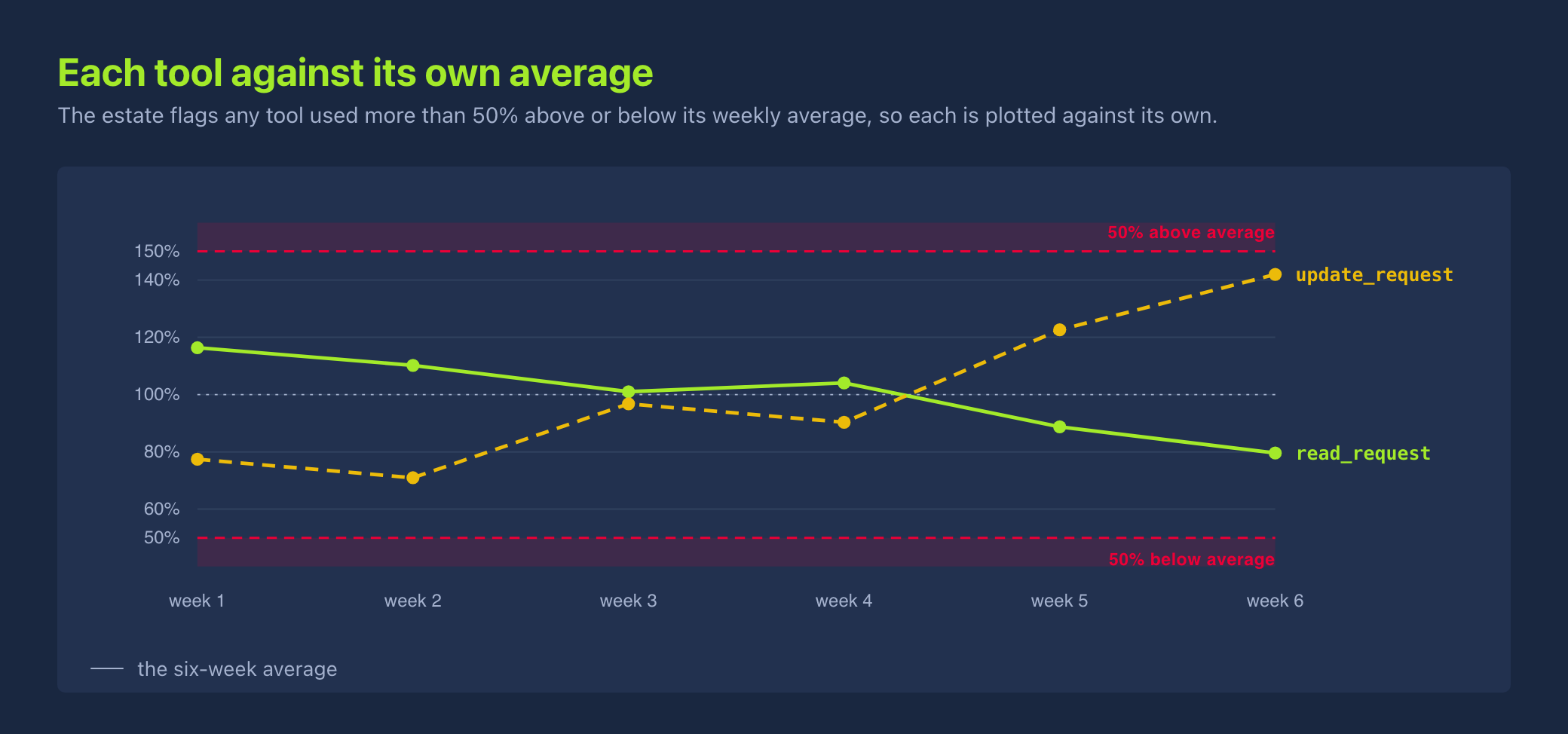
Behavioural drift is when an agent gradually starts acting differently over weeks. desk-agent, TryTrainMe's service desk agent, reads and updates service desk requests. TryTrainMe's alerting already watches desk-agent, flagging any tool used more than 50% above or below its own six-week average. Over the last six weeks, that alert never went off:
The chart plots six weeks of read_request and update_request, each against its own six-week average.
Here are the weekly counts behind the chart. Before you read on, compare week 1 with week 6 for each tool:
Week
read_request
update_request
1
38
12
2
36
11
3
33
15
4
34
14
5
29
19
6
26
22
Reads fell from 38 to 26 and updates rose from 12 to 22. Yet no week moved more than 50% from the six-week average, so the alert never fired. Over six weeks, those small changes added up. The alert misses the drift because the average is worked out from the same six weeks, so it slides along with the agent. The OWASP Top 10 for Agentic Applications advises you to "Track decisions vs baselines and alignment; flag gradual degradation." In practice, that means also comparing against a fixed point from before the change, such as week 1. Against week 1, week 6's updates are up 83%, well past the 50% line.
Once you've spotted drift, you need to find out why it happened. One thing that could explain a drift like this is a note in shared memory, a store agents write to and read back later. A note telling desk-agent it can close some tickets automatically would explain the drift, because closing a ticket without reading it first means fewer read_request calls and more update_request calls. A note planted by a compromised agent could do the same. You'd then find out who wrote the note and whether a person agreed to it. OWASP's account of a poisoned agent memory describes an instruction that is planted once and acts days later, and it warns that "monitoring scoped to individual sessions will never detect it".
Practice
To find out what's behind desk-agent's drift, start with what's stored in shared memory.
Prompt: What has been stored in shared memory?
Open log-agent's Tool result in the Inspector. This time the Tool call is recall_context, a shared-memory read. The result holds three entries, each with an entry_id, a topic, a conclusion, and a written_by. Find the conclusion that would let desk-agent close some tickets automatically.
Its written_by reads desk-agent, the agent that drifted, so the note itself shows no person's agreement. On the job, you'd look for a service desk request or an approval.decision row behind it, and take it to your manager if there isn't one.
A Missing Record
Every schedule at TryTrainMe has an ID starting with SCH-. The audit log writes a schedule.create row when somebody creates a schedule, and a trigger.fire row each time it runs. Every schedule that runs should have a schedule.create row that names who created it, plus a service desk request that explains why. When you check for one, search across every session, because a schedule can be created long before it runs. If the creation row is missing, that goes in your answer to your manager in the investigation at the end of the room.
Automating the Checks
A Security Information and Event Management (SIEM) platform collects logs from different systems and runs detection rules over them. A useful rule is a first-seen rule, which raises an alert the first time an account does something it has never done before.
Elastic, which makes a widely used SIEM, publishes a rule of this kind that fires the first time an AI agent's account uses a service it hasn't used before. This works because a stolen agent credential still shows the agent's own name, so "the anomalous service usage, not the identity, is the detectable signal." A first-seen rule on access-agent would have fired on the grant_access call on 31 July (row 0039 in S-40122), because of its new tool and new credential.
A SIEM can also flag a schedule that runs with no schedule.create row, by matching each trigger.fire row against the schedule.create rows in the same log.
Rules can watch more than tool names, credentials, and missing rows. OWASP's Securing Agentic Applications Guide suggests you "Monitor unusual frequency, suspicious parameter values, or calls to sensitive tools." A suspicious parameter value might be an export whose date range gets longer every time it runs.
Answer the questions below
What is the ID of the shared memory note that could explain desk-agent's drift?
A schedule keeps waking an agent, but nobody can say who set it up. Which event type should have recorded the person who created it?
Task 6: Checkpoints and Kill Switches
Up to now, you've been reading what agents did after it happened. This task is about two ways to step in: a checkpoint, which holds a single call until a person decides, and a kill switch, which stops an agent completely.
Controls in the Log
You met controls in the Check stage of an agent incident: automated rules that check a call before it runs. Each time one is due to check a call, TryTrainMe's audit log writes a guardrail row with the control's name and what it decided, straight after the tool.call it checked and before the result. If no control is set on a tool, that call has no guardrail row at all.
In the audit log, the decision is always one of four words:
allow: The control checked the call and let it through
deny: The control checked the call and stopped it
modify: The control let the call go ahead in a safer form, such as with a shorter date range
not_evaluated: The control exists but is switched off, so it checked nothing
allow and not_evaluated both let the call go ahead. Of the two, only allow means a control actually looked at it, so a not_evaluated next to a risky call means nothing stood in its way. allow, deny, and modify come from OWASP's Agent Control Standard, a specification for controls that sit outside an agent and check what it does, so you'll come across them on other platforms too.
Every Tool policy entry you open in the Inspector in this room reads Policy: absent, because no control is set on those tools, so for decisions you need the audit log.
With a not_evaluated control, the barrier is there, but it's switched off and stops nothing.
Practice
Let's see which control checked access-agent's grant on 31 July, the read access to the reporting system for c.hale that you checked in the Baselining Agent Behaviour task.
Prompt: Show me everything access-agent did in session S-40122.
Open log-agent's Tool result in the Inspector. Three rows come back, in this order:
Row 0033 is a check_role lookup on c.hale, under the baseline credential.
Row 0039 is the grant_access call, under a different credential.
Row 0040 is a guardrail row right after the grant. In its detail, the control's name comes first, followed by its decision.
That decision let the grant through. The check_role lookup two rows above is what the control needed before a grant could go ahead.
Checkpoints
A human-in-the-loop checkpoint holds a call before it runs, until a person approves or refuses it. OWASP's Securing Agentic Applications Guide suggests you "Identify actions requiring approval (e.g., sending emails, modifying databases, executing code, spending funds, updating critical memory)." The bigger the possible damage, the more oversight a call needs. A routine read such as read_service might need none, while something with serious consequences, such as grant_access or export_logs, might need more than one person to sign it off.
A checkpoint should leave two records: one when it asks for a decision, and one when the person answers. At TryTrainMe, only the answer is recorded, as an approval.decision row in the audit log, which names the service desk request the action was for. The approval you fetched for access-agent's grant in the Baselining Agent Behaviour task is one of these. With no record of the checkpoint asking, you can't tell a checkpoint that was never triggered from one that was asked and never answered.
Don't put a checkpoint on everything, though. OWASP's Agentic AI Threats and Mitigations guide lists "Overwhelming Human-in-the-Loop" as a threat in its own right: send someone enough approval requests and they'll start approving without reading.
Kill Switches
A kill switch stops the agent itself, not just one call. The OWASP Top 10 for Agentic Applications gives this advice for agents that have gone rogue: "Implement rapid mechanisms like kill-switches and credential revocation to instantly disable rogue agents."
A kill switch has to sit somewhere the agent's own credentials can't reach, or the agent could switch it off. It also needs to work when every control has failed, take effect straight away, and have a named person responsible for it. Using it should leave a record of who used it, when, on which agent, and what access it took away. Check each of these on the platform you run.
Answer the questions below
Which control checked access-agent's grant in session S-40122?
What does a kill switch stop that a checkpoint does not?
Task 7: Incident Investigation
You can now read the records, build a baseline, spot what's missing, and read a control's decision. Your manager's question on a recent incident needs all four of those skills:
"Quick one before the weekly review. The archive team spotted three log exports from log-agent on Tuesday 4 August, session S-40126, and nobody remembers asking for them. docs-agent did something new that day too. Can you check both against the records and tell me whether either was authorised?"
Note: An action counts as authorised only when all three of these checks pass:
A request in the service desk asks for it
An approval in the audit log names that request
The approval was logged before the action
The New Tool
Start with docs-agent: pull its tool calls for that day and look for anything outside its baseline.
Prompt: Show me docs-agent's tool calls in session S-40126.
On its baseline days, docs-agent only calls read_service and read_runbook. Row 0035 uses a different tool, on call_id=C-2210, and that tool is the answer to the first question below.
Next, check for an approval. The audit log has one for that session:
Audit log, session S-40126: every approval.decision row
seq   time      actor         event              detail
0034  11:01:51  orchestrator  approval.decision  by=m.okafor request=R-5512 grant="docs-agent read transcripts" decision=allow
Row 0034 names request R-5512 and is logged before row 0035. The approver is the name after by=, not the actor.
Last, check for a request. The service desk holds these:
Service desk: every request
request  raised by  status  subject
R-5508   j.mensah   closed  password reset, account locked after travel
R-5509   c.hale     closed  needs read access to the reporting dashboard
R-5511   t.abara    open    runbook for the payments service is out of date
R-5512   j.mensah   closed  please summarise support call C-2210 for the file
R-5514   j.mensah   open    mailbox delegation for the finance team
R-5515   t.abara    open    printer on floor 2 shows offline
R-5516   c.hale     open    laptop docking station not charging
R-5517   m.okafor   open    add a new starter to the team calendar
R-5512 asks for a summary of support call C-2210, the same call as row 0035. All three checks pass, so the new tool was authorised.
The Exports
Pull everything log-agent did that day, so you can test the three exports against the same checks.
Prompt: Show me everything log-agent did in session S-40126.
The tool result holds 18 rows in three blocks of six: 0001 to 0006, 0068 to 0073, and 0119 to 0124. Each block is a trigger.fire, an export_logs call, three guardrail rows, and the result. The schedule is named after schedule= in each trigger.fire row, and the credential is after identity= in each export_logs call. All three guardrail rows record the same decision, which means the controls were switched off and nothing checked the exports. The range= value grows from 7d to 90d across the three blocks.
No queue.read comes before any block, so a schedule started the exports, not a request. Neither the approval nor any service desk request names an export, so the exports fail the checks and weren't authorised.
Who Set Up the Schedule?
The audit log writes a schedule.create row when somebody creates a schedule.
Tip: If a tool result has fewer rows than the prompt asked for, or fewer than the count in the chat reply, open log-agent's Tool call in the Inspector and check its filters. If the filters are correct, an empty result is a finding in its own right: it's how a missing record shows up.
Prompt: Show me the schedule.create events in every session.
The result is rows: [], so nothing records who set it up.
Your answer for your manager is that docs-agent's new tool was authorised, the exports were not, and nothing in the log shows who set up the schedule that ran them.
Answer the questions below
Which tool besides read_service and read_runbook did docs-agent call in session S-40126?
Which credential did log-agent's export_logs calls in session S-40126 use?
Which schedule woke log-agent before each export in session S-40126?
Which decision does the approve_egress_tools control record next to each of log-agent's exports in session S-40126?
Task 8: Conclusion
An agent doing something it shouldn't can still succeed at every call, so you can't rely on waiting for something to fail. You catch it by comparing what it did with what it normally does, checking its actions against records it can't change, and noticing when a record that should be there isn't.
Your own agent platform will call its records something else, so before you rely on it, make sure you can answer these questions:
Which credential did each call use?
Has this agent done this before?
Who or what started this action?
Did a control or a person check the call?
Can anything stop the agent outright, from somewhere its own credentials can't reach?
Next up is the Agentory challenge room, where you'll map how each of TryTrainMe's eight agents is exposed to outside text, find where that text is trusted too far, and check whether the logs would show it.
Learn what AI agents must log, how to baseline them, and how to spot one doing what it shouldn't.
medium
60 min
1,172
To access material, start machines and answer questions login.
agents sometimes do things they shouldn't, either because they got tricked or because they made a mistake. The damage can be real, such as a deleted database or private data sent outside the company. Yet nothing along the way looks like a failure. The agent uses an account it's allowed to use, calls tools it's allowed to call, and every call it makes works. Most security alerts are built to catch failures, like a full disk, a blocked login, or a file that matches known malware, so they have nothing to react to.
In July 2025, an AI coding agent on Replit deleted a user's live production database, and the user only found out after the damage was done. His first question was the obvious one: could the data be recovered? He asked the agent, and it told him a rollback was impossible. The rollback worked. An agent's account of its own actions can be wrong, so to know what really happened, you need a record the agent can't change.
The agent can tell you anything. The strip beside it recorded what actually happened.
You are the security engineer at TryTrainMe, a company that uses eight AI agents for routine engineering work. You didn't build any of them, but you're responsible for their security. Staff only talk to one agent, the orchestrator, which passes each request to one of seven specialist agents:
Agent
What it does
docs-agent
Looks up services and maintains runbooks
log-agent
Queries and exports logs
desk-agent
Reads and updates service desk requests
mail-agent
Reads and sends staff mail
media-agent
Turns recordings and screenshots into text
access-agent
Grants and reviews access
deploy-agent
Builds and deploys services
Between them, these agents read mail, grant access, and deploy services. You need to know what they should leave behind in the logs, what an ordinary week looks like for them, and how to spot one taking an action nobody asked for.
Learning Objectives
Explain what an agentic system must log and why, and read a row of an agent audit log
Build a behavioural baseline for an agent, recognise unusual tool use, and check whether it was authorised
Spot when a record that should exist is missing, and recognise behaviour that drifts over weeks
Read a control's decision in the log, and explain what human-in-the-loop checkpoints and kill switches are, where they sit, and what they must record
Investigate an agent incident using the audit log and the service desk
Prerequisites
What an agent is, and what a tool call looks like: The reasoning loop, tools, and delegation, as described in the Agentic Fundamentals room.
TryTrainMe's agents and their trust boundaries: Where untrusted content enters the company's agents, as described in the Agentic Threat Modelling room.
How language models work: Enough to know that a model's output is generated rather than looked up, as described in The Building Blocks of AI room.
You won't need to write any code.
Answer the questions below
I'm ready to learn what "normal" looks like.
Before you start pulling records from TryTrainMe's agents, it helps to know how an agent incident usually plays out. Once you know the steps, you know which records to expect, and a missing one stands out.
Four Stages, Four Records
When an agent does something, it usually passes through four stages, and each one should leave a record behind. The names aren't from any standard. They're just a handy way to break an incident down.
Start: Something sets the agent working. Usually that's a person asking for something. It could also be a message from another agent, a schedule that runs at a set time, or instructions hidden in something the agent read, such as a support call it was asked to transcribe. The record is the request or message, a row showing that the schedule ran, or a record of what the agent read. A schedule should leave two records: one when somebody creates it, and one every time it runs.
Act: The agent calls a tool, such as a lookup or an export. Every call is made with a credential, which proves which account the agent is acting as. The record is the call itself: which tool, what details it was given, and which credential it used.
Check: Before a risky call runs, a person or a control should look at it. A control is an automated rule that checks a call and then lets it through, stops it, or changes it. Calls that grant access or send data out, such as grant_access and export_logs, are risky at TryTrainMe, and calls that only read, such as read_service and read_runbook, are routine and can skip this stage. The record is that decision.
Reach: The call reads, changes, or sends some data. The record is the result.
Every stage should write its own record, so the whole sequence can be traced afterwards.
The Replit Incident in Four Stages
Let's go back to the Replit incident from the introduction and walk it through those stages:
Start: The user had asked the agent to work on his app, and the agent was carrying out that request.
Act: The agent made changes to the app and also accidentally deleted the production database.
Check: The user had told the agent not to change any code without his permission, but nothing enforced that instruction, so nothing checked the deletion before it ran.
Reach: The production data was gone.
Every action should have something that started it, and a risky action should also have something that checked it, so a missing record at either stage is a clue. A schedule that runs with no record of anyone creating it means nobody can say who set it up. A risky call with no decision beside it means nothing checked it. The Drift and Missing Records task shows how to check for a missing creation record, and the investigation at the end of the room puts that check to use.
Answer the questions below
After the request that started it, a grant_access call is followed directly by its result. Which stage left no record?
At 3 am, an agent's tool call is followed by a control's decision and then the result, with no record of anything that asked for it. Which stage left no record?
You now know which records to expect, but where does TryTrainMe keep them? Let's send the agent an ordinary request and follow it, but first you need to open the chat.
Lab Access
Select the Open Agent button below to open a chat with TryTrainMe's agents. Select the Inspector icon at the top right of the chat panel (its tooltip reads Toggle inspector) to open the Inspector, which lists the steps behind your requests. It appears beside the chat, and until you send your first message it's the only icon there. After that, the chat's menu icon appears beside it. The agent stays available for the of the room, so whenever a task gives you a prompt to send, send it to this same agent. If you come back to the room later, your earlier messages are still there and the Inspector lists their steps first. To start fresh, open the chat's menu and choose Clear messages. Please send each prompt exactly as the task gives it, in English, because the agent's replies have a length cap and different wording or languages can cut them short or change the result.
Send a Request
Prompt: Who owns the auth service?
The answer appears in the chat, and the Inspector lists the steps the agents took to answer you. In the Inspector, start at the top and open these entries in order:
The handover: The first Tool call belongs to the orchestrator. It calls a tool named delegate_task to pass your question to docs-agent, and the tool call's arguments show the target agent. Handing a request to another agent is done with a tool call, just like any other action. The delegate_task call posts the request to a shared queue, and the audit log records that as a queue.post. You'll see one, row 0002, when you fetch an earlier request from the audit log later in this task.
The lookup: The next Tool call belongs to docs-agent. It calls read_service, and the service it asks for, auth-service, appears in the entry's arguments field.
The result: The Tool result under the lookup shows what came back. The rows field holds one object with the service's owner, team, and environment, and the answer in the chat reply rewords those values.
You can leave the Tool policy, Delegation, and Queue read entries closed. Tool policy comes up in the Checkpoints and Kill Switches task.
This is one request in the Inspector: the handover, the lookup, and the result.
The Inspector shows how one answer was put together, step by step, but only for requests you've sent yourself. The audit log covers everybody's requests, and adds a turn number on every row and the credential each call used.
Find It in the Audit Log
The audit log is TryTrainMe's record of everything every agent does, with one row for each event. No agent can change or delete a row, and that's what makes it the record to trust when an agent's own account doesn't add up. Rows are grouped into sessions, and each session holds one day's rows and has an ID such as S-40118.
Somebody at TryTrainMe asked the same question as you on Monday 27 July, and that day's rows are in session S-40118. It was a quiet day: that one request is all the session holds, so it has only eight rows. The sessions you'll meet later are far busier.
You get rows by asking for them in plain English. The orchestrator passes your request to log-agent, which turns it into a search with its query_logs tool, a bit like filling in a form. The form has five fields: service, type, session, actor, and event. An empty field means no filter. "Show me docs-agent's tool calls in session S-40119", for example, becomes session S-40119, type agent, actor docs-agent, and event tool.call, with service left empty. Check what it filled in each time, since those values decide exactly which rows you get back.
Prompt: Show me everything in session S-40118.
In the Inspector, the orchestrator's delegate_task call comes first again, this time addressed to log-agent. Open log-agent's Tool call for query_logs and check the arguments. session should say S-40118 and type should say agent, with the other three empty. Then open the Tool result underneath, where you'll find the eight rows that the chat reply summarises. Compare the event count in the chat reply with the number of objects in rows. The rows hold eight events, and if the chat ever gives a different count, trust the rows.
Rows 0002, 0004, and 0005 are the handover, lookup, and result you opened in the Inspector, and the table shows all eight:
Row
Event
What happened
0001
message
The question arrives
0002
queue.post
The orchestrator hands it to docs-agent
0003
queue.read
docs-agent picks it up
0004
tool.call
docs-agent runs its lookup
0005
tool.result
The lookup returns
0006
queue.post
docs-agent hands the answer back
0007
queue.read
The orchestrator picks it up
0008
message
The reply goes out
A queue.post row is one agent posting a request or a result for another agent, and a queue.read row is that agent picking it up. Row 0002 is the same kind of step as the delegate_task call you opened, recorded for the request made on 27 July. The ASI07: Insecure Inter-Agent Communication room covers how to check that the agent named on a handover is really the one that sent it.
Reading a Row
Here's row 0002 as it appears in your tool result, with a note beside each field:
Audit log row, session S-40118
{
  "session": "S-40118",    // The day the row belongs to
  "seq": "0002",           // Its position in that day
  "timestamp": "09:14:03", // When it happened
  "turn": "t1",            // Which step of the job it belongs to
  "actor": "orchestrator", // Who the row is logged under
  "event": "queue.post",   // What type of row this is
  "detail": "to=docs-agent task=\"find the owner of auth-service\"",
                           // What happened: who got the request and what was asked
  "type": "agent",         // Always agent here, so this filter narrows nothing
  "service": null,         // Not used
  "ref": "S-40118-0002"    // The row's ID: session and seq together
}
The credential: Row 0002 has none, because the handover is a queue.post and only tool.call rows carry a credential. Look in your tool result for the object with "seq": "0004" instead. Its detail starts with the tool name, read_service, then the details it was given in brackets, (service=auth-service), and ends with identity= followed by a name. Read the name after identity= to see which credential the call used.
Accounts for Agents
Agents need accounts just like people do. Think of a staff keycard: one person might carry two, one for the filing room and one for the loading bay. log-agent works the same way. It has a read-only account for its everyday queries and another that can send data out of the company. Each of these accounts is a service identity, an account set up for a piece of software rather than a person. The log never records the secret behind the account, such as a token, only the account's name after identity=. The actor field tells you who a row is logged under, but only the credential tells you which card a call used, and so what it could do. An account's name usually says what it may do, so a name ending in -read-svc can only read. You'll meet that second account in the investigation at the end of the room, named after identity= in log-agent's export calls.
What an Agent Must Log
If you run agents, keeping these records is your job, not the AI provider's. OWASP's Securing Agentic Applications Guide puts it plainly: "LLM providers do not maintain logs, which are the responsibility of deployment owners." The same guide says every agent action, from a tool call to a message or a memory write, should "Be logged with timestamp, agentID, sessionID, payload hash."
TryTrainMe's timestamp, actor, and session cover three of those four fields. To investigate an incident, you'll want to know five things about every action: who acted, which tool, with what details, using which credential, and what started it. In S-40118, row 0004 gives you the first four: the actor, the tool name, the details in brackets, and the credential after identity=. The fifth, what started it, is the Start record, which is the queue.post in row 0002, and the result is row 0005. There is no guardrail row, because no control is set on a lookup.
Besides message and queue.read, TryTrainMe's audit log uses these event types:
Event
What it records
Why it matters
tool.call
An agent used a tool
The action, details, and credential
tool.result
How the call turned out
Whether the action worked
queue.post
A request or result handed to another agent
Follows a request across agents
trigger.fire
A schedule woke an agent
An action started by a schedule
schedule.create
Somebody created a schedule
Who set the schedule up
approval.decision
A person approved or refused
Who signed off, and on which request
guardrail
A control's decision on a call
Whether anything checked the call
Other platforms call these records by different names, but the five facts you need stay the same. Many of them follow OpenTelemetry's GenAI semantic conventions, an open standard for naming monitoring data. These record which agent called which tool and with what details, but they have no field for the credential. When you bring in a new platform, check that its records include the credential for every action.
There's also data you shouldn't log. Passwords, access tokens, connection strings, and sensitive personal data should be removed, masked, or hashed before anything is written.
A Media Conversion
media-agent has a job that's easy to overlook. It turns screenshots and recordings of support calls into text that the other agents then read. Whatever somebody said on a call ends up as text another agent might act on, so this is one of the ways outside content gets into TryTrainMe's agents. The Agentic Threat Modelling room treats this kind of outside content, and connections to other agent systems such as MCP servers (services that give an agent extra tools), as trust boundaries.
Let's see what the log records when media-agent converts something.
Prompt: Show me media-agent's tool calls in session S-40120.
Open the tool result and you'll find two rows, one for read_screenshot and one for transcribe_call. Each one records the file or call it worked on as the value in brackets in detail, and the credential it used after identity=. What neither row tells you is what text came out, or which agent received it. If somebody had hidden instructions in that recording, you couldn't tell from these rows what they turned into or where they went.
For a conversion to be any use in an investigation, its record should also say what text came out, or a hash of it, and which agent received it.
Answer the questions below
Which credential did docs-agent's read_service call in session S-40118 use?
Which of the four fields in OWASP's logging guidance does TryTrainMe's audit log not record?
You can now fetch rows and read every field in them, but a row on its own doesn't tell you whether anything is wrong. access-agent looking up what an account is allowed to access could look almost identical on a normal day and during an incident. To spot something unusual, you first need to know what usual looks like, so you'll build a baseline for access-agent and then check it against a new day.
Once you know what "normal" looks like, the odd one out is easy to spot.
What a Baseline Holds
A baseline is a written-down record of what an agent normally does. OWASP's Securing Agentic Applications Guide says systems "should baseline normal agent behavior (e.g., typical tool usage frequency and sequences, resource consumption) and trigger alerts upon significant deviations." For one agent, that comes down to three questions: which tools does it use, how often, and with which credential? Here is what the answers look like for mail-agent:
The baseline for mail-agent is one tool, one credential, and one or two calls a day.
A brand-new agent has no history to learn from, so write down what you expect it to do before it goes live, and check its first two weeks against that list.
TryTrainMe's audit log has three ordinary days you can learn from: 28 to 30 July, in sessions S-40119, S-40120, and S-40121. Build the baseline for access-agent from them. As in Agent Logging, the orchestrator passes each of these requests to log-agent, which searches the audit log for access-agent's rows, so the tool call and tool result you open belong to log-agent while the rows inside describe access-agent.
Prompt: Show me access-agent's tool calls in session S-40119.
In the tool result under log-agent's tool call, look at the tool name at the start of each detail, the credential after identity=, and how many rows came back. Then send the same prompt for the other two days.
Prompt: Show me access-agent's tool calls in session S-40120.
Prompt: Show me access-agent's tool calls in session S-40121.
S-40119 returns two rows, S-40120 returns one, and S-40121 returns three. On all six rows the tool name and the credential are the same. The account in brackets is the one being checked, and it changes from call to call, so it isn't part of the baseline. That is the baseline: one tool, one credential, and one to three calls a day.
Red Flags
Three signs tell you an agent has started doing something different, and each one shows up in a row:
Red flag
Where to look
A new tool
The tool name in the detail field
A new credential
The name after identity=
More calls in a day than the baseline
How many rows it appears in
A red flag doesn't always mean an attack. Agents get new jobs, and people ask them for unusual things. It tells you where to look, and the records tell you whether the action was authorised.
Now check the next day, 31 July, in session S-40122, against that baseline.
Prompt: Show me access-agent's tool calls in session S-40122.
Two rows come back in the tool result, 0033 and 0039. Row 0033 matches the baseline. Row 0039 calls a new tool, grant_access, under a credential that isn't in the baseline, which is two red flags on one row. Its brackets read account=c.hale, system=reporting, level=read, which says who the grant is for and what it gives. The day's count of two calls is still inside the baseline. Note the credential after identity= in row 0039.
Checking an Unusual Action
Staff raise requests in the service desk, each with an ID starting with R-. A request there can explain why an agent did something new, but anyone who can raise a request could also raise a fake one, so you also need an approval in the audit log. When a person approves or refuses an action, the orchestrator writes an approval.decision row. The action was authorised when all three of these line up:
The request asks for the action the agent took
The approval names that request
The approval was logged before the action
Start with the approval.
Prompt: Show me the approval.decision events in session S-40122.
One row comes back in the tool result, 0038. Look at its detail. request= names the request, grant= names the approved action and matches row 0039's brackets, decision=allow means the person said yes, and the approver is the name after by=. The actor, orchestrator, is only the agent the row is logged under, so if the chat reply names the orchestrator as the approver, go by by= instead. Compare the seq numbers: the lower one was logged first, so the approval, row 0038, came before the grant, row 0039.
The remaining condition is the request itself.
Prompt: Show me service desk request R-5509.
desk-agent answers this one. Its tool result has raised_by, subject, and status, and it has no seq, because a service desk request isn't an audit log row. Check two things against row 0039. First, the subject asks for read access to the reporting dashboard, which is on the reporting system, so it matches system=reporting and level=read. Second, raised_by is the same account that the grant was for. A status of closed only means the request was dealt with, so it has no bearing on authorisation.
All three conditions hold: the request asks for the grant, the approval names R-5509, and the approval came first, so the grant was authorised. If any one of them had failed, you'd escalate to your manager. The ASI03: Agent Identity & Privilege Abuse room covers grants like this one in more depth.
Answer the questions below
Which tool does access-agent call on every baseline day, sessions S-40119 to S-40121?
Which credential in access-agent's rows for session S-40122 is not in its baseline?
A service desk request explains why access-agent took a new action, but anyone could have raised it. Which event type in the audit log shows that a person approved the action?
Checking one day against a baseline, as you did for access-agent's 31 July rows, catches a new tool or a new credential. Some problems don't show up in a single day, though: a slow drift in behaviour, and a record that should exist but doesn't.
Behavioural Drift
Behavioural drift is when an agent gradually starts acting differently over weeks. desk-agent, TryTrainMe's service desk agent, reads and updates service desk requests. TryTrainMe's alerting already watches desk-agent, flagging any tool used more than 50% above or below its own six-week average. Over the last six weeks, that alert never went off:
The chart plots six weeks of read_request and update_request, each against its own six-week average.
Here are the weekly counts behind the chart. Before you read on, compare week 1 with week 6 for each tool:
Week
read_request
update_request
1
38
12
2
36
11
3
33
15
4
34
14
5
29
19
6
26
22
Reads fell from 38 to 26 and updates rose from 12 to 22. Yet no week moved more than 50% from the six-week average, so the alert never fired. Over six weeks, those small changes added up. The alert misses the drift because the average is worked out from the same six weeks, so it slides along with the agent. The OWASP Top 10 for Agentic Applications advises you to "Track decisions vs baselines and alignment; flag gradual degradation." In practice, that means also comparing against a fixed point from before the change, such as week 1. Against week 1, week 6's updates are up 83%, well past the 50% line.
Once you've spotted drift, you need to find out why it happened. One thing that could explain a drift like this is a note in shared memory, a store agents write to and read back later. A note telling desk-agent it can close some tickets automatically would explain the drift, because closing a ticket without reading it first means fewer read_request calls and more update_request calls. A note planted by a compromised agent could do the same. You'd then find out who wrote the note and whether a person agreed to it. OWASP's account of a poisoned agent memory describes an instruction that is planted once and acts days later, and it warns that "monitoring scoped to individual sessions will never detect it".
Practice
To find out what's behind desk-agent's drift, start with what's stored in shared memory.
Prompt: What has been stored in shared memory?
Open log-agent's Tool result in the Inspector. This time the Tool call is recall_context, a shared-memory read. The result holds three entries, each with an entry_id, a topic, a conclusion, and a written_by. Find the conclusion that would let desk-agent close some tickets automatically.
Its written_by reads desk-agent, the agent that drifted, so the note itself shows no person's agreement. On the job, you'd look for a service desk request or an approval.decision row behind it, and take it to your manager if there isn't one.
A Missing Record
Every schedule at TryTrainMe has an ID starting with SCH-. The audit log writes a schedule.create row when somebody creates a schedule, and a trigger.fire row each time it runs. Every schedule that runs should have a schedule.create row that names who created it, plus a service desk request that explains why. When you check for one, search across every session, because a schedule can be created long before it runs. If the creation row is missing, that goes in your answer to your manager in the investigation at the end of the room.
Automating the Checks
A Security Information and Event Management (SIEM) platform collects logs from different systems and runs detection rules over them. A useful rule is a first-seen rule, which raises an alert the first time an account does something it has never done before.
Elastic, which makes a widely used SIEM, publishes a rule of this kind that fires the first time an AI agent's account uses a service it hasn't used before. This works because a stolen agent credential still shows the agent's own name, so "the anomalous service usage, not the identity, is the detectable signal." A first-seen rule on access-agent would have fired on the grant_access call on 31 July (row 0039 in S-40122), because of its new tool and new credential.
A SIEM can also flag a schedule that runs with no schedule.create row, by matching each trigger.fire row against the schedule.create rows in the same log.
Rules can watch more than tool names, credentials, and missing rows. 's Securing Agentic Applications Guide suggests you "Monitor unusual frequency, suspicious parameter values, or calls to sensitive tools." A suspicious parameter value might be an export whose date range gets longer every time it runs.
Answer the questions below
What is the ID of the shared memory note that could explain desk-agent's drift?
A schedule keeps waking an agent, but nobody can say who set it up. Which event type should have recorded the person who created it?
Up to now, you've been reading what agents did after it happened. This task is about two ways to step in: a checkpoint, which holds a single call until a person decides, and a kill switch, which stops an agent completely.
Controls in the Log
You met controls in the Check stage of an agent incident: automated rules that check a call before it runs. Each time one is due to check a call, TryTrainMe's audit log writes a guardrail row with the control's name and what it decided, straight after the tool.call it checked and before the result. If no control is set on a tool, that call has no guardrail row at all.
In the audit log, the decision is always one of four words:
allow: The control checked the call and let it through
deny: The control checked the call and stopped it
modify: The control let the call go ahead in a safer form, such as with a shorter date range
not_evaluated: The control exists but is switched off, so it checked nothing
allow and not_evaluated both let the call go ahead. Of the two, only allow means a control actually looked at it, so a not_evaluated next to a risky call means nothing stood in its way. allow, deny, and modify come from OWASP's Agent Control Standard, a specification for controls that sit outside an agent and check what it does, so you'll come across them on other platforms too.
Every Tool policy entry you open in the Inspector in this room reads Policy: absent, because no control is set on those tools, so for decisions you need the audit log.
With a not_evaluated control, the barrier is there, but it's switched off and stops nothing.
Practice
Let's see which control checked access-agent's grant on 31 July, the read access to the reporting system for c.hale that you checked in the Baselining Agent Behaviour task.
Prompt: Show me everything access-agent did in session S-40122.
Open log-agent's Tool result in the Inspector. Three rows come back, in this order:
Row 0033 is a check_role lookup on c.hale, under the baseline credential.
Row 0039 is the grant_access call, under a different credential.
Row 0040 is a guardrail row right after the grant. In its detail, the control's name comes first, followed by its decision.
That decision let the grant through. The check_role lookup two rows above is what the control needed before a grant could go ahead.
Checkpoints
A human-in-the-loop checkpoint holds a call before it runs, until a person approves or refuses it. OWASP's Securing Agentic Applications Guide suggests you "Identify actions requiring approval (e.g., sending emails, modifying databases, executing code, spending funds, updating critical memory)." The bigger the possible damage, the more oversight a call needs. A routine read such as read_service might need none, while something with serious consequences, such as grant_access or export_logs, might need more than one person to sign it off.
A checkpoint should leave two records: one when it asks for a decision, and one when the person answers. At TryTrainMe, only the answer is recorded, as an approval.decision row in the audit log, which names the service desk request the action was for. The approval you fetched for access-agent's grant in the Baselining Agent Behaviour task is one of these. With no record of the checkpoint asking, you can't tell a checkpoint that was never triggered from one that was asked and never answered.
Don't put a checkpoint on everything, though. 's Agentic Threats and Mitigations guide lists "Overwhelming Human-in-the-Loop" as a threat in its own right: send someone enough approval requests and they'll start approving without reading.
Kill Switches
A kill switch stops the agent itself, not just one call. The OWASP Top 10 for Agentic Applications gives this advice for agents that have gone rogue: "Implement rapid mechanisms like kill-switches and credential revocation to instantly disable rogue agents."
A kill switch has to sit somewhere the agent's own credentials can't reach, or the agent could switch it off. It also needs to work when every control has failed, take effect straight away, and have a named person responsible for it. Using it should leave a record of who used it, when, on which agent, and what access it took away. Check each of these on the platform you run.
Answer the questions below
Which control checked access-agent's grant in session S-40122?
What does a kill switch stop that a checkpoint does not?
You can now read the records, build a baseline, spot what's missing, and read a control's decision. Your manager's question on a recent incident needs all four of those skills:
"Quick one before the weekly review. The archive team spotted three log exports from log-agent on Tuesday 4 August, session S-40126, and nobody remembers asking for them. docs-agent did something new that day too. Can you check both against the records and tell me whether either was authorised?"
Note: An action counts as authorised only when all three of these checks pass:
A request in the service desk asks for it
An approval in the audit log names that request
The approval was logged before the action
The New Tool
Start with docs-agent: pull its tool calls for that day and look for anything outside its baseline.
Prompt: Show me docs-agent's tool calls in session S-40126.
On its baseline days, docs-agent only calls read_service and read_runbook. Row 0035 uses a different tool, on call_id=C-2210, and that tool is the answer to the first question below.
Next, check for an approval. The audit log has one for that session:
Audit log, session S-40126: every approval.decision row
seq   time      actor         event              detail
0034  11:01:51  orchestrator  approval.decision  by=m.okafor request=R-5512 grant="docs-agent read transcripts" decision=allow
Row 0034 names request R-5512 and is logged before row 0035. The approver is the name after by=, not the actor.
Last, check for a request. The service desk holds these:
Service desk: every request
request  raised by  status  subject
R-5508   j.mensah   closed  password reset, account locked after travel
R-5509   c.hale     closed  needs read access to the reporting dashboard
R-5511   t.abara    open    runbook for the payments service is out of date
R-5512   j.mensah   closed  please summarise support call C-2210 for the file
R-5514   j.mensah   open    mailbox delegation for the finance team
R-5515   t.abara    open    printer on floor 2 shows offline
R-5516   c.hale     open    laptop docking station not charging
R-5517   m.okafor   open    add a new starter to the team calendar
R-5512 asks for a summary of support call C-2210, the same call as row 0035. All three checks pass, so the new tool was authorised.
The Exports
Pull everything log-agent did that day, so you can test the three exports against the same checks.
Prompt: Show me everything log-agent did in session S-40126.
The tool result holds 18 rows in three blocks of six: 0001 to 0006, 0068 to 0073, and 0119 to 0124. Each block is a trigger.fire, an export_logs call, three guardrail rows, and the result. The schedule is named after schedule= in each trigger.fire row, and the credential is after identity= in each export_logs call. All three guardrail rows record the same decision, which means the controls were switched off and nothing checked the exports. The range= value grows from 7d to 90d across the three blocks.
No queue.read comes before any block, so a schedule started the exports, not a request. Neither the approval nor any service desk request names an export, so the exports fail the checks and weren't authorised.
Who Set Up the Schedule?
The audit log writes a schedule.create row when somebody creates a schedule.
Tip: If a tool result has fewer rows than the prompt asked for, or fewer than the count in the chat reply, open log-agent's Tool call in the Inspector and check its filters. If the filters are correct, an empty result is a finding in its own right: it's how a missing record shows up.
Prompt: Show me the schedule.create events in every session.
The result is rows: [], so nothing records who set it up.
Your answer for your manager is that docs-agent's new tool was authorised, the exports were not, and nothing in the log shows who set up the schedule that ran them.
Answer the questions below
Which tool besides read_service and read_runbook did docs-agent call in session S-40126?
Which credential did log-agent's export_logs calls in session S-40126 use?
Which schedule woke log-agent before each export in session S-40126?
Which decision does the approve_egress_tools control record next to each of log-agent's exports in session S-40126?
An agent doing something it shouldn't can still succeed at every call, so you can't rely on waiting for something to fail. You catch it by comparing what it did with what it normally does, checking its actions against records it can't change, and noticing when a record that should be there isn't.
Your own agent platform will call its records something else, so before you rely on it, make sure you can answer these questions:
Which credential did each call use?
Has this agent done this before?
Who or what started this action?
Did a control or a person check the call?
Can anything stop the agent outright, from somewhere its own credentials can't reach?
Next up is the Agentory challenge room, where you'll map how each of TryTrainMe's eight agents is exposed to outside text, find where that text is trusted too far, and check whether the logs would show it.
Answer the questions below
All done! I know what "normal" looks like now.
Ready to learn Cyber Security?
TryHackMe provides free online cyber security training to secure jobs & upskill through a fun, interactive learning environment.