Advent of Cyber 2025


0%
Advent of Cyber Prep Track
Get ready for the Advent of Cyber 2025 with the "Advent of Cyber Prep Track", a series of warm-up tasks aimed to get beginners ready for this year's event.
0%
Linux CLI - Shells Bells
Explore the Linux command-line interface and use it to unveil Christmas mysteries.
0%
Phishing - Merry Clickmas
Learn how to use the Social-Engineer Toolkit to send phishing emails.
0%
Splunk Basics - Did you SIEM?
Learn how to ingest and parse custom log data using Splunk.
0%
AI in Security - old sAInt nick
Unleash the power of AI by exploring it's uses within cyber security.
0%
IDOR - Santa’s Little IDOR
Learn about IDOR while helping pentest the TrypresentMe website.
0%
Malware Analysis - Egg-xecutable
Discover some common tooling for malware analysis within a sandbox environment.
0%
Network Discovery - Scan-ta Clause
Discover how to scan network ports and uncover what is hidden behind them.
0%
Prompt Injection - Sched-yule conflict
Learn to identify and exploit weaknesses in autonomous AI agents.
0%
Passwords - A Cracking Christmas
Learn how to crack password-based encrypted files.
0%
SOC Alert Triaging - Tinsel Triage
Investigate and triage alerts through Microsoft Sentinel.
0%
XSS - Merry XSSMas
Learn about types of XSS vulnerabilities and how to prevent them.
0%
Phishing - Phishmas Greetings
Learn how to spot phishing emails from Malhare's Eggsploit Bunnies sent to TBFC users.
0%
YARA Rules - YARA mean one!
Learn how YARA rules can be used to detect anomalies.
0%
Containers - DoorDasher's Demise
Continue your Advent of Cyber journey and learn about container security.
0%
Web Attack Forensics - Drone Alone
Explore web attack forensics using Splunk.
0%
Forensics - Registry Furensics
Learn what the Windows Registry is and how to investigate it.
0%
CyberChef - Hoperation Save McSkidy
The story continues, and the elves mount a rescue and will try to breach the Quantum Fortress's defenses and free McSkidy.
0%
Obfuscation - The Egg Shell File
McSkidy keeps her focus on a particular alert that caught her interest: an email posing as northpole-hr.
0%
ICS/Modbus - Claus for Concern
Learn to identify and exploit weaknesses in ICS systems.
0%
Race Conditions - Toy to The World
Learn how to exploit a race condition attack to oversell the limited-edition SleighToy.
0%
Malware Analysis - Malhare.exe
Learn about malware analysis and forensics.
0%
C2 Detection - Command & Carol
Explore how to analyze a large PCAP and extract valuable information.
0%
AWS Security - S3cret Santa
Learn the basics of AWS enumeration.
0%
Exploitation with cURL - Hoperation Eggsploit
The evil Easter bunnies operate a web control panel that holds the wormhole open. Using cURL, identify the endpoints, send the required requests, and shut the wormhole once and for all.
Topic Rewind Recap
Lock in what you learned with a recap. Earn points and keep your streak.
A warm up room, followed by 24 walkthrough rooms taken from our Advent of Cyber 2025 event.
Revisit our Advent of Cyber 2025 event, with a warm up room plus 24 individual walkthrough rooms covering topics from Linux Fundamentals to AI Security. Get yourself skilled up and help save Wareville in the process.
What are modules?
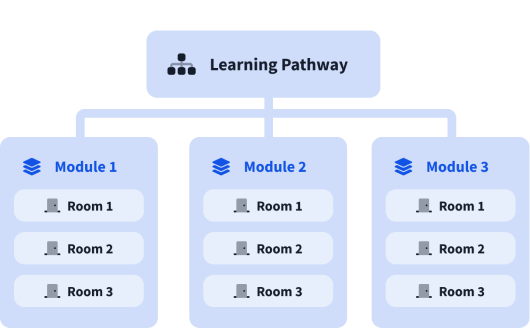
A learning pathway is made up of modules, and a module is made of bite-sized rooms (think of a room like a mini security lab).